目录
[2.1. winform界面设计](#2.1. winform界面设计)
[2.2. 代码实现](#2.2. 代码实现)
[2.2.1 加载可用相机设备](#2.2.1 加载可用相机设备)
[2.2.2 打开/关闭相机](#2.2.2 打开/关闭相机)
一、学习效果展示
C#映美精相机前期开发学习
二、实现步骤
2.1. winform界面设计
左侧为图像实时显示区域,右侧为相机初始化、参数设置、采集控制和图像保存模块。
①图像显示 ,采用的是picturebox控件**,但并不能直接显示相机采集到的图像数据,需经转换显示**
这个是重要细节,自己踩坑很久
② 相机初始化,采用的是两个button按键,一个combox控件;
两个button按键分别控制相机打开和相机关闭,combox控件显示可用的相机设备
③参数获取与设置,使用了4个textbox控件,一个combox控件,两个button控件
4个textbox控件分别接受相机帧率、曝光时间、增益、对比度参数;
comboxk控件主要是显示相机分辨率,本来也是想进行分辨率设置,但是相机分辨率设置会影响到帧率参数,高的分辨率不能够支持高的帧率。参数设置还是建议使用官方sdk直接设置好。
两个button控件分别用于获取参数和设置参数,其中设置参数功能暂时没写。
**④采集模式,**使用了三个button控件,分别对应单帧采集、连续采集、停止采集三个功能。
**⑤文件保存,**使用了一个button控件,直接将采集到的图片进行保存到指定的文件夹中。
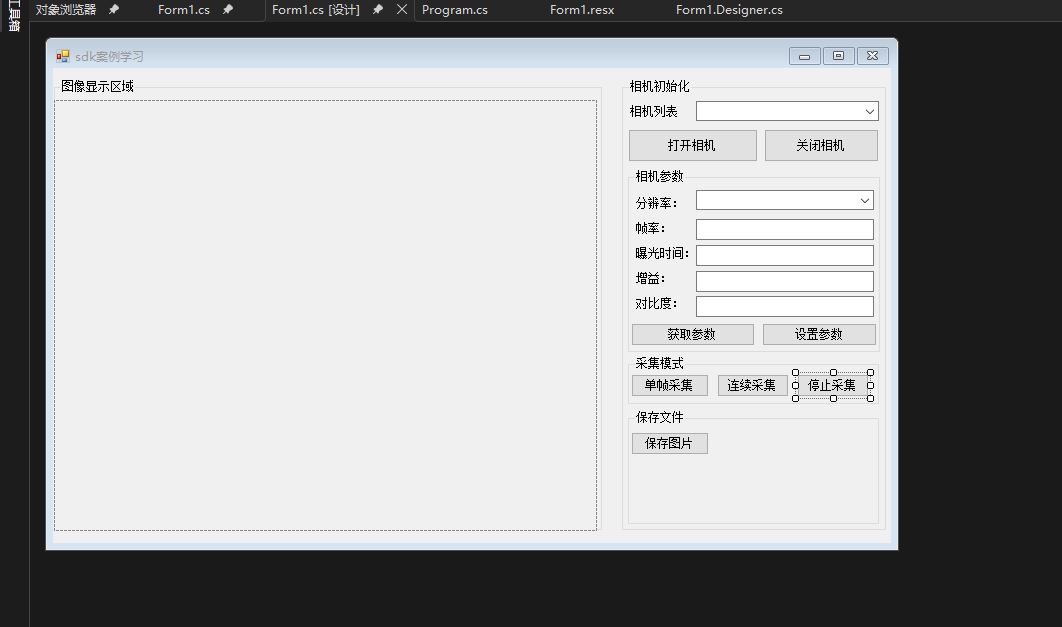
2.2. 代码实现
2.2.1 加载可用相机设备
结合映美精相机sdk库,枚举出目前可用的相机设备并将设备加载到combox列表中
cs
        //将相机列表加入combox1中
        #region
        private List<DeviceInfo> adddevice()
        {
            var devicesname1 = ic4.DeviceEnum.Devices.ToList();
            return devicesname1;
        }
       private void additemtobox(List<DeviceInfo> camerax)
       {
            //首先对列表进行清理
            comboBox1.Items.Clear();
            //如果没有连接相机设备
            if (camerax.Count == 0)
            {
                MessageBox.Show("没有连接相机设备");
                return;
            }
            else
            {
                //加载当连接相机设备
                foreach (var i in camerax)
                {
                    comboBox1.Items.Add("model:"+i.ModelName + "serial:" + i.Serial);
                }
            }
       }
2.2.2 打开/关闭相机
结合相机sdk库文件,撰写映美精相机打开和关闭程序
① 打开相机
cs
        #endregion
        //打开相机
        #region
        /// <summary>
        /// 打开相机
        /// </summary>
        /// <param name="sender"></param>
        /// <param name="e"></param>
        private void button2_Click(object sender, EventArgs e)
        {
            if (comboBox1.Items.Count == 0||comboBox1.SelectedIndex==-1)
            {
                MessageBox.Show("没有找到可用设备");
                return;
            }
            else
            {
                var firstDevInfox = ic4.DeviceEnum.Devices[comboBox1.SelectedIndex];
                grabbername.DeviceOpen(firstDevInfox);
                if (grabbername.IsDeviceOpen != true)
                {
                    MessageBox.Show("相机打开失败");
                    return;
                }
                //设置像素和像素模式
                grabbername.DevicePropertyMap.SetValue(ic4.PropId.PixelFormat, ic4.PixelFormat.Mono8);
                //设置roi区域
                setroiregion(grabbername);
                //防止多次被打开
                button2.Enabled = false;
                关闭相机.Enabled = true;
                //相机打开后可以获取相机参数
                button3.Enabled = true;
            }

        }
② 关闭相机
cs
        private void 关闭相机_Click_1(object sender, EventArgs e)
        {
            if (grabbername.IsDeviceOpen!=true)
            {
                MessageBox.Show("请先打开相机");
                return;
            }
            //关闭当前相机
            grabbername.DeviceClose();
            //允许重新打开相机
            button2.Enabled = true;
            关闭相机.Enabled = false;
            //显示相机参数
            button3.Enabled = false;

        }
2.2.3相机参数获取
结合映美精sdk库,撰写获取相机分辨率、帧率、曝光时间、增益、对比度参数
cs
private void combox2show()
{
    var shuxing = grabbername.DevicePropertyMap;
    //读取相机分辨率
    var xxvalue = shuxing.Find(ic4.PropId.Width);
    var yyvalue = shuxing.Find(ic4.PropId.Height);
    int xx = Convert.ToInt16(xxvalue.Value);
    int yy = Convert.ToInt16(yyvalue.Value);
    foreach (var item in comboBox2.Items)
    {
        if ((Convert.ToString(xx) + 'x' + Convert.ToString(yy)) == item.ToString())
        {
            comboBox2.SelectedItem = item;
            break;
        }
    }
    //读取相机帧率
    var FrameRate = shuxing.Find(ic4.PropId.AcquisitionFrameRate);
    textBox2.Text = FrameRate.Value.ToString();
    //读取相机曝光率
    var exposuretime = shuxing.Find(ic4.PropId.ExposureTime);
    textBox3.Text = exposuretime.Value.ToString();
    //读取相机增益
    var gain = shuxing.Find(ic4.PropId.Gain);
    textBox4.Text = gain.Value.ToString();
    //读取相机对比度
    var duibi = shuxing.Find(ic4.PropId.Contrast);
    textBox5.Text = duibi.Value.ToString();
}
2.2.4采集模式
①单帧采集开发
cs
        //单帧采集图像并显示
        private void button5_Click(object sender, EventArgs e)
        {
            if (grabbername.IsDeviceOpen && (comboBox1.Items.Count != 0 || comboBox1.SelectedIndex != -1))
            {
                snapSink = new SnapSink();
                grabbername.StreamSetup(snapSink, StreamSetupOption.AcquisitionStart);

                using (ic4.ImageBuffer image = snapSink.SnapSingle(TimeSpan.FromSeconds(1)))
                {
                    // 获取图像宽高和像素格式
                    int width = Convert.ToInt32(grabbername.DevicePropertyMap.Find(ic4.PropId.Width).Value);
                    int height = Convert.ToInt32(grabbername.DevicePropertyMap.Find(ic4.PropId.Height).Value);

                    //设置调色板并转换图片

                    // 显示
                    var old = pictureBox1.Image;
                    pictureBox1.Image = bmp;
                    old?.Dispose();
                }
                grabbername.StreamStop();
                snapSink = null;
            }
            else
                MessageBox.Show("请打开相机");
        }
②连续采集开发
cs
        /// <summary>
        /// 连续采集图像
        /// </summary>
        /// <param name="sender"></param>
        /// <param name="e"></param>
        private void button6_Click(object sender, EventArgs e)
        {
            //单帧采集拒绝
            button5.Enabled = false;
            //参数设置部分不可修改
            comboBox2.Enabled = false;
            textBox2.Enabled= false;
            textBox3.Enabled= false;
            textBox4.Enabled= false;
            textBox5.Enabled= false;

            if (grabbername.IsDeviceOpen && (comboBox1.Items.Count != 0 || comboBox1.SelectedIndex != -1))
            {
                pictureBox1.SizeMode = PictureBoxSizeMode.Zoom;
                StartRealtime();
            }
            else
            { MessageBox.Show("请先打开相机"); }
        }
③关闭连续采集
cs
        /// <summary>
        /// 停止连续采集
        /// </summary>
        /// <param name="sender"></param>
        /// <param name="e"></param>
        private void button7_Click(object sender, EventArgs e)
        {
            StopRealtime();
            button5.Enabled = true;
            comboBox2.Enabled = true;
            textBox2.Enabled = true;
            textBox3.Enabled = true;
            textBox4.Enabled = true;
            textBox5.Enabled = true;
        }
2.2.5保存文件
cs
using System;
using System.Drawing;
using System.Drawing.Imaging;
using System.IO;
using System.Windows.Forms;

private void btnSave_Click(object sender, EventArgs e)
{
    Bitmap snap = null;

    // 1) 取出当前最新帧(拷贝一份到本地变量)
    lock (_frameLock)
    {
        if (_latestFrame != null)
            snap =_latestFrame.Clone();
    }

    if (snap == null)
    {
        MessageBox.Show("当前没有可保存的图像,请先开始采集/显示。", "提示",
            MessageBoxButtons.OK, MessageBoxIcon.Information);
        return;
    }

    try
    {
        // 2) 选择保存路径与格式
        using (var sfd = new SaveFileDialog())
        {
            sfd.Title = "保存图片";
            sfd.Filter = "PNG (*.png)|*.png|BMP (*.bmp)|*.bmp|JPEG (*.jpg)|*.jpg";
            sfd.FileName = $"frame_{DateTime.Now:yyyyMMdd_HHmmss}.png";

            if (sfd.ShowDialog() != DialogResult.OK) return;

            // 3) 根据扩展名决定编码格式
            string ext = Path.GetExtension(sfd.FileName).ToLowerInvariant();
            ImageFormat fmt = ImageFormat.Png;
            if (ext == ".bmp") fmt = ImageFormat.Bmp;
            else if (ext == ".jpg" || ext == ".jpeg") fmt = ImageFormat.Jpeg;

            // 4) 保存
            snap.Save(sfd.FileName, fmt);
        }
    }
    catch (Exception ex)
    {
        MessageBox.Show("保存失败:" + ex.Message, "错误",
            MessageBoxButtons.OK, MessageBoxIcon.Error);
    }
    finally
    {
        snap.Dispose();
    }
}
需要完整代码联系博主哈,赚点买菜钱