DBC文件
DBC文件(通常指CAN总线数据库文件)可以用Vector CANdb++ Editor、CANoe/CANalyzer、文本编辑器等软件打开。全称 DataBase Controller Area Network【控制器局域网CAN数据库】。
DBC(Database CAN的缩写)是CAN网络数据库文件。这种文件格式由德国VECTOR公司制定,关于这种格式的了解可以参考规范文件《DBC File Format Document》,可以在附件中的链接获取。DBC文件可以定义CAN网络的节点(Network Node)、报文(Message)、信号(Signal),以及每个节点收发哪些报文,每个报文包含的信号,信号的位置等等。
常用的创建和编辑CAN DataBase(DBC文件)有两种方法,一种是下载CANdb++,Vector免费的工具;另一种就是使用CANoe创建,不过需要付费购买软硬件。两种方法创建DBC文件的方式都是一样的。
新建窗体应用程序CAN_DBC,将默认的Form1重命名为FormDataBaseCan
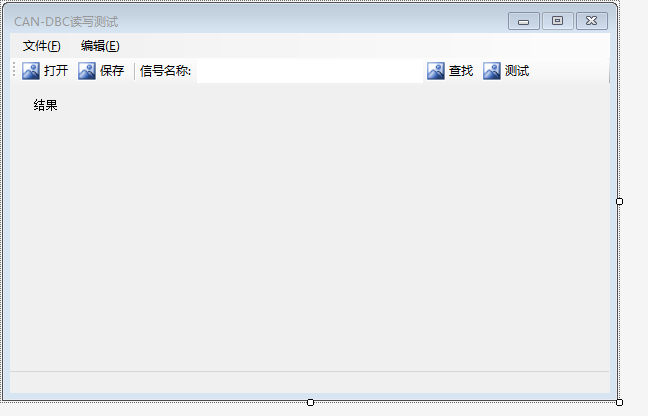
窗体FormDataBaseCan设计器如下:
新建信号类Typedef_SG
Typedef_SG.cs代码如下:
cs
using System;
using System.Collections.Generic;
using System.Linq;
using System.Text;
using System.Threading.Tasks;

namespace CAN_DBC
{
    public class Typedef_CodeType
    {
        public int motorola = 0;
        public int intel = 1;
    }
    public class Typedef_DataType
    {
        public string Unsigned = "+";
        public string Signed = "-";
    }
    /// <summary>
    /// 信号类
    /// </summary>
    public class Typedef_SG
    {
        public string Name;
        public int StartBit;
        public int Length;
        public int CodeType; //0=motorola,1=intel
        public string DataType; //-表示有符号型
        public double Factor;
        public double Offset;
        public double MinValue;
        public double MaxValue;
        public string Unit;
    }
    /// <summary>
    /// 报文类,一条报文【BO】有多条信号【SG】组成
    /// </summary>
    public class Typedef_BO
    {
        public uint ID;
        public string Name;
        public uint Length;
        //public SG[] SG;
        //Typedef_BO _BO = new Typedef_BO();
        public List<Typedef_SG> SG = new List<Typedef_SG>();
    }
}
窗体FormDataBaseCan设计器如下:
文件FormDataBaseCan.Designer.cs
cs
namespace CAN_DBC
{
    partial class FormDataBaseCan
    {
        /// <summary>
        /// 必需的设计器变量。
        /// </summary>
        private System.ComponentModel.IContainer components = null;

        /// <summary>
        /// 清理所有正在使用的资源。
        /// </summary>
        /// <param name="disposing">如果应释放托管资源,为 true;否则为 false。</param>
        protected override void Dispose(bool disposing)
        {
            if (disposing && (components != null))
            {
                components.Dispose();
            }
            base.Dispose(disposing);
        }

        #region Windows 窗体设计器生成的代码

        /// <summary>
        /// 设计器支持所需的方法 - 不要修改
        /// 使用代码编辑器修改此方法的内容。
        /// </summary>
        private void InitializeComponent()
        {
            System.ComponentModel.ComponentResourceManager resources = new System.ComponentModel.ComponentResourceManager(typeof(FormDataBaseCan));
            this.OpenDBCFile = new System.Windows.Forms.OpenFileDialog();
            this.SaveDBCFile = new System.Windows.Forms.SaveFileDialog();
            this.menuStrip1 = new System.Windows.Forms.MenuStrip();
            this.fileFToolStripMenuItem = new System.Windows.Forms.ToolStripMenuItem();
            this.btnLoadDBCFileToolStripMenuItem = new System.Windows.Forms.ToolStripMenuItem();
            this.btnSaveDBCFileToolStripMenuItem = new System.Windows.Forms.ToolStripMenuItem();
            this.quitToolStripMenuItem = new System.Windows.Forms.ToolStripMenuItem();
            this.eDITToolStripMenuItem = new System.Windows.Forms.ToolStripMenuItem();
            this.statusStrip1 = new System.Windows.Forms.StatusStrip();
            this.DBCFilePath = new System.Windows.Forms.ToolStripStatusLabel();
            this.BottomLabel1 = new System.Windows.Forms.ToolStripStatusLabel();
            this.toolStrip1 = new System.Windows.Forms.ToolStrip();
            this.toolStripbtnOpen = new System.Windows.Forms.ToolStripButton();
            this.toolStripbtnSave = new System.Windows.Forms.ToolStripButton();
            this.toolStripSeparator1 = new System.Windows.Forms.ToolStripSeparator();
            this.toolStripLabel1 = new System.Windows.Forms.ToolStripLabel();
            this.toolStripTextBox1 = new System.Windows.Forms.ToolStripTextBox();
            this.toolStripbtnSearch = new System.Windows.Forms.ToolStripButton();
            this.toolStripbtnTest = new System.Windows.Forms.ToolStripButton();
            this.label1 = new System.Windows.Forms.Label();
            this.menuStrip1.SuspendLayout();
            this.statusStrip1.SuspendLayout();
            this.toolStrip1.SuspendLayout();
            this.SuspendLayout();
            //
            // OpenDBCFile
            //
            this.OpenDBCFile.Filter = "DBC|*.dbc";
            //
            // SaveDBCFile
            //
            this.SaveDBCFile.Filter = "DBC|*.dbc";
            //
            // menuStrip1
            //
            this.menuStrip1.ImageScalingSize = new System.Drawing.Size(20, 20);
            this.menuStrip1.Items.AddRange(new System.Windows.Forms.ToolStripItem[] {
            this.fileFToolStripMenuItem,
            this.eDITToolStripMenuItem});
            this.menuStrip1.Location = new System.Drawing.Point(0, 0);
            this.menuStrip1.Name = "menuStrip1";
            this.menuStrip1.Padding = new System.Windows.Forms.Padding(4, 2, 0, 2);
            this.menuStrip1.Size = new System.Drawing.Size(600, 25);
            this.menuStrip1.TabIndex = 2;
            this.menuStrip1.Text = "menuStrip1";
            //
            // fileFToolStripMenuItem
            //
            this.fileFToolStripMenuItem.DropDownItems.AddRange(new System.Windows.Forms.ToolStripItem[] {
            this.btnLoadDBCFileToolStripMenuItem,
            this.btnSaveDBCFileToolStripMenuItem,
            this.quitToolStripMenuItem});
            this.fileFToolStripMenuItem.Name = "fileFToolStripMenuItem";
            this.fileFToolStripMenuItem.Size = new System.Drawing.Size(58, 21);
            this.fileFToolStripMenuItem.Text = "文件(&F)";
            //
            // btnLoadDBCFileToolStripMenuItem
            //
            this.btnLoadDBCFileToolStripMenuItem.Name = "btnLoadDBCFileToolStripMenuItem";
            this.btnLoadDBCFileToolStripMenuItem.Size = new System.Drawing.Size(167, 22);
            this.btnLoadDBCFileToolStripMenuItem.Text = "加载DBC文件(&O)";
            this.btnLoadDBCFileToolStripMenuItem.Click += new System.EventHandler(this.BtnLoadDBCFileToolStripMenuItem_Click);
            //
            // btnSaveDBCFileToolStripMenuItem
            //
            this.btnSaveDBCFileToolStripMenuItem.Name = "btnSaveDBCFileToolStripMenuItem";
            this.btnSaveDBCFileToolStripMenuItem.Size = new System.Drawing.Size(167, 22);
            this.btnSaveDBCFileToolStripMenuItem.Text = "保存DBC文件(&S)";
            this.btnSaveDBCFileToolStripMenuItem.Click += new System.EventHandler(this.BtnSaveDBCFileToolStripMenuItem_Click);
            //
            // quitToolStripMenuItem
            //
            this.quitToolStripMenuItem.Name = "quitToolStripMenuItem";
            this.quitToolStripMenuItem.Size = new System.Drawing.Size(167, 22);
            this.quitToolStripMenuItem.Text = "退出(&Q)";
            this.quitToolStripMenuItem.Click += new System.EventHandler(this.QuitToolStripMenuItem_Click);
            //
            // eDITToolStripMenuItem
            //
            this.eDITToolStripMenuItem.Name = "eDITToolStripMenuItem";
            this.eDITToolStripMenuItem.Size = new System.Drawing.Size(59, 21);
            this.eDITToolStripMenuItem.Text = "编辑(&E)";
            //
            // statusStrip1
            //
            this.statusStrip1.ImageScalingSize = new System.Drawing.Size(20, 20);
            this.statusStrip1.Items.AddRange(new System.Windows.Forms.ToolStripItem[] {
            this.DBCFilePath,
            this.BottomLabel1});
            this.statusStrip1.Location = new System.Drawing.Point(0, 338);
            this.statusStrip1.Name = "statusStrip1";
            this.statusStrip1.Padding = new System.Windows.Forms.Padding(1, 0, 10, 0);
            this.statusStrip1.Size = new System.Drawing.Size(600, 22);
            this.statusStrip1.SizingGrip = false;
            this.statusStrip1.TabIndex = 3;
            this.statusStrip1.Text = "statusStrip1";
            //
            // DBCFilePath
            //
            this.DBCFilePath.Name = "DBCFilePath";
            this.DBCFilePath.Size = new System.Drawing.Size(0, 17);
            //
            // BottomLabel1
            //
            this.BottomLabel1.Name = "BottomLabel1";
            this.BottomLabel1.Size = new System.Drawing.Size(12, 17);
            this.BottomLabel1.Text = " ";
            //
            // toolStrip1
            //
            this.toolStrip1.ImageScalingSize = new System.Drawing.Size(20, 20);
            this.toolStrip1.Items.AddRange(new System.Windows.Forms.ToolStripItem[] {
            this.toolStripbtnOpen,
            this.toolStripbtnSave,
            this.toolStripSeparator1,
            this.toolStripLabel1,
            this.toolStripTextBox1,
            this.toolStripbtnSearch,
            this.toolStripbtnTest});
            this.toolStrip1.Location = new System.Drawing.Point(0, 25);
            this.toolStrip1.Name = "toolStrip1";
            this.toolStrip1.Size = new System.Drawing.Size(600, 27);
            this.toolStrip1.TabIndex = 4;
            this.toolStrip1.Text = "toolStrip1";
            //
            // toolStripbtnOpen
            //
            this.toolStripbtnOpen.Image = ((System.Drawing.Image)(resources.GetObject("toolStripbtnOpen.Image")));
            this.toolStripbtnOpen.ImageTransparentColor = System.Drawing.Color.Magenta;
            this.toolStripbtnOpen.Name = "toolStripbtnOpen";
            this.toolStripbtnOpen.Size = new System.Drawing.Size(56, 24);
            this.toolStripbtnOpen.Text = "打开";
            this.toolStripbtnOpen.Click += new System.EventHandler(this.ToolStripbtnOpen_Click);
            //
            // toolStripbtnSave
            //
            this.toolStripbtnSave.Image = ((System.Drawing.Image)(resources.GetObject("toolStripbtnSave.Image")));
            this.toolStripbtnSave.ImageTransparentColor = System.Drawing.Color.Magenta;
            this.toolStripbtnSave.Name = "toolStripbtnSave";
            this.toolStripbtnSave.Size = new System.Drawing.Size(56, 24);
            this.toolStripbtnSave.Text = "保存";
            this.toolStripbtnSave.Click += new System.EventHandler(this.ToolStripbtnSave_Click);
            //
            // toolStripSeparator1
            //
            this.toolStripSeparator1.Name = "toolStripSeparator1";
            this.toolStripSeparator1.Size = new System.Drawing.Size(6, 27);
            //
            // toolStripLabel1
            //
            this.toolStripLabel1.Name = "toolStripLabel1";
            this.toolStripLabel1.Size = new System.Drawing.Size(59, 24);
            this.toolStripLabel1.Text = "信号名称:";
            //
            // toolStripTextBox1
            //
            this.toolStripTextBox1.Font = new System.Drawing.Font("Microsoft YaHei UI", 9F);
            this.toolStripTextBox1.MaxLength = 50;
            this.toolStripTextBox1.Name = "toolStripTextBox1";
            this.toolStripTextBox1.Size = new System.Drawing.Size(226, 27);
            //
            // toolStripbtnSearch
            //
            this.toolStripbtnSearch.Image = ((System.Drawing.Image)(resources.GetObject("toolStripbtnSearch.Image")));
            this.toolStripbtnSearch.ImageTransparentColor = System.Drawing.Color.Magenta;
            this.toolStripbtnSearch.Name = "toolStripbtnSearch";
            this.toolStripbtnSearch.Size = new System.Drawing.Size(56, 24);
            this.toolStripbtnSearch.Text = "查找";
            this.toolStripbtnSearch.Click += new System.EventHandler(this.ToolStripbtnSearch_Click);
            //
            // toolStripbtnTest
            //
            this.toolStripbtnTest.Image = ((System.Drawing.Image)(resources.GetObject("toolStripbtnTest.Image")));
            this.toolStripbtnTest.ImageTransparentColor = System.Drawing.Color.Magenta;
            this.toolStripbtnTest.Name = "toolStripbtnTest";
            this.toolStripbtnTest.Size = new System.Drawing.Size(56, 24);
            this.toolStripbtnTest.Text = "测试";
            this.toolStripbtnTest.Click += new System.EventHandler(this.ToolStripbtnTest_Click);
            //
            // label1
            //
            this.label1.AutoSize = true;
            this.label1.Location = new System.Drawing.Point(22, 66);
            this.label1.Margin = new System.Windows.Forms.Padding(2, 0, 2, 0);
            this.label1.Name = "label1";
            this.label1.Size = new System.Drawing.Size(29, 12);
            this.label1.TabIndex = 5;
            this.label1.Text = "结果";
            //
            // FormDataBaseCan
            //
            this.AutoScaleDimensions = new System.Drawing.SizeF(6F, 12F);
            this.AutoScaleMode = System.Windows.Forms.AutoScaleMode.Font;
            this.ClientSize = new System.Drawing.Size(600, 360);
            this.Controls.Add(this.label1);
            this.Controls.Add(this.toolStrip1);
            this.Controls.Add(this.statusStrip1);
            this.Controls.Add(this.menuStrip1);
            this.FormBorderStyle = System.Windows.Forms.FormBorderStyle.FixedDialog;
            this.MainMenuStrip = this.menuStrip1;
            this.Margin = new System.Windows.Forms.Padding(2);
            this.MaximizeBox = false;
            this.Name = "FormDataBaseCan";
            this.StartPosition = System.Windows.Forms.FormStartPosition.CenterScreen;
            this.Text = "CAN-DBC读写测试";
            this.menuStrip1.ResumeLayout(false);
            this.menuStrip1.PerformLayout();
            this.statusStrip1.ResumeLayout(false);
            this.statusStrip1.PerformLayout();
            this.toolStrip1.ResumeLayout(false);
            this.toolStrip1.PerformLayout();
            this.ResumeLayout(false);
            this.PerformLayout();

        }

        #endregion

        private System.Windows.Forms.OpenFileDialog OpenDBCFile;
        private System.Windows.Forms.SaveFileDialog SaveDBCFile;
        private System.Windows.Forms.MenuStrip menuStrip1;
        private System.Windows.Forms.ToolStripMenuItem fileFToolStripMenuItem;
        private System.Windows.Forms.ToolStripMenuItem btnLoadDBCFileToolStripMenuItem;
        private System.Windows.Forms.ToolStripMenuItem btnSaveDBCFileToolStripMenuItem;
        private System.Windows.Forms.ToolStripMenuItem quitToolStripMenuItem;
        private System.Windows.Forms.ToolStripMenuItem eDITToolStripMenuItem;
        private System.Windows.Forms.StatusStrip statusStrip1;
        private System.Windows.Forms.ToolStripStatusLabel DBCFilePath;
        private System.Windows.Forms.ToolStripStatusLabel BottomLabel1;
        private System.Windows.Forms.ToolStrip toolStrip1;
        private System.Windows.Forms.ToolStripButton toolStripbtnOpen;
        private System.Windows.Forms.ToolStripButton toolStripbtnSave;
        private System.Windows.Forms.ToolStripTextBox toolStripTextBox1;
        private System.Windows.Forms.ToolStripButton toolStripbtnSearch;
        private System.Windows.Forms.Label label1;
        private System.Windows.Forms.ToolStripSeparator toolStripSeparator1;
        private System.Windows.Forms.ToolStripLabel toolStripLabel1;
        private System.Windows.Forms.ToolStripButton toolStripbtnTest;
    }
}
窗体窗体FormDataBaseCan测试程序如下
文件FormDataBaseCan.cs
cs
using System;
using System.Collections.Generic;
using System.ComponentModel;
using System.Data;
using System.Diagnostics;
using System.Drawing;
using System.IO;
using System.Linq;
using System.Text;
using System.Text.RegularExpressions;
using System.Threading.Tasks;
using System.Windows.Forms;

namespace CAN_DBC
{
    public partial class FormDataBaseCan : Form
    {
        public FormDataBaseCan()
        {
            InitializeComponent();
        }

        #region 全局变量声明与定义
        private bool IsEdited = false;
        public static Dictionary<string, string> dictDBC = new Dictionary<string, string>(); //<SG.Name,BO.ID+SG[]>
        List<Typedef_BO> BO_List = new List<Typedef_BO>();
        Typedef_BO BO;
        Typedef_CodeType CodeType;
        Typedef_DataType DataType;
        #endregion

        #region Function
        private void LoadDBCFile()
        {
            dictDBC.Clear();
            BO_List.Clear();
            DialogResult dialogResult = OpenDBCFile.ShowDialog();
            if (dialogResult == DialogResult.OK)
            {
                string DBCFilePath = OpenDBCFile.FileName;
                BottomLabel1.Text = DBCFilePath;
                Stopwatch sw = new Stopwatch();
                sw.Restart();                                                                //按行读取
                using (var reader = new StreamReader(DBCFilePath))
                {
                    int i = 0;
                    int SG_index = 0;
                    int BO_index = 0;                                                        //
                    string str_Line = "";
                    while ((str_Line = reader.ReadLine()) != null)                           //带数据行
                    {
                        i++;
                        Regex regexSG = new Regex(@"^ SG_ [.]*");                            //SG
                        Regex regexBO = new Regex(@"^BO_ \d+");                              //BO
                        try
                        {
                            if (regexSG.IsMatch(str_Line))                                       //SG length=9
                            {
                                //MessageBox.Show("in SG_ ,line="+i);
                                string[] SG_Line = str_Line.Split(' ');
                                if (SG_Line.Length != 9) throw new Exception("数据格式错误,Line=" + i);
                                Typedef_SG SG = new Typedef_SG();
                                SG.Name = SG_Line[2];                                            //Name
                                string[] SG4 = SG_Line[4].Split(new char[2] { '|', '@' });       //StartBit,Length,CodeType,DataType
                                SG.StartBit = Convert.ToInt16(SG4[0]);
                                SG.Length = Convert.ToInt16(SG4[1]);
                                SG.CodeType = Convert.ToInt16(SG4[2].Substring(0, 1));
                                SG.DataType = SG4[2].Substring(1, 1);
                                string[] SG5 = SG_Line[5].Split(new char[3] { '(', ',', ')' }); //Factor,Offset
                                SG.Factor = Convert.ToDouble(SG5[1]);
                                SG.Offset = Convert.ToDouble(SG5[2]);
                                string[] SG6 = SG_Line[6].Split(new char[3] { '[', '|', ']' }); //MinValue,MaxValue,Unit
                                SG.MinValue = Convert.ToDouble(SG6[1]);
                                SG.MaxValue = Convert.ToDouble(SG6[2]);
                                SG.Unit = SG_Line[7];                                           //Unit
                                BO.SG.Add(SG);                                                  //SG to List BO.SG
                                dictDBC.Add(SG.Name, BO_index-1 + "," + SG_index);                     //添加元素key,value同步加入字典,实现根据SG.Name反查出(BO[BO_index] ,SG[SG_index])
                                SG_index++;
                            }
                            if (regexBO.IsMatch(str_Line))                                      //BO length=5
                            {
                                BO = new Typedef_BO();                                          //BO实例化
                                SG_index = 0;
                                string[] BO_Line = str_Line.Split(' ');
                                if (BO_Line.Length != 5) throw new Exception("数据格式错误,Line=" + i);
                                BO.ID = Convert.ToUInt16(BO_Line[1]);
                                BO.Name = BO_Line[2];
                                BO.Length = Convert.ToUInt16(BO_Line[3]);
                                BO_List.Add(BO);
                                BO_index++;
                                //MessageBox.Show("in BO_ ,line=" + i+ " ,name=" + BO.Name);
                            }
                        }
                        catch (Exception ex)
                        { MessageBox.Show(ex.Message); }
                    }
                }
                sw.Stop();
            }
        }

        public static string dictDBCSearch(String SGname)
        {
            string Result = "";
            if (!dictDBC.ContainsKey(SGname))               //假如不存在元素
                Result = SGname + ",不存在";
            else
                Result = SGname + "的 BO[BO_index] ,SG[SG_index] = " + dictDBC[SGname];
            return Result;
        }
        #endregion

        private void SaveDbcFile()
        {
            //SaveFileDialog SaveDBCDialog = new SaveFileDialog();
            DialogResult dialogResult = SaveDBCFile.ShowDialog();
            if (dialogResult == DialogResult.OK)
            {
                try
                {
                    using (StreamWriter writer = new StreamWriter(SaveDBCFile.FileName))
                    {
                        // 遍历所有的BO消息
                        for (int i = 0; i < BO_List.Count; i++)
                        {
                            Typedef_BO bo = BO_List[i];

                            // 写入BO行: BO_ id name length sender
                            writer.WriteLine($"BO_ {bo.ID} {bo.Name}: {bo.Length} Vector__XXX");

                            // 写入该BO下的所有SG信号
                            foreach (Typedef_SG sg in bo.SG)
                            {
                                // 构造SG行: SG_ name muxInfo startBit|length@codeType dataType (factor,offset) [min|max] unit receiver
                                string muxInfo = " ";
                                string dataTypeSymbol = sg.DataType == "0" ? "+" : "-";
                                string codeTypeStr = $"{sg.CodeType}{dataTypeSymbol}";

                                writer.WriteLine($" SG_ {sg.Name}{muxInfo}: {sg.StartBit}|{sg.Length}@{codeTypeStr} ({sg.Factor},{sg.Offset}) [{sg.MinValue}|{sg.MaxValue}] \"{sg.Unit}\" Vector__XXX");
                            }

                            // 在每组BO后面添加空行以提高可读性
                            writer.WriteLine();
                        }
                    }

                    MessageBox.Show("DBC文件保存成功!", "提示", MessageBoxButtons.OK, MessageBoxIcon.Information);
                }
                catch (Exception ex)
                {
                    MessageBox.Show($"保存失败:{ex.Message}", "错误", MessageBoxButtons.OK, MessageBoxIcon.Error);
                }
            }
        }

        #region UI
        private void BtnLoadDBCFileToolStripMenuItem_Click(object sender, EventArgs e)
        {
            //Open
            LoadDBCFile();
        }

        private void BtnSaveDBCFileToolStripMenuItem_Click(object sender, EventArgs e)
        {
            //save
            SaveDbcFile();
        }

        private void QuitToolStripMenuItem_Click(object sender, EventArgs e)
        {
            //Quit
            if (IsEdited)
            {
                DialogResult dialogResult = MessageBox.Show("文件有改动,是否保存该文件?", "提示", MessageBoxButtons.YesNoCancel, MessageBoxIcon.Question);

                if (dialogResult == DialogResult.No)
                {
                    Close();
                }
                else if (dialogResult == DialogResult.Yes)
                {
                    SaveDbcFile();
                    Close();
                }
            }
            else
                Close();
        }

        private void ToolStripbtnOpen_Click(object sender, EventArgs e)
        {
            //Open
            LoadDBCFile();
        }
        #endregion
        private void ToolStripbtnSearch_Click(object sender, EventArgs e)
        {
            label1.Text = dictDBCSearch(toolStripTextBox1.Text);
        }

        private void ToolStripbtnSave_Click(object sender, EventArgs e)
        {
            SaveDbcFile();
        }

        private void ToolStripbtnTest_Click(object sender, EventArgs e)
        {
            //取出:
            if (BO_List.Count > 0)
            {
                label1.Text = "BO_List[0].name=" + BO_List[0].Name + "\r\n"
                    + "BO_List[0].SG[0].name=" + BO_List[0].SG[0].Name + "\r\n"
                    + "BO_List[0].SG[1].unit=" + BO_List[0].SG[1].Unit;
            }
        }
    }
}
测试dbc文件snake.dbc如下
【dbc文件是一种固定格式的文本文件,有点类似于xml,可以用记事本打开】
Lua
VERSION "DIPBNYYYYYYYYYYYYYYYYYYYYYYYYYYYNNNNNNNNNN/4/%%%/4/'%**4NNN///"


NS_ :
	NS_DESC_
	CM_
	BA_DEF_
	BA_
	VAL_
	CAT_DEF_
	CAT_
	FILTER
	BA_DEF_DEF_
	EV_DATA_
	ENVVAR_DATA_
	SGTYPE_
	SGTYPE_VAL_
	BA_DEF_SGTYPE_
	BA_SGTYPE_
	SIG_TYPE_REF_
	VAL_TABLE_
	SIG_GROUP_
	SIG_VALTYPE_
	SIGTYPE_VALTYPE_
	BO_TX_BU_
	BA_DEF_REL_
	BA_REL_
	BA_DEF_DEF_REL_
	BU_SG_REL_
	BU_EV_REL_
	BU_BO_REL_
	SG_MUL_VAL_

BS_:

BU_: PUMA ACME

BO_ 81 puma_Obit1: 4 PUMA
 SG_ ML_Mess_CAN : 16|16@1+ (0.01,0) [0|0] "" Vector__XXX
 SG_ RL_Mess_CAN : 0|16@1+ (0.01,0) [0|0] "" Vector__XXX

BO_ 82 puma_Obit2: 8 PUMA
 SG_ IMEP_CAN : 48|16@1+ (0.001,0) [0|65.535] "%" Vector__XXX
 SG_ BMEP_CAN : 32|16@1+ (0.001,0) [0|65.535] "" Vector__XXX
 SG_ AI50_CAN : 16|16@1+ (0.01,-60) [-60|595.35] "" Vector__XXX
 SG_ Lambda_CAN : 0|16@1+ (0.001,0) [0|65.535] "" Vector__XXX

CM_ BO_ 3221225472 "This is a message for not used signals, created by Vector CANdb++ DBC OLE DB Provider.";
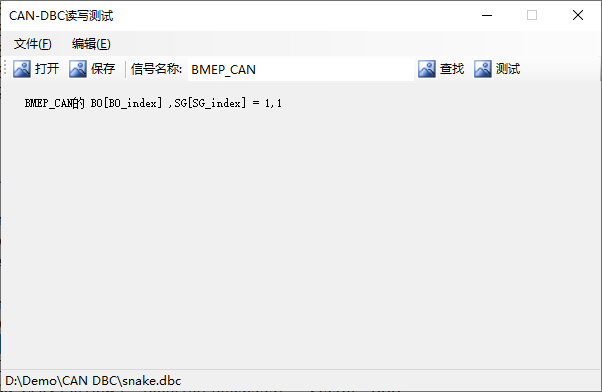
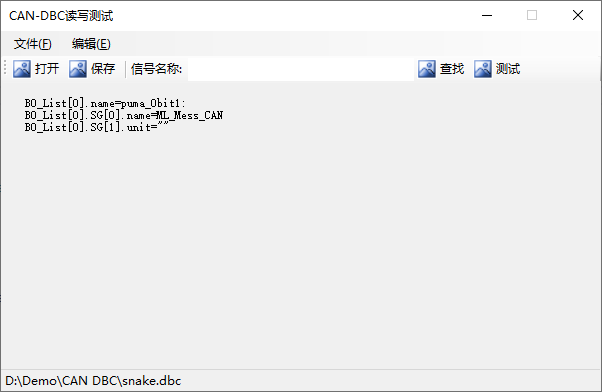
测试如图:
【打开】该文件snake.dbc,点击【测试】
输入信号BMEP_CAN,点击【查找】