Flutter for OpenHarmony构建全功能视差侧滑菜单系统:从动效设计到多页面导航的完整实践
在现代移动应用开发中,导航体验早已超越简单的页面跳转,演变为融合动效、深度感与交互反馈 的综合艺术。本文将深入剖析一段完整的
Flutter 代码,展示如何构建一个具备视差背景、毛玻璃菜单、多级页面导航和精细交互动画 的现代化应用系统------它不仅是一个 UI
组件库,更是一套完整的用户体验范式。
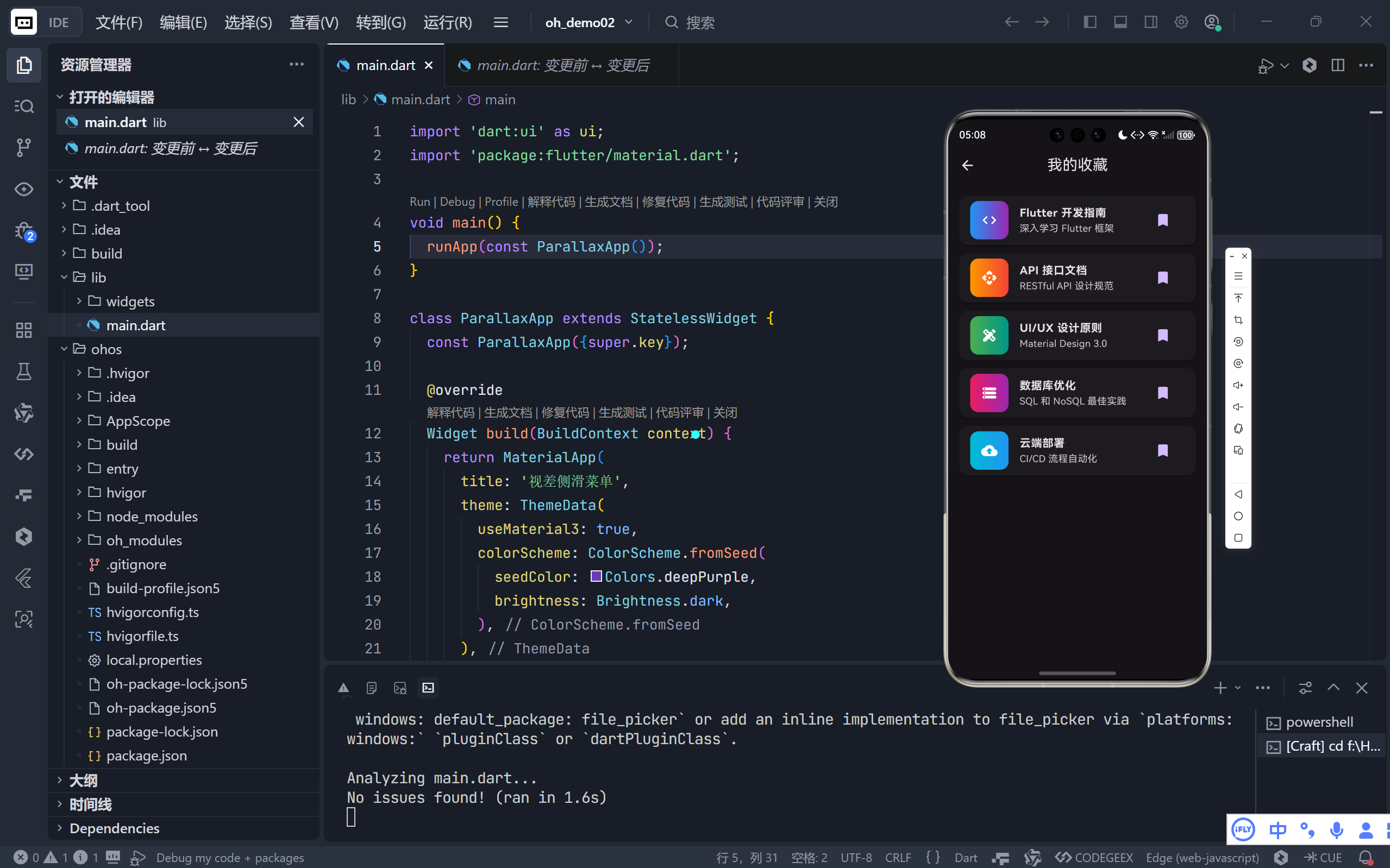
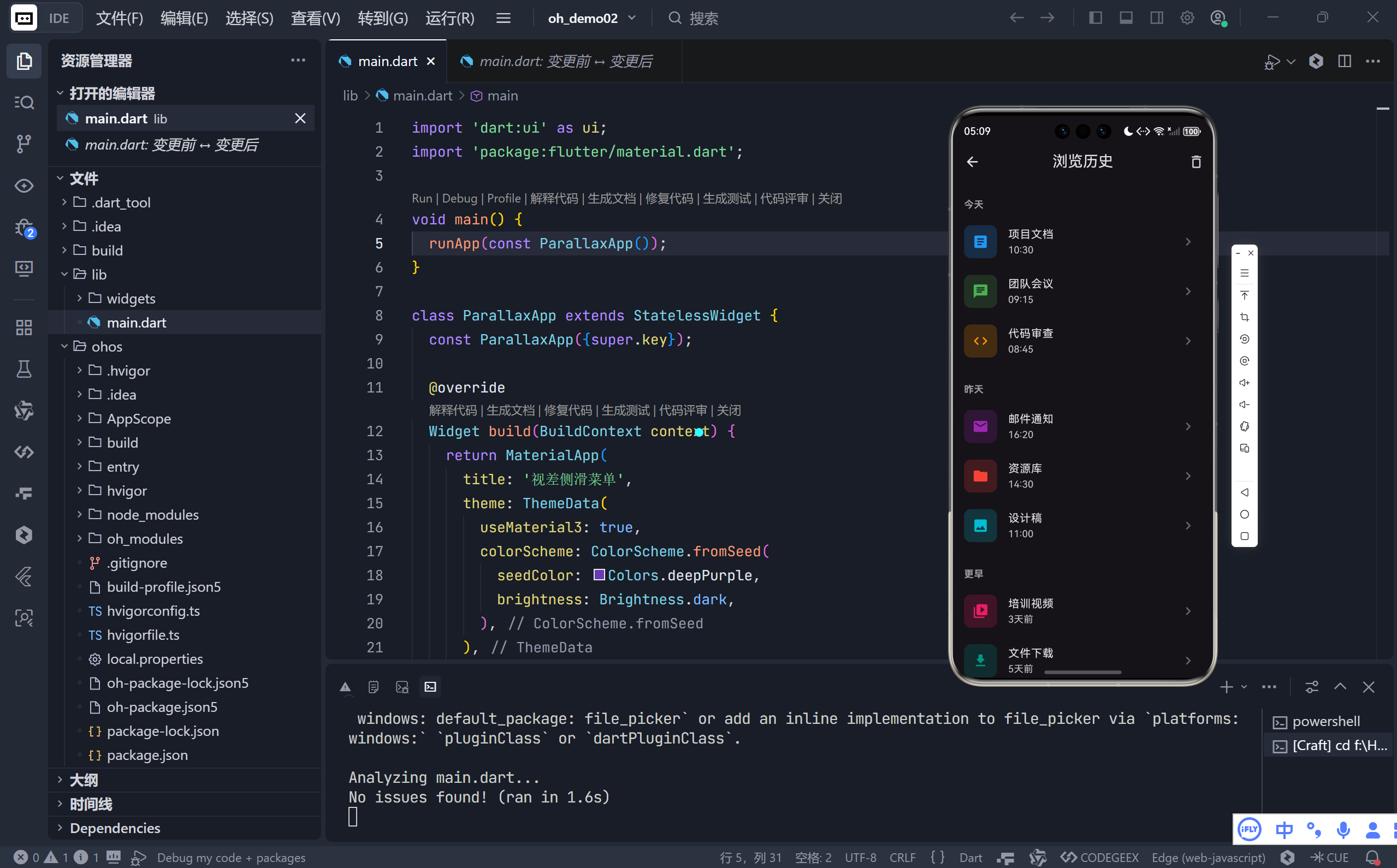
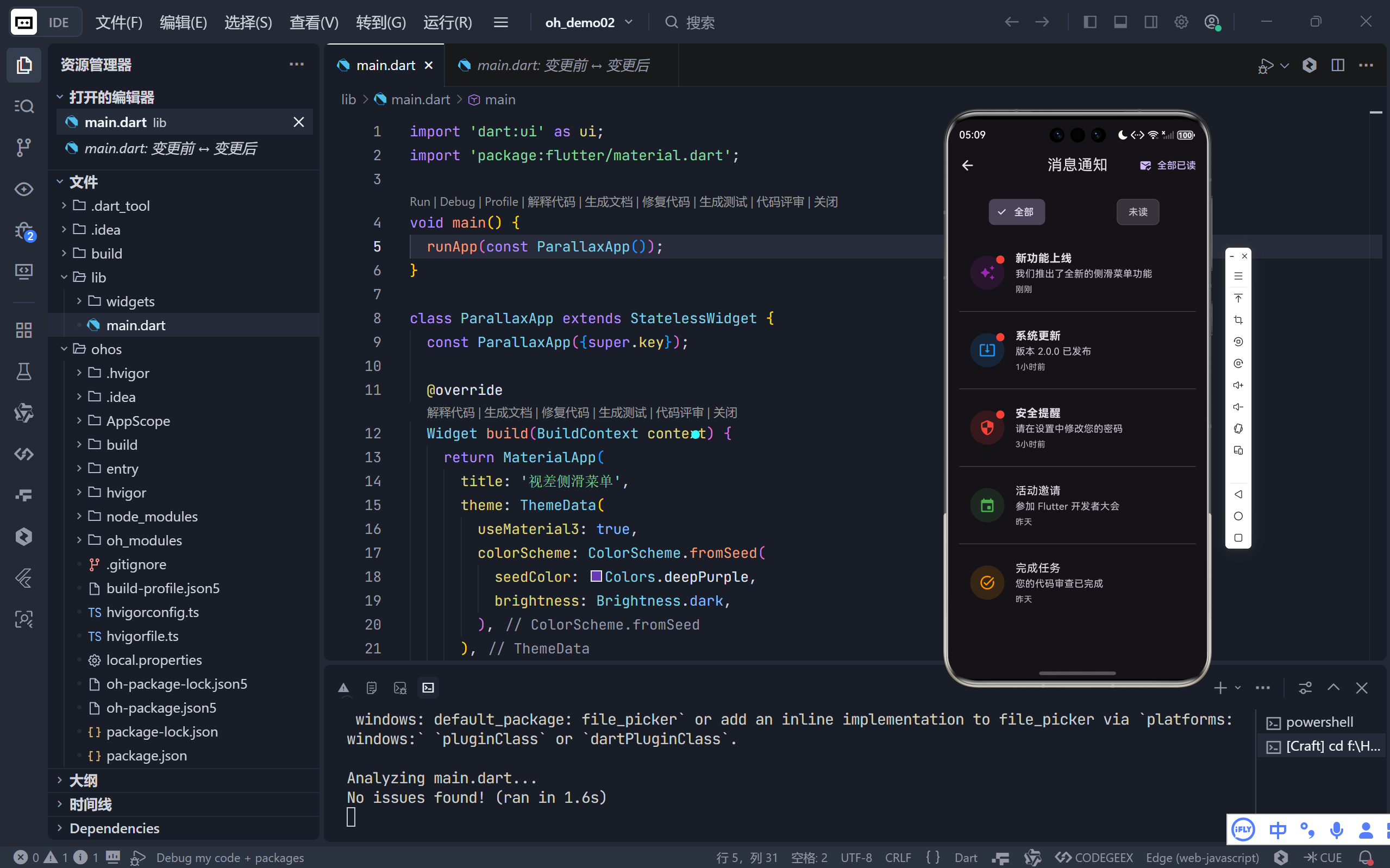
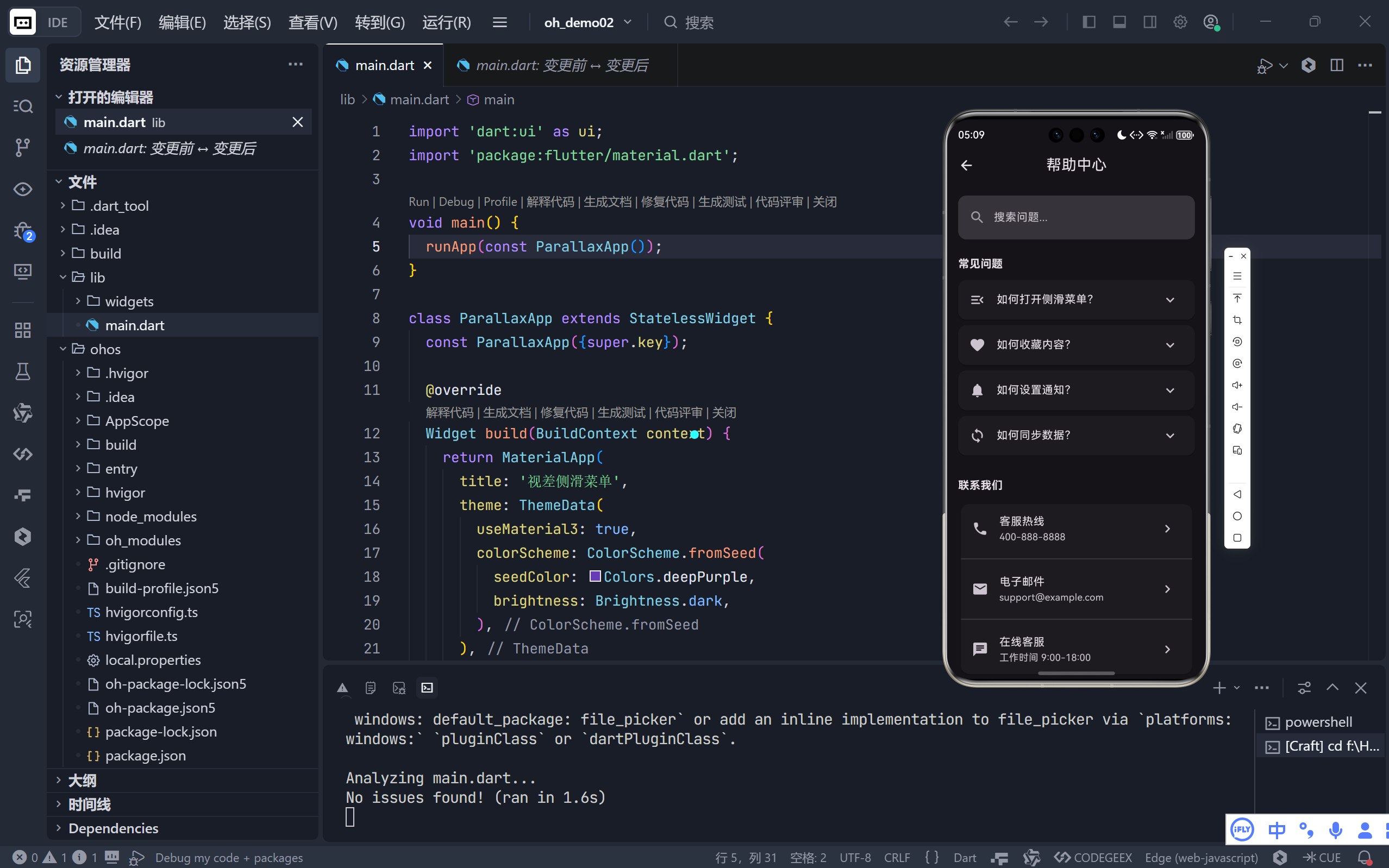
完整效果
一、整体架构:模块化与路由驱动
1. 声明式路由系统
dart
routes: {
  '/home': (context) => const HomePage(),
  '/favorites': (context) => const FavoritesPage(),
  '/history': (context) => const HistoryPage(),
  '/notifications': (context) => const NotificationsPage(),
  '/help': (context) => const HelpPage(),
}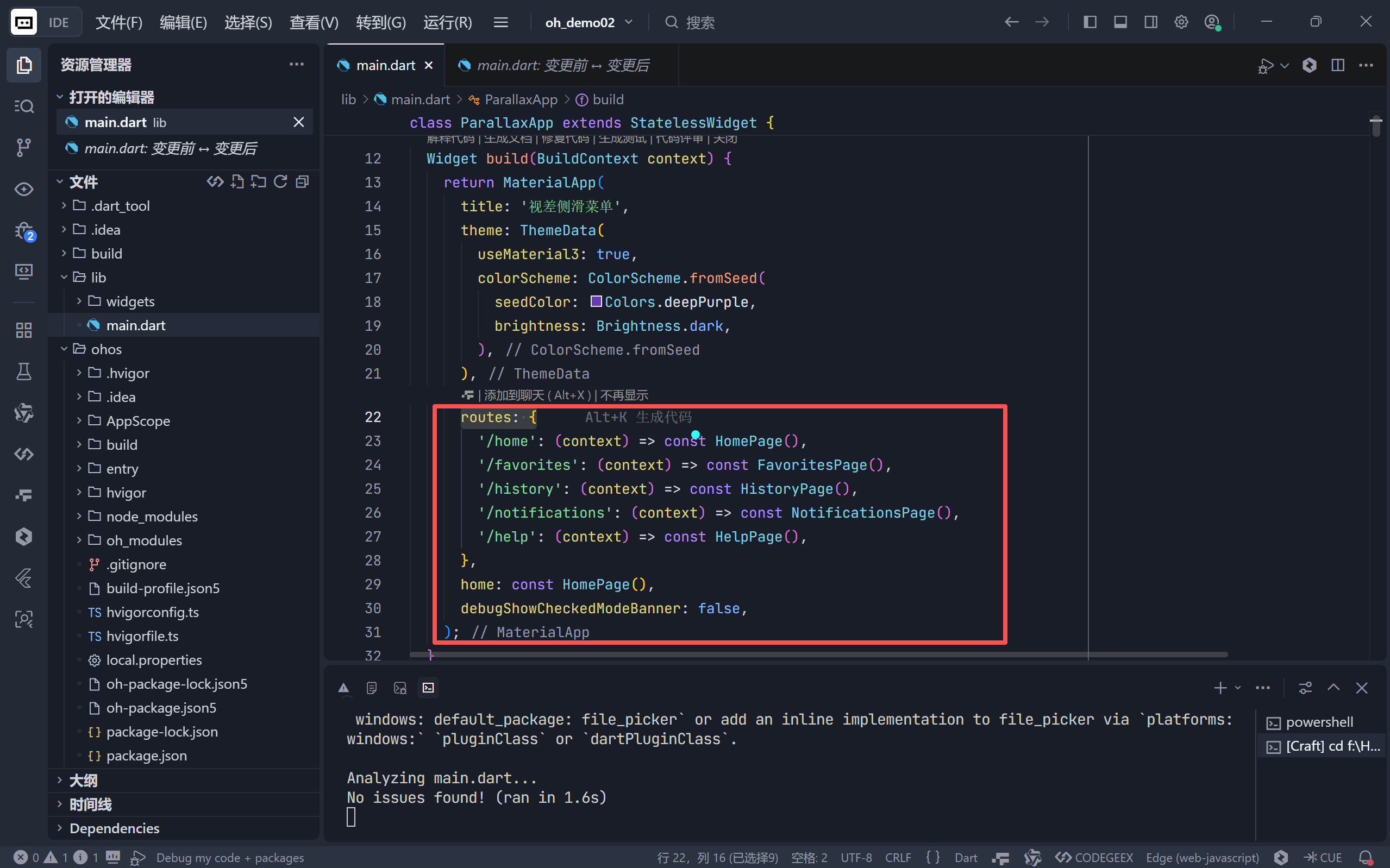
- 解耦设计:每个页面独立为 StatelessWidget/StatefulWidget;
- 类型安全:通过命名路由避免硬编码字符串错误;
- 可扩展性:新增页面只需添加路由映射。
2. 三层核心结构
- 主壳层(HomePage):管理全局状态(菜单开合、动画控制器);
- 子页面(FavoritesPage 等):专注业务逻辑与数据展示;
- 共享主题:Material 3 深色主题贯穿所有页面。
💡 这种架构实现了关注点分离:动效逻辑集中在 HomePage,内容逻辑分散在各子页面。
二、高级动效系统详解
1. 双控制器协同动画
dart
// 主动画控制器(400ms)
_animationController = AnimationController(duration: 400ms);
// 图标旋转控制器(300ms)
_rotationController = AnimationController(duration: 300ms);

// 动画组合
_slideAnimation = Tween(begin:0, end:1).animate(CurvedAnimation(
  parent: _animationController,
  curve: Curves.easeInOutCubic // 平滑加速/减速
));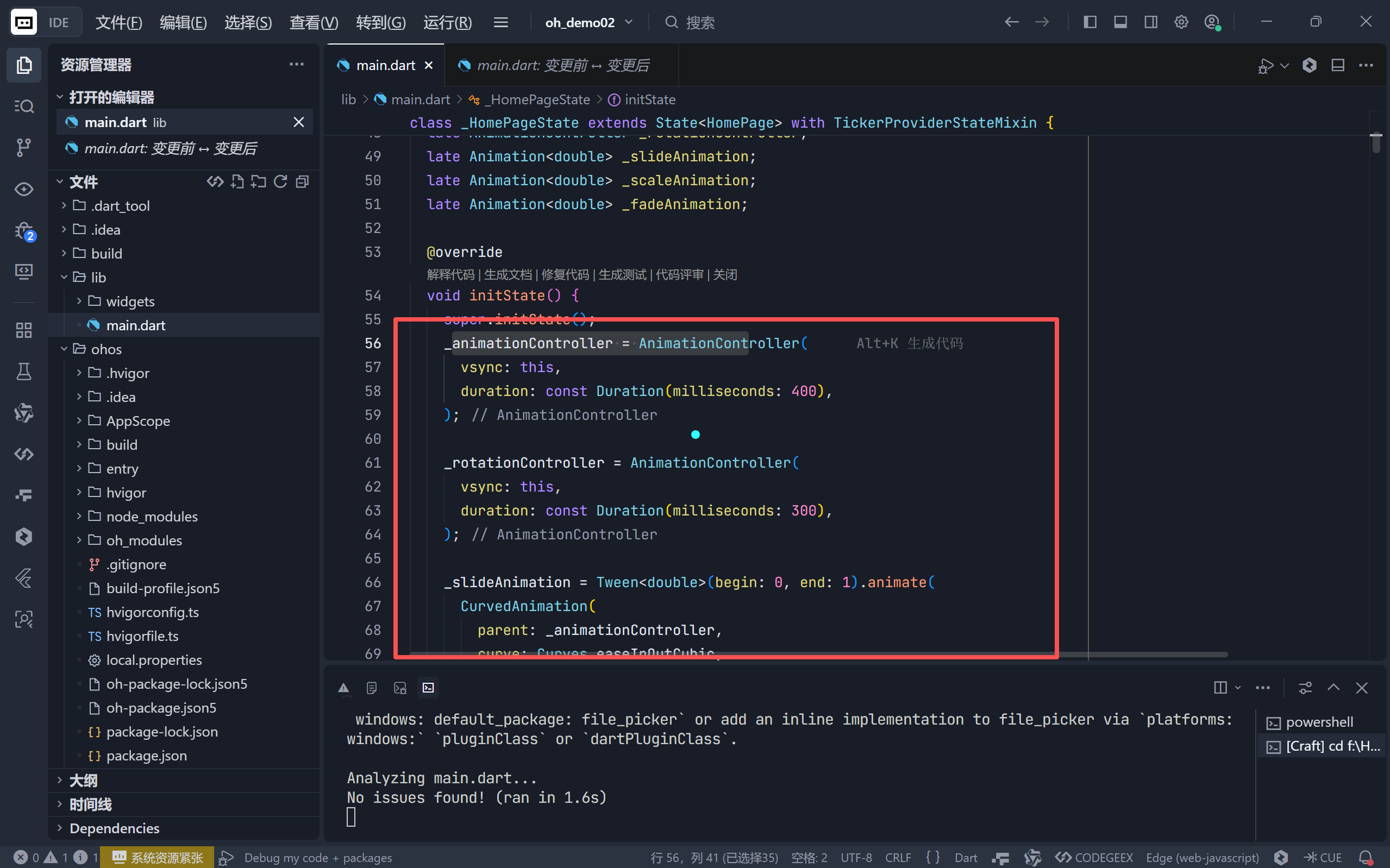
- 时间差设计:图标旋转快于菜单滑入,提供即时反馈;
- 曲线优化 :
easeInOutCubic比线性动画更符合物理直觉。
2. 视差背景效果
dart
double parallaxOffset = -_slideAnimation.value * 80;
Transform.translate(
  offset: Offset(parallaxOffset, 0),
  child: Transform.scale(scale: _scaleAnimation.value, ...)
)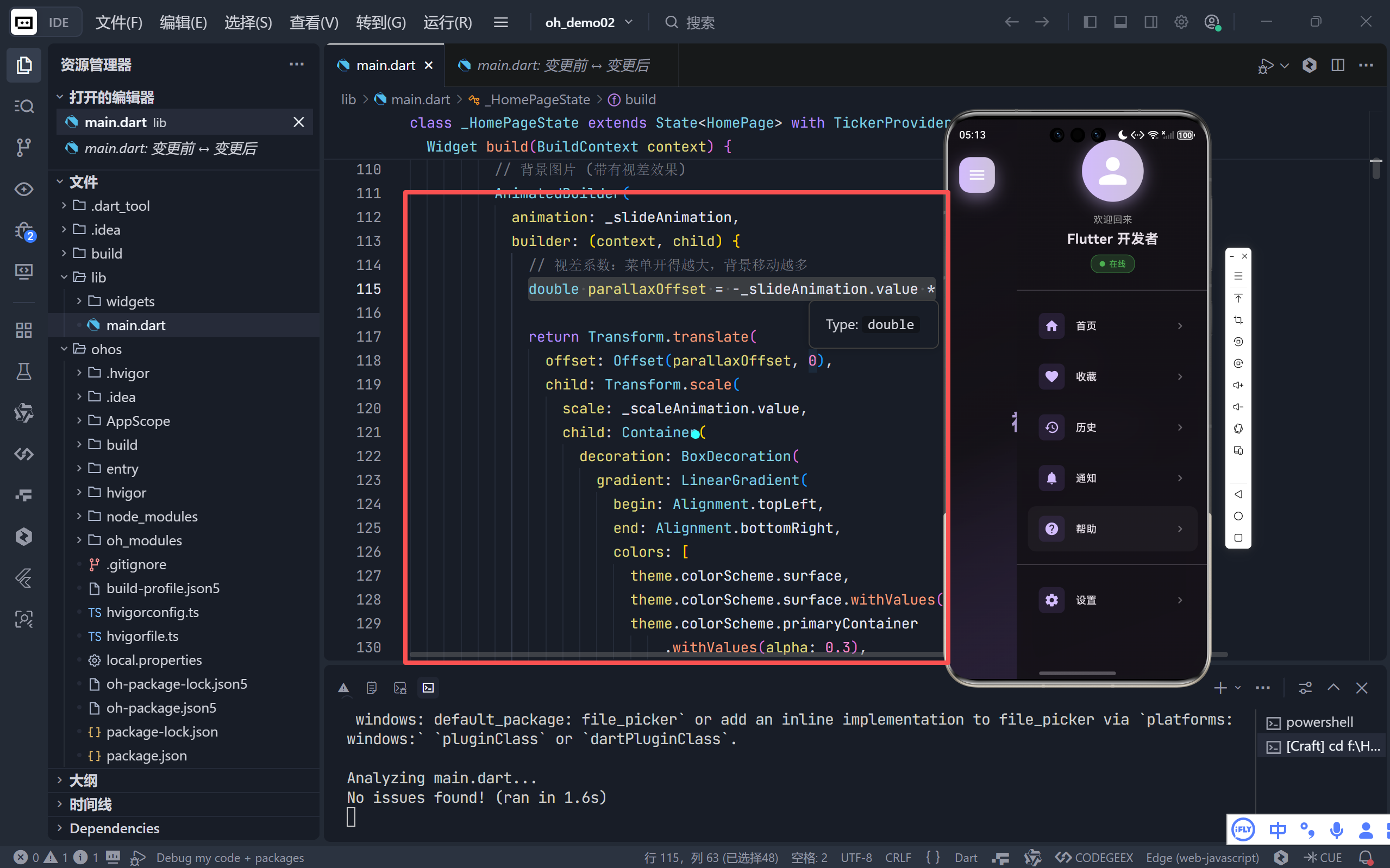
- 反向位移:菜单右滑时背景左移,模拟"景深";
- 同步缩放:背景缩小至 90%,强化"远离"视觉暗示。
3. 智能遮罩层
dart
if (_isMenuOpen)
  GestureDetector(
    onTap: _toggleMenu, // 点击任意位置关闭
    child: Container(color: Colors.black.withAlpha(0.4 * fadeValue))
)- 条件渲染:仅菜单打开时创建,节省资源;
- 手势穿透:确保遮罩区域可点击。
三、毛玻璃菜单与交互动效
1. Frosted Glass 实现
dart
BackdropFilter(
  filter: ui.ImageFilter.blur(sigmaX: 20, sigmaY: 20),
  child: Container(
    decoration: BoxDecoration(
      gradient: [surface.withAlpha(0.95), surface.withAlpha(0.9)],
      boxShadow: [BoxShadow(blurRadius: 30, offset: Offset(-5, 0))]
    )
  )
)- 模糊强度 :
sigma=20提供柔和虚化而不失背景纹理; - 色彩叠加:半透明深色渐变确保文字可读性;
- 动态阴影:左侧发光增强"浮出"感。
2. 菜单项微交互
dart
InkWell(
  borderRadius: BorderRadius.circular(12),
  child: Container(
    padding: EdgeInsets.all(16),
    decoration: BoxDecoration(borderRadius: ...),
    child: Row(children: [
      // 图标容器(浅色背景突出)
      Container(decoration: primaryContainer.withAlpha(0.3), child: Icon(...)),
      Text(title),
      Icon(Icons.chevron_right) // 引导性箭头
    ])
  )
)- 视觉引导:右侧箭头暗示"可操作";
- 色彩呼应 :图标容器使用
primaryContainer色系。
3. 汉堡图标动画
dart
IconButton(
  icon: AnimatedIcon(
    icon: AnimatedIcons.menu_close,
    progress: _animationController,
  ),
  onPressed: _toggleMenu,
)- 内置动画:自动处理 → × 的平滑过渡;
- 色彩统一:白色图标与紫色渐变按钮形成高对比度。
四、五大子页面深度解析
1. 收藏页(FavoritesPage)
- 卡片式布局:每项带双色渐变图标;
- 数据驱动 :静态列表
_favoriteItems包含标题/副标题/颜色; - 视觉层次:图标 > 标题 > 副标题 > 收藏按钮。
2. 历史页(HistoryPage)
- 时间分组:按"今天/昨天/更早"分类;
- 日期标题:灰色小字区分时间段;
- 操作集成:右上角"清空历史"弹出确认对话框。
3. 通知页(NotificationsPage)
- 状态管理 :
_NotificationItem类包含isRead字段; - 筛选系统:顶部 FilterChip 切换"全部/未读";
- 未读标记:红色圆点 + 加粗标题双重提示;
- 交互反馈:点击通知自动标记为已读。
4. 帮助页(HelpPage)
- 搜索集成:顶部 TextField 支持问题搜索;
- FAQ 展开:ExpansionTile 实现问答折叠;
- 联系渠道:电话/邮件/在线客服三重支持;
- 关于信息:版本号 + 应用描述卡片。
五、交互细节打磨
1. 即时反馈系统
- SnackBar 提示:操作后底部弹出轻量提示;
- Dialog 确认:危险操作(如清空历史)需二次确认;
- 页面返回:所有子页面 AppBar 含返回按钮。
2. 响应式安全区
dart
Positioned(
  top: MediaQuery.of(context).padding.top + 16, // 避开状态栏
  left: 16,
  child: ...
)- 刘海屏兼容:动态获取系统状态栏高度;
- 边缘留白 :左右
16px内边距符合 Material Design 规范。
3. 主题一致性
- 种子色系统 :
Colors.deepPurple自动派生完整色板; - 深色模式原生支持:所有组件自动适配深色背景;
- 文本层级 :
onSurface/onSurfaceVariant确保可读性。
六、性能与可维护性
1. 动画资源管理
dart
@override
void dispose() {
  _animationController.dispose();
  _rotationController.dispose();
  super.dispose();
}- 内存安全:及时释放动画控制器,避免内存泄漏。
2. 组件化设计
_buildMenuItem():复用菜单项模板;_buildSettingOption():标准化设置选项;- 单一职责:每个方法只负责特定 UI 片段。
3. 高效重绘
AnimatedBuilder仅重建动画相关子树;- 条件渲染 (
if (_isMenuOpen)) 避免无用 widget 创建; - 子页面使用 StatelessWidget 减少状态管理开销。
七、扩展可能性
-
手势滑动支持
添加
Draggable区域,支持从左侧边缘滑出菜单。 -
动态数据加载
将菜单项和子页面数据改为 API 驱动,支持远程配置。
-
主题切换
在设置面板中添加浅色/深色模式切换开关。
-
国际化支持
集成
flutter_localizations实现多语言。 -
状态持久化
使用
shared_preferences保存通知阅读状态。
🌐 加入社区
欢迎加入 开源鸿蒙跨平台开发者社区 ,获取最新资源与技术支持:
👉 开源鸿蒙跨平台开发者社区
完整代码
bash
import 'dart:ui' as ui;
import 'package:flutter/material.dart';
void main() {
runApp(const ParallaxApp());
}
class ParallaxApp extends StatelessWidget {
const ParallaxApp({super.key});
@override
Widget build(BuildContext context) {
return MaterialApp(
title: '视差侧滑菜单',
theme: ThemeData(
useMaterial3: true,
colorScheme: ColorScheme.fromSeed(
seedColor: Colors.deepPurple,
brightness: Brightness.dark,
),
),
routes: {
'/home': (context) => const HomePage(),
'/favorites': (context) => const FavoritesPage(),
'/history': (context) => const HistoryPage(),
'/notifications': (context) => const NotificationsPage(),
'/help': (context) => const HelpPage(),
},
home: const HomePage(),
debugShowCheckedModeBanner: false,
);
}
}
class HomePage extends StatefulWidget {
const HomePage({super.key});
@override
State<HomePage> createState() => _HomePageState();
}
class _HomePageState extends State<HomePage> with TickerProviderStateMixin {
bool _isMenuOpen = false;
final double _menuWidth = 280.0;
// 控制器
late AnimationController _animationController;
late AnimationController _rotationController;
late Animation<double> _slideAnimation;
late Animation<double> _scaleAnimation;
late Animation<double> _fadeAnimation;
@override
void initState() {
super.initState();
_animationController = AnimationController(
vsync: this,
duration: const Duration(milliseconds: 400),
);
_rotationController = AnimationController(
vsync: this,
duration: const Duration(milliseconds: 300),
);
_slideAnimation = Tween<double>(begin: 0, end: 1).animate(
CurvedAnimation(
parent: _animationController,
curve: Curves.easeInOutCubic,
),
);
_scaleAnimation = Tween<double>(begin: 1, end: 0.9).animate(
CurvedAnimation(
parent: _animationController,
curve: Curves.easeInOut,
),
);
_fadeAnimation = Tween<double>(begin: 0, end: 1).animate(
CurvedAnimation(parent: _animationController, curve: Curves.easeIn),
);
}
@override
void dispose() {
_animationController.dispose();
_rotationController.dispose();
super.dispose();
}
void _toggleMenu() {
if (_isMenuOpen) {
_animationController.reverse();
_rotationController.reverse();
} else {
_animationController.forward();
_rotationController.forward();
}
_isMenuOpen = !_isMenuOpen;
}
@override
Widget build(BuildContext context) {
final theme = Theme.of(context);
return Scaffold(
body: Stack(
children: [
// 背景图片 (带有视差效果)
AnimatedBuilder(
animation: _slideAnimation,
builder: (context, child) {
// 视差系数:菜单开得越大,背景移动越多
double parallaxOffset = -_slideAnimation.value * 80;
return Transform.translate(
offset: Offset(parallaxOffset, 0),
child: Transform.scale(
scale: _scaleAnimation.value,
child: Container(
decoration: BoxDecoration(
gradient: LinearGradient(
begin: Alignment.topLeft,
end: Alignment.bottomRight,
colors: [
theme.colorScheme.surface,
theme.colorScheme.surface.withValues(alpha: 0.8),
theme.colorScheme.primaryContainer
.withValues(alpha: 0.3),
],
),
),
child: Center(
child: Column(
mainAxisAlignment: MainAxisAlignment.center,
children: [
Icon(
Icons.menu_open_rounded,
size: 80,
color: theme.colorScheme.primary
.withValues(alpha: 0.5),
),
const SizedBox(height: 24),
Text(
'视差侧滑菜单',
textAlign: TextAlign.center,
style: TextStyle(
fontSize: 32,
fontWeight: FontWeight.bold,
color: theme.colorScheme.primary
.withValues(alpha: 0.8),
),
),
const SizedBox(height: 12),
Text(
'点击左上角按钮打开菜单',
textAlign: TextAlign.center,
style: TextStyle(
fontSize: 16,
color: theme.colorScheme.onSurface
.withValues(alpha: 0.6),
),
),
],
),
),
),
),
);
},
),
// 侧边栏菜单
AnimatedBuilder(
animation: _slideAnimation,
builder: (context, child) {
// 计算滑入时的偏移和缩放
final slideOffset = (1 - _slideAnimation.value) * 100;
return Transform.translate(
offset: Offset(slideOffset, 0),
child: ClipRRect(
borderRadius: const BorderRadius.only(
bottomRight: Radius.circular(20),
topRight: Radius.circular(20),
),
child: BackdropFilter(
filter: ui.ImageFilter.blur(sigmaX: 20, sigmaY: 20),
child: Container(
width: _menuWidth,
decoration: BoxDecoration(
gradient: LinearGradient(
begin: Alignment.topLeft,
end: Alignment.bottomRight,
colors: [
theme.colorScheme.surface.withValues(alpha: 0.95),
theme.colorScheme.surface.withValues(alpha: 0.9),
],
),
boxShadow: [
BoxShadow(
color: Colors.black.withValues(alpha: 0.3),
blurRadius: 30,
offset: const Offset(-5, 0),
),
],
),
child: ListView(
padding: const EdgeInsets.symmetric(vertical: 20),
children: [
// 用户头像区域
Padding(
padding: const EdgeInsets.symmetric(
horizontal: 20, vertical: 10),
child: Column(
crossAxisAlignment: CrossAxisAlignment.center,
children: [
Container(
decoration: BoxDecoration(
shape: BoxShape.circle,
gradient: LinearGradient(
colors: [
theme.colorScheme.primary,
theme.colorScheme.secondary,
],
),
boxShadow: [
BoxShadow(
color: theme.colorScheme.primary
.withValues(alpha: 0.5),
blurRadius: 20,
offset: const Offset(0, 5),
),
],
),
child: const CircleAvatar(
radius: 45,
backgroundColor: Colors.transparent,
child: Icon(
Icons.person_rounded,
size: 60,
color: Colors.white,
),
),
),
const SizedBox(height: 16),
const Text(
'欢迎回来',
style: TextStyle(
fontSize: 14,
color: Colors.grey,
),
),
const SizedBox(height: 4),
Text(
'Flutter 开发者',
style: TextStyle(
fontSize: 20,
fontWeight: FontWeight.bold,
color: theme.colorScheme.onSurface,
),
),
const SizedBox(height: 8),
Container(
padding: const EdgeInsets.symmetric(
horizontal: 12,
vertical: 4,
),
decoration: BoxDecoration(
color: Colors.green.withValues(alpha: 0.2),
borderRadius: BorderRadius.circular(12),
border: Border.all(
color:
Colors.green.withValues(alpha: 0.5),
width: 1,
),
),
child: Row(
mainAxisSize: MainAxisSize.min,
children: [
Container(
width: 8,
height: 8,
decoration: const BoxDecoration(
color: Colors.green,
shape: BoxShape.circle,
),
),
const SizedBox(width: 6),
const Text(
'在线',
style: TextStyle(
fontSize: 12,
color: Colors.green,
fontWeight: FontWeight.w500,
),
),
],
),
),
],
),
),
const Divider(height: 30),
// 菜单项
..._buildMenuItems(theme),
const Divider(height: 30),
// 设置按钮
_buildMenuItem(
icon: Icons.settings_rounded,
title: '设置',
theme: theme,
onTap: () {
_showSettingsBottomSheet(context);
},
),
const SizedBox(height: 20),
],
),
),
),
),
);
},
),
// 主内容区域的遮罩层 (当菜单打开时)
if (_isMenuOpen)
AnimatedBuilder(
animation: _fadeAnimation,
builder: (context, child) {
return GestureDetector(
onTap: _toggleMenu,
child: Container(
color: Colors.black
.withValues(alpha: 0.4 * _fadeAnimation.value),
),
);
},
),
// 浮动操作按钮 (用于打开菜单)
Positioned(
top: MediaQuery.of(context).padding.top + 16,
left: 16,
child: Material(
elevation: 8,
borderRadius: BorderRadius.circular(16),
child: Container(
decoration: BoxDecoration(
gradient: LinearGradient(
colors: [
theme.colorScheme.primary,
theme.colorScheme.secondary,
],
),
borderRadius: BorderRadius.circular(16),
boxShadow: [
BoxShadow(
color: theme.colorScheme.primary.withValues(alpha: 0.5),
blurRadius: 20,
offset: const Offset(0, 8),
),
],
),
child: IconButton(
icon: AnimatedIcon(
icon: AnimatedIcons.menu_close,
progress: _animationController,
color: Colors.white,
),
onPressed: _toggleMenu,
iconSize: 28,
padding: const EdgeInsets.all(12),
),
),
),
),
],
),
);
}
List<Widget> _buildMenuItems(ThemeData theme) {
final menuItems = [
{'icon': Icons.home_rounded, 'title': '首页', 'route': '/home'},
{'icon': Icons.favorite_rounded, 'title': '收藏', 'route': '/favorites'},
{'icon': Icons.history_rounded, 'title': '历史', 'route': '/history'},
{
'icon': Icons.notifications_rounded,
'title': '通知',
'route': '/notifications'
},
{'icon': Icons.help_rounded, 'title': '帮助', 'route': '/help'},
];
return menuItems.map((item) {
return _buildMenuItem(
icon: item['icon'] as IconData,
title: item['title'] as String,
theme: theme,
onTap: () {
Navigator.pushNamed(context, item['route'] as String);
_toggleMenu();
},
);
}).toList();
}
Widget _buildMenuItem({
required IconData icon,
required String title,
required ThemeData theme,
required VoidCallback onTap,
}) {
return Padding(
padding: const EdgeInsets.symmetric(horizontal: 16, vertical: 4),
child: Material(
color: Colors.transparent,
child: InkWell(
onTap: onTap,
borderRadius: BorderRadius.circular(12),
child: Container(
padding: const EdgeInsets.symmetric(horizontal: 16, vertical: 14),
decoration: BoxDecoration(
borderRadius: BorderRadius.circular(12),
),
child: Row(
children: [
Container(
padding: const EdgeInsets.all(8),
decoration: BoxDecoration(
color: theme.colorScheme.primaryContainer
.withValues(alpha: 0.3),
borderRadius: BorderRadius.circular(8),
),
child: Icon(
icon,
size: 22,
color: theme.colorScheme.primary,
),
),
const SizedBox(width: 16),
Expanded(
child: Text(
title,
style: TextStyle(
fontSize: 15,
fontWeight: FontWeight.w500,
color: theme.colorScheme.onSurface,
),
),
),
Icon(
Icons.chevron_right_rounded,
size: 20,
color: theme.colorScheme.onSurface.withValues(alpha: 0.4),
),
],
),
),
),
),
);
}
void _showSettingsBottomSheet(BuildContext context) {
showModalBottomSheet(
context: context,
backgroundColor: Colors.transparent,
isScrollControlled: true,
builder: (context) => Container(
decoration: BoxDecoration(
color: Theme.of(context).colorScheme.surface,
borderRadius: const BorderRadius.only(
topLeft: Radius.circular(24),
topRight: Radius.circular(24),
),
),
padding: const EdgeInsets.all(24),
child: Column(
mainAxisSize: MainAxisSize.min,
children: [
Container(
width: 40,
height: 4,
decoration: BoxDecoration(
color: Colors.grey.withValues(alpha: 0.3),
borderRadius: BorderRadius.circular(2),
),
),
const SizedBox(height: 20),
const Text(
'设置',
style: TextStyle(
fontSize: 20,
fontWeight: FontWeight.bold,
),
),
const SizedBox(height: 20),
_buildSettingOption(
icon: Icons.notifications_active_rounded,
title: '通知',
subtitle: '启用推送通知',
theme: Theme.of(context),
),
_buildSettingOption(
icon: Icons.dark_mode_rounded,
title: '深色模式',
subtitle: '使用深色主题',
theme: Theme.of(context),
),
_buildSettingOption(
icon: Icons.language_rounded,
title: '语言',
subtitle: '简体中文',
theme: Theme.of(context),
),
const SizedBox(height: 20),
],
),
),
);
}
Widget _buildSettingOption({
required IconData icon,
required String title,
required String subtitle,
required ThemeData theme,
}) {
return Padding(
padding: const EdgeInsets.only(bottom: 16),
child: Container(
padding: const EdgeInsets.all(16),
decoration: BoxDecoration(
color: theme.colorScheme.surfaceContainerHighest,
borderRadius: BorderRadius.circular(16),
),
child: Row(
children: [
Container(
padding: const EdgeInsets.all(10),
decoration: BoxDecoration(
color: theme.colorScheme.primary.withValues(alpha: 0.1),
borderRadius: BorderRadius.circular(12),
),
child: Icon(
icon,
color: theme.colorScheme.primary,
),
),
const SizedBox(width: 16),
Expanded(
child: Column(
crossAxisAlignment: CrossAxisAlignment.start,
children: [
Text(
title,
style: const TextStyle(
fontWeight: FontWeight.w600,
fontSize: 15,
),
),
Text(
subtitle,
style: TextStyle(
color: Colors.grey,
fontSize: 13,
),
),
],
),
),
Switch(
value: true,
onChanged: (value) {},
),
],
),
),
);
}
}
// ============ 首页 ============
class FavoritesPage extends StatelessWidget {
const FavoritesPage({super.key});
@override
Widget build(BuildContext context) {
final theme = Theme.of(context);
return Scaffold(
appBar: AppBar(
leading: IconButton(
icon: const Icon(Icons.arrow_back_rounded),
onPressed: () => Navigator.pop(context),
),
title: const Text('我的收藏'),
centerTitle: true,
),
body: ListView.builder(
padding: const EdgeInsets.all(16),
itemCount: _favoriteItems.length,
itemBuilder: (context, index) {
final item = _favoriteItems[index];
return Card(
margin: const EdgeInsets.only(bottom: 12),
elevation: 2,
child: ListTile(
leading: Container(
width: 56,
height: 56,
decoration: BoxDecoration(
gradient: LinearGradient(
colors: [
item['color1'] as Color,
item['color2'] as Color,
],
),
borderRadius: BorderRadius.circular(12),
),
child: Icon(
item['icon'] as IconData,
color: Colors.white,
),
),
title: Text(
item['title'] as String,
style: const TextStyle(fontWeight: FontWeight.bold),
),
subtitle: Text(item['subtitle'] as String),
trailing: IconButton(
icon: const Icon(Icons.bookmark_rounded),
color: theme.colorScheme.primary,
onPressed: () {},
),
),
);
},
),
);
}
static final List<Map<String, dynamic>> _favoriteItems = [
{
'icon': Icons.code_rounded,
'title': 'Flutter 开发指南',
'subtitle': '深入学习 Flutter 框架',
'color1': Colors.blue,
'color2': Colors.purple,
},
{
'icon': Icons.api_rounded,
'title': 'API 接口文档',
'subtitle': 'RESTful API 设计规范',
'color1': Colors.orange,
'color2': Colors.red,
},
{
'icon': Icons.design_services_rounded,
'title': 'UI/UX 设计原则',
'subtitle': 'Material Design 3.0',
'color1': Colors.green,
'color2': Colors.teal,
},
{
'icon': Icons.storage_rounded,
'title': '数据库优化',
'subtitle': 'SQL 和 NoSQL 最佳实践',
'color1': Colors.pink,
'color2': Colors.purple,
},
{
'icon': Icons.cloud_upload_rounded,
'title': '云端部署',
'subtitle': 'CI/CD 流程自动化',
'color1': Colors.cyan,
'color2': Colors.blue,
},
];
}
// ============ 历史页面 ============
class HistoryPage extends StatelessWidget {
const HistoryPage({super.key});
@override
Widget build(BuildContext context) {
final theme = Theme.of(context);
return Scaffold(
appBar: AppBar(
leading: IconButton(
icon: const Icon(Icons.arrow_back_rounded),
onPressed: () => Navigator.pop(context),
),
title: const Text('浏览历史'),
actions: [
IconButton(
icon: const Icon(Icons.delete_outline_rounded),
onPressed: () {
showDialog(
context: context,
builder: (context) => AlertDialog(
title: const Text('清空历史'),
content: const Text('确定要清空所有浏览历史吗?'),
actions: [
TextButton(
onPressed: () => Navigator.pop(context),
child: const Text('取消'),
),
FilledButton(
onPressed: () {
Navigator.pop(context);
ScaffoldMessenger.of(context).showSnackBar(
const SnackBar(content: Text('历史记录已清空')),
);
},
child: const Text('确定'),
),
],
),
);
},
),
],
centerTitle: true,
),
body: ListView(
children: [
_buildDateHeader('今天'),
..._historyItems.where((item) => item['day'] == 'today').map((item) {
return _buildHistoryItem(item, theme);
}),
_buildDateHeader('昨天'),
..._historyItems
.where((item) => item['day'] == 'yesterday')
.map((item) {
return _buildHistoryItem(item, theme);
}),
_buildDateHeader('更早'),
..._historyItems
.where((item) => item['day'] == 'earlier')
.map((item) {
return _buildHistoryItem(item, theme);
}),
],
),
);
}
Widget _buildDateHeader(String date) {
return Padding(
padding: const EdgeInsets.fromLTRB(16, 24, 16, 8),
child: Text(
date,
style: const TextStyle(
fontSize: 14,
fontWeight: FontWeight.bold,
color: Colors.grey,
),
),
);
}
Widget _buildHistoryItem(Map<String, dynamic> item, ThemeData theme) {
return ListTile(
leading: Container(
width: 48,
height: 48,
decoration: BoxDecoration(
color: (item['color'] as Color).withValues(alpha: 0.2),
borderRadius: BorderRadius.circular(10),
),
child: Icon(
item['icon'] as IconData,
color: item['color'] as Color,
),
),
title: Text(item['title'] as String),
subtitle: Text(item['time'] as String),
trailing: Icon(
Icons.chevron_right_rounded,
color: theme.colorScheme.onSurface.withValues(alpha: 0.4),
),
onTap: () {
// 导航到对应页面
},
);
}
static final List<Map<String, dynamic>> _historyItems = [
{
'day': 'today',
'icon': Icons.article_rounded,
'title': '项目文档',
'time': '10:30',
'color': Colors.blue
},
{
'day': 'today',
'icon': Icons.chat_rounded,
'title': '团队会议',
'time': '09:15',
'color': Colors.green
},
{
'day': 'today',
'icon': Icons.code_rounded,
'title': '代码审查',
'time': '08:45',
'color': Colors.orange
},
{
'day': 'yesterday',
'icon': Icons.mail_rounded,
'title': '邮件通知',
'time': '16:20',
'color': Colors.purple
},
{
'day': 'yesterday',
'icon': Icons.folder_rounded,
'title': '资源库',
'time': '14:30',
'color': Colors.red
},
{
'day': 'yesterday',
'icon': Icons.image_rounded,
'title': '设计稿',
'time': '11:00',
'color': Colors.cyan
},
{
'day': 'earlier',
'icon': Icons.video_library_rounded,
'title': '培训视频',
'time': '3天前',
'color': Colors.pink
},
{
'day': 'earlier',
'icon': Icons.download_rounded,
'title': '文件下载',
'time': '5天前',
'color': Colors.teal
},
];
}
// ============ 通知页面 ============
class NotificationsPage extends StatefulWidget {
const NotificationsPage({super.key});
@override
State<NotificationsPage> createState() => _NotificationsPageState();
}
class _NotificationsPageState extends State<NotificationsPage> {
bool _filterAll = true;
bool _filterUnread = false;
@override
Widget build(BuildContext context) {
final theme = Theme.of(context);
return Scaffold(
appBar: AppBar(
leading: IconButton(
icon: const Icon(Icons.arrow_back_rounded),
onPressed: () => Navigator.pop(context),
),
title: const Text('消息通知'),
centerTitle: true,
actions: [
TextButton.icon(
onPressed: () {
setState(() {
_notifications.clear();
_notifications.addAll([
_NotificationItem(
title: '欢迎使用',
message: '感谢您使用本应用',
time: '刚刚',
icon: Icons.wb_sunny_rounded,
color: Colors.orange,
isRead: false,
),
]);
});
},
icon: const Icon(Icons.mark_email_read_rounded),
label: const Text('全部已读'),
),
],
),
body: Column(
children: [
// 筛选按钮
Padding(
padding: const EdgeInsets.all(16),
child: Row(
children: [
Expanded(
child: FilterChip(
label: const Text('全部'),
selected: _filterAll,
onSelected: (value) {
setState(() {
_filterAll = true;
_filterUnread = false;
});
},
backgroundColor: theme.colorScheme.surfaceContainerHighest,
),
),
const SizedBox(width: 8),
Expanded(
child: FilterChip(
label: const Text('未读'),
selected: _filterUnread,
onSelected: (value) {
setState(() {
_filterUnread = true;
_filterAll = false;
});
},
backgroundColor: theme.colorScheme.surfaceContainerHighest,
),
),
],
),
),
// 通知列表
Expanded(
child: ListView.separated(
padding: const EdgeInsets.symmetric(horizontal: 16),
itemCount: _filterUnread
? _notifications.where((n) => !n.isRead).length
: _notifications.length,
separatorBuilder: (_, __) => const Divider(),
itemBuilder: (context, index) {
final notifications = _filterUnread
? _notifications.where((n) => !n.isRead).toList()
: _notifications;
final notification = notifications[index];
return _buildNotificationTile(notification, theme);
},
),
),
],
),
);
}
Widget _buildNotificationTile(
_NotificationItem notification, ThemeData theme) {
return ListTile(
contentPadding: const EdgeInsets.symmetric(vertical: 8, horizontal: 16),
leading: Stack(
children: [
Container(
width: 50,
height: 50,
decoration: BoxDecoration(
color: notification.color.withValues(alpha: 0.15),
shape: BoxShape.circle,
),
child: Icon(notification.icon, color: notification.color),
),
if (!notification.isRead)
Positioned(
right: 0,
top: 0,
child: Container(
width: 12,
height: 12,
decoration: const BoxDecoration(
color: Colors.red,
shape: BoxShape.circle,
),
),
),
],
),
title: Text(
notification.title,
style: TextStyle(
fontWeight: notification.isRead ? FontWeight.normal : FontWeight.bold,
),
),
subtitle: Column(
crossAxisAlignment: CrossAxisAlignment.start,
children: [
Text(notification.message),
const SizedBox(height: 4),
Text(
notification.time,
style: TextStyle(
fontSize: 12,
color: Colors.grey[400],
),
),
],
),
onTap: () {
setState(() {
notification.isRead = true;
});
},
);
}
final List<_NotificationItem> _notifications = [
_NotificationItem(
title: '新功能上线',
message: '我们推出了全新的侧滑菜单功能',
time: '刚刚',
icon: Icons.auto_awesome_rounded,
color: Colors.purple,
isRead: false,
),
_NotificationItem(
title: '系统更新',
message: '版本 2.0.0 已发布',
time: '1小时前',
icon: Icons.system_update_alt_rounded,
color: Colors.blue,
isRead: false,
),
_NotificationItem(
title: '安全提醒',
message: '请在设置中修改您的密码',
time: '3小时前',
icon: Icons.security_rounded,
color: Colors.red,
isRead: false,
),
_NotificationItem(
title: '活动邀请',
message: '参加 Flutter 开发者大会',
time: '昨天',
icon: Icons.event_rounded,
color: Colors.green,
isRead: true,
),
_NotificationItem(
title: '完成任务',
message: '您的代码审查已完成',
time: '昨天',
icon: Icons.task_alt_rounded,
color: Colors.orange,
isRead: true,
),
];
}
class _NotificationItem {
String title;
String message;
String time;
IconData icon;
Color color;
bool isRead;
_NotificationItem({
required this.title,
required this.message,
required this.time,
required this.icon,
required this.color,
required this.isRead,
});
}
// ============ 帮助页面 ============
class HelpPage extends StatelessWidget {
const HelpPage({super.key});
@override
Widget build(BuildContext context) {
return Scaffold(
appBar: AppBar(
leading: IconButton(
icon: const Icon(Icons.arrow_back_rounded),
onPressed: () => Navigator.pop(context),
),
title: const Text('帮助中心'),
centerTitle: true,
),
body: ListView(
padding: const EdgeInsets.all(16),
children: [
// 搜索框
Container(
padding: const EdgeInsets.symmetric(horizontal: 16, vertical: 8),
decoration: BoxDecoration(
color: Theme.of(context).colorScheme.surfaceContainerHighest,
borderRadius: BorderRadius.circular(12),
),
child: Row(
children: [
const Icon(Icons.search_rounded, color: Colors.grey),
const SizedBox(width: 12),
Expanded(
child: TextField(
decoration: const InputDecoration(
hintText: '搜索问题...',
border: InputBorder.none,
),
),
),
],
),
),
const SizedBox(height: 24),
// 常见问题
_buildSectionTitle('常见问题'),
...List.generate(_faqItems.length, (index) {
return _buildExpansionTile(
icon: _faqItems[index]['icon'] as IconData,
title: _faqItems[index]['question'] as String,
answer: _faqItems[index]['answer'] as String,
);
}),
const SizedBox(height: 24),
// 联系我们
_buildSectionTitle('联系我们'),
Card(
child: Column(
children: [
_buildContactItem(
icon: Icons.phone_rounded,
title: '客服热线',
subtitle: '400-888-8888',
),
const Divider(),
_buildContactItem(
icon: Icons.email_rounded,
title: '电子邮件',
subtitle: 'support@example.com',
),
const Divider(),
_buildContactItem(
icon: Icons.chat_rounded,
title: '在线客服',
subtitle: '工作时间 9:00-18:00',
),
],
),
),
const SizedBox(height: 24),
// 关于
_buildSectionTitle('关于'),
Card(
child: Padding(
padding: const EdgeInsets.all(16),
child: Column(
children: [
const Icon(
Icons.info_rounded,
size: 48,
color: Colors.blue,
),
const SizedBox(height: 12),
const Text(
'视差侧滑菜单',
style: TextStyle(
fontSize: 18,
fontWeight: FontWeight.bold,
),
),
const SizedBox(height: 4),
Text(
'版本 1.0.0',
style: TextStyle(
color: Colors.grey[400],
),
),
const SizedBox(height: 16),
const Text(
'这是一个使用 Flutter 开发的现代化应用示例,展示了流畅的侧滑菜单动画和优雅的 UI 设计。',
textAlign: TextAlign.center,
style: TextStyle(
color: Colors.grey,
),
),
],
),
),
),
],
),
);
}
Widget _buildSectionTitle(String title) {
return Padding(
padding: const EdgeInsets.only(bottom: 12),
child: Text(
title,
style: const TextStyle(
fontSize: 16,
fontWeight: FontWeight.bold,
),
),
);
}
Widget _buildExpansionTile({
required IconData icon,
required String title,
required String answer,
}) {
return Card(
margin: const EdgeInsets.only(bottom: 8),
child: ExpansionTile(
leading: Icon(icon),
title: Text(title),
children: [
Padding(
padding: const EdgeInsets.all(16),
child: Text(
answer,
style: const TextStyle(
color: Colors.grey,
height: 1.5,
),
),
),
],
),
);
}
Widget _buildContactItem({
required IconData icon,
required String title,
required String subtitle,
}) {
return ListTile(
leading: Icon(icon),
title: Text(title),
subtitle: Text(subtitle),
trailing: const Icon(Icons.chevron_right_rounded),
);
}
static final List<Map<String, dynamic>> _faqItems = [
{
'icon': Icons.menu_open_rounded,
'question': '如何打开侧滑菜单?',
'answer': '点击左上角的菜单按钮即可打开侧滑菜单。您也可以从屏幕左边缘向右滑动来打开菜单。',
},
{
'icon': Icons.favorite_rounded,
'question': '如何收藏内容?',
'answer': '在内容详情页点击收藏按钮即可将内容添加到收藏列表。收藏后可以在"收藏"页面查看所有收藏的内容。',
},
{
'icon': Icons.notifications_rounded,
'question': '如何设置通知?',
'answer': '在设置页面中找到"通知"选项,您可以开启或关闭推送通知。支持分类通知和免打扰模式。',
},
{
'icon': Icons.sync_rounded,
'question': '如何同步数据?',
'answer': '应用支持云端同步功能。在设置中登录您的账号,即可将数据同步到云端,在不同设备间保持一致性。',
},
];
}