十五、K8s 控制器 DaemonSet 从入门到企业实战应用
15.1 DaemonSet 控制器相关概念
15.1.1 DaemonSet 概述
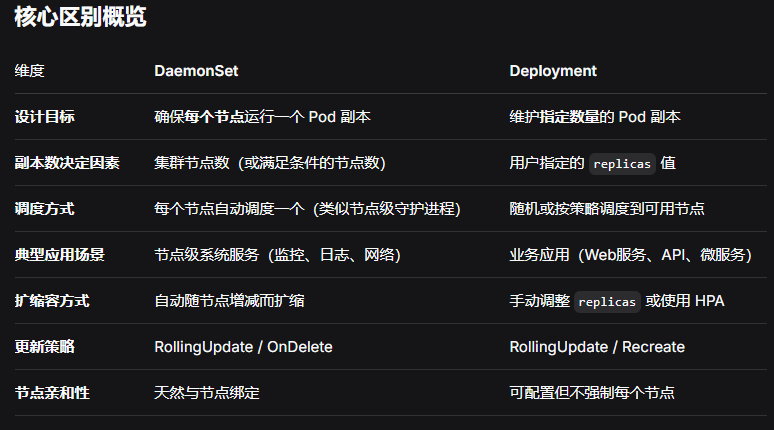
DaemonSet 控制器能够确保 k8s集群 所有的节点都运行一个相同的 pod副本,当向 k8s集群中增加 node 节点时,这个 node 节点也会自动创建一个 pod 副本,当 node 节点从集群移除,这些 pod 也会自动删除;删除 Daemonset 也会删除它们创建的 pod。
15.1.2 DaemonSet 工作原理:如何管理 Pod?
Daemonset 的控制器会监听 kuberntes 的 daemonset对象、pod对象、node对象 ,这些被监听的对象之变动,就会触发 syncLoop循环 让 k8s集群 朝着daemonset对象描述的状态进行演进。
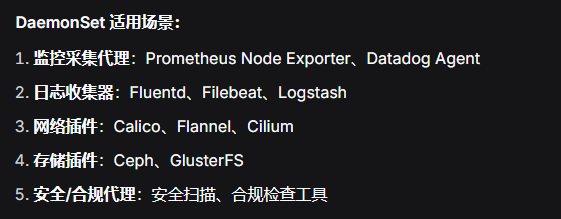
15.1.3 DaemonSet 典型应用场景
- 在集群的每个节点上运行存储,比如:glusterd 或 ceph。
- 在每个节点上运行日志收集组件,比如:flunentd、logstash、filebeat 等。
- 在每个节点上运行监控组件,比如:Prometheus、Node Exporter、collectd 等。
15.1.4 DaemonSet 与 Deployment 的区别?
15.2 DaemonSet 资源清单文件编写技巧
15.2.1 ds.spec字段
bash
[root@k8s-master1 ~]# kubectl explain  ds.spec
  minReadySeconds       <integer>
  # Pod 就绪后的等待时间,默认为0

  revisionHistoryLimit  <integer>
  # 保留历史版本数量

  selector      <LabelSelector> -required-
  # 标签选择器

  template      <PodTemplateSpec> -required-
  # 资源模版

  updateStrategy        <DaemonSetUpdateStrategy>
  # 更新策略
15.2.2 ds.spec.selector字段
bash
[root@k8s-master1 ~]# kubectl explain  ds.spec.selector
  matchExpressions      <[]LabelSelectorRequirement>
  matchLabels   <map[string]string>
15.2.3 ds.spec.updateStrategy字段
bash
[root@k8s-master1 ~]# kubectl explain  ds.spec.updateStrategy
  rollingUpdate <RollingUpdateDaemonSet>
  type  <string>
     - `"OnDelete"`
     - `"RollingUpdate"`
15.3 DaemonSet 案例:部署日志收集组件 fluentd
bash
# 导入资源包所需的镜像
m1 && n1 && n2 ~]#ctr -n k8s.io images import fluentd_2_5_1.tar.gz
docker.io/xianchao/fluentd:v2.5.1

[root@k8s-master1 daemonset]# kubectl get nodes
NAME                    STATUS   ROLES           AGE   VERSION
k8s-master1.kaser.org   Ready    control-plane   32d   v1.31.3
k8s-node1.kaser.org     Ready    work            32d   v1.31.3
k8s-node2.kaser.org     Ready    work            32d   v1.31.3

[root@k8s-master1 daemonset]# kubectl get nodes --show-labels
node-role.kubernetes.io/control-plane
# 这里也有可能是:node-role.kubernetes.io/master	版本问题导致的,自己查看

[root@k8s-master1 daemonset]# vim daemonset.yaml
apiVersion: apps/v1
kind: DaemonSet
metadata:
  name: fluentd-elasticsearch
  namespace: kube-system
  labels:
    k8s-app: fluentd-logging
spec:
  selector:
    matchLabels:
      name: fluentd-elasticsearch
  template:
    metadata:
      labels:
        name: fluentd-elasticsearch
    spec:
      tolerations:		# 定义容忍度
        - key: "node-role.kubernetes.io/control-plane"
          effect: NoSchedule
      containers:
        - name: fluentd-elasticsearch
          image: docker.io/xianchao/fluentd:v2.5.1
          imagePullPolicy: IfNotPresent
          resources:	# 资源配额
            limits:
              memory: 200Mi
              cpu: 100m
            requests:
              memory: 200Mi
              cpu: 100m
          volumeMounts:
            - name: var-log
              mountPath: /var/log
            - name: var-lib-docker-containers
              mountPath: /var/lib/docker/containers
      volumes:
        - name: var-log
          hostPath:
            path: /var/log
        - name: var-lib-docker-containers
          hostPath:
            path: /var/lib/docker/containers
      terminationGracePeriodSeconds: 30		# 优雅关闭服务

[root@k8s-master1 daemonset]# kubectl apply -f daemonset.yaml
# 查看DaemonSet资源
[root@k8s-master1 daemonset]# kubectl get ds -n kube-system | grep flu
fluentd-elasticsearch   3         3         3       3            3

# 查看pod资源并观察master控制节点是否被调度
[root@k8s-master1 daemonset]# kubectl get pods -n kube-system -owide | grep flu
fluentd-elasticsearch-4gg6q                     1/1     Running   10.244.90.152    k8s-node2.kaser.org
fluentd-elasticsearch-8sr7k                     1/1     Running   10.244.160.66    k8s-master1.kaser.org
fluentd-elasticsearch-gbh8q                     1/1     Running   10.244.147.216   k8s-node1.kaser.org
15.4 DaemonSet 更新
15.4.1 ds.spec.updateStrategy字段
bash
]# kubectl explain ds.spec.updateStrategy
  rollingUpdate <RollingUpdateDaemonSet>
  type  <string>
     - `"OnDelete"`
     - `"RollingUpdate"`
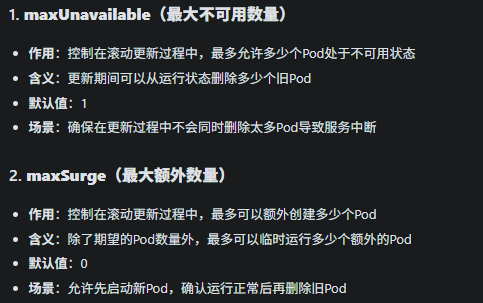
15.4.2 ds.spec.updateStrategy.rollingUpdate
bash
]# kubectl explain ds.spec.updateStrategy.rollingUpdate
  maxSurge      <IntOrString>
  maxUnavailable