文章简介:本文介绍如何在SpringBoot项目中解析旧版Microsoft Access的.mdb文件。通过UCanAccess开源库,无需安装Access或ODBC驱动,即可实现跨平台数据读取。文中提供完整的Maven依赖配置、核心工具类封装及使用示例,帮助开发者快速完成遗留系统数据迁移。该方法尤其适合临时数据提取任务,为处理历史数据库提供便捷的Java解决方案。
最近在做一个数据迁移项目,需要从老旧的.mdb(Microsoft Access)文件中提取数据。虽然Access数据库现在用得不多,但在一些遗留系统中还能见到。网上查了一圈,发现UCanAccess这个神器,结合AI的帮助,很快就完成了需求开发。
以下是UCanAccess的文档地址http://ucanaccess.sourceforge.net/site.html
🚀 快速开始
1️⃣ 引入Maven依赖
首先,我们需要在pom.xml中添加UCanAccess的依赖:
xml
<!-- 添加UCanAccess依赖 -->
<dependency>
    <groupId>net.sf.ucanaccess</groupId>
    <artifactId>ucanaccess</artifactId>
    <version>5.0.1</version>
</dependency>
2️⃣ 核心工具类实现
下面是我封装的MdbJdbcUtil.java工具类,可以直接复制使用:
java
import java.sql.*;
import java.util.*;
import java.util.stream.Collectors;
import java.util.stream.IntStream;

public class MdbJdbcUtil {
    private static final String DRIVER_CLASS = "net.ucanaccess.jdbc.UcanaccessDriver";
    private static final String URL_PREFIX = "jdbc:ucanaccess://";
    private static final String URL_MEMORY = ";memory=false";

    /**
     * 私有构造方法,防止实例化
     */
    private MdbJdbcUtil() {
        throw new UnsupportedOperationException("This is a utility class and cannot be instantiated");
    }
    /**
     * 静态初始化块,加载数据库驱动
     */
    static {
        try {
            Class.forName(DRIVER_CLASS);
        } catch (ClassNotFoundException e) {
            throw new RuntimeException("Failed to load UCanAccess JDBC driver", e);
        }
    }

    /**
     * 创建数据库连接
     *
     * @param mdbPath MDB文件路径
     * @return 数据库连接
     * @throws SQLException 如果连接失败
     */
    public static Connection getConnection(String mdbPath) throws SQLException {
        if (mdbPath == null || mdbPath.trim().isEmpty()) {
            throw new IllegalArgumentException("MDB file path cannot be null or empty");
        }

        Properties props = new Properties();
        props.put("charSet", "UTF-8");

        String dbUrl = URL_PREFIX + mdbPath + URL_MEMORY;
        return DriverManager.getConnection(dbUrl, props);
    }
    /**
     * 执行带参数的查询并返回List<Map<String, Object>>结果
     *
     * @param mdbPath MDB文件路径
     * @param sql SQL查询语句
     * @param params 查询参数列表
     * @return 查询结果列表,每个Map代表一行数据
     * @throws SQLException 如果查询失败
     */
    public static List<Map<String, Object>> queryForList(String mdbPath, String sql, Object... params) throws SQLException {
        validateParameters(mdbPath, sql);

        Connection conn = null;
        PreparedStatement stmt = null;
        ResultSet rs = null;

        try {
            conn = getConnection(mdbPath);
            stmt = conn.prepareStatement(sql);

            // 设置查询参数
            if (params != null) {
                for (int i = 0; i < params.length; i++) {
                    stmt.setObject(i + 1, params[i]);
                }
            }

            rs = stmt.executeQuery();
            return convertResultSetToList(rs);

        } finally {
            closeResources(rs, stmt, conn);
        }
    }

    /**
     * 验证参数有效性
     *
     * @param mdbPath MDB文件路径
     * @param sql SQL语句
     */
    private static void validateParameters(String mdbPath, String sql) {
        if (mdbPath == null || mdbPath.trim().isEmpty()) {
            throw new IllegalArgumentException("MDB file path cannot be null or empty");
        }
        if (sql == null || sql.trim().isEmpty()) {
            throw new IllegalArgumentException("SQL statement cannot be null or empty");
        }
    }

    /**
     * 关闭数据库资源
     *
     * @param rs ResultSet对象
     * @param stmt Statement对象
     * @param conn Connection对象
     */
    private static void closeResources(ResultSet rs, Statement stmt, Connection conn) {
        try {
            if (rs != null) {
                rs.close();
            }
        } catch (SQLException e) {
            // 记录日志但不抛出异常
            System.err.println("Failed to close ResultSet: " + e.getMessage());
        }

        try {
            if (stmt != null) {
                stmt.close();
            }
        } catch (SQLException e) {
            System.err.println("Failed to close Statement: " + e.getMessage());
        }

        try {
            if (conn != null) {
                conn.close();
            }
        } catch (SQLException e) {
            System.err.println("Failed to close Connection: " + e.getMessage());
        }
    }

    /**
     * 将ResultSet转换为List<Map<String, Object>>
     *
     * @param rs ResultSet对象
     * @return 转换后的列表
     * @throws SQLException 如果转换失败
     */
    private static List<Map<String, Object>> convertResultSetToList(ResultSet rs) throws SQLException {
        List<Map<String, Object>> resultList = new ArrayList<>();

        if (rs == null) {
            return resultList;
        }

        ResultSetMetaData metaData = rs.getMetaData();
        int columnCount = metaData.getColumnCount();

        // 获取列名列表
        List<String> columnNames = IntStream.rangeClosed(1, columnCount)
                .mapToObj(i -> {
                    try {
                        return metaData.getColumnLabel(i);
                    } catch (SQLException e) {
                        throw new RuntimeException("Failed to get column name", e);
                    }
                })
                .collect(Collectors.toList());

        // 遍历结果集
        while (rs.next()) {
            Map<String, Object> row = new LinkedHashMap<>();
            for (String columnName : columnNames) {
                row.put(columnName, rs.getObject(columnName));
            }
            resultList.add(row);
        }

        return resultList;
    }
}
3️⃣ 如何使用工具类
java
public class Example {
    public static void main(String[] args) throws SQLException {
        String sql = "select * from UserInfo";
        String mdbPath = "D:\\mdb\\mdbtest.mdb";
        List<Map<String, Object>> resultList = MdbJdbcUtil.queryForList(mdbPath,sql);
        System.out.println("查询结果数量"+resultList.size());
        for (Map<String, Object> row : resultList) {
            System.out.println(row);
        }
    }
}
运行上面的代码,你会看到如下输出:
text
查询结果数量: 2
{UserNO=1, UserID=Admin, UserName=管理员Admin, UserPassword=123456}
{UserNO=2, UserID=Xiuji, UserName=管理员Xiuji, UserPassword=123456789}
⚠️ 注意事项
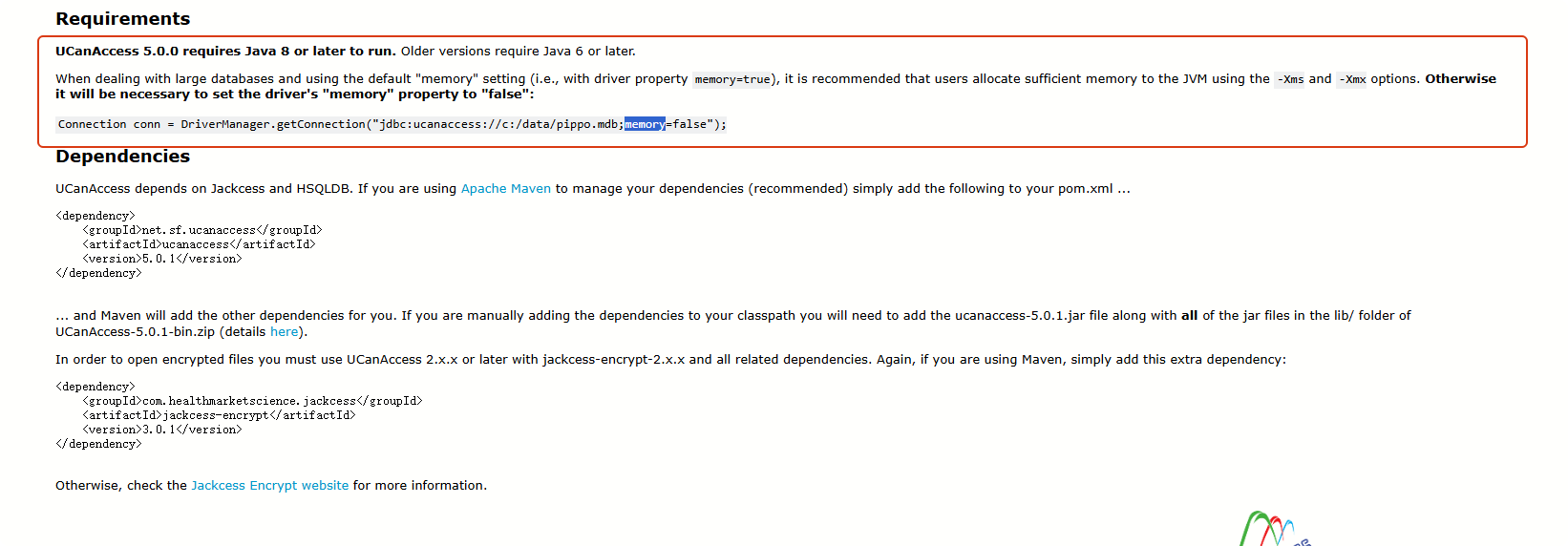
- memory设置
在处理大型数据库并使用默认的"memory"设置(即驱动属性memory=true)时,建议用户通过-Xms和-Xmx选项为JVM分配足够的内存。否则,必须将驱动的"memory"属性设置为"false"
- ignoreCase设置
ignoreCase:此属性用于禁用(ignoreCase=true)或启用(ignoreCase=false)文本比较的区分大小写功能。默认值=true。

📝 总结
通过UCanAccess库,我们可以轻松地在SpringBoot项目中解析.mdb文件,无需依赖Windows环境或ODBC驱动。这个方案特别适合:
- ✅ 临时数据提取任务
- ✅ 遗留系统数据迁移