一、 zhuoqing文件夹层级
D:\zhuoqing
├── DesignCenter
│ ├── PythonCmd\ # 存放PythonCmd压缩包内容
│ └── Tools
│ │ ├── GIF Movie Gear
├── window
│ ├──cb
│ │ ├──config\ # 配置文件夹
│ │ ├── PowerPoint\ # 存放PowerPoint压缩包内容
│ │ ├── UDPCopy\ # 存放UDPCopy压缩包内容
二、 核心文件夹(D盘根目录)
D:
├── Python\ # 存放Python压缩包内容
├── MooC\ # 核心文件夹
├── Nutdisk\ # 核心文件夹
├── Temp\ # 核心文件夹
├── TEASOFT\ # 软件更新文件夹
└── Picture\ # 核心文件夹
三、TEASOFT文件夹部署说明
1、文件列表
| 文件名 | 大小 | 说明 |
|---|---|---|
| extract.PY | 1.05 KB | Python解压脚本 |
| in.bat | 252 B | 打包脚本 |
| oute.bat | 97 B | 解压脚本 |
| PowerPoint.zip | 184.7 MB | PowerPoint相关文件 |
| Python.zip | 23.43 MB | Python环境或工具 |
| PythonCmd.zip | 745.63 KB | Python命令行工具 |
| UDPCopy.zip | 1.66 MB | UDP复制工具 |
2、文件功能说明
(1)
负责批量解压4个压缩包到指定目录,解压完成后自动打开目标文件夹。
(2)
用于将4个ZIP文件从各个源位置复制到当前目录 d:\Nutdisk\Teasoft\ 进行集中管理。
(3)
用于执行 extract.py 完成解压操作,不过需要注意的是需要修改为自己电脑上对应的Python.exe。
python
D:\030Python\008Py312\python.exe D:\TEASOFT\extract.PY3、 解压路径映射
| 压缩包文件 | 解压目标目录 |
|---|---|
| PowerPoint.zip | d:\zhuoqing\window\cb |
| Python.zip | d:\ |
| PythonCmd.zip | d:\zhuoqing\DesignCenter |
| UDPCopy.zip | d:\zhuoqing\window\cb |
四、工作流程
- 收集文件 :执行
in.bat将分散在各处的ZIP文件收集到d:\Nutdisk\Teasoft\目录 - 批量解压 :执行
oute.bat运行extract.py批量解压4个ZIP文件 - 自动打开 :解压完成后自动打开
d:\zhuoqing\window\cb文件夹
五、PPTSYNC配置
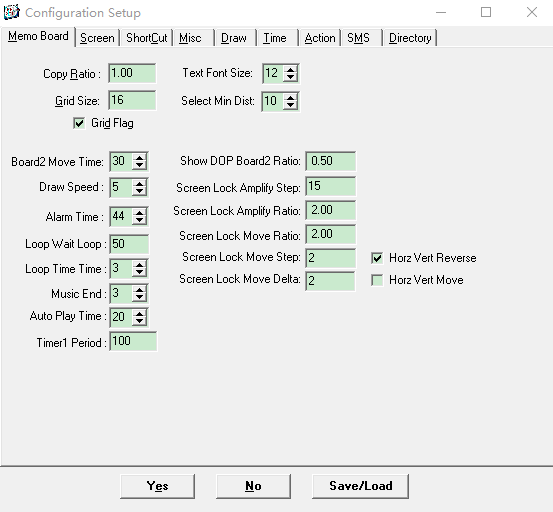
▲ 图1 Memo Board
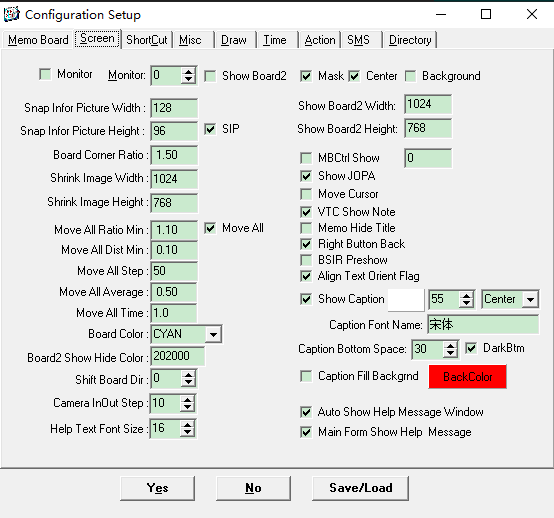
▲ 图2 Screen
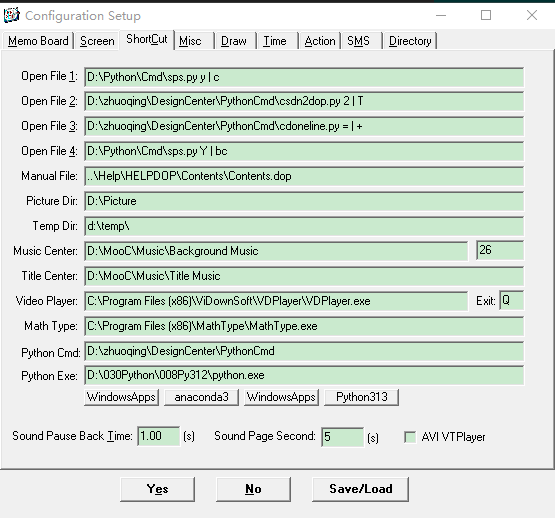
▲ 图3 ShortCut
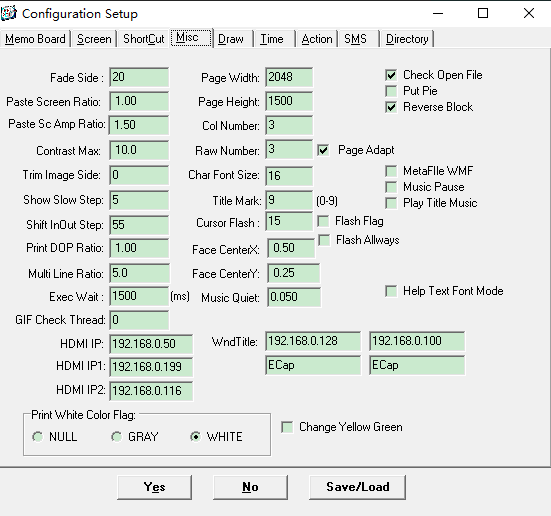
▲ 图4 Msic
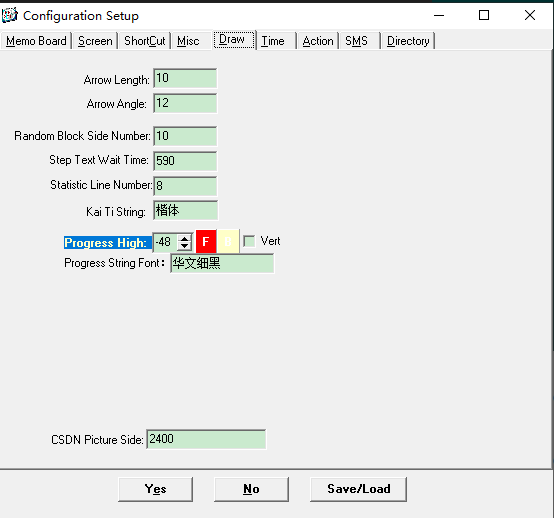
▲ 图5 Draw
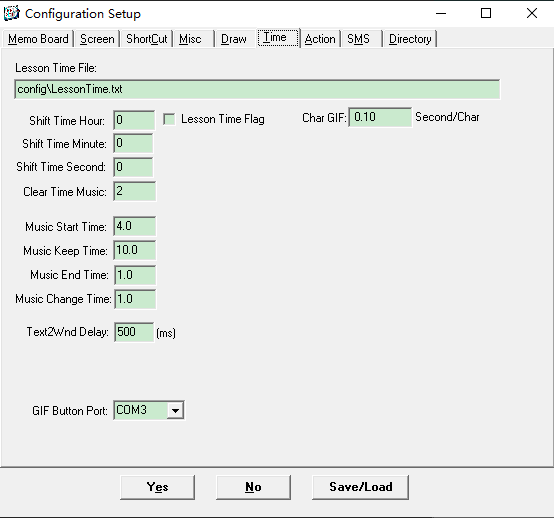
▲ 图6 Time
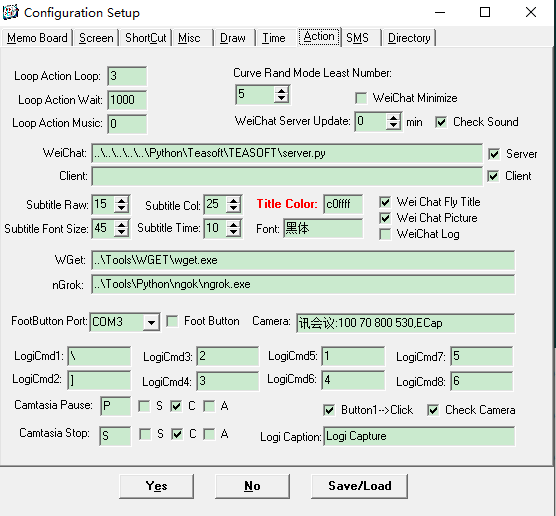
▲ 图7 Action
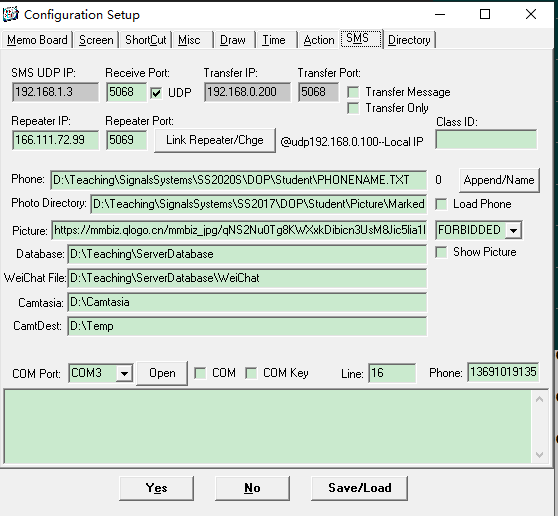
▲ 图8 SMS
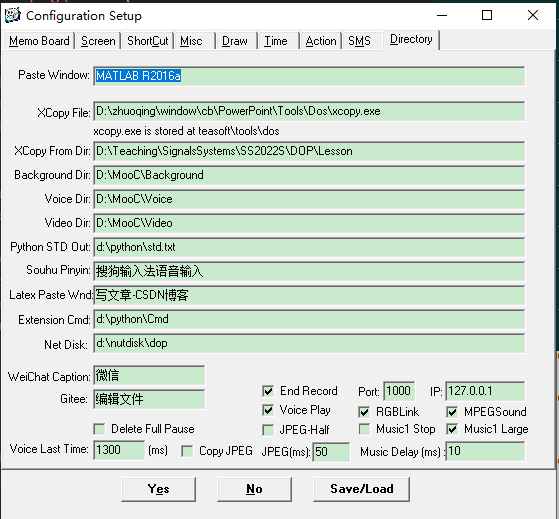
▲ 图9 Directory
六、bat更新软件
在上述配置文件中仅仅需要修改python.exe的路径即可,其余仅采用默认参数即可。
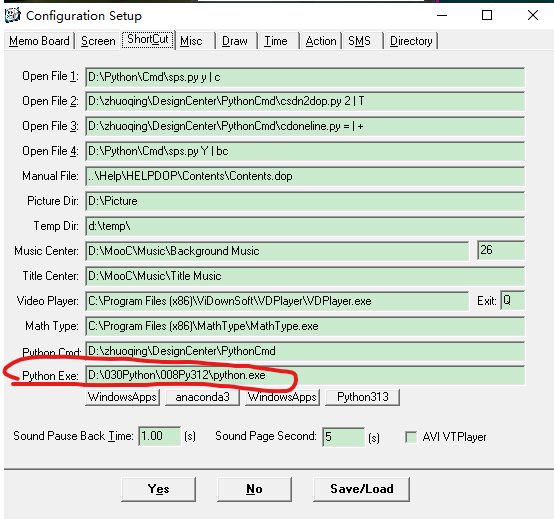
▲ 图10 修改参数
1、待解决的问题1
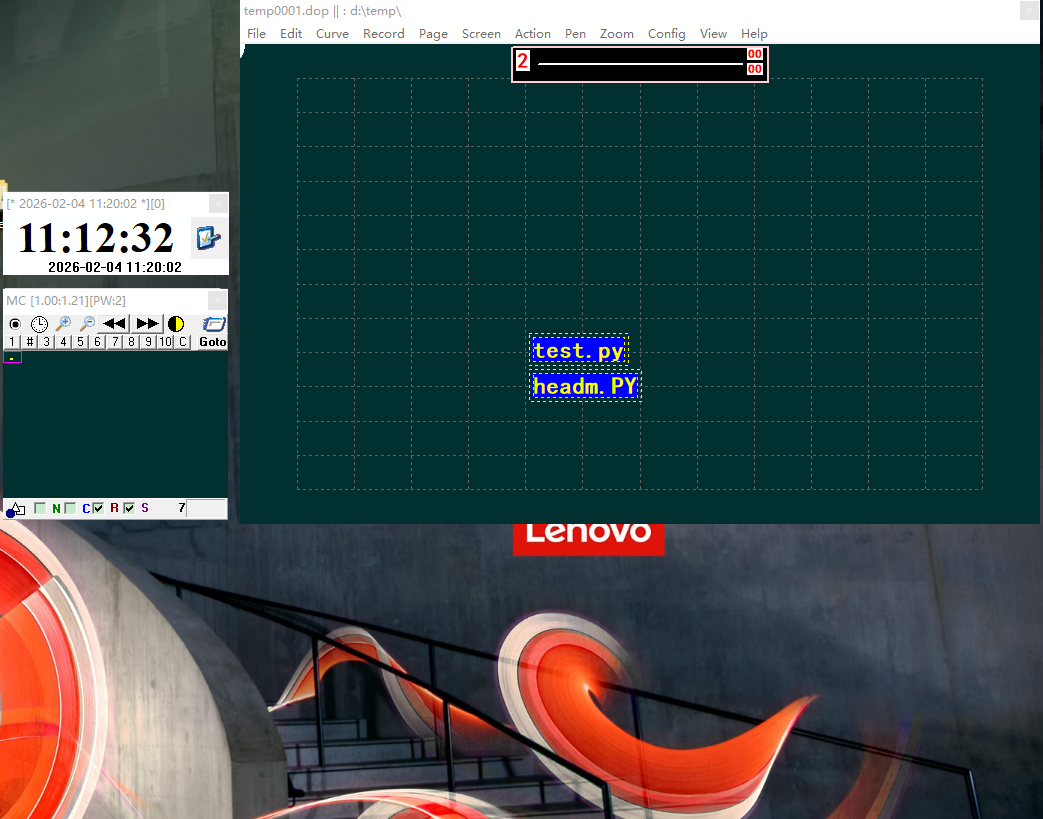
▲ 图11 缺少下方printf打印窗口
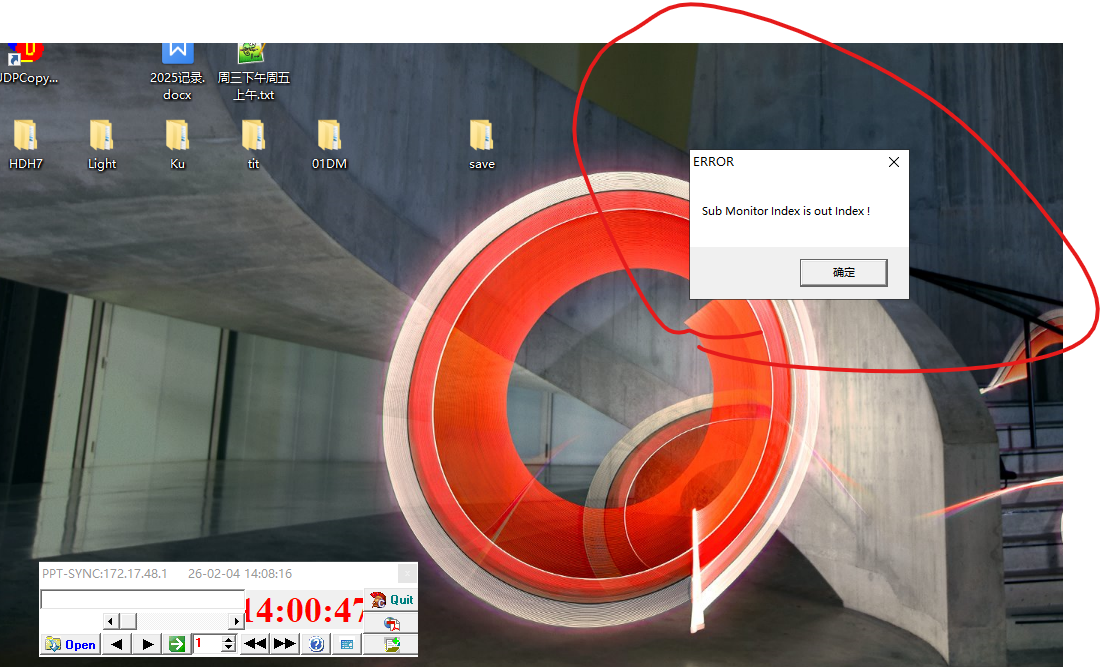
▲ 图12 解压后首次报错
下述代码用于完成压缩文件解压至指定文件夹用于自动更新最新的py文件以及pptsync软件,在此基础上进行优化,增添自动检测D:\zhuoqing\DesignCenter\PythonCmd、D:\Python3级目录下的py文件是否有需要导入安装的库,自动化实现py文件更新的同时自动安装所需要的库。
2、待解决的问题2
python
#!/usr/local/bin/python
# -*- coding: gbk -*-
#============================================================
# EXTRACT.PY                     -- by Dr. ZhuoQing 2024-01-14
#
# Note:
#============================================================

#from headm import *
import zipfile
import os

zfile1 = r'D:\TEASOFT\PowerPoint.zip'
outdir1 = r'D:\zhuoqing\window\cb'
zfile2 = r'D:\TEASOFT\Python.zip'
outdir2 = r'D:\\'
zfile3 = r'D:\TEASOFT\PythonCmd.zip'
outdir3 = r'D:\zhuoqing\DesignCenter'
zfile4 = r'D:\TEASOFT\UDPCopy.zip'
outdir4 = r'd:\zhuoqing\window\cb'


zfiledim = [zfile1, zfile2, zfile3, zfile4]
outdirdim = [outdir1, outdir2, outdir3, outdir4]

for zf,od in zip(zfiledim, outdirdim):
    zoutfile = zipfile.ZipFile(zf, 'r')
    print("Extract file :%s to %s"%(zf, od))
    zoutfile.extractall(od)


os.startfile(r'D:\zhuoqing\window\cb')

#------------------------------------------------------------
#        END OF FILE : EXTRACT.PY
#============================================================
优化后的代码如下
python
#!/usr/local/bin/python
# -*- coding: utf-8 -*-
#============================================================
# EXTRACT.PY                     -- by Dr. ZhuoQing 2024-01-14
#
# Note:
#============================================================

#from headm import *
import warnings
warnings.filterwarnings('ignore')  # 抑制所有警告信息

import zipfile
import os
import ast
import subprocess
import sys

zfile1 = r'D:\TEASOFT\PowerPoint.zip'
outdir1 = r'D:\zhuoqing\window\cb'
zfile2 = r'D:\TEASOFT\Python.zip'
outdir2 = r'D:\\'
zfile3 = r'D:\TEASOFT\PythonCmd.zip'
outdir3 = r'D:\zhuoqing\DesignCenter'
zfile4 = r'D:\TEASOFT\UDPCopy.zip'
outdir4 = r'd:\zhuoqing\window\cb'


zfiledim = [zfile1, zfile2, zfile3, zfile4]
outdirdim = [outdir1, outdir2, outdir3, outdir4]

for zf,od in zip(zfiledim, outdirdim):
    zoutfile = zipfile.ZipFile(zf, 'r')
    print("Extract file :%s to %s"%(zf, od))
    zoutfile.extractall(od)


os.startfile(r'D:\zhuoqing\window\cb')

#============================================================
# 自动检测并安装Python依赖库
#============================================================

def get_imports_from_file(filepath):
    """从Python文件中提取所有import语句"""
    imports = set()
    try:
        # 尝试多种编码读取文件
        for encoding in ['utf-8', 'gbk', 'latin-1']:
            try:
                with open(filepath, 'r', encoding=encoding, errors='ignore') as f:
                    content = f.read()
                break
            except UnicodeDecodeError:
                continue
        else:
            return imports

        tree = ast.parse(content, filepath)
        for node in ast.walk(tree):
            if isinstance(node, ast.Import):
                for alias in node.names:
                    module_name = alias.name.split('.')[0]
                    imports.add(module_name)
            elif isinstance(node, ast.ImportFrom):
                if node.module:
                    module_name = node.module.split('.')[0]
                    imports.add(module_name)
    except Exception:
        pass
    return imports


def scan_directory_for_imports(directory):
    """扫描目录下所有.py文件,收集import语句"""
    all_imports = set()
    py_files = []

    # 需要跳过的系统目录和常见软件目录
    skip_dirs = {
        '$Recycle.Bin', 'System Volume Information', 'Windows', 'Program Files',
        'Program Files (x86)', 'ProgramData', 'Users', 'Recovery', 'Boot', 'EFI',
        '001AD', '001', '001AI', 'zhuoqing', 'Dev', 'Temp', 'AppData'
    }

    for root, dirs, files in os.walk(directory):
        # 过滤掉需要跳过的目录
        dirs[:] = [d for d in dirs if d not in skip_dirs and not d.startswith('.')]

        for file in files:
            if file.endswith('.py'):
                filepath = os.path.join(root, file)
                py_files.append(filepath)
                imports = get_imports_from_file(filepath)
                all_imports.update(imports)

    return all_imports, py_files


# Windows 平台不可用的库(macOS/iOS 特有)
WINDOWS_SKIP_LIBS = {
    'appkit', 'foundation', 'corefoundation', 'cocoapy', 'pyobjc',
    'pyobjccore', 'pyobjcframeworkappkit', 'pyobjcframeworkfoundation'
}

# 已过时的库(不再支持)
DEPRECATED_LIBS = {
    'numeric',  # 已被 numpy 取代
    'psyco'     # Python 2 JIT, 不支持 Python 3
}

# pip 包名映射(import名 -> pip包名)
PIP_PACKAGE_MAP = {
    'opengl': 'PyOpenGL',
    'pyautogui': 'pyautogui',
    'cv2': 'opencv-python',
    'skimage': 'scikit-image',
    'yaml': 'pyyaml',
    'bs4': 'beautifulsoup4',
}

# 自定义项目模块(不应该尝试安装的库)
CUSTOM_MODULES = {
    'cdfsub', 'csdncfg', 'headm', 'tsdefine', 'tsmodule', 'vssub', 'web', 'tsserver', 'head'
}

def check_module_available(module_name):
    """检查模块是否可用(尝试导入)"""
    import io
    import contextlib

    module_lower = module_name.lower()

    # 跳过 Windows 平台不可用的库
    if module_lower in WINDOWS_SKIP_LIBS:
        return True, "macOS/iOS 特有库,Windows 不可用"

    # 跳过已过时的库
    if module_lower in DEPRECATED_LIBS:
        return False, None

    # 抑制标准输出和标准错误输出
    with contextlib.redirect_stdout(io.StringIO()):
        with contextlib.redirect_stderr(io.StringIO()):
            # 抑制 TensorFlow 日志
            os.environ['TF_CPP_MIN_LOG_LEVEL'] = '3'
            os.environ['TF_ENABLE_ONEDNN_OPTS'] = '0'

            try:
                __import__(module_name)
                return True, None
            except ImportError:
                return False, None
            except Exception as e:
                return True, str(e)


def install_package(package_name):
    """使用pip安装包"""
    # 检查是否是自定义模块
    if package_name.lower() in CUSTOM_MODULES:
        return False, "自定义项目模块,无需安装"

    # 映射到正确的 pip 包名
    pip_name = PIP_PACKAGE_MAP.get(package_name.lower(), package_name)

    try:
        result = subprocess.run(
            [sys.executable, '-m', 'pip', 'install', pip_name],
            capture_output=True,
            text=True,
            encoding='utf-8'
        )
        return result.returncode == 0, result.stdout + result.stderr
    except Exception as e:
        return False, str(e)


def scan_specific_dir(directory, max_depth=3):
    """扫描特定目录,支持深度控制"""
    all_imports = set()
    py_files = []

    for root, dirs, files in os.walk(directory):
        # 计算当前深度
        rel_path = os.path.relpath(root, directory)
        depth = 0 if rel_path == '.' else rel_path.count(os.sep)

        # 超过深度则停止递归
        if depth > max_depth:
            dirs[:] = []
            continue

        # 收集 .py 文件(不区分大小写)
        for file in files:
            if file.lower().endswith('.py'):
                filepath = os.path.join(root, file)
                py_files.append(filepath)
                imports = get_imports_from_file(filepath)
                all_imports.update(imports)

    return all_imports, py_files


def auto_update_dependencies():
    """自动检测并安装依赖库"""
    print("\n" + "="*60)
    print("开始自动检测和安装Python依赖库...")
    print("="*60)

    all_imports = set()
    all_py_files = []

    # 精准扫描这两个目录
    scan_dirs = [
        (r'D:\zhuoqing\DesignCenter\PythonCmd', 3),
        (r'D:\Python', 3)
    ]

    for scan_dir, max_depth in scan_dirs:
        if os.path.exists(scan_dir):
            print(f"\n正在扫描目录: {scan_dir} (深度: {max_depth})")
            imports, py_files = scan_specific_dir(scan_dir, max_depth)
            all_imports.update(imports)
            all_py_files.extend(py_files)
            print(f"  发现 {len(py_files)} 个 .py 文件")
        else:
            print(f"\n目录不存在,跳过: {scan_dir}")

    print(f"\n总共发现 {len(all_py_files)} 个 .py 文件")
    print(f"发现 {len(all_imports)} 个导入的库")

    if not all_imports:
        print("未发现任何导入库,无需安装。")
        return

    # 分类过滤库
    filtered_libs = []
    skip_reasons = {}

    for lib in all_imports:
        lib_lower = lib.lower()

        if lib_lower in WINDOWS_SKIP_LIBS:
            skip_reasons[lib] = "macOS/iOS 库"
        elif lib_lower in DEPRECATED_LIBS:
            skip_reasons[lib] = "已过时"
        elif lib_lower in CUSTOM_MODULES:
            skip_reasons[lib] = "自定义项目模块"
        else:
            filtered_libs.append(lib)

    # 显示跳过的库
    if skip_reasons:
        print(f"\n已跳过 {len(skip_reasons)} 个库:")
        for lib, reason in sorted(skip_reasons.items()):
            print(f"  ⊗ {lib:25} - {reason}")

    if not filtered_libs:
        print("\n无需安装任何库。")
        return

    # 检查每个库是否可用
    print(f"\n正在检查 {len(filtered_libs)} 个库的可用性...")
    missing_libs = []
    existing_libs = []

    for lib in sorted(filtered_libs):
        available, error = check_module_available(lib)
        if available:
            existing_libs.append(lib)
            if error:
                print(f"  ⚠ {lib:25} - {error[:50]}")
            else:
                print(f"  ✓ {lib:25} - 已安装")
        else:
            missing_libs.append(lib)
            print(f"  ⊗ {lib:25} - 需要安装")

    # 如果没有缺失的库,直接返回
    if not missing_libs:
        print(f"\n✓ 所有 {len(existing_libs)} 个库都已可用")
        print("="*60 + "\n")
        return

    # 安装缺失的库
    print(f"\n发现 {len(missing_libs)} 个缺失的库,开始安装...")
    print("-" * 60)

    installed_count = 0
    failed_count = 0
    skipped_count = 0

    for lib in missing_libs:
        print(f"正在安装 {lib:25}...", end='', flush=True)
        success, error = install_package(lib)
        if success:
            print(" ✓")
            installed_count += 1
        elif "自定义项目模块" in error:
            print(" ⚠ 自定义模块")
            skipped_count += 1
        else:
            print(" ✗")
            failed_count += 1

    print("-" * 60)
    print(f"安装完成: 成功 {installed_count} 个, 跳过 {skipped_count} 个, 失败 {failed_count} 个")
    print("="*60 + "\n")


# 执行自动依赖安装
auto_update_dependencies()


#------------------------------------------------------------
#        END OF FILE : EXTRACT.PY
#============================================================