【源码+注释】纯C++小游戏开发之射击小球游戏
灵感来源:《三角洲行动》第8赛季中,MP7的电玩高手2枪皮中的检视小游戏
一、项目前置配置
开发平台:DevC++
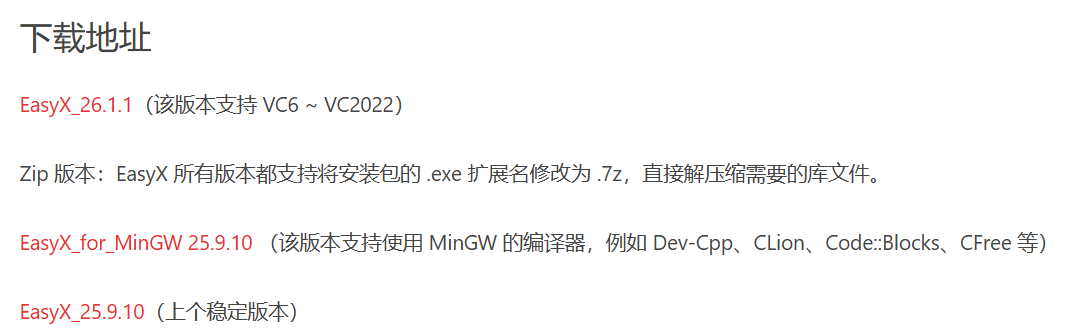
图形库:EasyX库
https://easyx.cn/easyx
二、项目源码
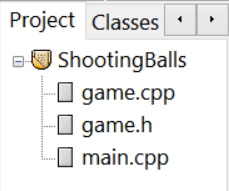
项目结构:
1. game.h文件
cpp
#ifndef GAME_H
#define GAME_H

#include <windows.h>
#include <graphics.h>
#include <conio.h>
#include <time.h>
#include <cmath>
#include <string>
#include <algorithm>  // 添加这个头文件以使用min()
using namespace std;

// 颜色定义 - 紫色主题
const COLORREF DEEP_PURPLE = RGB(75, 0, 130);       // 深紫色
const COLORREF INDIGO_PURPLE = RGB(111, 45, 168);  // 靛紫色
const COLORREF VIOLET = RGB(138, 43, 226);         // 紫罗兰
const COLORREF MEDIUM_PURPLE = RGB(147, 112, 219); // 中紫色
const COLORREF AMETHYST = RGB(153, 102, 204);      // 兰紫色
const COLORREF LIGHT_PURPLE = RGB(186, 85, 211);   // 浅紫色
const COLORREF PINK_PURPLE = RGB(218, 112, 214);   // 粉紫色
const COLORREF LAVENDER = RGB(230, 230, 250);      // 薰衣草色(高光用)

const COLORREF DARK_BG = RGB(20, 15, 35);          // 深紫色背景
const COLORREF GRID_COLOR = RGB(45, 40, 70);       // 紫色网格线
const COLORREF UI_PURPLE = RGB(120, 80, 180);      // UI紫色

// 圆球结构体
struct Ball {
    float x, y;           // 位置
    float speed;          // 移动速度
    float radius;         // 半径
    COLORREF color;       // 颜色
    bool active;          // 是否活跃
    int direction;        // 1:从左到右, -1:从右到左
    float trail[5][2];    // 轨迹点   存储圆球最近5个位置的历史坐标
    int trailIndex;       // 轨迹索引    指示下一个要更新的轨迹位置    取值范围:0-4,循环使用
};

// 游戏类
class Game {
private:
    // 游戏状态
    int score;                    // 得分
    int targetsHit;               // 击中数量
    int timeLeft;                 // 剩余时间(秒)
    bool gameActive;              // 游戏是否进行中
    DWORD startTime;              // 游戏开始时间
    DWORD lastFrameTime;          // 上一帧的时间

    // 游戏配置
    static const int MAX_BALLS = 20; // 小球数量
    static const int SCREEN_WIDTH = 1024;
    static const int SCREEN_HEIGHT = 768;
    static const int GAME_DURATION = 60; // 游戏时长60秒

    // 紫色颜色数组
    static const int PURPLE_COLORS_COUNT = 7;
    COLORREF purpleColors[PURPLE_COLORS_COUNT];

    // 圆球数组
    Ball balls[MAX_BALLS];

    // 私有方法
    void init();                     // 初始化游戏
    void initBall(Ball& ball);       // 初始化单个圆球
    void update();                   // 更新游戏状态
    void render();                   // 渲染游戏画面
    void handleInput();              // 处理用户输入
    void reset();                    // 重置游戏

    // 辅助方法
    void updateBall(Ball& ball);     // 更新圆球位置
    void drawBall(const Ball& ball); // 绘制圆球
    void drawGameUI();               // 绘制游戏UI
    void drawGameOverScreen();       // 绘制游戏结束界面
    void drawMP7Model();             // 绘制MP7模型
    bool checkBallHit(Ball& ball, int mouseX, int mouseY); // 检查击中

public:
    Game();                          // 构造函数
    ~Game();                         // 析构函数
    void run();                      // 运行游戏主循环
};

#endif // GAME_H
2. game.cpp文件
csharp
#include "game.h"
using namespace std;
// 构造函数
Game::Game() {
    // 初始化随机数种子
    srand(time(NULL));

    // 初始化紫色颜色数组
    purpleColors[0] = DEEP_PURPLE;
    purpleColors[1] = INDIGO_PURPLE;
    purpleColors[2] = VIOLET;
    purpleColors[3] = MEDIUM_PURPLE;
    purpleColors[4] = AMETHYST;
    purpleColors[5] = LIGHT_PURPLE;
    purpleColors[6] = PINK_PURPLE;

    // 初始化图形窗口
    initgraph(SCREEN_WIDTH, SCREEN_HEIGHT);
    setbkcolor(DARK_BG);
    cleardevice();

    // 初始化游戏状态
    reset();
}

// 析构函数
Game::~Game() {
    // 关闭图形窗口
    closegraph();
}

// 重置游戏状态
void Game::reset() {
    score = 0;
    targetsHit = 0; // 击中数量
    timeLeft = GAME_DURATION; // 将剩余时间(timeLeft)设置为游戏时长(GAME_DURATION,即60秒)
    gameActive = true; // 表示游戏进行中
    startTime = GetTickCount();  // 记录游戏开始时间
    lastFrameTime = GetTickCount(); // 记录上一帧的时间,用于控制帧率
    // GetTickCount():返回系统启动到现在的毫秒数

    // 初始化所有圆球
    for (int i = 0; i < MAX_BALLS; i++) { //  MAX_BALLS :20
        initBall(balls[i]);
        // 让圆球在不同时间出现
        balls[i].x = (balls[i].direction == 1) ? -balls[i].radius - i * 30 : SCREEN_WIDTH + balls[i].radius + i * 30;
        // 如果圆球方向为1(从左向右),则圆球的初始 x 坐标为:负的圆球半径减去 i*30
		// 如果圆球方向为-1(从右向左),则圆球的初始 x 坐标为:屏幕宽度加上圆球半径再加上 i*30
		// 这样每个圆球从屏幕左侧(右侧)更远的位置开始,使得它们不会同时出现。
    }
}

// 初始化单个圆球
void Game::initBall(Ball& ball) { // 通过引用传递,直接修改传入的圆球对象
    ball.radius = 15 + rand() % 20;  // 随机半径15-35
    ball.speed = 0.5f + (rand() % 100) / 200.0f;  // 随机速度 0.5-1.0

    // 随机选择紫色颜色
    int colorIndex = rand() % PURPLE_COLORS_COUNT;
    ball.color = purpleColors[colorIndex];

    // 随机选择出现边(0:左边, 1:右边)
    if (rand() % 2 == 0) {
        // 从左边出现
        ball.x = -ball.radius; // 设置圆球的初始 x 坐标为负的半径,这样圆球刚好在屏幕左侧外
        ball.direction = 1; // 方向为1,表示向右移动
    } else {
        // 从右边出现
        ball.x = SCREEN_WIDTH + ball.radius; // 设置圆球的初始 x 坐标为屏幕宽度加上半径,这样圆球刚好在屏幕右侧外
        ball.direction = -1; // 方向为-1,表示向左移动
    }

    // 随机垂直位置
    ball.y = 100 + rand() % (SCREEN_HEIGHT - 200); // 是在屏幕中间区域(上下各留100像素的边界)随机出现

    ball.active = true;
    ball.trailIndex = 0; // 表示轨迹数组的第一个位置

    // 初始化轨迹
    // 将轨迹数组中的5个点都初始化为圆球的初始位置
	// 这样在圆球刚开始移动时,轨迹点都是重叠的,绘制时不会出现拖尾,直到圆球移动并更新轨迹点
    for (int i = 0; i < 5; i++) {
        ball.trail[i][0] = ball.x;
        ball.trail[i][1] = ball.y;
    }
}

// 更新圆球位置
void Game::updateBall(Ball& ball) {
    if (!ball.active) return;

    // 更新位置
    // 根据圆球的速度和方向更新其 x 坐标
	// 如果方向为1(向右),则 x 增加;方向为-1(向左),则 x 减少
    ball.x += ball.speed * ball.direction;

    // 更新轨迹
    ball.trail[ball.trailIndex][0] = ball.x;
    ball.trail[ball.trailIndex][1] = ball.y;
    // trailIndex 会在0到4之间循环        这样下一次更新轨迹时,会覆盖最旧的轨迹点,实现循环缓冲区
    ball.trailIndex = (ball.trailIndex + 1) % 5;

    // 检查是否移出屏幕
    if ((ball.direction == 1 && ball.x > SCREEN_WIDTH + ball.radius) || // 方向从左往右,移到屏幕右侧
        (ball.direction == -1 && ball.x < -ball.radius)) {
        ball.active = false;
    }
}

// 绘制圆球(带轨迹效果)
void Game::drawBall(const Ball& ball) {
    if (!ball.active) return;

    // 绘制轨迹(渐隐效果)
    for (int i = 0; i < 5; i++) {
        int idx = (ball.trailIndex + i) % 5; // 每个i值对应一个轨迹点

        float alpha = 1.0f - (i * 0.2f); // 计算当前轨迹点的透明度系数(渐隐效果)
        /*
		1.0f 表示完全不透明
		i * 0.2f 随着i增加而增加

		计算结果:
		i=0: alpha = 1.0 - 0.0 = 1.0 (100%不透明)
		i=1: alpha = 1.0 - 0.2 = 0.8 (80%不透明)
		i=2: alpha = 1.0 - 0.4 = 0.6 (60%不透明)
		i=3: alpha = 1.0 - 0.6 = 0.4 (40%不透明)
		i=4: alpha = 1.0 - 0.8 = 0.2 (20%不透明)
		*/

        // 计算轨迹颜色
        int r = GetRValue(ball.color);
        int g = GetGValue(ball.color);
        int b = GetBValue(ball.color);

        // 紫色轨迹颜色(稍微淡一点)
        // 修复:使用min并确保两个参数都是int类型
        int trailR = min(255, static_cast<int>(r + 50 * (1 - alpha)));
        int trailG = min(255, static_cast<int>(g + 30 * (1 - alpha)));
        int trailB = min(255, static_cast<int>(b + 50 * (1 - alpha)));

        COLORREF trailColor = RGB(trailR, trailG, trailB);

        // 绘制轨迹点
        setfillcolor(trailColor);
        solidcircle(ball.trail[idx][0], ball.trail[idx][1], ball.radius * 0.3f * alpha);
        /*
		solidcircle(轨迹点的x坐标, 轨迹点的y坐标, 轨迹点半径)

		ball.radius:圆球主体半径(例如20像素)
		0.3f:轨迹点大小为主体的30%
		* alpha:越旧的轨迹点越小
		*/
    }

    // 绘制圆球主体
    setfillcolor(ball.color);
    solidcircle(ball.x, ball.y, ball.radius);

    // 绘制圆球高光(使用薰衣草色)
    setfillcolor(LAVENDER);
    solidcircle(
        ball.x - ball.radius * 0.3f,
        ball.y - ball.radius * 0.3f,
        ball.radius * 0.4f
    );

    // 添加紫色光晕效果
    setlinecolor(RGB(
        min(255, GetRValue(ball.color) + 50),
        min(255, GetGValue(ball.color) + 30),
        min(255, GetBValue(ball.color) + 50)
    ));
    circle(ball.x, ball.y, ball.radius + 2);
}

// 绘制MP7枪械文字标识
void Game::drawMP7Model() {
    settextcolor(LAVENDER);
    settextstyle(16, 0, "Arial");
    outtextxy(SCREEN_WIDTH - 190, SCREEN_HEIGHT - 120, "MP7 - 电玩高手S2");
}

// 绘制游戏UI
void Game::drawGameUI() {
    // 绘制顶部状态栏背景(半透明紫色)
    setfillcolor(RGB(60, 45, 100));
    solidrectangle(0, 0, SCREEN_WIDTH, 60);

    // 绘制剩余时间
    char timeText[50];
    sprintf(timeText, "剩余时间: %02d:%02d", timeLeft / 60, timeLeft % 60);

    settextcolor(LAVENDER);
    settextstyle(24, 0, "Arial");
    int textWidth = textwidth(timeText);
    outtextxy((SCREEN_WIDTH - textWidth) / 2, 20, timeText);

    // 绘制击败数量
    char scoreText[50];
    sprintf(scoreText, "击败: %d", targetsHit);

    settextcolor(LIGHT_PURPLE);
    settextstyle(28, 0, "Arial");
    outtextxy(50, 18, scoreText);

    // 绘制分数
    char totalText[50];
    sprintf(totalText, "得分: %d", score);
    outtextxy(SCREEN_WIDTH - 150, 18, totalText);
}

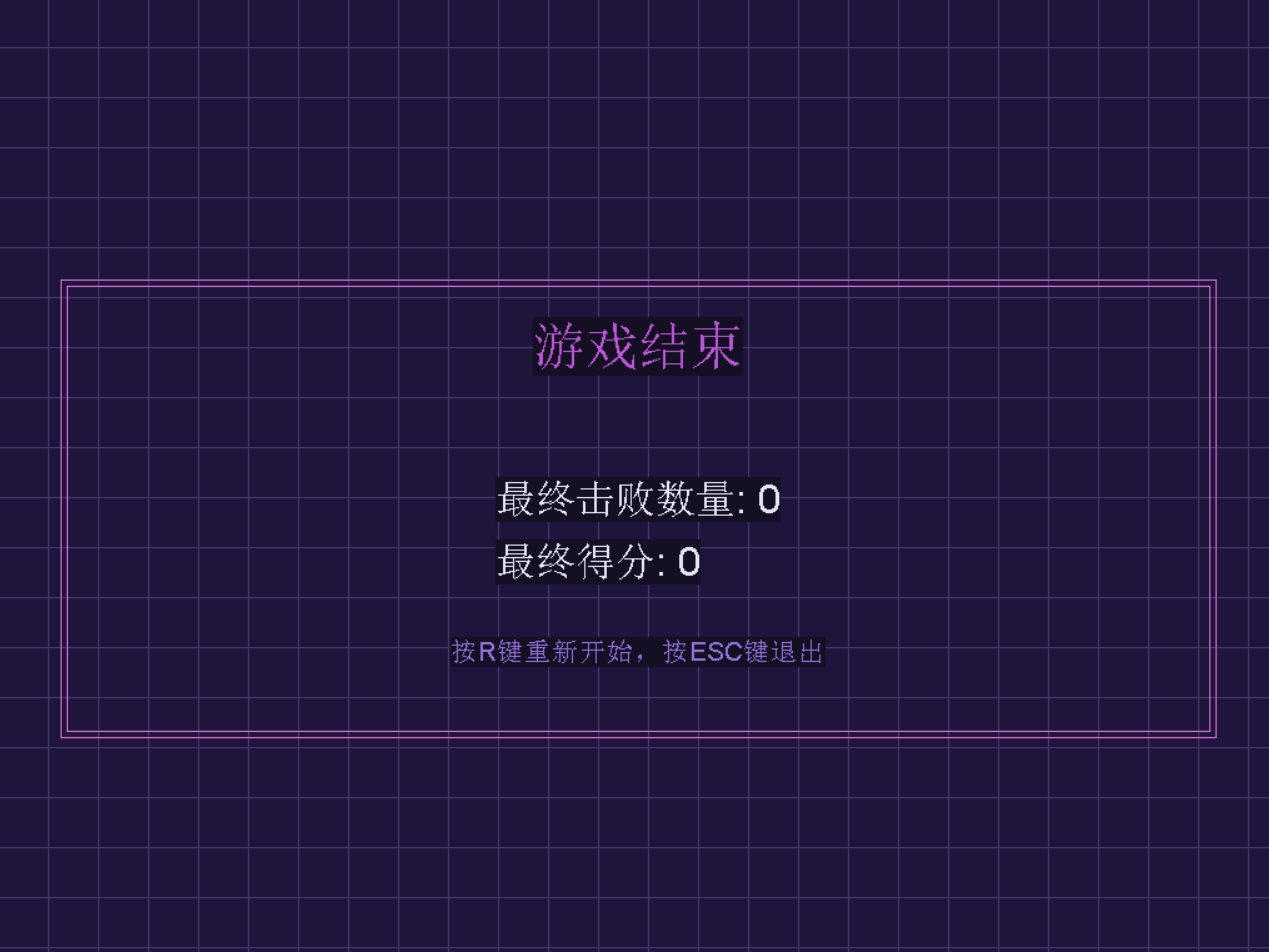
// 绘制游戏结束界面
void Game::drawGameOverScreen() {
    // 深紫色半透明覆盖层
    setfillcolor(RGB(30, 20, 60));
    solidrectangle(0, 0, SCREEN_WIDTH, SCREEN_HEIGHT);

    // 绘制紫色网格线
    setlinecolor(RGB(70, 55, 110));
    for (int x = 0; x < SCREEN_WIDTH; x += 40) { // 每隔40,绘制竖线
        line(x, 0, x, SCREEN_HEIGHT);
    }
    for (int y = 0; y < SCREEN_HEIGHT; y += 40) { // 每隔40,绘制横线
        line(0, y, SCREEN_WIDTH, y);
    }

    // 游戏结束标题
    settextcolor(LIGHT_PURPLE);
    settextstyle(48, 0, "Arial");
    const char* title = "游戏结束";
    int titleWidth = textwidth(title);
    outtextxy((SCREEN_WIDTH - titleWidth) / 2, SCREEN_HEIGHT / 3, title);

    // 最终击败数量
    char finalScore[100];
    sprintf(finalScore, "最终击败数量: %d", targetsHit);

    settextcolor(LAVENDER);
    settextstyle(36, 0, "Arial");
    int scoreWidth = textwidth(finalScore);
    outtextxy((SCREEN_WIDTH - scoreWidth) / 2, SCREEN_HEIGHT / 2, finalScore);

    // 最终分数
    char totalScore[100];
    sprintf(totalScore, "最终得分: %d", score);
    outtextxy((SCREEN_WIDTH - scoreWidth) / 2, SCREEN_HEIGHT / 2 + 50, totalScore);

    // 重新开始提示
    settextcolor(MEDIUM_PURPLE);
    settextstyle(24, 0, "Arial");
    const char* restartMsg = "按R键重新开始,按ESC键退出";
    int msgWidth = textwidth(restartMsg);
    outtextxy((SCREEN_WIDTH - msgWidth) / 2, SCREEN_HEIGHT * 2 / 3, restartMsg);

    // 添加紫色装饰边框
    setlinecolor(PINK_PURPLE);
    rectangle(50, SCREEN_HEIGHT / 3 - 30, SCREEN_WIDTH - 50, SCREEN_HEIGHT * 2 / 3 + 80);
    rectangle(55, SCREEN_HEIGHT / 3 - 25, SCREEN_WIDTH - 55, SCREEN_HEIGHT * 2 / 3 + 75);
}

// 检查鼠标是否击中圆球
bool Game::checkBallHit(Ball& ball, int mouseX, int mouseY) {
    if (!ball.active) return false;

    // 计算鼠标与圆心的距离
    float dx = mouseX - ball.x;
    float dy = mouseY - ball.y;
    float distance = sqrt(dx * dx + dy * dy);

    // 如果距离小于半径,则击中
    if (distance <= ball.radius) {
        ball.active = false;

        // 击中特效:在击中位置绘制一个紫色光晕
        setfillcolor(RGB(
            min(255, GetRValue(ball.color) + 80),
            min(255, GetGValue(ball.color) + 50),
            min(255, GetBValue(ball.color) + 80)
        ));
        solidcircle(mouseX, mouseY, 25);

        return true;
    }

    return false;
}

// 处理用户输入
void Game::handleInput() {
    // 键盘输入
    if (kbhit()) {
        int key = getch();
        if (key == 27) { // ESC键退出
            exit(0);
        }
        if (!gameActive && (key == 'r' || key == 'R')) {
            reset();
        }
    }

    // 鼠标输入
    if (MouseHit()) {
        MOUSEMSG mmsg = GetMouseMsg();

        if (mmsg.uMsg == WM_LBUTTONDOWN && gameActive) {
            // 检查是否击中任何圆球
            for (int i = 0; i < MAX_BALLS; i++) {
                if (checkBallHit(balls[i], mmsg.x, mmsg.y)) {
                    targetsHit++;
                    // 大圆球更多分
                    score += 10 + (int)(balls[i].radius / 5);

                    // 播放击中提示(视觉反馈)
                    settextcolor(PINK_PURPLE);
                    settextstyle(20, 0, "Arial");
                    char hitText[20];
                    sprintf(hitText, "+%d", 10 + (int)(balls[i].radius / 5));
                    outtextxy(mmsg.x + 20, mmsg.y - 20, hitText);
                }
            }
        }
    }
}

// 更新游戏状态
void Game::update() {
    // 更新游戏时间
    if (gameActive) {
        DWORD currentTime = GetTickCount();
        DWORD elapsedSeconds = (currentTime - startTime) / 1000;
        timeLeft = GAME_DURATION - elapsedSeconds;

        if (timeLeft <= 0) {
            timeLeft = 0;
            gameActive = false;
        }
    }

    // 更新圆球
    for (int i = 0; i < MAX_BALLS; i++) {
        if (gameActive) {
            updateBall(balls[i]);

            // 如果圆球不活跃且游戏进行中,重新初始化
            if (!balls[i].active && gameActive) {
                // 随机决定是否生成新圆球
                if (rand() % 50 == 0) { // 大约每50帧生成一个新圆球
                    initBall(balls[i]);
                }
            }
        }
    }
}

// 渲染游戏画面
void Game::render() {
    // 清除屏幕
    cleardevice();

    // 绘制紫色渐变背景(从深紫到中紫)
    for (int y = 0; y < SCREEN_HEIGHT; y++) {
        int r = 20 + (y * 15 / SCREEN_HEIGHT);
        int g = 15 + (y * 10 / SCREEN_HEIGHT);
        int b = 35 + (y * 20 / SCREEN_HEIGHT);
        setlinecolor(RGB(r, g, b));
        line(0, y, SCREEN_WIDTH, y);
    }

    // 绘制网格背景(紫色)
    setlinecolor(GRID_COLOR);
    for (int x = 0; x < SCREEN_WIDTH; x += 40) {
        line(x, 0, x, SCREEN_HEIGHT);
    }
    for (int y = 0; y < SCREEN_HEIGHT; y += 40) {
        line(0, y, SCREEN_WIDTH, y);
    }

    // 绘制圆球
    for (int i = 0; i < MAX_BALLS; i++) {
        drawBall(balls[i]);
    }

    // 绘制游戏UI
    drawGameUI();

    // 绘制MP7的机械文字
    drawMP7Model();

    // 如果游戏结束,显示结束界面
    if (!gameActive) {
        drawGameOverScreen();
    }
}

// 运行游戏主循环
void Game::run() {
    while (true) {
        // 处理输入
        handleInput();

        // 更新游戏状态
        update();

        // 渲染游戏画面
        render();

        // 控制帧率
        DWORD currentTime = GetTickCount();
        DWORD frameTime = currentTime - lastFrameTime;
        if (frameTime < 16) { // 约60FPS
            Sleep(16 - frameTime);
        }
        lastFrameTime = GetTickCount();

        // 刷新显示
        FlushBatchDraw();
    }
}
3. main.cpp文件
cpp
#include "game.h"

int main() {
    // 创建游戏对象
    Game game;
    // 运行游戏
    game.run();

    return 0;
}
三、运行结果
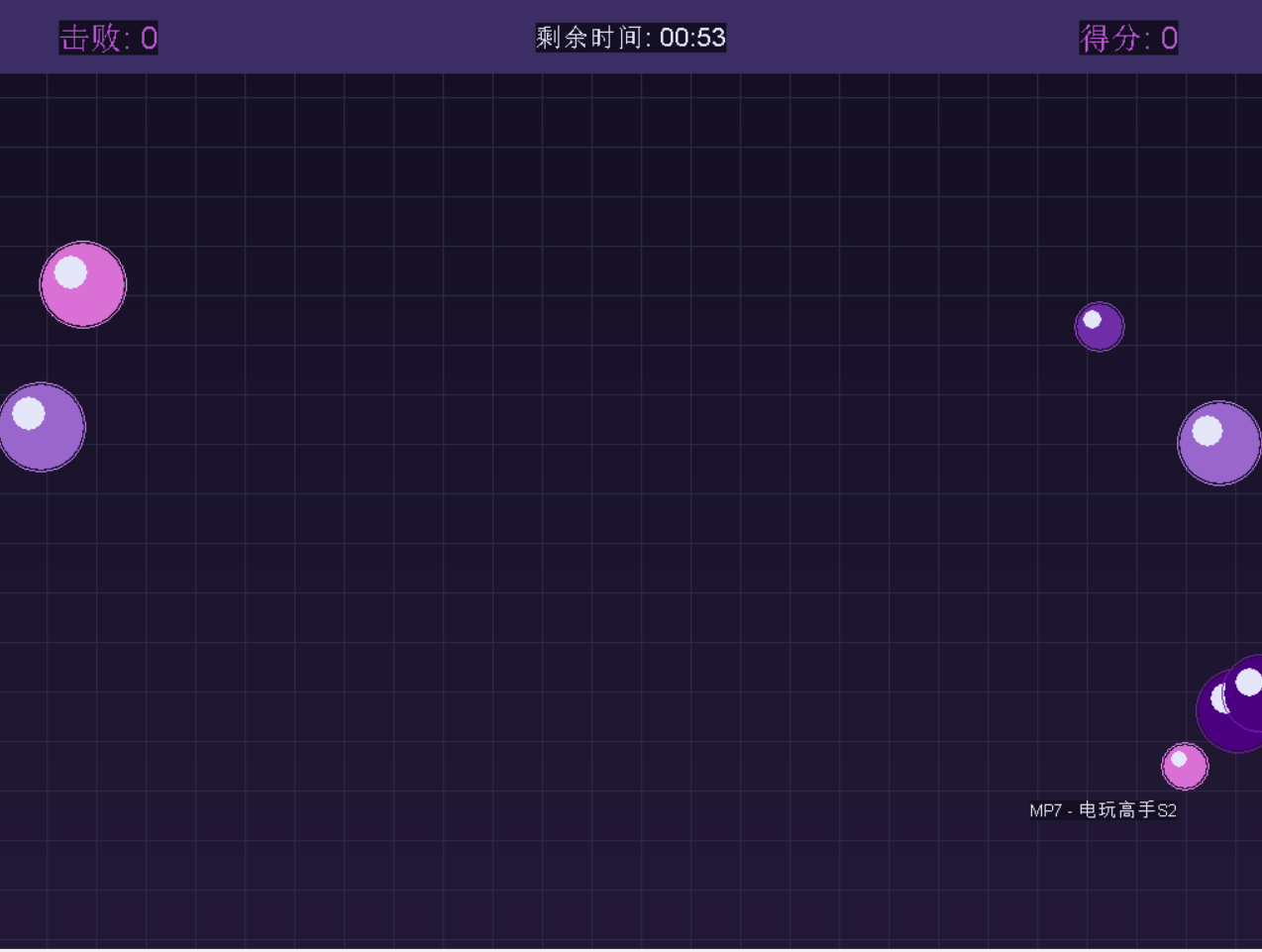
玩法介绍:在倒计时结束前,鼠标点击小球,击败次数+1,得分根据小球的大小而增加不同分值。
1. 游戏开始界面
2. 游戏结束界面(倒计时结束后)