欢迎加入开源鸿蒙跨平台社区:开源鸿蒙跨平台开发者社区
Flutter for OpenHarmony 实战:打地鼠游戏完整开发指南
文章目录
- [Flutter for OpenHarmony 实战:打地鼠游戏完整开发指南](#Flutter for OpenHarmony 实战:打地鼠游戏完整开发指南)
-
- 摘要
- 一、项目背景与功能概述
-
- [1.1 打地鼠游戏介绍](#1.1 打地鼠游戏介绍)
- [1.2 应用功能规划](#1.2 应用功能规划)
- [1.3 游戏配置](#1.3 游戏配置)
- 二、数据模型设计
-
- [2.1 游戏配置](#2.1 游戏配置)
- [2.2 游戏初始化](#2.2 游戏初始化)
- 三、游戏循环实现
-
- [3.1 开始游戏](#3.1 开始游戏)
- [3.2 结束游戏](#3.2 结束游戏)
- 四、地鼠生成算法
-
- [4.1 随机生成地鼠](#4.1 随机生成地鼠)
- [4.2 难度调整](#4.2 难度调整)
- 五、点击检测实现
-
- [5.1 打地鼠逻辑](#5.1 打地鼠逻辑)
- [5.2 防止重复点击](#5.2 防止重复点击)
- 六、UI界面实现
-
- [6.1 游戏网格](#6.1 游戏网格)
- [6.2 地洞组件](#6.2 地洞组件)
- [6.3 游戏信息面板](#6.3 游戏信息面板)
- 七、资源管理
-
- [7.1 定时器销毁](#7.1 定时器销毁)
- [7.2 游戏重置](#7.2 游戏重置)
- 八、总结
摘要
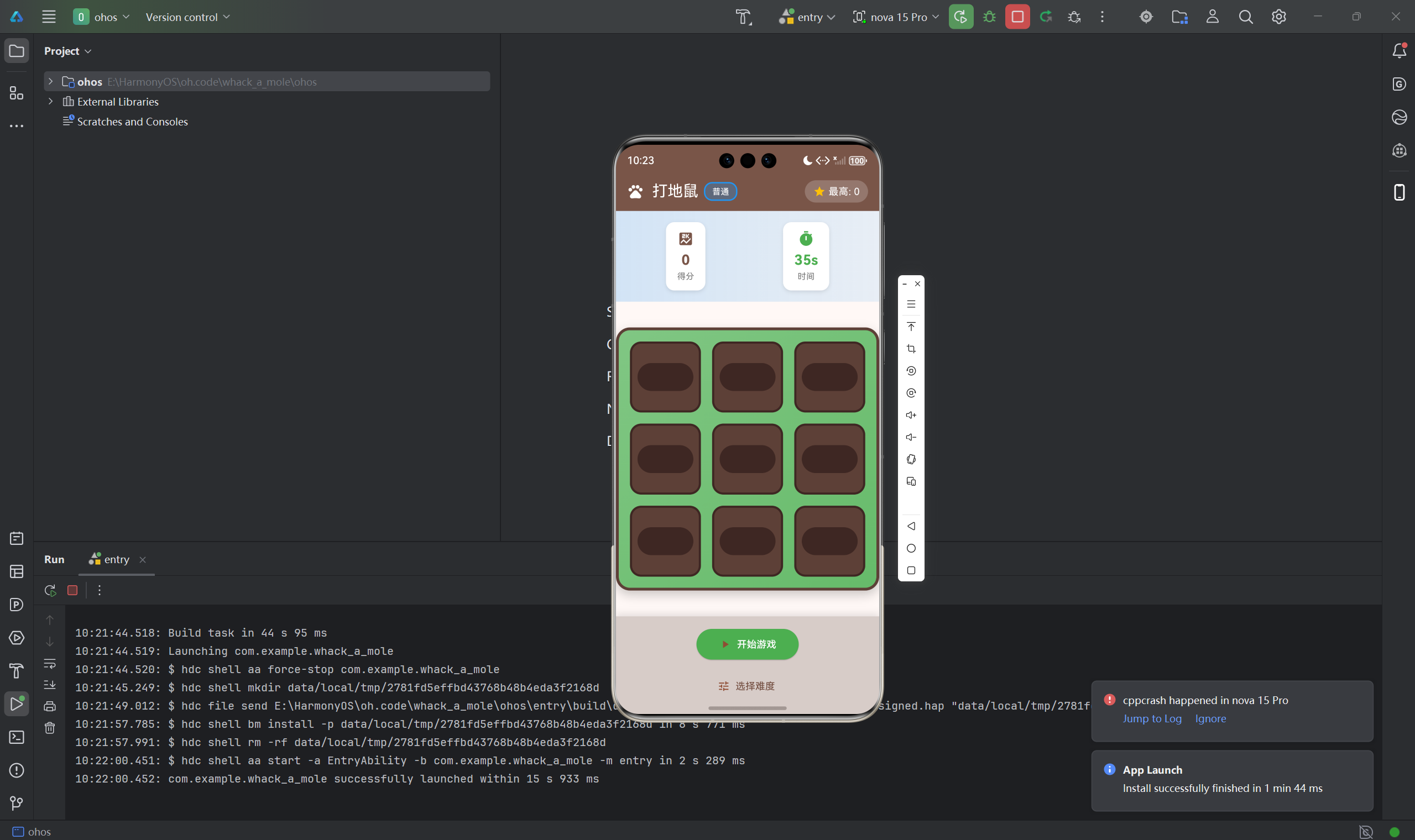
打地鼠(Whack-a-Mole)是一款经典的街机休闲游戏,玩家需要在有限时间内尽可能多地点击从地洞中冒出的地鼠来得分。本文将详细介绍如何使用Flutter for OpenHarmony框架开发一款功能完整的打地鼠游戏。文章涵盖了定时器管理、随机生成算法、点击检测、倒计时实现等核心技术点。通过本文学习,读者将掌握Flutter在反应类游戏开发中的完整流程,了解多定时器协调和状态管理的应用。
一、项目背景与功能概述
1.1 打地鼠游戏介绍
打地鼠是一款考验反应速度的经典街机游戏:
- 目标:在限定时间内打中尽可能多的地鼠
- 规则 :
- 地鼠随机从地洞中冒出
- 点击地鼠得分
- 每个地鼠只能打一次
- 时间结束后游戏结束
1.2 应用功能规划
| 功能模块 | 具体功能 |
|---|---|
| 游戏网格 | 3×3地洞布局 |
| 地鼠生成 | 随机位置、随机数量 |
| 点击检测 | 判断是否打中地鼠 |
| 倒计时 | 30秒游戏时间 |
| 分数计算 | 每打中一只得10分 |
| 最高分记录 | 保存历史最高分 |
| 游戏控制 | 开始、结束、重新开始 |
| 视觉反馈 | 打中特效显示 |
1.3 游戏配置
| 参数 | 值 | 说明 |
|---|---|---|
| 网格大小 | 3×3 | 地洞数量 |
| 游戏时长 | 30秒 | 倒计时 |
| 地鼠显示时间 | 800ms | 地鼠停留时间 |
| 同时出现数量 | 1-2只 | 随机变化 |
| 每只地鼠得分 | 10 | 分数增量 |
二、数据模型设计
2.1 游戏配置
dart
class _GamePageState extends State<GamePage> {
  // 游戏配置
  static const int _gridRows = 3;
  static const int _gridCols = 3;
  static const int _gameDuration = 30; // 游戏时长(秒)
  static const int _moleShowTime = 800; // 地鼠显示时间(毫秒)

  // 游戏状态
  List<List<bool>> _moles = [];        // 地鼠位置
  List<List<bool?>> _hitStatus = [];   // 打击状态
  int _score = 0;                      // 当前分数
  int _bestScore = 0;                  // 最高分
  int _timeLeft = _gameDuration;       // 剩余时间
  bool _gameRunning = false;           // 游戏运行标志
  bool _gameOver = false;              // 游戏结束标志

  Timer? _gameTimer;                   // 游戏倒计时时钟
  Timer? _moleTimer;                   // 地鼠生成时钟
  final Random _random = Random();
}
2.2 游戏初始化
dart
void _initGame() {
  _gameTimer?.cancel();
  _moleTimer?.cancel();

  _moles = List.generate(_gridRows, (_) => List.filled(_gridCols, false));
  _hitStatus = List.generate(_gridRows, (_) => List.filled(_gridCols, null));
  _score = 0;
  _timeLeft = _gameDuration;
  _gameRunning = false;
  _gameOver = false;

  setState(() {});
}
三、游戏循环实现
3.1 开始游戏
dart
void _startGame() {
  _initGame();
  _gameRunning = true;

  // 启动倒计时
  _gameTimer = Timer.periodic(const Duration(seconds: 1), (timer) {
    setState(() {
      _timeLeft--;
      if (_timeLeft <= 0) {
        _endGame();
      }
    });
  });

  // 启动地鼠生成
  _spawnMole();
  _moleTimer = Timer.periodic(
    Duration(milliseconds: _moleShowTime),
    (timer) {
      if (_gameRunning) {
        _spawnMole();
      }
    }
  );

  setState(() {});
}双定时器设计:
_gameTimer:每秒触发一次,处理倒计时_moleTimer:每800ms触发一次,生成新的地鼠
3.2 结束游戏
dart
void _endGame() {
  _gameTimer?.cancel();
  _moleTimer?.cancel();
  _gameRunning = false;
  _gameOver = true;

  if (_score > _bestScore) {
    _bestScore = _score;
  }

  _showGameOverDialog();
}
四、地鼠生成算法
4.1 随机生成地鼠
dart
void _spawnMole() {
  setState(() {
    // 清除之前的地鼠
    for (int r = 0; r < _gridRows; r++) {
      for (int c = 0; c < _gridCols; c++) {
        _moles[r][c] = false;
      }
    }

    // 收集所有位置
    final positions = <Point>[];
    for (int r = 0; r < _gridRows; r++) {
      for (int c = 0; c < _gridCols; c++) {
        positions.add(Point(r, c));
      }
    }
    positions.shuffle(_random);

    // 随机选择1-2个位置显示地鼠
    final moleCount = _random.nextInt(2) + 1;
    for (int i = 0; i < moleCount && i < positions.length; i++) {
      final pos = positions[i];
      _moles[pos.x.toInt()][pos.y.toInt()] = true;
      _hitStatus[pos.x.toInt()][pos.y.toInt()] = null;
    }
  });
}算法特点:
- 使用洗牌算法随机排列位置
- 随机选择1-2个位置显示地鼠
- 清除旧地鼠状态避免重复
4.2 难度调整
可以通过调整参数来改变游戏难度:
dart
// 简单模式:地鼠显示时间长
static const int _moleShowTime = 1200;

// 困难模式:地鼠显示时间短
static const int _moleShowTime = 500;

// 同时出现更多地鼠
final moleCount = _random.nextInt(3) + 1; // 1-3只
五、点击检测实现
5.1 打地鼠逻辑
dart
void _whackMole(int row, int col) {
  if (!_gameRunning) return;
  if (!_moles[row][col]) return;
  if (_hitStatus[row][col] == true) return; // 已经打过了

  setState(() {
    _hitStatus[row][col] = true;
    _score += 10;

    // 立即隐藏地鼠
    _moles[row][col] = false;
  });
}检测条件:
- 游戏正在运行
- 该位置有地鼠
- 该地鼠还未被打过
5.2 防止重复点击
使用_hitStatus数组记录每个位置的打击状态:
null:未显示地鼠false:地鼠显示但未被打true:地鼠已被打中
六、UI界面实现
6.1 游戏网格
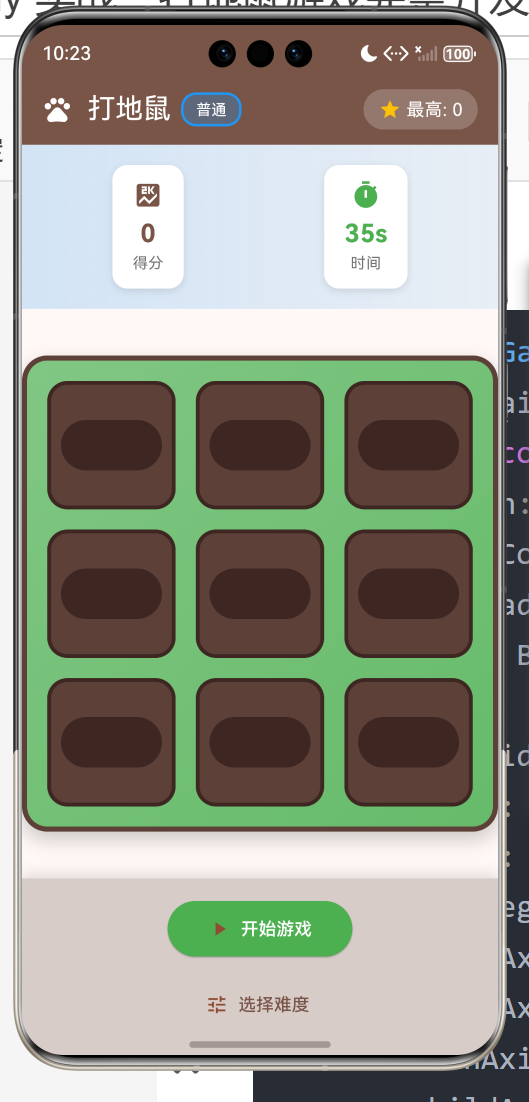
dart
Widget _buildGameGrid() {
  return Container(
    padding: const EdgeInsets.all(16),
    decoration: BoxDecoration(
      color: Colors.green.shade200,
      borderRadius: BorderRadius.circular(16),
      border: Border.all(color: Colors.brown.shade700, width: 4),
    ),
    child: GridView.builder(
      primary: true,
      padding: EdgeInsets.zero,
      gridDelegate: const SliverGridDelegateWithFixedCrossAxisCount(
        crossAxisCount: _gridCols,
        crossAxisSpacing: 16,
        mainAxisSpacing: 16,
        childAspectRatio: 1.0,
      ),
      itemCount: _gridRows * _gridCols,
      itemBuilder: (context, index) {
        final row = index ~/ _gridCols;
        final col = index % _gridCols;
        return _buildHole(row, col);
      },
    ),
  );
}
6.2 地洞组件
dart
Widget _buildHole(int row, int col) {
  final hasMole = _moles[row][col];
  final isHit = _hitStatus[row][col] == true;

  return GestureDetector(
    onTap: () => _whackMole(row, col),
    child: Container(
      decoration: BoxDecoration(
        color: Colors.brown.shade700,
        borderRadius: BorderRadius.circular(16),
        border: Border.all(
          color: Colors.brown.shade900,
          width: 3,
        ),
      ),
      child: Stack(
        children: [
          // 地洞背景
          Center(
            child: Container(
              width: 80,
              height: 40,
              decoration: BoxDecoration(
                color: Colors.brown.shade900,
                borderRadius: BorderRadius.circular(40),
              ),
            ),
          ),

          // 地鼠
          if (hasMole && !isHit)
            Positioned(
              bottom: 20,
              left: 0,
              right: 0,
              child: Center(
                child: Container(
                  width: 60,
                  height: 60,
                  decoration: BoxDecoration(
                    color: Colors.brown,
                    shape: BoxShape.circle,
                    border: Border.all(
                      color: Colors.brown.shade700,
                      width: 3,
                    ),
                  ),
                  child: const Column(
                    mainAxisAlignment: MainAxisAlignment.center,
                    children: [
                      Icon(Icons.pets, size: 24, color: Colors.white),
                      SizedBox(height: 2),
                      Row(
                        mainAxisAlignment: MainAxisAlignment.center,
                        children: [
                          Icon(Icons.visibility, size: 8, color: Colors.black),
                          SizedBox(width: 8),
                          Icon(Icons.visibility, size: 8, color: Colors.black),
                        ],
                      ),
                      Icon(Icons.sentiment_satisfied,
                        size: 16, color: Colors.white),
                    ],
                  ),
                ),
              ),
            ),

          // 打击效果
          if (isHit)
            Positioned(
              bottom: 20,
              left: 0,
              right: 0,
              child: Center(
                child: Container(
                  width: 60,
                  height: 60,
                  decoration: BoxDecoration(
                    color: Colors.amber,
                    shape: BoxShape.circle,
                    border: Border.all(color: Colors.orange, width: 3),
                  ),
                  child: const Icon(
                    Icons.star,
                    size: 40,
                    color: Colors.white,
                  ),
                ),
              ),
            ),
        ],
      ),
    ),
  );
}
6.3 游戏信息面板
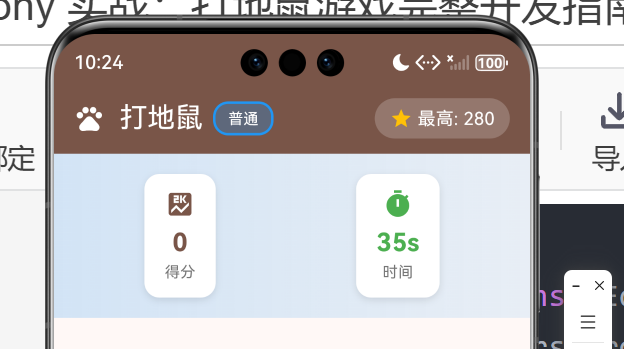
dart
Container(
  padding: const EdgeInsets.all(16),
  color: Colors.brown.shade100,
  child: Row(
    mainAxisAlignment: MainAxisAlignment.spaceAround,
    children: [
      Column(
        children: [
          const Icon(Icons.score, size: 20),
          const SizedBox(height: 4),
          Text(
            '得分: $_score',
            style: const TextStyle(
              fontSize: 20,
              fontWeight: FontWeight.bold,
            ),
          ),
        ],
      ),
      Column(
        children: [
          const Icon(Icons.timer, size: 20),
          const SizedBox(height: 4),
          Text(
            '时间: $_timeLeft秒',
            style: TextStyle(
              fontSize: 20,
              fontWeight: FontWeight.bold,
              color: _timeLeft <= 10 ? Colors.red : Colors.black,
            ),
          ),
        ],
      ),
    ],
  ),
)
七、资源管理
7.1 定时器销毁
dart
@override
void dispose() {
  _gameTimer?.cancel();
  _moleTimer?.cancel();
  super.dispose();
}
重要 :在dispose方法中取消所有定时器,防止内存泄漏。
7.2 游戏重置
dart
void _initGame() {
  _gameTimer?.cancel();  // 先取消旧定时器
  _moleTimer?.cancel();

  // ... 初始化逻辑 ...

  setState(() {});
}
八、总结
本文详细介绍了使用Flutter for OpenHarthon开发打地鼠游戏的完整过程,涵盖了以下核心技术点:
- 数据模型:地鼠位置、打击状态、游戏配置
- 游戏循环:双定时器设计、倒计时实现
- 地鼠生成:随机算法、难度调整
- 点击检测:状态判断、防止重复
- UI实现:网格布局、堆叠组件、动画效果
- 资源管理:定时器销毁、内存管理
这个项目展示了Flutter在反应类游戏开发中的完整流程,特别是多定时器协调和状态管理的应用。
欢迎加入开源鸿蒙跨平台社区 : 开源鸿蒙跨平台开发者社区