一:远程调用基本流程
1:基本流程
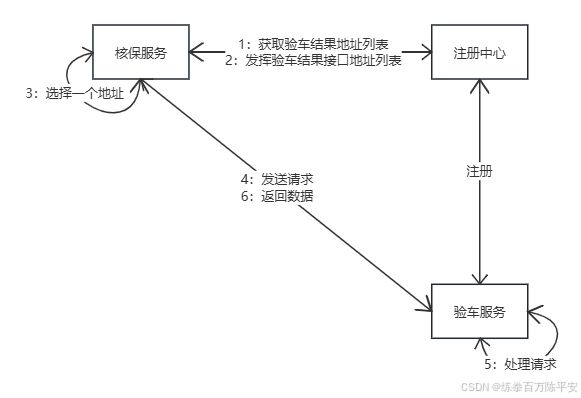
2:模拟一个真实场景
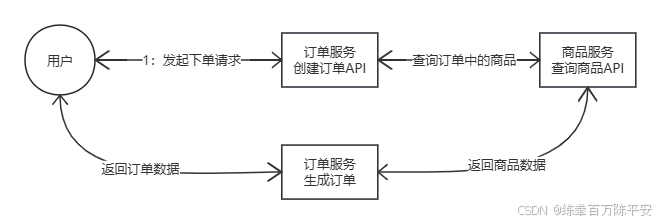
二:编写测试代码进行RPC
1:编写订单编码
@RestController
public class OrderController {

    @Autowired
    private OrderService orderService;

    @GetMapping("/create")
    public Order createOrder(@RequestParam("userId") Long userId, @RequestParam("productId") Long productId) throws NacosException {
        Order order = orderService.createOrder(productId, userId);
        return order;
    }
}


@Service
public class OrderServiceImpl implements OrderService{

    @Autowired
    NacosServiceDiscovery nacosServiceDiscovery;
    @Autowired
    RestTemplate restTemplate;

    @Override
    public Order createOrder(Long productId, Long user) throws NacosException {
        Order order = new Order();
        order.setId(productId);
        order.setProducts(List.of(productId));
        return order;
    }

    private Product getProduct(Long productId) throws NacosException {
        List<ServiceInstance> instances = nacosServiceDiscovery.getInstances("service-product");
        ServiceInstance serviceInstance = instances.get(0);
        String url = "http://"+serviceInstance.getHost()+":"+serviceInstance.getPort()+"/product/"+productId;
        Product product = restTemplate.getForObject(url, Product.class);
        return product;
    }
}
2:编写商品编码
@RestController
public class ProductController {


    @Autowired
    ProductService productService;

    @GetMapping("/product/{id}")
    public Product getProductbyId(@PathVariable("id") Long productId){
        return  productService.getProductById(productId);
    }
}


@Service
public class productServiceImpl implements ProductService {
    @Override
    public Product getProductById(Long id) {
        Product product = new Product();
        product.setProductName("苹果");
        product.setId(id);
        return product;
    }
}
到这我们已经实现了基于注册中心的远程调用:http版本的。
3:负载均衡
        <dependency>
            <groupId>org.springframework.cloud</groupId>
            <artifactId>spring-cloud-starter-loadbalancer</artifactId>
        </dependency>

@SpringBootTest
public class LoadBalanceTest {

    @Autowired
    LoadBalancerClient loadBalancerClient;

    @Test
    void test(){
        for (int i = 0; i < 100; i++) {
            ServiceInstance choose = loadBalancerClient.choose("service-product");
            System.out.println("choose"+choose.getHost()+":"+choose.getPort());
        }
    }
}

choose192.168.59.1:8002
choose192.168.59.1:8001
choose192.168.59.1:8002
choose192.168.59.1:8001
choose192.168.59.1:8002
choose192.168.59.1:8001
choose192.168.59.1:8002
choose192.168.59.1:8001
choose192.168.59.1:8002
choose192.168.59.1:8001
choose192.168.59.1:8002
choose192.168.59.1:8001
choose192.168.59.1:8002
choose192.168.59.1:8001
choose192.168.59.1:8002
choose192.168.59.1:8001
choose192.168.59.1:8002
choose192.168.59.1:8001
choose192.168.59.1:8002
choose192.168.59.1:8001
choose192.168.59.1:8002
choose192.168.59.1:8001
choose192.168.59.1:8002
choose192.168.59.1:8001
choose192.168.59.1:8002
choose192.168.59.1:8001
choose192.168.59.1:8002
choose192.168.59.1:8001
choose192.168.59.1:8002
choose192.168.59.1:8001
choose192.168.59.1:8002
choose192.168.59.1:8001
choose192.168.59.1:8002
choose192.168.59.1:8001
choose192.168.59.1:8002
choose192.168.59.1:8001
choose192.168.59.1:8002
choose192.168.59.1:8001
choose192.168.59.1:8002
choose192.168.59.1:8001
choose192.168.59.1:8002
choose192.168.59.1:8001
choose192.168.59.1:8002
choose192.168.59.1:8001
choose192.168.59.1:8002
choose192.168.59.1:8001
choose192.168.59.1:8002
choose192.168.59.1:8001
choose192.168.59.1:8002
choose192.168.59.1:8001
choose192.168.59.1:8002
choose192.168.59.1:8001
choose192.168.59.1:8002
choose192.168.59.1:8001
choose192.168.59.1:8002
choose192.168.59.1:8001
choose192.168.59.1:8002
choose192.168.59.1:8001
choose192.168.59.1:8002
choose192.168.59.1:8001
choose192.168.59.1:8002
choose192.168.59.1:8001
choose192.168.59.1:8002
choose192.168.59.1:8001
choose192.168.59.1:8002
choose192.168.59.1:8001
choose192.168.59.1:8002
choose192.168.59.1:8001
choose192.168.59.1:8002
choose192.168.59.1:8001
choose192.168.59.1:8002
choose192.168.59.1:8001
choose192.168.59.1:8002
choose192.168.59.1:8001
choose192.168.59.1:8002
choose192.168.59.1:8001
choose192.168.59.1:8002
choose192.168.59.1:8001
choose192.168.59.1:8002
choose192.168.59.1:8001
choose192.168.59.1:8002
choose192.168.59.1:8001
choose192.168.59.1:8002
choose192.168.59.1:8001
choose192.168.59.1:8002
choose192.168.59.1:8001
choose192.168.59.1:8002
choose192.168.59.1:8001
choose192.168.59.1:8002
choose192.168.59.1:8001
choose192.168.59.1:8002
choose192.168.59.1:8001
choose192.168.59.1:8002
choose192.168.59.1:8001
choose192.168.59.1:8002
choose192.168.59.1:8001
choose192.168.59.1:8002
choose192.168.59.1:8001
choose192.168.59.1:8002
choose192.168.59.1:8001
基于此,我们修改负载均衡的代码。
@Service
public class OrderServiceImpl implements OrderService{

    @Autowired
    NacosServiceDiscovery nacosServiceDiscovery;
    @Autowired
    RestTemplate restTemplate;
    @Autowired
    LoadBalancerClient loadBalancerClient;

    @Override
    public Order createOrder(Long productId, Long user) throws NacosException {
        Order order = new Order();
        order.setId(productId);
        order.setProducts(List.of(productId));
        return order;
    }

    private Product getProduct(Long productId) throws NacosException {
        ServiceInstance serviceInstance = loadBalancerClient.choose("service-product");
        String url = "http://"+serviceInstance.getHost()+":"+serviceInstance.getPort()+"/product/"+productId;
        Product product = restTemplate.getForObject(url, Product.class);
        return product;
    }
}
4:@LoadBalance
这样的话,RestTemplate默认就带有了负载均衡功能。
url中真实的ip地址换成应用名称,RestTemplate可以动态给我们进行替换。
@Configuration
public class ProductServiceConfig {


    @LoadBalanced
    @Bean
    public RestTemplate restTemplate(){
        return new RestTemplate();
    }
}

public class OrderServiceImpl implements OrderService{

    @Autowired
    NacosServiceDiscovery nacosServiceDiscovery;
    @Autowired
    RestTemplate restTemplate;
    @Autowired
    LoadBalancerClient loadBalancerClient;

    @Override
    public Order createOrder(Long productId, Long user) throws NacosException {
        Order order = new Order();
        order.setId(productId);
        order.setProducts(List.of(productId));
        return order;
    }

    private Product getProduct(Long productId) throws NacosException {
//        ServiceInstance serviceInstance = loadBalancerClient.choose("service-product");
        // 这里改为应用名称即可。
        String url = "http://service-product"+"/product/"+productId;
        Product product = restTemplate.getForObject(url, Product.class);
        return product;
    }
}
5:思考
如果注册中心宕机,远程过程调用还能成功吗?
应用服务中会进行实例缓存,将注册中心的数据进行同步和实时更新。当注册中心宕机了
1:如果调用过的接口:缓存中已经拿到过地址列表。可以通讯
2:如果没有调用过:缓存中没有,需要第一次进行,则必须去注册中心拿地址。
Nacos注册中心是这么做的。