freertos开发空气检测仪之显示系统点亮lcd屏成功
本篇文章继续更新技术文章,这次带来的时将开发的空气检测仪项目推进之点亮lcd屏。
原理图
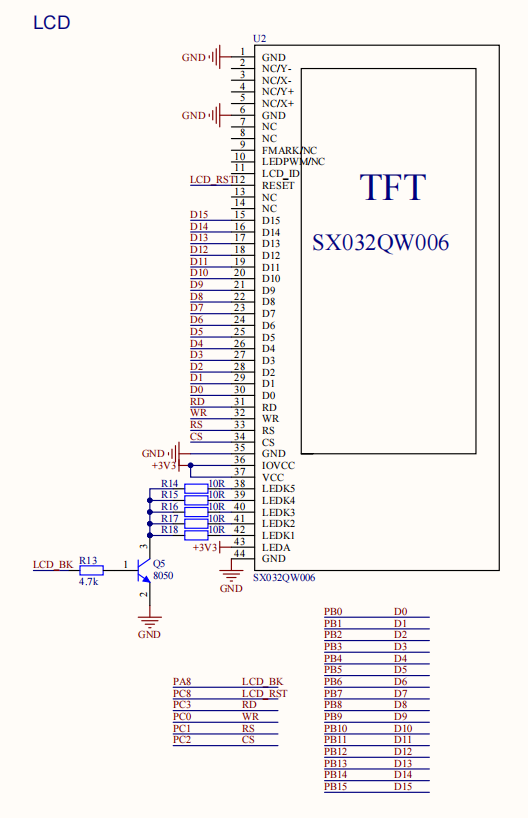
这个是一个240 * 400 分辨率的屏幕,可以显示像素点:240 * 400 = 96,000 个点
颜色深度:16 bit (RGB565) = 2 Bytes。(设计有16根data线)
所需显存:96,000 * 2 = 192,000 Bytes (192KB)
在MCU端开这么大的RAM空间来进行刷屏,显然行不通,项目中没有外挂SDRAM,只能进行简化操作硬件。
如果是 OLED (128x64, 单色)
像素点:128 * 64 = 8192 个点
颜色深度:1 bit (亮/灭)
所需显存:8192 bits = 1024 Bytes (1KB)
GD32F303 的 SRAM 有64KB,拿 1KB 出来做全屏缓冲(FrameBuffer)简直是小菜一碟。有了这个 Buffer,可以随意画点、画线,最后一次性 Flush 到屏幕,效率高且无闪烁,根据具体使用场景具体设计。
显示设备结构体
/* 显示设备结构体 */
typedef struct DisplayDevice {
    char *name;             /* 设备名称 */
    void *FBBase;           /* 显存基地址: CPU能直接读写的显存 */
    int iXres;              /* X方向分辨率 */
    int iYres;              /* Y方向分辨率 */
    int iBpp;               /* 每个像素的位数 */

    /* 硬件初始化 */
    int (*Init)(struct DisplayDevice *ptDev);

    /* 把FBBase的数据刷到LCD的显存里 */
    void (*Flush)(struct DisplayDevice *ptDev);

    /* 在显存中设置(iX,iY)像素的颜色
     * dwColor的格式:0x00RRGGBB
     */
    int (*SetPixel)(struct DisplayDevice *ptDev, int iX, int iY, unsigned int dwColor);

    /* 填充矩形区域 (加速绘制) */
    int (*FillRect)(struct DisplayDevice *ptDev, int x, int y, int w, int h, unsigned int dwColor);

    /* 链表指针 */
    struct DisplayDevice *pNext;
} DisplayDevice, *PDisplayDevice;
注册lcd结构体
static struct DisplayDevice g_lcd_dev = {
    .name = "lcd_240x400",
    .FBBase = NULL, /* 无显存模式 */
    .iXres = LCD_WIDTH,
    .iYres = LCD_HEIGHT,
    .iBpp = 16,
    .Init = LCD_Dev_Init,
    .Flush = LCD_Dev_Flush,
    .SetPixel = LCD_Dev_SetPixel,
    .FillRect = LCD_Dev_FillRect,
    .pNext = NULL
};

void DisplayDeviceRegister(PDisplayDevice ptDev)
{
    if (ptDev == NULL)
        return;

    ptDev->pNext = g_ptDisplayDevices;
    g_ptDisplayDevices = ptDev;
}


void Driver_LCD_Init(void)
{
    DisplayDeviceRegister(&g_lcd_dev);
}
完成对应的lcd函数
使用项目中的参考资料进行封装,把LCD的硬件封装完成,进行调试即可。
单元测试
#include "lcd_test.h"
#include "display_device.h"
#include "driver_lcd.h"
#include "RTT_Debug.h"
#include "FreeRTOS.h"
#include "task.h"

/* 测试颜色 */
#define TEST_RED    0xF800
#define TEST_GREEN  0x07E0
#define TEST_BLUE   0x001F
#define TEST_WHITE  0xFFFF
#define TEST_BLACK  0x0000

static void lcd_test_task(void *pvParameters)
{
    struct DisplayDevice *pDev = GetDisplayDevice("lcd_240x400");
    int width, height;
    int x, y;

    if (pDev == NULL) {
        DBG_log("[LCD TEST] Failed to get LCD device!\n");
        vTaskDelete(NULL);
        return;
    }

    if (pDev->Init(pDev) != 0) {
        DBG_log("[LCD TEST] Failed to init LCD device!\n");
        /* 虽然初始化失败,但可能ID读取错误仍能工作,继续尝试? 或者直接返回 */
        /* vTaskDelete(NULL); return; */
    }

    DBG_log("[LCD TEST] Device initialized. Starting test pattern...\n");

    width = pDev->iXres;
    height = pDev->iYres;

    while (1)
    {
        /* 1. 刷全屏红色 (使用 FillRect 加速) */
        DBG_log("[LCD TEST] Fill RED (Accelerated)\n");
        if (pDev->FillRect) {
            pDev->FillRect(pDev, 0, 0, width, height, TEST_RED);
        } else {
            for (y = 0; y < height; y++) {
                for (x = 0; x < width; x++) {
                    pDev->SetPixel(pDev, x, y, TEST_RED);
                }
            }
        }
        vTaskDelay(pdMS_TO_TICKS(1000));

        /* 2. 刷全屏绿色 */
        DBG_log("[LCD TEST] Fill GREEN (Accelerated)\n");
        if (pDev->FillRect) {
            pDev->FillRect(pDev, 0, 0, width, height, TEST_GREEN);
        } else {
            for (y = 0; y < height; y++) {
                for (x = 0; x < width; x++) {
                    pDev->SetPixel(pDev, x, y, TEST_GREEN);
                }
            }
        }
        vTaskDelay(pdMS_TO_TICKS(1000));

        /* 3. 刷全屏蓝色 */
        DBG_log("[LCD TEST] Fill BLUE (Accelerated)\n");
        if (pDev->FillRect) {
            pDev->FillRect(pDev, 0, 0, width, height, TEST_BLUE);
        } else {
            for (y = 0; y < height; y++) {
                for (x = 0; x < width; x++) {
                    pDev->SetPixel(pDev, x, y, TEST_BLUE);
                }
            }
        }
        vTaskDelay(pdMS_TO_TICKS(1000));
    }
}

void lcd_test_start(void)
{
    /* 1. 初始化驱动 */
    Driver_LCD_Init();

    /* 2. 创建测试任务 */
    xTaskCreate(lcd_test_task, "lcd_test", 512, NULL, 4, NULL);
}
实验现象
在本次实验中,调试可以进行秒刷屏,能看到了屏幕会秒刷红色,绿色,蓝色,循环往复,也没影响之前调试的功能,本次实验很好的完成。