一,简介
本文在Catlike Coding 实现的【Custom SRP 2.5.0】基础上参考文章【unity实现learn-opengl的视差贴图Parallax Mapping】实现视差贴图
二,环境
Unity :2022.3.18f1
CRP Library :14.0.10
URP基本结构 :Custom SRP 2.5.0
三,实现
素材准备:
实现视差贴图需要有贴图对应的高度纹理数据。贴图可以从这里获取【Textures.com】
本次实现用的贴图是【这张】。
主体:
实现视差贴图主要在shader就只做一件事,就是调整采样贴图的UV。
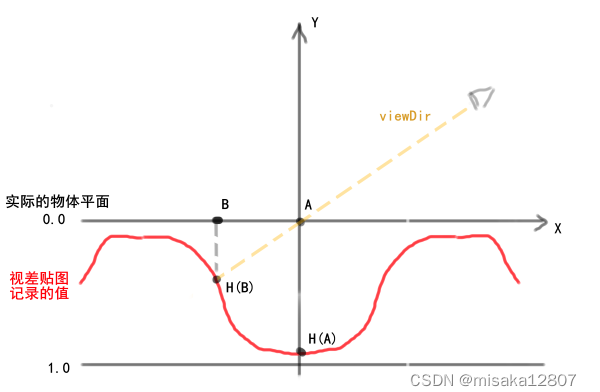
在一般采样物体表面的时候,A点是平时所采样的点,但在现实中H(B)这个地点才是人眼所看到的位置,B点才是符合现实情况的采样点。AB这段距离就是需要修正值。
在渲染过程中,A点坐标我们是能知道的,视线点坐标也是能知道的,但是H(B)这个点我们并不能知道。为了知道这个H(B)点的大概范围我们目前是在AB方向上一步一步向前走每走一步就检查一下当前的这个位置的高度符不符合条件,即H(B)的高度高于我在向AB方向走时,AH(A)方向上增加的高度。
对应的代码为:
            float2 steep_ParallaxMapping(float2 texCoords, float3 viewDir)
            {
                float LayerDepth = 1 / _Step;
                int MaxCount = _Step;
                float currentLayerDepth = 1;
                float2 deltaTexCoords = (viewDir.xy / viewDir.z) * (LayerDepth);

                float2 currentTexCoords = texCoords;
                float currentDepthMapValue = SAMPLE_TEXTURE2D(_HightTex,sampler_HightTex, currentTexCoords).r;

                for (int i = 1; i < MaxCount; i++)
                {
                    currentTexCoords -= deltaTexCoords;
                    currentDepthMapValue = SAMPLE_TEXTURE2D_LOD(_HightTex,sampler_HightTex, currentTexCoords,0).r;
                    currentLayerDepth -= LayerDepth;
                    if(currentDepthMapValue > currentLayerDepth)
                    {

                        return currentTexCoords;
                    }
                }

                return currentTexCoords;
            }
currentLayerDepth 对应为A点初始的高度。
deltaTexCoords 为每次前进时AB方向上移动的距离
LayerDepth 为每次前进时对应的高度需要减少多少
viewDir 是视线的方向,注意必须是表面的切线空间上
参考代码:
Shader "Custom/ParallaxShader"
{
    Properties
    {
        _Color ("Color", Color) = (1,1,1,1)
        _MainTex ("Albedo (RGB)", 2D) = "white" {}
        _NormalTex ("NormalTex", 2D) = "white" {}
        _Shininess ("Shininess", float) = 0
        _SpecIntensity ("SpecIntensity", float) = 0
        _HightTex ("HightTex", 2D) = "white" {}
        _Step ("MaxStep", Range(1,10000)) = 0

    }
    SubShader
    {
        Pass
        {

            Tags { "LightMode" = "CustomLit"}


            HLSLPROGRAM
             #pragma target 4.5

            #include "Custom RP/ShaderLibrary/Common.hlsl"
            #include "Custom RP/ShaderLibrary/Surface.hlsl"
            #include "Custom RP/ShaderLibrary/Shadows.hlsl"
            #include "Custom RP/ShaderLibrary/Light.hlsl"
            #include "Custom RP/ShaderLibrary/BRDF.hlsl"
            #include "Custom RP/ShaderLibrary/GI.hlsl"
            #include "Custom RP/ShaderLibrary/Lighting.hlsl"
            #include "Custom RP/ShaderLibrary/LitInput.hlsl"

            struct Attributes {
	            float3 positionOS : POSITION;
	            float3 normalOS : NORMAL;
                float4 tangentOS : TANGENT;
	            float2 baseUV : TEXCOORD0;

            };

            struct Varyings {
	            float4 positionCS_SS : SV_POSITION;
	            float3 positionWS : VAR_POSITION;
	            float3 normalWS : VAR_NORMAL;
	            float2 baseUV : VAR_BASE_UV;
                float4 tangentWS : VAR_TANGENT;
            };


            #pragma vertex LitPassVertex
	        #pragma fragment LitPassFragment

            TEXTURE2D(_MainTex);
            SAMPLER(sampler_MainTex);
            TEXTURE2D(_NormalTex);
             SAMPLER(sampler_NormalTex);
            TEXTURE2D(_HightTex);
             SAMPLER(sampler_HightTex);

            UNITY_INSTANCING_BUFFER_START(UnityPerMaterial)
            UNITY_DEFINE_INSTANCED_PROP(float4, _MainTex_ST)
            UNITY_DEFINE_INSTANCED_PROP(float4, _Color)
            UNITY_DEFINE_INSTANCED_PROP(float, _Shininess)
            UNITY_DEFINE_INSTANCED_PROP(float, _SpecIntensity)
            UNITY_DEFINE_INSTANCED_PROP(float, _Step)
            UNITY_DEFINE_INSTANCED_PROP(float, _Hight_Scale)

            UNITY_INSTANCING_BUFFER_END(UnityPerMaterial)

            Varyings LitPassVertex(Attributes input)
	        {
		        Varyings output;

		        output.positionWS = TransformObjectToWorld(input.positionOS);
		        output.positionCS_SS = TransformWorldToHClip(output.positionWS);
                float4 baseST = INPUT_PROP(_MainTex_ST);
                output.baseUV = input.baseUV * baseST.xy + baseST.zw;
                output.normalWS = TransformObjectToWorldNormal(input.normalOS);
                output.tangentWS = float4(TransformObjectToWorldDir(input.tangentOS.xyz), input.tangentOS.w);
		        return output;
	        }

            float3 GetAmbientLight(float3 normalWS)
            {
		        float4 coefficients[7];
		        coefficients[0] = unity_SHAr;
		        coefficients[1] = unity_SHAg;
		        coefficients[2] = unity_SHAb;
		        coefficients[3] = unity_SHBr;
		        coefficients[4] = unity_SHBg;
		        coefficients[5] = unity_SHBb;
		        coefficients[6] = unity_SHC;
		        return max(0.0, SampleSH9(coefficients, normalWS));
            }

            float2 steep_ParallaxMapping(float2 texCoords, float3 viewDir)
            {
                float LayerDepth = 1 / _Step;
                int MaxCount = _Step;
                float currentLayerDepth = 1;
                float2 deltaTexCoords = (viewDir.xy / viewDir.z) * (LayerDepth);

                float2 currentTexCoords = texCoords;
                float currentDepthMapValue = SAMPLE_TEXTURE2D(_HightTex,sampler_HightTex, currentTexCoords).r;

                for (int i = 1; i < MaxCount; i++)
                {
                    currentTexCoords -= deltaTexCoords;
                    currentDepthMapValue = SAMPLE_TEXTURE2D_LOD(_HightTex,sampler_HightTex, currentTexCoords,0).r;
                    currentLayerDepth -= LayerDepth;
                    if(currentDepthMapValue > currentLayerDepth)
                    {

                        return currentTexCoords;
                    }
                }

                return currentTexCoords;
            }

            float3 GetNormalWS(float2 uv, float3 normalWS, float4 tangentWS)
            {
                float4 normalE = SAMPLE_TEXTURE2D(_NormalTex, sampler_NormalTex, uv);
                float3 normal = DecodeNormal(normalE, 1);
                return NormalTangentToWorld(normal,normalWS, tangentWS);
            }

	        float4 LitPassFragment(Varyings input) : SV_TARGET
            {
                float4 color = INPUT_PROP(_Color);
                float2 uv = input.baseUV;
                // Parallax Mapping
                float3 viewDir = normalize(_WorldSpaceCameraPos - input.positionWS);
                float3 worldBitangent  = cross(input.normalWS, input.tangentWS.xyz) * input.tangentWS.w;
                float3x3 viewDirMatrix = float3x3(input.tangentWS.xyz, worldBitangent, input.normalWS);
                //将视线方向从世界空间转到切线空间
                float3 viewDirTS = mul(viewDirMatrix, viewDir);
                uv = steep_ParallaxMapping(uv, normalize(viewDirTS));
                float4 baseColor = SAMPLE_TEXTURE2D(_MainTex, sampler_MainTex, uv) * color;
                //当前的uv坐标可能已经偏移了,所以需要重新计算法线
                float3 normalWS = GetNormalWS(uv,input.normalWS, input.tangentWS);

                float3 diffuse = 0;
                float3 specular = 0;
                for (int i = 0; i < GetDirectionalLightCount(); i++) {

                    DirectionalLightData data = _DirectionalLightData[i];
                    diffuse += data.color.rgb * max(0, dot(normalWS, data.directionAndMask.xyz));

                    float3 halfDir = normalize(data.directionAndMask + viewDir);
                    float spec = pow(max(0, dot(normalWS, halfDir)), _Shininess);
                    specular = spec *  data.color.rgb * _SpecIntensity;
		        }

                float3 ambient = GetAmbientLight(normalWS);

	            return float4(baseColor.xyz * (diffuse + ambient + specular),1) ;

	        }


            ENDHLSL

        }

    }

}
此时你的效果大致上是这样的:
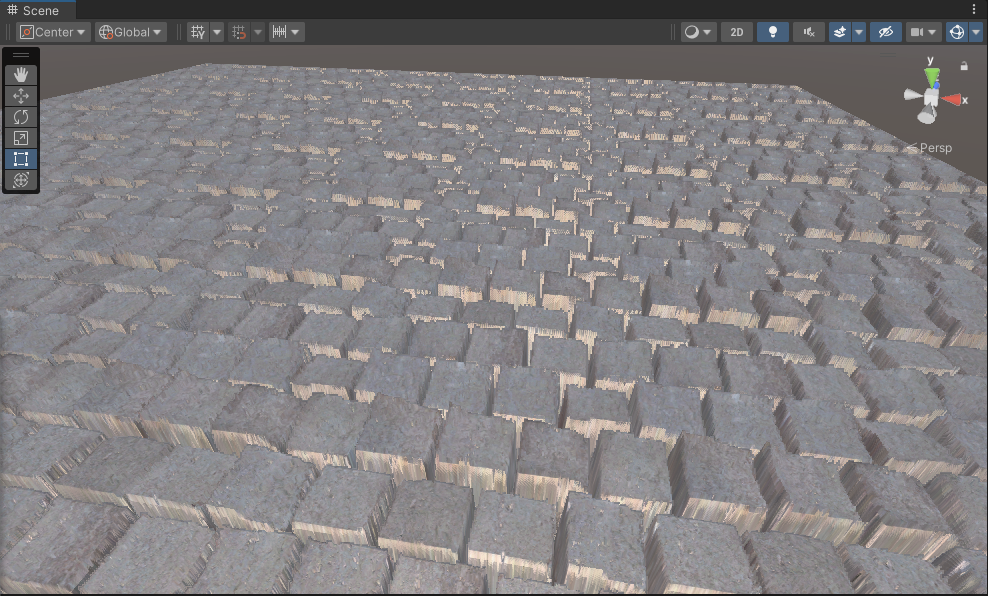
可以看到,表面的凹凸感有了,但是效果并不好看。
有些方块之间还会出现摩尔纹现象:
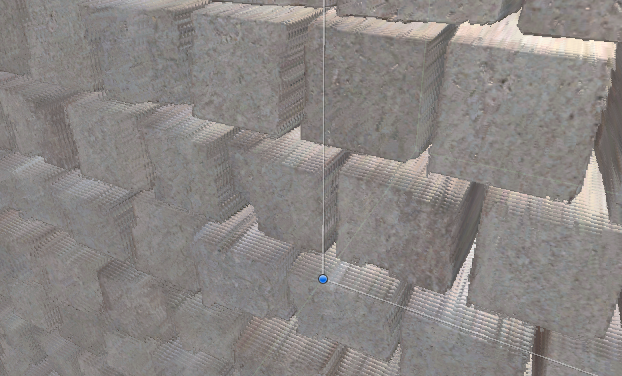
这个可以通过增大精度来解决,或是通过插值来模糊处理,也就是【视差遮蔽映射】。
视差遮蔽映射:
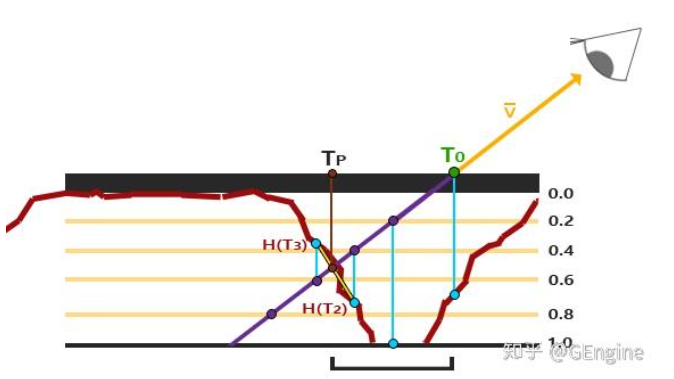
视差遮蔽映射中,H(T3)是当前采样的点,Tp是理想中我们采样的点,H(T2)是上一个不符合条件的采样点,虽然不符合条件,但是它已经相当逼近理想点了,理想点就在H(T3)和H(T2)之间,所以我们需要一个权重,告诉我们实际的采样坐标应该是往H(T3)靠近还是往H(T2)靠近。具体算法如下:
// 计算在H(T3)和H(T2)处,光线高度与表面深度的差值
float diff0 = currentRayHeight0 - depthSampleHT2; // 正数,表示在表面上方的"距离"
float diff1 = depthSampleHT3 - currentRayHeight1; // 正数,表示穿透到表面下方的"距离"

// 交点相对于TP点的比例(权重)
float weight = diff0 / (diff0 + diff1);
物理意义 :weight 表示了交点更靠近 H(T3) 还是 H(T2)。
-
如果
diff0很小(光线在 H(T2)点几乎就接触表面了),那么weight接近0,交点非常接近 H(T2)。 -
如果
diff1很小(光线在 H(T3)点只是刚刚穿透),那么weight接近1,交点非常接近 H(T3)。
最后使用weight来确定最终的采样坐标应该靠近往H(T3)靠近还是往H(T2)靠近
float2 final = HT3 * weight + HT2 * (1 - weight);对应到工程上的代码为:
........
if(currentDepthMapValue > currentLayerDepth)
{
    float2 prevTexCoords = currentTexCoords + deltaTexCoords;
    //表面下
    float afterDepth = currentDepthMapValue - currentLayerDepth;
    //表面上的距离
    float beforeDepth = currentLayerDepth + LayerDepth - SAMPLE_TEXTURE2D_LOD(_HightTex,sampler_HightTex, prevTexCoords,0).r ;
    float weight = beforeDepth / (afterDepth + beforeDepth);
    float2 finalTexCoords = currentTexCoords *(weight) + (1 - weight) * prevTexCoords;

    return finalTexCoords;
}
......
效果:
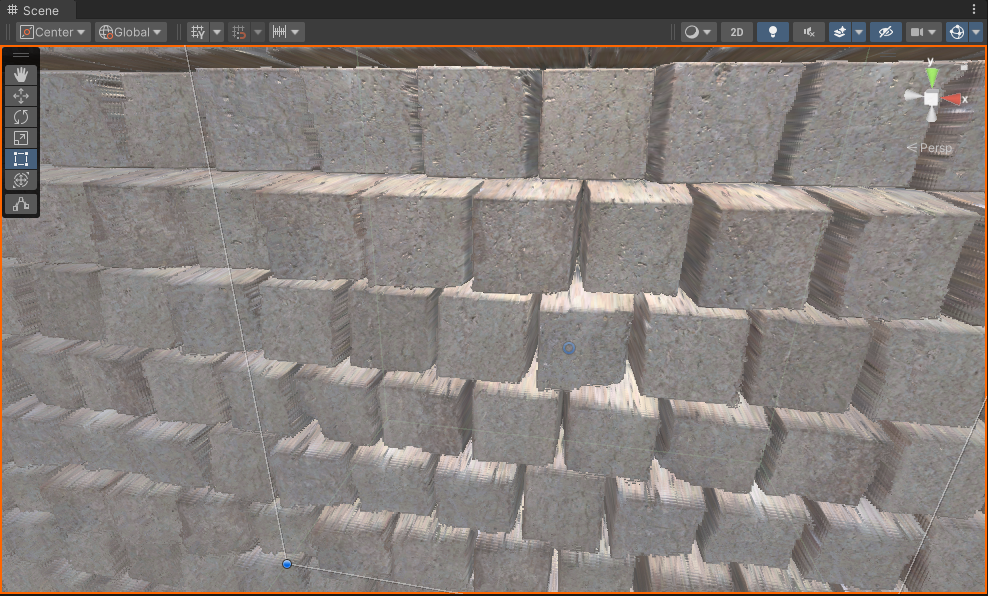
(插值后)
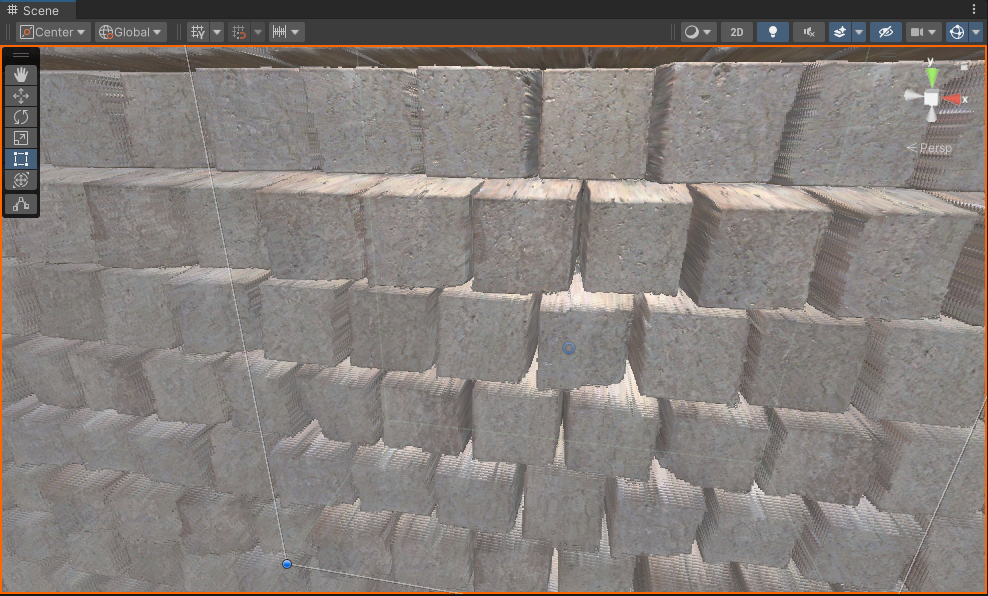
(插值前)
可以发现,效果并不明显。

插值终究只是权益之策,选择合适的精度才是主要的。
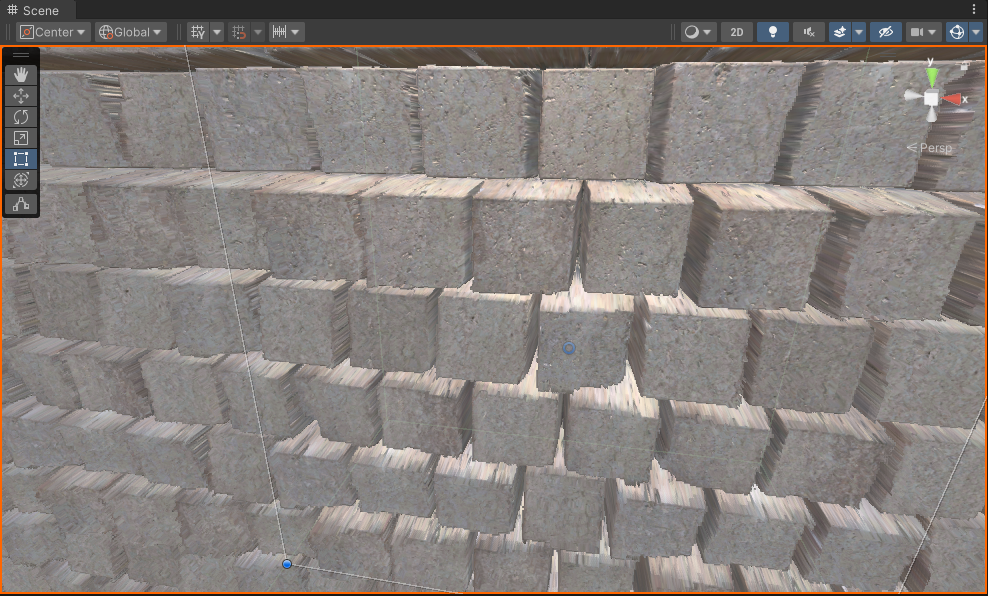
(循环次数为1000的情况)
最后增加一个高度参数,通过调整uv步进幅度达到调整缝隙高度的效果。
float2 deltaTexCoords = (viewDir.xy / viewDir.z) * (LayerDepth * _Hight_Scale);效果:_Hight_Scale = 0.12
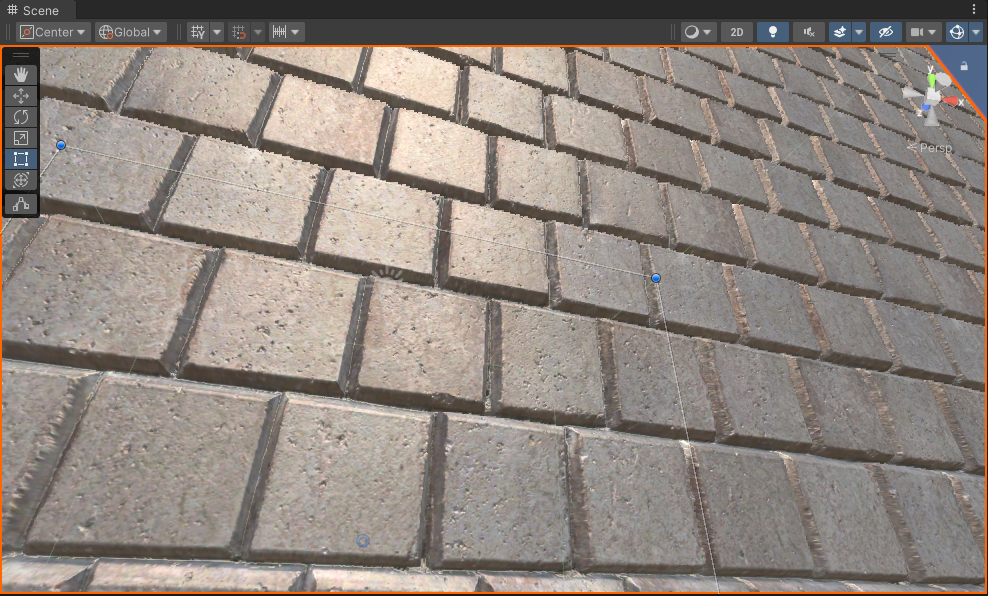
完整代码:
Shader "Custom/ParallaxShader"
{
    Properties
    {
        _Color ("Color", Color) = (1,1,1,1)
        _MainTex ("Albedo (RGB)", 2D) = "white" {}
        _NormalTex ("NormalTex", 2D) = "white" {}
        _Shininess ("Shininess", float) = 0
        _SpecIntensity ("SpecIntensity", float) = 0
        _HightTex ("HightTex", 2D) = "white" {}
        _Step ("MaxStep", Range(1,10000)) = 0
        _Hight_Scale ("Hight_Scale", float) = 0

    }
    SubShader
    {
        Pass
        {

            Tags { "LightMode" = "CustomLit"}


            HLSLPROGRAM
             #pragma target 4.5

            #include "Custom RP/ShaderLibrary/Common.hlsl"
            #include "Custom RP/ShaderLibrary/Surface.hlsl"
            #include "Custom RP/ShaderLibrary/Shadows.hlsl"
            #include "Custom RP/ShaderLibrary/Light.hlsl"
            #include "Custom RP/ShaderLibrary/BRDF.hlsl"
            #include "Custom RP/ShaderLibrary/GI.hlsl"
            #include "Custom RP/ShaderLibrary/Lighting.hlsl"
            #include "Custom RP/ShaderLibrary/LitInput.hlsl"

            struct Attributes {
	            float3 positionOS : POSITION;
	            float3 normalOS : NORMAL;
                float4 tangentOS : TANGENT;
	            float2 baseUV : TEXCOORD0;

            };

            struct Varyings {
	            float4 positionCS_SS : SV_POSITION;
	            float3 positionWS : VAR_POSITION;
	            float3 normalWS : VAR_NORMAL;
	            float2 baseUV : VAR_BASE_UV;
                float4 tangentWS : VAR_TANGENT;
            };


            #pragma vertex LitPassVertex
	        #pragma fragment LitPassFragment

            TEXTURE2D(_MainTex);
            SAMPLER(sampler_MainTex);
            TEXTURE2D(_NormalTex);
             SAMPLER(sampler_NormalTex);
            TEXTURE2D(_HightTex);
             SAMPLER(sampler_HightTex);

            UNITY_INSTANCING_BUFFER_START(UnityPerMaterial)
            UNITY_DEFINE_INSTANCED_PROP(float4, _MainTex_ST)
            UNITY_DEFINE_INSTANCED_PROP(float4, _Color)
            UNITY_DEFINE_INSTANCED_PROP(float, _Shininess)
            UNITY_DEFINE_INSTANCED_PROP(float, _SpecIntensity)
            UNITY_DEFINE_INSTANCED_PROP(float, _Step)
            UNITY_DEFINE_INSTANCED_PROP(float, _Hight_Scale)

            UNITY_INSTANCING_BUFFER_END(UnityPerMaterial)

            Varyings LitPassVertex(Attributes input)
	        {
		        Varyings output;

		        output.positionWS = TransformObjectToWorld(input.positionOS);
		        output.positionCS_SS = TransformWorldToHClip(output.positionWS);
                float4 baseST = INPUT_PROP(_MainTex_ST);
                output.baseUV = input.baseUV * baseST.xy + baseST.zw;
                output.normalWS = TransformObjectToWorldNormal(input.normalOS);
                output.tangentWS = float4(TransformObjectToWorldDir(input.tangentOS.xyz), input.tangentOS.w);
		        return output;
	        }

            float3 GetAmbientLight(float3 normalWS)
            {
		        float4 coefficients[7];
		        coefficients[0] = unity_SHAr;
		        coefficients[1] = unity_SHAg;
		        coefficients[2] = unity_SHAb;
		        coefficients[3] = unity_SHBr;
		        coefficients[4] = unity_SHBg;
		        coefficients[5] = unity_SHBb;
		        coefficients[6] = unity_SHC;
		        return max(0.0, SampleSH9(coefficients, normalWS));
            }

            float2 steep_ParallaxMapping(float2 texCoords, float3 viewDir)
            {
                float LayerDepth = 1 / _Step;
                int MaxCount = _Step;
                float currentLayerDepth = 1;
                float2 deltaTexCoords = (viewDir.xy / viewDir.z) * (LayerDepth * _Hight_Scale);

                float2 currentTexCoords = texCoords;
                float currentDepthMapValue = SAMPLE_TEXTURE2D(_HightTex,sampler_HightTex, currentTexCoords).r;

                for (int i = 1; i < MaxCount; i++)
                {
                    currentTexCoords -= deltaTexCoords;
                    currentDepthMapValue = SAMPLE_TEXTURE2D_LOD(_HightTex,sampler_HightTex, currentTexCoords,0).r;
                    currentLayerDepth -= LayerDepth;
                    if(currentDepthMapValue > currentLayerDepth)
                    {
                        float2 prevTexCoords = currentTexCoords + deltaTexCoords;
                        //表面下
                        float afterDepth = currentDepthMapValue - currentLayerDepth;
                        //表面上的距离
                        float beforeDepth = currentLayerDepth + LayerDepth - SAMPLE_TEXTURE2D_LOD(_HightTex,sampler_HightTex, prevTexCoords,0).r ;
                        float weight = beforeDepth / (afterDepth + beforeDepth);
                        float2 finalTexCoords = currentTexCoords *(weight) + (1 - weight) * prevTexCoords;

                        return currentTexCoords;
                    }
                }

                return currentTexCoords;
            }

            float3 GetNormalWS(float2 uv, float3 normalWS, float4 tangentWS)
            {
                float4 normalE = SAMPLE_TEXTURE2D(_NormalTex, sampler_NormalTex, uv);
                float3 normal = DecodeNormal(normalE, 1);
                return NormalTangentToWorld(normal,normalWS, tangentWS);
            }

	        float4 LitPassFragment(Varyings input) : SV_TARGET
            {
                float4 color = INPUT_PROP(_Color);
                float2 uv = input.baseUV;
                // Parallax Mapping
                float3 viewDir = normalize(_WorldSpaceCameraPos - input.positionWS);
                float3 worldBitangent  = cross(input.normalWS, input.tangentWS.xyz) * input.tangentWS.w;
                float3x3 viewDirMatrix = float3x3(input.tangentWS.xyz, worldBitangent, input.normalWS);
                //将视线方向从世界空间转到切线空间
                float3 viewDirTS = mul(viewDirMatrix, viewDir);
                uv = steep_ParallaxMapping(uv, normalize(viewDirTS));
                float4 baseColor = SAMPLE_TEXTURE2D(_MainTex, sampler_MainTex, uv) * color;
                //当前的uv坐标可能已经偏移了,所以需要重新计算法线
                float3 normalWS = GetNormalWS(uv,input.normalWS, input.tangentWS);

                float3 diffuse = 0;
                float3 specular = 0;
                for (int i = 0; i < GetDirectionalLightCount(); i++) {

                    DirectionalLightData data = _DirectionalLightData[i];
                    diffuse += data.color.rgb * max(0, dot(normalWS, data.directionAndMask.xyz));

                    float3 halfDir = normalize(data.directionAndMask + viewDir);
                    float spec = pow(max(0, dot(normalWS, halfDir)), _Shininess);
                    specular = spec *  data.color.rgb * _SpecIntensity;
		        }

                float3 ambient = GetAmbientLight(normalWS);

	            return float4(baseColor.xyz * (diffuse + ambient + specular),1) ;

	        }


            ENDHLSL

        }

    }

}
参考资料:
【unity实现learn-opengl的视差贴图Parallax Mapping】