最近在做一个 Text-to-SQL 的 Agent 项目 EasySQL,用 LangGraph 搭的状态机,跑通之后遇到一个头疼的问题:Agent 内部 LLM 调了几轮、每轮花了多少 Token、SQL 生成到底在哪一步挂的......全是黑盒,日志翻到眼花也拼不出完整链路。后来接了 Langfuse,瞬间清爽了。这篇文章就把我踩过的坑和两种接入方式整理一下,代码都是从项目里直接搬的。
什么是langfuse
Langfuse 是一个开源的 LLM 可观测性平台(LLM Observability Platform),专门为LLM 应用设计。它能自动捕获:
- 每次 LLM 调用的输入/输出/Token 用量/延迟/成本
- Agent 工具调用的完整链路追踪(Trace)
- 多步骤 Pipeline 中每个节点的耗时和状态
可以把 Langfuse 理解为:给你的 AI Agent 装一个"黑匣子记录仪"。它主要做以下四件事
- Tracing:看到你的 Agent 每一步做了什么、花了多久、用了多少 Token
- Evaluation:给每次调用打分------自动(LLM-as-Judge)、手动、或代码评分
- Prompt Management:版本控制 prompt,A/B 测试不同 prompt 效果
- Metrics & Dashboards:聚合看成本、延迟、质量趋势
核心数据模型(这是理解 Langfuse 一切的基础):
langfuse核心数据模型
Langfuse 的可观测性数据模型:
| SESSION | 一个用户的多轮对话会话(可选) | 用户打开聊天窗口到关闭的整个过程 |
|---|---|---|
| TRACE | 一次完整的端到端请求 | 用户问"查询本月订单",从接收到返回结果 |
| SPAN | 一个有开始/结束时间的工作单元 | Schema 检索、Neo4j 查询、Prompt 构建 |
| GENERATION | 一次 LLM API 调用(最核心的观测类型) | 调用 genimi-3-flash 生成 SQL |
| EVENT | 一个时间点事件(无持续时间) | 日志记录、异常捕获 |
GENERATION 自动捕获的信息:
-
输入/输出 Token 数
-
成本($)
-
延迟(ms)
-
使用的模型名称
-
完整的 prompt 和 completion
Observations 可以无限嵌套------一个 SPAN 内可以包含子 SPAN、GENERATION、EVENT 等,形成树状结构。SCORE(评分) 可以附加在 TRACE 或 OBSERVATION 上,支持 NUMERIC(数值)、BOOLEAN(布尔)、CATEGORICAL(分类)三种类型,用于评估质量。
一. 自动callback实现Langfuse集成
原理
利用 LangChain 框架内置的 callback 机制,Langfuse 提供一个 CallbackHandler,传入 invoke() 的 config 中。LangChain/LangGraph执行过程中的每个事件(LLM 调用、工具调用、链执行等)都会自动触发 callback,Langfuse 据此构建完整的 Trace 树。
项目使用
配置层
定义配置类
python
class LangfuseConfig(BaseSettings):
    """
    Configuration for LangFuse observability.

    LangFuse provides tracing and monitoring for LLM applications.
    All settings can be overridden via LANGFUSE_* environment variables.
    """

    model_config = SettingsConfigDict(env_file=".env", env_file_encoding="utf-8", extra="ignore")

    enabled: bool = Field(
        default=False, alias="langfuse_enabled", description="Enable LangFuse tracing"
    )
    public_key: str | None = Field(
        default=None, alias="langfuse_public_key", description="LangFuse public key"
    )
    secret_key: str | None = Field(
        default=None, alias="langfuse_secret_key", description="LangFuse secret key"
    )
    host: str = Field(
        default="https://cloud.langfuse.com",
        alias="langfuse_host",
        description="LangFuse host URL (cloud or self-hosted)",
    )

    def is_configured(self) -> bool:
        """Check if LangFuse is properly configured with required credentials."""
return bool(self.enabled and self.public_key and self.secret_key)- enabled:总开关,读取环境变量 LANGFUSE_ENABLED,默认 false
- public_key / secret_key:Langfuse 项目的 API 密钥对,在 Langfuse 仪表盘的 Settings → API Keys 中生成
- host:Langfuse 服务地址。如果用 Langfuse Cloud 就是 cloud.langfuse.com如果自建就填你自己的地址如 http://localhost:3000
- is_configured():三个条件全满足才算配置完成------enabled=true 且两个 key 都有值
代码中通过 get_settings().langfuse.is_configured() 来判断是否启用。
callback工厂函数
python
def get_langfuse_callbacks() -> list[Any]:
    """Get LangFuse callback handlers if configured."""
    settings = get_settings()
    if not settings.langfuse.is_configured():
        return []                          # ← 未配置则返回空列表,不影响正常运行
    try:
        import os
        from langfuse.langchain import CallbackHandler   # ← 关键:LangChain 回调处理器
        os.environ.setdefault("LANGFUSE_PUBLIC_KEY", settings.langfuse.public_key or "")
        os.environ.setdefault("LANGFUSE_SECRET_KEY", settings.langfuse.secret_key or "")
        os.environ.setdefault("LANGFUSE_HOST", settings.langfuse.host)
        return [CallbackHandler()]         # ← 返回一个 CallbackHandler 实例
    except ImportError:
        logger.warning("langfuse package not installed, tracing disabled")
        return []
这里发生了什么?
- 先检查配置是否完整,不完整就返回空 \[\]
- 将配置中的密钥写入环境变量(os.environ.setdefault)。这是因为 CallbackHandler() 在实例化时会自动从环境变量读取 LANGFUSE_PUBLIC_KEY、LANGFUSE_SECRET_KEY、LANGFUSE_HOST
- 创建 CallbackHandler() 实例并返回。这个 Handler 实现了 LangChain 的 BaseCallbackHandler 接口,会自动拦截所有 LangChain/LangGraph 的事件(LLM 调用开始/结束、工具调用、链执行等)
CallbackHandler 能自动捕获什么?
- 每个 LLM 调用的 prompt、completion、model name、token 数、延迟
- 每个 tool 调用的输入输出
- LangGraph 中每个 node 的执行流程
- 错误和异常
注入到 LangGraph 执行
首先需要在将上面的callbacks写入到agent调用的传参RunnableConfig对象中。也就是RunnableConfig源码定义中的callbacks中
python
class RunnableConfig(TypedDict, total=False):
    """Configuration for a `Runnable`.

    See the [reference docs](https://reference.langchain.com/python/langchain_core/runnables/#langchain_core.runnables.RunnableConfig)
    for more details.
    """

    tags: list[str]
    """Tags for this call and any sub-calls (e.g. a Chain calling an LLM).

    You can use these to filter calls.
    """

    metadata: dict[str, Any]
    """Metadata for this call and any sub-calls (e.g. a Chain calling an LLM).

    Keys should be strings, values should be JSON-serializable.
    """

    callbacks: Callbacks
    """Callbacks for this call and any sub-calls (e.g. a Chain calling an LLM).

    Tags are passed to all callbacks, metadata is passed to handle*Start callbacks.
    """

    run_name: str
    """Name for the tracer run for this call.

    Defaults to the name of the class."""
项目代码抽取了一层专门做RunnableConfig配置的构建
python
class QueryService:

    def __init__(self, repository: SessionRepository) -> None:
        self._graph: Any = None
        self._repo = repository
        self._callbacks: list[Any] | None = None

    @property
    def callbacks(self) -> list[Any]:
        if self._callbacks is None:
            self._callbacks = get_langfuse_callbacks()   # ← 懒加载,只初始化一次
        return self._callbacks

    def _make_config(self, session_id: str, thread_id: str | None = None) -> RunnableConfig:
        effective_thread_id = thread_id or session_id
        config: RunnableConfig = {"configurable": {"thread_id": effective_thread_id}}
        if self.callbacks:
            config["callbacks"] = self.callbacks
            logger.debug(f"LangFuse callbacks attached: {len(self.callbacks)} handler(s)")
        return config
agent调用的时候传入
python
            async for chunk in self.graph.astream(
                input_state,
                self._make_config(session.session_id, effective_thread_id),
                stream_mode=["updates", "custom"],
            ):
graph.astream会发生如下流程
- LangGraph 内部读取 config"callbacks"
- 每个 node/LLM 调用都触发 CallbackHandler 的回调方法
- CallbackHandler 将事件发送到 Langfuse 服务
缺点:
- 只能追踪 LangChain/LangGraph 内部 ------ 框架外的自定义 Python 代码(如 Milvus 查询、Neo4j 查询)不可见
- Trace 结构由框架决定 ------ 控制力有限,命名和层级结构取决于 LangChain 的回调事件
二. 手动Span追踪
原理:
直接使用 Langfuse SDK,通过 @observe() 装饰器或 start_as_current_observation() 上下文管理器,手动控制 Trace 和 Span的创建。被装饰的函数自动形成父子嵌套关系。
我这里为什么需要手动Span
Agent 内部的多轮迭代中每一步(LLM 调用、工具调用)已经被 CallbackHandler 自动追踪。手动 Span的目的不是追踪这些步骤本身,而是在这些细粒度追踪之上添加一个业务语义的汇总节点------直接记录最终 SQL、是否通过验证、总共迭代了几轮,这样Langfuse UI 中不需要逐条翻看就能快速了解这次 Agent 执行的结果。
也就是说,我希望提供一个结果汇总层,而非追踪流程本身,成功时展示如下
python
span.update(output={
      "sql": last_sql,
      "success": validation_passed,
      "iterations": iteration,
  })
失败时展示如下
python
span.update(output={"error": str(e)}, level="ERROR")因此手动创建 span 可以:
- 自定义记录初始输入(用户查询、数据库名)
- 在 Langfuse UI 中清晰地看到"SQL Agent 执行"这个整体以及自定义的信息,而不仅仅是零散的 LLM 调用
项目使用
- 获取langfuse客户端
python
def _get_langfuse_client():
    """获取 Langfuse 全局客户端(单例模式)"""
    settings = get_settings()
    if not settings.langfuse.is_configured():
        return None
    try:
        from langfuse import get_client       # ← v3 SDK 的单例获取方法
        return get_client()
    except ImportError:
        logger.debug("Langfuse not installed, skipping tracing")
        return None
    except Exception as e:
        logger.debug(f"Failed to get Langfuse client: {e}")
return None- 创建Span类型的观察对象
python
@contextmanager
def _langfuse_span(name: str, **kwargs):
    """创建一个 Langfuse Span 的上下文管理器"""
    langfuse = _get_langfuse_client()
    if langfuse is None:
        yield None                             # ← 未配置时优雅退化,不影响业务
        return
    try:
        with langfuse.start_as_current_observation(
            as_type="span",                    # ← 创建 SPAN 类型的观察
            name=name,                         # ← Span 名称,如 "sql-agent-execution"
            **kwargs,                          # ← 额外参数如 input
        ) as span:
            yield span
    except Exception as e:
        logger.debug(f"Langfuse span creation failed: {e}")
yield None- 使用
python
async def __call__(self, state, config, *, writer=None):
    # ...
    with _langfuse_span(
        "sql-agent-execution",                              # ← Span 名称
        input={"query": raw_query, "db_name": db_name},     # ← 记录输入
    ) as span:
        # ... SQL Agent 的整个迭代循环在这个 span 内 ...
        # 每次迭代:LLM 调用 → 工具调用 → 验证 → 可能修复
        # 成功时更新 Span 输出:
        if span:
            span.update(
                output={
                    "sql": last_sql,               # 最终生成的 SQL
                    "success": validation_passed,   # 验证是否通过
                    "iterations": iteration,        # 迭代了几轮
                }
            )
        # 异常时标记为错误:
        except Exception as e:
            if span:
                span.update(output={"error": str(e)}, level="ERROR")
这段代码做了什么?
它为整个 SQL Agent 的执行创建了一个命名为 "sql-agent-execution" 的 SPAN。这个 Span:
- 输入:记录用户的原始问题和目标数据库名
- 输出:记录最终 SQL、是否验证通过、总共迭代了多少轮
- 错误:如果出异常,标记为 ERROR 级别
手动 Span 的价值不在于追踪链路本身(CallbackHandler 已经覆盖了),而在于提供一个汇总视图:在 Langfuse UI 中点开一个 Trace,直接在sql-agent-execution 这个 Span 的 output 里就能看到 {sql: "...", success: true, iterations: 2},不需要逐个翻看子节点去拼凑结论。
langfuse界面
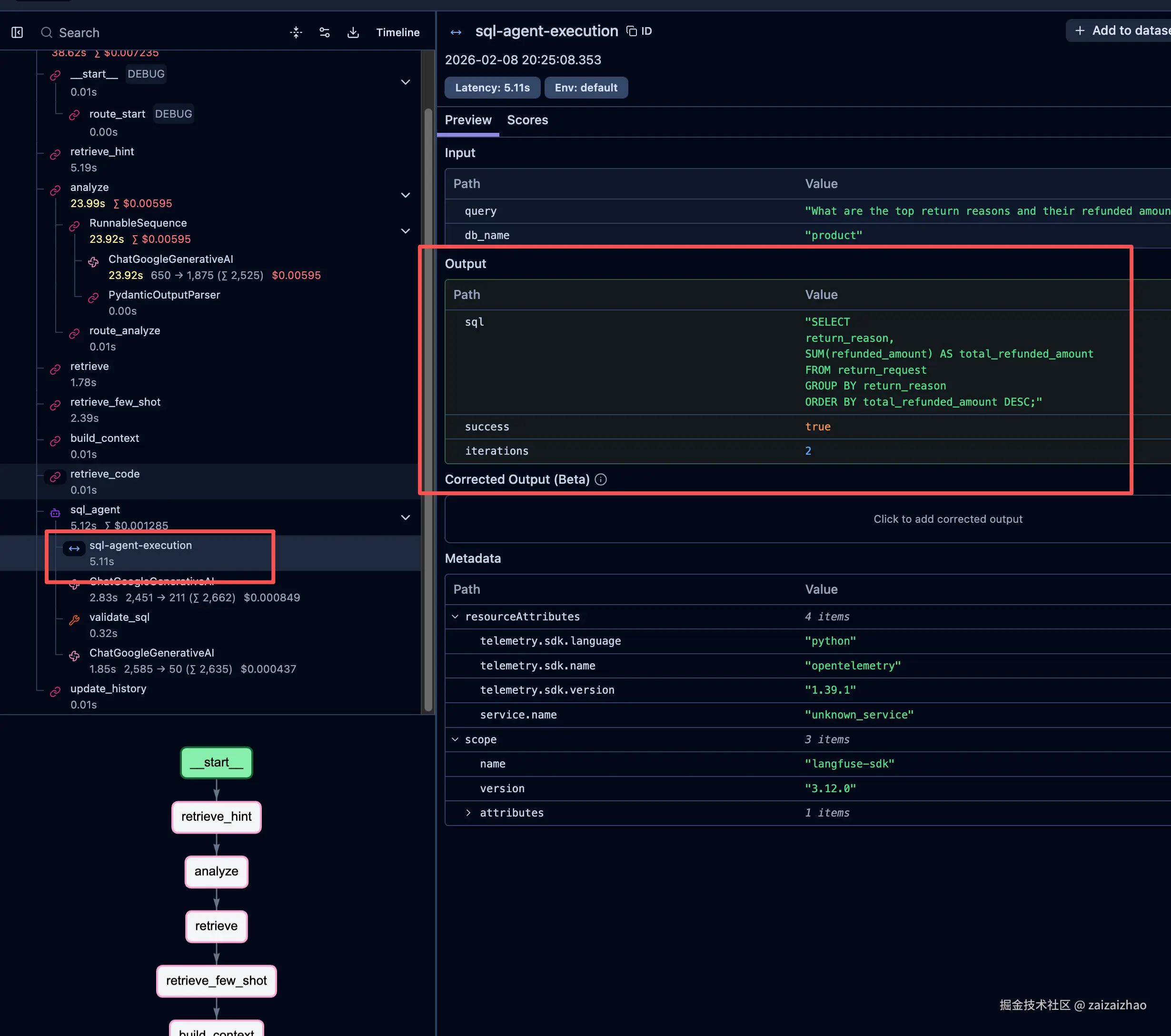
- 在 sql_agent 节点下多了一个并列的 Span,携带了 input={query, db_name} 和 output={sql, success, iterations} 的汇总信息
- 但它没有包裹住 LLM 调用和 Tool 调用,所以不构成层级关系
- 它只是一个独立的"信息标注节点",挂在 sql_agent 下面
如果想让手动 Span 真正成为 LLM 调用和 Tool 调用(如以上validate_sql)的父级,需要让 CallbackHandler 感知到手动 Span 的上下文。Langfuse官方文档中给出的做法是结合 propagate_attributes 使用:
python
  from langfuse import get_client, propagate_attributes
  from langfuse.langchain import CallbackHandler
  langfuse = get_client()
  with langfuse.start_as_current_observation(as_type="span", name="sql-agent-execution"):
      with propagate_attributes():
          handler = CallbackHandler()  # 在这里创建 handler,它会继承当前 span 作为 parent
          # 然后把 handler 传入 LLM 调用...
但我的项目中 CallbackHandler() 是在 get_langfuse_callbacks() 中提前创建好的,然后通过 config"callbacks" 传入 LangGraph,并非在手动Span 上下文内创建,所以两者无法建立父子关系,而是自定义的Span自动使用了根CallbackHandler()创建的上下文 ,这里就涉及到OpenTelemetry (OTEL)了,OpenTelemetry 是一个厂商中立的开源可观测性框架,它解决问题就是在分布式系统中,把散落在各处的监控数据关联起来,还原出完整的请求路径。
完整官方示例
python
from langfuse import observe, get_client, propagate_attributes
from langfuse.langchain import CallbackHandler
from langchain_openai import ChatOpenAI
from langchain_core.prompts import ChatPromptTemplate

@observe() # Automatically log function as a trace to Langfuse
def process_user_query(user_input: str):
    langfuse = get_client()

    # Propagate trace attributes to all child observations
    with propagate_attributes(
        session_id="session-1234",
        user_id="user-5678",
    ):

      # Initialize the Langfuse handler - automatically inherits the current trace context
      langfuse_handler = CallbackHandler()

      # Your Langchain code - will be nested under the @observe trace
      llm = ChatOpenAI(model_name="gpt-4o")
      prompt = ChatPromptTemplate.from_template("Respond to: {input}")
      chain = prompt | llm

      result = chain.invoke({"input": user_input}, config={"callbacks": [langfuse_handler]})

      # Update trace with input and final output
      langfuse.update_current_trace(
        name="user-query-processing",
        input={"query": user_input},
        output={"response": result.content},
        )

    return result.content

# Usage
answer = process_user_query("What is the capital of France?")
总结
本文介绍了在 Agent 开发中集成 Langfuse 可观测性的两种方式:
| 方式 | 适用场景 | 优点 | 局限 |
|---|---|---|---|
| 自动 Callback | 快速接入,追踪 LangChain/LangGraph 内部链路 | 零侵入、开箱即用 | 只能追踪框架内部,自定义逻辑不可见 |
| 手动 Span | 需要业务语义汇总、追踪框架外逻辑 | 完全可控,可自定义输入输出 | 需要手动管理上下文 |
实际项目中,两者结合使用是最佳实践:Callback 负责自动追踪 LLM 调用和工具调用的细粒度链路,手动 Span 负责在此之上附加业务维度的汇总信息(如最终 SQL、验证结果、迭代轮次),让 Langfuse Dashboard 既有深度又有概览。
以上所有代码示例均来自我的开源项目 EasySQL ------ 一个 Text-to-SQL 智能体分析应用,项目地址:github.com/zaizaizhao/...。项目主要技术栈包括:
- LangGraph:构建多步骤 Agent 状态机,支持条件路由、Human-in-the-Loop 澄清、SQL 生成→验证→修复的迭代循环
- LangChain:LLM 调用抽象与 RunnableConfig 配置传递
- Langfuse:Callback + 手动 Span 双模式可观测性,实现全链路追踪与业务汇总
- PostgreSQL + AsyncPostgresSaver:LangGraph Checkpointer 状态持久化,支持多轮对话上下文
- FastAPI + Uvicorn:异步 API 服务层,提供流式 SSE 响应
- Milvus:向量数据库,用于 Schema 语义检索
- Neo4j: 图数据库,用于知识图谱构建
- Pydantic Settings:类型安全的配置管理,支持环境变量覆盖
欢迎 Star ⭐ 和交流!