单位里现在主流的数据处理还都是用excel,但是处理起来费时费力还老出问题,他们也经常找我们技术部门的人来处理数据,也对python这个"高大上"的东西很是好奇,但是又有畏难情绪,其实现在AI发展的这么快,别的不说,搞个python代码处理数据那还真是让AI砸了码农的饭碗了,只有想不到没有做不到。为了让他们初步的接触认识python,我就利用AI开发了这么个基于 Flask 的在线 Python 编辑、运行和学习的平台,提供代码编辑、执行、文件管理、示例代码和练习系统等功能,让大家伙不用自己下载安装python就能在网页上先体验一番,还能循序渐进的了解python,学习python。这次大部分的代码都是AI生成的,我只提供创意,不废话了,直接上菜。
界面是这样的
既然是多用户,必然要有登录界面。
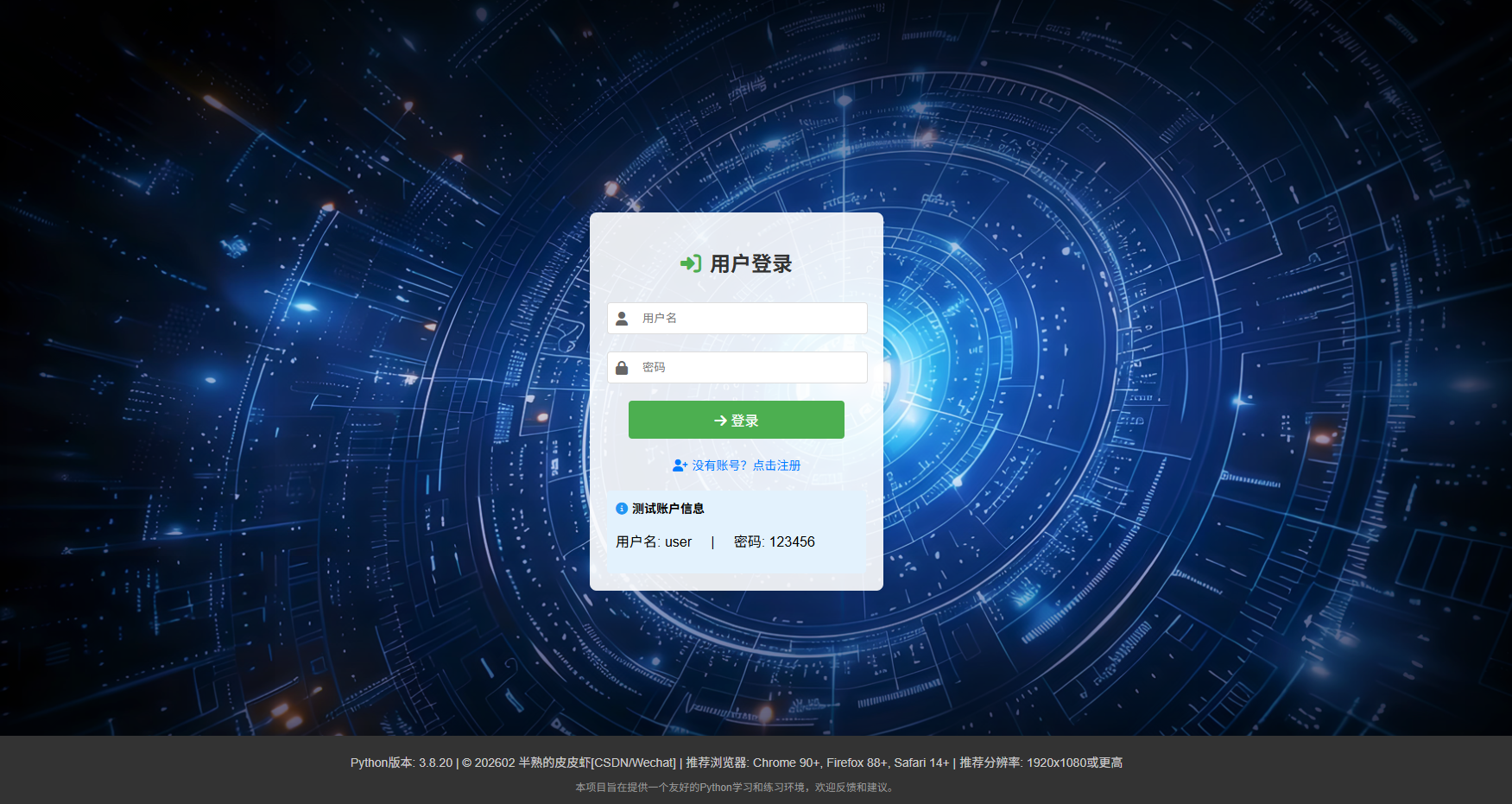
为了大家方便,提供了一个不用注册的账号用于测试,毕竟是学习来的,不用那么麻烦。
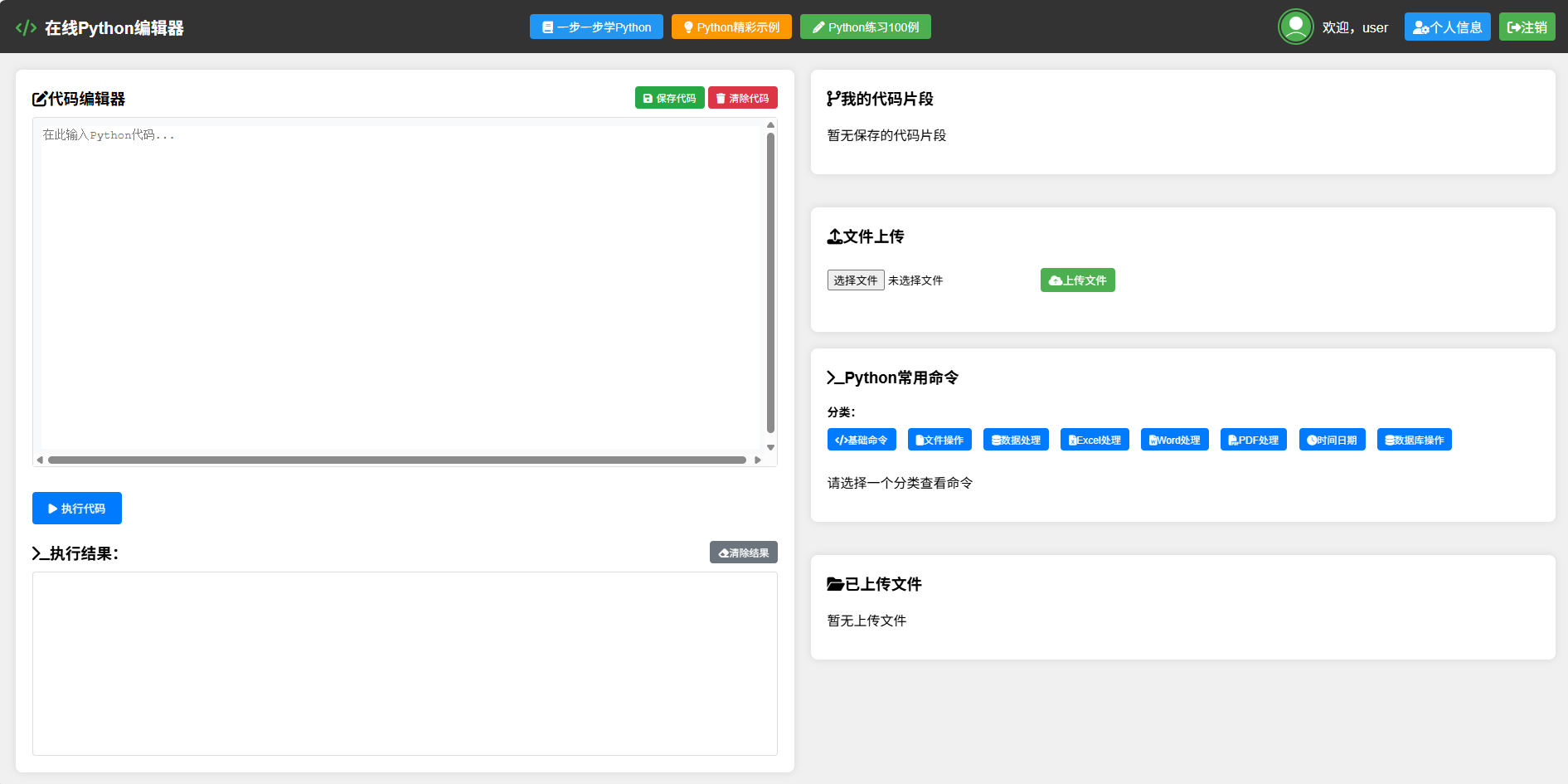
主界面就这个样子了,是不是一目了然。
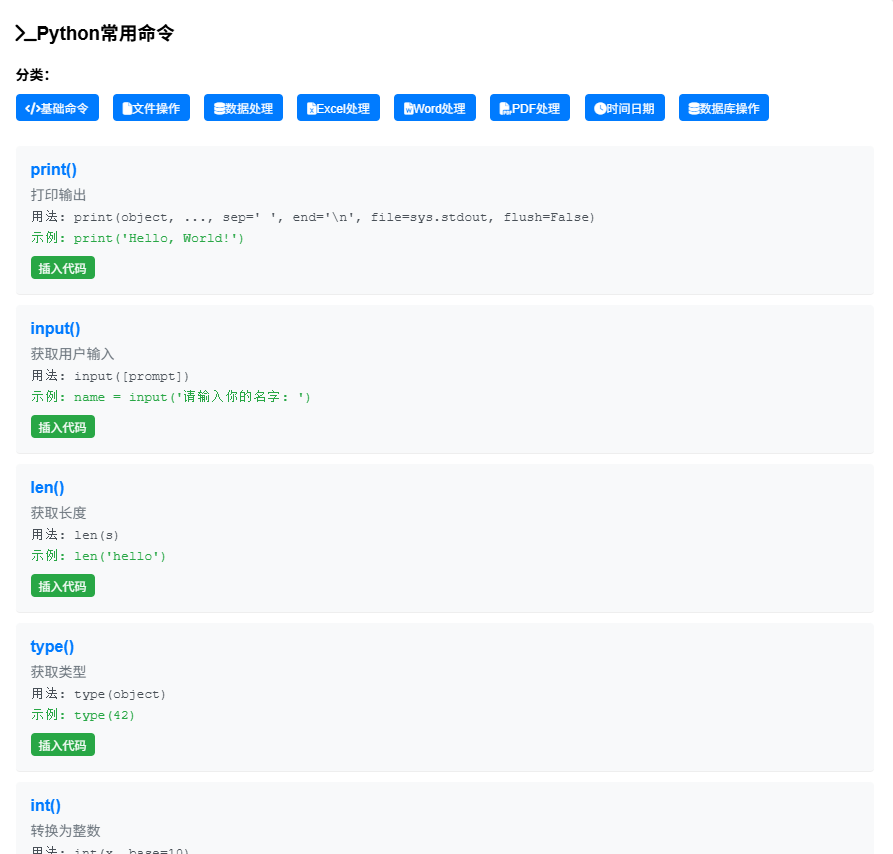
右边放了些python的常用命令。
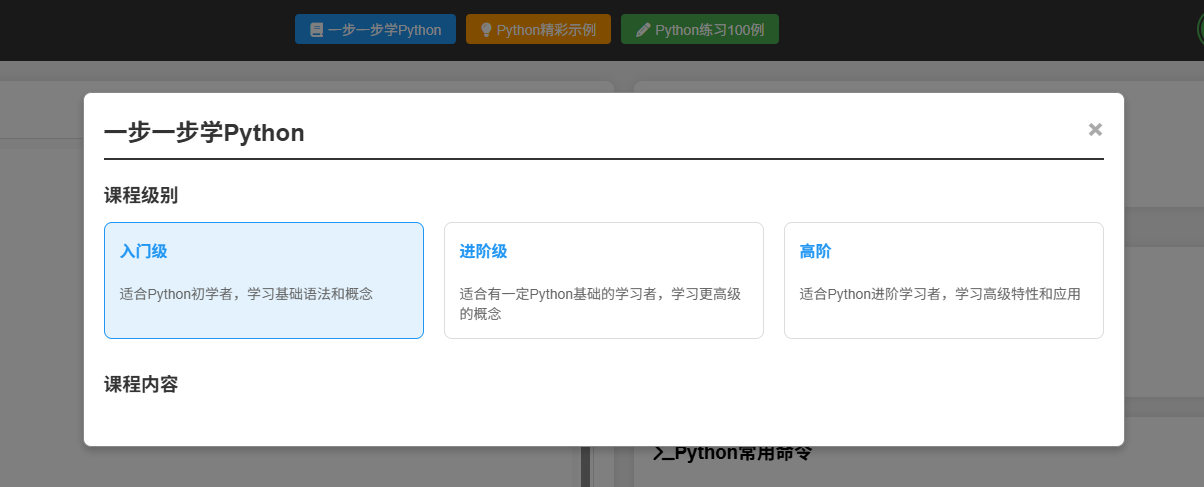
顶端放了一些主要的学习的功能,一步一步学Python,从基础开始。
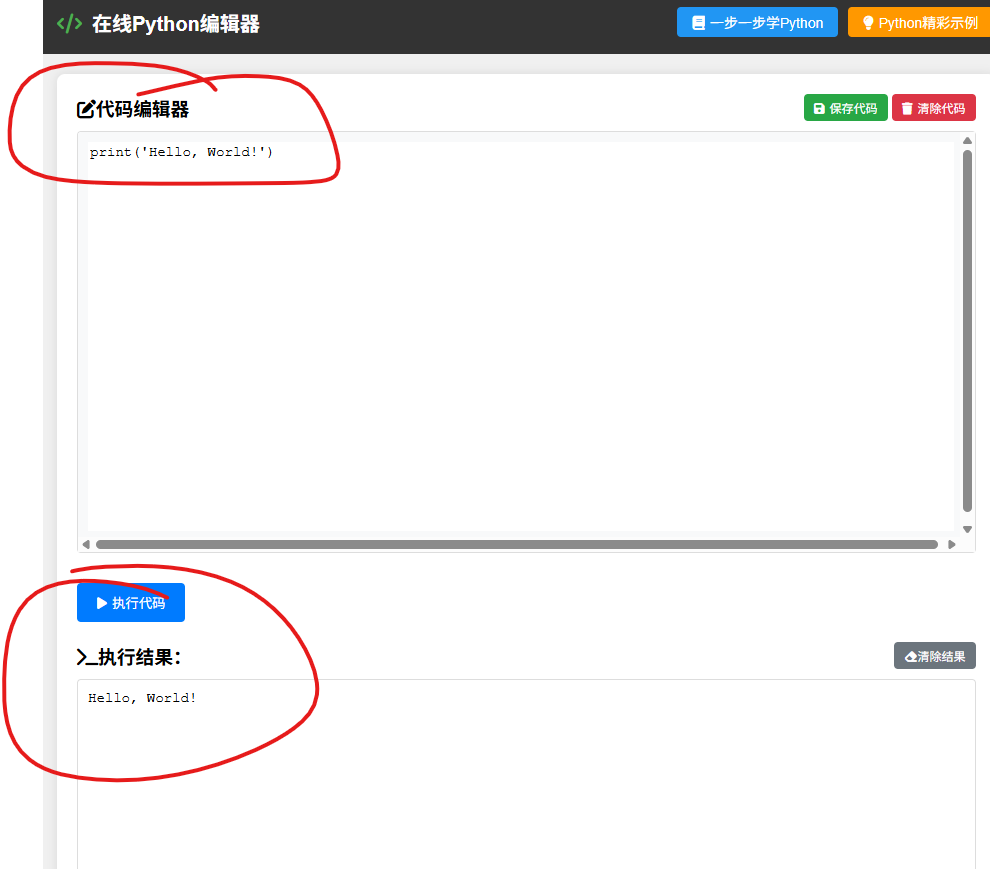
看到的代码可以直接点击插入到编辑区,点击执行就可以显示结果。
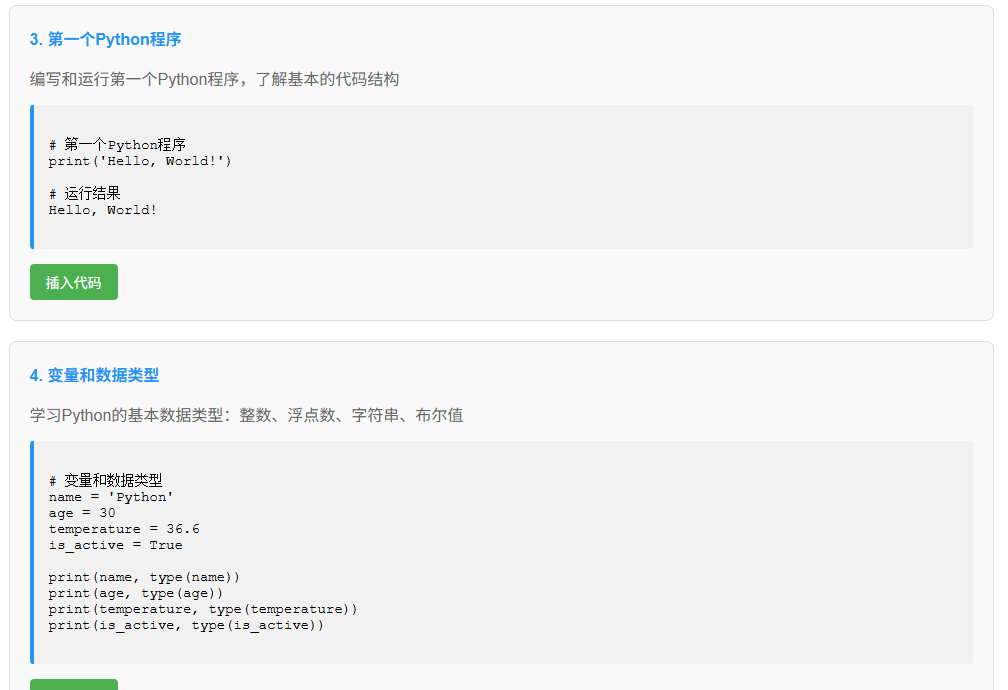
插入代码
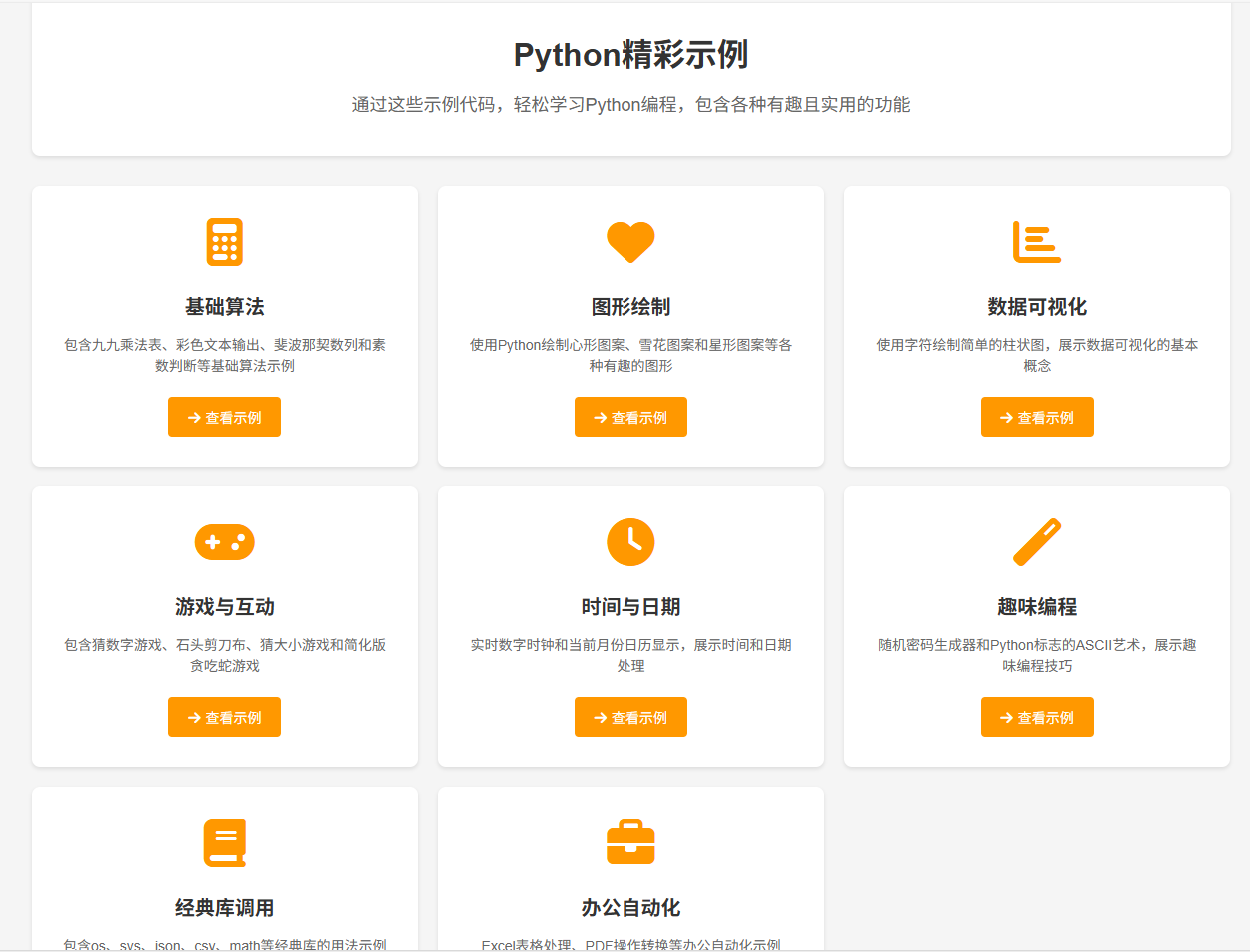
还放了一些精彩示例
同样也可以复制代码在编辑器运行查看结果,轻点几下解决,连代码输入都省了。
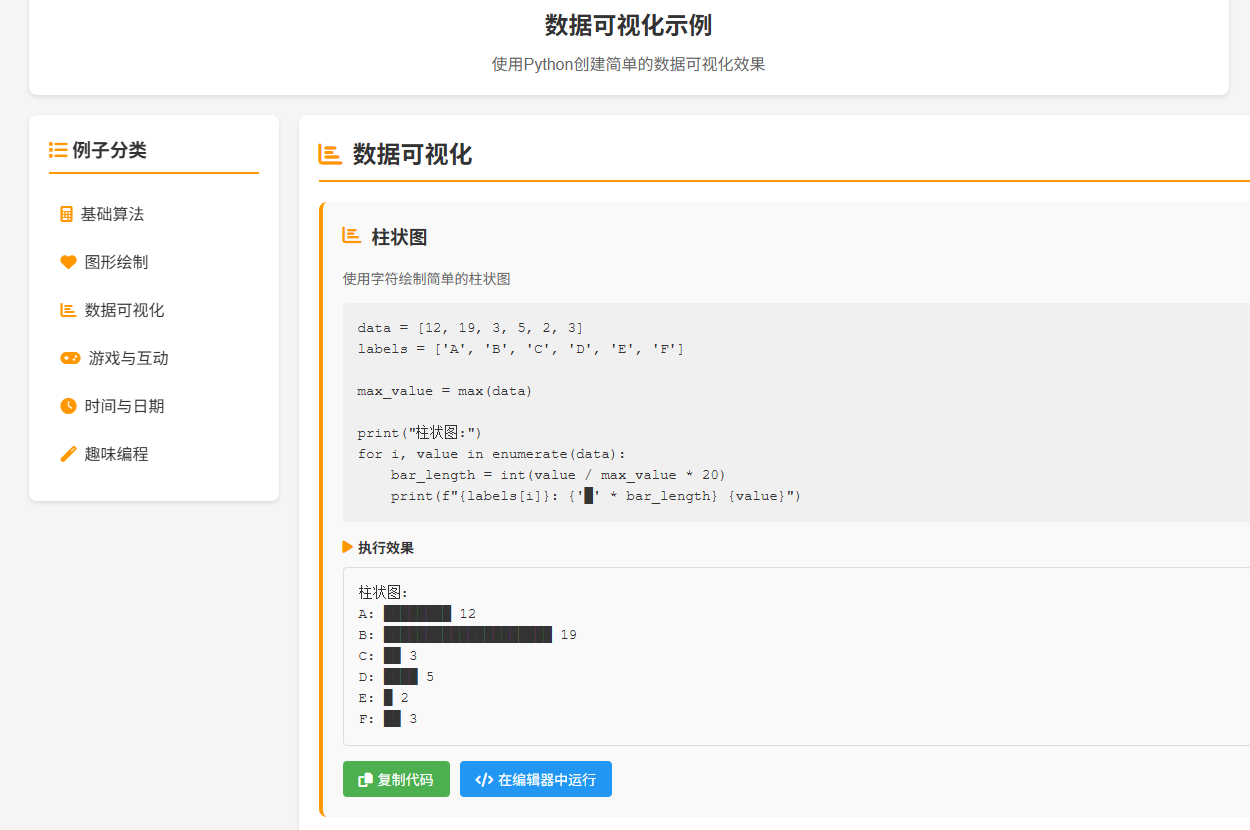
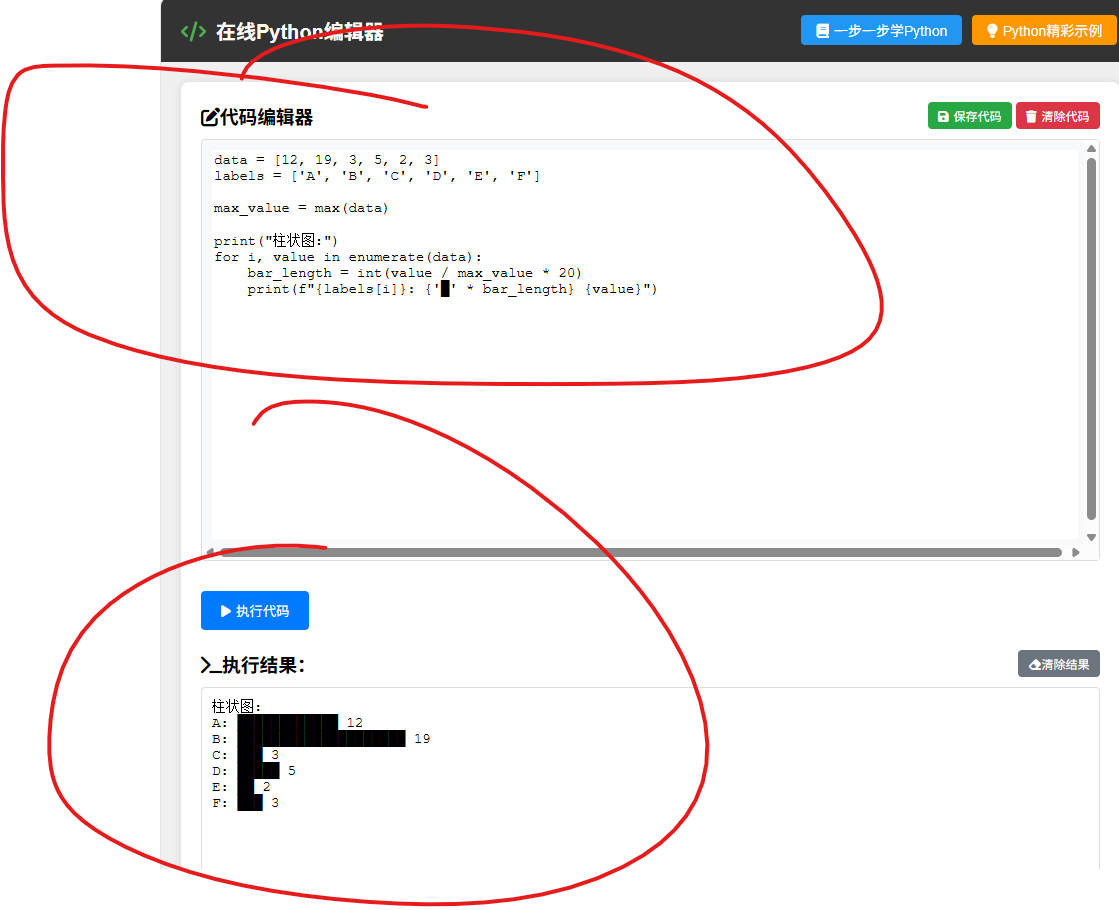
还有就是生成了一些python开发的例子,更便于用户理解。
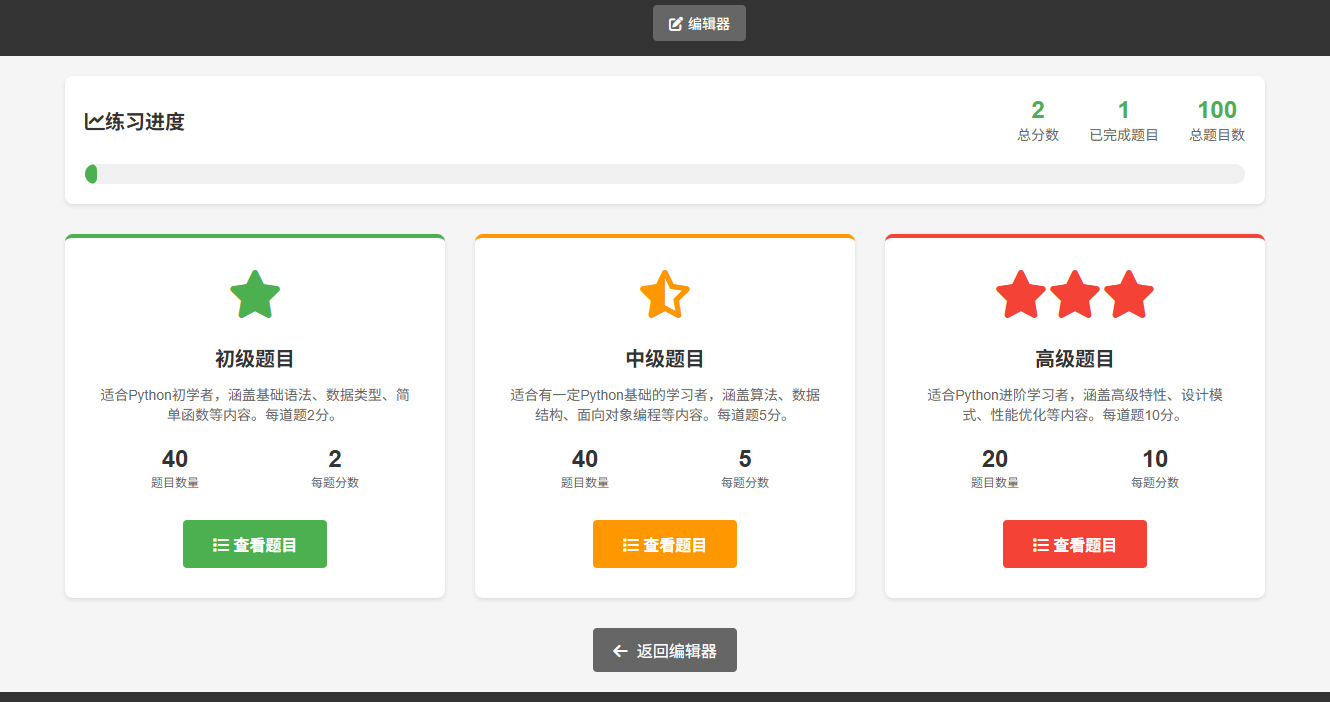
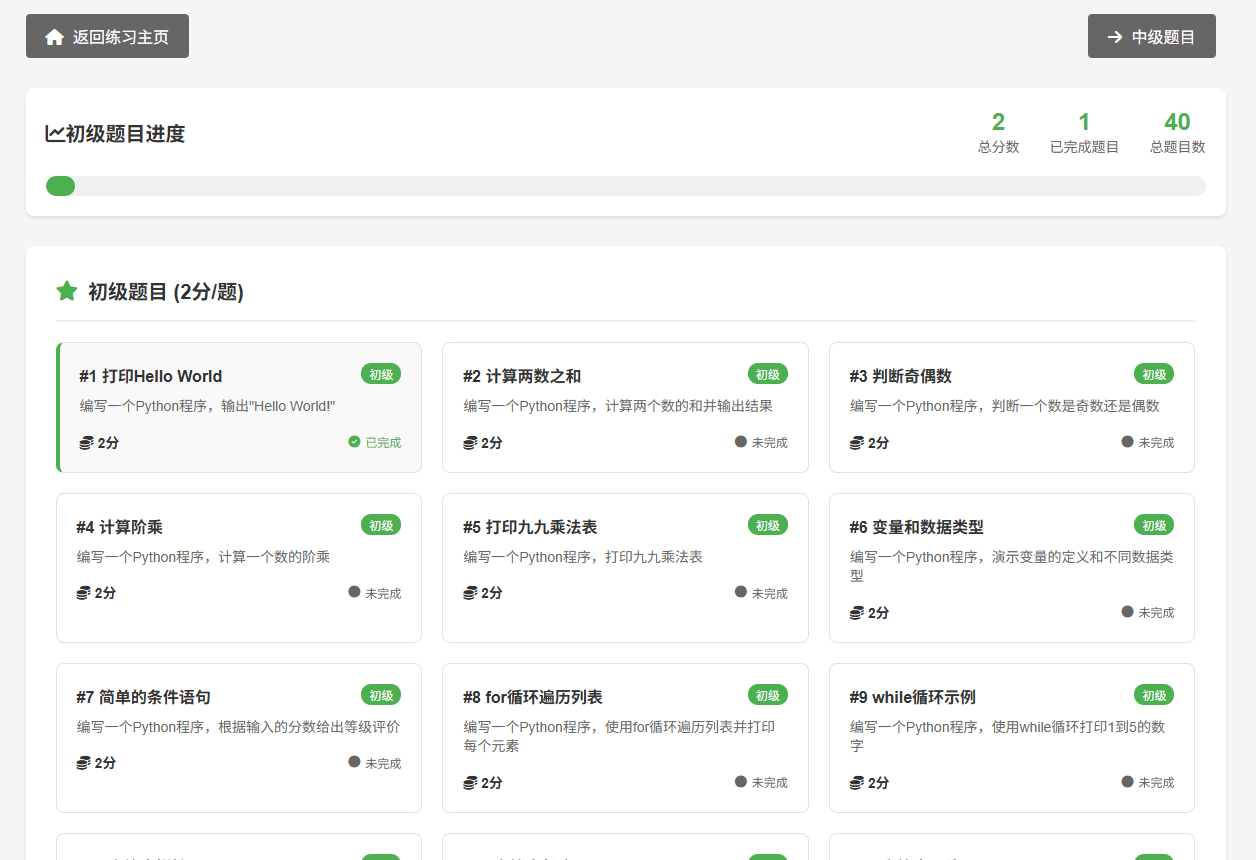
相当于练习考试,还能得分,当然分数计算的准不准确的就不用深究了。
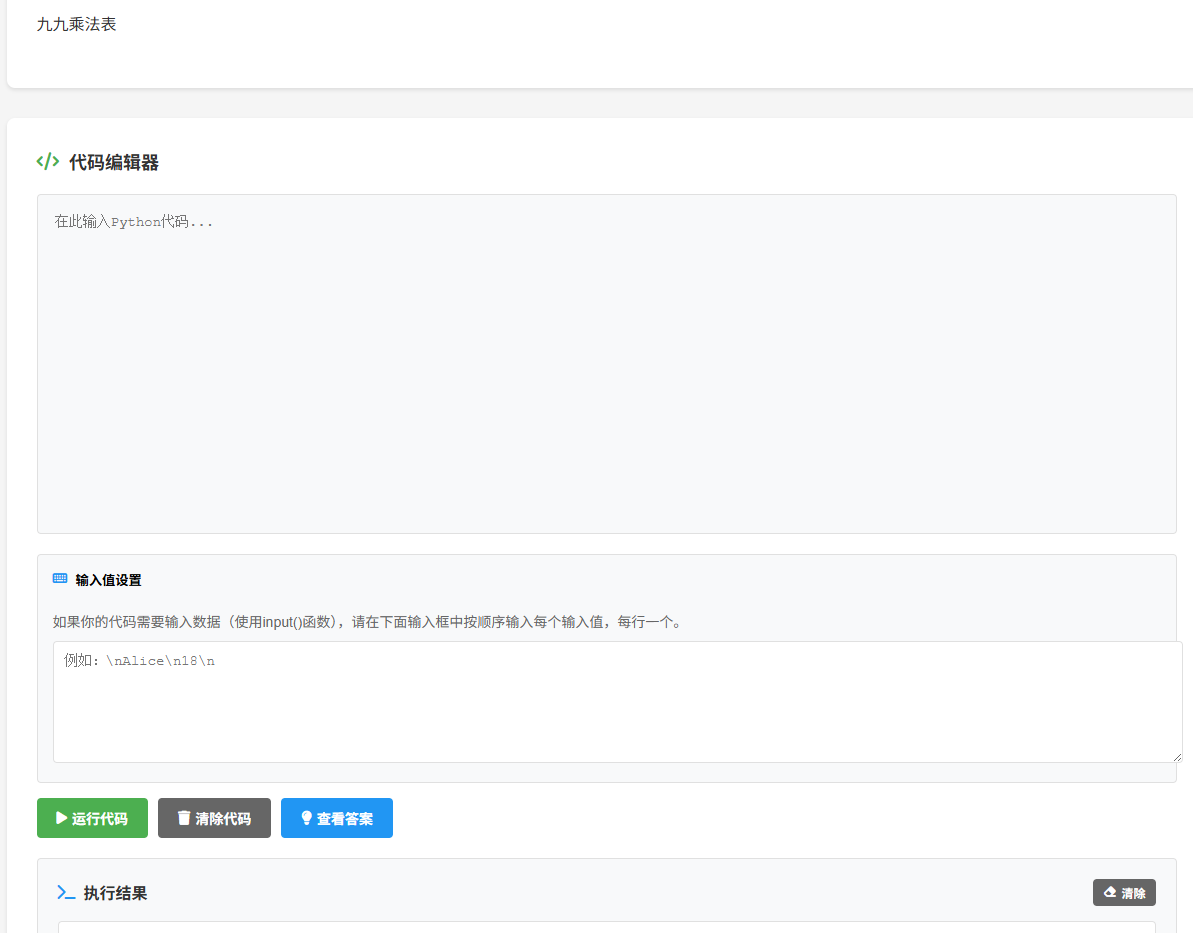
可以查看答案,复制代码,运行代码看结果。
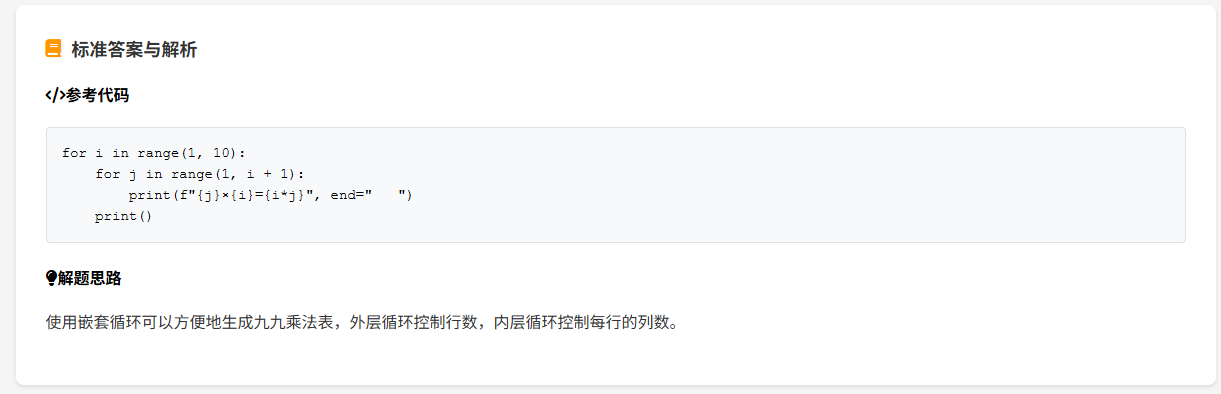
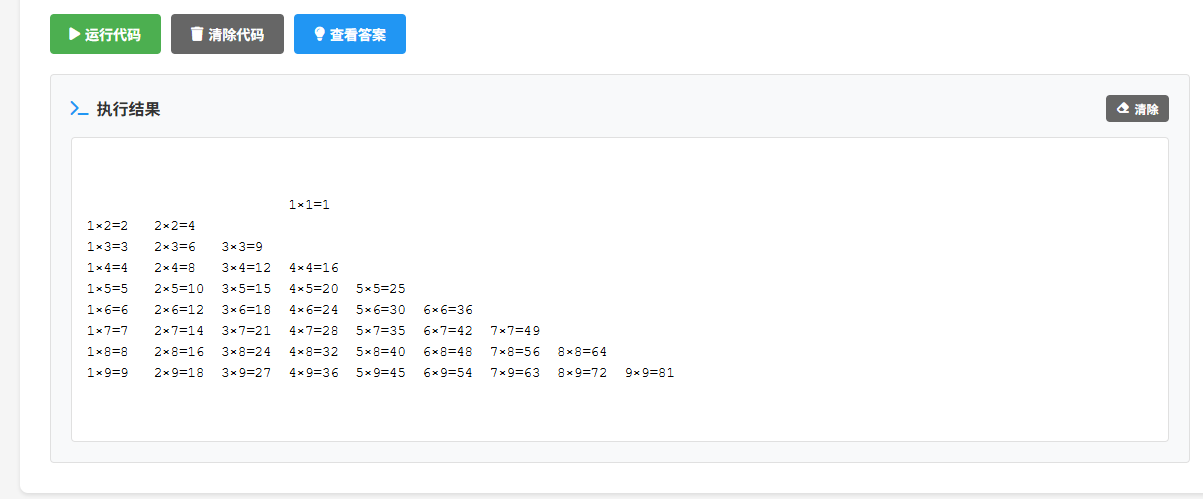
这个程序感觉如何?我已经部署上了,测试了效果还可以,偶尔有点小问题也不用在意。哈哈。
下面是项目文档:
Webpython 是一个基于 Flask 的在线 Python 编辑器和学习平台,提供代码编辑、执行、文件管理、示例代码和练习系统等功能。
主要功能
-
用户认证与管理(注册、登录、个人资料管理)
-
在线 Python 代码编辑器(支持代码执行和结果展示)
-
文件上传与管理(支持多种文件类型)
-
代码片段保存与管理
-
Python 示例代码库(按分类组织)
-
Python 练习系统(分难度级别)
-
管理员功能(用户管理、文件管理)
技术特点
-
模块化设计,易于扩展
-
安全的代码执行环境
-
响应式布局,支持多设备访问
-
完整的用户权限管理
-
详细的日志记录
2. 技术栈
后端技术
-
**Python 3.8+**:主要开发语言
-
**Flask**:Web 框架
-
**Flask-Login**:用户认证管理
-
**Flask-WTF**:表单处理和 CSRF 保护
-
**Flask-SQLAlchemy**:ORM 数据库工具
-
**SQLite**:轻量级数据库
-
**Werkzeug**:密码加密和安全工具
-
**python-dotenv**:环境变量管理
前端技术
-
**HTML5**:页面结构
-
**CSS3**:样式设计
-
**JavaScript**:客户端交互
-
**Font Awesome**:图标库
-
**ECharts**:数据可视化(可选)
目录结构
```
Webpython/
├── pycache/ # Python 编译缓存
├── build/ # PyInstaller 构建目录
├── dist/ # 打包输出目录
├── logs/ # 日志文件目录
├── routes/ # 路由模块
│ ├── pycache/ # 路由编译缓存
│ ├── init.py # 路由初始化
│ ├── auth.py # 用户认证路由
│ ├── editor.py # 代码编辑器路由
│ ├── examples.py # 示例代码路由
│ ├── files.py # 文件管理路由
│ └── practice.py # 练习系统路由
├── static/ # 静态文件
│ ├── avatars/ # 用户头像
│ ├── css/ # CSS 文件
│ ├── js/ # JavaScript 文件
│ └── webfonts/ # 字体文件
├── templates/ # 模板文件
│ ├── editor.html # 代码编辑器页面
│ ├── login.html # 登录页面
│ ├── register.html # 注册页面
│ ├── profile.html # 个人资料页面
│ ├── python_examples.html # 示例代码索引页面
│ └── practice_*.html # 练习系统相关页面
├── uploads/ # 文件上传目录
├── utils/ # 工具模块
│ ├── pycache/ # 工具编译缓存
│ ├── init.py # 工具初始化
│ ├── code_executor.py # 代码执行器
│ ├── file_utils.py # 文件工具
│ └── logger.py # 日志工具
├── .env # 环境变量配置
├── Python.ico # 应用图标
├── app.py # 主应用文件
├── app.spec # PyInstaller 配置
├── build_exe.py # 构建脚本
├── config.py # 应用配置
├── init_commands.py # 初始化命令数据
├── models.py # 数据库模型
├── requirements.txt # 依赖包列表
├── setup.py # 安装脚本
├── users.db # SQLite 数据库文件
├── webpython.png # 应用图标
└── webpython.spec # PyInstaller 配置
```
代码编辑器模块
**功能**:提供在线 Python 代码编辑和执行环境
**路由**:
-
`/editor` - 代码编辑器页面
-
`/api/save_code` - 保存代码片段
-
`/api/load_code/<id>` - 加载代码片段
-
`/api/delete_code/<id>` - 删除代码片段
-
`/api/update_code/<id>` - 更新代码片段
-
`/api/code_snippets` - 获取代码片段列表
其实主要的代码基本上都是js。
python
from flask import Blueprint, render_template, request, redirect, url_for, flash, jsonify
from flask_login import login_required, current_user
from models import db, File, User, CodeSnippet
from utils import execute_code_safely, setup_logger
import os
import logging

logger = logging.getLogger(__name__)
editor_bp = Blueprint('editor', __name__)


@editor_bp.route('/editor', methods=['GET', 'POST'])
@login_required
def editor():
    output = ''
    code = ''

    if request.method == 'POST':
        code = request.form.get('code', '')

        if code.strip():
            user_upload_folder = os.path.join('uploads', str(current_user.id))
            output = execute_code_safely(
                code,
                user_upload_folder=user_upload_folder,
                timeout=10,
                max_output_size=1024*1024
            )
            logger.info(f'用户 {current_user.username} 执行了代码')

    if current_user.is_admin:
        user_files = File.query.all()
        all_users = User.query.all()
        code_snippets = CodeSnippet.query.all()
    else:
        user_files = File.query.filter_by(user_id=current_user.id).all()
        all_users = None
        code_snippets = CodeSnippet.query.filter_by(user_id=current_user.id).all()

    return render_template(
        'editor.html',
        code=code,
        output=output,
        files=user_files,
        all_users=all_users,
        is_admin=current_user.is_admin,
        code_snippets=code_snippets
    )


@editor_bp.route('/api/save_code', methods=['POST'])
@login_required
def save_code():
    data = request.get_json()
    title = data.get('title', '未命名代码')
    code = data.get('code', '')
    description = data.get('description', '')
    is_favorite = data.get('is_favorite', False)

    if not code.strip():
        return jsonify({'success': False, 'message': '代码不能为空'}), 400

    try:
        snippet = CodeSnippet(
            title=title,
            code=code,
            description=description,
            user_id=current_user.id,
            is_favorite=is_favorite
        )
        db.session.add(snippet)
        db.session.commit()

        logger.info(f'用户 {current_user.username} 保存了代码片段: {title}')
        return jsonify({'success': True, 'message': '保存成功', 'id': snippet.id})
    except Exception as e:
        logger.error(f'保存代码失败: {str(e)}')
        db.session.rollback()
        return jsonify({'success': False, 'message': '保存失败'}), 500


@editor_bp.route('/api/load_code/<int:snippet_id>', methods=['GET'])
@login_required
def load_code(snippet_id):
    snippet = CodeSnippet.query.get_or_404(snippet_id)

    if snippet.user_id != current_user.id and not current_user.is_admin:
        return jsonify({'success': False, 'message': '无权访问'}), 403

    return jsonify({
        'success': True,
        'title': snippet.title,
        'code': snippet.code,
        'description': snippet.description,
        'is_favorite': snippet.is_favorite
    })


@editor_bp.route('/api/delete_code/<int:snippet_id>', methods=['DELETE'])
@login_required
def delete_code(snippet_id):
    snippet = CodeSnippet.query.get_or_404(snippet_id)

    if snippet.user_id != current_user.id and not current_user.is_admin:
        return jsonify({'success': False, 'message': '无权删除'}), 403

    try:
        db.session.delete(snippet)
        db.session.commit()
        logger.info(f'用户 {current_user.username} 删除了代码片段: {snippet.title}')
        return jsonify({'success': True, 'message': '删除成功'})
    except Exception as e:
        logger.error(f'删除代码失败: {str(e)}')
        db.session.rollback()
        return jsonify({'success': False, 'message': '删除失败'}), 500


@editor_bp.route('/api/update_code/<int:snippet_id>', methods=['PUT'])
@login_required
def update_code(snippet_id):
    snippet = CodeSnippet.query.get_or_404(snippet_id)

    if snippet.user_id != current_user.id and not current_user.is_admin:
        return jsonify({'success': False, 'message': '无权修改'}), 403

    data = request.get_json()

    try:
        if 'title' in data:
            snippet.title = data['title']
        if 'code' in data:
            snippet.code = data['code']
        if 'description' in data:
            snippet.description = data['description']
        if 'is_favorite' in data:
            snippet.is_favorite = data['is_favorite']

        db.session.commit()
        logger.info(f'用户 {current_user.username} 更新了代码片段: {snippet.title}')
        return jsonify({'success': True, 'message': '更新成功'})
    except Exception as e:
        logger.error(f'更新代码失败: {str(e)}')
        db.session.rollback()
        return jsonify({'success': False, 'message': '更新失败'}), 500


@editor_bp.route('/api/code_snippets', methods=['GET'])
@login_required
def get_code_snippets():
    if current_user.is_admin:
        snippets = CodeSnippet.query.all()
    else:
        snippets = CodeSnippet.query.filter_by(user_id=current_user.id).all()

    snippets_list = []
    for snippet in snippets:
        snippets_list.append({
            'id': snippet.id,
            'title': snippet.title,
            'description': snippet.description,
            'created_at': snippet.created_at.isoformat(),
            'is_favorite': snippet.is_favorite
        })

    return jsonify({'success': True, 'snippets': snippets_list})
editor.html
html
<!DOCTYPE html>
<html lang="zh-CN">
<head>
<meta charset="UTF-8">
<meta name="viewport" content="width=device-width, initial-scale=1.0">
<title>在线Python编辑器</title>
<link rel="stylesheet" href="{{ url_for('static', filename='css/all.min.css') }}">
<style>
body {
font-family: Arial, sans-serif;
background-color: #f0f0f0;
margin: 0;
padding: 0;
}
.header {
background-color: #333;
color: white;
padding: 10px 20px;
display: flex;
justify-content: space-between;
align-items: center;
}
.header h1 {
margin: 0;
font-size: 20px;
}
.header h1 i {
margin-right: 10px;
color: #4CAF50;
}
.header .user-info {
display: flex;
align-items: center;
}
.header .user-info span {
margin-right: 10px;
}
.header .user-info a {
color: white;
text-decoration: none;
padding: 5px 10px;
background-color: #4CAF50;
border-radius: 4px;
}
.header .user-info a:hover {
background-color: #45a049;
}
.header .header-buttons {
display: flex;
gap: 10px;
}
.header .learn-btn {
padding: 5px 15px;
background-color: #2196F3;
color: white;
border: none;
border-radius: 4px;
cursor: pointer;
font-size: 14px;
}
.header .learn-btn:hover {
background-color: #0b7dda;
}
.header .learn-btn i {
margin-right: 5px;
}
.container {
display: flex;
flex-wrap: wrap;
padding: 20px;
gap: 20px;
}
.left-panel {
flex: 1;
min-width: 300px;
background-color: white;
padding: 20px;
border-radius: 8px;
box-shadow: 0 0 10px rgba(0,0,0,0.1);
}
.right-panel {
flex: 1;
min-width: 300px;
display: flex;
flex-direction: column;
gap: 20px;
}
.code-editor {
background-color: #f8f9fa;
border: 1px solid #ddd;
border-radius: 4px;
padding: 10px;
height: 400px;
overflow: auto;
}
.code-editor textarea {
width: 100%;
height: 100%;
border: none;
resize: none;
font-family: 'Courier New', Courier, monospace;
font-size: 14px;
}
.output {
background-color: white;
border: 1px solid #ddd;
border-radius: 4px;
padding: 10px;
height: 200px;
overflow: auto;
font-family: 'Courier New', Courier, monospace;
font-size: 14px;
white-space: pre-wrap;
}
.file-upload {
background-color: white;
padding: 20px;
border-radius: 8px;
box-shadow: 0 0 10px rgba(0,0,0,0.1);
}
.file-upload h3 {
margin-top: 0;
}
.file-upload form {
margin-bottom: 20px;
}
.file-upload input[type="file"] {
margin: 10px 0;
}
.file-upload button {
padding: 5px 10px;
background-color: #4CAF50;
color: white;
border: none;
border-radius: 4px;
cursor: pointer;
}
.file-upload button:hover {
background-color: #45a049;
}
.file-list {
background-color: white;
padding: 20px;
border-radius: 8px;
box-shadow: 0 0 10px rgba(0,0,0,0.1);
}
.file-list h3 {
margin-top: 0;
}
.file-list ul {
list-style: none;
padding: 0;
margin: 0;
}
.file-list li {
padding: 10px;
border-bottom: 1px solid #ddd;
display: flex;
justify-content: space-between;
align-items: center;
}
.file-list li:last-child {
border-bottom: none;
}
.file-list .file-actions a {
margin-left: 10px;
color: #007bff;
text-decoration: none;
}
.file-list .file-actions a:hover {
text-decoration: underline;
}
.file-list .file-actions .delete {
color: #dc3545;
}
.file-owner {
font-size: 12px;
color: #6c757d;
margin-left: 10px;
}
.command-reference {
background-color: white;
padding: 20px;
border-radius: 8px;
box-shadow: 0 0 10px rgba(0,0,0,0.1);
margin-bottom: 20px;
}
.command-reference h3 {
margin-top: 0;
}
.command-category {
margin-bottom: 15px;
}
.command-category h4 {
margin: 0 0 10px 0;
font-size: 14px;
}
.command-category button {
margin-right: 10px;
margin-bottom: 10px;
padding: 5px 10px;
background-color: #007bff;
color: white;
border: none;
border-radius: 4px;
cursor: pointer;
font-size: 12px;
}
.command-category button:hover {
background-color: #0069d9;
}
.command-list {
margin-top: 15px;
}
.command-list ul {
list-style: none;
padding: 0;
margin: 0;
}
.command-list li {
padding: 15px;
border-bottom: 1px solid #eee;
margin-bottom: 10px;
border-radius: 4px;
background-color: #f8f9fa;
}
.command-list li:last-child {
border-bottom: none;
}
.command-name {
font-weight: bold;
color: #007bff;
margin-bottom: 5px;
}
.command-desc {
font-size: 14px;
color: #6c757d;
margin-bottom: 5px;
}
.command-usage {
font-size: 13px;
color: #495057;
margin-bottom: 5px;
font-family: 'Courier New', Courier, monospace;
}
.command-example {
font-size: 13px;
color: #28a745;
margin-bottom: 10px;
font-family: 'Courier New', Courier, monospace;
white-space: pre-wrap;
}
.command-list button {
padding: 3px 8px;
background-color: #28a745;
color: white;
border: none;
border-radius: 4px;
cursor: pointer;
font-size: 12px;
}
.command-list button:hover {
background-color: #218838;
}
.pagination {
margin-top: 20px;
text-align: center;
display: flex;
justify-content: center;
align-items: center;
flex-wrap: wrap;
gap: 10px;
}
.pagination span {
font-size: 14px;
color: #6c757d;
}
.pagination button {
padding: 5px 10px;
background-color: #f8f9fa;
color: #007bff;
border: 1px solid #dee2e6;
border-radius: 4px;
cursor: pointer;
font-size: 12px;
}
.pagination button:hover {
background-color: #e9ecef;
}
.pagination button.active {
background-color: #007bff;
color: white;
border-color: #007bff;
}
.pagination button:disabled {
opacity: 0.5;
cursor: not-allowed;
}
.flash {
background-color: #d4edda;
color: #155724;
padding: 10px;
margin: 10px 0;
border-radius: 4px;
border: 1px solid #c3e6cb;
}
.execute-btn {
padding: 10px 20px;
background-color: #007bff;
color: white;
border: none;
border-radius: 4px;
cursor: pointer;
margin-top: 10px;
}
.execute-btn:hover {
background-color: #0069d9;
}
.execute-btn i {
margin-right: 5px;
}
.output-container {
margin-top: 20px;
}
.output-header {
display: flex;
justify-content: space-between;
align-items: center;
margin-bottom: 10px;
}
.output-header h3 {
margin: 0;
}
.output-header button {
padding: 5px 10px;
background-color: #6c757d;
color: white;
border: none;
border-radius: 4px;
cursor: pointer;
font-size: 12px;
}
.output-header button:hover {
background-color: #5a6268;
}
.code-editor-container {
margin-bottom: 20px;
}
.code-editor-header {
display: flex;
justify-content: space-between;
align-items: center;
margin-bottom: 10px;
}
.code-editor-header h3 {
margin: 0;
}
.clear-btn {
padding: 5px 10px;
background-color: #dc3545;
color: white;
border: none;
border-radius: 4px;
cursor: pointer;
font-size: 12px;
}
.clear-btn:hover {
background-color: #c82333;
}
.clear-btn i {
margin-right: 5px;
}
.code-snippets {
background-color: white;
padding: 20px;
border-radius: 8px;
box-shadow: 0 0 10px rgba(0,0,0,0.1);
margin-bottom: 20px;
}
.code-snippets h3 {
margin-top: 0;
}
.snippet-list {
list-style: none;
padding: 0;
margin: 0;
}
.snippet-item {
padding: 10px;
border-bottom: 1px solid #ddd;
display: flex;
justify-content: space-between;
align-items: center;
}
.snippet-item:last-child {
border-bottom: none;
}
.snippet-info {
flex: 1;
}
.snippet-title {
font-weight: bold;
color: #333;
}
.snippet-desc {
font-size: 12px;
color: #6c757d;
}
.snippet-actions {
display: flex;
gap: 5px;
}
.snippet-actions button {
padding: 3px 8px;
background-color: #007bff;
color: white;
border: none;
border-radius: 4px;
cursor: pointer;
font-size: 12px;
}
.snippet-actions button:hover {
background-color: #0069d9;
}
.snippet-actions .delete-btn {
background-color: #dc3545;
}
.snippet-actions .delete-btn:hover {
background-color: #c82333;
}
.save-code-btn {
padding: 5px 10px;
background-color: #28a745;
color: white;
border: none;
border-radius: 4px;
cursor: pointer;
font-size: 12px;
}
.save-code-btn:hover {
background-color: #218838;
}
.save-code-btn i {
margin-right: 5px;
}
.modal {
display: none;
position: fixed;
z-index: 1000;
left: 0;
top: 0;
width: 100%;
height: 100%;
background-color: rgba(0,0,0,0.5);
}
.modal-content {
background-color: white;
margin: 10% auto;
padding: 20px;
border: 1px solid #888;
width: 80%;
max-width: 500px;
border-radius: 8px;
}
.modal-header {
display: flex;
justify-content: space-between;
align-items: center;
margin-bottom: 20px;
}
.modal-header h3 {
margin: 0;
}
.close-modal {
color: #aaa;
font-size: 28px;
font-weight: bold;
cursor: pointer;
}
.close-modal:hover {
color: black;
}
.modal-body input,
.modal-body textarea {
width: 100%;
margin-bottom: 10px;
padding: 8px;
border: 1px solid #ddd;
border-radius: 4px;
}
.modal-body textarea {
height: 100px;
resize: vertical;
}
.modal-footer {
display: flex;
justify-content: flex-end;
gap: 10px;
}
.modal-footer button {
padding: 8px 16px;
border: none;
border-radius: 4px;
cursor: pointer;
}
.modal-footer .cancel-btn {
background-color: #6c757d;
color: white;
}
.modal-footer .save-btn {
background-color: #28a745;
color: white;
}
</style>
</head>
<body>
<div class="header">
<h1><i class="fas fa-code"></i>在线Python编辑器</h1>
<div class="header-buttons">
<button onclick="showPythonCourse()" class="learn-btn"><i class="fas fa-book"></i>一步一步学Python</button>
<a href="{{ url_for('examples.python_examples') }}" class="learn-btn" style="background-color: #ff9800; text-decoration: none; display: inline-block;"><i class="fas fa-lightbulb"></i>Python精彩示例</a>
<a href="{{ url_for('practice.practice_home') }}" class="learn-btn" style="background-color: #4CAF50; text-decoration: none; display: inline-block;"><i class="fas fa-pencil-alt"></i>Python练习100例</a>
</div>
<div class="user-info">
<div style="display: flex; align-items: center; gap: 10px;">
<img src="{{ url_for('static', filename='avatars/' + current_user.avatar + '.svg') }}" alt="头像" style="width: 40px; height: 40px; border-radius: 50%; border: 2px solid #4CAF50;">
<span>欢迎,{{ current_user.username }}</span>
<a href="{{ url_for('auth.profile') }}" style="color: white; text-decoration: none; padding: 5px 10px; background-color: #2196F3; border-radius: 4px;"><i class="fas fa-user-cog"></i>个人信息</a>
<a href="{{ url_for('auth.logout') }}"><i class="fas fa-sign-out-alt"></i>注销</a>
</div>
</div>
</div>
<div class="container">
<div class="left-panel">
{% with messages = get_flashed_messages() %}
{% if messages %}
{% for message in messages %}
<div class="flash">{{ message }}</div>
{% endfor %}
{% endif %}
{% endwith %}
<form method="POST">
<input type="hidden" name="csrf_token" value="{{ csrf_token() }}"/>
<div class="code-editor-container">
<div class="code-editor-header">
<h3><i class="fas fa-edit"></i>代码编辑器</h3>
<div>
<button type="button" onclick="showSaveModal()" class="save-code-btn"><i class="fas fa-save"></i>保存代码</button>
<button type="button" onclick="clearCode()" class="clear-btn"><i class="fas fa-trash"></i>清除代码</button>
</div>
</div>
<div class="code-editor">
<textarea name="code" placeholder="在此输入Python代码..." id="codeEditor">{{ code }}</textarea>
</div>
</div>
<button type="submit" class="execute-btn"><i class="fas fa-play"></i>执行代码</button>
</form>
<div class="output-container">
<div class="output-header">
<h3><i class="fas fa-terminal"></i>执行结果:</h3>
<button onclick="clearOutput()"><i class="fas fa-eraser"></i>清除结果</button>
</div>
<div class="output" id="outputArea">{{ output|safe }}</div>
</div>
</div>
<div class="right-panel">
<div class="code-snippets">
<h3><i class="fas fa-code-branch"></i>我的代码片段</h3>
{% if code_snippets %}
<ul class="snippet-list">
{% for snippet in code_snippets %}
<li class="snippet-item">
<div class="snippet-info">
<div class="snippet-title">{{ snippet.title }}</div>
{% if snippet.description %}
<div class="snippet-desc">{{ snippet.description }}</div>
{% endif %}
</div>
<div class="snippet-actions">
<button onclick="loadCode({{ snippet.id }})"><i class="fas fa-download"></i>加载</button>
<button onclick="deleteCode({{ snippet.id }})" class="delete-btn"><i class="fas fa-trash-alt"></i>删除</button>
</div>
</li>
{% endfor %}
</ul>
{% else %}
<p>暂无保存的代码片段</p>
{% endif %}
</div>
<div class="file-upload">
<h3><i class="fas fa-upload"></i>文件上传</h3>
<form method="POST" action="{{ url_for('files.upload_file') }}" enctype="multipart/form-data">
<input type="hidden" name="csrf_token" value="{{ csrf_token() }}"/>
<input type="file" name="file">
<button type="submit"><i class="fas fa-cloud-upload-alt"></i>上传文件</button>
</form>
</div>
<div class="command-reference">
<h3><i class="fas fa-terminal"></i>Python常用命令</h3>
<div class="command-category">
<h4>分类:</h4>
<button onclick="showCommands('basic')"><i class="fas fa-code"></i>基础命令</button>
<button onclick="showCommands('file')"><i class="fas fa-file"></i>文件操作</button>
<button onclick="showCommands('data')"><i class="fas fa-database"></i>数据处理</button>
<button onclick="showCommands('excel')"><i class="fas fa-file-excel"></i>Excel处理</button>
<button onclick="showCommands('word')"><i class="fas fa-file-word"></i>Word处理</button>
<button onclick="showCommands('pdf')"><i class="fas fa-file-pdf"></i>PDF处理</button>
<button onclick="showCommands('time')"><i class="fas fa-clock"></i>时间日期</button>
<button onclick="showCommands('db')"><i class="fas fa-database"></i>数据库操作</button>
</div>
<div class="command-list" id="commandList">
<p>请选择一个分类查看命令</p>
</div>
</div>
<div class="file-list">
<h3><i class="fas fa-folder-open"></i>已上传文件</h3>
{% if files %}
<ul>
{% for file in files %}
<li>
<div>
<span>{{ file.filename }}</span>
{% if is_admin %}
{% for user in all_users %}
{% if user.id == file.user_id %}
<span class="file-owner"> (所属用户: {{ user.username }})</span>
{% endif %}
{% endfor %}
{% endif %}
</div>
<div class="file-actions">
<a href="{{ url_for('files.download_file', file_id=file.id) }}"><i class="fas fa-download"></i>下载</a>
<a href="{{ url_for('files.delete_file', file_id=file.id) }}" class="delete" onclick="return confirm('确定要删除此文件吗?');"><i class="fas fa-trash-alt"></i>删除</a>
</div>
</li>
{% endfor %}
</ul>
{% else %}
<p>暂无上传文件</p>
{% endif %}
</div>
</div>
</div>
<div id="saveModal" class="modal">
<div class="modal-content">
<div class="modal-header">
<h3><i class="fas fa-save"></i>保存代码片段</h3>
<span class="close-modal" onclick="closeSaveModal()">×</span>
</div>
<div class="modal-body">
<input type="text" id="snippetTitle" placeholder="代码标题" required>
<textarea id="snippetDesc" placeholder="代码描述(可选)"></textarea>
</div>
<div class="modal-footer">
<button class="cancel-btn" onclick="closeSaveModal()">取消</button>
<button class="save-btn" onclick="saveCode()">保存</button>
</div>
</div>
</div>
{% include 'python_course.html' %}
<script>
const commands = {
basic: [
{
name: "print()",
desc: "打印输出",
usage: "print(object, ..., sep=' ', end='\\n', file=sys.stdout, flush=False)",
example: "print('Hello, World!')",
code: "print('Hello, World!')"
},
{
name: "input()",
desc: "获取用户输入",
usage: "input([prompt])",
example: "name = input('请输入你的名字: ')",
code: "name = input('请输入你的名字: '); print(f'你好,{name}!')"
},
{
name: "len()",
desc: "获取长度",
usage: "len(s)",
example: "len('hello')",
code: "print(len('hello')); print(len([1, 2, 3]))"
},
{
name: "type()",
desc: "获取类型",
usage: "type(object)",
example: "type(42)",
code: "print(type(42)); print(type('hello')); print(type([1, 2, 3]))"
},
{
name: "int()",
desc: "转换为整数",
usage: "int(x, base=10)",
example: "int('42')",
code: "print(int('42')); print(int(3.14))"
},
{
name: "float()",
desc: "转换为浮点数",
usage: "float(x)",
example: "float('3.14')",
code: "print(float('3.14')); print(float(42))"
},
{
name: "str()",
desc: "转换为字符串",
usage: "str(object='')",
example: "str(42)",
code: "print(str(42)); print(str(3.14))"
},
{
name: "bool()",
desc: "转换为布尔值",
usage: "bool([x])",
example: "bool(1)",
code: "print(bool(1)); print(bool(0)); print(bool('hello')); print(bool(''))"
},
{
name: "abs()",
desc: "获取绝对值",
usage: "abs(x)",
example: "abs(-42)",
code: "print(abs(-42)); print(abs(3.14))"
},
{
name: "max()",
desc: "获取最大值",
usage: "max(iterable, *[, default=obj, key=func]) or max(arg1, arg2, *args, *[, key=func])",
example: "max([1, 2, 3])",
code: "print(max([1, 2, 3])); print(max(1, 2, 3, 4, 5))"
},
{
name: "min()",
desc: "获取最小值",
usage: "min(iterable, *[, default=obj, key=func]) or min(arg1, arg2, *args, *[, key=func])",
example: "min([1, 2, 3])",
code: "print(min([1, 2, 3])); print(min(1, 2, 3, 4, 5))"
},
{
name: "sum()",
desc: "求和",
usage: "sum(iterable, /, start=0)",
example: "sum([1, 2, 3])",
code: "print(sum([1, 2, 3])); print(sum(range(10))"
},
{
name: "round()",
desc: "四舍五入",
usage: "round(number[, ndigits])",
example: "round(3.14159)",
code: "print(round(3.14159)); print(round(3.14159, 2))"
},
{
name: "sorted()",
desc: "排序",
usage: "sorted(iterable, /, *, key=None, reverse=False)",
example: "sorted([3, 1, 2])",
code: "print(sorted([3, 1, 2])); print(sorted('hello'))"
}
],
file: [
{
name: "open()",
desc: "打开文件",
usage: "open(file, mode='r', buffering=-1, encoding=None, errors=None, newline=None, closefd=True, opener=None)",
example: "open('file.txt', 'r')",
code: "# 读取文件\nwith open('file.txt', 'r') as f:\n content = f.read()\n print(content)\n\n# 写入文件\nwith open('output.txt', 'w') as f:\n f.write('Hello, File!')"
},
{
name: "read()",
desc: "读取文件内容",
usage: "file.read(size=-1)",
example: "f.read()",
code: "with open('file.txt', 'r') as f:\n content = f.read()\n print(content)"
},
{
name: "write()",
desc: "写入文件内容",
usage: "file.write(string)",
example: "f.write('Hello')",
code: "with open('output.txt', 'w') as f:\n f.write('Hello, File!')\n f.write('\\nSecond line.')"
},
{
name: "readline()",
desc: "读取一行",
usage: "file.readline(size=-1)",
example: "f.readline()",
code: "with open('file.txt', 'r') as f:\n line = f.readline()\n while line:\n print(line.strip())\n line = f.readline()"
},
{
name: "readlines()",
desc: "读取所有行",
usage: "file.readlines(hint=-1)",
example: "f.readlines()",
code: "with open('file.txt', 'r') as f:\n lines = f.readlines()\n for line in lines:\n print(line.strip())"
},
{
name: "writelines()",
desc: "写入多行",
usage: "file.writelines(lines)",
example: "f.writelines(['Line 1\\n', 'Line 2\\n'])\n",
code: "with open('output.txt', 'w') as f:\n f.writelines(['Line 1\\n', 'Line 2\\n', 'Line 3\\n'])"
},
{
name: "os.path.exists()",
desc: "检查文件是否存在",
usage: "os.path.exists(path)",
example: "os.path.exists('file.txt')",
code: "import os\nprint(os.path.exists('file.txt'))"
},
{
name: "os.path.join()",
desc: "拼接路径",
usage: "os.path.join(path, *paths)",
example: "os.path.join('dir', 'file.txt')",
code: "import os\nprint(os.path.join('dir', 'subdir', 'file.txt'))"
},
{
name: "shutil.copy()",
desc: "复制文件",
usage: "shutil.copy(src, dst, *, follow_symlinks=True)",
example: "shutil.copy('src.txt', 'dst.txt')",
code: "import shutil\nshutil.copy('src.txt', 'dst.txt')\nprint('文件复制成功')"
},
{
name: "shutil.move()",
desc: "移动文件",
usage: "shutil.move(src, dst, copy_function=copy2)",
example: "shutil.move('src.txt', 'dst.txt')",
code: "import shutil\nshutil.move('src.txt', 'dst.txt')\nprint('文件移动成功')"
}
],
data: [
{
name: "list()",
desc: "创建列表",
usage: "list([iterable])",
example: "list('hello')",
code: "print(list('hello')); print(list(range(5))"
},
{
name: "dict()",
desc: "创建字典",
usage: "dict(**kwarg) dict(mapping, **kwarg) dict(iterable, **kwarg)",
example: "dict(a=1, b=2)",
code: "print(dict(a=1, b=2)); print(dict([('a', 1), ('b', 2)])"
},
{
name: "set()",
desc: "创建集合",
usage: "set([iterable])",
example: "set('hello')",
code: "print(set('hello')); print(set([1, 2, 2, 3])"
},
{
name: "range()",
desc: "创建范围",
usage: "range(stop) range(start, stop[, step])",
example: "range(5)",
code: "print(list(range(5))); print(list(range(2, 10, 2))"
},
{
name: "zip()",
desc: "压缩多个可迭代对象",
usage: "zip(*iterables, strict=False)",
example: "zip([1, 2, 3], ['a', 'b', 'c'])\n",
code: "print(list(zip([1, 2, 3], ['a', 'b', 'c']))); print(dict(zip(['a', 'b', 'c'], [1, 2, 3]))"
},
{
name: "enumerate()",
desc: "枚举可迭代对象",
usage: "enumerate(iterable, start=0)",
example: "enumerate(['a', 'b', 'c'])\n",
code: "for i, item in enumerate(['a', 'b', 'c']):\n print(f'{i}: {item}')"
},
{
name: "map()",
desc: "映射函数到可迭代对象",
usage: "map(func, *iterables)",
example: "map(str, [1, 2, 3])",
code: "print(list(map(str, [1, 2, 3]))); print(list(map(lambda x: x*2, [1, 2, 3]))"
},
{
name: "filter()",
desc: "过滤可迭代对象",
usage: "filter(function, iterable)",
example: "filter(lambda x: x > 0, [-1, 0, 1, 2])\n",
code: "print(list(filter(lambda x: x > 0, [-1, 0, 1, 2]))); print(list(filter(None, [0, 1, '', 'hello']))"
},
{
name: "列表推导式",
desc: "快速创建列表",
usage: "[expression for item in iterable if condition]",
example: "[x*2 for x in range(5)]",
code: "print([x*2 for x in range(5)]); print([x for x in range(10) if x % 2 == 0]"
},
{
name: "字典推导式",
desc: "快速创建字典",
usage: "{key: value for item in iterable if condition}",
example: "{x: x*2 for x in range(5)}",
code: "print({x: x*2 for x in range(5)}); print({k: v for k, v in zip(['a', 'b', 'c'], [1, 2, 3])}"
},
{
name: "集合推导式",
desc: "快速创建集合",
usage: "{expression for item in iterable if condition}",
example: "{x*2 for x in range(5)}",
code: "print({x*2 for x in range(5)}); print({c for c in 'hello'}"
}
],
time: [
{
name: "time.time()",
desc: "获取当前时间戳",
usage: "time.time()",
example: "time.time()",
code: "import time\nprint(time.time())"
},
{
name: "time.sleep()",
desc: "暂停执行",
usage: "time.sleep(seconds)",
example: "time.sleep(1)",
code: "import time\nprint('开始'); time.sleep(2); print('结束')"
},
{
name: "datetime.datetime.now()",
desc: "获取当前日期时间",
usage: "datetime.datetime.now(tz=None)",
example: "datetime.datetime.now()",
code: "from datetime import datetime\nprint(datetime.now())"
},
{
name: "datetime.date.today()",
desc: "获取当前日期",
usage: "datetime.date.today()",
example: "datetime.date.today()",
code: "from datetime import date\nprint(date.today())"
},
{
name: "strftime()",
desc: "格式化日期时间",
usage: "datetime.strftime(format)",
example: "datetime.now().strftime('%Y-%m-%d %H:%M:%S')",
code: "from datetime import datetime\nprint(datetime.now().strftime('%Y-%m-%d %H:%M:%S')); print(datetime.now().strftime('%Y/%m/%d'))"
},
{
name: "strptime()",
desc: "解析日期时间字符串",
usage: "datetime.strptime(date_string, format)",
example: "datetime.strptime('2023-01-01', '%Y-%m-%d')",
code: "from datetime import datetime\nprint(datetime.strptime('2023-01-01', '%Y-%m-%d'))"
},
{
name: "timedelta()",
desc: "表示时间差",
usage: "datetime.timedelta(days=0, seconds=0, microseconds=0, milliseconds=0, minutes=0, hours=0, weeks=0)",
example: "datetime.timedelta(days=1)",
code: "from datetime import datetime, timedelta\ntoday = datetime.now(); tomorrow = today + timedelta(days=1); print(f'Today: {today}'); print(f'Tomorrow: {tomorrow}')"
}
],
db: [
{
name: "sqlite3.connect()",
desc: "连接SQLite数据库",
usage: "sqlite3.connect(database[, timeout, detect_types, isolation_level, check_same_thread, factory, cached_statements, uri])",
example: "sqlite3.connect('example.db')",
code: "import sqlite3\n\nconn = sqlite3.connect('example.db'); c = conn.cursor()\n\nc.execute('''CREATE TABLE IF NOT EXISTS users\n (id INTEGER PRIMARY KEY, name TEXT, age INTEGER)''')\n\nc.execute('INSERT INTO users (name, age) VALUES (?, ?)', ('Alice', 30))\n\nconn.commit()\n\nc.execute('SELECT * FROM users'); print(c.fetchall())\n\nconn.close()"
},
{
name: "execute()",
desc: "执行SQL语句",
usage: "cursor.execute(sql, parameters=None)",
example: "c.execute('SELECT * FROM users')",
code: "import sqlite3\n\nconn = sqlite3.connect('example.db'); c = conn.cursor()\n\nc.execute('SELECT * FROM users'); print(c.fetchall())\n\nconn.close()"
},
{
name: "fetchone()",
desc: "获取一条查询结果",
usage: "cursor.fetchone()",
example: "c.fetchone()",
code: "import sqlite3\n\nconn = sqlite3.connect('example.db'); c = conn.cursor()\n\nc.execute('SELECT * FROM users'); print(c.fetchone())\n\nconn.close()"
},
{
name: "fetchall()",
desc: "获取所有查询结果",
usage: "cursor.fetchall()",
example: "c.fetchall()",
code: "import sqlite3\n\nconn = sqlite3.connect('example.db'); c = conn.cursor()\n\nc.execute('SELECT * FROM users'); print(c.fetchall())\n\nconn.close()"
},
{
name: "commit()",
desc: "提交事务",
usage: "connection.commit()",
example: "conn.commit()",
code: "import sqlite3\n\nconn = sqlite3.connect('example.db'); c = conn.cursor()\n\nc.execute('INSERT INTO users (name, age) VALUES (?, ?)', ('Bob', 25))\nconn.commit()\n\nc.execute('SELECT * FROM users'); print(c.fetchall())\n\nconn.close()"
}
],
excel: [
{
name: "pandas.read_excel()",
desc: "读取Excel文件",
usage: "pandas.read_excel(io, sheet_name=0, header=0, names=None, index_col=None, usecols=None, squeeze=False, dtype=None, engine=None, converters=None, true_values=None, false_values=None, skiprows=None, nrows=None, na_values=None, keep_default_na=True, na_filter=True, verbose=False, parse_dates=False, date_parser=None, thousands=None, comment=None, skipfooter=0, convert_float=True, mangle_dupe_cols=True, storage_options=None)",
example: "pandas.read_excel('data.xlsx')",
code: "import pandas as pd\n\ndf = pd.read_excel('data.xlsx'); print(df)\n\ndf.to_excel('output.xlsx', index=False)"
},
{
name: "pandas.DataFrame()",
desc: "创建DataFrame",
usage: "pandas.DataFrame(data=None, index=None, columns=None, dtype=None, copy=None)",
example: "pandas.DataFrame({'A': [1, 2, 3], 'B': [4, 5, 6]})",
code: "import pandas as pd\n\ndf = pd.DataFrame({'A': [1, 2, 3], 'B': [4, 5, 6]}); print(df)"
},
{
name: "DataFrame.head()",
desc: "查看前几行",
usage: "DataFrame.head(n=5)",
example: "df.head()",
code: "import pandas as pd\n\ndf = pd.DataFrame({'A': range(10), 'B': range(10)}); print(df.head()); print(df.head(3))"
},
{
name: "DataFrame.tail()",
desc: "查看后几行",
usage: "DataFrame.tail(n=5)",
example: "df.tail()",
code: "import pandas as pd\n\ndf = pd.DataFrame({'A': range(10), 'B': range(10)}); print(df.tail()); print(df.tail(3))"
},
{
name: "DataFrame.info()",
desc: "查看DataFrame信息",
usage: "DataFrame.info(verbose=None, buf=None, max_cols=None, memory_usage=None, show_counts=None, null_counts=None)",
example: "df.info()",
code: "import pandas as pd\n\ndf = pd.DataFrame({'A': range(10), 'B': range(10)}); df.info()"
},
{
name: "DataFrame.describe()",
desc: "查看统计信息",
usage: "DataFrame.describe(percentiles=None, include=None, exclude=None, datetime_is_numeric=False)",
example: "df.describe()",
code: "import pandas as pd\n\ndf = pd.DataFrame({'A': range(10), 'B': range(10)}); print(df.describe())"
},
{
name: "DataFrame.loc[]",
desc: "按标签选择",
usage: "DataFrame.loc[行标签, 列标签]",
example: "df.loc[0, 'A']",
code: "import pandas as pd\n\ndf = pd.DataFrame({'A': range(5), 'B': range(5)}); print(df.loc[0, 'A']); print(df.loc[:, ['A', 'B']])"
},
{
name: "DataFrame.iloc[]",
desc: "按位置选择",
usage: "DataFrame.iloc[行位置, 列位置]",
example: "df.iloc[0, 0]",
code: "import pandas as pd\n\ndf = pd.DataFrame({'A': range(5), 'B': range(5)}); print(df.iloc[0, 0]); print(df.iloc[:, [0, 1]])"
}
],
word: [
{
name: "docx.Document()",
desc: "创建Word文档",
usage: "docx.Document(docx=None)",
example: "docx.Document()",
code: "from docx import Document\n\ndoc = Document(); doc.add_heading('标题', 0); doc.add_paragraph('这是一个段落。')\n\ndoc.save('example.docx')"
},
{
name: "add_heading()",
desc: "添加标题",
usage: "Document.add_heading(text='', level=0)",
example: "doc.add_heading('标题', 0)",
code: "from docx import Document\n\ndoc = Document()\ndoc.add_heading('一级标题', 0)\ndoc.add_heading('二级标题', 1)\ndoc.add_heading('三级标题', 2)\n\ndoc.save('headings.docx')"
},
{
name: "add_paragraph()",
desc: "添加段落",
usage: "Document.add_paragraph(text='', style=None)",
example: "doc.add_paragraph('这是一个段落。')",
code: "from docx import Document\n\ndoc = Document()\ndoc.add_paragraph('这是第一个段落。')\ndoc.add_paragraph('这是第二个段落。')\n\ndoc.save('paragraphs.docx')"
},
{
name: "add_table()",
desc: "添加表格",
usage: "Document.add_table(rows, cols, style=None)",
example: "doc.add_table(3, 2)\n",
code: "from docx import Document\n\ndoc = Document()\ntable = doc.add_table(3, 2)\n\n# 填充表格\ntable.cell(0, 0).text = '姓名'\ntable.cell(0, 1).text = '年龄'\ntable.cell(1, 0).text = 'Alice'\ntable.cell(1, 1).text = '30'\ntable.cell(2, 0).text = 'Bob'\ntable.cell(2, 1).text = '25'\n\ndoc.save('table.docx')"
},
{
name: "add_picture()",
desc: "添加图片",
usage: "Document.add_picture(image_path_or_stream, width=None, height=None)",
example: "doc.add_picture('image.jpg')",
code: "from docx import Document\nfrom docx.shared import Inches\n\ndoc = Document()\ndoc.add_picture('image.jpg', width=Inches(2), height=Inches(1.5))\n\ndoc.save('picture.docx')"
}
],
pdf: [
{
name: "PyPDF2.PdfReader()",
desc: "读取PDF文件",
usage: "PyPDF2.PdfReader(stream, strict=True, password=None)",
example: "PyPDF2.PdfReader('example.pdf')",
code: "import PyPDF2\n\nwith open('example.pdf', 'rb') as file:\n reader = PyPDF2.PdfReader(file)\n num_pages = len(reader.pages)\n print(f'页数: {num_pages}')\n \n page = reader.pages[0]\n text = page.extract_text()\n print(text)"
},
{
name: "PyPDF2.PdfWriter()",
desc: "创建PDF文件",
usage: "PyPDF2.PdfWriter()",
example: "PyPDF2.PdfWriter()",
code: "import PyPDF2\n\nwriter = PyPDF2.PdfWriter()\n\n# 这里需要添加页面到writer\n# writer.add_page(page)\n\nwith open('output.pdf', 'wb') as file:\n writer.write(file)"
},
{
name: "extract_text()",
desc: "提取页面文本",
usage: "PageObject.extract_text()",
example: "page.extract_text()",
code: "import PyPDF2\n\nwith open('example.pdf', 'rb') as file:\n reader = PyPDF2.PdfReader(file)\n page = reader.pages[0]\n text = page.extract_text()\n print(text)"
},
{
name: "merge_page()",
desc: "合并页面",
usage: "PageObject.merge_page(page2)",
example: "page1.merge_page(page2)",
code: "import PyPDF2\n\nwith open('example1.pdf', 'rb') as file1, open('example2.pdf', 'rb') as file2:\n reader1 = PyPDF2.PdfReader(file1)\n reader2 = PyPDF2.PdfReader(file2)\n \n writer = PyPDF2.PdfWriter()\n \n # 添加第一个PDF的所有页面\n for page_num in range(len(reader1.pages)):\n writer.add_page(reader1.pages[page_num])\n \n # 添加第二个PDF的所有页面\n for page_num in range(len(reader2.pages)):\n writer.add_page(reader2.pages[page_num])\n \n with open('merged.pdf', 'wb') as output_file:\n writer.write(output_file)"
},
{
name: "rotate()",
desc: "旋转页面",
usage: "PageObject.rotate(angle)",
example: "page.rotate(90)",
code: "import PyPDF2\n\nwith open('example.pdf', 'rb') as file:\n reader = PyPDF2.PdfReader(file)\n writer = PyPDF2.PdfWriter()\n \n for page_num in range(len(reader.pages)):\n page = reader.pages[page_num]\n page.rotate(90) # 旋转90度\n writer.add_page(page)\n \n with open('rotated.pdf', 'wb') as output_file:\n writer.write(output_file)"
}
]
};
function showCommands(category) {
const commandList = document.getElementById('commandList');
const commandData = commands[category] || [];
if (commandData.length > 0) {
let html = '<ul>';
commandData.forEach((cmd, index) => {
html += '<li>';
html += '<div class="command-name">' + cmd.name + '</div>';
html += '<div class="command-desc">' + cmd.desc + '</div>';
html += '<div class="command-usage">用法: ' + cmd.usage + '</div>';
html += '<div class="command-example">示例: ' + cmd.example + '</div>';
html += '<button onclick="insertCodeAt(' + index + ', \'' + category + '\')">插入代码</button>';
html += '</li>';
});
html += '</ul>';
commandList.innerHTML = html;
} else {
commandList.innerHTML = '<p>该分类暂无命令</p>';
}
}
function insertCodeAt(index, category) {
const cmd = commands[category][index];
const code = cmd.code || cmd.example;
const textarea = document.getElementById('codeEditor');
textarea.value = code + '\n';
textarea.focus();
}
function insertCode(code) {
const textarea = document.getElementById('codeEditor');
textarea.value = code + '\n';
textarea.focus();
}
function clearCode() {
document.getElementById('codeEditor').value = '';
document.getElementById('codeEditor').focus();
}
function clearOutput() {
document.getElementById('outputArea').textContent = '';
}
function showSaveModal() {
const code = document.getElementById('codeEditor').value.trim();
if (!code) {
alert('请先输入代码');
return;
}
document.getElementById('saveModal').style.display = 'block';
document.getElementById('snippetTitle').value = '';
document.getElementById('snippetDesc').value = '';
}
function closeSaveModal() {
document.getElementById('saveModal').style.display = 'none';
}
async function saveCode() {
const title = document.getElementById('snippetTitle').value.trim();
const description = document.getElementById('snippetDesc').value.trim();
const code = document.getElementById('codeEditor').value.trim();
if (!title) {
alert('请输入代码标题');
return;
}
try {
const response = await fetch('/api/save_code', {
method: 'POST',
headers: {
'Content-Type': 'application/json',
},
body: JSON.stringify({
title: title,
description: description,
code: code,
is_favorite: false
})
});
const data = await response.json();
if (data.success) {
alert('保存成功');
closeSaveModal();
location.reload();
} else {
alert('保存失败: ' + data.message);
}
} catch (error) {
alert('保存失败: ' + error.message);
}
}
async function loadCode(snippetId) {
try {
const response = await fetch(`/api/load_code/${snippetId}`);
const data = await response.json();
if (data.success) {
document.getElementById('codeEditor').value = data.code;
} else {
alert('加载失败: ' + data.message);
}
} catch (error) {
alert('加载失败: ' + error.message);
}
}
async function deleteCode(snippetId) {
if (!confirm('确定要删除此代码片段吗?')) {
return;
}
try {
const response = await fetch(`/api/delete_code/${snippetId}`, {
method: 'DELETE'
});
const data = await response.json();
if (data.success) {
alert('删除成功');
location.reload();
} else {
alert('删除失败: ' + data.message);
}
} catch (error) {
alert('删除失败: ' + error.message);
}
}
function showPythonCourse() {
document.getElementById('pythonCourseModal').style.display = 'block';
}
function closePythonCourse() {
document.getElementById('pythonCourseModal').style.display = 'none';
}
function showCourseLevel(level, element) {
document.querySelectorAll('.course-level').forEach(el => el.classList.remove('active'));
element.classList.add('active');
document.querySelectorAll('.course-topics').forEach(el => el.style.display = 'none');
document.getElementById(level + '-content').style.display = 'block';
}
function insertCodeToEditor(code) {
document.getElementById('codeEditor').value = code + '\n';
closePythonCourse();
}
window.onclick = function(event) {
const modal = document.getElementById('saveModal');
const courseModal = document.getElementById('pythonCourseModal');
if (event.target == modal) {
modal.style.display = 'none';
}
if (event.target == courseModal) {
courseModal.style.display = 'none';
}
}
</script>
<footer style="background-color: #333; color: white; padding: 20px; text-align: center; margin-top: 20px;">
<div style="max-width: 1200px; margin: 0 auto;">
<div style="font-size: 14px; color: #ccc; margin-bottom: 10px;">
<span>Python版本: {{ python_version }}</span> |
<span>© 202602 半熟的皮皮虾[CSDN/Wechat]</span> |
<span>推荐浏览器: Chrome 90+, Firefox 88+, Safari 14+</span> |
<span>推荐分辨率: 1920x1080或更高</span>
</div>
<div style="font-size: 12px; color: #999;">
本项目旨在提供一个友好的Python学习和练习环境,欢迎反馈和建议。
</div>
</div>
</footer>
</body>
</html>看大家喜欢不。