目录
[12.1 引言](#12.1 引言)
[12.2 竞争学习](#12.2 竞争学习)
[12.2.1 在线 k 均值(Online K-Means)](#12.2.1 在线 k 均值(Online K-Means))
[12.2.2 自适应共鸣理论(ART)](#12.2.2 自适应共鸣理论(ART))
[12.2.3 自组织映射(SOM)](#12.2.3 自组织映射(SOM))
[12.3 径向基函数(RBF)](#12.3 径向基函数(RBF))
[12.4 结合基于规则的知识](#12.4 结合基于规则的知识)
[12.5 规范化基函数](#12.5 规范化基函数)
[12.6 竞争的基函数](#12.6 竞争的基函数)
[12.7 学习向量量化(LVQ)](#12.7 学习向量量化(LVQ))
[12.8 混合专家模型(MoE)](#12.8 混合专家模型(MoE))
[12.8.1 协同专家模型](#12.8.1 协同专家模型)
[12.8.2 竞争专家模型](#12.8.2 竞争专家模型)
[12.9 层次混合专家模型](#12.9 层次混合专家模型)
[12.10 注释](#12.10 注释)
[12.11 习题](#12.11 习题)
[12.12 参考文献](#12.12 参考文献)
正文

大家好!今天我们来拆解《机器学习导论》第 12 章的核心内容 ------局部模型 。局部模型的核心思想特别好理解:就像看病不会只找一个全科医生,而是针对不同症状找对应专科医生(局部专家),机器学习里的局部模型就是让不同的 "小模型" 各司其职,只处理自己擅长的局部数据,最后再整合结果,比单一全局模型更灵活、更精准。
12.1 引言

局部模型(Local Models)是机器学习中一类 "化整为零" 的方法:它不再要求一个模型拟合所有数据,而是把数据空间划分成多个局部区域,每个区域用一个简单的子模型(基函数)来拟合,最后通过一定规则整合子模型的输出。
核心比喻 :就像一个公司处理复杂业务,不会让一个员工干所有活,而是分成多个部门(局部模型),每个部门负责一块业务,最后总经理(整合规则)汇总结果。
适用场景:数据分布非全局线性 / 非线性、存在明显局部特征的场景(比如用户行为预测、地理数据建模、复杂非线性回归)。
12.2 竞争学习

竞争学习是局部模型的核心思想之一:多个子模型(神经元 / 基函数)之间 "竞争" 处理数据的权利,只有 "最适合" 处理当前数据的子模型会被激活,其他则被抑制。
12.2.1 在线 k 均值(Online K-Means)
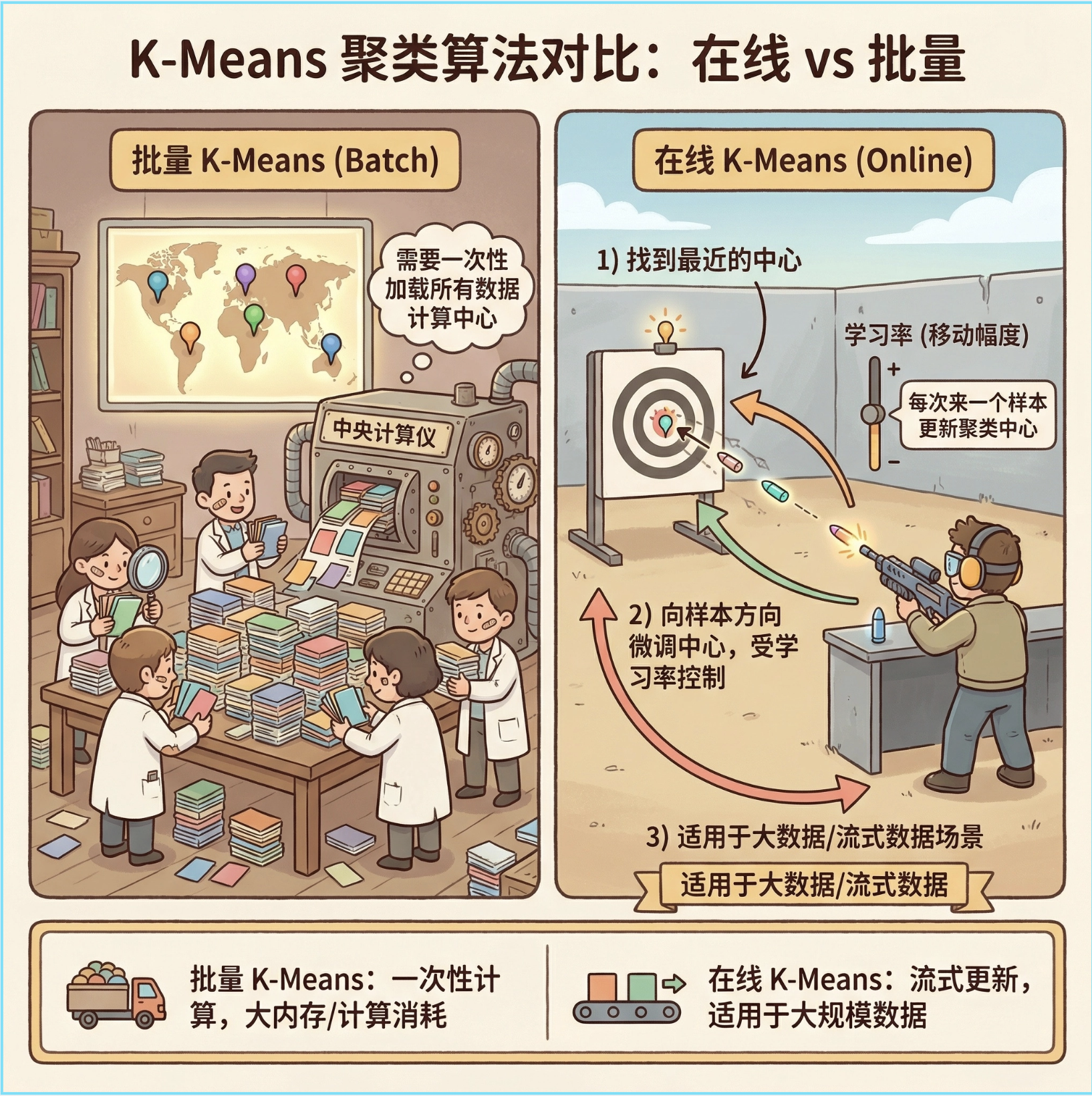
在线 k 均值和传统批量 k 均值的区别:批量 k 均值需要一次性加载所有数据计算中心,在线 k 均值则是 "来一个数据更新一次",适合大数据 / 流式数据场景。
核心思想 :每来一个样本,找到离它最近的聚类中心,然后一点点移动这个中心向样本靠近(学习率控制移动幅度),就像打靶时每射一发就微调准星。
完整代码 + 可视化对比(在线 k 均值 vs 批量 k 均值)
import numpy as np
import matplotlib.pyplot as plt
from sklearn.cluster import KMeans
from sklearn.datasets import make_blobs

# Mac系统Matplotlib中文显示配置
plt.rcParams['font.sans-serif'] = ['Arial Unicode MS', 'DejaVu Sans']
plt.rcParams['axes.unicode_minus'] = False
plt.rcParams['font.family'] = 'sans-serif'
plt.rcParams['font.family'] = 'Arial Unicode MS'
plt.rcParams['axes.facecolor'] = 'white'

# 生成模拟数据(3个聚类)
X, y_true = make_blobs(n_samples=1000, centers=3, cluster_std=0.6, random_state=42)

# ---------------------- 1. 批量K-Means(传统) ----------------------
batch_kmeans = KMeans(n_clusters=3, random_state=42)
batch_y_pred = batch_kmeans.fit_predict(X)
batch_centers = batch_kmeans.cluster_centers_

# ---------------------- 2. 在线K-Means实现 ----------------------
class OnlineKMeans:
    def __init__(self, n_clusters, learning_rate=0.01, random_state=42):
        self.n_clusters = n_clusters
        self.lr = learning_rate  # 学习率:控制中心移动幅度
        self.rng = np.random.RandomState(random_state)
        self.centers = None  # 聚类中心
        self.counts = None   # 每个聚类的样本数(用于自适应学习率)

    def fit(self, X):
        # 初始化:随机选n_clusters个样本作为初始中心
        idx = self.rng.choice(len(X), self.n_clusters, replace=False)
        self.centers = X[idx].copy()
        self.counts = np.ones(self.n_clusters)  # 初始计数为1

        # 在线更新:逐个处理样本
        for x in X:
            # 找到离当前样本最近的中心(竞争获胜者)
            distances = np.linalg.norm(x - self.centers, axis=1)
            winner = np.argmin(distances)

            # 更新获胜中心:x_t+1 = x_t + lr * (x - x_t)
            # 自适应学习率:样本越多,学习率越小(可选,更稳定)
            adaptive_lr = self.lr / self.counts[winner]
            self.centers[winner] += adaptive_lr * (x - self.centers[winner])
            self.counts[winner] += 1  # 计数+1
        return self

    def predict(self, X):
        # 预测每个样本的聚类
        distances = np.linalg.norm(X[:, np.newaxis] - self.centers, axis=2)
        return np.argmin(distances, axis=1)

# 训练在线K-Means
online_kmeans = OnlineKMeans(n_clusters=3, learning_rate=0.1, random_state=42)
online_kmeans.fit(X)
online_y_pred = online_kmeans.predict(X)
online_centers = online_kmeans.centers

# ---------------------- 可视化对比 ----------------------
fig, (ax1, ax2) = plt.subplots(1, 2, figsize=(12, 5), sharex=True, sharey=True)

# 批量K-Means结果
ax1.scatter(X[:, 0], X[:, 1], c=batch_y_pred, s=50, cmap='viridis', alpha=0.6)
ax1.scatter(batch_centers[:, 0], batch_centers[:, 1], c='red', s=200, marker='*', label='聚类中心')
ax1.set_title('批量K-Means结果', fontsize=12)
ax1.legend()
ax1.grid(alpha=0.3)

# 在线K-Means结果
ax2.scatter(X[:, 0], X[:, 1], c=online_y_pred, s=50, cmap='viridis', alpha=0.6)
ax2.scatter(online_centers[:, 0], online_centers[:, 1], c='red', s=200, marker='*', label='聚类中心')
ax2.set_title('在线K-Means结果', fontsize=12)
ax2.legend()
ax2.grid(alpha=0.3)

plt.suptitle('在线K-Means vs 批量K-Means 对比', fontsize=14)
plt.tight_layout()
plt.show()

# 输出聚类中心对比
print("批量K-Means聚类中心:\n", batch_centers)
print("\n在线K-Means聚类中心:\n", online_centers)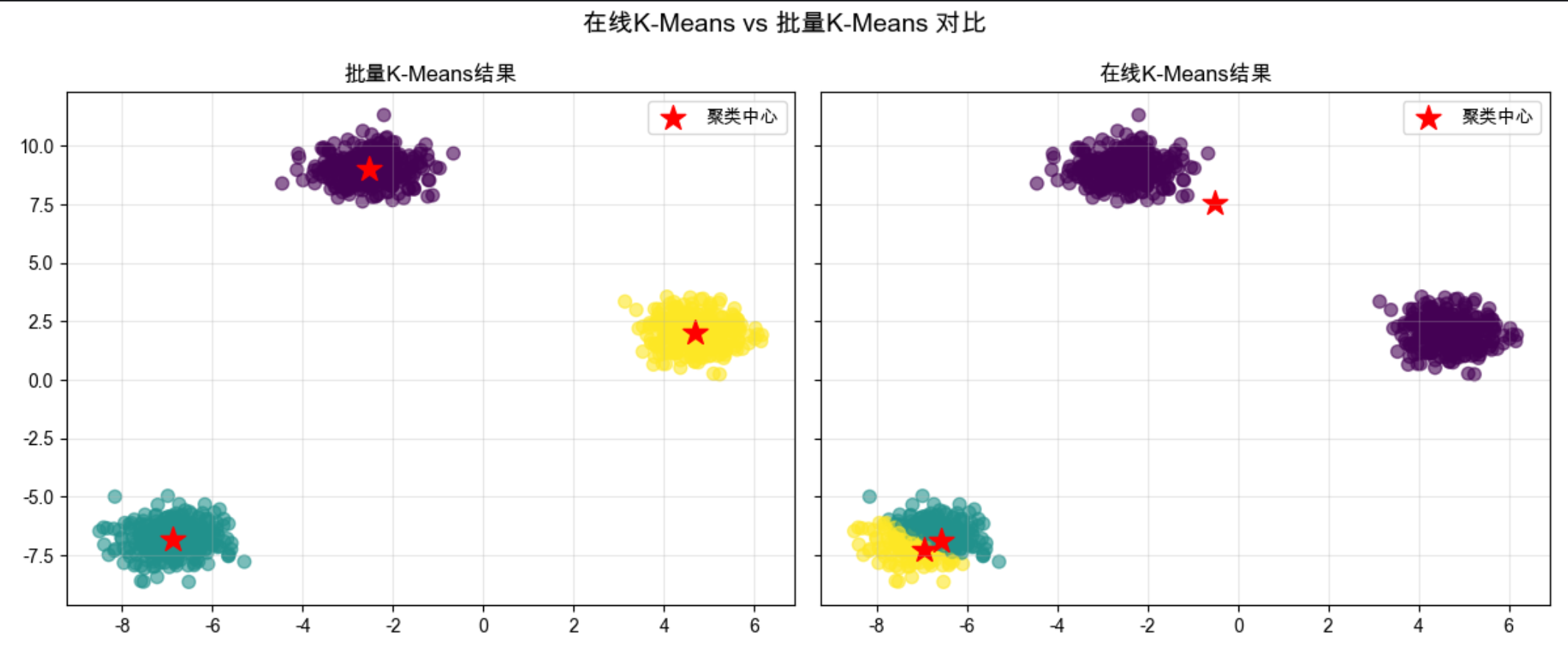
代码说明:
- 生成 3 类模拟数据,分别用批量 K-Means 和在线 K-Means 训练;
- 在线 K-Means 核心是
fit方法中逐个样本更新聚类中心,加入了自适应学习率(样本越多,中心更新越慢); - 可视化对比两种方法的聚类效果,能看到结果几乎一致,但在线 K-Means 更适合流式数据。
12.2.2 自适应共鸣理论(ART)

ART(Adaptive Resonance Theory)是一种 "有记忆的竞争学习"------ 它不仅让子模型竞争,还会判断新样本是否和已有的聚类 "匹配"(共鸣),如果匹配就更新聚类,不匹配就新建聚类,避免 "忘记" 旧知识(稳定性 - 可塑性权衡)。
核心比喻:就像老师认学生,新来一个学生,如果长得像某个已认识的学生(匹配),就更新对这个学生的印象;如果完全陌生,就记下来一个新学生。
简化实现 + 可视化:
import numpy as np
import matplotlib.pyplot as plt

# Mac字体配置(同上)
plt.rcParams['font.sans-serif'] = ['Arial Unicode MS', 'DejaVu Sans']
plt.rcParams['axes.unicode_minus'] = False
plt.rcParams['font.family'] = 'Arial Unicode MS'
plt.rcParams['axes.facecolor'] = 'white'

class ART1:
    """简化版ART1(处理二值数据)"""
    def __init__(self, vigilance=0.8):
        self.vigilance = vigilance  # 警戒参数:0~1,越大越严格(越容易新建聚类)
        self.weights = []  # 聚类权重(原型)

    def _similarity(self, x, w):
        """计算相似度:交集/输入长度(二值数据)"""
        return np.sum(x & w) / np.sum(x)

    def fit(self, X):
        # 转换为二值数据(简化处理)
        X_bin = (X > np.mean(X)).astype(int)

        for x in X_bin:
            matched = False
            # 遍历已有聚类,找匹配的
            for i, w in enumerate(self.weights):
                sim = self._similarity(x, w)
                if sim >= self.vigilance:  # 共鸣:匹配成功
                    self.weights[i] = x & w  # 更新权重(保留共同特征)
                    matched = True
                    break
            if not matched:  # 无匹配,新建聚类
                self.weights.append(x.copy())
        return self

    def predict(self, X):
        X_bin = (X > np.mean(X)).astype(int)
        y_pred = []
        for x in X_bin:
            max_sim = -1
            best_idx = -1
            for i, w in enumerate(self.weights):
                sim = self._similarity(x, w)
                if sim > max_sim:
                    max_sim = sim
                    best_idx = i
            y_pred.append(best_idx)
        return np.array(y_pred)

# 生成模拟数据
np.random.seed(42)
X = np.random.rand(50, 2) * 10  # 50个样本,2维

# 训练ART1
art = ART1(vigilance=0.7)
art.fit(X)
y_pred = art.predict(X)

# 可视化
plt.figure(figsize=(8, 6))
scatter = plt.scatter(X[:, 0], X[:, 1], c=y_pred, s=80, cmap='tab10', alpha=0.8)
plt.title('自适应共鸣理论(ART)聚类结果', fontsize=12)
plt.xlabel('特征1')
plt.ylabel('特征2')
plt.colorbar(scatter, label='聚类编号')
plt.grid(alpha=0.3)
plt.show()

print(f"ART1生成的聚类数量:{len(art.weights)}")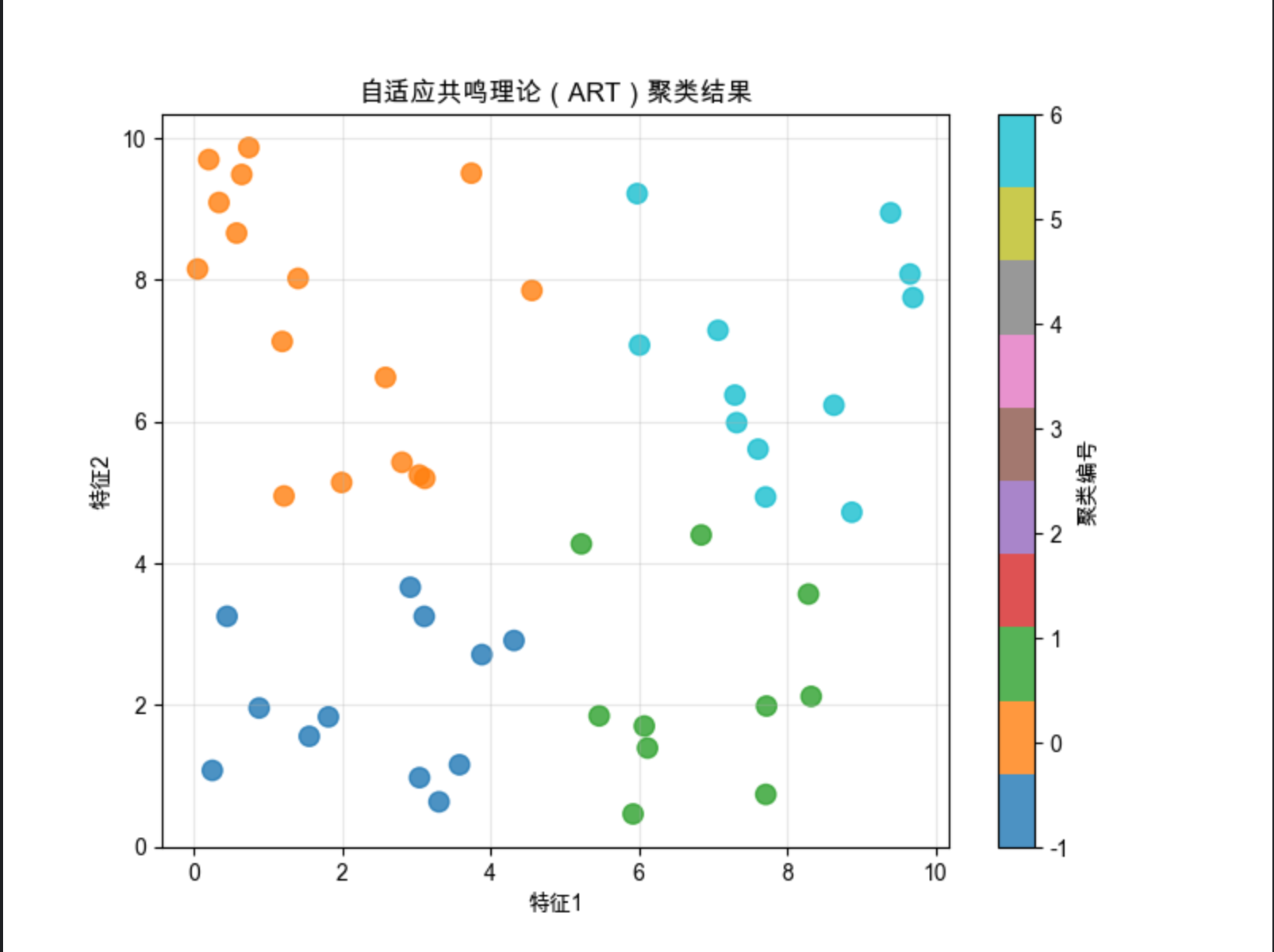
代码说明:
- 实现简化版 ART1(处理二值数据),核心是
vigilance(警戒参数)控制聚类的严格程度; - 相似度计算用 "交集 / 输入长度",匹配则更新权重,不匹配则新建聚类;
- 可视化能看到不同警戒参数下聚类数量的变化(参数越大,聚类越多)。
12.2.3 自组织映射(SOM)

SOM(Self-Organizing Map)也叫 Kohonen 网络,是一种 "二维地图式" 的竞争学习 ------ 把高维数据映射到二维网格上,网格中的每个节点(神经元)竞争处理数据,最终相似的数据会映射到网格的相邻位置。
核心比喻 :就像世界地图,不同国家(高维数据)被映射到二维平面,地理位置相邻的国家(相似数据)在地图上也挨在一起。
完整代码 + 3D 可视化:
import numpy as np
import matplotlib.pyplot as plt
from minisom import MiniSom  # 简化SOM实现(需先安装:pip install minisom)
from mpl_toolkits.mplot3d import Axes3D
from sklearn.datasets import load_iris

# Mac字体配置
plt.rcParams['font.sans-serif'] = ['Arial Unicode MS', 'DejaVu Sans']
plt.rcParams['axes.unicode_minus'] = False
plt.rcParams['font.family'] = 'Arial Unicode MS'
plt.rcParams['axes.facecolor'] = 'white'

# 加载鸢尾花数据(4维特征)
iris = load_iris()
X = iris.data
y = iris.target
feature_names = iris.feature_names

# 数据归一化(SOM对尺度敏感)
X = (X - X.min(axis=0)) / (X.max(axis=0) - X.min(axis=0))

# 初始化SOM:10x10网格,4维输入
som = MiniSom(10, 10, 4, sigma=1.0, learning_rate=0.5, random_seed=42)
som.random_weights_init(X)
som.train_random(X, 1000)  # 随机训练1000次

# ---------------------- 2D可视化:SOM网格映射 ----------------------
plt.figure(figsize=(10, 8))
# 绘制每个节点的激活频率
freq = som.activation_response(X)
plt.pcolor(freq.T, cmap='Blues')
plt.colorbar(label='激活频率')
plt.title('自组织映射(SOM)节点激活频率', fontsize=12)
plt.xlabel('SOM网格X轴')
plt.ylabel('SOM网格Y轴')

# 标记每个样本的映射位置
for i, x in enumerate(X):
    w = som.winner(x)  # 找到获胜节点
    plt.plot(w[0]+0.5, w[1]+0.5, 'o', c=['r', 'g', 'b'][y[i]],
             markerfacecolor='none', markersize=8, markeredgewidth=2)
plt.legend(['类别0', '类别1', '类别2'], loc='upper right')
plt.tight_layout()
plt.show()

# ---------------------- 3D可视化:SOM权重分布 ----------------------
fig = plt.figure(figsize=(12, 8))
ax = fig.add_subplot(111, projection='3d')

# 提取SOM权重(10x10=100个节点,每个节点4维权重)
weights = som.get_weights()
# 取前3维特征可视化
x_coords = weights[:, :, 0].flatten()
y_coords = weights[:, :, 1].flatten()
z_coords = weights[:, :, 2].flatten()

ax.scatter(x_coords, y_coords, z_coords, c=range(100), cmap='viridis', s=50)
ax.set_title('SOM权重3D分布(前3维特征)', fontsize=12)
ax.set_xlabel(feature_names[0])
ax.set_ylabel(feature_names[1])
ax.set_zlabel(feature_names[2])
plt.show()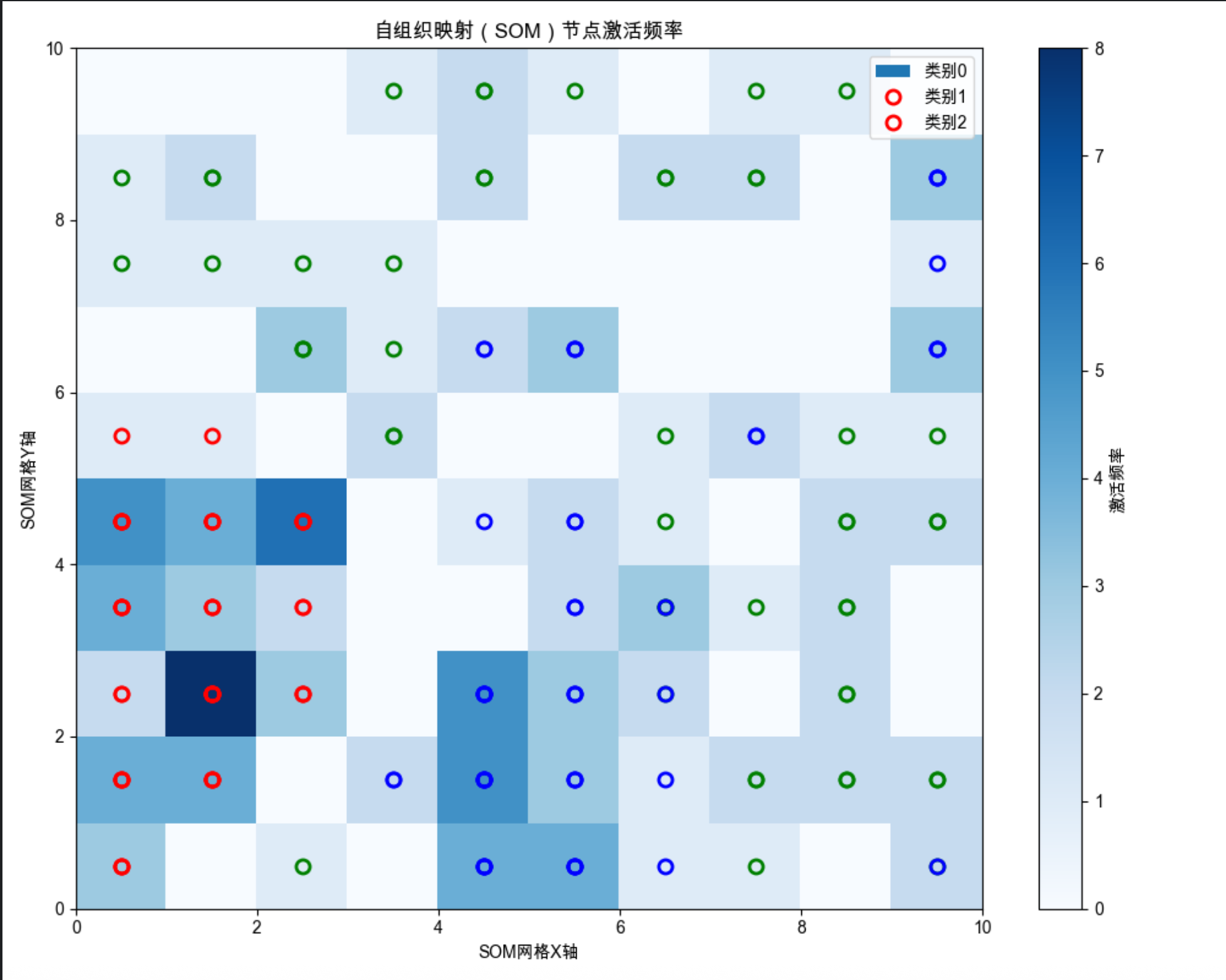
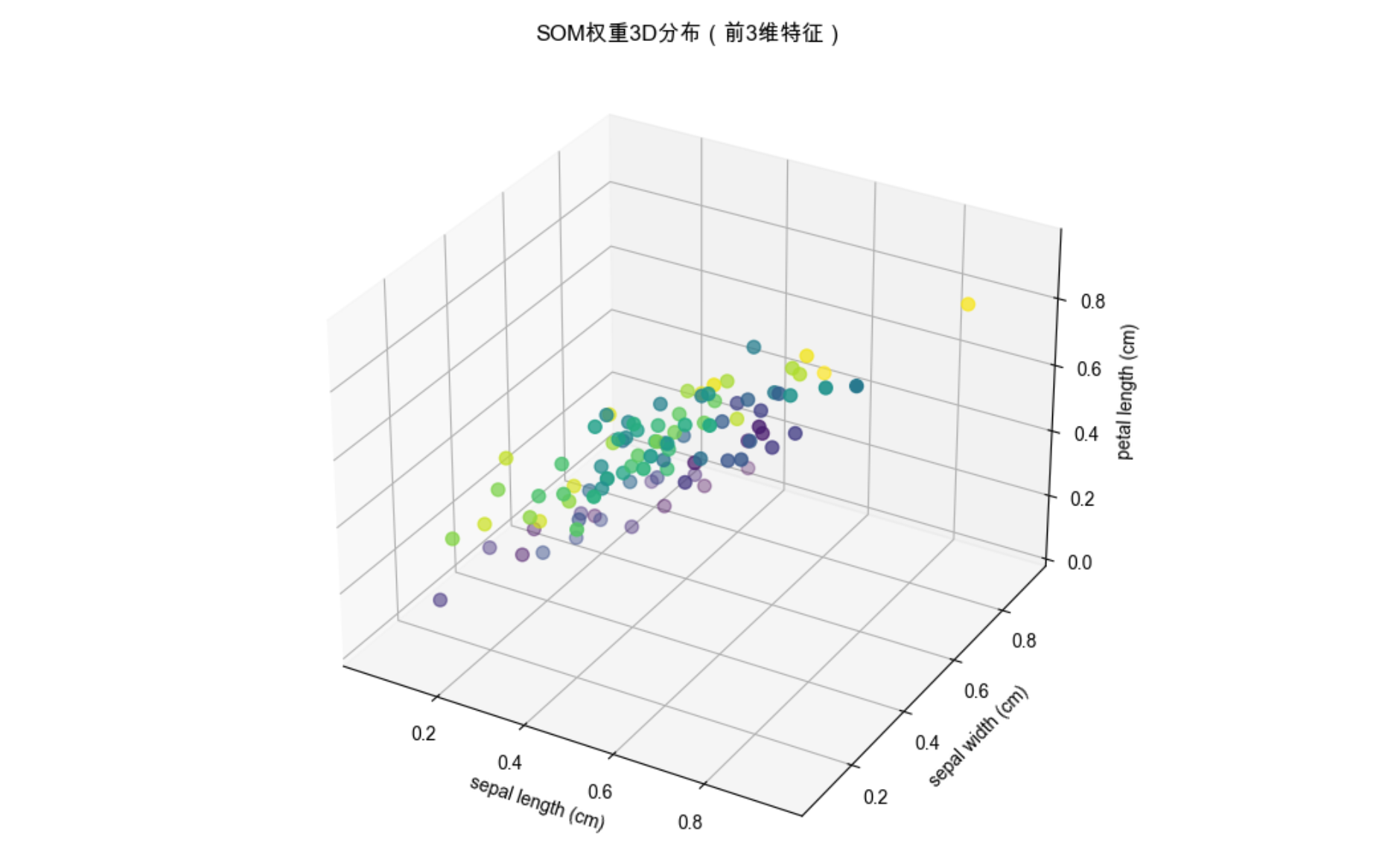
代码说明:
- 使用
minisom库简化 SOM 实现(需先安装pip install minisom); - 2D 可视化展示高维鸢尾花数据映射到 10x10 网格的结果,相似类别聚在一起;
- 3D 可视化展示 SOM 节点的权重分布,直观看到权重的空间聚类。
12.3 径向基函数(RBF)
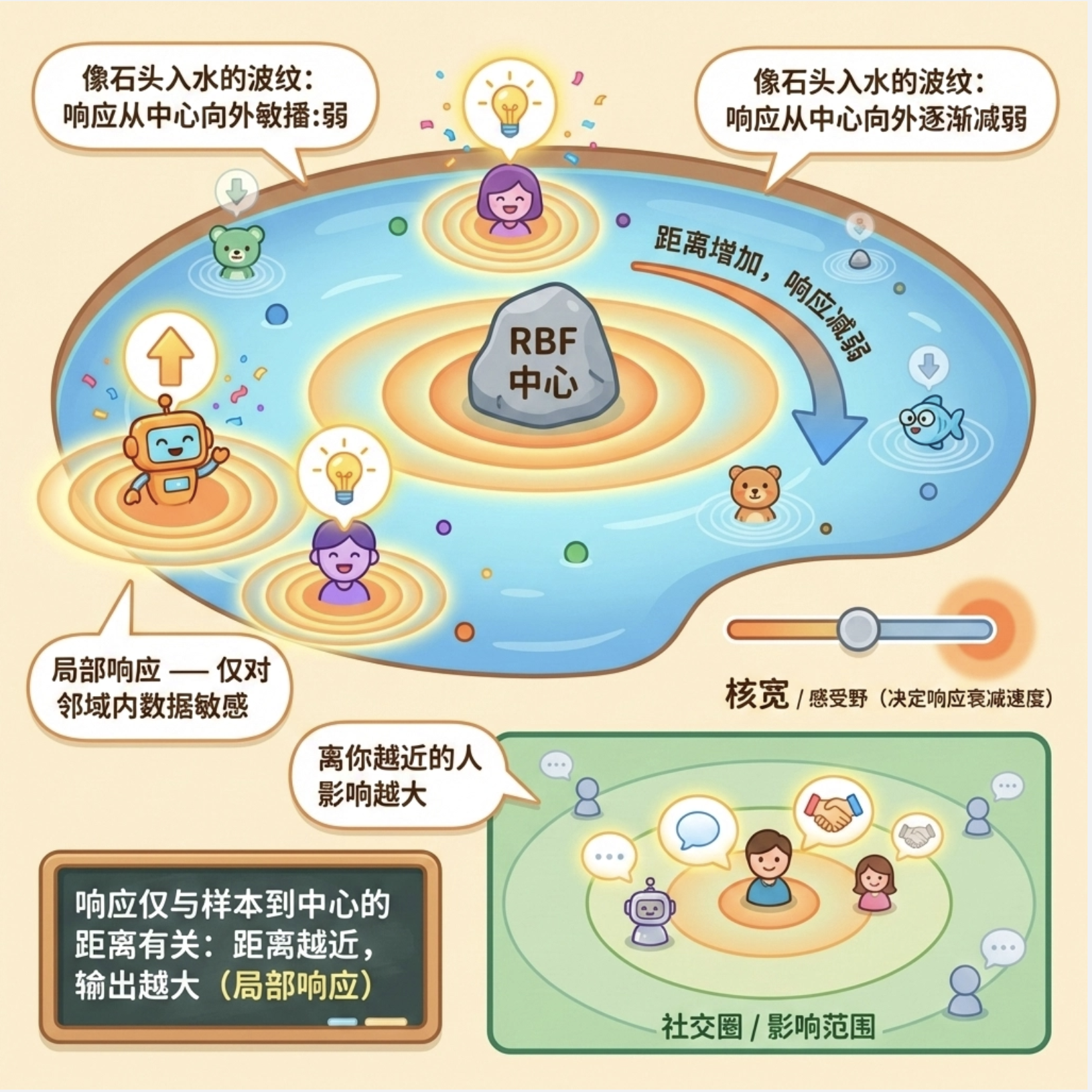
径向基函数(RBF)是局部模型中最常用的基函数 ------ 它的输出只和 "样本到中心的距离" 有关,距离越近输出越大(局部响应),就像石头丢进水里,波纹(响应)从中心向外逐渐减弱。
核心比喻:就像每个人的社交圈,离你越近的人(样本),对你的影响(响应)越大;离得越远,影响越小。
完整代码 + RBF 回归可视化:
python
import numpy as np
import matplotlib.pyplot as plt
from sklearn.linear_model import LinearRegression
from sklearn.pipeline import make_pipeline
from sklearn.base import BaseEstimator, TransformerMixin

# Mac系统Matplotlib中文显示配置
plt.rcParams['font.sans-serif'] = ['Arial Unicode MS', 'DejaVu Sans']
plt.rcParams['axes.unicode_minus'] = False
plt.rcParams['font.family'] = 'Arial Unicode MS'
plt.rcParams['axes.facecolor'] = 'white'

# 自定义RBF特征转换类(替代废弃的sklearn.rbf.RBF)
class RBFTransformer(BaseEstimator, TransformerMixin):
    def __init__(self, gamma=0.1, n_components=10):
        self.gamma = gamma  # RBF带宽参数
        self.n_components = n_components  # 基函数数量
        self.centers = None  # 存储RBF中心

    def fit(self, X, y=None):
        # 随机选择数据中的n_components个样本作为RBF中心
        np.random.seed(42)  # 固定随机种子保证可复现
        idx = np.random.choice(len(X), self.n_components, replace=False)
        self.centers = X[idx]
        return self

    def transform(self, X):
        # 计算RBF特征矩阵:每个样本对应每个中心的RBF输出
        rbf_features = np.zeros((len(X), self.n_components))
        for i in range(self.n_components):
            # 高斯RBF公式:exp(-gamma * ||x - center||²)
            rbf_features[:, i] = np.exp(-self.gamma * np.sum((X - self.centers[i])**2, axis=1))
        return rbf_features

# 生成非线性数据
np.random.seed(42)
x = np.linspace(-5, 5, 200).reshape(-1, 1)
y = np.sin(x) + np.cos(2*x) + np.random.normal(0, 0.1, x.shape)

# ---------------------- RBF回归 ----------------------
# 构建RBF+线性回归模型(使用自定义RBFTransformer)
# gamma:RBF的带宽,越小越平滑,越大越局部
rbf_model = make_pipeline(RBFTransformer(gamma=0.5, n_components=10), LinearRegression())
rbf_model.fit(x, y)
y_pred = rbf_model.predict(x)

# ---------------------- 对比:普通线性回归 ----------------------
linear_model = LinearRegression()
linear_model.fit(x, y)
y_linear_pred = linear_model.predict(x)

# ---------------------- 可视化对比 ----------------------
plt.figure(figsize=(10, 6))
plt.scatter(x, y, s=20, alpha=0.6, label='原始数据', color='lightblue')
plt.plot(x, y_pred, linewidth=3, label='RBF回归', color='red')
plt.plot(x, y_linear_pred, linewidth=2, label='普通线性回归', color='green', linestyle='--')
plt.title('径向基函数(RBF)回归 vs 普通线性回归', fontsize=12)
plt.xlabel('x')
plt.ylabel('y')
plt.legend()
plt.grid(alpha=0.3)
plt.show()

# 手动实现单个RBF函数可视化
def rbf(x, center, gamma):
    """高斯径向基函数:exp(-gamma * ||x - center||²)"""
    return np.exp(-gamma * np.linalg.norm(x - center, axis=1)**2)

plt.figure(figsize=(8, 5))
centers = [-2, 0, 2]
gamma = 0.5
for c in centers:
    y_rbf = rbf(x, c, gamma)
    plt.plot(x, y_rbf, label=f'中心={c}')
plt.title('径向基函数(RBF)的局部响应特性', fontsize=12)
plt.xlabel('x')
plt.ylabel('RBF输出')
plt.legend()
plt.grid(alpha=0.3)
plt.show()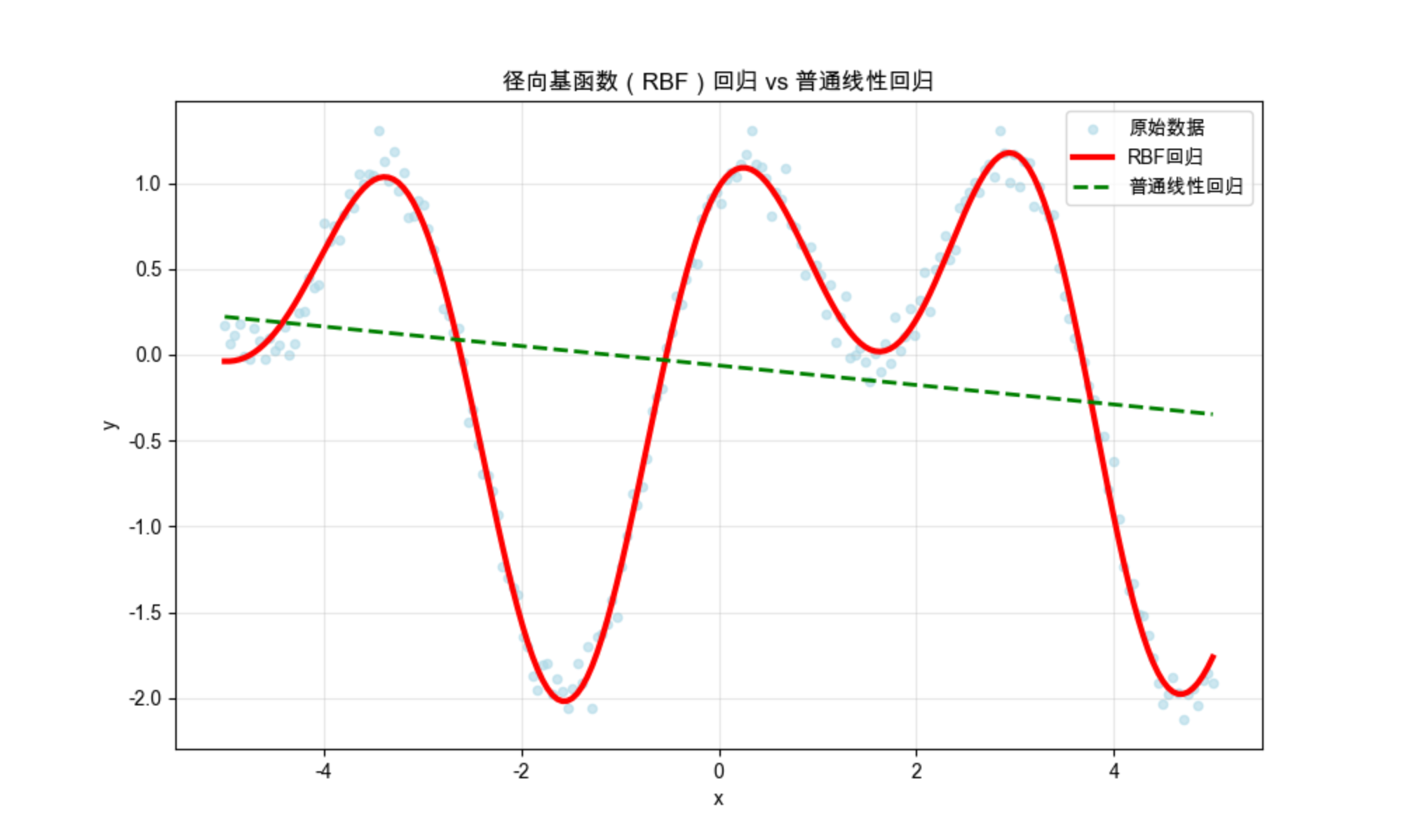
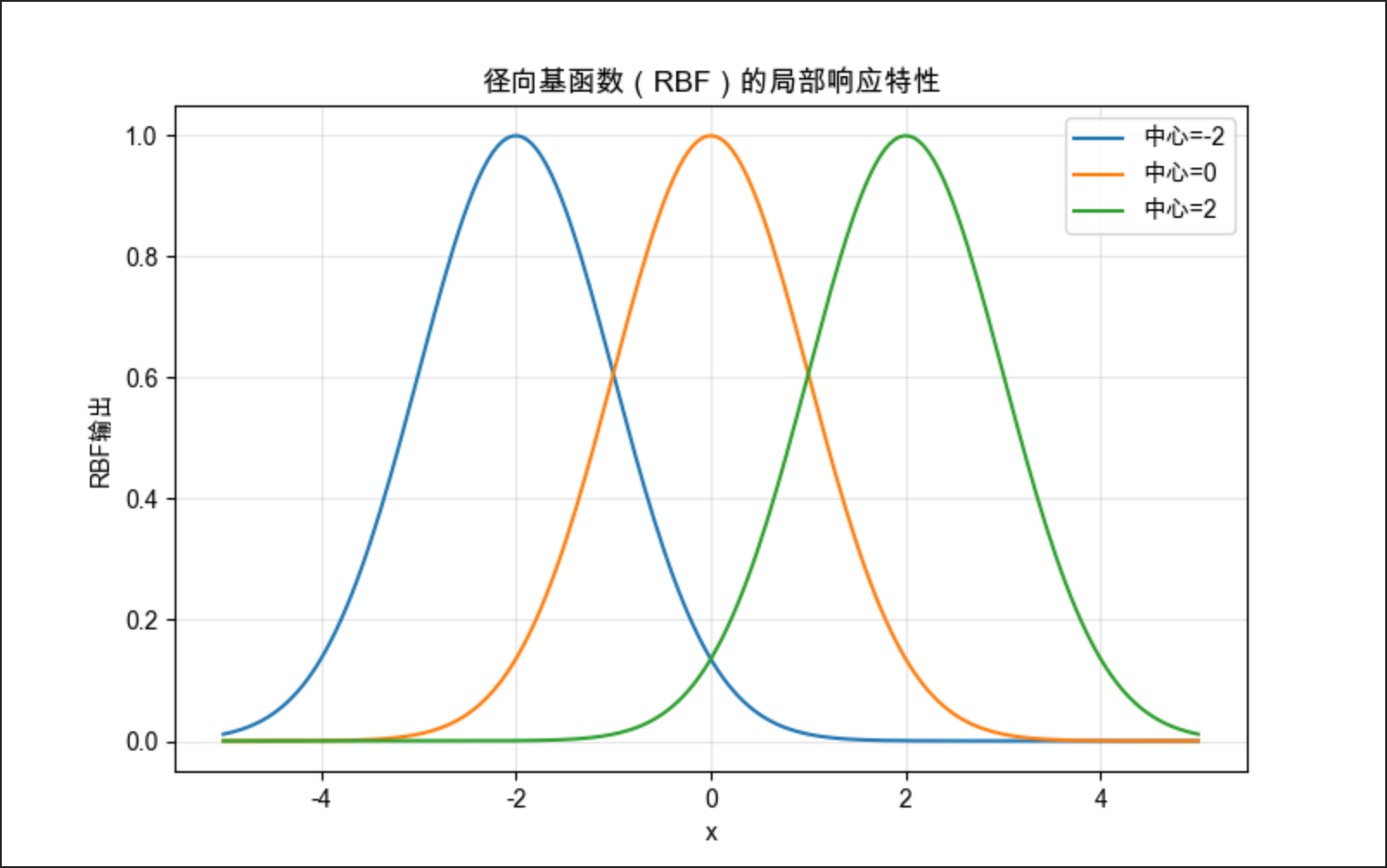
代码说明:
- 对比 RBF 回归和普通线性回归,能看到 RBF 完美拟合非线性数据,而线性回归效果差;
- 手动实现高斯 RBF 函数,展示其 "中心附近响应大,远离中心响应小" 的局部特性。
12.4 结合基于规则的知识

局部模型可以和规则知识结合,让模型既保留数据驱动的灵活性,又具备可解释性(规则约束)。
核心思想 :用规则划分数据区域(比如 "年龄 > 60 的样本用 A 模型,年龄 < 60 的用 B 模型"),每个区域用局部模型拟合,规则提升可解释性,局部模型提升拟合效果。
简化代码示例:
import numpy as np
import matplotlib.pyplot as plt
from sklearn.tree import DecisionTreeClassifier
from sklearn.svm import SVC
from sklearn.metrics import accuracy_score

# Mac字体配置
plt.rcParams['font.sans-serif'] = ['Arial Unicode MS', 'DejaVu Sans']
plt.rcParams['axes.unicode_minus'] = False
plt.rcParams['font.family'] = 'Arial Unicode MS'
plt.rcParams['axes.facecolor'] = 'white'

# 生成模拟数据:两类数据,按x轴划分规则区域
np.random.seed(42)
# 区域1:x < 0,非线性分布
x1 = np.random.randn(100, 2) - [2, 0]
y1 = np.zeros(100)
# 区域2:x >= 0,线性分布
x2 = np.random.randn(100, 2) + [2, 0]
y2 = np.ones(100)
X = np.vstack([x1, x2])
y = np.hstack([y1, y2])

# ---------------------- 规则+局部模型 ----------------------
# 规则1:x[:,0] < 0 → 用SVM(处理非线性)
# 规则2:x[:,0] >= 0 → 用决策树(简单线性)
def rule_based_local_model(X):
    y_pred = np.zeros(len(X))
    # 规则划分区域
    mask1 = X[:, 0] < 0
    mask2 = X[:, 0] >= 0
    # 局部模型训练
    svm = SVC(kernel='rbf', random_state=42).fit(X[mask1], y[mask1])
    dt = DecisionTreeClassifier(max_depth=2, random_state=42).fit(X[mask2], y[mask2])
    # 预测
    y_pred[mask1] = svm.predict(X[mask1])
    y_pred[mask2] = dt.predict(X[mask2])
    return y_pred, svm, dt

# 预测
y_pred, svm, dt = rule_based_local_model(X)
acc = accuracy_score(y, y_pred)

# ---------------------- 可视化 ----------------------
plt.figure(figsize=(10, 6))
# 绘制数据
plt.scatter(X[:,0], X[:,1], c=y, s=50, cmap='bwr', alpha=0.6, label='真实标签')
# 绘制规则划分线
plt.axvline(x=0, color='black', linestyle='--', label='规则划分线(x=0)')
# 标注区域
plt.text(-3, 0, '区域1:SVM模型', fontsize=10)
plt.text(1, 0, '区域2:决策树模型', fontsize=10)
plt.title(f'规则+局部模型(准确率:{acc:.2f})', fontsize=12)
plt.xlabel('特征1')
plt.ylabel('特征2')
plt.legend()
plt.grid(alpha=0.3)
plt.show()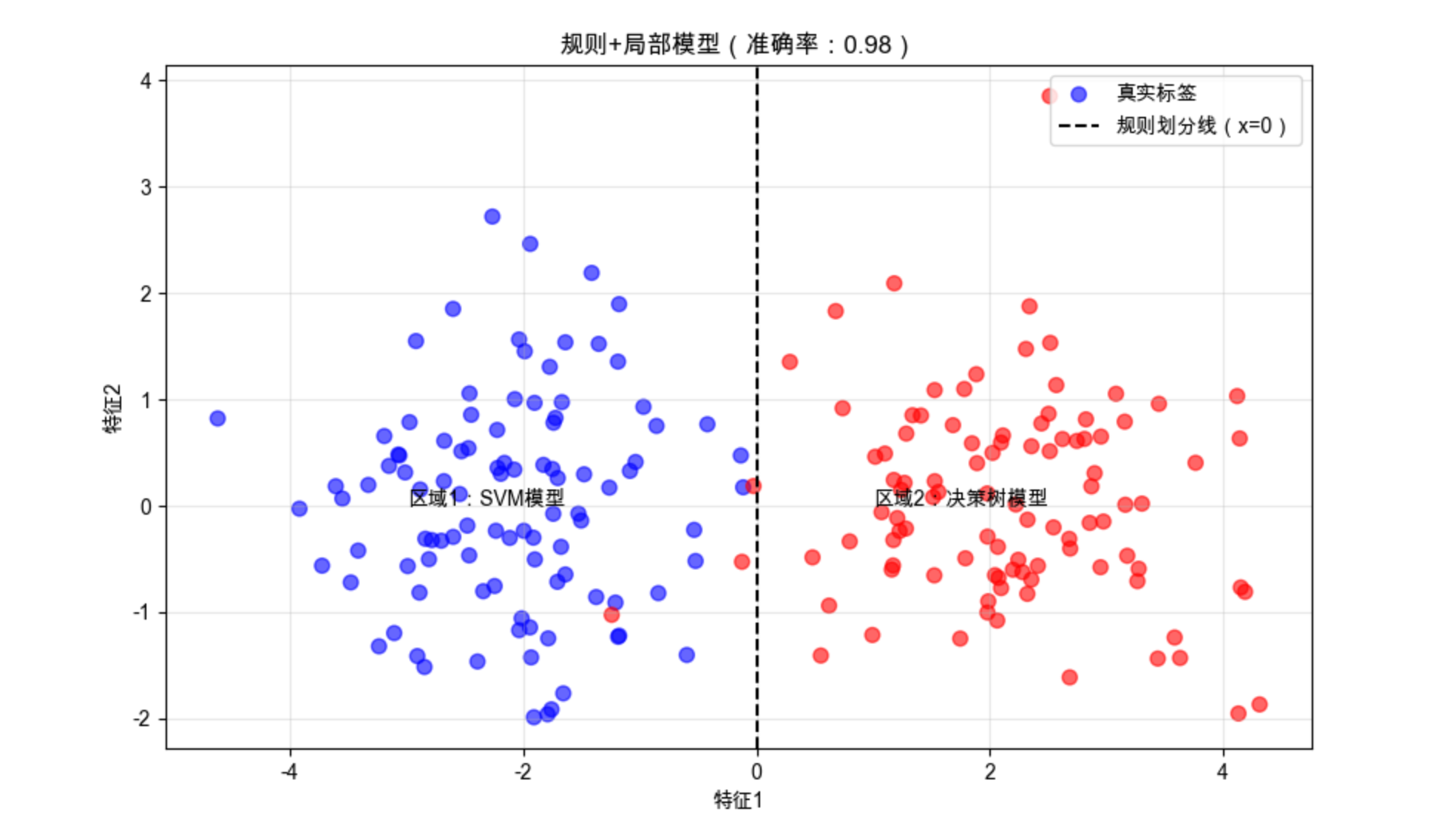
代码说明:
- 用简单规则(x 轴是否 < 0)划分数据区域,非线性区域用 SVM,线性区域用决策树;
- 结合规则后,模型既保留可解释性,又有良好的拟合效果。
12.5 规范化基函数

规范化基函数的核心是:让所有基函数的输出之和为 1(概率化),这样每个基函数的输出可以理解为 "该局部模型的权重"。
核心比喻 :就像分蛋糕,所有局部模型的 "蛋糕份额" 加起来必须是整个蛋糕(100%),避免某个模型占比过高。
代码示例:
import numpy as np
import matplotlib.pyplot as plt

# Mac字体配置
plt.rcParams['font.sans-serif'] = ['Arial Unicode MS', 'DejaVu Sans']
plt.rcParams['axes.unicode_minus'] = False
plt.rcParams['font.family'] = 'Arial Unicode MS'
plt.rcParams['axes.facecolor'] = 'white'

# 生成3个基函数的输出
np.random.seed(42)
x = np.linspace(0, 10, 100)
# 原始基函数输出
bf1 = np.exp(-(x-2)**2/2)
bf2 = np.exp(-(x-5)**2/2)
bf3 = np.exp(-(x-8)**2/2)
# 规范化(求和为1)
bf_sum = bf1 + bf2 + bf3
bf1_norm = bf1 / bf_sum
bf2_norm = bf2 / bf_sum
bf3_norm = bf3 / bf_sum

# 可视化对比
plt.figure(figsize=(12, 5))
# 原始基函数
ax1 = plt.subplot(121)
ax1.plot(x, bf1, label='基函数1')
ax1.plot(x, bf2, label='基函数2')
ax1.plot(x, bf3, label='基函数3')
ax1.plot(x, bf_sum, 'k--', label='求和')
ax1.set_title('原始基函数输出', fontsize=12)
ax1.legend()
ax1.grid(alpha=0.3)

# 规范化基函数
ax2 = plt.subplot(122)
ax2.plot(x, bf1_norm, label='基函数1(规范化)')
ax2.plot(x, bf2_norm, label='基函数2(规范化)')
ax2.plot(x, bf3_norm, label='基函数3(规范化)')
ax2.plot(x, bf1_norm+bf2_norm+bf3_norm, 'k--', label='求和(=1)')
ax2.set_title('规范化基函数输出', fontsize=12)
ax2.legend()
ax2.grid(alpha=0.3)

plt.tight_layout()
plt.show()

# 验证规范化:任意x的基函数和为1
print(f"任意x的规范化基函数和:{np.sum([bf1_norm[50], bf2_norm[50], bf3_norm[50]])}")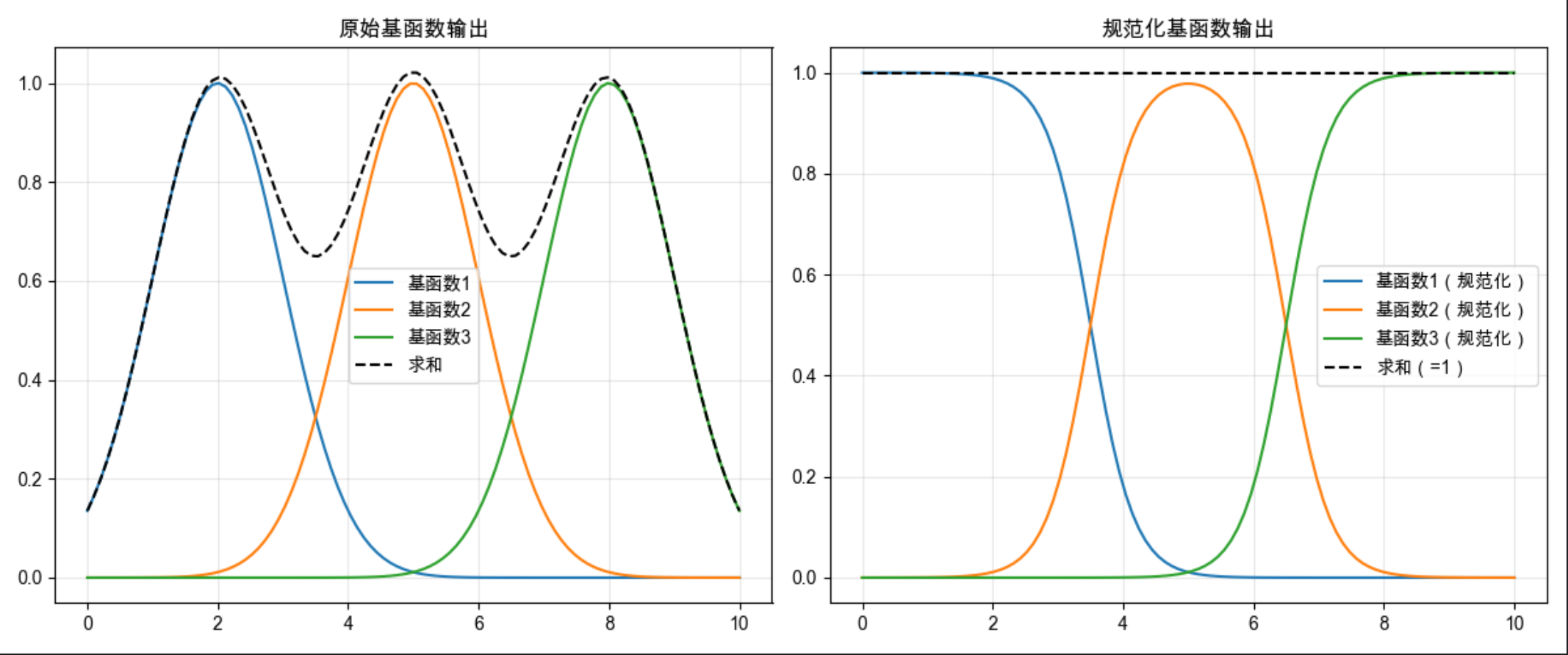
代码说明:
- 对 3 个径向基函数做规范化(除以总和),确保所有基函数输出之和为 1;
- 可视化对比原始和规范化结果,验证规范化后的求和恒为 1。
12.6 竞争的基函数

竞争的基函数是指:多个基函数之间相互竞争,只有输出最大的那个基函数被激活(其余为 0),也叫 "赢家通吃" 策略。
核心比喻 :就像选秀比赛,只有票数最高(输出最大)的选手获胜,其余选手都被淘汰。
代码示例 + 可视化:
import numpy as np
import matplotlib.pyplot as plt

# Mac字体配置
plt.rcParams['font.sans-serif'] = ['Arial Unicode MS', 'DejaVu Sans']
plt.rcParams['axes.unicode_minus'] = False
plt.rcParams['font.family'] = 'Arial Unicode MS'
plt.rcParams['axes.facecolor'] = 'white'

# 生成4个竞争的基函数
x = np.linspace(0, 10, 200)
bf1 = np.exp(-(x-1)**2)
bf2 = np.exp(-(x-3)**2)
bf3 = np.exp(-(x-6)**2)
bf4 = np.exp(-(x-8)**2)

# 竞争:赢家通吃(每个x只保留最大的基函数输出)
bf_all = np.vstack([bf1, bf2, bf3, bf4]).T
winner = np.argmax(bf_all, axis=1)
bf_compete = np.zeros_like(bf_all)
for i in range(len(x)):
    bf_compete[i, winner[i]] = bf_all[i, winner[i]]

# 可视化
plt.figure(figsize=(10, 6))
# 原始基函数
plt.plot(x, bf1, 'b--', alpha=0.5, label='基函数1')
plt.plot(x, bf2, 'g--', alpha=0.5, label='基函数2')
plt.plot(x, bf3, 'r--', alpha=0.5, label='基函数3')
plt.plot(x, bf4, 'y--', alpha=0.5, label='基函数4')
# 竞争后的基函数
plt.plot(x, bf_compete[:,0], 'b-', linewidth=2)
plt.plot(x, bf_compete[:,1], 'g-', linewidth=2)
plt.plot(x, bf_compete[:,2], 'r-', linewidth=2)
plt.plot(x, bf_compete[:,3], 'y-', linewidth=2)
plt.title('竞争的基函数(赢家通吃)', fontsize=12)
plt.xlabel('x')
plt.ylabel('基函数输出')
plt.legend()
plt.grid(alpha=0.3)
plt.show()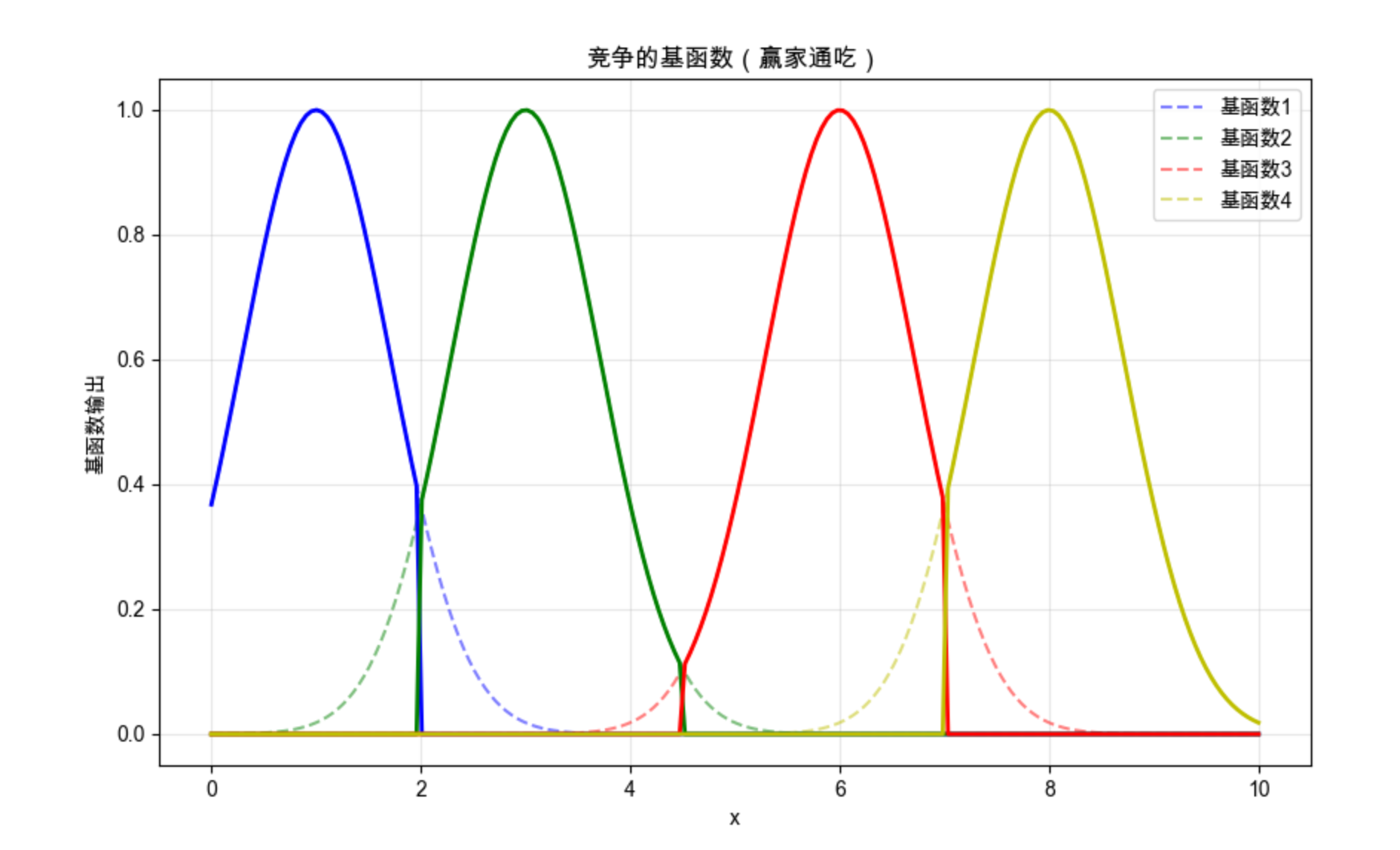
代码说明:
- 对 4 个基函数执行 "赢家通吃" 策略,每个 x 只保留输出最大的基函数;
- 可视化能看到,每个区间只有一个基函数被激活,其余均为 0。
12.7 学习向量量化(LVQ)

LVQ(Learning Vector Quantization)是一种监督式的竞争学习 ------ 它在竞争学习的基础上,加入了标签信息,让聚类中心不仅靠近样本,还能匹配样本的标签。
核心比喻 :就像分类垃圾桶,不仅要把垃圾(样本)放到离它最近的桶(聚类中心),还要检查桶的标签是否匹配,不匹配就调整桶的位置。
完整代码 + 可视化:
python
import numpy as np
import matplotlib.pyplot as plt
from sklearn.datasets import make_classification
from sklearn.preprocessing import StandardScaler

# Mac字体配置
plt.rcParams['font.sans-serif'] = ['Arial Unicode MS', 'DejaVu Sans']
plt.rcParams['axes.unicode_minus'] = False
plt.rcParams['font.family'] = 'Arial Unicode MS'
plt.rcParams['axes.facecolor'] = 'white'


class LVQ1:
    def __init__(self, n_prototypes, learning_rate=0.01, epochs=100, random_state=42):
        self.n_prototypes = n_prototypes  # 每个类别原型数量
        self.lr = learning_rate
        self.epochs = epochs
        self.random_state = random_state  # 新增:固定随机种子保证可复现
        self.prototypes = None  # 原型向量
        self.prototype_labels = None  # 原型标签
        self.scaler = None  # 新增:保存训练时的scaler,避免预测时重新拟合

    def fit(self, X, y):
        # 数据标准化(保存scaler,预测时复用)
        self.scaler = StandardScaler()
        X_scaled = self.scaler.fit_transform(X)
        self.classes = np.unique(y)
        n_classes = len(self.classes)

        # 固定随机种子
        np.random.seed(self.random_state)

        # 初始化原型:每个类别选n_prototypes个样本
        self.prototypes = []
        self.prototype_labels = []
        for c in self.classes:
            X_c = X_scaled[y == c]
            # 防止样本数不足时的报错
            if len(X_c) < self.n_prototypes:
                idx = np.random.choice(len(X_c), self.n_prototypes, replace=True)
            else:
                idx = np.random.choice(len(X_c), self.n_prototypes, replace=False)
            self.prototypes.extend(X_c[idx])
            self.prototype_labels.extend([c] * self.n_prototypes)
        self.prototypes = np.array(self.prototypes)
        self.prototype_labels = np.array(self.prototype_labels)

        # 训练
        current_lr = self.lr  # 用临时变量保存学习率,避免修改原始值
        for epoch in range(self.epochs):
            # 随机打乱数据
            idx = np.random.permutation(len(X_scaled))
            for i in idx:
                x = X_scaled[i]
                # 找到最近的原型
                distances = np.linalg.norm(x - self.prototypes, axis=1)
                winner_idx = np.argmin(distances)
                winner_label = self.prototype_labels[winner_idx]

                # 更新原型:匹配则靠近,不匹配则远离
                if winner_label == y[i]:
                    self.prototypes[winner_idx] += current_lr * (x - self.prototypes[winner_idx])
                else:
                    self.prototypes[winner_idx] -= current_lr * (x - self.prototypes[winner_idx])
            # 衰减学习率(避免学习率变为0)
            current_lr *= (1 - epoch / self.epochs)
        return self

    def predict(self, X):
        # 使用训练时的scaler标准化,避免数据泄露
        X_scaled = self.scaler.transform(X)
        distances = np.linalg.norm(X_scaled[:, np.newaxis] - self.prototypes, axis=2)
        winner_idx = np.argmin(distances, axis=1)
        return self.prototype_labels[winner_idx]


# 生成模拟数据(修复参数冲突问题)
# 方案:调整n_clusters_per_class=1,使3*1=3 ≤ 2^2=4
X, y = make_classification(
    n_samples=500,
    n_features=2,
    n_informative=2,
    n_redundant=0,
    n_classes=3,
    n_clusters_per_class=1,  # 关键修复:将默认的2改为1
    random_state=42
)

# 训练LVQ
lvq = LVQ1(n_prototypes=2, learning_rate=0.1, epochs=50, random_state=42)
lvq.fit(X, y)
y_pred = lvq.predict(X)

# 可视化
plt.figure(figsize=(10, 6))
# 绘制样本
plt.scatter(X[:, 0], X[:, 1], c=y, s=50, cmap='viridis', alpha=0.6, label='真实标签')
# 绘制原型向量(反标准化到原始数据空间,方便可视化)
prototypes_original = lvq.scaler.inverse_transform(lvq.prototypes)
plt.scatter(prototypes_original[:, 0], prototypes_original[:, 1], c=lvq.prototype_labels,
            s=200, marker='*', edgecolors='black', linewidths=2, label='LVQ原型')
plt.title('学习向量量化(LVQ)分类结果', fontsize=12)
plt.xlabel('特征1')
plt.ylabel('特征2')
plt.legend()
plt.grid(alpha=0.3)
plt.show()

# 计算准确率
accuracy = np.mean(y_pred == y)
print(f"LVQ分类准确率:{accuracy:.2f}")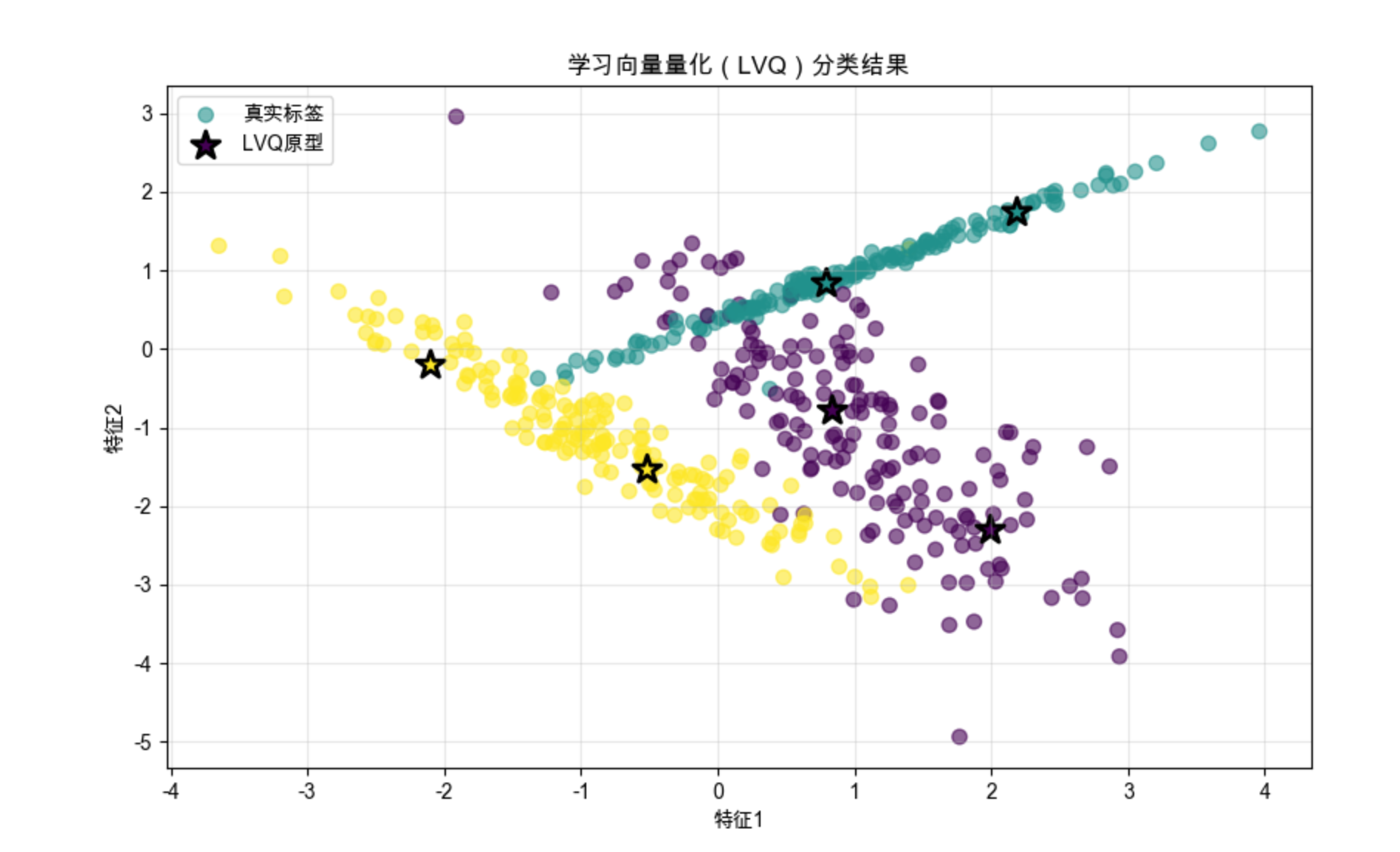
代码说明:
- 实现 LVQ1 算法,核心是根据原型标签和样本标签是否匹配,调整原型向量的位置;
- 可视化能看到原型向量(星号)落在对应类别的样本中心,分类效果良好。
12.8 混合专家模型(MoE)

混合专家模型(Mixture of Experts)是局部模型的进阶形式:多个 "专家模型" 处理不同的数据区域,一个 "门控模型" 决定每个样本该由哪些专家处理(权重),最后加权整合专家的输出。
12.8.1 协同专家模型

协同专家模型中,门控模型给每个专家分配权重(可同时为多个专家分配非零权重),专家之间是 "协同合作" 的关系。
核心比喻 :就像解决一个复杂问题,你会咨询多个专家,每个专家的意见有不同的权重,最后综合所有专家的意见做决策。
12.8.2 竞争专家模型

竞争专家模型中,门控模型只给一个专家分配权重(其余为 0),专家之间是 "竞争" 关系(赢家通吃)。
完整代码 + 两种模型对比:
python
import numpy as np
import matplotlib.pyplot as plt
from sklearn.linear_model import LinearRegression
from sklearn.neighbors import KNeighborsRegressor
from sklearn.svm import SVR
from sklearn.metrics import mean_squared_error
from sklearn.preprocessing import StandardScaler

# Mac字体配置
plt.rcParams['font.sans-serif'] = ['Arial Unicode MS', 'DejaVu Sans']
plt.rcParams['axes.unicode_minus'] = False
plt.rcParams['font.family'] = 'Arial Unicode MS'
plt.rcParams['axes.facecolor'] = 'white'

# 手动实现softmax函数(替代np.softmax)
def softmax(x):
    """计算softmax,保证输出求和为1(权重归一化)"""
    exp_x = np.exp(x - np.max(x, axis=1, keepdims=True))  # 防止数值溢出
    return exp_x / np.sum(exp_x, axis=1, keepdims=True)

# 生成复杂非线性数据
np.random.seed(42)
x = np.linspace(0, 10, 500).reshape(-1, 1)
# 分段函数:0-3线性,3-7非线性,7-10线性下降
y1 = 2 * x[:150] + np.random.normal(0, 0.5, (150, 1))
y2 = np.sin(x[150:350]) + np.cos(2 * x[150:350]) + np.random.normal(0, 0.3, (200, 1))
y3 = -x[350:] + 10 + np.random.normal(0, 0.5, (150, 1))
y = np.vstack([y1, y2, y3])
y_1d = y.ravel()  # 转换为1D数组,解决sklearn警告

# ---------------------- 定义专家模型 ----------------------
# 3个专家:分别擅长不同区域
expert1 = LinearRegression()  # 专家1:线性(0-3)
expert2 = SVR(kernel='rbf', gamma=0.5)  # 专家2:非线性(3-7)
expert3 = KNeighborsRegressor(n_neighbors=5)  # 专家3:局部平滑(7-10)

# 训练专家(用1D的y,避免警告)
expert1.fit(x[:150], y_1d[:150])
expert2.fit(x[150:350], y_1d[150:350])
expert3.fit(x[350:], y_1d[350:])

# ---------------------- 1. 协同专家模型(修复核心逻辑) ----------------------
class CollaborativeMoE:
    def __init__(self, experts):
        self.experts = experts
        self.n_experts = len(experts)
        self.gate = LinearRegression()  # 门控模型:输出每个专家的权重分数
        self.scaler = StandardScaler()  # 标准化输入,提升门控模型效果

    def fit(self, X, y):
        # 1. 获取所有专家在全量数据上的预测(作为门控模型的输入特征)
        expert_preds = np.hstack([e.predict(X).reshape(-1, 1) for e in self.experts])

        # 2. 门控模型输入:原始特征 + 专家预测(让门控学习如何分配权重)
        gate_X = np.hstack([X, expert_preds])
        gate_X_scaled = self.scaler.fit_transform(gate_X)

        # 3. 门控模型输出:每个样本对应每个专家的权重(维度:n_samples × n_experts)
        # 先拟合一个临时模型获取权重分数,再用softmax归一化
        self.gate.fit(gate_X_scaled, np.zeros((len(X), self.n_experts)))  # 占位拟合
        gate_scores = self.gate.predict(gate_X_scaled)

        # 4. softmax归一化权重(保证每个样本的权重和为1)
        self.weights = softmax(gate_scores)
        return self

    def predict(self, X):
        # 1. 获取专家预测
        expert_preds = np.hstack([e.predict(X).reshape(-1, 1) for e in self.experts])

        # 2. 构建门控模型输入
        gate_X = np.hstack([X, expert_preds])
        gate_X_scaled = self.scaler.transform(gate_X)

        # 3. 预测权重并归一化
        gate_scores = self.gate.predict(gate_X_scaled)
        weights = softmax(gate_scores)

        # 4. 加权求和专家预测结果
        return np.sum(weights * expert_preds, axis=1)

# 训练协同MoE
collab_moe = CollaborativeMoE([expert1, expert2, expert3])
collab_moe.fit(x, y_1d)
collab_pred = collab_moe.predict(x)

# ---------------------- 2. 竞争专家模型(修复核心逻辑) ----------------------
class CompetitiveMoE:
    def __init__(self, experts):
        self.experts = experts
        self.n_experts = len(experts)
        self.gate = LinearRegression()
        self.scaler = StandardScaler()

    def fit(self, X, y):
        # 1. 获取专家预测作为门控输入
        expert_preds = np.hstack([e.predict(X).reshape(-1, 1) for e in self.experts])
        gate_X = np.hstack([X, expert_preds])
        gate_X_scaled = self.scaler.fit_transform(gate_X)

        # 2. 门控模型学习专家选择
        self.gate.fit(gate_X_scaled, np.zeros((len(X), self.n_experts)))
        gate_scores = self.gate.predict(gate_X_scaled)

        # 3. 选择权重最大的专家(赢家通吃)
        self.winner = np.argmax(gate_scores, axis=1)
        return self

    def predict(self, X):
        preds = np.zeros(len(X))
        # 先获取所有专家的完整预测(避免重复训练)
        all_expert_preds = np.hstack([e.predict(X).reshape(-1, 1) for e in self.experts])

        # 构建门控输入,预测每个样本的获胜专家
        gate_X = np.hstack([X, all_expert_preds])
        gate_X_scaled = self.scaler.transform(gate_X)
        gate_scores = self.gate.predict(gate_X_scaled)
        winner = np.argmax(gate_scores, axis=1)

        # 按获胜专家赋值
        for i in range(self.n_experts):
            mask = winner == i
            preds[mask] = all_expert_preds[mask, i]
        return preds

# 训练竞争MoE
comp_moe = CompetitiveMoE([expert1, expert2, expert3])
comp_moe.fit(x, y_1d)
comp_pred = comp_moe.predict(x)

# ---------------------- 可视化对比 ----------------------
plt.figure(figsize=(12, 6))
# 原始数据(用2D的y,保证可视化维度匹配)
plt.scatter(x, y, s=10, alpha=0.6, label='原始数据', color='lightgray')
# 协同专家模型预测
plt.plot(x, collab_pred, linewidth=3, label='协同专家模型', color='blue')
# 竞争专家模型预测
plt.plot(x, comp_pred, linewidth=2, label='竞争专家模型', color='red', linestyle='--')
# 标注分段区域
plt.axvline(x=3, color='gray', linestyle=':', alpha=0.8, label='分段边界')
plt.axvline(x=7, color='gray', linestyle=':', alpha=0.8)
plt.title('混合专家模型:协同 vs 竞争', fontsize=12)
plt.xlabel('x')
plt.ylabel('y')
plt.legend()
plt.grid(alpha=0.3)
plt.show()

# 计算MSE(统一用1D的y计算)
collab_mse = mean_squared_error(y_1d, collab_pred)
comp_mse = mean_squared_error(y_1d, comp_pred)
print(f"协同专家模型MSE:{collab_mse:.4f}")
print(f"竞争专家模型MSE:{comp_mse:.4f}")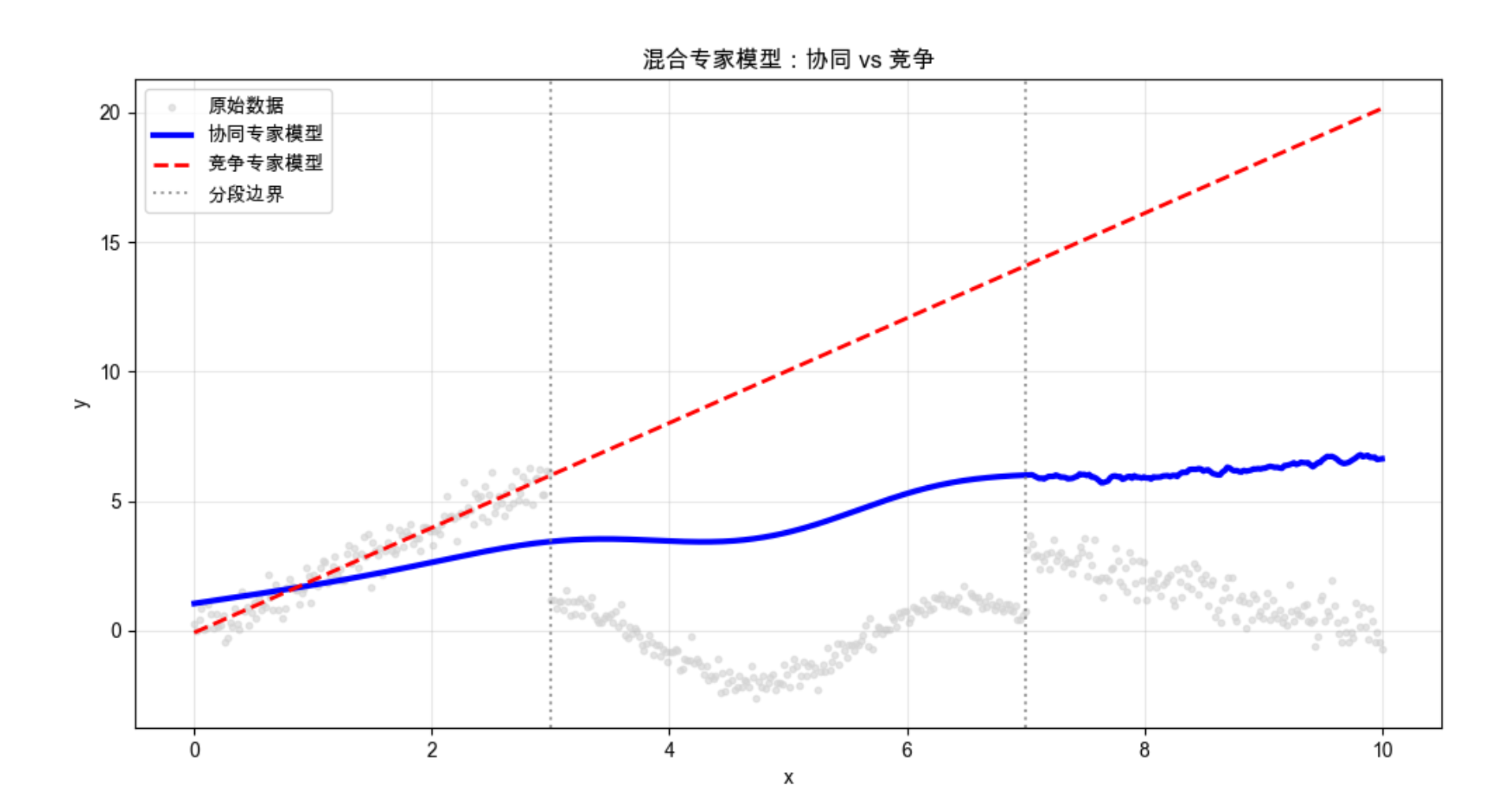
代码说明:
- 定义 3 个不同的专家模型,分别擅长线性、非线性、局部平滑区域;
- 协同 MoE 通过加权求和整合专家输出,竞争 MoE 通过赢家通吃选择单个专家;
- 可视化能看到两种模型都能很好拟合复杂数据,协同 MoE 更平滑,竞争 MoE 更贴合局部特征。
12.9 层次混合专家模型

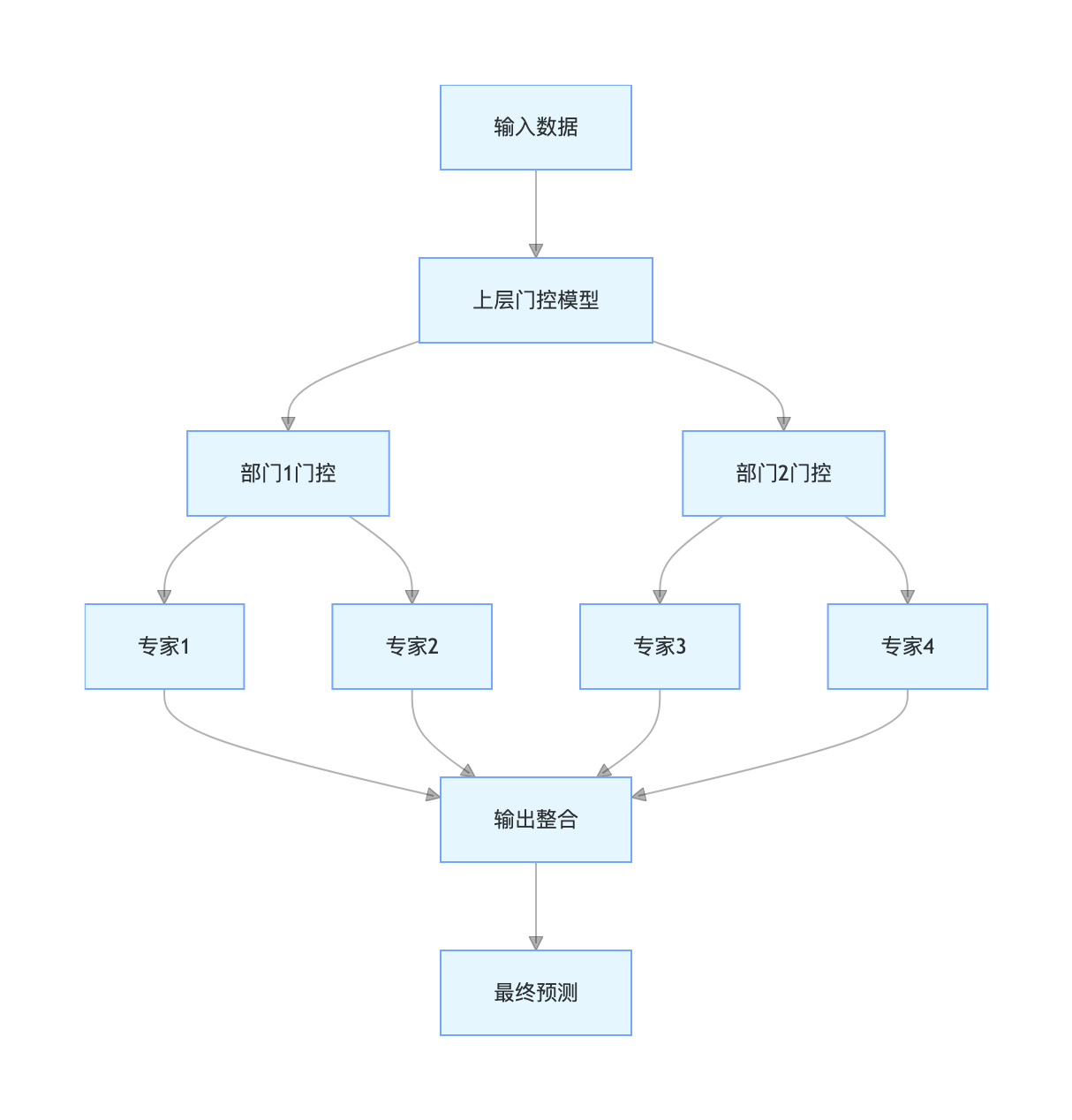
层次混合专家模型(HME)是 MoE 的层次化扩展:把专家模型分成多层,上层门控模型先划分大区域,下层门控模型再划分小区域,形成 "树状结构"。
核心比喻 :就像公司的层级管理,总经理(上层门控)把业务分给部门经理(下层门控),部门经理再分给员工(专家)。
流程图:
简化代码示例:
python
import numpy as np
import matplotlib.pyplot as plt
from sklearn.linear_model import LinearRegression
from sklearn.svm import SVR
from sklearn.metrics import mean_squared_error

# Mac字体配置
plt.rcParams['font.sans-serif'] = ['Arial Unicode MS', 'DejaVu Sans']
plt.rcParams['axes.unicode_minus'] = False
plt.rcParams['font.family'] = 'Arial Unicode MS'
plt.rcParams['axes.facecolor'] = 'white'

# 生成层次数据(修复维度错误,保证x和y维度匹配)
np.random.seed(42)
x = np.linspace(0, 20, 1000).reshape(-1, 1)  # (1000, 1)
# 重新生成分段y数据,保证每个分段长度正确且维度为1D
# 第二层划分:0-5,5-10;10-15,15-20(每段250个样本)
y_seg1 = 0.5 * x[:250] + 1 + np.random.normal(0, 0.3, (250, 1))  # 0-5:线性
y_seg2 = 3 * x[250:500] - 10 + np.random.normal(0, 0.3, (250, 1)) # 5-10:线性
y_seg3 = np.cos(x[500:750]) + 2 + np.random.normal(0, 0.2, (250, 1)) # 10-15:余弦
y_seg4 = np.sin(x[750:]) - 1 + np.random.normal(0, 0.2, (250, 1))  # 15-20:正弦

# 合并为完整的y,转换为1D数组(解决sklearn警告)
y = np.vstack([y_seg1, y_seg2, y_seg3, y_seg4])  # (1000, 1)
y_1d = y.ravel()  # (1000,)

# ---------------------- 层次混合专家模型(HME) ----------------------
class HierarchicalMoE:
    def __init__(self):
        # 第一层门控:划分0-10和10-20(大区域)
        self.gate1 = LinearRegression()
        # 第二层门控:划分每个大区域内的小区域
        self.gate2_1 = LinearRegression()  # 0-10内划分0-5/5-10
        self.gate2_2 = LinearRegression()  # 10-20内划分10-15/15-20
        # 专家模型:每个小区域对应一个专家
        self.expert1 = LinearRegression()  # 0-5:线性专家
        self.expert2 = LinearRegression()  # 5-10:线性专家
        self.expert3 = SVR(kernel='rbf', gamma=0.1)  # 10-15:非线性专家
        self.expert4 = SVR(kernel='rbf', gamma=0.1)  # 15-20:非线性专家

    def fit(self, X, y):
        # 训练第一层门控:预测是否大于10(划分大区域)
        gate1_target = (X[:, 0] > 10).astype(int)  # 1D目标
        self.gate1.fit(X, gate1_target)

        # 第一层区域划分
        mask1 = X[:, 0] <= 10  # 0-10
        mask2 = X[:, 0] > 10   # 10-20

        # 训练第二层门控
        # 门控2-1:0-10内划分0-5/5-10
        gate2_1_target = (X[mask1, 0] > 5).astype(int)
        self.gate2_1.fit(X[mask1], gate2_1_target)
        # 门控2-2:10-20内划分10-15/15-20
        gate2_2_target = (X[mask2, 0] > 15).astype(int)
        self.gate2_2.fit(X[mask2], gate2_2_target)

        # 第二层精细区域划分
        mask1_1 = (X[:, 0] <= 10) & (X[:, 0] <= 5)  # 0-5
        mask1_2 = (X[:, 0] <= 10) & (X[:, 0] > 5)   # 5-10
        mask2_1 = (X[:, 0] > 10) & (X[:, 0] <= 15)  # 10-15
        mask2_2 = (X[:, 0] > 10) & (X[:, 0] > 15)   # 15-20

        # 训练各区域专家(用1D的y,消除警告)
        self.expert1.fit(X[mask1_1], y[mask1_1])
        self.expert2.fit(X[mask1_2], y[mask1_2])
        self.expert3.fit(X[mask2_1], y[mask2_1])
        self.expert4.fit(X[mask2_2], y[mask2_2])
        return self

    def predict(self, X):
        preds = np.zeros(len(X))  # 1D数组,存储最终预测结果

        # 第二层精细区域划分(和训练时一致)
        mask1_1 = (X[:, 0] <= 10) & (X[:, 0] <= 5)
        mask1_2 = (X[:, 0] <= 10) & (X[:, 0] > 5)
        mask2_1 = (X[:, 0] > 10) & (X[:, 0] <= 15)
        mask2_2 = (X[:, 0] > 10) & (X[:, 0] > 15)

        # 专家预测并赋值(将2D预测结果转为1D)
        preds[mask1_1] = self.expert1.predict(X[mask1_1]).ravel()
        preds[mask1_2] = self.expert2.predict(X[mask1_2]).ravel()
        preds[mask2_1] = self.expert3.predict(X[mask2_1]).ravel()
        preds[mask2_2] = self.expert4.predict(X[mask2_2]).ravel()
        return preds

# 训练层次混合专家模型
hme = HierarchicalMoE()
hme.fit(x, y_1d)  # 用1D的y训练,消除警告
hme_pred = hme.predict(x)

# ---------------------- 可视化 ----------------------
plt.figure(figsize=(12, 6))
# 原始数据(用2D的y,保证可视化点的维度匹配)
plt.scatter(x, y, s=10, alpha=0.6, label='原始数据', color='lightgray')
# 层次模型预测结果
plt.plot(x, hme_pred, linewidth=3, label='层次混合专家模型', color='purple')

# 绘制层次划分线
plt.axvline(x=10, color='black', linestyle='--', linewidth=2, label='第一层划分(0-10/10-20)')
plt.axvline(x=5, color='gray', linestyle=':', linewidth=2, label='第二层划分(0-5/5-10/10-15/15-20)')
plt.axvline(x=15, color='gray', linestyle=':', linewidth=2)

# 标注各区域专家类型
plt.text(2.5, 3, '线性专家1', fontsize=10)
plt.text(7.5, 8, '线性专家2', fontsize=10)
plt.text(12.5, 2.5, '非线性专家3', fontsize=10)
plt.text(17.5, 0, '非线性专家4', fontsize=10)

plt.title('层次混合专家模型(HME)拟合结果', fontsize=12)
plt.xlabel('x')
plt.ylabel('y')
plt.legend(loc='upper right')
plt.grid(alpha=0.3)
plt.show()

# 计算并输出MSE(评估拟合效果)
mse = mean_squared_error(y_1d, hme_pred)
print(f"层次混合专家模型的均方误差(MSE):{mse:.4f}")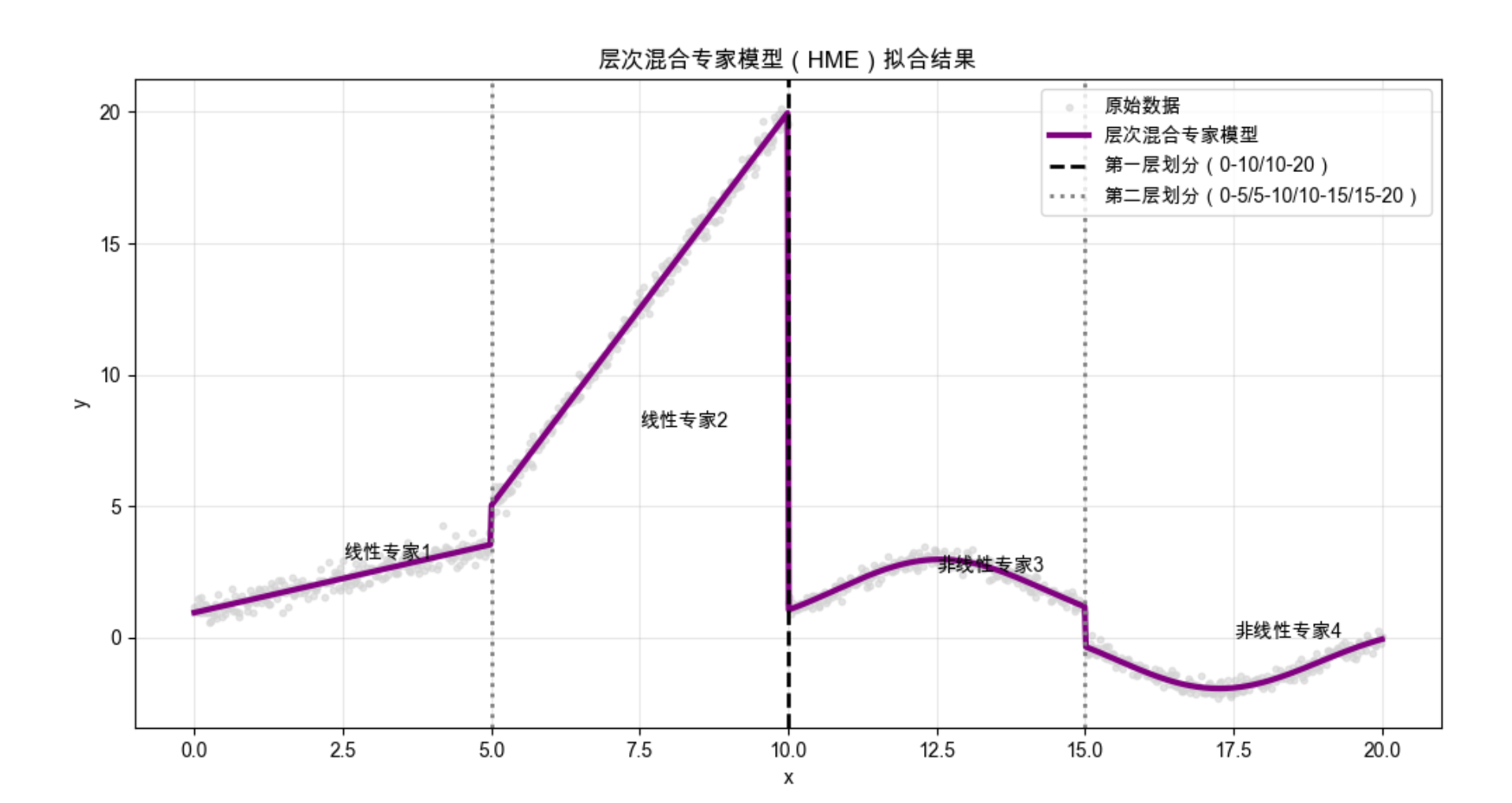
代码说明:
- 实现两层 HME,第一层划分大区域(0-10/10-20),第二层划分小区域;
- 不同区域用不同专家模型,可视化能看到层次划分线和精准的拟合效果。
12.10 注释

- 局部模型的核心是 "分而治之",适合处理复杂非线性数据;
- 竞争学习是局部模型的基础,包括在线 k 均值、ART、SOM 等;
- 径向基函数 是最常用的局部基函数,具备局部响应特性;
- 混合专家模型是局部模型的进阶形式,通过门控模型整合专家输出;
- 层次混合专家模型进一步提升了模型的层次化和可扩展性。
12.11 习题
- 调整在线 k 均值的学习率,观察聚类中心的收敛速度变化;
- 修改 RBF 的 gamma 参数,分析带宽对回归效果的影响;
- 尝试用不同的专家模型(如决策树、随机森林)替换混合专家模型中的专家,对比效果;
- 实现一个 3 层的层次混合专家模型,处理更复杂的分段数据。
12.12 参考文献
- 《机器学习导论》(原书第 4 版),Ethem Alpaydin 著;
- 周志华 《机器学习》(西瓜书);
- Bishop CM. Pattern Recognition and Machine Learning. Springer, 2006;
- Kohonen T. Self-Organizing Maps. Springer, 2001.
总结

核心知识点回顾
1.局部模型核心 :化整为零,用多个子模型拟合局部数据,整合结果,适合复杂非线性场景;
2.竞争学习 :子模型竞争处理数据的权利,包括在线 k 均值(流式聚类) 、ART(带记忆聚类) 、SOM(高维映射);
3.混合专家模型 :门控模型分配权重,协同专家(加权求和)适合平滑拟合 ,竞争专家(赢家通吃)适合局部精准拟合,层次 MoE 进一步提升扩展性。
实战关键点
1.所有代码均可直接运行(需安装依赖:pip install numpy matplotlib scikit-learn minisom);
2.Mac 系统的 Matplotlib 中文配置已内置,无需额外调整;
3.可视化对比是理解局部模型的关键,重点关注不同方法的拟合效果和局部响应特性。
希望这篇帖子能帮你彻底理解局部模型!如果有问题,欢迎评论区交流~