一、上下文
小爱AI的注册地址:https://xiaoai.plus/register?aff=3TIp
上下文包括消息列表之外的任何数据,这些数据可以影响代理行为或工具执行。这可以是:
- 运行时传入的信息,如 `user_id` 或 API 凭据。
- 多步推理过程中更新的内部状态。
- 来自先前交互的持久记忆或事实。
LangGraph 提供了三种提供上下文的主要方式:
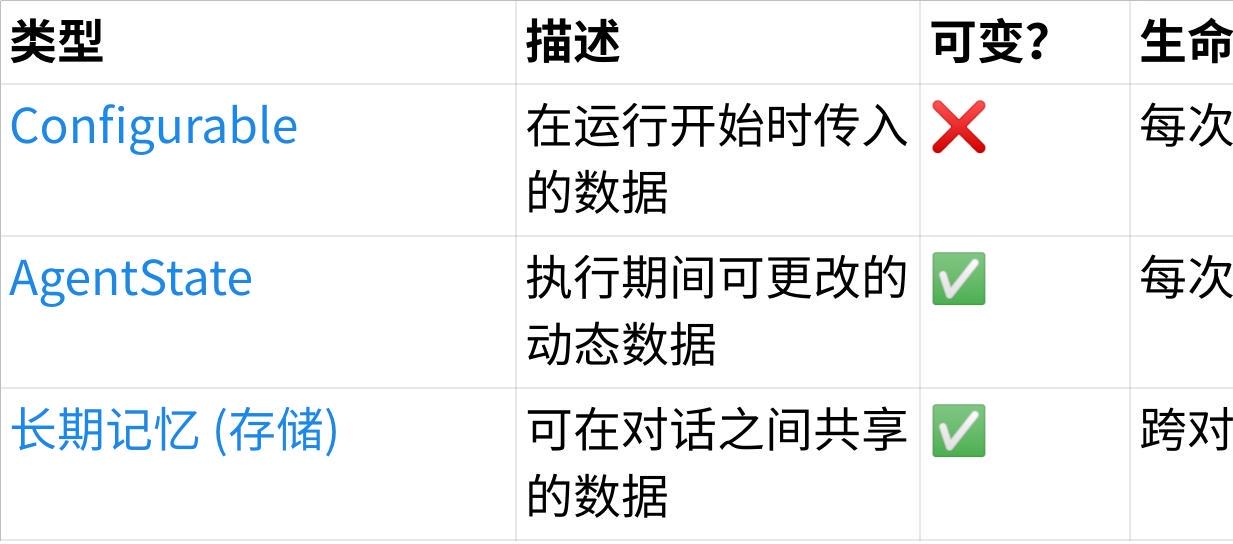
点击图片可查看完整电子表格
您可以使用上下文来:
- 调整模型看到的系统提示
- 为工具提供必要的输入
- 在正在进行的对话中跟踪事实
Configurable
配置适用于不可变数据,如用户元数据或 API 密钥。当您有在运行期间不会更改的值时使用。
使用保留用于此目的的键 "configurable" 指定配置。
|----------------------------------------------------------------------------------------------------------------------------|
| C++ agent.invoke( {"messages": {"role": "user", "content": "hi!"}}, config={"configurable": {"user_id": "user_123"}} ) |
案例:通过 Configurable 中掺入参数,来动态设置系统提示词
状态 AgentState( 可变上下文 )
状态在运行期间充当Agent的记忆,可以短期存储也可以长期存储。它保存可在执行期间演变的动态数据,例如从工具或 LLM 输出派生的值。
1、搞清楚AgentState的作用。
2、案例:(给用户发出一个祝福语句)输入username ---> config----> 工具1---> 把username修改到State中------> 工具2----->获取State的username得到最终答案。
二、记忆存储
这是一个强大的功能,允许您在多次调用中持久化代理的状态。否则,状态仅限于单次运行。
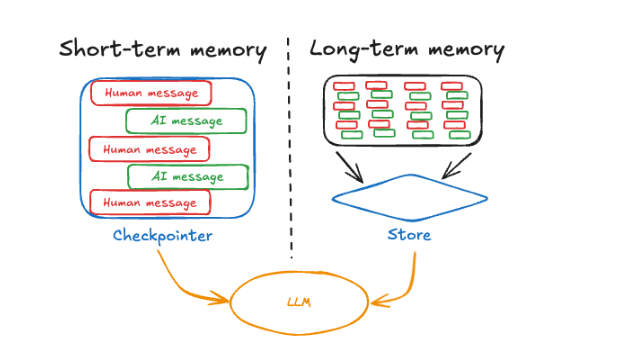
短期存储:线程级存储(会话级)
短期存储使Agent能够跟踪多轮对话。要使用它,您必须:
- 在创建代理时提供checkpointer。checkpointer可以实现代理状态的持久性。
- 在运行代理时在配置中提供thread_id。thread_id是对话会话的唯一标识符。
|------------------------------------------------------------------------------------------------------------------------------------------------------------------------------------------------------------------------------------------------------------------------------------------------------------------------------------------------------------------------------------------------------------------------------------------------------------|
| Python python # 内存: 开发环境 checkpointer = InMemorySaver() # 在生产环境中,使用由数据库支持的检查点 DB_URI = "postgresql://postgres:postgres@localhost:5432/postgres?sslmode=disable" with PostgresSaver.from_conn_string(DB_URI) as checkpointer: # 必须安装:pip install -U "psycopg[binary,pool]" langgraph-checkpoint-postgres # 生产环境:Redis # pip install -U langgraph-checkpoint-redis DB_URI = "redis://:6379" with RedisSaver.from_conn_string(DB_URI) as checkpointer: |
长期存储:跨线程存储
使用长期内存来跨会话存储用户特定或应用程序特定的数据。这对于聊天机器人等应用程序非常有用,您可能希望记住用户偏好或其他信息。
要使用长期内存,您需要:
- 配置一个存储以在调用之间持久化数据。
- 使用get_store函数从工具或提示中访问存储。
|----------------------------------------------------------------------------------------------------------------------------------------------------------------------------------------------------------------------------------------------------------------------------------------------------------------------------------------------------------------------------------------------------------------------------------------------------------------------------------------------------|
| python Python # 开发环境中: 内存 store = InMemoryStore() # 在生产环境中,使用由数据库支持的存储 DB_URI = "postgresql://postgres:postgres@localhost:5442/postgres?sslmode=disable" with ( PostgresStore.from_conn_string(DB_URI) as store, PostgresSaver.from_conn_string(DB_URI) as checkpointer, ): # store.setup() # checkpointer.setup() DB_URI = "redis://:6379" with ( RedisStore.from_conn_string(DB_URI) as store, RedisSaver.from_conn_string(DB_URI) as checkpointer, ): store.setup() checkpointer.setup() |
注意:
- 首次使用 Postgres 存储时,您需要调用 store.setup(),checkpointer.setup()
- 首次使用 Redis 存储时,您需要调用 store.setup(),checkpointer.setup()