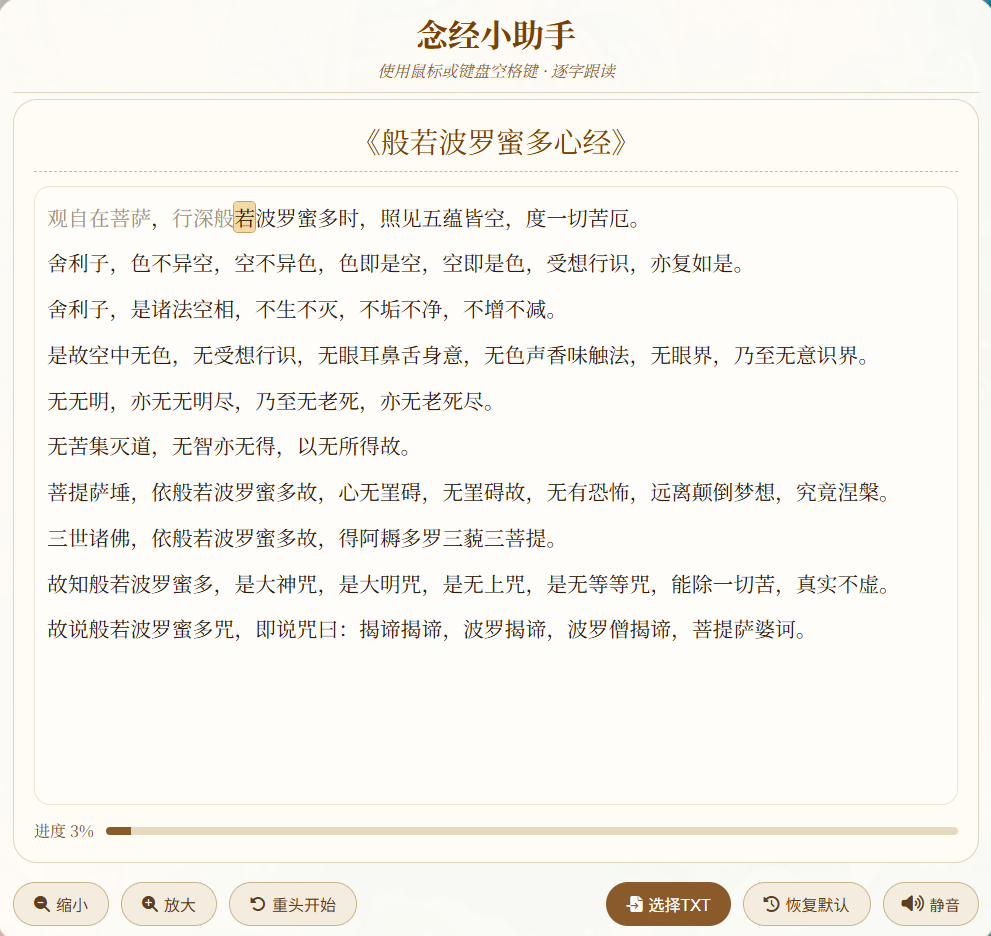
一、 核心诵读功能
-
逐字跟读模式 :点击经文区域或按键盘空格键,系统会按照汉字顺序逐个高亮显示,引导用户逐字跟读。
-
智能跳过括号 :自动识别并跳过括号及其内的内容(支持中文
()和英文()括号),不参与高亮计数,适合处理经文中的注解。 -
视觉进度反馈 :通过顶部的进度条 和百分比数字,实时显示当前诵读的进度(基于汉字总数)。
二、 文本与自定义
-
导入自定义经文 :点击 "选择TXT" 按钮,可以上传自定义的
.txt文件作为新的经文进行诵读。 -
恢复默认经文 :点击 "恢复默认" 按钮,可随时切换回内置的《般若波罗蜜多心经》。
-
经文标题识别:支持显示当前经文的标题(默认或基于文件名)。
三、 辅助与界面
-
木鱼音效反馈 :每按一次空格或点击,会播放一次简短的木鱼音效。可通过 "静音/取消静音" 按钮开关音效。
-
视图调整:
-
字体缩放 :提供 "放大/缩小" 按钮,可调整经文字体大小以适应阅读。
-
自动滚动:当高亮的当前字超出可视区域时,经文区域会自动滚动将其居中。
-
-
重置进度 :点击 "重头开始" 按钮,可将高亮位置快速重置到经文的第一个汉字。
html
<!DOCTYPE html>
<html lang="zh-CN">
<head>
<meta charset="UTF-8">
<meta name="viewport" content="width=device-width, initial-scale=1.0, maximum-scale=1.0, user-scalable=no, viewport-fit=cover">
<title>念经小助手 · 逐字念经 · 跳过括号</title>
<link rel="stylesheet" href="https://fonts.googleapis.com/css2?family=Noto+Serif+SC:wght@400;700&display=swap">
<link rel="stylesheet" href="https://cdnjs.cloudflare.com/ajax/libs/font-awesome/6.4.0/css/all.min.css">
<style>
* { margin:0; padding:0; box-sizing:border-box; -webkit-tap-highlight-color:transparent; }
html, body { width:100%; height:100%; overflow:hidden; background:#f5f1e6; font-family:'Noto Serif SC',serif; }
body { background-image:url('lianchi.jpg'); background-size:cover; background-position:center; display:flex; align-items:center; justify-content:center; }
.container {
width:100%; max-width:1000px; height:100%; max-height:100%;
background:rgba(255,253,248,0.97); border-radius:28px; border:1px solid #e0d5bd;
display:flex; flex-direction:column; overflow-y:auto; -webkit-overflow-scrolling:touch;
padding:max(16px, env(safe-area-inset-top)) max(16px, env(safe-area-inset-right)) max(12px, env(safe-area-inset-bottom)) max(16px, env(safe-area-inset-left));
margin:0 auto; box-shadow:0 8px 30px rgba(0,0,0,0.15);
}
header { text-align:center; margin-bottom:6px; border-bottom:1px solid #e0d5bd; padding-bottom:10px; flex-shrink:0; }
h1 { font-size:2.0rem; color:#7b3f00; margin:0 30px 4px; line-height:1.3; }
.subtitle { color:#8b5a2b; font-style:italic; }
/* 阅读区 */
.reading-area {
flex:1; background:#fffcf5; border-radius:24px; padding:20px; border:1px solid #e0d5bd;
display:flex; flex-direction:column; min-height:280px; margin-bottom:8px;
}
.sutra-title { font-size:1.8rem; color:#7b3f00; text-align:center; border-bottom:1px dashed #d4b68a; padding-bottom:10px; margin-bottom:14px; flex-shrink:0; }
/* 经文容器 - 保留所有原始字符,但跳过括号内容 */
.sutra-text {
font-size:1.3rem; line-height:2.2; color:#2b1e12; text-align:justify;
overflow-y:auto; -webkit-overflow-scrolling:touch; padding:8px 12px;
flex:1; background:#fffdf9; border-radius:16px; border:1px solid #eee3d0;
cursor:pointer; user-select:none;
letter-spacing:normal; word-spacing:normal;
white-space:pre-wrap; /* 保留换行符和空格 */
word-break:break-word;
}
.sutra-text::-webkit-scrollbar { width:5px; }
.sutra-text::-webkit-scrollbar-track { background:#f0e4d2; }
.sutra-text::-webkit-scrollbar-thumb { background:#b5946e; border-radius:8px; }
/* 高亮当前字 */
.sutra-text .current-char {
background-color:#f3d9a4;
border-radius:4px;
box-shadow:0 0 0 1px #c9a062;
display:inline;
}
/* 已读汉字灰色 */
.sutra-text .read-char {
color:#a39280;
}
/* 被跳过的括号内容 - 灰色显示 */
.sutra-text .skipped-content {
color:#c0b0a0;
}
.progress-section { display:flex; align-items:center; gap:12px; margin-top:14px; flex-shrink:0; }
.progress-info { color:#6b4f2e; white-space:nowrap; }
.progress-bar-container { flex:1; height:8px; background:#e5d9c0; border-radius:12px; overflow:hidden; }
.progress-fill { height:100%; background:#8b5a2b; width:0%; transition:width 0.2s; }
/* 辅助工具 - 重新布局,将控制按钮放在右侧 */
.reading-tools {
display:flex;
flex-wrap:wrap;
align-items:center;
justify-content:space-between;
gap:12px;
margin-top:6px;
flex-shrink:0;
padding:5px 0;
}
.left-tools {
display:flex;
flex-wrap:wrap;
gap:12px;
}
.right-tools {
display:flex;
flex-wrap:wrap;
gap:12px;
justify-content:flex-end;
}
.tool-btn {
background:#f4ecde;
border:1px solid #c9b58b;
color:#5d3e20;
padding:8px 20px;
border-radius:40px;
font-size:1rem;
min-height:44px;
cursor:pointer;
display:inline-flex;
align-items:center;
gap:6px;
white-space:nowrap;
}
.tool-btn:active { background:#e1d2b7; transform:scale(0.97); }
/* 主要按钮样式 */
.btn-primary {
background:#8b5a2b;
color:white;
border:none;
}
.btn-outline {
background:#f4ecde;
color:#5d3e20;
border:1px solid #c9b58b;
}
/* 文件上传包装器 */
.file-input-wrapper { position:relative; overflow:hidden; display:inline-block; }
.file-input-wrapper input[type=file] { position:absolute; left:0; top:0; opacity:0; width:100%; height:100%; cursor:pointer; }
/* 静音按钮样式 */
.mute-btn {
background:#f4ecde; color:#5d3e20; border:1px solid #c9b58b;
padding:8px 18px; border-radius:40px; font-size:0.95rem;
display:inline-flex; align-items:center; gap:6px; cursor:pointer; min-height:44px;
}
.mute-btn.muted {
background:#d4b483; color:#3a2a1a;
}
.mute-btn i { font-size:1.1rem; }
@media (max-width:600px) {
.reading-tools { flex-direction:column; align-items:stretch; }
.left-tools, .right-tools { justify-content:center; }
}
@media (max-width:375px) {
.sutra-text { font-size:1.1rem; }
.tool-btn { padding:6px 12px; font-size:0.9rem; }
}
</style>
</head>
<body>
<div class="container">
<header>
<h1>念经小助手</h1>
<div class="subtitle">使用鼠标或键盘空格键 · 逐字跟读</div>
</header>
<!-- 阅读区 -->
<div class="reading-area">
<div class="sutra-title" id="sutraTitle">《般若波罗蜜多心经》</div>
<div class="sutra-text" id="sutraText" tabindex="0"></div>
<!-- 进度条 -->
<div class="progress-section">
<span class="progress-info" id="progressInfo">进度 0%</span>
<div class="progress-bar-container"><div class="progress-fill" id="progressFill"></div></div>
</div>
</div>
<!-- 辅助工具 - 重新布局,控制按钮放在右侧 -->
<div class="reading-tools">
<div class="left-tools">
<button class="tool-btn" id="fontDown"><i class="fas fa-search-minus"></i> 缩小</button>
<button class="tool-btn" id="fontUp"><i class="fas fa-search-plus"></i> 放大</button>
<button class="tool-btn" id="resetIndex"><i class="fas fa-undo-alt"></i> 重头开始</button>
</div>
<div class="right-tools">
<div class="file-input-wrapper">
<button class="tool-btn btn-primary"><i class="fas fa-file-import"></i> 选择TXT</button>
<input type="file" id="fileInput" accept=".txt, text/plain">
</div>
<button class="tool-btn btn-outline" id="restoreBtn"><i class="fas fa-history"></i> 恢复默认</button>
<button class="mute-btn" id="muteBtn">
<i class="fas fa-volume-up"></i> 静音
</button>
</div>
</div>
</div>
<script>
(function() {
// ---------- 默认经文:《般若波罗蜜多心经》(带括号示例) ----------
const DEFAULT_TITLE = "般若波罗蜜多心经";
const DEFAULT_TEXT = `观自在菩萨,行深般若波罗蜜多时,照见五蕴皆空,度一切苦厄。
舍利子,色不异空,空不异色,色即是空,空即是色,受想行识,亦复如是。
舍利子,是诸法空相,不生不灭,不垢不净,不增不减。
是故空中无色,无受想行识,无眼耳鼻舌身意,无色声香味触法,无眼界,乃至无意识界。
无无明,亦无无明尽,乃至无老死,亦无老死尽。
无苦集灭道,无智亦无得,以无所得故。
菩提萨埵,依般若波罗蜜多故,心无罣碍,无罣碍故,无有恐怖,远离颠倒梦想,究竟涅槃。
三世诸佛,依般若波罗蜜多故,得阿耨多罗三藐三菩提。
故知般若波罗蜜多,是大神咒,是大明咒,是无上咒,是无等等咒,能除一切苦,真实不虚。
故说般若波罗蜜多咒,即说咒曰:揭谛揭谛,波罗揭谛,波罗僧揭谛,菩提萨婆诃。`;
// 状态
let currentTitle = DEFAULT_TITLE;
let currentText = DEFAULT_TEXT;
// 处理后的数据
let displayChars = []; // 显示的字符数组(包含所有要显示的字符)
let charTypes = []; // 每个字符的类型:'hanzi', 'normal', 'skipped'
let hanziIndices = []; // 汉字在displayChars中的索引位置
let currentHanziIndex = 0; // 当前高亮的是第几个汉字
let fontSize = 1.3;
// 音效静音状态
let isMuted = false;
// DOM 元素
const sutraTitle = document.getElementById('sutraTitle');
const sutraText = document.getElementById('sutraText');
const fileInput = document.getElementById('fileInput');
const restoreBtn = document.getElementById('restoreBtn');
const muteBtn = document.getElementById('muteBtn');
const progressInfo = document.getElementById('progressInfo');
const progressFill = document.getElementById('progressFill');
const fontDown = document.getElementById('fontDown');
const fontUp = document.getElementById('fontUp');
const resetIndexBtn = document.getElementById('resetIndex');
// ---------- 判断是否为汉字 ----------
function isChineseChar(char) {
const code = char.charCodeAt(0);
return (code >= 0x4E00 && code <= 0x9FFF) || // CJK统一汉字
(code >= 0x3400 && code <= 0x4DBF) || // CJK扩展A
(code >= 0x20000 && code <= 0x2A6DF); // CJK扩展B
}
// ---------- 处理文本:跳过括号及其内容 ----------
function processText(rawText) {
const chars = Array.from(rawText);
displayChars = [];
charTypes = [];
hanziIndices = [];
let inBracket = false; // 是否在括号内
for (let i = 0; i < chars.length; i++) {
const ch = chars[i];
// 检测括号开始(支持英文和中文括号)
if (ch === '(' || ch === '(') {
inBracket = true;
// 仍然添加括号本身,但标记为跳过内容
displayChars.push(ch);
charTypes.push('skipped');
continue;
}
// 检测括号结束
if (ch === ')' || ch === ')') {
inBracket = false;
displayChars.push(ch);
charTypes.push('skipped');
continue;
}
// 如果在括号内,标记为跳过内容
if (inBracket) {
displayChars.push(ch);
charTypes.push('skipped');
continue;
}
// 不在括号内,正常处理
displayChars.push(ch);
if (isChineseChar(ch)) {
charTypes.push('hanzi');
hanziIndices.push(displayChars.length - 1); // 记录汉字位置
} else {
charTypes.push('normal');
}
}
// 确保当前汉字索引不越界
if (currentHanziIndex >= hanziIndices.length) {
currentHanziIndex = hanziIndices.length - 1;
}
if (currentHanziIndex < 0) currentHanziIndex = 0;
}
// ---------- 渲染经文 ----------
function renderText() {
if (!displayChars.length) { sutraText.innerHTML = ''; return; }
let html = '';
for (let i = 0; i < displayChars.length; i++) {
const ch = displayChars[i];
const type = charTypes[i];
// 处理特殊字符
let displayChar = ch;
if (ch === '<') displayChar = '<';
else if (ch === '>') displayChar = '>';
else if (ch === '&') displayChar = '&';
else if (ch === '\n') displayChar = '\n';
if (type === 'hanzi') {
// 找到这个汉字是第几个汉字
const hanziPos = hanziIndices.indexOf(i);
if (hanziPos < currentHanziIndex) {
// 已读汉字
html += `<span class="read-char">${displayChar}</span>`;
} else if (hanziPos === currentHanziIndex) {
// 当前高亮汉字
html += `<span class="current-char">${displayChar}</span>`;
} else {
// 未读汉字
html += displayChar;
}
} else if (type === 'skipped') {
// 被跳过的括号内容(包括括号本身)用灰色显示
html += `<span class="skipped-content">${displayChar}</span>`;
} else {
// 普通字符(标点、空格、换行等)
html += displayChar;
}
}
sutraText.innerHTML = html;
// 滚动到当前高亮字
const cur = sutraText.querySelector('.current-char');
if (cur) {
cur.scrollIntoView({ block: 'center', behavior: 'smooth' });
}
updateProgress();
}
// ---------- 更新进度条 ----------
function updateProgress() {
if (!hanziIndices.length) {
progressInfo.textContent = '进度 0%';
progressFill.style.width = '0%';
return;
}
const percent = Math.min(100, Math.round((currentHanziIndex / hanziIndices.length) * 100));
progressInfo.textContent = `进度 ${percent}%`;
progressFill.style.width = percent + '%';
}
// ---------- 下一字 (跳到下一个汉字) ----------
function nextChar() {
if (!hanziIndices.length) return;
if (currentHanziIndex >= hanziIndices.length - 1) return; // 已到末尾不再移动
// 非静音状态下播放音效
if (!isMuted) {
playMuyu();
}
currentHanziIndex++;
renderText();
}
// ---------- 重置索引到第一个汉字 ----------
function resetIndex() {
currentHanziIndex = 0;
renderText();
}
// ---------- 加载新文本 ----------
function loadNewText(rawText, title) {
currentText = rawText;
currentTitle = title || '经文';
processText(rawText);
sutraTitle.innerText = `《${currentTitle}》`;
currentHanziIndex = 0;
renderText();
}
// ---------- 木鱼音效 ----------
let audioCtx = null;
function playMuyu() {
if (!audioCtx) {
try { audioCtx = new (window.AudioContext || window.webkitAudioContext)(); } catch (e) { return; }
}
if (audioCtx.state === 'suspended') audioCtx.resume();
if (audioCtx.state !== 'running') return;
const now = audioCtx.currentTime;
const osc = audioCtx.createOscillator();
const gain = audioCtx.createGain();
osc.type = 'sine';
osc.frequency.value = 420;
gain.gain.setValueAtTime(0.3, now);
gain.gain.exponentialRampToValueAtTime(0.001, now + 0.1);
osc.connect(gain);
gain.connect(audioCtx.destination);
osc.start();
osc.stop(now + 0.1);
}
// ---------- 静音切换 ----------
function toggleMute() {
isMuted = !isMuted;
if (isMuted) {
muteBtn.innerHTML = '<i class="fas fa-volume-mute"></i> 取消静音';
muteBtn.classList.add('muted');
} else {
muteBtn.innerHTML = '<i class="fas fa-volume-up"></i> 静音';
muteBtn.classList.remove('muted');
}
}
// ---------- 事件绑定 ----------
sutraText.addEventListener('click', nextChar);
document.addEventListener('keydown', (e) => {
if (e.code === 'Space' && document.activeElement?.tagName !== 'INPUT' && document.activeElement?.tagName !== 'BUTTON') {
e.preventDefault();
nextChar();
}
});
fileInput.addEventListener('change', function(e) {
const file = e.target.files[0];
if (!file) return;
const reader = new FileReader();
reader.onload = (ev) => {
let content = ev.target.result;
if (content.charCodeAt(0) === 0xFEFF) content = content.slice(1);
const name = file.name.replace(/\.txt$/i, '').replace(/\.text$/i, '') || '导入经文';
loadNewText(content, name);
};
reader.readAsText(file, 'UTF-8');
});
restoreBtn.addEventListener('click', () => {
loadNewText(DEFAULT_TEXT, DEFAULT_TITLE);
fileInput.value = '';
});
muteBtn.addEventListener('click', toggleMute);
fontDown.addEventListener('click', () => {
fontSize = Math.max(0.8, fontSize - 0.1);
sutraText.style.fontSize = fontSize + 'rem';
});
fontUp.addEventListener('click', () => {
fontSize = Math.min(2.5, fontSize + 0.1);
sutraText.style.fontSize = fontSize + 'rem';
});
resetIndexBtn.addEventListener('click', resetIndex);
// ---------- 初始化 ----------
loadNewText(DEFAULT_TEXT, DEFAULT_TITLE);
})();
</script>
</body>
</html>