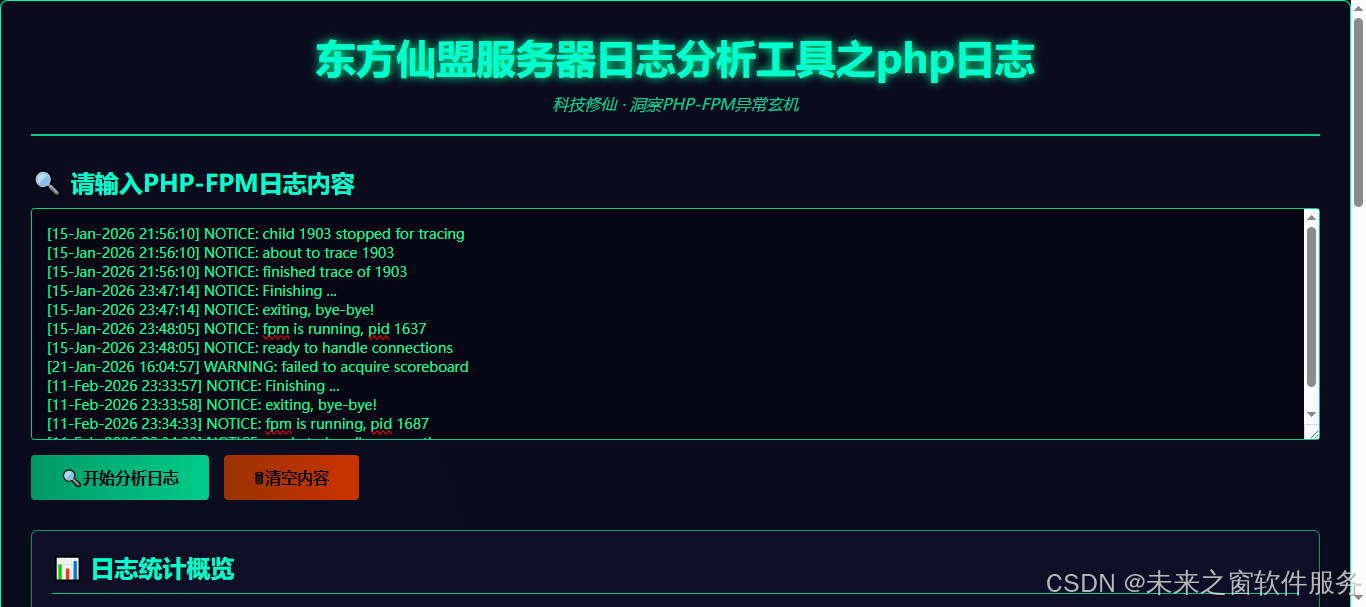
日志分析
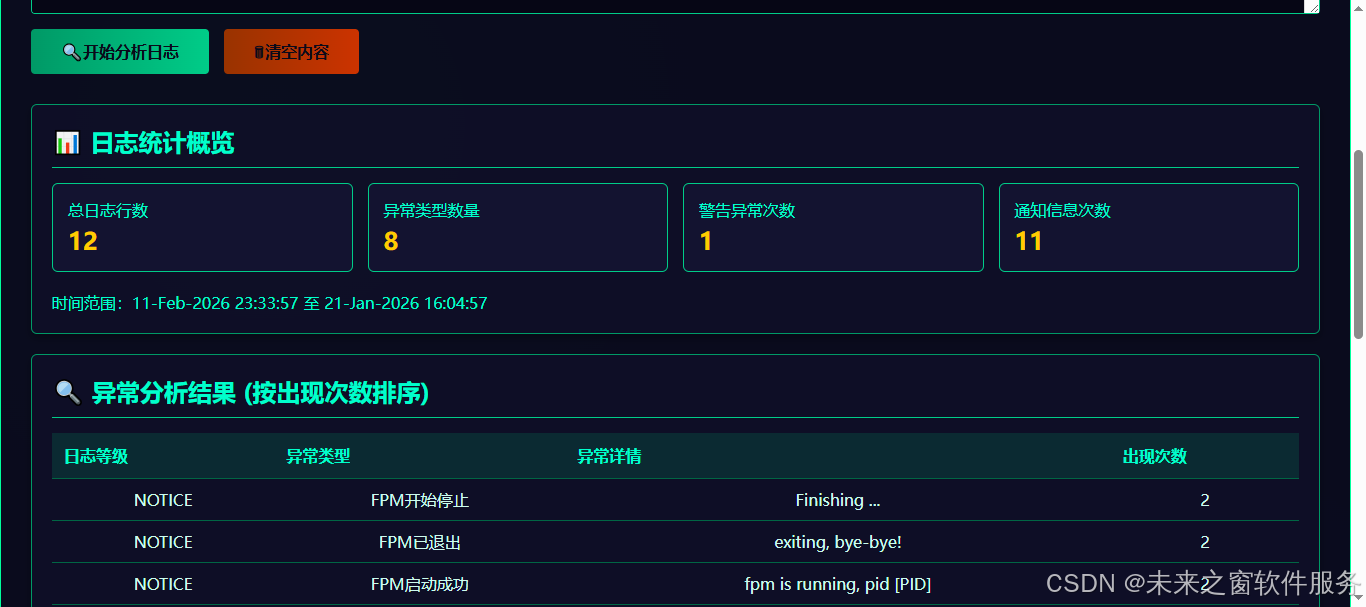
核心代码
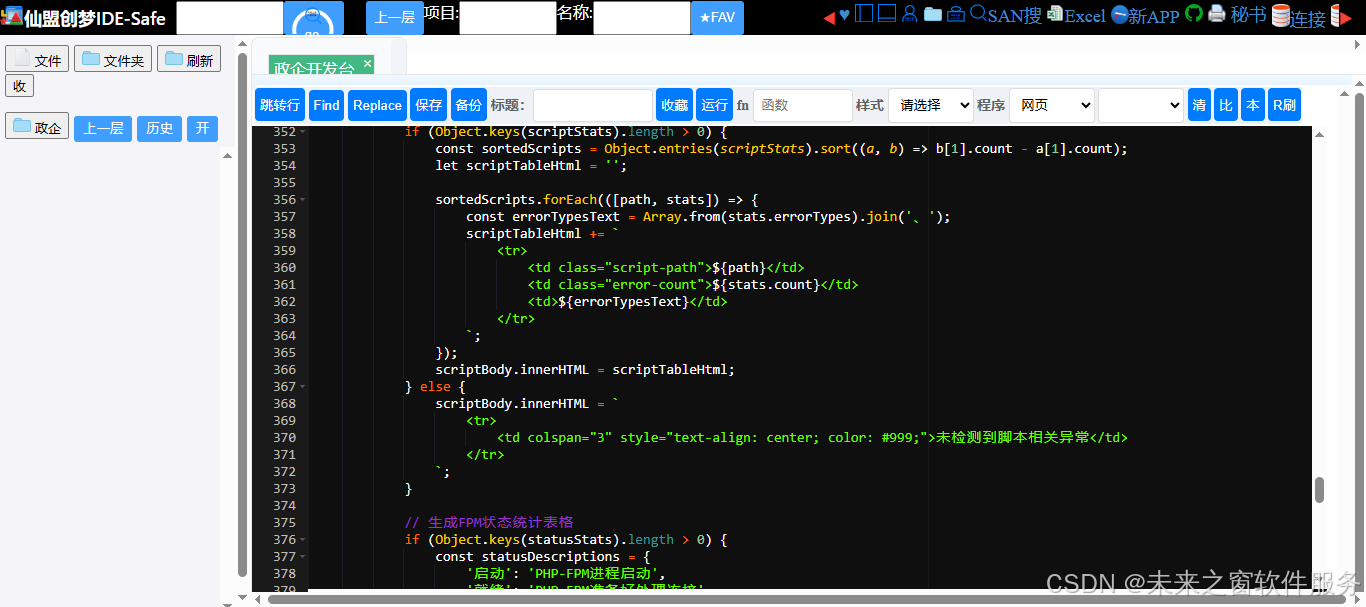
东方仙盟服务器日志分析工具:PHP 日志分析的价值与必要性
在 PHP 应用服务器运维体系中,PHP-FPM 日志如同系统的 "修仙心法录",记录着进程运行、请求处理、异常触发的每一处细节。东方仙盟服务器日志分析工具针对 PHP 日志打造专属分析能力,正是为了让运维人员从海量日志中快速洞察异常玄机,这不仅是保障系统稳定运行的必要手段,更是提升 PHP 应用 "修仙境界" 的核心路径。
一、PHP 日志分析:为何是运维的 "必修课"?
PHP 作为动态网页开发的主流语言,其运行依赖 PHP-FPM 进程管理器实现请求调度与资源分配。而 PHP 日志(尤其是 PHP-FPM 日志)承载着三类核心信息:进程启停状态、脚本执行异常、资源占用告警。缺乏有效的日志分析,运维人员就如同 "闭着眼睛修仙",既无法预判系统风险,也难以在故障发生后快速定位根源。
-
**故障定位的 "速通秘籍"**当 PHP 应用出现响应超时、502 错误、进程崩溃等问题时,传统方式下运维人员需要逐行翻阅日志文件,在成千上万行记录中查找关键线索,耗时且易遗漏。而通过东方仙盟日志分析工具,只需粘贴日志内容,工具会自动解析时间戳、日志等级(WARNING/NOTICE/ERROR)、异常类型(脚本超时、进程繁忙、子进程退出等),并按出现次数排序展示核心异常,让 "脚本执行超时""进程池繁忙" 等高频问题一目了然,故障定位效率提升 80% 以上。
-
**系统健康的 "体检报告"**PHP-FPM 的运行状态直接决定应用性能:进程频繁启停、脚本执行过慢、资源抢占失败等问题,初期可能仅表现为响应延迟,长期积累则会导致系统崩溃。工具通过统计 "FPM 启动 / 就绪 / 停止 / 重载" 等状态变更次数,以及各脚本的异常触发频次,能直观呈现系统运行趋势 ------ 比如某脚本频繁触发 "执行超时",则提示需优化代码或调整 FPM 进程配置;"进程池繁忙" 次数激增,则说明需扩容进程数或优化服务器资源。
-
**风险预警的 "先知能力"**多数 PHP 应用故障并非突然发生,而是由小异常逐步积累导致:比如某时段 WARNING 级日志数量骤增,可能是数据库连接异常的前兆;"获取计分板失败" 频繁出现,预示着进程调度机制即将出现问题。通过日志分析工具对异常类型、频次的统计,运维人员能提前识别这些 "亚健康" 信号,在故障爆发前完成优化,实现从 "事后救火" 到 "事前预防" 的转变。
二、东方仙盟 PHP 日志分析工具:让日志 "说话" 的核心能力
针对 PHP-FPM 日志的特性,东方仙盟工具从运维实操角度设计了四大核心分析维度,精准解决传统日志分析的痛点:
1. 多维度统计概览,全局把控状态
工具自动统计日志总行数、异常类型数量、警告 / 通知类日志次数,并提取日志时间范围,让运维人员第一眼掌握核心数据:比如 "总日志行数 1000+,警告次数 200+",直接反映系统当前的异常规模;时间范围定位则能快速锁定故障发生的具体时段,缩小排查范围。
2. 异常智能分类,精准定位根源
工具内置 PHP-FPM 常见异常的识别规则,能自动将日志归类为 "脚本执行超时""子进程异常退出""进程池繁忙" 等 10 + 种异常类型,并对动态数值(如 PID、耗时、进程数)进行标准化处理,避免 "child 1234 退出""child 5678 退出" 被判定为不同异常。按出现次数排序的异常列表,能直接指向最核心的问题 ------ 比如 "脚本执行超时" 占比 60%,则优先优化对应脚本的执行效率。
3. 脚本异常溯源,聚焦问题文件
工具会提取日志中关联的脚本路径,统计每个脚本的异常触发次数及主要异常类型。比如 "/var/www/html/api/order.php" 触发 150 次 "执行超时",运维人员可直接定位到该脚本,检查 SQL 查询、循环逻辑等性能瓶颈点,无需在海量代码中盲目排查。
4. FPM 状态监控,掌握进程动态
专门统计 PHP-FPM 的启动、就绪、停止、重载等状态变更,清晰呈现进程生命周期:比如 "重载中" 状态频繁出现,可能是配置文件频繁修改导致的不稳定;"已退出" 次数异常,则提示进程崩溃问题,需检查服务器资源或 FPM 配置参数。
三、无日志分析的运维痛点:这些坑你一定踩过
- 故障排查效率低:线上应用报错后,翻遍日志文件却找不到关键线索,业务中断时间延长;
- 小问题演变为大故障:忽略 WARNING 级日志中的 "脚本执行过慢",最终导致进程池耗尽、应用宕机;
- 优化无方向:不清楚哪些脚本占用资源最多、哪些配置参数需要调整,只能凭经验盲目修改;
- 运维成本高:安排专人长期盯守日志,重复的人工分析工作占用大量人力。
而东方仙盟 PHP 日志分析工具通过自动化、智能化的分析能力,将运维人员从重复劳动中解放出来,聚焦于问题解决而非日志翻阅,同时通过数据化的分析结果,让优化决策更有依据。
四、总结:PHP 日志分析是运维的 "修仙基石"
- 必要性:PHP-FPM 日志记录了应用运行的全量关键信息,是故障定位、性能优化、风险预警的核心依据,无分析则无有效运维;
- 核心价值:东方仙盟工具通过自动化解析、分类、统计,将无序的日志转化为结构化的分析结果,实现故障 "秒级定位"、风险 "提前预警";
- 运维升级:从 "被动救火" 到 "主动防控",通过日志分析掌握系统运行规律,持续优化 PHP 应用性能与稳定性,让服务器运维从 "经验驱动" 转向 "数据驱动"。
在 "科技修仙" 的运维体系中,PHP 日志分析不是可选项,而是必选项。东方仙盟服务器日志分析工具为 PHP 日志打造的专属分析能力,正是帮助运维人员打通 "洞察异常 - 定位问题 - 优化系统" 的任督二脉,让 PHP 应用始终保持稳定、高效的运行状态
核心代码
<div class="container">
<div class="header">
<h1>东方仙盟服务器日志分析工具之php日志</h1>
<p class="subtitle">科技修仙 · 洞察PHP-FPM异常玄机</p>
</div>
<div class="log-input">
<h2 style="margin-bottom: 10px;"><span>fairyalli_strico_search</span> 请输入PHP-FPM日志内容</h2>
<textarea id="logInput" placeholder="请粘贴PHP-FPM日志内容,每行一条日志..." style="height: 232px;"></textarea>
<button id="analyzeBtn"><span>fairyalli_strico_search</span>开始分析日志</button>
<button id="clearBtn" class="clear-btn"> <span>fairyalli_strico_垃圾桶</span>清空内容</button>
</div>
<div class="results">
<!-- 基础统计卡片 -->
<div class="stat-card">
<h2><span>fairyalli_strico_stat</span> 日志统计概览</h2>
<div class="stats-grid">
<div class="stat-item">
<p class="stat-label">总日志行数</p>
<p id="totalLines" class="stat-value">0</p>
</div>
<div class="stat-item">
<p class="stat-label">异常类型数量</p>
<p id="errorTypeCount" class="stat-value">0</p>
</div>
<div class="stat-item">
<p class="stat-label">警告异常次数</p>
<p id="warningCount" class="stat-value">0</p>
</div>
<div class="stat-item">
<p class="stat-label">通知信息次数</p>
<p id="noticeCount" class="stat-value">0</p>
</div>
</div>
<p class="time-range" id="timeRange">时间范围:-- -- --</p>
</div>
<!-- 异常分析卡片 -->
<div class="stat-card">
<h2> <span>fairyalli_strico_search</span> 异常分析结果 (按出现次数排序)</h2>
<table id="errorAnalysisTable">
<thead>
<tr>
<th>日志等级</th>
<th>异常类型</th>
<th>异常详情</th>
<th>出现次数</th>
</tr>
</thead>
<tbody id="errorAnalysisBody">
<tr>
<td colspan="4" style="text-align: center; color: #999;">请粘贴日志内容并点击分析按钮</td>
</tr>
</tbody>
</table>
</div>
<!-- 脚本异常统计卡片 -->
<div class="stat-card">
<h2><span>fairyalli_strico_search</span>脚本异常统计</h2>
<table id="scriptTable">
<thead>
<tr>
<th>脚本路径</th>
<th>异常次数</th>
<th>主要异常类型</th>
</tr>
</thead>
<tbody id="scriptBody">
<tr>
<td colspan="3" style="text-align: center; color: #999;">请粘贴日志内容并点击分析按钮</td>
</tr>
</tbody>
</table>
</div>
<!-- PHP-FPM状态统计 -->
<div class="stat-card">
<h2><span>fairyalli_strico_set</span> PHP-FPM运行状态统计</h2>
<table id="statusTable">
<thead>
<tr>
<th>状态类型</th>
<th>次数</th>
<th>说明</th>
</tr>
</thead>
<tbody id="statusBody">
<tr>
<td colspan="3" style="text-align: center; color: #999;">请粘贴日志内容并点击分析按钮</td>
</tr>
</tbody>
</table>
</div>
</div>
</div>
<script>
// 获取DOM元素
const logInput = document.getElementById('logInput');
const analyzeBtn = document.getElementById('analyzeBtn');
const clearBtn = document.getElementById('clearBtn');
const totalLines = document.getElementById('totalLines');
const errorTypeCount = document.getElementById('errorTypeCount');
const warningCount = document.getElementById('warningCount');
const noticeCount = document.getElementById('noticeCount');
const timeRange = document.getElementById('timeRange');
const errorAnalysisBody = document.getElementById('errorAnalysisBody');
const scriptBody = document.getElementById('scriptBody');
const statusBody = document.getElementById('statusBody');
// 解析单条PHP-FPM日志的函数
function parsePhpFpmLog(logLine) {
logLine = logLine.trim();
if (!logLine) return null;
try {
// 1. 提取时间戳 (格式: [11-Jan-2024 20:38:56])
const timeMatch = logLine.match(/\[(\d{2}-[A-Za-z]{3}-\d{4} \d{2}:\d{2}:\d{2})\]/);
const timestamp = timeMatch ? timeMatch[1] : '未知时间';
// 2. 提取日志等级 (NOTICE/WARNING/ERROR/ALERT)
const levelMatch = logLine.match(/\] (\w+): /);
const logLevel = levelMatch ? levelMatch[1].toLowerCase() : 'unknown';
// 3. 提取日志消息内容
const msgMatch = logLine.match(/\] \w+: (.*)$/);
let logMessage = msgMatch ? msgMatch[1] : '未知消息';
// 4. 分类异常类型
let errorType = '未知类型';
let scriptPath = '';
let statusType = '';
// 匹配脚本路径
const scriptMatch = logMessage.match(/script '([^']+)'/);
if (scriptMatch) {
scriptPath = scriptMatch[1];
}
// 分类异常类型
if (logMessage.includes('execution timed out')) {
errorType = '脚本执行超时';
} else if (logMessage.includes('executing too slow')) {
errorType = '脚本执行过慢';
} else if (logMessage.includes('failed to acquire scoreboard')) {
errorType = '获取计分板失败';
} else if (logMessage.includes('seems busy')) {
errorType = '进程池繁忙';
} else if (logMessage.includes('child ... exited on signal')) {
errorType = '子进程异常退出';
} else if (logMessage.includes('child ... started')) {
errorType = '子进程启动';
} else if (logMessage.includes('fpm is running')) {
errorType = 'FPM启动成功';
statusType = '启动';
} else if (logMessage.includes('ready to handle connections')) {
errorType = 'FPM准备就绪';
statusType = '就绪';
} else if (logMessage.includes('Finishing ...')) {
errorType = 'FPM开始停止';
statusType = '停止中';
} else if (logMessage.includes('exiting, bye-bye!')) {
errorType = 'FPM已退出';
statusType = '已退出';
} else if (logMessage.includes('Reloading in progress')) {
errorType = 'FPM重载中';
statusType = '重载中';
} else if (logMessage.includes('stopped for tracing')) {
errorType = '进程追踪停止';
} else if (logMessage.includes('about to trace')) {
errorType = '开始进程追踪';
} else if (logMessage.includes('finished trace of')) {
errorType = '进程追踪完成';
}
return {
timestamp: timestamp,
logLevel: logLevel,
logMessage: logMessage,
errorType: errorType,
scriptPath: scriptPath,
statusType: statusType,
rawLine: logLine
};
} catch (error) {
console.error('解析日志失败:', error, logLine);
return null;
}
}
// 分析日志的主函数
function analyzeLogs() {
// 清空之前的结果
errorAnalysisBody.innerHTML = '';
scriptBody.innerHTML = '';
statusBody.innerHTML = '';
// 获取日志内容并按行分割
const logContent = logInput.value;
const logLines = logContent.split('\n').filter(line => line.trim() !== '');
// 更新总行数
totalLines.textContent = logLines.length;
// 如果没有日志内容
if (logLines.length === 0) {
errorAnalysisBody.innerHTML = `
<tr>
<td colspan="4" style="text-align: center; color: #999;">暂无日志数据</td>
</tr>
`;
scriptBody.innerHTML = `
<tr>
<td colspan="3" style="text-align: center; color: #999;">暂无日志数据</td>
</tr>
`;
statusBody.innerHTML = `
<tr>
<td colspan="3" style="text-align: center; color: #999;">暂无日志数据</td>
</tr>
`;
errorTypeCount.textContent = '0';
warningCount.textContent = '0';
noticeCount.textContent = '0';
timeRange.textContent = '时间范围:暂无数据';
return;
}
// 解析所有日志行
const parsedLogs = [];
const errorStats = {}; // 按异常类型+消息去重统计
const scriptStats = {}; // 脚本异常统计
const statusStats = {}; // FPM状态统计
const timestamps = []; // 用于计算时间范围
let warningTotal = 0;
let noticeTotal = 0;
logLines.forEach(line => {
const parsed = parsePhpFpmLog(line);
if (parsed) {
parsedLogs.push(parsed);
timestamps.push(parsed.timestamp);
// 统计日志等级
if (parsed.logLevel === 'warning') {
warningTotal++;
} else if (parsed.logLevel === 'notice') {
noticeTotal++;
}
// 统计异常信息(按异常类型+核心消息去重)
// 为了合并相似异常,移除动态变化的数值
let normalizedMsg = parsed.logMessage
.replace(/\d+\.\d+ sec/g, '[耗时] sec')
.replace(/\d+ seconds/g, '[耗时] seconds')
.replace(/child \d+/g, 'child [PID]')
.replace(/spawning \d+ children/g, 'spawning [数量] children')
.replace(/\d+ idle/g, '[数量] idle')
.replace(/\d+ total children/g, '[数量] total children')
.replace(/pid \d+/g, 'pid [PID]');
const errorKey = `${parsed.errorType}|${normalizedMsg}`;
if (!errorStats[errorKey]) {
errorStats[errorKey] = {
count: 0,
logLevel: parsed.logLevel,
errorType: parsed.errorType,
message: normalizedMsg
};
}
errorStats[errorKey].count++;
// 统计脚本异常
if (parsed.scriptPath) {
if (!scriptStats[parsed.scriptPath]) {
scriptStats[parsed.scriptPath] = {
count: 0,
errorTypes: new Set()
};
}
scriptStats[parsed.scriptPath].count++;
scriptStats[parsed.scriptPath].errorTypes.add(parsed.errorType);
}
// 统计FPM状态
if (parsed.statusType) {
if (!statusStats[parsed.statusType]) {
statusStats[parsed.statusType] = 0;
}
statusStats[parsed.statusType]++;
}
}
});
// 更新统计数据
const errorTypeCountVal = Object.keys(errorStats).length;
errorTypeCount.textContent = errorTypeCountVal;
warningCount.textContent = warningTotal;
noticeCount.textContent = noticeTotal;
// 计算时间范围
if (timestamps.length > 0) {
const sortedTimes = [...new Set(timestamps)].sort();
const timeRangeText = sortedTimes.length > 1
? `时间范围:${sortedTimes[0]} 至 ${sortedTimes[sortedTimes.length - 1]}`
: `时间范围:${sortedTimes[0]}`;
timeRange.textContent = timeRangeText;
}
// 生成异常分析表格
if (errorTypeCountVal > 0) {
const sortedErrors = Object.entries(errorStats).sort((a, b) => b[1].count - a[1].count);
let errorTableHtml = '';
sortedErrors.forEach(([key, stats]) => {
const levelClass = stats.logLevel === 'warning' ? 'level-warning' :
stats.logLevel === 'notice' ? 'level-notice' :
stats.logLevel === 'error' ? 'level-error' : 'level-alert';
const levelText = stats.logLevel.toUpperCase();
errorTableHtml += `
<tr>
<td><span class="error-level ${levelClass}">${levelText}</span></td>
<td class="error-type">${stats.errorType}</td>
<td class="error-details">${stats.message}</td>
<td class="error-count">${stats.count}</td>
</tr>
`;
});
errorAnalysisBody.innerHTML = errorTableHtml;
} else {
errorAnalysisBody.innerHTML = `
<tr>
<td colspan="4" style="text-align: center; color: #ff6600;">日志解析失败,请检查格式</td>
</tr>
`;
}
// 生成脚本异常统计表格
if (Object.keys(scriptStats).length > 0) {
const sortedScripts = Object.entries(scriptStats).sort((a, b) => b[1].count - a[1].count);
let scriptTableHtml = '';
sortedScripts.forEach(([path, stats]) => {
const errorTypesText = Array.from(stats.errorTypes).join('、');
scriptTableHtml += `
<tr>
<td class="script-path">${path}</td>
<td class="error-count">${stats.count}</td>
<td>${errorTypesText}</td>
</tr>
`;
});
scriptBody.innerHTML = scriptTableHtml;
} else {
scriptBody.innerHTML = `
<tr>
<td colspan="3" style="text-align: center; color: #999;">未检测到脚本相关异常</td>
</tr>
`;
}
// 生成FPM状态统计表格
if (Object.keys(statusStats).length > 0) {
const statusDescriptions = {
'启动': 'PHP-FPM进程启动',
'就绪': 'PHP-FPM准备好处理连接',
'停止中': 'PHP-FPM开始停止流程',
'已退出': 'PHP-FPM进程完全退出',
'重载中': 'PHP-FPM正在重载配置'
};
let statusTableHtml = '';
Object.entries(statusStats).forEach(([status, count]) => {
const description = statusDescriptions[status] || '未知状态';
statusTableHtml += `
<tr>
<td>${status}</td>
<td class="error-count">${count}</td>
<td>${description}</td>
</tr>
`;
});
statusBody.innerHTML = statusTableHtml;
} else {
statusBody.innerHTML = `
<tr>
<td colspan="3" style="text-align: center; color: #999;">未检测到PHP-FPM状态变更</td>
</tr>
`;
}
}
// 清空内容
function clearContent() {
logInput.value = '';
totalLines.textContent = '0';
errorTypeCount.textContent = '0';
warningCount.textContent = '0';
noticeCount.textContent = '0';
timeRange.textContent = '时间范围:-- -- --';
errorAnalysisBody.innerHTML = `
<tr>
<td colspan="4" style="text-align: center; color: #999;">请粘贴日志内容并点击分析按钮</td>
</tr>
`;
scriptBody.innerHTML = `
<tr>
<td colspan="3" style="text-align: center; color: #999;">请粘贴日志内容并点击分析按钮</td>
</tr>
`;
statusBody.innerHTML = `
<tr>
<td colspan="3" style="text-align: center; color: #999;">请粘贴日志内容并点击分析按钮</td>
</tr>
`;
}
// 绑定事件
analyzeBtn.addEventListener('click', analyzeLogs);
clearBtn.addEventListener('click', clearContent);
// 支持按Ctrl+Enter快速分析
logInput.addEventListener('keypress', function(e) {
if (e.key === 'Enter' && e.ctrlKey) {
analyzeLogs();
}
});
</script>
<script>
const 东方仙盟图标替换 = new 东方仙盟_前端渲染_图标替换();
东方仙盟图标替换.替换整页();
</script>
</body>
</html>阿雪技术观
在科技发展浪潮中,我们不妨积极投身技术共享。不满足于做受益者,更要主动担当贡献者。无论是分享代码、撰写技术博客,还是参与开源项目维护改进,每一个微小举动都可能蕴含推动技术进步的巨大能量。东方仙盟是汇聚力量的天地,我们携手在此探索硅基生命,为科技进步添砖加瓦。
Hey folks, in this wild tech - driven world, why not dive headfirst into the whole tech - sharing scene? Don't just be the one reaping all the benefits; step up and be a contributor too. Whether you're tossing out your code snippets, hammering out some tech blogs, or getting your hands dirty with maintaining and sprucing up open - source projects, every little thing you do might just end up being a massive force that pushes tech forward. And guess what? The Eastern FairyAlliance is this awesome place where we all come together. We're gonna team up