Keepalived高可用
3.7.1 Keepalived简介
| 项目 | 说明 |
|---|---|
| 核心功能 | 健康检查 + VRRP故障转移 |
| 应用场景 | LVS调度器的高可用、Nginx/HAProxy的高可用 |
| 工作原理 | 基于VRRP协议,实现VIP漂移,主备自动切换 |
| 与LVS关系 | 自动管理ipvsadm规则,无需手动配置 |
3.7.2 VRRP协议原理
        ┌─────────┐                    ┌─────────┐
        │  Master │ ←------ VIP ------→       │  Backup │
        │ (主LVS) │    192.168.1.200   │ (备LVS) │
        └────┬────┘                    └────┬────┘
             │                              │
             │        心跳检测(1秒/次)       │
             └────────------→←------------------------------------------------------┘

Master故障 → Backup收不到心跳 → Backup抢占VIP → 成为新Master| 概念 | 说明 |
|---|---|
| VRID | 虚拟路由ID,同一组主备必须相同(0-255) |
| Priority | 优先级(1-254),值大的优先成为Master |
| Preempt | 抢占模式,Master恢复后是否抢回VIP |
| Advert_int | 心跳间隔,默认1秒 |
3.7.3 Keepalived安装配置
1. 安装Keepalived
bash
# 主备LVS都安装
yum install -y keepalived

# 查看版本
keepalived -v
2. Master节点配置(lvs-server1)
bash
cat > /etc/keepalived/keepalived.conf << 'EOF'
global_defs {
    router_id LVS_MASTER    # 路由ID,唯一标识
    script_user root
    enable_script_security
}

# VRRP实例定义
vrrp_instance VI_1 {
    state MASTER            # 初始状态:MASTER
    interface eth0          # 绑定网卡
    virtual_router_id 51    # VRID,主备必须一致
    priority 100            # 优先级,MASTER要高于BACKUP
    advert_int 1            # 心跳间隔1秒
    authentication {
        auth_type PASS      # 认证类型
        auth_pass 1111      # 认证密码(主备一致)
    }
    virtual_ipaddress {
        192.168.1.200/24    # VIP配置
    }
}

# LVS虚拟服务配置(自动管理ipvsadm)
virtual_server 192.168.1.200 80 {
    delay_loop 6            # 健康检查间隔6秒
    lb_algo wrr             # 调度算法:加权轮询
    lb_kind DR              # 工作模式:DR(或NAT/TUN)
    protocol TCP            # 协议类型

    # RS1配置
    real_server 192.168.1.11 80 {
        weight 1            # 权重
        TCP_CHECK {         # TCP健康检查
            connect_timeout 3
            nb_get_retry 3
            delay_before_retry 3
        }
    }

    # RS2配置
    real_server 192.168.1.12 80 {
        weight 2
        TCP_CHECK {
            connect_timeout 3
            nb_get_retry 3
            delay_before_retry 3
        }
    }
}
EOF
3. Backup节点配置(lvs-server2)
bash
cat > /etc/keepalived/keepalived.conf << 'EOF'
global_defs {
    router_id LVS_BACKUP    # 路由ID不同
}

vrrp_instance VI_1 {
    state BACKUP            # 初始状态:BACKUP
    interface eth0
    virtual_router_id 51    # VRID与MASTER一致
    priority 90             # 优先级低于MASTER
    advert_int 1
    authentication {
        auth_type PASS
        auth_pass 1111      # 密码与MASTER一致
    }
    virtual_ipaddress {
        192.168.1.200/24    # VIP相同
    }
}

# LVS配置与MASTER完全一致
virtual_server 192.168.1.200 80 {
    delay_loop 6
    lb_algo wrr
    lb_kind DR
    protocol TCP

    real_server 192.168.1.11 80 {
        weight 1
        TCP_CHECK {
            connect_timeout 3
            nb_get_retry 3
            delay_before_retry 3
        }
    }

    real_server 192.168.1.12 80 {
        weight 2
        TCP_CHECK {
            connect_timeout 3
            nb_get_retry 3
            delay_before_retry 3
        }
    }
}
EOF
4. 启动服务
bash
# 主备都执行
systemctl start keepalived
systemctl enable keepalived

# 查看状态
systemctl status keepalived

# 查看VIP(仅在MASTER上能看到)
ip addr show eth0
3.7.4 健康检查机制
TCP_CHECK(四层检查)
bash
TCP_CHECK {
    connect_timeout 3      # 连接超时3秒
    nb_get_retry 3         # 重试3次
    delay_before_retry 3   # 重试间隔3秒
    connect_port 80        # 检查端口
}
HTTP_GET(七层检查)
bash
HTTP_GET {
    url {
        path /health.html   # 检查URL
        status_code 200     # 期望状态码
    }
    connect_timeout 3
    nb_get_retry 3
    delay_before_retry 3
}
自定义脚本检查(MISC_CHECK)
bash
# 检查脚本(如检查MySQL)
cat > /etc/keepalived/check_mysql.sh << 'EOF'
#!/bin/bash
mysql -e "show status;" > /dev/null 2>&1
if [ $? -eq 0 ]; then
    exit 0    # 健康
else
    exit 1    # 不健康
fi
EOF
chmod +x /etc/keepalived/check_mysql.sh

# keepalived配置中使用
real_server 192.168.1.11 3306 {
    weight 1
    MISC_CHECK {
        misc_path "/etc/keepalived/check_mysql.sh"
        misc_timeout 10
    }
}
3.7.5 高可用测试
bash
# 1. 查看主备状态(MASTER)
cat /var/log/messages | grep Keepalived
# 输出:VRRP_Instance(VI_1) Transition to MASTER STATE

# 2. 查看VIP绑定(仅在MASTER)
ip addr | grep 192.168.1.200

# 3. 模拟MASTER故障
systemctl stop keepalived    # 或关机

# 4. 观察BACKUP日志(自动抢占VIP)
# 输出:VRRP_Instance(VI_1) Transition to MASTER STATE

# 5. 恢复MASTER(看是否抢回VIP,取决于preempt设置)
systemctl start keepalived
3.7.6 Keepalived + LVS 架构图
                    客户端请求
                       ↓
                ┌─────────────┐
                │   VIP漂移    │  ← 192.168.1.200
                │  192.168.1.200 │
                └──────┬──────┘
                       │
           ┌───────────┴───────────┐
           │                       │
    ┌──────┴──────┐         ┌──────┴──────┐
    │   MASTER    │←------------------→│   BACKUP    │
    │  lvs-server1│  VRRP心跳 │  lvs-server2│
    │  Priority:100│  (1秒)  │  Priority:90 │
    └──────┬──────┘         └─────────────┘
           │
    ┌──────┴──────┐
    ↓             ↓
   RS1           RS2
 1.11:80       1.12:80
3.7.7 常见问题排查
| 问题 | 原因 | 解决 |
|---|---|---|
| VIP无法漂移 | VRID不一致/密码不一致/防火墙阻断VRRP | 检查配置,开放VRRP协议(组播224.0.0.18) |
| 脑裂(双VIP) | 心跳线中断,互相认为对方故障 | 增加串口线/独立心跳网卡,配置仲裁机制 |
| RS健康检查失败 | RS未启动/防火墙/检查脚本错误 | 手动测试检查脚本,关闭RS防火墙 |
| LVS规则未生效 | lb_kind配置错误 | 确认DR/NAT/TUN模式与网络环境匹配 |
keepalived的基本设定和配置
1.安装keepalived
bash
[root@KA1 ~]# dnf install keepalived.x86_64 -y
[root@KA2 ~]#  dnf install keepalived.x86_64 -y
2.环境设定
bash
#部署rs1和rh2(单网卡NAT模式)
[root@rs1 ~]# vmset.sh eth0 172.25.254.10 rs1
[root@rs1 ~]# dnf install httpd -y
[root@rs1 ~]# echo RS1 - 172.25.254.10 > /var/www/html/index.html
[root@rs1 ~]# systemctl enable --now httpd

[root@rs2 ~]# vmset.sh eth0 172.25.254.20 rs2
[root@rs2 ~]# dnf install httpd -y
[root@rs2 ~]# echo RS2 - 172.25.254.20 > /var/www/html/index.html
[root@rs2 ~]# systemctl enable --now httpd
测试
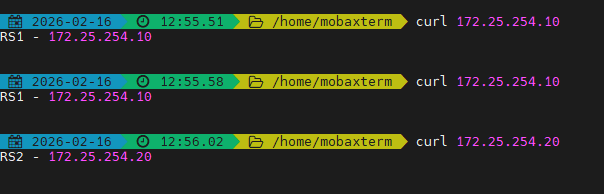
bash
#设定ka1和ka2
[root@KA1 ~]# vmset.sh eth0 172.25.254.50 KA1
[root@KA2 ~]# vmset.sh eth0 172.25.254.60 KA2


#设定本地解析
[root@KA1 ~]# vim /etc/hosts
127.0.0.1   localhost localhost.localdomain localhost4 localhost4.localdomain4
::1         localhost localhost.localdomain localhost6 localhost6.localdomain6
172.25.254.50     KA1
172.25.254.60     KA2
172.25.254.10     rs1
172.25.254.20     rs2


[root@KA1 ~]# for i in 60 10 20
> do
> scp /etc/hosts 172.25.254.$i:/etc/hosts
> done

#在所有主机中查看/etc/hosts


#在ka1中开启时间同步服务
[root@KA1 ~]# vim /etc/chrony.conf
 26 allow 0.0.0.0/0
 29 local stratum 10

[root@KA1 ~]# systemctl restart chronyd
[root@KA1 ~]# systemctl enable --now chronyd


#在ka2中使用ka1的时间同步服务
[root@KA2 ~]# vim /etc/chrony.conf
pool 172.25.254.50 iburst

[root@KA2 ~]# systemctl restart chronyd
[root@KA2 ~]# systemctl enable --now chronyd

[root@KA2 ~]# chronyc sources -v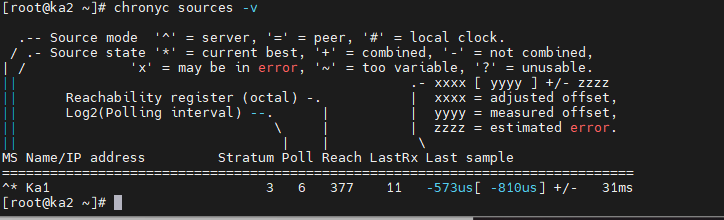
3.配置虚拟路由
bash
#在master
[root@KA1 ~]# vim /etc/keepalived/keepalived.conf
global_defs {
   notification_email {
     timinglee_zln@163.com
   }
   notification_email_from timinglee_zln@163.com
   smtp_server 127.0.0.1
   smtp_connect_timeout 30
   router_id KA1
   vrrp_skip_check_adv_addr
   #vrrp_strict
   vrrp_garp_interval 1
   vrrp_gna_interval 1
   vrrp_mcast_group4 224.0.0.44
}
vrrp_instance WEB_VIP {
    state MASTER
    interface eth0
    virtual_router_id 51
    priority 100
    advert_int 1
    authentication {
        auth_type PASS
        auth_pass 1111
    }
    virtual_ipaddress {
        172.25.254.100/24 dev eth0 label eth0:0
    }
}

[root@KA1 ~]# systemctl enable --now keepalived.service
Created symlink /etc/systemd/system/multi-user.target.wants/keepalived.service → /usr/lib/systemd/system/keepalived.service.

#在KA2中设定
[root@KA2 ~]# vim /etc/keepalived/keepalived.conf
global_defs {
   notification_email {
     timinglee_zln@163.com
   }
   notification_email_from timinglee_zln@163.com
   smtp_server 127.0.0.1
   smtp_connect_timeout 30
   router_id KA1
   vrrp_skip_check_adv_addr
   #vrrp_strict
   vrrp_garp_interval 1
   vrrp_gna_interval 1
   vrrp_mcast_group4 224.0.0.44
}
vrrp_instance WEB_VIP {
    state BACKUP
    interface eth0
    virtual_router_id 51
    priority 80
    advert_int 1
    authentication {
        auth_type PASS
        auth_pass 1111
    }
    virtual_ipaddress {
        172.25.254.100/24 dev eth0 label eth0:0
    }
}

[root@KA2 ~]# systemctl enable --now keepalived.service
Created symlink /etc/systemd/system/multi-user.target.wants/keepalived.service → /usr/lib/systemd/system/keepalived.service.


#验证
[root@KA1 ~]# tcpdump -i eth0 -nn host 224.0.0.44
11:38:46.183386 IP 172.25.254.50 > 224.0.0.44: VRRPv2, Advertisement, vrid 51, prio 100, authtype simple, intvl 1s, length 20
11:38:47.184051 IP 172.25.254.50 > 224.0.0.44: VRRPv2, Advertisement, vrid 51, prio 100, authtype simple, intvl 1s, length 20
11:38:48.184610 IP 172.25.254.50 > 224.0.0.44: VRRPv2, Advertisement, vrid 51, prio 100, authtype simple, intvl 1s, length 20
11:38:49.185084 IP 172.25.254.50 > 224.0.0.44: VRRPv2, Advertisement, vrid 51, prio 100, authtype simple, intvl 1s, length 20


[root@KA1 ~]# ifconfig
eth0: flags=4163<UP,BROADCAST,RUNNING,MULTICAST>  mtu 1500
        inet 172.25.254.50  netmask 255.255.255.0  broadcast 172.25.254.255
        inet6 fe80::3901:aeea:786a:7227  prefixlen 64  scopeid 0x20<link>
        ether 00:0c:29:26:33:d9  txqueuelen 1000  (Ethernet)
        RX packets 5847  bytes 563634 (550.4 KiB)
        RX errors 0  dropped 0  overruns 0  frame 0
        TX packets 5224  bytes 698380 (682.0 KiB)
        TX errors 0  dropped 0 overruns 0  carrier 0  collisions 0

eth0:0: flags=4163<UP,BROADCAST,RUNNING,MULTICAST>  mtu 1500
        inet 172.25.254.100  netmask 255.255.255.0  broadcast 0.0.0.0
        ether 00:0c:29:26:33:d9  txqueuelen 1000  (Ethernet)

lo: flags=73<UP,LOOPBACK,RUNNING>  mtu 65536
        inet 127.0.0.1  netmask 255.0.0.0
        inet6 ::1  prefixlen 128  scopeid 0x10<host>
        loop  txqueuelen 1000  (Local Loopback)
        RX packets 42  bytes 3028 (2.9 KiB)
        RX errors 0  dropped 0  overruns 0  frame 0
        TX packets 42  bytes 3028 (2.9 KiB)
        TX errors 0  dropped 0 overruns 0  carrier 0  collisions 0


#测试故障
#在一个独立的shell中执行
[root@KA1 ~]# tcpdump -i eth0 -nn host 224.0.0.44

#在kA1中模拟故障
[root@KA1 ~]# systemctl stop keepalived.service

#在KA2中看vip是否被迁移到当前主机
[root@KA2 ~]# ifconfig
eth0: flags=4163<UP,BROADCAST,RUNNING,MULTICAST>  mtu 1500
        inet 172.25.254.60  netmask 255.255.255.0  broadcast 172.25.254.255
        inet6 fe80::26df:35e5:539:56bc  prefixlen 64  scopeid 0x20<link>
        ether 00:0c:29:1e:fd:7a  txqueuelen 1000  (Ethernet)
        RX packets 2668  bytes 237838 (232.2 KiB)
        RX errors 0  dropped 0  overruns 0  frame 0
        TX packets 2229  bytes 280474 (273.9 KiB)
        TX errors 0  dropped 0 overruns 0  carrier 0  collisions 0

eth0:0: flags=4163<UP,BROADCAST,RUNNING,MULTICAST>  mtu 1500
        inet 172.25.254.100  netmask 255.255.255.0  broadcast 0.0.0.0
        ether 00:0c:29:1e:fd:7a  txqueuelen 1000  (Ethernet)

lo: flags=73<UP,LOOPBACK,RUNNING>  mtu 65536
        inet 127.0.0.1  netmask 255.0.0.0
        inet6 ::1  prefixlen 128  scopeid 0x10<host>
        loop  txqueuelen 1000  (Local Loopback)
        RX packets 52  bytes 3528 (3.4 KiB)
        RX errors 0  dropped 0  overruns 0  frame 0
        TX packets 52  bytes 3528 (3.4 KiB)
        TX errors 0  dropped 0 overruns 0  carrier 0  collisions 0