文章目录
- 一、条件变量的背景
- 二、条件变量详解
-
- 概述
- [▶ wait() 等待, 无谓词](#▶ wait() 等待, 无谓词)
- [▶ wait() 等待, 有谓词](#▶ wait() 等待, 有谓词)
- [▶ wait_for() 相对时间等待, 无谓词](#▶ wait_for() 相对时间等待, 无谓词)
- [▶ wait_for() 相对时间等待, 有谓词](#▶ wait_for() 相对时间等待, 有谓词)
- [▶ wait_until() 绝对时间等待, 无谓词](#▶ wait_until() 绝对时间等待, 无谓词)
- [▶ wait_until() 绝对时间等待, 有谓词](#▶ wait_until() 绝对时间等待, 有谓词)
- [▶ notify_one() 唤醒一个等待线程](#▶ notify_one() 唤醒一个等待线程)
- [▶ notify_all() 唤醒所有等待线程](#▶ notify_all() 唤醒所有等待线程)
- 三、小结
一、条件变量的背景
-
应用背景:在多线程程序中,我们经常遇到这样的场景:线程 A 需要等待某个条件成立(比如缓冲区非空),才能继续执行;而这个条件是由线程 B 在未来某个时刻设置的。
-
如果用 轮询(busy-waiting) 的方式检查条件(比如
while (!GlobalReady) {}),会 浪费大量 CPU 资源,效率极低。 -
条件变量(std::condition_variable) 就是为解决这个问题而生的:它允许一个或多个线程 挂起(阻塞) ,直到其他线程 通知(notify) 它们某个条件/状态可能已经满足,它才继续执行。
-
💡 类比:医院诊室模型
| 并发概念 | 医院场景中的对应物 | 作用说明 |
|---|---|---|
| 共享资源 | 一个医生诊室(一次只能看一位病人) | 临界区,需互斥访问 |
| 互斥锁(Mutex) | 诊室的门 + 医生的"正在接诊"状态 | 进入前必须确认医生空闲并关门;保证独占 |
| 线程(Thread) | 多个候诊病人(张三、李四、王五...) | 并发请求使用资源的执行单元 |
| 条件变量(Condition Variable) | 候诊区的叫号屏幕 + 护士的呼叫系统 | 不主动敲门,而是等被"精准通知" |
二、条件变量详解
概述
- 头文件 :
#include <condition_variable> - 命名空间 :
using namespace std; - ⚠️ 条件变量必须也只能与
unique_lock<mutex>配合使用,以保证线程安全。 - 条件变量本身不存储"条件"状态,它只是一个通知/等待机制。它不会记住你是否调用了 notify_one(),也不会自动检查 ready == true 这样的逻辑。它只负责: 释放锁让线程挂起,并在收到通知(或虚假唤醒)时上锁恢复执行 。因此,⚠️ 条件的状态 必须由程序员自己维护和检查。
▶ wait() 等待, 无谓词
基本用法
cpp
void wait(std::unique_lock<std::mutex>& lock);- 作用 :
- 内部自动释放锁,让当前线程挂起(阻塞);
- 直到其他线程通过 notify_one() 或 notify_all() 唤醒后自动重新加锁。
- 前提 :⚠️ 调用前此线程必须已持有锁。
- 样例:
cpp
condition_variable cv;
mutex mtx;
unique_lock<mutex> lock(mtx);

cv.wait(lock);
实例
cpp
#include <iostream>
#include <thread>
#include <mutex>
#include <condition_variable>
#include <chrono>
using namespace std;

mutex mtx;
condition_variable cv;
bool ready = false;

void worker() {
    cout << "Worker: 等待信号..."<< endl;
    unique_lock<mutex> lock(mtx); // unique_lock关联锁并上锁
    cv.wait(lock); // 释放锁,当前线程阻塞,直到被 notify
    cout << "Worker: 收到信号!开始工作。"<< endl;
}

void boss() {
    this_thread::sleep_for(chrono::seconds(2));
    { // 这里的花括号是为了限制 lock_guard 的作用域,从而尽早释放互斥锁。
        lock_guard<mutex> lock(mtx);
        ready = true;
    }
    cv.notify_one(); // 发送通知
    cout << "Boss: 已发送信号!"<< endl;
}

int main() {
    thread t1(worker);
    thread t2(boss);

    t1.join();
    t2.join();
    return 0;
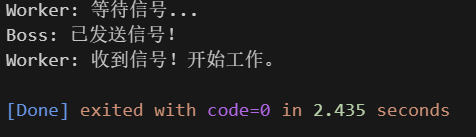
}
缺陷
1、竞争条件(Race Condition)导致误判
-
即使你收到了 notify,也不能保证在你被唤醒时,条件仍然成立。
-
场景举例 :
- 假设有两个等待线程 A 和 B,一个通知线程 T。
- T 设置 ready = true 并调用 cv.notify_all(),让两个线程收到通知后都执行。
- 线程 A 先被唤醒,检查 ready == true,继续执行,并将 ready 重置为 false(比如消费了一个任务)。
- 线程 B 被唤醒(因为是 notify_all),但此时 ready 已经被 A 改回 false。如果 B 使用的是下面这种只检查一次的错误写法,就错了:
cppif (!ready) { cv.wait(lock); }- ⚠️ 此时可能出错,这是因为该线程在被唤醒后不会再检查 ready 的状态,如果 ready状态已经被线程A改变成了 false,往下执行可能会出错!因为我们假想的状态是 ready 为 true 且收到通知的时候才会往下执行。
2、虚假唤醒
- 这是操作系统层面的行为:即使没有任何线程调用 notify,等待线程也可能被唤醒。POSIX 标准明确允许这种行为(出于性能或实现简化考虑)。例如,在某些多核系统上,中断、调度器行为等都可能触发虚假唤醒。
- 后果:
线程从 wait() 返回,但条件根本没变。
如果没有重新检查条件,就会执行错误逻辑。 - 📌 虚假唤醒不是 bug,而是标准允许的行为,程序必须能容忍它。
3、解决办法:while 循环判断状态
- 尽管当前线程会被 竞争条件/虚假唤醒 所影响,但是我们可以通过如下while 循环结构避免这种影响:
- 存在竞争条件时,条件 task_ready 可能被其他线程修改置为 false。但是当前线程在 cv.wait(lock); 执行结束返回后,while 循环这个代码结构内还是会执行一次 task_ready 的状态判断,进行二次确认,此时 task_ready 若还为false,则会继续加锁线程阻塞等待通知。
- 存在虚假唤醒时,条件 task_ready 可能还未被修改。while 代码块的具体细节和上述保持一致。
cpp
while (!task_ready) {       // ← 关键:while 循环
	cv.wait(lock);           // 可能因 notify 或虚假唤醒返回
}| 除了以上 while 结构解决办法,有谓词的 wait 也可以解决竞争条件和 虚假唤醒导致的误判现象。 |
|---|
▶ wait() 等待, 有谓词
基本用法
cpp
template< class Predicate >
void wait(std::unique_lock<std::mutex>& lock, Predicate pred);-
谓词 pred:
- 谓词
pred是一个可调用对象(如 lambda、函数指针、函数对象等),可以理解为是一个 预期条件, 不接受参数,返回 bool 类型。 - 谓词中通常访问受互斥锁保护的共享状态(如
ready变量) ,因此 其必须在持有锁时才能安全读取------而 wait 的设计恰好保证了这一点:每次检查谓词前都已加锁。
- 谓词
-
作用:
- 内部自动释放锁,让当前线程挂起;
- 当被 notify_one() 或 notify_all() 唤醒后,会先重新 获取/加 锁;然后检查谓词 pred 是否为 true,只有当谓词返回 true 时,wait 才会返回;否则继续阻塞等待下一次通知。
-
前提 :⚠️ 调用前此线程必须已持有锁。
✅ 强烈建议使用带谓词版本 ,避免手动处理虚假唤醒和竞态条件。
- 样例:
cpp
condition_variable cv;
mutex mtx;
unique_lock<mutex> lock(mtx);

cv.wait(lock, []{ return ready; });
实例
cpp
#include <iostream>
#include <thread>
#include <mutex>
#include <condition_variable>
#include <chrono>
using namespace std;

mutex mtx;
condition_variable cv;
bool ready = false;

void worker() {
    cout << "Worker: 等待信号..."<< endl;
    unique_lock<mutex> lock(mtx); // unique_lock关联锁并上锁
    cv.wait(lock, []{ return ready; }); // 带谓词版本:自动处理虚假唤醒和条件重检
    cout << "Worker: 收到信号!开始工作。"<< endl;
}

void boss() {
    this_thread::sleep_for(chrono::seconds(2));
    { // 这里的花括号是为了限制 lock_guard 的作用域,从而尽早释放互斥锁。
        lock_guard<mutex> lock(mtx);
        ready = true;
    }
    cv.notify_one(); // 发送通知
    cout << "Boss: 已发送信号!"<< endl;
}

int main() {
    thread t1(worker);
    thread t2(boss);

    t1.join();
    t2.join();
    return 0;
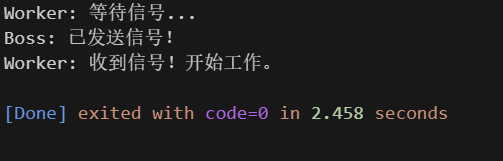
}
▶ wait_for() 相对时间等待, 无谓词
基本用法
cpp
// 无谓词 wait_for()
template< class Rep, class Period >
std::cv_status wait_for(
    std::unique_lock<std::mutex>& lock,
    const std::chrono::duration<Rep, Period>& rel_time
);- 作用 : 内部自动释放锁,让当前线程挂起(阻塞);直到其他线程通过
notify_one()/notify_all() 唤醒或者超时时间 rel_time 到期后自动重新加锁。- 当被通知唤醒(但不一定条件成立 ,可能虚假唤醒),返回
std::cv_status::no_timeout:; - 当超时了,返回
std::cv_status::timeout。
- 当被通知唤醒(但不一定条件成立 ,可能虚假唤醒),返回
- ⚠️ 注意:无谓词版本 不检查条件是否真正满足,需手动处理虚假唤醒!
- 样例:
cpp
condition_variable cv;
mutex mtx;
unique_lock<mutex> lock(mtx);

auto status = cv.wait_for(lock, chrono::seconds(1));

if (status == cv_status::timeout) {
    cout << "超时!" << endl;
} else {
    cout << "收到信号!"<< endl;
}
实例
cpp
#include <iostream>
#include <thread>
#include <mutex>
#include <condition_variable>
#include <chrono>
using namespace std;

mutex mtx;
condition_variable cv;
bool ready = false;

void worker() {
    unique_lock<mutex> lock(mtx); // unique_lock关联锁并上锁
    cout << "Worker: 等待信号..."<< endl;
    auto start = chrono::steady_clock::now();
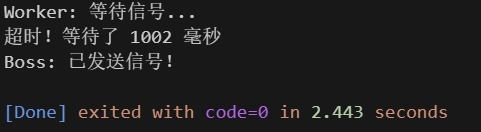
    auto status = cv.wait_for(lock, chrono::seconds(1)); // ✅️ 测试超时等待
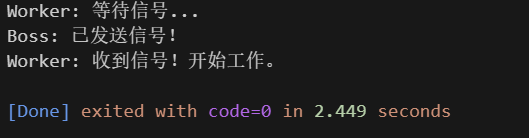
    //auto status = cv.wait_for(lock, chrono::seconds(5)); // ✅️ 测试通知唤醒
    auto end = chrono::steady_clock::now();

    // 此时 lock 仍然是 locked!
    auto elapsed = chrono::duration_cast<chrono::milliseconds>(end - start);
    if (status == cv_status::timeout) {
        cout << "超时!等待了 " << elapsed.count() << " 毫秒"<< endl;
        return;
        // 可以安全访问受 mtx 保护的数据(虽然本例中没有)
    }
    cout << "Worker: 收到信号!开始工作。"<< endl;
}

void boss() {
    this_thread::sleep_for(chrono::seconds(2));
    { // 这里的花括号是为了限制 lock_guard 的作用域,从而尽早释放互斥锁。
        lock_guard<mutex> lock(mtx);
        ready = true;
    }
    cv.notify_one(); // 发送通知
    cout << "Boss: 已发送信号!"<< endl;
}

int main() {
    thread t1(worker);
    thread t2(boss);

    t1.join();
    t2.join();
    return 0;
}
▶ wait_for() 相对时间等待, 有谓词
基本用法⭐⭐
cpp
// 有谓词 wait_for()
template< class Rep, class Period, class Predicate >
bool wait_for(
    std::unique_lock<std::mutex>& lock,
    const std::chrono::duration<Rep, Period>& rel_time,
    Predicate pred
);-
作用 : 内部自动释放锁,让当前线程挂起(阻塞);直到其他线程通过
notify_one()/notify_all() 唤醒或者超时时间 rel_time 到期后自动重新加锁,然后调用 pred() 检查条件。- 无论是被通知唤醒还是超时,只要 pred() 条件为真,则返回
true。 - 当超时且条件为 false 时,则返回
false。 - 当被通知唤醒但是条件为false时,则继续wait_for等待,不返回 。
- 无论是被通知唤醒还是超时,只要 pred() 条件为真,则返回
-
样例:
cpp
condition_variable cv;
mutex mtx;
unique_lock<mutex> lock(mtx);

bool result = cv.wait_for(lock, chrono::seconds(3), []{ return ready; });

if (result) {
	cout << "收到信号!"<< endl;
} else {
	cout << "超时!"<< endl;
}
✅ 强烈建议使用带谓词版本 ,避免手动处理虚假唤醒和竞态条件。
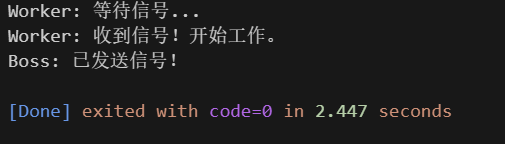
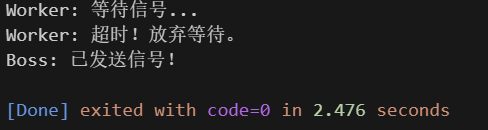
实例
cpp
#include <iostream>
#include <thread>
#include <mutex>
#include <condition_variable>
#include <chrono>
using namespace std;

mutex mtx;
condition_variable cv;
bool ready = false;

void worker() {
    unique_lock<mutex> lock(mtx); // unique_lock关联锁并上锁
    cout << "Worker: 等待信号..."<< endl;
    auto start = chrono::steady_clock::now();

    bool result = cv.wait_for(lock, chrono::seconds(3), []{ return ready; }); // ✅️ 通知唤醒,返回 true
    // bool result = cv.wait_for(lock, chrono::seconds(1), []{ return ready; }); // ✅️ 超时唤醒 且条件为 false,返回 false

    if (result) {
        cout << "Worker: 收到信号!开始工作。"<< endl;
    } else {
        cout << "Worker: 超时!放弃等待。\n";
    }
}

void boss() {
    this_thread::sleep_for(chrono::seconds(2));
    { // 这里的花括号是为了限制 lock_guard 的作用域,从而尽早释放互斥锁。
        lock_guard<mutex> lock(mtx);
        ready = true;
    }
    cv.notify_one(); // 发送通知
    cout << "Boss: 已发送信号!"<< endl;
}

int main() {
    thread t1(worker);
    thread t2(boss);

    t1.join();
    t2.join();
    return 0;
}
▶ wait_until() 绝对时间等待, 无谓词
💡 提示 : wait_until() 使用的是绝对时间点(如"2026-02-18 22:45:00"),而 wait_for() 使用的是相对时长(如"再等3秒"),两者功能等价,只是表达方式不同。
基本用法
cpp
// 无谓词 wait_until()
template< class Clock, class Duration >
std::cv_status wait_until(
    std::unique_lock<std::mutex>& lock,
    const std::chrono::time_point<Clock, Duration>& abs_time
);- 作用 : 内部自动释放锁,让当前线程挂起(阻塞);直到其他线程通过
notify_one()/notify_all() 唤醒,或者系统时间达到指定的绝对时间点 abs_time后自动重新加锁。- 当被通知唤醒(但不一定条件成立 ,可能虚假唤醒),返回
std::cv_status::no_timeout。 - 当到达
abs_time仍未被唤醒,则超时,返回std::cv_status::timeout。
- 当被通知唤醒(但不一定条件成立 ,可能虚假唤醒),返回
- ⚠️ 注意:无谓词版本 不检查条件是否真正满足,需手动处理虚假唤醒!
- 样例:
cpp
condition_variable cv;
mutex mtx;
unique_lock<mutex> lock(mtx);

auto deadline = chrono::steady_clock::now() + chrono::seconds(1);// ✅️ 最多等到未来1秒
auto status = cv.wait_until(lock, deadline);

if (status == cv_status::timeout) {
    cout << "超时!" << endl;
} else {
    cout << "收到信号!"<< endl;
}
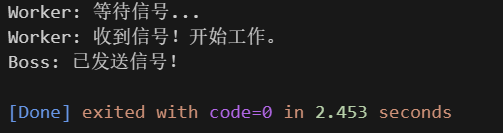
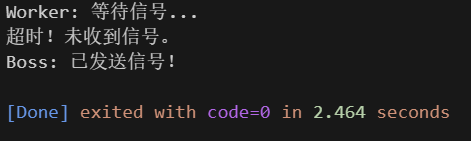
实例
cpp
#include <iostream>
#include <thread>
#include <mutex>
#include <condition_variable>
#include <chrono>
using namespace std;

mutex mtx;
condition_variable cv;
bool ready = false;

void worker() {
    unique_lock<mutex> lock(mtx);
    cout << "Worker: 等待信号..." << endl;

    auto deadline = chrono::steady_clock::now() + chrono::seconds(3);// ✅️ 通知唤醒,最多等到未来3秒
    //auto deadline = chrono::steady_clock::now() + chrono::seconds(1);// ✅️ 超时,最多等到未来1秒
    auto status = cv.wait_until(lock, deadline);

    if (status == cv_status::timeout) {
        cout << "超时!未收到信号。" << endl;
    } else {
        cout << "Worker: 收到信号!开始工作。" << endl;
    }
}

void boss() {
    this_thread::sleep_for(chrono::seconds(2));
    {
        lock_guard<mutex> lock(mtx);
        ready = true;
    }
    cv.notify_one();
    cout << "Boss: 已发送信号!" << endl;
}

int main() {
    thread t1(worker);
    thread t2(boss);

    t1.join();
    t2.join();
    return 0;
}
▶ wait_until() 绝对时间等待, 有谓词
基本用法
cpp
// 有谓词 wait_until()
template< class Clock, class Duration, class Predicate >
bool wait_until(
    std::unique_lock<std::mutex>& lock,
    const std::chrono::time_point<Clock, Duration>& abs_time,
    Predicate pred
);- 作用 : 内部自动释放锁,让当前线程挂起(阻塞);直到其他线程通过
notify_one()/notify_all() 唤醒,或系统时间达到 abs_time,然后重新加锁并调用pred()检查条件。- 无论是被通知唤醒还是超时,只要 pred() 条件为真,则返回
true。 - 当超时且条件为 false 时,则返回
false。 - 当被通知唤醒但是条件为false时,则继续wait_for等待,不返回 。
- 无论是被通知唤醒还是超时,只要 pred() 条件为真,则返回
- 样例:
cpp
condition_variable cv;
mutex mtx;
unique_lock<mutex> lock(mtx);

auto deadline = chrono::steady_clock::now() + chrono::seconds(3);// ✅️ 最多等到未来3秒
bool result = cv.wait_until(lock, deadline, []{ return ready; });

if (result) {
	cout << "收到信号!"<< endl;
} else {
	cout << "超时!"<< endl;
}
✅ 强烈建议使用带谓词版本 ,避免手动处理虚假唤醒和竞态条件。
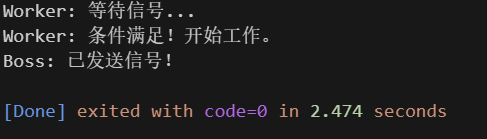
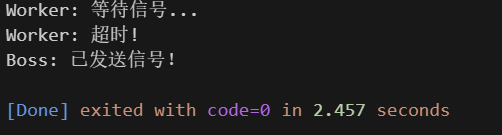
实例
cpp
#include <iostream>
#include <thread>
#include <mutex>
#include <condition_variable>
#include <chrono>
using namespace std;

mutex mtx;
condition_variable cv;
bool ready = false;

void worker() {
    unique_lock<mutex> lock(mtx);
    cout << "Worker: 等待信号..." << endl;

    auto deadline = chrono::steady_clock::now() + chrono::seconds(3);// ✅️ 通知唤醒,最多等到未来3秒
    //auto deadline = chrono::steady_clock::now() + chrono::seconds(1);// ✅️ 超时,最多等到未来1秒

    bool result = cv.wait_until(lock, deadline, []{ return ready; });

    if (result) {
        cout << "Worker: 条件满足!开始工作。" << endl;
    } else {
        cout << "Worker: 超时!" << endl;
    }
}

void boss() {
    this_thread::sleep_for(chrono::seconds(2));
    {
        lock_guard<mutex> lock(mtx);
        ready = true;
    }
    cv.notify_one();
    cout << "Boss: 已发送信号!" << endl;
}

int main() {
    thread t1(worker);
    thread t2(boss);

    t1.join();
    t2.join();
    return 0;
}
▶ notify_one() 唤醒一个等待线程
基本用法
cpp
void notify_one() noexcept;- 作用 :唤醒一个等待线程 ,但具体是哪一个,由操作系统线程调度器决定,程序无法控制,也不应依赖其顺序。
- 如果当前没有线程在等待,
notify_one() 什么也不做(不会累积通知)。 - ⚠️被唤醒的线程 不一定立即运行 ------它必须先成功重新获得互斥锁。
- 如果当前没有线程在等待,
- ⚠️ 不能替代谓词检查 :即使收到通知,也可能是虚假唤醒,因此 必须配合谓词使用,尤其是在无谓词的 wait 中。
- ✅ 推荐在修改状态后通知,确保被唤醒的线程看到的是最新的、一致的状态。 若先通知再改状态,等待线程可能被唤醒但发现条件仍不满足,导致逻辑错误或额外等待。
- 样例:
cpp
{
	// 1、上锁,修改状态
	lock_guard<mutex> lock(mtx);
	ready = true;
}
// 2、通知单个线程
cv.notify_one();
实例
参考前述内容的实例。
▶ notify_all() 唤醒所有等待线程
基本用法
cpp
void notify_all() noexcept;- 作用 : 唤醒所有等待线程
- 如果没有线程在等待,
notify_all() 什么也不做。 - ⚠️所有被唤醒的线程 不会同时运行 , 会
依次竞争互斥锁,逐个获得并执行。
- 如果没有线程在等待,
- 和
notify_one()一样,不需要持有互斥锁即可调用; - ⚠️ 仍需配合谓词使用! 即使收到通知,线程也必须检查条件是否真正满足(防止虚假唤醒或状态已变化)。
- ✅ 何时使用
notify_all():当 多个线程都需要响应同一个事件 时,例如:
配置更新,所有工作线程需重载参数;
程序即将退出,通知所有后台线程清理资源;
广播式任务(如"所有人暂停")。 - 样例:
cpp
{
	// 1、上锁,修改状态
	lock_guard<mutex> lock(mtx);
	ready = true;
}
// 2、通知多个线程
cv.notify_all();
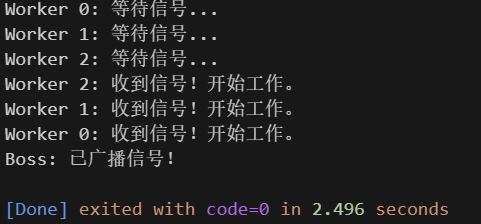
实例
cpp
#include <iostream>
#include <thread>
#include <vector>
#include <mutex>
#include <condition_variable>
#include <chrono>
using namespace std;

mutex mtx;
condition_variable cv;
bool ready = false; // 全局就绪标志

void worker(int id) {
    unique_lock<mutex> lock(mtx);
    cout << "Worker " << id << ": 等待信号..." << endl;

    // 带谓词等待:直到 ready == true 或超时(3秒)
    bool result = cv.wait_for(lock, chrono::seconds(3), []{ return ready; });

    if (result) {
        cout << "Worker " << id << ": 收到信号!开始工作。" << endl;
    } else {
        cout << "Worker " << id << ": 超时!放弃等待。" << endl;
    }
}

void boss() {
    this_thread::sleep_for(chrono::seconds(2)); // 模拟准备时间

    {
        lock_guard<mutex> lock(mtx);
        ready = true; // 设置就绪状态
    }

    cv.notify_all(); // ✅ 唤醒所有等待的 worker 线程
    cout << "Boss: 已广播信号!" << endl;
}

int main() {
    const int NUM_WORKERS = 3;
    vector<thread> workers;

    // 启动多个工作线程
    for (int i = 0; i < NUM_WORKERS; ++i) {
        workers.emplace_back(worker, i);
    }

    // 启动 boss 线程
    thread t_boss(boss);

    // 等待所有线程完成
    for (auto& t : workers) {
        t.join();
    }
    t_boss.join();

    return 0;
}
三、小结
- 务必使用带谓词的
wait()/wait_for()/wait_until()。 - 避免频繁 notify_all,优先用 notify_one。