一 Toolcalling的作用
1.1 toolcalling
Toolcalling:简短来说,就是让大模型能够调用外部工具来完成它本身做不到的任务 。如调用搜索API****、天气API获取最新数据****。调用邮件api、订票系统等。
二 使用案例
2.1 案例背景说明
用户问:"北京天气怎么样?"
→ LLM 识别需要调用 getWeather(String city) 工具
→ Java 执行该方法获取真实数据
→ 将结果返回给 LLM,生成自然语言回答
2.2 关键点说明
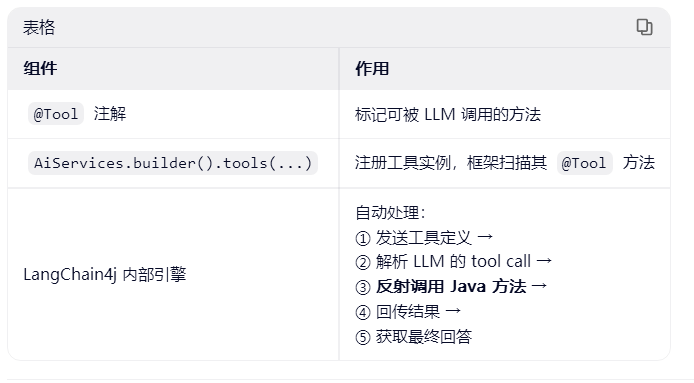
在 LangChain4j 的方案一 中,getWeather(String city) 方法的调用是 由 LangChain4j 框架自动完成的 ,你不需要手动解析 LLM 的输出或显式调用该方法。整个过程对开发者是透明的,**只需通过 @Tool 注解声明工具方法,框架会在 LLM 决定需要调用工具时自动执行它。**只需用 @Tool 标记方法,并通过 .tools() 注册实例,LangChain4j 会在 LLM 需要时自动反射调用它,并将结果无缝集成到对话中。
2.3 实现步骤
下面是一个 完整的 Spring Boot + LangChain4j 实现 Tool Calling 的案例,包含:
- 使用
@Tool注解暴露 Java 方法 - 通过 OpenAI(GPT-4o)实现自动工具调用
- REST API 接口供前端或测试调用
- 自动处理 LLM → 工具 → 最终回答的全流程
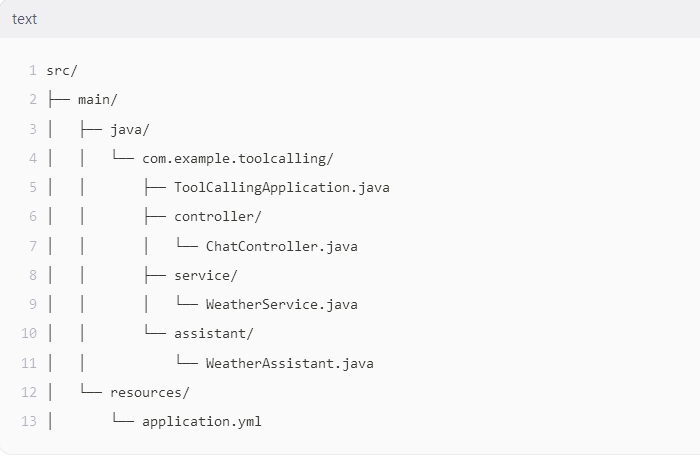
2.3.1 项目结构
2.3.2 maven依赖pom.xml
langchain4j-spring-boot-starter 提供了自动配置,简化集成。
<dependencies>
    <dependency>
        <groupId>org.springframework.boot</groupId>
        <artifactId>spring-boot-starter-web</artifactId>
    </dependency>

    <!-- LangChain4j Core -->
    <dependency>
        <groupId>dev.langchain4j</groupId>
        <artifactId>langchain4j-spring-boot-starter</artifactId>
        <version>0.32.0</version>
    </dependency>

    <!-- OpenAI Integration -->
    <dependency>
        <groupId>dev.langchain4j</groupId>
        <artifactId>langchain4j-open-ai-spring-boot-starter</artifactId>
        <version>0.32.0</version>
    </dependency>
</dependencies>
2.3.3 yml配置文件
langchain4j:
  open-ai:
    chat-model:
      api-key: ${OPENAI_API_KEY}  # 从环境变量读取
      model-name: gpt-4o
      temperature: 0.0
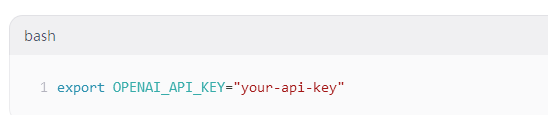
请确保设置环境变量:
2.3.4 定义service
@Service 让 Spring 管理该 Bean,便于注入。
package com.example.toolcalling.service;

import dev.langchain4j.agent.tool.Tool;
import org.springframework.stereotype.Service;

@Service
public class WeatherService {

    @Tool("Get the current weather in a given city")
    public String getWeather(String city) {
        System.out.println("🔍 [TOOL CALL] Executing getWeather('" + city + "')");

        // 模拟真实逻辑(可替换为 HTTP 调用天气 API)
        if ("Beijing".equalsIgnoreCase(city)) {
            return "Sunny, 25°C";
        } else if ("Shanghai".equalsIgnoreCase(city)) {
            return "Cloudy, 22°C";
        }
        return "Weather data not available for " + city;
    }
}
2.3.5 定义 AI 助手接口
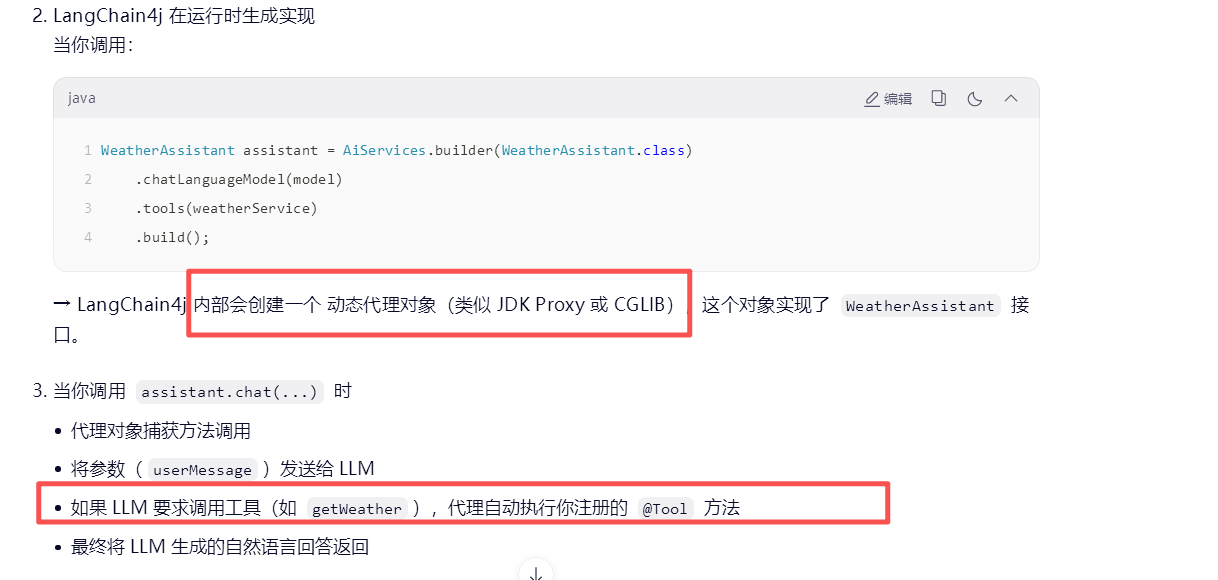
说明: public interface WeatherAssistant 只需接口,不需要编写实现类,这是 LangChain4j 的核心魔法之一:它会在运行时动态生成该接口的实现类(通过代理或字节码生成),并自动处理与 LLM 的交互、工具调用、结果解析等复杂逻辑。
这种模式类似于:
Spring Data JPA:UserRepository extends JpaRepository → 无需实现
Feign Client:UserService extends FeignClient → 无需实现
放心使用,这是 正确且高效的做法!
package com.example.toolcalling.assistant;

public interface WeatherAssistant {
    String chat(String userMessage);
}
实现触发原理
2.3.6 注册tools工具类
关键:.tools(weatherService) 将 Spring Bean 注入为工具。
package com.example.toolcalling.config;

import com.example.toolcalling.assistant.WeatherAssistant;
import com.example.toolcalling.service.WeatherService;
import dev.langchain4j.service.AiServices;
import dev.langchain4j.spring.ChatModelFactory;
import org.springframework.context.annotation.Bean;
import org.springframework.context.annotation.Configuration;

@Configuration
public class AiConfig {

    private final WeatherService weatherService;
    private final ChatModelFactory chatModelFactory;

    public AiConfig(WeatherService weatherService, ChatModelFactory chatModelFactory) {
        this.weatherService = weatherService;
        this.chatModelFactory = chatModelFactory;
    }

    @Bean
    public WeatherAssistant weatherAssistant() {
        return AiServices.builder(WeatherAssistant.class)
                .chatLanguageModel(chatModelFactory.createChatModel())
                .tools(weatherService) // 注册工具
                .build();
    }
}
2.3.7 创建restcontroller
package com.controller;

import com.example.toolcalling.assistant.WeatherAssistant;
import org.springframework.web.bind.annotation.*;

@RestController
@RequestMapping("/api/chat")
public class ChatController {

    private final WeatherAssistant weatherAssistant;

    public ChatController(WeatherAssistant weatherAssistant) {
        this.weatherAssistant = weatherAssistant;
    }

    @PostMapping
    public String chat(@RequestBody String userMessage) {
        return weatherAssistant.chat(userMessage);
    }
}
2.3.8 启动类
package com.example.toolcalling;

import org.springframework.boot.SpringApplication;
import org.springframework.boot.autoconfigure.SpringBootApplication;

@SpringBootApplication
public class ToolCallingApplication {
    public static void main(String[] args) {
        SpringApplication.run(ToolCallingApplication.class, args);
    }
}
2.3.8 调用测试
1.启动:mvn spring-boot:run
2.测试:
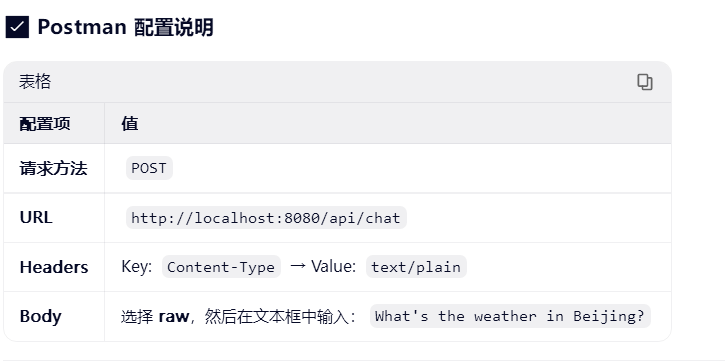
3.结果输出:
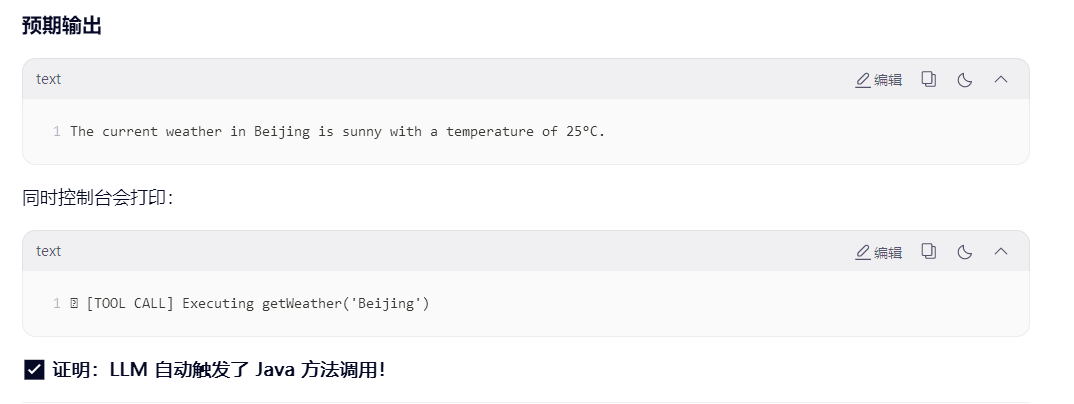
4.注意:
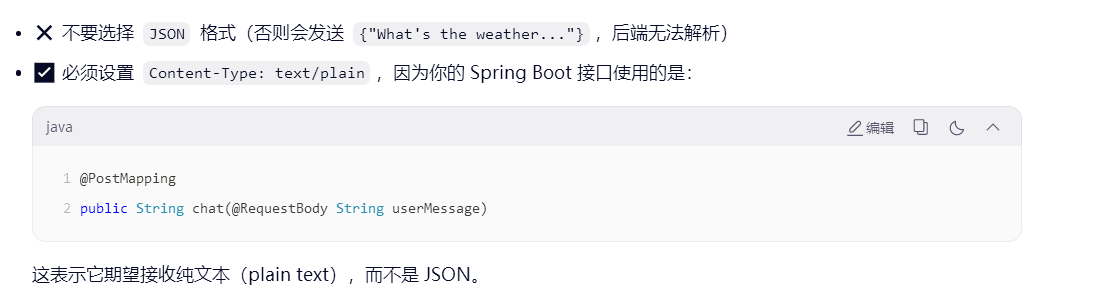
说明: public interface WeatherAssistant 只需接口,不需要编写实现类,这是 LangChain4j 的核心魔法之一:它会在运行时动态生成该接口的实现类(通过代理或字节码生成),并自动处理与 LLM 的交互、工具调用、结果解析等复杂逻辑。