本专栏内容为:项目专栏
💓博主csdn个人主页:小小unicorn⏩专栏分类:微服务即时通讯系统
🚚代码仓库:小小unicorn的代码仓库🚚
🌹🌹🌹关注我带你学习编程知识
语音子服务
功能设计
- 文件的上传
a. 单个文件的上传:这个接口基本用于后台部分,收到文件消息后将文件数据转发给文件子服务进行存储
b. 多个文件的上传:这个接口基本用于后台部分,收到文件消息后将文件数据转发给文件子服务进行存储 - 文件的下载
a. 单个文件的下载:在后台用于获取用户头像文件数据,以及客户端用于获取文件/语音/图片消息的文件数据
b. 多个文件的下载:在后台用于大批量获取用户头像数据(比如获取用户列表的时候),以及前端的批量文件下载
模块划分
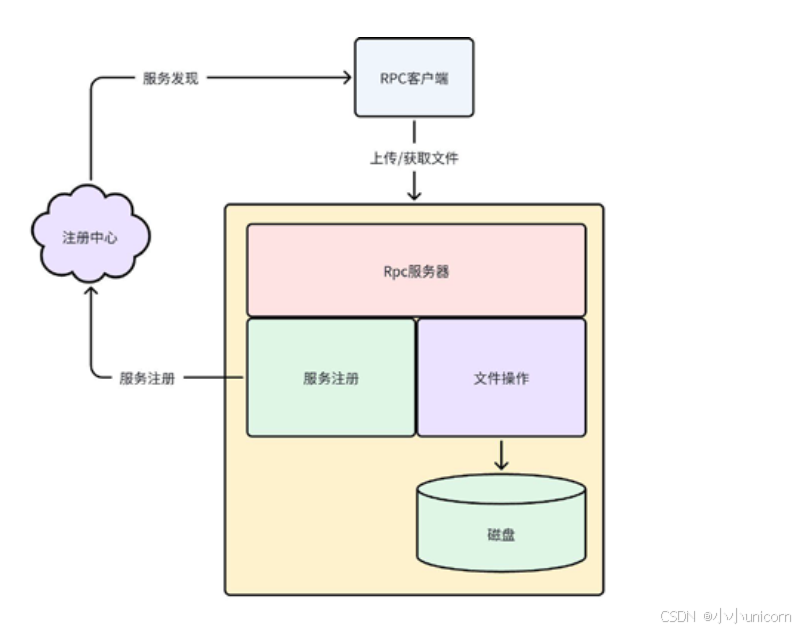
- 参数/配置文件解析模块:基于
gflags 框架直接使用进行参数/配置文件解析。 - 日志模块:基于
spdlog 框架封装的模块直接使用进行日志输出。 - 服务注册模块:基于
etcd 框架封装的注册模块直接使用进行文件存储管理子服务
的服务注册。 - rpc 服务模块:基于
brpc 框架搭建rpc 服务器。 - 文件操作模块:基于标准库的文件流操作实现文件读写的封装
模块功能示意图
接口实现流程
单个文件的上传:
- 获取文件元数据(大小、文件名、文件内容)。
- 为文件分配
文件 ID。 - 以
文件 ID为文件名打开文件,并写入数据。 - 组织响应进行返回。
多个文件的上传:
多文件上传,其实相较于单文件上传,就是将处理的过程循环进行了而已
- 从请求中获取文件元数据。
- 为文件分配
文件 ID。 - 以
文件 ID为文件名打开文件,并写入数据。 - 回到第一步进行下一个文件的处理。
- 当所有文件数据存储完毕,组织响应进行返回。
单个文件的下载:
- 从请求中获取
文件 ID - 以
文件 ID作为文件名打开文件,获取文件大小,并从中读取文件数据。 - 组织响应进行返回
多个文件的下载:
多文件下载,其实相较于单文件下载,就是将处理的过程循环进行了而已
- 从请求中获取
文件 ID。 - 以
文件 ID作为文件名打开文件,获取文件大小,并从中读取文件数据。 - 回到第一步进行下一个文件的处理。
- 当所有文件数据获取完毕,组织响应进行返回
代码实现
代码框架:

file_server.cc
cpp
// 按照流程完成服务器的搭建
// 1. 参数解析
// 2. 日志初始化
// 3. 构造服务器对象,启动服务器
#include "file_server.hpp"

DEFINE_bool(run_mode, false, "程序的运行模式,false-调试; true-发布;");
DEFINE_string(log_file, "", "发布模式下,用于指定日志的输出文件");
DEFINE_int32(log_level, 0, "发布模式下,用于指定日志输出等级");

DEFINE_string(registry_host, "http://127.0.0.1:2379", "服务注册中心地址");
DEFINE_string(base_service, "/service", "服务监控根目录");
DEFINE_string(instance_name, "/file_service/instance", "当前实例名称");
DEFINE_string(access_host, "127.0.0.1:10002", "当前实例的外部访问地址");

DEFINE_string(storage_path, "./data/", "当前实例的外部访问地址");

DEFINE_int32(listen_port, 10002, "Rpc服务器监听端口");
DEFINE_int32(rpc_timeout, -1, "Rpc调用超时时间");
DEFINE_int32(rpc_threads, 1, "Rpc的IO线程数量");

int main(int argc, char *argv[])
{
    google::ParseCommandLineFlags(&argc, &argv, true);
    bite_im::init_logger(FLAGS_run_mode, FLAGS_log_file, FLAGS_log_level);

    bite_im::FileServerBuilder fsb;
    fsb.make_rpc_server(FLAGS_listen_port, FLAGS_rpc_timeout, FLAGS_rpc_threads, FLAGS_storage_path);
    fsb.make_reg_object(FLAGS_registry_host, FLAGS_base_service + FLAGS_instance_name, FLAGS_access_host);
    auto server = fsb.build();
    server->start();
    return 0;
}
file_server.hpp
cpp
// 实现文件存储子服务
// 1. 实现文件rpc服务类 --- 实现rpc调用的业务处理接口
// 2. 实现文件存储子服务的服务器类
// 3. 实现文件存储子服务类的构造者
#include <brpc/server.h>
#include <butil/logging.h>
#include "etcd.hpp" // 服务注册模块封装
#include "logger.hpp" // 日志模块封装
#include "utils.hpp"
#include "base.pb.h"
#include "file.pb.h"
namespace bite_im
{
class FileServiceImpl : public bite_im::FileService
{
public:
FileServiceImpl(const std::string &storage_path) : _storage_path(storage_path)
{
umask(0);
mkdir(storage_path.c_str(), 0775);
if (_storage_path.back() != '/')
_storage_path.push_back('/');
}
~FileServiceImpl() {}
void GetSingleFile(google::protobuf::RpcController *controller,
const ::bite_im::GetSingleFileReq *request,
::bite_im::GetSingleFileRsp *response,
::google::protobuf::Closure *done)
{
brpc::ClosureGuard rpc_guard(done);
response->set_request_id(request->request_id());
// 1. 取出请求中的文件ID(起始就是文件名)
std::string fid = request->file_id();
std::string filename = _storage_path + fid;
// 2. 将文件ID作为文件名,读取文件数据
std::string body;
bool ret = readFile(filename, body);
if (ret == false) // 失败了,组织响应
{
response->set_success(false);
response->set_errmsg("读取文件数据失败!");
LOG_ERROR("{} 读取文件数据失败!", request->request_id());
return;
}
// 3. 组织响应
response->set_success(true);
response->mutable_file_data()->set_file_id(fid);
response->mutable_file_data()->set_file_content(body);
}
void GetMultiFile(google::protobuf::RpcController *controller,
const ::bite_im::GetMultiFileReq *request,
::bite_im::GetMultiFileRsp *response,
::google::protobuf::Closure *done)
{
brpc::ClosureGuard rpc_guard(done);
response->set_request_id(request->request_id());
// 循环取出请求中的文件ID,读取文件数据进行填充
for (int i = 0; i < request->file_id_list_size(); i++)
{
std::string fid = request->file_id_list(i); // 第i个id
std::string filename = _storage_path + fid;
std::string body;
bool ret = readFile(filename, body);
if (ret == false)
{
response->set_success(false);
response->set_errmsg("读取文件数据失败!");
LOG_ERROR("{} 读取文件数据失败!", request->request_id());
return;
}
FileDownloadData data;
data.set_file_id(fid);
data.set_file_content(body);
response->mutable_file_data()->insert({fid, data});
}
response->set_success(true);
}
void PutSingleFile(google::protobuf::RpcController *controller,
const ::bite_im::PutSingleFileReq *request,
::bite_im::PutSingleFileRsp *response,
::google::protobuf::Closure *done)
{
brpc::ClosureGuard rpc_guard(done);
response->set_request_id(request->request_id());
// 1. 为文件生成一个唯一uudi作为文件名 以及 文件ID
std::string fid = uuid();
std::string filename = _storage_path + fid;
// 2. 取出请求中的文件数据,进行文件数据写入
bool ret = writeFile(filename, request->file_data().file_content());
if (ret == false)
{
response->set_success(false);
response->set_errmsg("读取文件数据失败!");
LOG_ERROR("{} 写入文件数据失败!", request->request_id());
return;
}
// 3. 组织响应
response->set_success(true);
response->mutable_file_info()->set_file_id(fid);
response->mutable_file_info()->set_file_size(request->file_data().file_size());
response->mutable_file_info()->set_file_name(request->file_data().file_name());
}
void PutMultiFile(google::protobuf::RpcController *controller,
const ::bite_im::PutMultiFileReq *request,
::bite_im::PutMultiFileRsp *response,
::google::protobuf::Closure *done)
{
brpc::ClosureGuard rpc_guard(done);
response->set_request_id(request->request_id());
for (int i = 0; i < request->file_data_size(); i++)
{
std::string fid = uuid();
std::string filename = _storage_path + fid;
bool ret = writeFile(filename, request->file_data(i).file_content());
if (ret == false)
{
response->set_success(false);
response->set_errmsg("读取文件数据失败!");
LOG_ERROR("{} 写入文件数据失败!", request->request_id());
return;
}
bite_im::FileMessageInfo *info = response->add_file_info();
info->set_file_id(fid);
info->set_file_size(request->file_data(i).file_size());
info->set_file_name(request->file_data(i).file_name());
}
response->set_success(true);
}
private:
std::string _storage_path;
};
class FileServer
{
public:
using ptr = std::shared_ptr<FileServer>;
FileServer(const Registry::ptr ®_client,
const std::shared_ptr<brpc::Server> &server) : _reg_client(reg_client),
_rpc_server(server) {}
~FileServer() {}
// 搭建RPC服务器,并启动服务器
void start()
{
_rpc_server->RunUntilAskedToQuit();
}
private:
Registry::ptr _reg_client;
std::shared_ptr<brpc::Server> _rpc_server;
};
class FileServerBuilder
{
public:
// 用于构造服务注册客户端对象
void make_reg_object(const std::string ®_host,
const std::string &service_name,
const std::string &access_host)
{
_reg_client = std::make_shared<Registry>(reg_host);
_reg_client->registry(service_name, access_host);
}
// 构造RPC服务器对象
void make_rpc_server(uint16_t port, int32_t timeout,
uint8_t num_threads, const std::string &path = "./data/")
{
_rpc_server = std::make_shared<brpc::Server>();
FileServiceImpl *file_service = new FileServiceImpl(path);
int ret = _rpc_server->AddService(file_service,
brpc::ServiceOwnership::SERVER_OWNS_SERVICE);
if (ret == -1)
{
LOG_ERROR("添加Rpc服务失败!");
abort();
}
brpc::ServerOptions options;
options.idle_timeout_sec = timeout;
options.num_threads = num_threads;
ret = _rpc_server->Start(port, &options);
if (ret == -1)
{
LOG_ERROR("服务启动失败!");
abort();
}
}
FileServer::ptr build()
{
if (!_reg_client)
{
LOG_ERROR("还未初始化服务注册模块!");
abort();
}
if (!_rpc_server)
{
LOG_ERROR("还未初始化RPC服务器模块!");
abort();
}
FileServer::ptr server = std::make_shared<FileServer>(_reg_client, _rpc_server);
return server;
}
private:
Registry::ptr _reg_client;
std::shared_ptr<brpc::Server> _rpc_server;
};
}CMakeList.txt
cpp
# 1. 添加cmake版本说明
cmake_minimum_required(VERSION 3.1.3)
# 2. 声明工程名称
project(file_server)

set(target "file_server")
#set(CMAKE_CXX_FLAGS "${CMAKE_CXX_FLAGS} -g")

# 3. 检测并生成ODB框架代码
#   1. 添加所需的proto映射代码文件名称
set(proto_path ${CMAKE_CURRENT_SOURCE_DIR}/../proto)
set(proto_files file.proto base.proto)
#   2. 检测框架代码文件是否已经生成
set(proto_hxx "")
set(proto_cxx "")
set(proto_srcs "")
foreach(proto_file ${proto_files})
#   3. 如果没有生成,则预定义生成指令 -- 用于在构建项目之间先生成框架代码
    string(REPLACE ".proto" ".pb.cc" proto_cc ${proto_file})
    string(REPLACE ".proto" ".pb.h" proto_hh  ${proto_file})
    if (NOT EXISTS ${CMAKE_CURRENT_BINARY_DIR}${proto_cc})
        add_custom_command(
            PRE_BUILD
            COMMAND protoc
            ARGS --cpp_out=${CMAKE_CURRENT_BINARY_DIR} -I ${proto_path} --experimental_allow_proto3_optional ${proto_path}/${proto_file}
            DEPENDS ${proto_path}/${proto_file}
            OUTPUT ${CMAKE_CURRENT_BINARY_DIR}/${proto_cc}
            COMMENT "生成Protobuf框架代码文件:" ${CMAKE_CURRENT_BINARY_DIR}/${proto_cc}
        )
    endif()
    list(APPEND proto_srcs ${CMAKE_CURRENT_BINARY_DIR}/${proto_cc})
endforeach()

# 4. 获取源码目录下的所有源码文件
set(src_files "")
aux_source_directory(${CMAKE_CURRENT_SOURCE_DIR}/source src_files)
# 5. 声明目标及依赖
add_executable(${target} ${src_files} ${proto_srcs})
# 7. 设置需要连接的库
target_link_libraries(${target} -lgflags -lspdlog -lfmt -lbrpc -lssl -lcrypto -lprotobuf -lleveldb -letcd-cpp-api -lcpprest -lcurl /usr/lib/x86_64-linux-gnu/libjsoncpp.so.19)


#set(test_client "file_client")
#set(test_files "")
#aux_source_directory(${CMAKE_CURRENT_SOURCE_DIR}/test test_files)
#add_executable(${test_client} ${test_files} ${proto_srcs})
#target_link_libraries(${test_client} -lgtest -lgflags -lspdlog -lfmt -lbrpc -lssl -lcrypto -lprotobuf -lleveldb -letcd-cpp-api -lcpprest -lcurl /usr/lib/x86_64-linux-gnu/libjsoncpp.so.19)

# 6. 设置头文件默认搜索路径
include_directories(${CMAKE_CURRENT_BINARY_DIR})
include_directories(${CMAKE_CURRENT_SOURCE_DIR}/../common)
include_directories(${CMAKE_CURRENT_SOURCE_DIR}/../third/include)

#8. 设置安装路径
INSTALL(TARGETS ${target} ${test_client} RUNTIME DESTINATION bin)创建build目录,cmaske .. 并且make
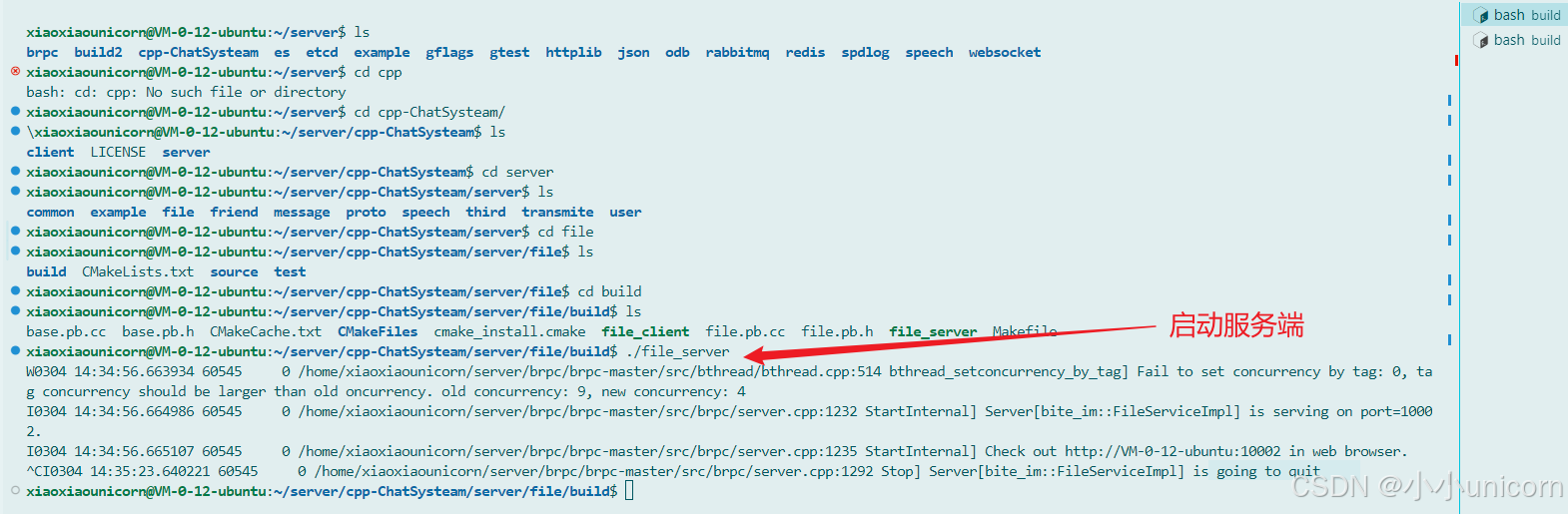
运行结果如下:

文件存储子服务测试程序编写
file_client.cc
cpp
// 编写一个file客户端程序,对文件存储子服务进行单元测试
//  1. 封装四个接口进行rpc调用,实现对于四个业务接口的测试
#include <gflags/gflags.h>
#include <gtest/gtest.h>
#include <thread>
#include "etcd.hpp"
#include "channel.hpp"
#include "logger.hpp"
#include "file.pb.h"
#include "base.pb.h"
#include "utils.hpp"

DEFINE_bool(run_mode, false, "程序的运行模式,false-调试; true-发布;");
DEFINE_string(log_file, "", "发布模式下,用于指定日志的输出文件");
DEFINE_int32(log_level, 0, "发布模式下,用于指定日志输出等级");

DEFINE_string(etcd_host, "http://127.0.0.1:2379", "服务注册中心地址");
DEFINE_string(base_service, "/service", "服务监控根目录");
DEFINE_string(file_service, "/service/file_service", "服务监控根目录");

bite_im::ServiceChannel::ChannelPtr channel;
std::string single_file_id;

TEST(put_test, single_file)
{
    // 1. 读取当前目录下的指定文件数据
    std::string body;
    ASSERT_TRUE(bite_im::readFile("./Makefile", body));
    // 2. 实例化rpc调用客户端对象,发起rpc调用
    bite_im::FileService_Stub stub(channel.get());

    bite_im::PutSingleFileReq req;
    req.set_request_id("1111");
    req.mutable_file_data()->set_file_name("Makefile");
    req.mutable_file_data()->set_file_size(body.size());
    req.mutable_file_data()->set_file_content(body);

    brpc::Controller *cntl = new brpc::Controller();
    bite_im::PutSingleFileRsp *rsp = new bite_im::PutSingleFileRsp();
    stub.PutSingleFile(cntl, &req, rsp, nullptr);
    ASSERT_FALSE(cntl->Failed());
    // 3. 检测返回值中上传是否成功
    ASSERT_TRUE(rsp->success());
    ASSERT_EQ(rsp->file_info().file_size(), body.size());
    ASSERT_EQ(rsp->file_info().file_name(), "Makefile");
    single_file_id = rsp->file_info().file_id();
    LOG_DEBUG("文件ID:{}", rsp->file_info().file_id());
}

TEST(get_test, single_file)
{
    // 先发起Rpc调用,进行文件下载
    bite_im::FileService_Stub stub(channel.get());
    bite_im::GetSingleFileReq req;
    bite_im::GetSingleFileRsp *rsp;
    req.set_request_id("2222");
    req.set_file_id(single_file_id);

    brpc::Controller *cntl = new brpc::Controller();
    rsp = new bite_im::GetSingleFileRsp();
    stub.GetSingleFile(cntl, &req, rsp, nullptr);
    ASSERT_FALSE(cntl->Failed());
    ASSERT_TRUE(rsp->success());
    // 将文件数据,存储到文件中
    ASSERT_EQ(single_file_id, rsp->file_data().file_id());
    bite_im::writeFile("make_file_download", rsp->file_data().file_content());
}

std::vector<std::string> multi_file_id;

TEST(put_test, multi_file)
{
    // 1. 读取当前目录下的指定文件数据
    std::string body1;
    ASSERT_TRUE(bite_im::readFile("./base.pb.h", body1));
    std::string body2;
    ASSERT_TRUE(bite_im::readFile("./file.pb.h", body2));
    // 2. 实例化rpc调用客户端对象,发起rpc调用
    bite_im::FileService_Stub stub(channel.get());

    bite_im::PutMultiFileReq req;
    req.set_request_id("3333");

    auto file_data = req.add_file_data();
    file_data->set_file_name("base.pb.h");
    file_data->set_file_size(body1.size());
    file_data->set_file_content(body1);

    file_data = req.add_file_data();
    file_data->set_file_name("file.pb.h");
    file_data->set_file_size(body2.size());
    file_data->set_file_content(body2);

    brpc::Controller *cntl = new brpc::Controller();
    bite_im::PutMultiFileRsp *rsp = new bite_im::PutMultiFileRsp();
    stub.PutMultiFile(cntl, &req, rsp, nullptr);
    ASSERT_FALSE(cntl->Failed());
    // 3. 检测返回值中上传是否成功
    ASSERT_TRUE(rsp->success());
    for (int i = 0; i < rsp->file_info_size(); i++)
    {
        multi_file_id.push_back(rsp->file_info(i).file_id());
        LOG_DEBUG("文件ID:{}", multi_file_id[i]);
    }
}

TEST(get_test, multi_file)
{
    // 先发起Rpc调用,进行文件下载
    bite_im::FileService_Stub stub(channel.get());
    bite_im::GetMultiFileReq req;
    bite_im::GetMultiFileRsp *rsp;
    req.set_request_id("4444");
    req.add_file_id_list(multi_file_id[0]);
    req.add_file_id_list(multi_file_id[1]);

    brpc::Controller *cntl = new brpc::Controller();
    rsp = new bite_im::GetMultiFileRsp();
    stub.GetMultiFile(cntl, &req, rsp, nullptr);
    ASSERT_FALSE(cntl->Failed());
    ASSERT_TRUE(rsp->success());
    // 将文件数据,存储到文件中
    ASSERT_TRUE(rsp->file_data().find(multi_file_id[0]) != rsp->file_data().end());
    ASSERT_TRUE(rsp->file_data().find(multi_file_id[1]) != rsp->file_data().end());
    auto map = rsp->file_data();
    auto file_data1 = map[multi_file_id[0]];
    bite_im::writeFile("base_download_file1", file_data1.file_content());
    auto file_data2 = map[multi_file_id[1]];
    bite_im::writeFile("file_download_file2", file_data2.file_content());
}

int main(int argc, char *argv[])
{
    testing::InitGoogleTest(&argc, argv);
    google::ParseCommandLineFlags(&argc, &argv, true);

    bite_im::init_logger(FLAGS_run_mode, FLAGS_log_file, FLAGS_log_level);

    // 1. 先构造Rpc信道管理对象
    auto sm = std::make_shared<bite_im::ServiceManager>();
    sm->declared(FLAGS_file_service);
    auto put_cb = std::bind(&bite_im::ServiceManager::onServiceOnline, sm.get(), std::placeholders::_1, std::placeholders::_2);
    auto del_cb = std::bind(&bite_im::ServiceManager::onServiceOffline, sm.get(), std::placeholders::_1, std::placeholders::_2);
    // 2. 构造服务发现对象
    bite_im::Discovery::ptr dclient = std::make_shared<bite_im::Discovery>(FLAGS_etcd_host, FLAGS_base_service, put_cb, del_cb);

    // 3. 通过Rpc信道管理对象,获取提供Echo服务的信道
    channel = sm->choose(FLAGS_file_service);
    if (!channel)
    {
        std::this_thread::sleep_for(std::chrono::seconds(1));
        return -1;
    }

    return RUN_ALL_TESTS();
}
CMakeList.txt
cpp
# 1. 添加cmake版本说明
cmake_minimum_required(VERSION 3.1.3)
# 2. 声明工程名称
project(file_server)

set(target "file_server")
set(CMAKE_CXX_FLAGS "${CMAKE_CXX_FLAGS} -g")

# 3. 检测并生成ODB框架代码
#   1. 添加所需的proto映射代码文件名称
set(proto_path ${CMAKE_CURRENT_SOURCE_DIR}/../proto)
set(proto_files file.proto base.proto)
#   2. 检测框架代码文件是否已经生成
set(proto_hxx "")
set(proto_cxx "")
set(proto_srcs "")
foreach(proto_file ${proto_files})
#   3. 如果没有生成,则预定义生成指令 -- 用于在构建项目之间先生成框架代码
    string(REPLACE ".proto" ".pb.cc" proto_cc ${proto_file})
    string(REPLACE ".proto" ".pb.h" proto_hh  ${proto_file})
    if (NOT EXISTS ${CMAKE_CURRENT_BINARY_DIR}${proto_cc})
        add_custom_command(
            PRE_BUILD
            COMMAND protoc
            ARGS --cpp_out=${CMAKE_CURRENT_BINARY_DIR} -I ${proto_path} --experimental_allow_proto3_optional ${proto_path}/${proto_file}
            DEPENDS ${proto_path}/${proto_file}
            OUTPUT ${CMAKE_CURRENT_BINARY_DIR}/${proto_cc}
            COMMENT "生成Protobuf框架代码文件:" ${CMAKE_CURRENT_BINARY_DIR}/${proto_cc}
        )
    endif()
    list(APPEND proto_srcs ${CMAKE_CURRENT_BINARY_DIR}/${proto_cc})
endforeach()

# 4. 获取源码目录下的所有源码文件
set(src_files "")
aux_source_directory(${CMAKE_CURRENT_SOURCE_DIR}/source src_files)
# 5. 声明目标及依赖
add_executable(${target} ${src_files} ${proto_srcs})
# 7. 设置需要连接的库
target_link_libraries(${target} -lgflags -lspdlog -lfmt -lbrpc -lssl -lcrypto -lprotobuf -lleveldb -letcd-cpp-api -lcpprest -lcurl /usr/lib/x86_64-linux-gnu/libjsoncpp.so.19)


set(test_client "file_client")
set(test_files "")
aux_source_directory(${CMAKE_CURRENT_SOURCE_DIR}/test test_files)
add_executable(${test_client} ${test_files} ${proto_srcs})
target_link_libraries(${test_client} -lgtest -lgflags -lspdlog -lfmt -lbrpc -lssl -lcrypto -lprotobuf -lleveldb -letcd-cpp-api -lcpprest -lcurl /usr/lib/x86_64-linux-gnu/libjsoncpp.so.19)

# 6. 设置头文件默认搜索路径
include_directories(${CMAKE_CURRENT_BINARY_DIR})
include_directories(${CMAKE_CURRENT_SOURCE_DIR}/../common)
include_directories(${CMAKE_CURRENT_SOURCE_DIR}/../third/include)

#8. 设置安装路径
INSTALL(TARGETS ${target} ${test_client} RUNTIME DESTINATION bin)
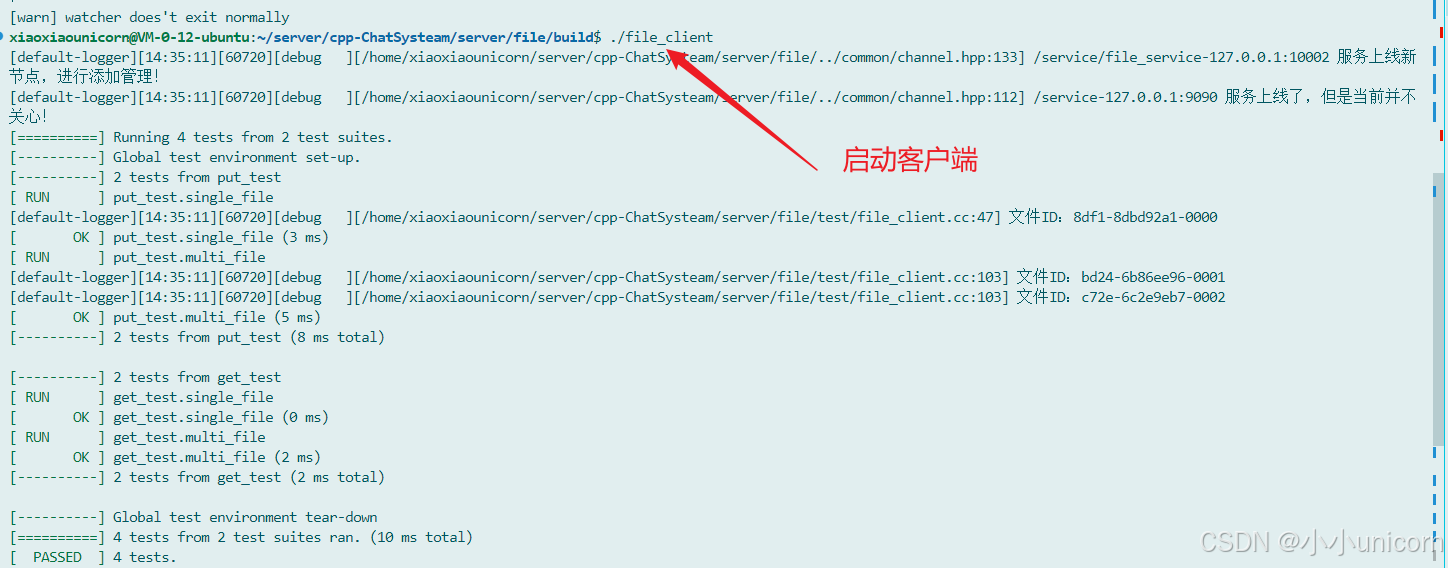
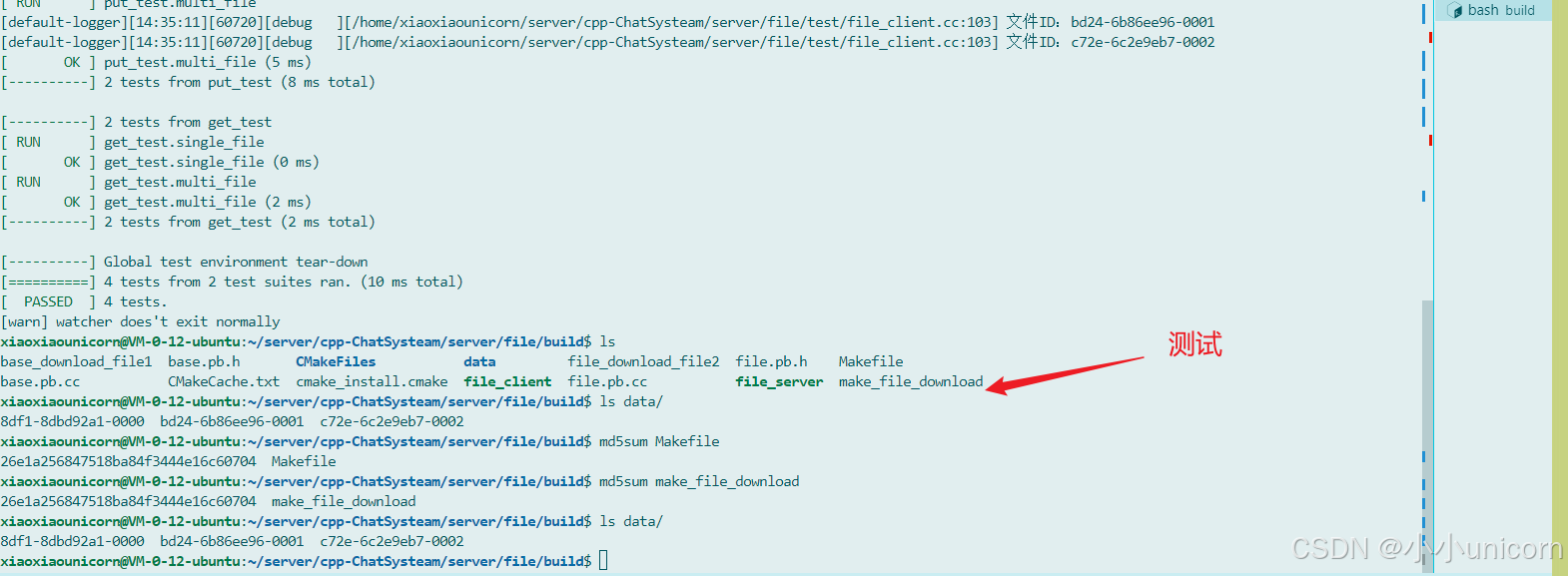
运行完毕之后,启动我们的客户端和服务端: