上一篇:【高级程序设计 实验报告6】扫雷
目录
一、实验目的
了解 C++对文件读写操作。
二、实验环境
Visual Studio 2017、Windows10
三、实验内容
对文件进行读写。
文件打开方式:
ios::in 打开文件进行读操作,即读取文件中的数据
ios::out 打开文件进行写操作,即输出数据到文件中
ios::ate 打开文件时文件指针指向文件末尾,但是你可以在文件中的任何地方写数据
ios::app 打开文件不会清空数据,文件指针始终在文件末尾,因此只能在文件末尾
写数据
ios:trunc 默认,若打开文件已存在,测清空文件的内容
ios::nocreate 若打开文件不存在则不建立,返回打开失败信息
ios::noreplace 打开文件时不能覆盖,若文件存在测返回打开失败信息
ios::binary 打开文件为二进制文件,否则为文本文件
四、实验步骤
1)创建项目
2)利用 IOS:IN 文件编写
3)实验结果
运行截图:
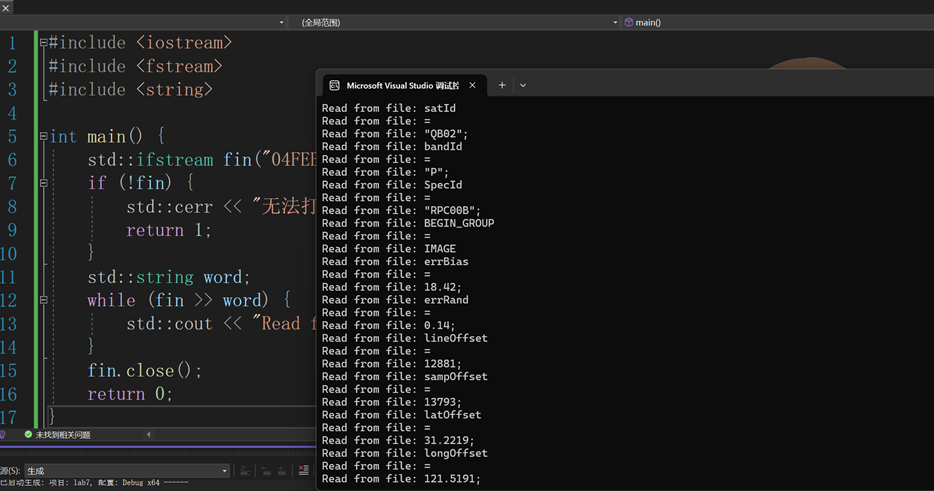
运行结果:
Read from file: satId
Read from file: =
Read from file: "QB02";
Read from file: bandId
Read from file: =
Read from file: "P";
Read from file: SpecId
Read from file: =
Read from file: "RPC00B";
Read from file: BEGIN_GROUP
Read from file: =
Read from file: IMAGE
Read from file: errBias
Read from file: =
Read from file: 18.42;
Read from file: errRand
Read from file: =
Read from file: 0.14;
Read from file: lineOffset
Read from file: =
Read from file: 12881;
Read from file: sampOffset
Read from file: =
Read from file: 13793;
Read from file: latOffset
Read from file: =
Read from file: 31.2219;
Read from file: longOffset
Read from file: =
Read from file: 121.5191;
Read from file: heightOffset
Read from file: =
Read from file: 20;
Read from file: lineScale
Read from file: =
Read from file: 13172;
Read from file: sampScale
Read from file: =
Read from file: 13812;
Read from file: latScale
Read from file: =
Read from file: 0.0826;
Read from file: longScale
Read from file: =
Read from file: 0.0944;
Read from file: heightScale
Read from file: =
Read from file: 501;
Read from file: lineNumCoef
Read from file: =
Read from file: (
Read from file: -1.057032E-03,
Read from file: -1.213815E-02,
Read from file: -9.912392E-01,
Read from file: +2.160953E-02,
Read from file: -1.266359E-04,
Read from file: +6.745135E-06,
Read from file: +2.179383E-04,
Read from file: -6.908676E-04,
Read from file: +1.798719E-03,
Read from file: -6.150191E-06,
Read from file: -1.171661E-06,
Read from file: -2.743666E-07,
Read from file: +2.715213E-05,
Read from file: -1.330819E-07,
Read from file: -1.143990E-05,
Read from file: -6.096293E-05,
Read from file: -1.141245E-05,
Read from file: +4.867008E-07,
Read from file: -1.759363E-05,
Read from file: +4.353202E-06);
Read from file: lineDenCoef
Read from file: =
Read from file: (
Read from file: +1.000000E+00,
Read from file: -1.477262E-04,
Read from file: +6.431291E-04,
Read from file: +2.386261E-04,
Read from file: +1.571120E-05,
Read from file: -6.717437E-07,
Read from file: -5.375222E-06,
Read from file: +8.588398E-06,
Read from file: -2.672493E-05,
Read from file: +1.527395E-05,
Read from file: +3.376996E-07,
Read from file: +4.208274E-08,
Read from file: +1.401940E-05,
Read from file: -8.380114E-08,
Read from file: +1.918142E-07,
Read from file: +3.232610E-04,
Read from file: -6.729629E-06,
Read from file: -1.418655E-08,
Read from file: +1.477277E-05,
Read from file: -1.099389E-05);
Read from file: sampNumCoef
Read from file: =
Read from file: (
Read from file: -2.952752E-03,
Read from file: +1.001093E+00,
Read from file: +3.223476E-03,
Read from file: +2.267689E-03,
Read from file: -1.820613E-03,
Read from file: +6.311864E-04,
Read from file: -3.251605E-04,
Read from file: +1.043426E-03,
Read from file: -1.303782E-03,
Read from file: +9.541229E-06,
Read from file: +2.433079E-06,
Read from file: -1.604161E-05,
Read from file: -3.218350E-05,
Read from file: -7.563561E-06,
Read from file: +6.586746E-05,
Read from file: -5.668938E-05,
Read from file: -2.200462E-06,
Read from file: +8.402269E-07,
Read from file: +1.564317E-05,
Read from file: -2.139418E-06);
Read from file: sampDenCoef
Read from file: =
Read from file: (
Read from file: +1.000000E+00,
Read from file: +1.915708E-03,
Read from file: +1.836343E-03,
Read from file: -6.241859E-04,
Read from file: -4.831275E-05,
Read from file: +2.811915E-06,
Read from file: -1.959083E-06,
Read from file: -1.618778E-08,
Read from file: +1.738714E-05,
Read from file: -8.081709E-06,
Read from file: -1.511757E-07,
Read from file: -7.945617E-08,
Read from file: +1.434163E-06,
Read from file: +0.000000E+00,
Read from file: -4.982303E-08,
Read from file: -2.951413E-07,
Read from file: -7.620251E-08,
Read from file: +3.317219E-08,
Read from file: +2.282115E-07,
Read from file: -1.476494E-08);
Read from file: END_GROUP
Read from file: =
Read from file: IMAGE
Read from file: END;

C:\Users\victo\Desktop\lab7\x64\Debug\lab7.exe (进程 31608)已退出,代码为 0。
按任意键关闭此窗口. . .
代码
cpp
#include <iostream>
#include <fstream>
#include <string>

int main() {
    std::ifstream fin("04FEB15023028-P1BS-005559842010_01_P001.RPB");
    if (!fin) {
        std::cerr << "无法打开文件" << std::endl;
        return 1;
    }
    std::string word;
    while (fin >> word) {
        std::cout << "Read from file: " << word << std::endl;
    }
    fin.close();
    return 0;
}
代码说明
头文件引入:
<iostream> 用于输入输出操作,像 std::cout 和 std::cerr 都来自这个头文件。
<fstream> 用于文件流操作,这里用到了 std::ifstream 来进行文件读取。
<string> 用于处理字符串,这里的 std::string 用来存储从文件中读取的单词。
文件打开:
std::ifstream fin("04FEB15023028-P1BS-005559842010_01_P001.RPB"); 尝试以读模式打开指定的 RPB 文件。如果文件打开失败,fin 会处于错误状态,通过 !fin 条件判断并使用 std::cerr 输出错误信息,然后程序以状态码 1 退出。
逐词读取与输出:
while (fin >> word) 循环会持续从文件流 fin 中读取单词,每次读取成功会将单词存储到 word 字符串变量中。
std::cout << "Read from file: " << word << std::endl; 则是将读取到的单词按照指定格式输出到控制台。
文件关闭:
fin.close(); 关闭打开的文件流,释放相关资源。
实验心得
本次文件读写实验,让我系统掌握了C++中文件操作的核心方法,也深刻体会到理论与实践结合的重要性。通过亲手编写代码、调试运行、分析结果,我不仅学会了文件的基本读写操作,更对程序设计中数据处理的严谨性有了更直观的认知,收获颇丰,也对自身存在的不足有了清晰的认识。
实验开始前,我先回顾了C++文件操作的相关理论知识,了解到文件打开方式的多种类型,如ios::in用于读操作、ios::out用于写操作,还有ate、app、trunc等不同模式的作用。起初我对这些打开方式的区别理解较为模糊,尤其是ate和app的差异,总觉得两者都是指向文件末尾,难以区分。但在实际操作中,通过对比不同打开模式的运行效果,我逐渐明确了二者的核心不同:ate模式虽指向文件末尾,却可在文件任意位置写入数据,而app模式只能在末尾追加,且不会清空原有数据。这种理论结合实操的方式,让抽象的知识点变得具体可感,也让我意识到,脱离实践的理论记忆往往不够深刻,只有亲手操作,才能真正理解其内涵。
本次实验的核心任务是读取指定的RPB文件并将内容输出到控制台,看似简单的操作,实际执行过程中却遇到了一些小问题。在编写代码时,我最初忘记引入<string>头文件,导致std::string类型无法正常使用,程序报错。经过排查,我意识到头文件是程序正常运行的基础,不同的功能需要对应引入相应的头文件,缺一不可。此外,在打开文件时,我曾因文件路径填写错误,导致程序无法找到目标文件,输出"无法打开文件"的错误提示。后来通过核对文件路径、调整文件位置,成功解决了这一问题。这些小挫折让我明白,程序设计需要极度的细心和严谨,一个微小的失误,比如遗漏头文件、写错文件路径,都可能导致程序无法正常运行,这也培养了我认真排查错误、耐心解决问题的能力。
在代码调试成功后,我观察到程序能够逐词读取RPB文件中的内容,并按照指定格式输出到控制台,从文件开头的satId、bandId,到中间的各类系数,再到最后的END;,每一项数据都被准确读取和输出,进程正常退出,代码运行结果符合预期。通过分析代码结构,我对文件操作的流程有了更清晰的梳理:首先通过std::ifstream创建文件输入流,尝试打开目标文件;然后通过条件判断文件是否打开成功,若失败则输出错误信息并退出程序;接着通过循环逐词读取文件内容并输出;最后关闭文件流,释放资源。这个流程环环相扣,每一步都有其重要作用,尤其是文件关闭操作,让我认识到资源管理在程序设计中的重要性,及时关闭文件可以避免资源泄露,保证程序的稳定性。
通过本次实验,我不仅熟练掌握了C++文件读写的基本操作,掌握了ifstream类的使用方法,还学会了排查程序中的常见错误,提升了自身的实操能力和问题解决能力。同时,我也认识到自己的不足:对文件操作的高级用法了解较少,比如二进制文件的读写、文件指针的灵活移动等,还需要进一步学习和实践。此外,在代码编写的规范性上还有提升空间,比如代码注释不够详细、变量命名不够规范,这些细节都需要在今后的实验中加以改进。
本次实验让我深刻体会到,程序设计是一个不断探索、不断纠错、不断完善的过程。每一次实验都是一次成长,不仅能巩固所学的理论知识,更能提升实操能力和严谨的思维习惯。在今后的学习中,我将更加注重理论与实践的结合,多动手、多思考、多总结,不断提升自己的程序设计能力,为后续更复杂的编程学习打下坚实的基础。同时,我也明白了严谨细致的重要性,无论是代码编写还是实验操作,只有认真对待每一个细节,才能确保实验的成功,写出高效、规范、稳定的程序。