解密openclaw底层pi-mono架构系列一:4.pi-coding-agent
不谈玄学,只讲落地。
我是一名深耕算法工程化一线的实践者,擅长将 新技术、关键技术、AI/ML 技术从论文和 demo 转化为可规模化部署的生产系统。在这里,你看不到堆砌公式的理论空谈,只有真实项目中踩过的坑、趟过的路,每一篇文章都源自实战经验的提炼。我相信技术的价值在于解决真实问题,而不是制造焦虑。如果你也厌倦了"收藏即学会",渴望掌握让算法真正跑起来的硬核能力,那么这里就是你的技术补给站。
pi-coding-agent:你的终端 AI 编程搭档 ------ 交互式编程助手详解
前三篇我们依次介绍了
pi-ai(统一 LLM API)、pi-agent-core(智能体运行时)、pi-tui(终端 UI 框架)。现在,把它们三个"拼"在一起,就是本篇的主角------pi-coding-agent,一个住在终端里的 AI 编程助手,类似 Claude Code 的开源实现。
目录
- [pi-coding-agent 是什么](#pi-coding-agent 是什么)
- 整体架构:三个包的"合体"
- 四种运行模式
- [内置工具:Agent 的"双手"](#内置工具:Agent 的"双手")
- [5 分钟上手:最简 Coding Agent](#5 分钟上手:最简 Coding Agent)
- [扩展系统:给 Agent 加技能](#扩展系统:给 Agent 加技能)
- 会话管理与上下文压缩
- [上下文文件:教 Agent 守规矩](#上下文文件:教 Agent 守规矩)
- 总结与下一步
1. pi-coding-agent 是什么
一句话定义
pi-coding-agent = pi-ai + pi-agent-core + pi-tui + 内置编程工具
它是整个 Pi Mono 项目的核心产品,类似终端版的 Claude Code / Cursor,能:
- 读写文件、执行命令
- 搜索代码、精确编辑
- 自主决策调用哪个工具
- 流式输出 + 漂亮的终端界面
类比理解
| 层级 | 类比 | 对应的包 |
|---|---|---|
| 嘴巴(说话能力) | 打电话给专家问问题 | pi-ai |
| 大脑(思考能力) | 雇员工,自主决策 | pi-agent-core |
| 脸面(展示能力) | 漂亮的办公桌面 | pi-tui |
| 完整的人 | 会编程的全能助手 | pi-coding-agent |
2. 整体架构:三个包的"合体"
架构图
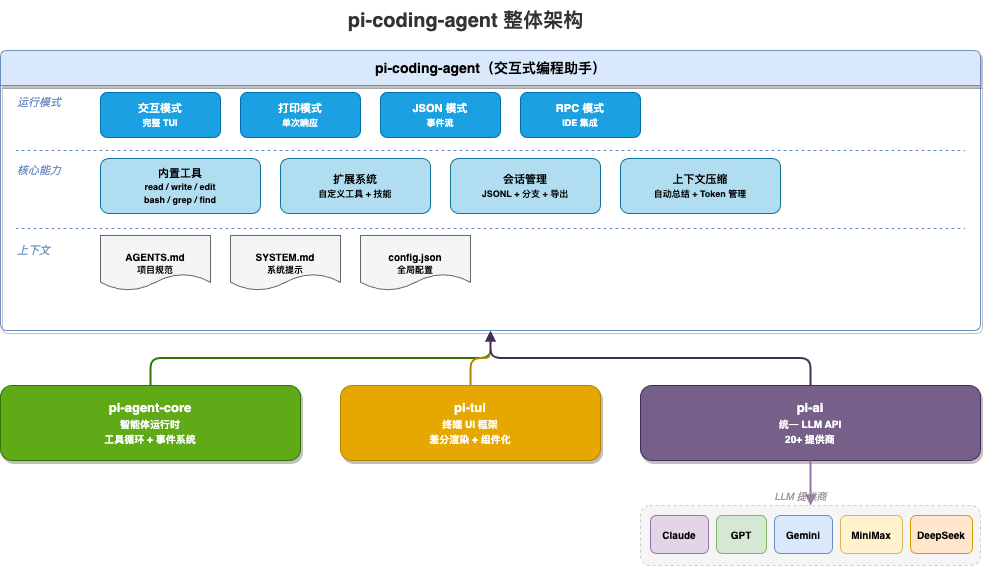
模块组成
pi-coding-agent
    ├── pi-ai           → 调用 LLM(MiniMax / Claude / GPT / Gemini...)
    ├── pi-agent-core   → Agent 运行循环 + 工具调用 + 事件系统
    └── pi-tui          → 终端 UI 渲染 + 键盘交互
源码目录结构
packages/coding-agent/src/
├── cli/
│   └── index.ts              # CLI 入口
│
├── modes/                    # 四种运行模式
│   ├── interactive.ts        # 交互模式(完整 TUI)
│   ├── print.ts              # 打印模式(单次响应)
│   ├── json.ts               # JSON 模式(事件流)
│   └── rpc.ts                # RPC 模式(IDE 集成)
│
├── core/
│   ├── tools/                # 内置工具
│   │   ├── read.ts           # 读文件
│   │   ├── write.ts          # 写文件
│   │   ├── edit.ts           # 精确编辑(差分)
│   │   ├── bash.ts           # 执行命令
│   │   ├── grep.ts           # 搜索内容
│   │   └── find.ts           # 查找文件
│   │
│   ├── extensions/           # 扩展系统
│   ├── compaction/           # 上下文压缩
│   ├── sessions/             # 会话管理
│   └── export-html/          # 导出 HTML
│
└── index.ts
3. 四种运行模式
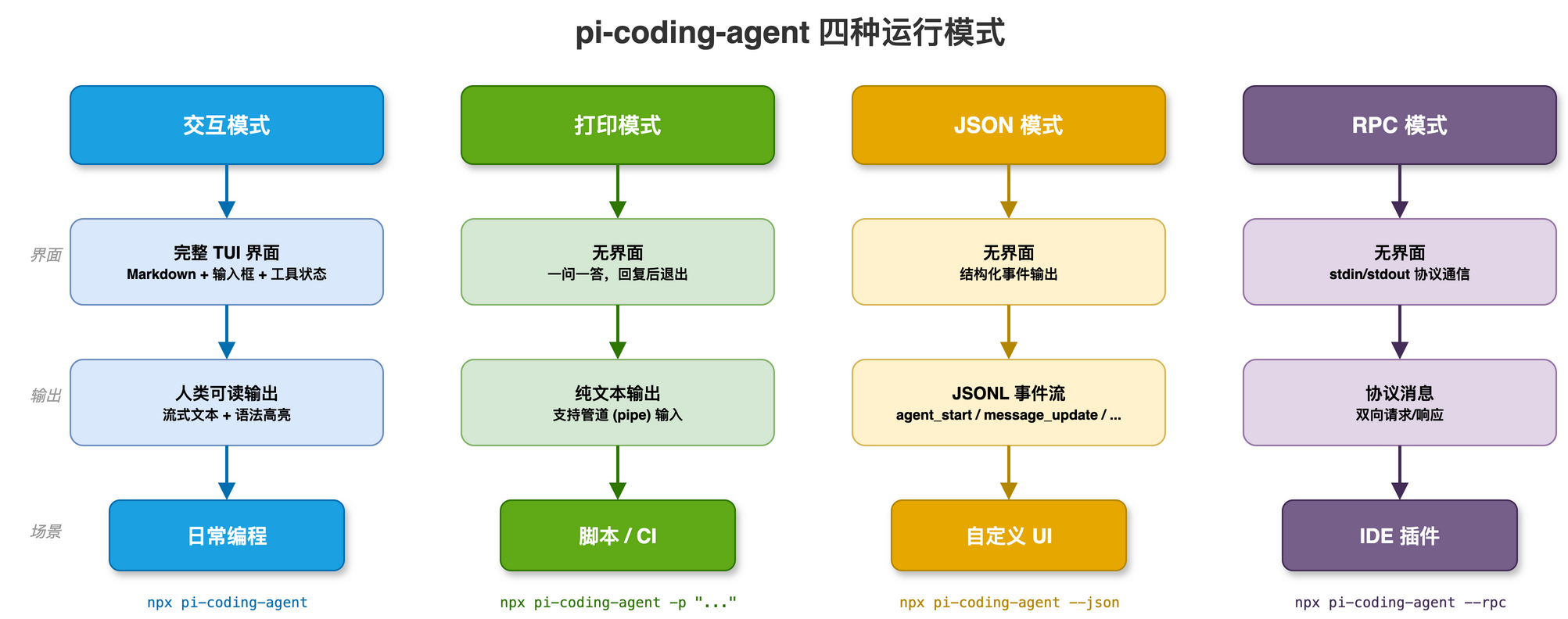
pi-coding-agent 提供四种模式,适应不同场景:
3.1 交互模式(默认)
完整的 TUI 界面,像聊天一样对话编程:
bash
# 先设置 API Key
export MINIMAX_CN_API_KEY=your-minimax-api-key

# 启动交互模式(使用默认模型)
npx @mariozechner/pi-coding-agent

# 指定使用 MiniMax-M2.5 模型
npx @mariozechner/pi-coding-agent --model MiniMax-M2.5

# 在特定目录启动
npx @mariozechner/pi-coding-agent --cwd /path/to/project
安装后也可以直接用短命令
pi:pi --model MiniMax-M2.5
界面布局:
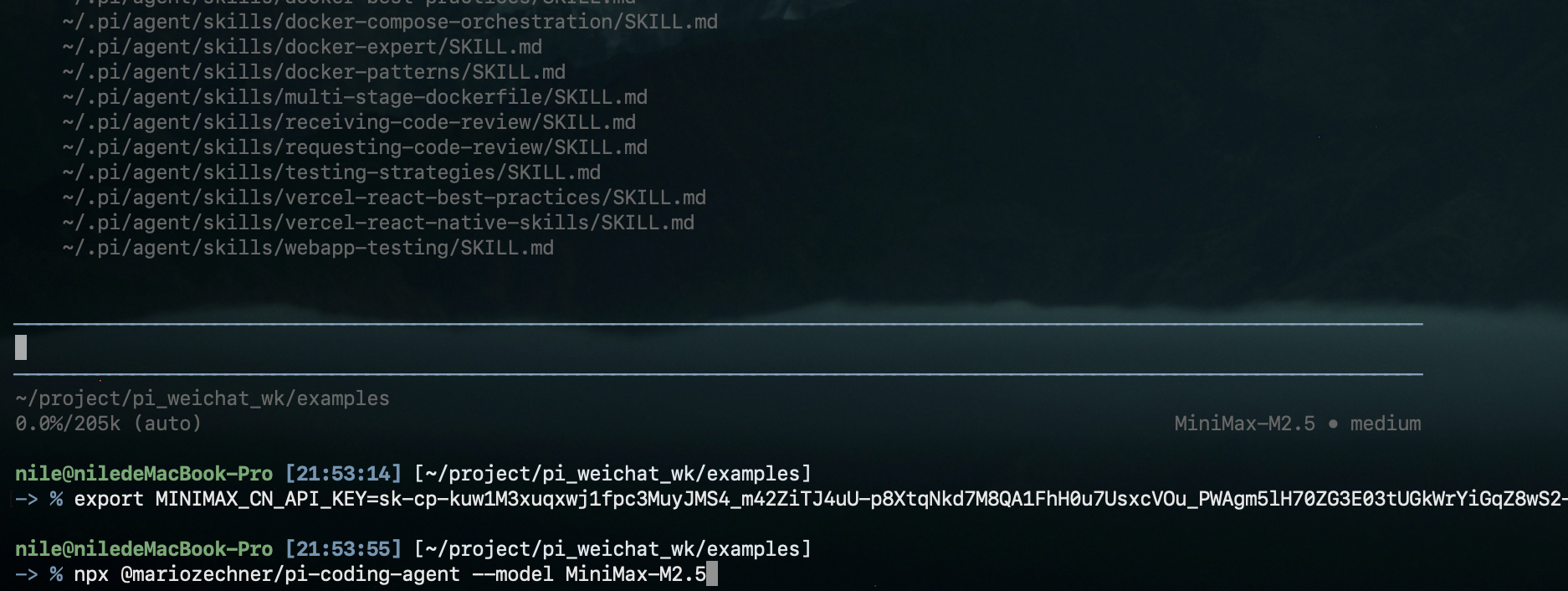
┌─────────────────────────────────────────┐
│  [会话信息]  模型: MiniMax-M2.5           │
│                                         │
│  用户: 帮我分析这个函数的性能问题          │
│                                         │
│  AI: 我来分析一下...                    │
│  [工具] 读取文件: src/utils.ts           │
│  发现了 3 个性能问题:                   │
│  1. ...                                │
│                                         │
│  ┌─────────────────────────────────┐   │
│  │ > _  (输入框)                   │   │
│  └─────────────────────────────────┘   │
│  [Tab] 思考  [Ctrl+P] 模型  [Ctrl+T] 主题│
└─────────────────────────────────────────┘
常用快捷键:
| 快捷键 | 功能 |
|---|---|
Enter |
发送消息 |
Shift+Enter |
换行(多行输入) |
Ctrl+C |
停止 Agent / 退出 |
Ctrl+P |
切换模型 |
Shift+Tab |
切换思考深度 |
@ |
文件路径补全 |
/ |
斜杠命令 |
斜杠命令:
/help      显示帮助          /model     切换模型
/clear     清空会话          /theme     切换主题
/history   会话历史树        /compact   手动压缩上下文
/export    导出为 HTML       /hotkeys   显示快捷键
3.2 打印模式(脚本集成)
一问一答,适合脚本和管道:
bash
# 单次问答
npx @mariozechner/pi-coding-agent -p "帮我生成一个 Hello World 函数"

# 管道输入
cat README.md | npx @mariozechner/pi-coding-agent -p "总结这个文档"
3.3 JSON 模式(程序集成)
输出结构化事件流,供其他程序消费:
bash
npx @mariozechner/pi-coding-agent --json -p "写一个排序函数"
jsonl
{"type": "agent_start", "timestamp": 1706000000}
{"type": "message_update", "text": "function ", "timestamp": 1706000003}
{"type": "turn_end", "inputTokens": 150, "outputTokens": 50, "cost": 0.000025}
3.4 RPC 模式(IDE 集成)
通过 stdin/stdout 协议通信,供 VS Code 等 IDE 插件调用:
bash
npx @mariozechner/pi-coding-agent --rpc模式对比
| 模式 | 界面 | 输出格式 | 典型场景 |
|---|---|---|---|
| 交互 | 完整 TUI | 人类可读 | 日常编程 |
| 打印 | 无 | 纯文本 | 脚本 / CI |
| JSON | 无 | JSONL 事件流 | 自定义 UI |
| RPC | 无 | 协议消息 | IDE 插件 |
4. 内置工具:Agent 的"双手"
pi-coding-agent 预装了一套编程工具,Agent 可以自主决定何时调用哪个工具。
工具一览
| 工具 | 功能 | 类比 |
|---|---|---|
read |
读取文件内容 | 打开文件查看 |
write |
创建/覆盖文件 | 新建文件 |
edit |
精确替换文件片段 | 查找替换 |
bash |
执行 Shell 命令 | 打开终端敲命令 |
grep |
搜索文件内容 | 全局搜索 |
find |
按模式查找文件 | 文件搜索 |
ls |
列出目录内容 | 查看文件夹 |
工具调用示例
Agent 收到任务后,会自主编排工具调用顺序:
用户: "帮我检查 src/auth.ts 有没有安全问题"

Agent 内部自动执行:
  1. read("src/auth.ts")          → 读取文件内容
  2. 分析代码,发现 SQL 注入风险
  3. 输出安全问题报告

用户: "帮我修复第一个问题"

Agent 内部自动执行:
  1. edit("src/auth.ts", 旧代码 → 新代码)  → 精确替换
  2. bash("npm test")                       → 运行测试确认
  3. 输出修复结果
关键点 :用户只描述目标,Agent 自主决定用什么工具、按什么顺序调用。这就是 pi-agent-core 的工具循环在实际产品中的应用。
5. 5 分钟上手:最简 Coding Agent
对应
examples/04-pi-coding-agent/01-minimal.ts
完整代码
typescript
import { createAgentSession, SessionManager, AuthStorage, ModelRegistry } from "@mariozechner/pi-coding-agent";
import { getModel } from "@mariozechner/pi-ai";

// ① 配置模型 ------ 使用 MiniMax-M2.5
const authStorage = AuthStorage.create();
const modelRegistry = new ModelRegistry(authStorage);
const model = getModel("minimax-cn", "MiniMax-M2.5");

// ② createAgentSession ------ 一行代码创建完整 Agent
//    自动配置:内置工具 + 技能扩展
const { session } = await createAgentSession({
  model,                                      // 指定 MiniMax-M2.5 模型
  sessionManager: SessionManager.inMemory(),  // 会话仅在内存中
  authStorage,
  modelRegistry,
});

// ③ 订阅事件 ------ 实时打印 AI 输出
session.subscribe((event) => {
  if (event.type === "message_update" && event.assistantMessageEvent.type === "text_delta") {
    process.stdout.write(event.assistantMessageEvent.delta);  // 流式打印
  }
  if (event.type === "tool_execution_start") {
    console.log(`\n  [工具] 调用: ${event.toolName}`);
  }
  if (event.type === "tool_execution_end") {
    console.log(`  [工具] 完成: ${event.toolName}`);
  }
});

// ④ 发送任务 ------ Agent 自动调用工具完成
const task = "当前目录有哪些文件?列出它们的名称。";
console.log(`用户: ${task}\n`);
console.log("AI: ");

await session.prompt(task);

console.log(`\n对话共 ${session.state.messages.length} 条消息`);
与 pi-agent-core 的对比
| 对比项 | pi-agent-core (第 2 章) | pi-coding-agent (本章) |
|---|---|---|
| 工具 | 手动定义每个工具 | 内置 read/write/bash 等 |
| 配置 | 手动传 model/apiKey/tools | createAgentSession + getModel() 自动配置 |
| 会话 | 手动管理 messages | SessionManager 自动管理 |
| 扩展 | 无 | 扩展系统 + 技能系统 |
| 定位 | 通用 Agent 框架 | 编程专用 Agent 产品 |
模型选择说明
本章示例统一使用 MiniMax-M2.5 模型。pi-ai 的 getModel() 支持 20+ 家 LLM 供应商,切换模型只需一行:
typescript
import { getModel } from "@mariozechner/pi-ai";

// MiniMax 国内版(本章示例)
const model = getModel("minimax-cn", "MiniMax-M2.5");

// 也可以用其他供应商
const claude = getModel("anthropic", "claude-sonnet-4-20250514");
const gpt4   = getModel("openai", "gpt-4o-mini");
const gemini = getModel("google", "gemini-2.5-flash");
运行前需设置对应的 API Key 环境变量:
bash
# 先 export MiniMax 的 API Key
export MINIMAX_CN_API_KEY=your-minimax-api-key

# 运行示例代码
tsx 04-pi-coding-agent/01-minimal.ts

# 或者 CLI 方式启动
npx @mariozechner/pi-coding-agent --model MiniMax-M2.5
本章使用国内版
minimax-cnprovider。海外版 provider 为minimax,环境变量为MINIMAX_API_KEY。
一句话 :pi-agent-core 是造 Agent 的"引擎",pi-coding-agent 是造好的"整车"。
6. 扩展系统:给 Agent 加技能
对应
examples/04-pi-coding-agent/02-custom-tools.ts
通过扩展注册自定义工具
typescript
import { createAgentSession, DefaultResourceLoader, SessionManager, AuthStorage, ModelRegistry } from "@mariozechner/pi-coding-agent";
import { Type, getModel } from "@mariozechner/pi-ai";

// ① 创建资源加载器,注册内联扩展
const resourceLoader = new DefaultResourceLoader({
  extensionFactories: [
    (pi) => {
      // ② 注册自定义工具
      pi.registerTool({
        name: "get_system_info",
        label: "获取系统信息",
        description: "获取当前系统的基本信息",
        parameters: Type.Object({}),
        async execute(_id, _params, _signal, _onUpdate) {
          const info = {
            platform: process.platform,
            nodeVersion: process.version,
            arch: process.arch,
            cwd: process.cwd(),
          };
          return {
            content: [{ type: "text" as const, text: JSON.stringify(info, null, 2) }],
            details: info,
          };
        },
      });

      // ③ 监听 Agent 事件
      pi.on("agent_start", async () => console.log("  [扩展] Agent 开始"));
      pi.on("agent_end", async (e: any) => console.log(`  [扩展] Agent 结束`));
    },
  ],
});

await resourceLoader.reload();

// ④ 创建会话(传入资源加载器 + MiniMax 模型)
const authStorage = AuthStorage.create();
const modelRegistry = new ModelRegistry(authStorage);
const model = getModel("minimax-cn", "MiniMax-M2.5");

const { session } = await createAgentSession({
  model,
  resourceLoader,
  sessionManager: SessionManager.inMemory(),
  authStorage,
  modelRegistry,
});

// ⑤ 使用自定义工具
await session.prompt("请获取当前系统信息");
扩展能力一览
| 能力 | API | 说明 |
|---|---|---|
| 注册工具 | pi.registerTool(...) |
Agent 可调用的新工具 |
| 监听事件 | pi.on("agent_start", ...) |
感知 Agent 生命周期 |
| 斜杠命令 | 命令配置 | /deploy 等自定义命令 |
| UI 组件 | 渲染配置 | 自定义消息展示方式 |
技能系统(Skills)
技能是更轻量的扩展方式,用 Markdown + Shell 实现:
~/.pi/skills/
└── deploy/
    ├── README.md    # 技能描述(/deploy staging)
    └── index.sh     # 执行逻辑
在对话中输入 /deploy staging,Agent 自动执行技能脚本。
7. 会话管理与上下文压缩
会话持久化
会话以 JSONL 格式保存,支持像 Git 一样的分支:
main ──── 问题1 ──── 回复1 ──── 问题2 ──── 回复2
                              │
                              └── 问题2(修改版) ──── 回复2'
                                     (branch)
用 /history 查看会话树,可以回到任意节点继续对话。
上下文压缩(Compaction)
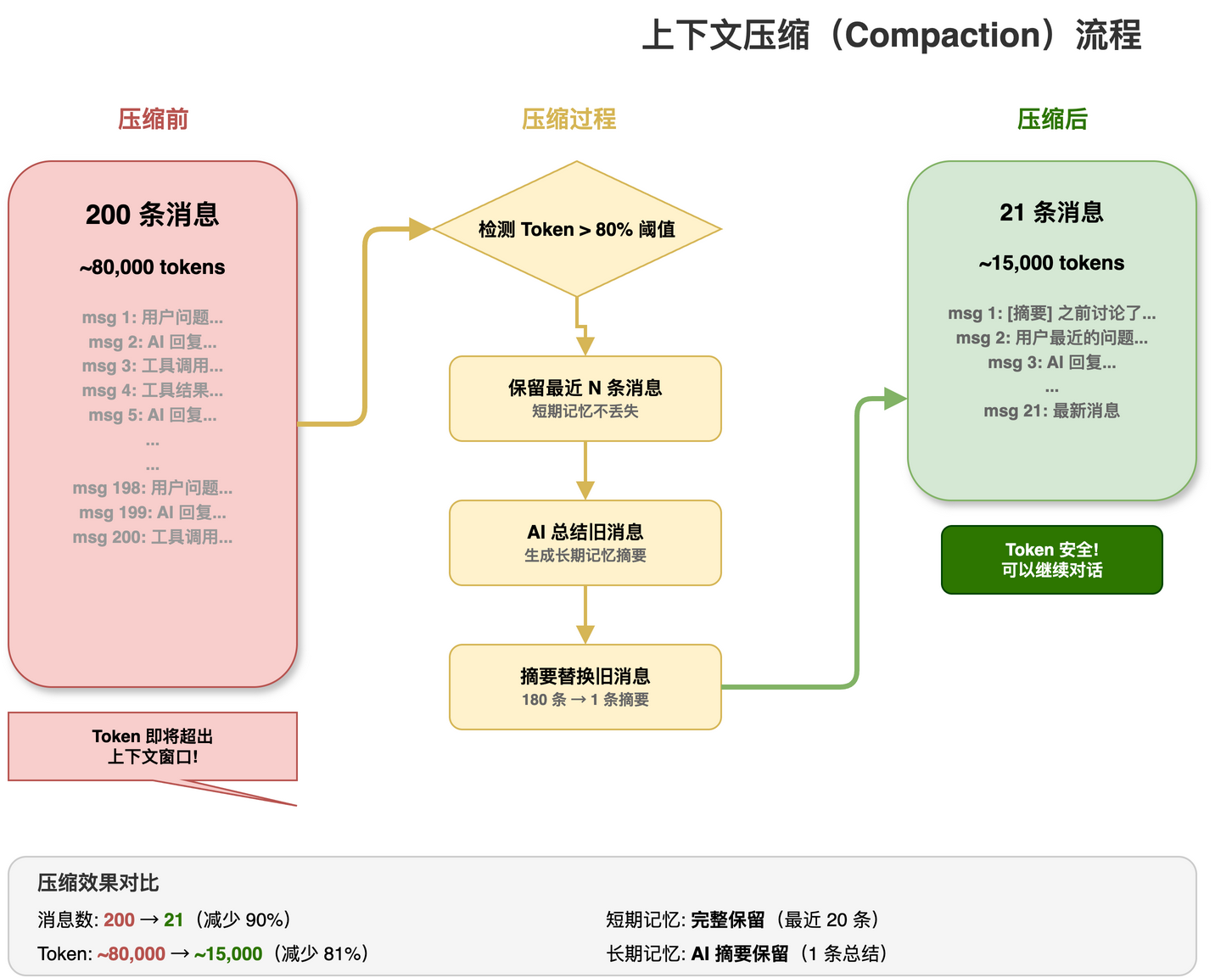
长对话会超出模型上下文窗口,pi-coding-agent 自动处理:
触发条件:当前 Token 数 > 模型上下文窗口的 80%

压缩过程:
  1. 保留最近 N 条消息(短期记忆)
  2. 用 AI 总结较老的消息(生成摘要)
  3. 摘要替换旧消息(节省 Token)

效果:
  压缩前: 200 条消息, ~80000 tokens
压缩后: 1 条摘要 + 20 条消息, ~15000 tokens类比:就像你的笔记本写满了,把前面的内容总结成一页"要点回顾",腾出空间继续写。
8. 上下文文件:教 Agent 守规矩
在项目根目录放置这些文件,Agent 启动时自动读取:
AGENTS.md(项目规范)
markdown
# 项目规范

## 代码风格
- 使用 4 空格缩进
- 函数名用 camelCase
- 禁止使用 any 类型

## 测试规范
- 每个函数必须有单元测试
- 测试文件放在 __tests__/ 目录SYSTEM.md(系统提示)
markdown
你是这个项目的专属 AI 助手。
技术栈:React + TypeScript + PostgreSQL。

在回答时:
1. 优先使用项目已有的库
2. 遵循项目代码风格
3. 提供完整的错误处理
Agent 会根据这些文件调整自己的行为,就像给新员工看"入职手册"。
9. 总结与下一步
pi-coding-agent 的核心价值
| 能力 | 说明 |
|---|---|
| 开箱即用 | createAgentSession 一行代码,工具/模型/会话全就位 |
| 四种模式 | 交互 / 打印 / JSON / RPC,覆盖所有使用场景 |
| 内置工具链 | read/write/edit/bash/grep/find,编程全覆盖 |
| 可扩展 | 扩展系统 + 技能系统,按需加能力 |
| 智能压缩 | 自动上下文压缩,长对话不怕超窗口 |
| 项目感知 | AGENTS.md + SYSTEM.md,Agent 懂你的项目 |
一句话记住
pi-ai 是嘴巴------能说话。
pi-agent-core 是大脑------能思考。
pi-tui 是脸面------能展示。
pi-coding-agent 是完整的人------能帮你写代码。