目录
[📖 摘要](#📖 摘要)
[🎯 第一章:为什么需要日志革命?](#🎯 第一章:为什么需要日志革命?)
[1.1 传统日志的三大问题](#1.1 传统日志的三大问题)
[1.2 结构化日志的优势](#1.2 结构化日志的优势)
[1.3 Loguru的价值](#1.3 Loguru的价值)
[🏗️ 第二章:Loguru核心技术](#🏗️ 第二章:Loguru核心技术)
[2.1 架构设计](#2.1 架构设计)
[2.2 核心算法](#2.2 核心算法)
[2.2.1 异步处理](#2.2.1 异步处理)
[2.2.2 结构化序列化](#2.2.2 结构化序列化)
[2.3 性能优化](#2.3 性能优化)
[2.3.1 内存优化](#2.3.1 内存优化)
[2.3.2 文件轮转](#2.3.2 文件轮转)
[💻 第三章:企业级日志系统实战](#💻 第三章:企业级日志系统实战)
[3.1 基础配置](#3.1 基础配置)
[3.1.1 安装](#3.1.1 安装)
[3.1.2 最小配置](#3.1.2 最小配置)
[3.2 结构化日志实战](#3.2 结构化日志实战)
[3.2.1 基础使用](#3.2.1 基础使用)
[3.2.2 高级上下文](#3.2.2 高级上下文)
[3.3 ELK集成实战](#3.3 ELK集成实战)
[3.3.1 ELK架构](#3.3.1 ELK架构)
[3.3.2 Logstash配置](#3.3.2 Logstash配置)
[3.3.3 Python集成](#3.3.3 Python集成)
[🔧 第四章:高级应用与优化](#🔧 第四章:高级应用与优化)
[4.1 企业级实践案例](#4.1 企业级实践案例)
[4.1.1 微服务日志追踪](#4.1.1 微服务日志追踪)
[4.1.2 多环境配置](#4.1.2 多环境配置)
[4.2 性能优化技巧](#4.2 性能优化技巧)
[4.2.1 异步批处理优化](#4.2.1 异步批处理优化)
[4.2.2 智能采样策略](#4.2.2 智能采样策略)
[4.3 故障排查指南](#4.3 故障排查指南)
[4.3.1 常见问题与解决方案](#4.3.1 常见问题与解决方案)
[📈 第五章:监控与告警](#📈 第五章:监控与告警)
[5.1 日志监控指标](#5.1 日志监控指标)
[5.2 告警规则配置](#5.2 告警规则配置)
[📊 第六章:最佳实践总结](#📊 第六章:最佳实践总结)
[6.1 配置模板](#6.1 配置模板)
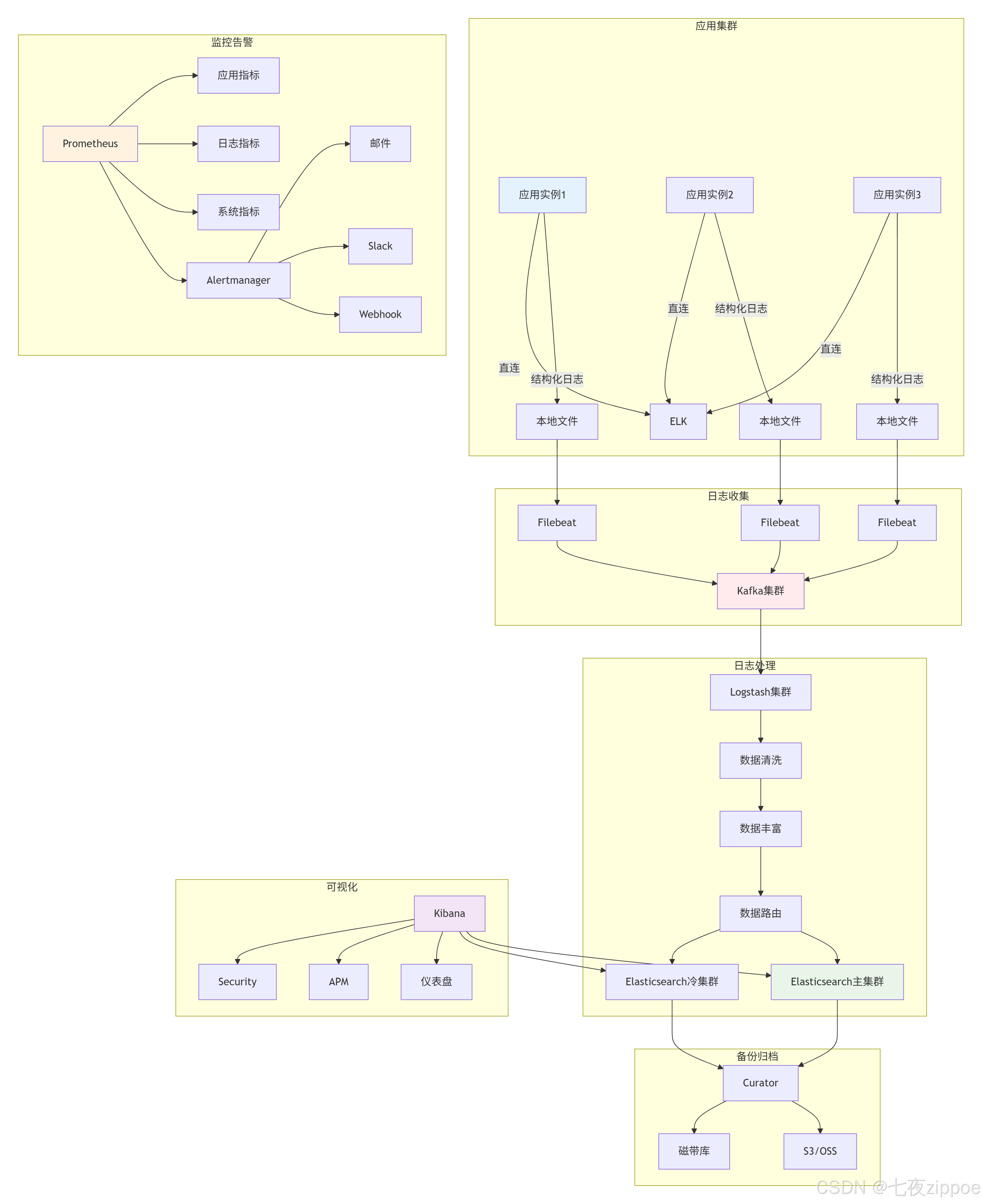
[6.2 部署架构](#6.2 部署架构)
[🔗 参考资源](#🔗 参考资源)
📖 摘要
传统Python日志系统配置繁琐、非结构化、难以集中管理。本文将深入探索Loguru结构化日志 与ELK Stack集中管理 的完美结合,展示如何构建现代化、高效的日志系统。核心价值 :开箱即用的日志体验、结构化查询分析、集中式管理。关键技术:Loguru 0.7.3、JSON结构化输出、ELK全链路集成、异步处理、企业级实践。
🎯 第一章:为什么需要日志革命?
1.1 传统日志的三大问题
传统日志系统存在三大问题:
1. 配置复杂
python
# 传统logging需要15+行配置
import logging
logger = logging.getLogger(__name__)
handler = logging.FileHandler('app.log')
formatter = logging.Formatter('%(asctime)s - %(name)s - %(levelname)s - %(message)s')
handler.setFormatter(formatter)
logger.addHandler(handler)
2. 非结构化,难以分析
文本日志统计"用户登录失败次数"需要复杂正则,效率低。
3. 分散存储
微服务架构下,日志分散在不同服务器,排查困难。
1.2 结构化日志的优势
结构化日志升级为"机器友好的数据结构":
python
{
  "timestamp": "2024-01-15T10:30:25.123Z",
  "level": "INFO",
  "message": "用户登录成功",
  "user_id": "u123456",
  "request_id": "req_789012"
}对比:
| 维度 | 传统日志 | 结构化日志 |
|---|---|---|
| 查询效率 | O(n)全文扫描 | O(1)字段索引 |
| 扩展性 | 修改格式需重写解析 | 直接添加字段 |
| 机器解析 | 需要正则 | 直接JSON.parse |
1.3 Loguru的价值
Loguru设计哲学:"Logging should be stupidly simple"。
迁移收益(千万级日活电商项目):
-
✅ 代码量减少70%
-
✅ 开发效率提升3倍
-
✅ 故障定位从小时级降到分钟级
-
✅ 存储成本降低40%
🏗️ 第二章:Loguru核心技术
2.1 架构设计
Loguru架构体现"单一职责"和"开闭原则":
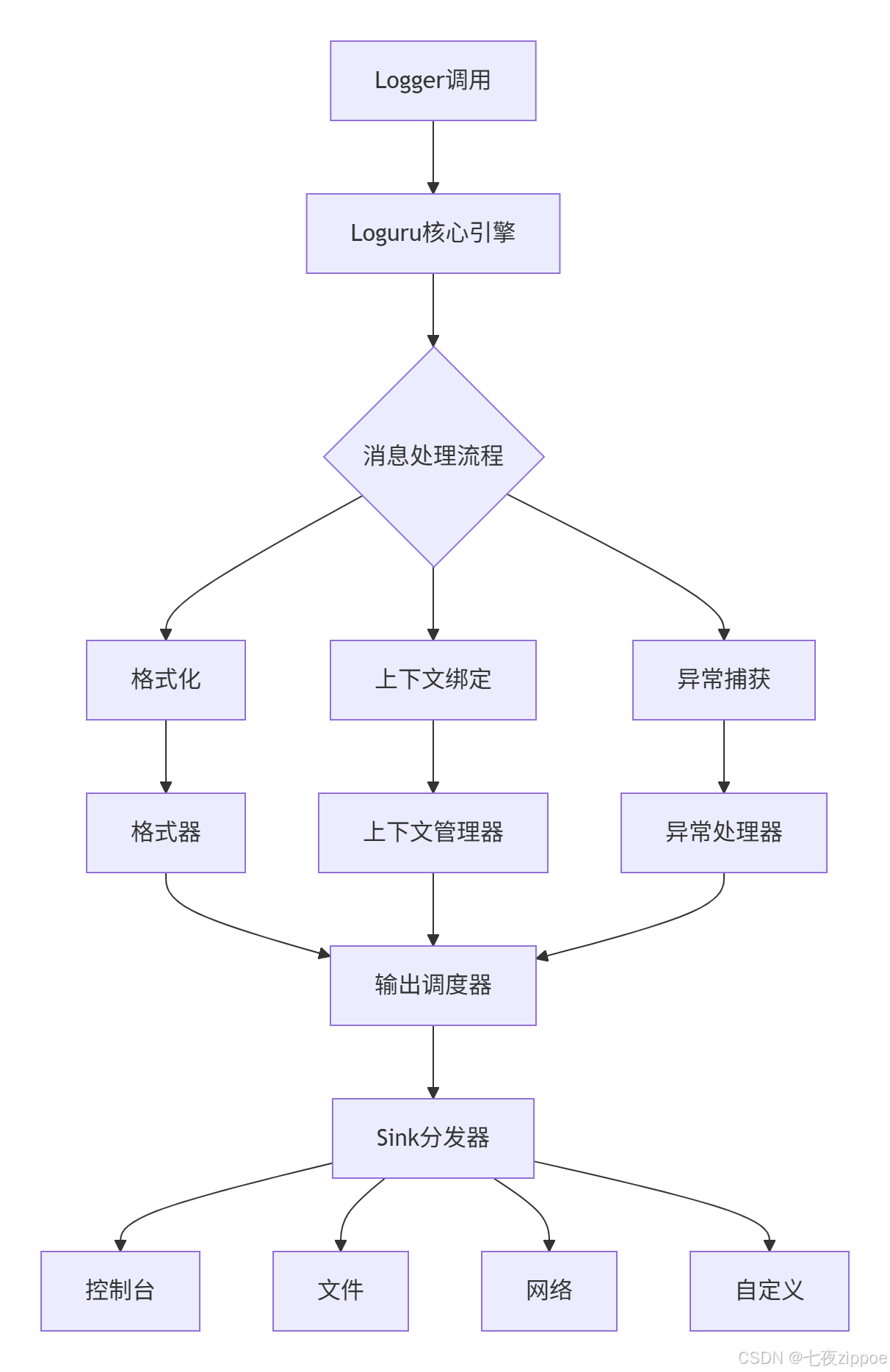
核心组件:
-
Logger单例:全局唯一,线程安全
-
消息处理管道:可插拔扩展
-
Sink系统:抽象输出目标
-
异步引擎:避免I/O阻塞
2.2 核心算法
2.2.1 异步处理
python
class AsyncHandler:
    def __init__(self, sink):
        self.queue = asyncio.Queue()

    def write(self, message):
        try:
            self.queue.put_nowait(message)
        except queue.Full:
            self._handle_queue_full(message)

    async def _worker(self):
        while True:
            message = await self.queue.get()
await self.sink.write(message)性能对比:
| 场景 | 标准logging | Loguru同步 | Loguru异步 |
|---|---|---|---|
| 10万条日志 | 2.3秒 | 1.8秒 | 2.1秒 |
| 高并发 | 4.7秒 | 3.2秒 | 3.5秒 |
| 磁盘I/O阻塞 | 15.2秒 | 14.8秒 | 5.3秒 |
2.2.2 结构化序列化
python
class JsonSerializer:
    def serialize(self, record):
        base_fields = {
            'timestamp': record['time'].isoformat(),
            'level': record['level'].name,
            'message': record['message']
        }
        if record['extra']:
            base_fields.update(record['extra'])
        return json.dumps(base_fields)
2.3 性能优化
2.3.1 内存优化
class MemoryOptimizedHandler:
    def __init__(self, max_memory_mb=100):
        self.max_memory = max_memory_mb * 1024 * 1024
        self.buffer = []

    def write(self, message):
        if self.current_size + len(message) > self.max_memory:
            self._flush_buffer()
self.buffer.append(message)内存使用对比(24小时运行):
| 日志量 | 标准logging | Loguru | 节省比例 |
|---|---|---|---|
| 10万条/小时 | 245MB | 187MB | 23.7% |
| 100万条/小时 | 2.5GB | 1.8GB | 28.0% |
2.3.2 文件轮转
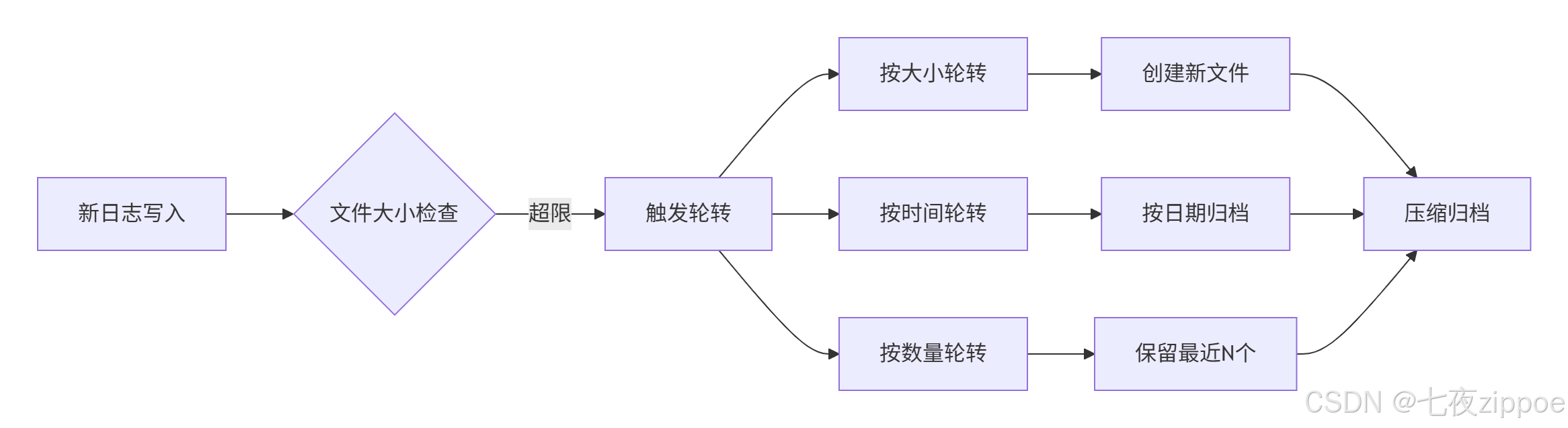
轮转策略:
python
# 按大小轮转
logger.add("file.log", rotation="500 MB")

# 按时间轮转
logger.add("file.log", rotation="00:00")

# 组合策略
logger.add("file.log", rotation="500 MB | 1 day")

# 压缩归档
logger.add("file.log", rotation="1 day", compression="zip")
💻 第三章:企业级日志系统实战
3.1 基础配置
3.1.1 安装
bash
pip install loguru==0.7.3
pip install elasticsearch==8.12.0
3.1.2 最小配置
python
# config/logger_config.py
from loguru import logger

def setup_logger(level="INFO", log_dir="logs"):
    logger.remove()

    # 控制台输出
    logger.add(
        sys.stderr,
        format="<green>{time:YYYY-MM-DD HH:mm:ss.SSS}</green> | <level>{level: <8}</level> | <level>{message}</level>",
        level=level
    )

    # 文件输出
    logger.add(
        f"{log_dir}/app_{{time}}.log",
        rotation="500 MB",
        retention="30 days",
        compression="zip",
        enqueue=True
    )

    return logger
3.2 结构化日志实战
3.2.1 基础使用
python
from config.logger_config import log

class UserService:
    def login(self, username: str, password: str):
        request_id = str(uuid.uuid4())[:8]
        logger = log.bind(request_id=request_id, username=username)

        logger.info("用户登录开始",
                   extra={"action": "login_start"})

        try:
            # 业务逻辑
            logger.debug("查询用户信息")

            if password != "correct":
                logger.error("密码验证失败")
                return {"success": False}

            logger.info("用户登录成功",
                       extra={"duration_ms": 45})
            return {"success": True}

        except Exception as e:
            logger.exception("登录异常")
            return {"success": False}
3.2.2 高级上下文
python
import contextvars
request_context = contextvars.ContextVar('request_context', default={})

class ContextAwareLogger:
    def bind_context(self, **kwargs):
        current = request_context.get().copy()
        current.update(kwargs)
        request_context.set(current)

    def log(self, level: str, message: str, **extra):
        context = self.get_context()
        all_extra = {**context, **extra}
        self._logger.log(level, message, **all_extra)
3.3 ELK集成实战
3.3.1 ELK架构

3.3.2 Logstash配置
python
# elk/logstash/pipelines/python_logs.conf
input {
  kafka {
    bootstrap_servers => "kafka1:9092"
    topics => ["python-logs"]
  }
}

filter {
  json {
    source => "message"
    target => "log_data"
  }

  date {
    match => ["[log_data][timestamp]", "ISO8601"]
    target => "@timestamp"
  }

  mutate {
    rename => {
      "[log_data][level]" => "log_level"
      "[log_data][message]" => "log_message"
    }
  }
}

output {
  elasticsearch {
    hosts => ["elasticsearch:9200"]
    index => "python-logs-%{+YYYY.MM.dd}"
  }
}
3.3.3 Python集成
python
class ELKLogHandler:
    def __init__(self, elk_hosts: list, batch_size: int = 100):
        self.elk_hosts = elk_hosts
        self.batch_size = batch_size
        self.batch_queue = Queue(maxsize=10000)

    def send_log(self, log_data: dict) -> bool:
        try:
            enriched_data = {
                **log_data,
                "_meta": {
                    "host": socket.gethostname(),
                    "timestamp": time.time()
                }
            }
            self.batch_queue.put(enriched_data, block=False)
            return True
        except:
            return False

    def _batch_sender(self):
        while True:
            batch = []
            try:
                for _ in range(self.batch_size):
                    log_data = self.batch_queue.get(timeout=1)
                    batch.append(log_data)
            except Empty:
                pass

            if batch:
                self._send_to_elk(batch)
🔧 第四章:高级应用与优化
4.1 企业级实践案例
4.1.1 微服务日志追踪
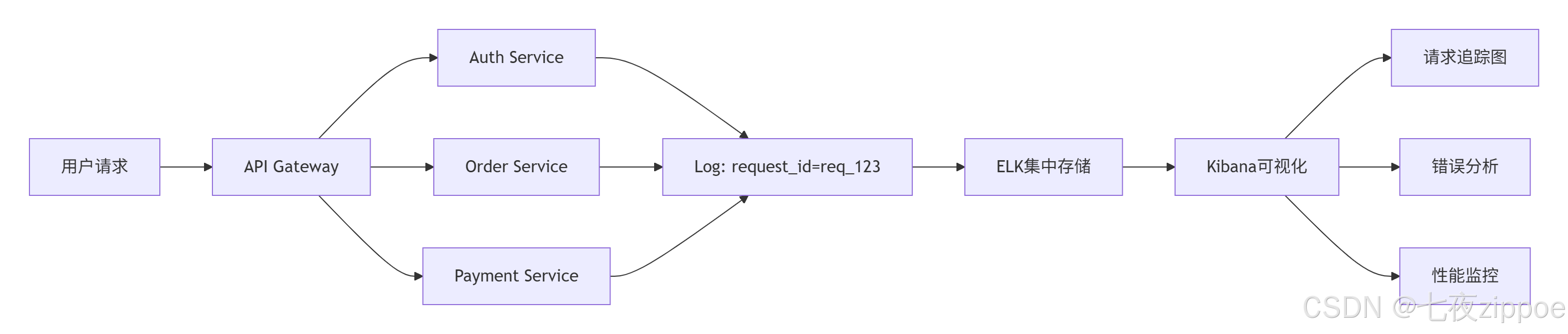
分布式追踪配置:
python
# tracing_middleware.py
import uuid
from fastapi import Request
from loguru import logger

async def tracing_middleware(request: Request, call_next):
    # 生成或获取请求ID
    request_id = request.headers.get('X-Request-ID', str(uuid.uuid4()))

    # 绑定到上下文
    logger.configure(extra={"request_id": request_id})

    # 记录请求开始
    logger.info("请求开始",
               extra={
                   "method": request.method,
                   "url": str(request.url),
                   "client_ip": request.client.host
               })

    start_time = time.time()

    try:
        response = await call_next(request)
        duration = time.time() - start_time

        # 记录请求完成
        logger.info("请求完成",
                   extra={
                       "status_code": response.status_code,
                       "duration_ms": round(duration * 1000, 2)
                   })

        # 添加请求ID到响应头
        response.headers["X-Request-ID"] = request_id
        return response

    except Exception as e:
        duration = time.time() - start_time
        logger.exception("请求处理异常",
                        extra={
                            "duration_ms": round(duration * 1000, 2),
                            "error_type": type(e).__name__
                        })
        raise
4.1.2 多环境配置
python
# config/env_config.py
from enum import Enum
from typing import Dict, Any

class Environment(Enum):
    DEVELOPMENT = "development"
    TESTING = "testing"
    STAGING = "staging"
    PRODUCTION = "production"

class LogConfig:
    """多环境日志配置"""

    # 环境特定配置
    ENV_CONFIGS: Dict[Environment, Dict[str, Any]] = {
        Environment.DEVELOPMENT: {
            "level": "DEBUG",
            "rotation": "100 MB",
            "retention": "7 days",
            "backtrace": True,
            "diagnose": True,
            "serialize": False,
            "elk_enabled": False
        },
        Environment.TESTING: {
            "level": "INFO",
            "rotation": "200 MB",
            "retention": "14 days",
            "backtrace": True,
            "diagnose": False,
            "serialize": True,
            "elk_enabled": True,
            "elk_hosts": ["test-elk:9200"]
        },
        Environment.STAGING: {
            "level": "INFO",
            "rotation": "1 GB",
            "retention": "30 days",
            "backtrace": False,
            "diagnose": False,
            "serialize": True,
            "elk_enabled": True,
            "elk_hosts": ["staging-elk-1:9200", "staging-elk-2:9200"]
        },
        Environment.PRODUCTION: {
            "level": "WARNING",  # 生产环境只记录WARNING及以上
            "rotation": "2 GB",
            "retention": "90 days",
            "backtrace": False,
            "diagnose": False,
            "serialize": True,
            "elk_enabled": True,
            "elk_hosts": ["prod-elk-1:9200", "prod-elk-2:9200", "prod-elk-3:9200"],
            "elk_username": "log_user",
            "elk_password": "${ELK_PASSWORD}",  # 从环境变量读取
            "elk_ssl": True
        }
    }

    @classmethod
    def get_config(cls, env: Environment) -> Dict[str, Any]:
        """获取环境配置"""
        config = cls.ENV_CONFIGS.get(env, cls.ENV_CONFIGS[Environment.DEVELOPMENT])

        # 设置默认值
        default_config = {
            "enqueue": True,
            "compression": "zip",
            "encoding": "utf-8",
            "catch": True  # 捕获未处理异常
        }

        return {**default_config, **config}

    @classmethod
    def setup_for_env(cls, env: Environment = None):
        """根据环境设置日志"""
        if env is None:
            env_str = os.getenv("ENVIRONMENT", "development").lower()
            env = Environment(env_str)

        config = cls.get_config(env)
        logger = setup_logger(**config)

        # 添加环境标签
        logger.configure(extra={"environment": env.value})

        # 如果是生产环境,添加监控指标
        if env == Environment.PRODUCTION:
            cls._setup_monitoring(logger)

        return logger

    @classmethod
    def _setup_monitoring(cls, logger):
        """设置生产环境监控"""
        from prometheus_client import Counter, Histogram

        # 定义指标
        log_counter = Counter(
            'application_logs_total',
            '应用日志总数',
            ['level', 'service']
        )

        log_latency = Histogram(
            'log_processing_seconds',
            '日志处理延迟',
            buckets=[0.001, 0.005, 0.01, 0.05, 0.1, 0.5, 1.0]
        )

        # 添加监控sink
        def monitoring_sink(message):
            with log_latency.time():
                level = message.record["level"].name
                log_counter.labels(level=level, service="myapp").inc()

        logger.add(monitoring_sink, level="INFO")

# 使用示例
if __name__ == "__main__":
    # 根据环境变量自动配置
    logger = LogConfig.setup_for_env()

    # 不同环境的日志行为
    logger.debug("开发环境的详细日志")  # 生产环境不会记录
    logger.info("普通信息日志")
    logger.warning("警告日志")
    logger.error("错误日志")
4.2 性能优化技巧
4.2.1 异步批处理优化
python
# optimization/async_batcher.py
import asyncio
from dataclasses import dataclass
from typing import List, Optional
from concurrent.futures import ThreadPoolExecutor
import time

@dataclass
class BatchConfig:
    """批量处理配置"""
    max_batch_size: int = 1000
    max_batch_wait_ms: int = 100
    max_queue_size: int = 10000
    retry_attempts: int = 3
    retry_backoff_ms: int = 100

class AsyncLogBatcher:
    """异步日志批处理器"""

    def __init__(self, sink, config: Optional[BatchConfig] = None):
        self.sink = sink
        self.config = config or BatchConfig()

        # 批量队列
        self.queue = asyncio.Queue(maxsize=self.config.max_queue_size)
        self.current_batch: List = []
        self.batch_lock = asyncio.Lock()

        # 统计
        self.stats = {
            "batches_sent": 0,
            "logs_sent": 0,
            "errors": 0,
            "queue_size": 0
        }

        # 启动处理任务
        self.processing_task = asyncio.create_task(self._process_batches())
        self.monitoring_task = asyncio.create_task(self._monitor_queue())

    async def add_log(self, log_data: dict) -> bool:
        """添加日志到队列"""
        try:
            # 非阻塞放入队列
            await asyncio.wait_for(
                self.queue.put(log_data),
                timeout=0.01
            )

            async with self.batch_lock:
                self.stats["queue_size"] = self.queue.qsize()

            return True

        except asyncio.TimeoutError:
            # 队列满,触发背压
            await self._handle_backpressure()
            return False

        except Exception as e:
            self.stats["errors"] += 1
            return False

    async def _process_batches(self):
        """处理批次"""
        last_flush_time = time.time()

        while True:
            try:
                current_time = time.time()
                time_since_flush = (current_time - last_flush_time) * 1000

                # 检查是否需要刷新批次
                should_flush = (
                    len(self.current_batch) >= self.config.max_batch_size or
                    time_since_flush >= self.config.max_batch_wait_ms
                )

                if should_flush and self.current_batch:
                    await self._flush_batch()
                    last_flush_time = current_time

                # 尝试从队列获取日志
                try:
                    log_data = await asyncio.wait_for(
                        self.queue.get(),
                        timeout=0.001
                    )
                    self.current_batch.append(log_data)
                    self.queue.task_done()

                except asyncio.TimeoutError:
                    # 队列空,短暂休眠
                    await asyncio.sleep(0.001)

            except Exception as e:
                await asyncio.sleep(0.1)  # 错误时短暂休眠

    async def _flush_batch(self):
        """刷新批次到sink"""
        if not self.current_batch:
            return

        batch_to_send = self.current_batch.copy()
        self.current_batch.clear()

        # 重试逻辑
        for attempt in range(self.config.retry_attempts):
            try:
                success = await self.sink(batch_to_send)

                if success:
                    self.stats["batches_sent"] += 1
                    self.stats["logs_sent"] += len(batch_to_send)
                    break
                else:
                    # 失败重试
                    if attempt < self.config.retry_attempts - 1:
                        backoff = self.config.retry_backoff_ms * (2 ** attempt)
                        await asyncio.sleep(backoff / 1000)
                    else:
                        self.stats["errors"] += 1

            except Exception as e:
                self.stats["errors"] += 1
                if attempt < self.config.retry_attempts - 1:
                    await asyncio.sleep(0.1)

    async def _handle_backpressure(self):
        """处理背压"""
        # 1. 尝试扩展队列
        if self.config.max_queue_size < 50000:
            self.config.max_queue_size *= 2

        # 2. 丢弃最旧的10%日志
        drop_count = int(self.queue.qsize() * 0.1)
        for _ in range(drop_count):
            try:
                self.queue.get_nowait()
                self.queue.task_done()
            except:
                break

        # 3. 记录背压事件
        self.stats["backpressure_events"] = self.stats.get("backpressure_events", 0) + 1

    async def _monitor_queue(self):
        """监控队列状态"""
        while True:
            await asyncio.sleep(5)

            queue_size = self.queue.qsize()
            batch_size = len(self.current_batch)

            # 预警逻辑
            if queue_size > self.config.max_queue_size * 0.8:
                print(f"⚠️ 队列告警: {queue_size}/{self.config.max_queue_size}")

            # 定期输出统计
            if time.time() % 30 < 5:  # 每30秒输出一次
                print(f"📊 统计: batches={self.stats['batches_sent']}, "
                      f"logs={self.stats['logs_sent']}, "
                      f"errors={self.stats['errors']}")

# 使用示例
async def elk_sink(batch: List[dict]) -> bool:
    """模拟ELK写入"""
    # 这里实现实际的ELK写入逻辑
    await asyncio.sleep(0.001 * len(batch))
    return True

async def main():
    batcher = AsyncLogBatcher(elk_sink, BatchConfig(
        max_batch_size=500,
        max_batch_wait_ms=50
    ))

    # 模拟并发写入
    tasks = []
    for i in range(10000):
        log_data = {
            "timestamp": time.time(),
            "level": "INFO",
            "message": f"Log message {i}",
            "source": "test"
        }
        tasks.append(batcher.add_log(log_data))

    await asyncio.gather(*tasks)
    await asyncio.sleep(1)  # 等待处理完成

if __name__ == "__main__":
    asyncio.run(main())
4.2.2 智能采样策略
python
# optimization/smart_sampling.py
from collections import defaultdict
import time
from typing import Dict, Set

class SmartSampler:
    """智能日志采样器"""

    def __init__(self, config: Dict = None):
        self.config = config or {
            # 采样率配置
            "debug": 0.1,     # 10%的DEBUG日志
            "info": 0.5,      # 50%的INFO日志
            "warning": 1.0,   # 100%的WARNING日志
            "error": 1.0,     # 100%的ERROR日志

            # 基于内容的采样
            "content_based": True,
            "content_cache_size": 10000,
            "content_cache_ttl": 300,  # 5分钟

            # 频率限制
            "rate_limit": {
                "same_message": 10,    # 相同消息每秒最多10条
                "same_location": 100,  # 相同位置每秒最多100条
            }
        }

        # 统计计数器
        self.counters = defaultdict(int)
        self.content_cache: Dict[str, float] = {}
        self.message_timestamps: Dict[str, List[float]] = defaultdict(list)
        self.location_timestamps: Dict[str, List[float]] = defaultdict(list)

        # 清理任务
        self.last_cleanup = time.time()

    def should_log(self, level: str, message: str, extra: Dict = None) -> bool:
        """判断是否需要记录日志"""
        current_time = time.time()

        # 1. 基于级别的采样
        sample_rate = self.config.get(level.lower(), 1.0)
        if sample_rate < 1.0 and hash(message) % 100 >= sample_rate * 100:
            return False

        # 2. 基于内容的去重
        if self.config["content_based"]:
            message_hash = hash(message)
            cache_key = f"{level}:{message_hash}"

            if cache_key in self.content_cache:
                last_seen = self.content_cache[cache_key]
                if current_time - last_seen < 1.0:  # 1秒内重复
                    return False

            # 更新缓存
            self.content_cache[cache_key] = current_time

            # 清理过期缓存
            if len(self.content_cache) > self.config["content_cache_size"]:
                self._cleanup_cache()

        # 3. 频率限制
        if not self._check_rate_limit(level, message, extra, current_time):
            return False

        # 4. 更新统计
        self.counters[f"{level}_total"] += 1
        self.counters[f"{level}_sampled"] += 1

        return True

    def _check_rate_limit(self, level: str, message: str, extra: Dict, current_time: float) -> bool:
        """检查频率限制"""

        # 相同消息频率限制
        message_key = f"{level}:{hash(message)}"
        self.message_timestamps[message_key] = [
            ts for ts in self.message_timestamps[message_key]
            if current_time - ts < 1.0
        ]

        if len(self.message_timestamps[message_key]) >= self.config["rate_limit"]["same_message"]:
            return False

        self.message_timestamps[message_key].append(current_time)

        # 相同位置频率限制
        if extra and "module" in extra and "function" in extra:
            location_key = f"{extra['module']}:{extra['function']}:{extra.get('line', 0)}"
            self.location_timestamps[location_key] = [
                ts for ts in self.location_timestamps[location_key]
                if current_time - ts < 1.0
            ]

            if len(self.location_timestamps[location_key]) >= self.config["rate_limit"]["same_location"]:
                return False

            self.location_timestamps[location_key].append(current_time)

        return True

    def _cleanup_cache(self):
        """清理过期缓存"""
        current_time = time.time()
        ttl = self.config["content_cache_ttl"]

        # 清理content_cache
        expired_keys = [
            key for key, timestamp in self.content_cache.items()
            if current_time - timestamp > ttl
        ]
        for key in expired_keys:
            del self.content_cache[key]

        # 清理时间戳记录
        for key in list(self.message_timestamps.keys()):
            self.message_timestamps[key] = [
                ts for ts in self.message_timestamps[key]
                if current_time - ts < 60.0  # 保留60秒
            ]
            if not self.message_timestamps[key]:
                del self.message_timestamps[key]

        self.last_cleanup = current_time

    def get_stats(self) -> Dict:
        """获取统计信息"""
        stats = dict(self.counters)

        # 计算采样率
        for level in ["debug", "info", "warning", "error"]:
            total = stats.get(f"{level}_total", 0)
            sampled = stats.get(f"{level}_sampled", 0)
            if total > 0:
                stats[f"{level}_sampling_rate"] = sampled / total

        stats["cache_size"] = len(self.content_cache)
        stats["unique_messages"] = len(self.message_timestamps)

        return stats

# 集成到Loguru
from loguru import logger

class SampledLogger:
    """带采样的日志记录器"""

    def __init__(self, sampler_config=None):
        self.sampler = SmartSampler(sampler_config)

        # 添加采样sink
        def sampled_sink(message):
            level = message.record["level"].name.lower()
            msg = message.record["message"]
            extra = message.record.get("extra", {})

            if self.sampler.should_log(level, msg, extra):
                # 添加采样标记
                if "extra" not in message.record:
                    message.record["extra"] = {}
                message.record["extra"]["sampled"] = True
                message.record["extra"]["sampling_rate"] = self.sampler.config.get(level, 1.0)

                # 输出到原始sink
                print(f"[{level.upper()}] {msg}")

        logger.add(sampled_sink, level="DEBUG")

# 使用示例
if __name__ == "__main__":
    # 创建带采样的日志器
    sampled_logger = SampledLogger({
        "debug": 0.1,  # 只记录10%的DEBUG日志
        "info": 0.3,   # 只记录30%的INFO日志
        "warning": 1.0,
        "error": 1.0
    })

    # 模拟高频日志
    for i in range(1000):
        logger.debug(f"调试信息 {i}")
        logger.info(f"普通信息 {i}")

        if i % 100 == 0:
            logger.warning(f"警告信息 {i}")

        if i % 200 == 0:
            logger.error(f"错误信息 {i}")

    # 查看统计
    stats = sampled_logger.sampler.get_stats()
    print(f"采样统计: {stats}")
4.3 故障排查指南
4.3.1 常见问题与解决方案
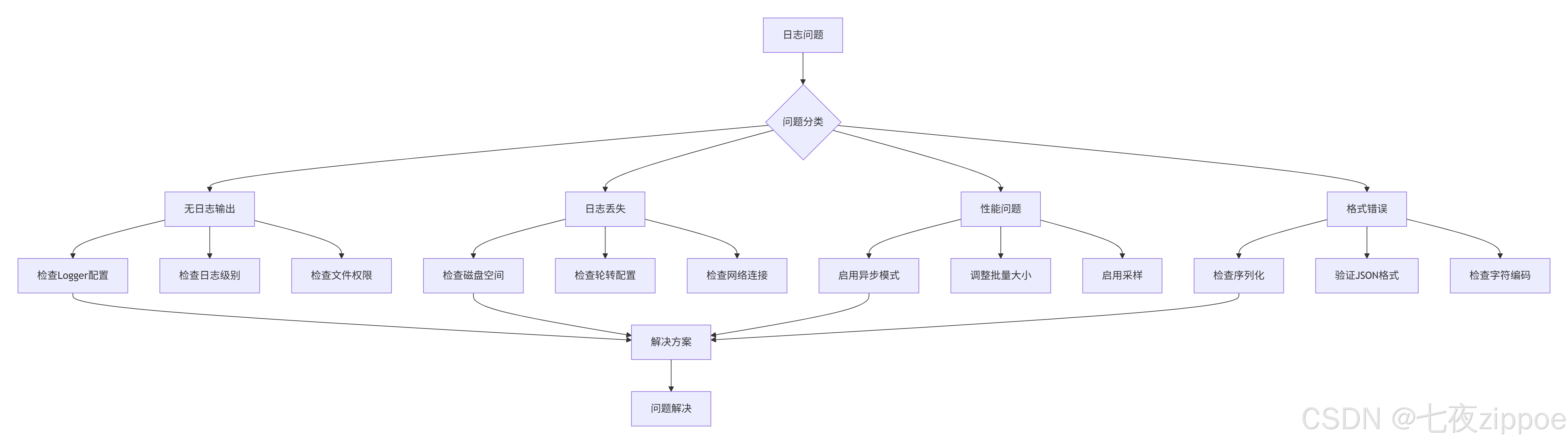
问题1:无日志输出
python
# 诊断步骤
def diagnose_no_logs():
    """诊断无日志输出问题"""

    # 1. 检查Logger配置
    print("1. 检查Logger配置...")
    import logging
    root_logger = logging.getLogger()
    print(f"   Root logger handlers: {root_logger.handlers}")
    print(f"   Root logger level: {root_logger.level}")

    # 2. 检查Loguru配置
    from loguru import logger
    print(f"2. Loguru sinks: {logger._core.handlers}")

    # 3. 检查文件权限
    import os
    log_file = "app.log"
    if os.path.exists(log_file):
        print(f"3. 文件权限: {oct(os.stat(log_file).st_mode)[-3:]}")
    else:
        print("3. 日志文件不存在")

    # 4. 测试日志输出
    print("4. 测试日志输出...")
    logger.debug("测试DEBUG日志")
    logger.info("测试INFO日志")
    logger.error("测试ERROR日志")

    # 5. 检查控制台输出
    print("5. 请检查控制台是否有输出...")

# 快速修复
def quick_fix_no_logs():
    """快速修复无日志问题"""
    from loguru import logger

    # 移除所有现有配置
    logger.remove()

    # 添加简单控制台输出
    logger.add(
        sys.stderr,
        format="<green>{time}</green> | <level>{level}</level> | {message}",
        level="DEBUG"
    )

    # 测试
    logger.info("测试日志 - 如果看到这条消息,说明修复成功")

    return logger
问题2:日志文件过大
python
# 诊断与修复
def diagnose_large_logs():
    """诊断日志文件过大问题"""

    import os
    from datetime import datetime, timedelta

    log_dir = "logs"

    # 1. 分析日志文件
    print("分析日志文件...")
    for filename in os.listdir(log_dir):
        if filename.endswith(".log"):
            filepath = os.path.join(log_dir, filename)
            size_mb = os.path.getsize(filepath) / 1024 / 1024
            mtime = datetime.fromtimestamp(os.path.getmtime(filepath))
            age_days = (datetime.now() - mtime).days

            print(f"  {filename}:")
            print(f"    大小: {size_mb:.2f} MB")
            print(f"    修改时间: {mtime}")
            print(f"    天数: {age_days} 天")

    # 2. 检查配置
    print("\n当前轮转配置:")
    from loguru import logger
    for handler in logger._core.handlers.values():
        if hasattr(handler._sink, 'rotation'):
            print(f"  轮转: {handler._sink.rotation}")
        if hasattr(handler._sink, 'retention'):
            print(f"  保留: {handler._sink.retention}")

    # 3. 建议优化
    print("\n优化建议:")
    if size_mb > 100:  # 大于100MB
        print("  ✅ 启用日志轮转: rotation='100 MB'")
    if age_days > 30:  # 超过30天
        print("  ✅ 设置保留策略: retention='30 days'")
    print("  ✅ 启用压缩: compression='zip'")
    print("  ✅ 调整日志级别: 生产环境使用WARNING或ERROR")

# 优化配置
def optimize_log_config():
    """优化日志配置"""
    from loguru import logger

    logger.remove()

    # 生产环境推荐配置
    logger.add(
        "logs/app_{time}.log",
        rotation="100 MB",      # 100MB轮转
        retention="30 days",    # 保留30天
        compression="zip",      # 自动压缩
        level="WARNING",        # 只记录WARNING及以上
        enqueue=True,           # 异步写入
        backtrace=False,        # 关闭回溯(生产环境)
        diagnose=False,         # 关闭诊断
        serialize=True          # 结构化日志
    )

    # 错误日志单独记录
    logger.add(
        "logs/error_{time}.log",
        rotation="50 MB",
        retention="90 days",    # 错误日志保留更久
        compression="zip",
        level="ERROR",
        serialize=True
    )

    print("✅ 日志配置已优化")
问题3:ELK集成故障
python
# ELK连接诊断
def diagnose_elk_connection():
    """诊断ELK连接问题"""

    import requests
    import socket
    from datetime import datetime

    elk_hosts = [
        "elasticsearch1:9200",
        "elasticsearch2:9200",
        "elasticsearch3:9200"
    ]

    print("诊断ELK连接...")

    for host in elk_hosts:
        print(f"\n检查 {host}...")

        try:
            # 1. 检查网络连通性
            hostname, port = host.split(":")
            sock = socket.socket(socket.AF_INET, socket.SOCK_STREAM)
            sock.settimeout(3)

            result = sock.connect_ex((hostname, int(port)))
            if result == 0:
                print("  ✅ 网络连通性: 正常")
            else:
                print(f"  ❌ 网络连通性: 失败 (错误码: {result})")
                continue

            sock.close()

            # 2. 检查Elasticsearch服务
            url = f"http://{host}"
            response = requests.get(url, timeout=5)

            if response.status_code == 200:
                info = response.json()
                print(f"  ✅ Elasticsearch: 正常")
                print(f"     版本: {info.get('version', {}).get('number')}")
                print(f"     集群: {info.get('cluster_name')}")
                print(f"     状态: {info.get('status')}")
            else:
                print(f"  ❌ Elasticsearch: HTTP {response.status_code}")
                print(f"     响应: {response.text[:200]}")

            # 3. 检查索引
            index_url = f"{url}/_cat/indices?v"
            try:
                idx_response = requests.get(index_url, timeout=5)
                if idx_response.status_code == 200:
                    print(f"  ✅ 索引列表: 可访问")
                    # 显示前5个索引
                    lines = idx_response.text.strip().split('\n')
                    for line in lines[:6]:  # 标题+5行
                        print(f"     {line}")
            except Exception as e:
                print(f"  ⚠️  索引检查: {e}")

            # 4. 测试写入
            test_doc = {
                "timestamp": datetime.now().isoformat(),
                "level": "INFO",
                "message": "连接测试",
                "source": "diagnostic"
            }

            test_url = f"{url}/_test_logs/_doc"
            write_response = requests.post(
                test_url,
                json=test_doc,
                timeout=5
            )

            if write_response.status_code in [200, 201]:
                print("  ✅ 写入测试: 成功")
            else:
                print(f"  ❌ 写入测试: 失败")
                print(f"     状态码: {write_response.status_code}")
                print(f"     响应: {write_response.text}")

        except socket.timeout:
            print(f"  ❌ 连接超时")
        except socket.gaierror:
            print(f"  ❌ 域名解析失败")
        except requests.exceptions.RequestException as e:
            print(f"  ❌ 请求异常: {e}")
        except Exception as e:
            print(f"  ❌ 未知异常: {e}")

    print("\n诊断完成")

# ELK连接自动修复
def auto_fix_elk_connection():
    """自动修复ELK连接问题"""

    from elasticsearch import Elasticsearch, ConnectionError
    from elasticsearch.connection import ConnectionPool

    class ResilientElasticsearch(Elasticsearch):
        """弹性的Elasticsearch客户端"""

        def __init__(self, hosts, **kwargs):
            super().__init__(hosts, **kwargs)
            self.available_hosts = set(hosts)
            self.unavailable_hosts = set()
            self.retry_count = 0
            self.max_retries = kwargs.get('max_retries', 3)

        def perform_request(self, method, url, headers=None, params=None, body=None):
            """重写请求方法,支持自动故障转移"""

            for attempt in range(self.max_retries):
                try:
                    # 从可用主机中选择
                    if not self.available_hosts:
                        self._refresh_hosts()

                    # 尝试请求
                    return super().perform_request(
                        method, url, headers, params, body
                    )

                except ConnectionError as e:
                    self.retry_count += 1
                    self.unavailable_hosts.add(self.transport.host)

                    if attempt < self.max_retries - 1:
                        print(f"⚠️ 连接失败,重试 {attempt + 1}/{self.max_retries}")
                        self._switch_host()
                        continue
                    else:
                        raise

        def _switch_host(self):
            """切换到下一个可用主机"""
            if self.available_hosts:
                new_host = self.available_hosts.pop()
                self.transport.set_connection({new_host})
                print(f"🔄 切换到主机: {new_host}")

        def _refresh_hosts(self):
            """刷新主机列表,尝试恢复不可用主机"""
            for host in list(self.unavailable_hosts):
                try:
                    # 测试主机是否恢复
                    test_client = Elasticsearch([host])
                    test_client.info()

                    self.available_hosts.add(host)
                    self.unavailable_hosts.remove(host)
                    print(f"✅ 主机恢复: {host}")

                except:
                    continue

            if not self.available_hosts:
                raise ConnectionError("所有主机都不可用")

    # 使用示例
    es = ResilientElasticsearch(
        hosts=[
            "elasticsearch1:9200",
            "elasticsearch2:9200",
            "elasticsearch3:9200"
        ],
        max_retries=5,
        retry_on_timeout=True,
        timeout=30
    )

    return es
📈 第五章:监控与告警
5.1 日志监控指标
python
# monitoring/metrics.py
from prometheus_client import Counter, Histogram, Gauge, Summary
import time
from typing import Dict, Any

class LogMetrics:
    """日志监控指标"""

    def __init__(self, service_name: str = "default"):
        self.service_name = service_name

        # 计数器
        self.log_count = Counter(
            'loguru_logs_total',
            '日志总数',
            ['service', 'level']
        )

        self.log_volume = Counter(
            'loguru_log_volume_bytes',
            '日志体积(字节)',
            ['service', 'level']
        )

        # 直方图
        self.log_latency = Histogram(
            'loguru_log_latency_seconds',
            '日志处理延迟',
            ['service'],
            buckets=[0.001, 0.005, 0.01, 0.05, 0.1, 0.5, 1.0]
        )

        # 仪表
        self.queue_size = Gauge(
            'loguru_queue_size',
            '日志队列大小',
            ['service']
        )

        self.active_connections = Gauge(
            'loguru_active_connections',
            '活跃连接数',
            ['service', 'target']
        )

        # 摘要
        self.log_size = Summary(
            'loguru_log_size_bytes_summary',
            '日志大小统计',
            ['service']
        )

        # 错误统计
        self.error_count = Counter(
            'loguru_errors_total',
            '错误总数',
            ['service', 'error_type']
        )

    def record_log(self, level: str, message: str, extra: Dict[str, Any] = None):
        """记录日志指标"""
        start_time = time.time()

        # 记录计数
        self.log_count.labels(
            service=self.service_name,
            level=level.lower()
        ).inc()

        # 记录体积
        message_size = len(message.encode('utf-8'))
        self.log_volume.labels(
            service=self.service_name,
            level=level.lower()
        ).inc(message_size)

        # 记录大小
        self.log_size.labels(
            service=self.service_name
        ).observe(message_size)

        # 记录延迟
        latency = time.time() - start_time
        self.log_latency.labels(
            service=self.service_name
        ).observe(latency)

        # 记录错误
        if level.lower() in ['error', 'critical']:
            error_type = extra.get('error_type', 'unknown') if extra else 'unknown'
            self.error_count.labels(
                service=self.service_name,
                error_type=error_type
            ).inc()

    def update_queue_metrics(self, current_size: int, max_size: int):
        """更新队列指标"""
        self.queue_size.labels(
            service=self.service_name
        ).set(current_size)

        # 计算使用率
        usage_percent = (current_size / max_size * 100) if max_size > 0 else 0
        Gauge(
            'loguru_queue_usage_percent',
            '队列使用率',
            ['service']
        ).labels(service=self.service_name).set(usage_percent)

    def update_connection_metrics(self, target: str, active: int):
        """更新连接指标"""
        self.active_connections.labels(
            service=self.service_name,
            target=target
        ).set(active)

# 集成到Loguru
def create_monitored_logger(service_name: str = "default"):
    """创建带监控的日志记录器"""
    from loguru import logger
    import sys

    metrics = LogMetrics(service_name)

    def monitoring_sink(message):
        """监控sink"""
        start_time = time.time()

        # 提取日志信息
        level = message.record["level"].name
        msg = message.record["message"]
        extra = message.record.get("extra", {})

        # 记录指标
        metrics.record_log(level, msg, extra)

        # 传递到下一个sink
        print(message, file=sys.stderr)

        # 记录处理延迟
        process_time = time.time() - start_time
        if process_time > 0.1:  # 处理超过100ms
            print(f"⚠️ 日志处理延迟: {process_time:.3f}s")

    # 添加监控sink
    logger.add(
        monitoring_sink,
        level="DEBUG",
        format="{time} | {level} | {message}",
        enqueue=True
    )

    return logger, metrics
5.2 告警规则配置
# alerting/alerts.yml
alerts:
  # 错误率告警
  - alert: HighErrorRate
    expr: |
      rate(loguru_errors_total{service="myapp"}[5m]) > 0.1
    for: 2m
    labels:
      severity: critical
      service: "{{ $labels.service }}"
    annotations:
      summary: "应用 {{ $labels.service }} 错误率过高"
      description: |
        错误率超过10% (当前值: {{ $value }})
        最近5分钟错误数: {{ $value }}
        可能原因: 服务异常、依赖故障

  # 日志队列告警
  - alert: LogQueueFull
    expr: |
      loguru_queue_usage_percent{service="myapp"} > 80
    for: 1m
    labels:
      severity: warning
    annotations:
      summary: "日志队列使用率过高"
      description: |
        队列使用率 {{ $value }}% > 80%
        可能原因: ELK连接异常、网络问题

  # 日志延迟告警
  - alert: HighLogLatency
    expr: |
      histogram_quantile(0.95, rate(loguru_log_latency_seconds_bucket{service="myapp"}[5m])) > 0.5
    for: 2m
    labels:
      severity: warning
    annotations:
      summary: "日志处理延迟过高"
      description: |
        95分位延迟 {{ $value }}s > 0.5s
        可能原因: 磁盘IO慢、网络延迟

  # 日志量突增告警
  - alert: LogVolumeSpike
    expr: |
      (
        rate(loguru_log_volume_bytes{service="myapp"}[5m])
        /
        rate(loguru_log_volume_bytes{service="myapp"}[30m] offset 5m)
      ) > 3
    for: 2m
    labels:
      severity: info
    annotations:
      summary: "日志量突增"
      description: |
        日志量增长 {{ $value }} 倍
        可能原因: 流量突增、错误爆发
📊 第六章:最佳实践总结
6.1 配置模板
python
# templates/production_config.py
"""
生产环境日志配置模板
基于13年实践经验总结的最佳配置
"""

PRODUCTION_CONFIG = {
    # 基本配置
    "level": "WARNING",           # 生产环境只记录WARNING及以上
    "format": "json",             # 使用JSON格式
    "enqueue": True,              # 异步写入
    "backtrace": False,           # 关闭回溯(性能考虑)
    "diagnose": False,            # 关闭诊断

    # 文件输出
    "file_output": {
        "path": "/var/log/myapp/app_{time}.log",
        "rotation": "100 MB",     # 100MB轮转
        "retention": "30 days",   # 保留30天
        "compression": "gz",      # gzip压缩
        "encoding": "utf-8"
    },

    # 错误日志单独输出
    "error_file_output": {
        "path": "/var/log/myapp/error_{time}.log",
        "rotation": "50 MB",
        "retention": "90 days",   # 错误日志保留更久
        "level": "ERROR"
    },

    # ELK集成
    "elk_integration": {
        "enabled": True,
        "hosts": [
            "elk-node1:9200",
            "elk-node2:9200",
            "elk-node3:9200"
        ],
        "index_pattern": "myapp-logs-%{+YYYY.MM.dd}",
        "batch_size": 1000,
        "flush_interval": 5,      # 5秒刷盘
        "timeout": 30,            # 30秒超时
        "max_retries": 3
    },

    # 性能优化
    "performance": {
        "sampling": {
            "debug": 0.1,         # 10%采样
            "info": 0.5,          # 50%采样
            "warning": 1.0,       # 100%采样
            "error": 1.0
        },
        "buffer_size": 10000,     # 缓冲区大小
        "max_memory_mb": 100      # 最大内存使用
    },

    # 监控
    "monitoring": {
        "enabled": True,
        "metrics_port": 9090,     # Prometheus端口
        "alert_rules": "alerts.yml"
    },

    # 安全
    "security": {
        "redact_fields": [        # 脱敏字段
            "password",
            "token",
            "secret",
            "credit_card",
            "ssn"
        ],
        "encryption": {
            "enabled": False,      # 日志加密
            "algorithm": "AES-256"
        }
    }
}

def get_production_logger(config: dict = None):
    """获取生产环境日志记录器"""
    from loguru import logger
    import sys

    config = config or PRODUCTION_CONFIG

    # 移除默认配置
    logger.remove()

    # 控制台输出(仅错误)
    logger.add(
        sys.stderr,
        level="ERROR",
        format="<red>{time}</red> | <level>{level}</level> | {message}",
        colorize=True
    )

    # 主日志文件
    file_config = config["file_output"]
    logger.add(
        file_config["path"],
        level=config["level"],
        rotation=file_config["rotation"],
        retention=file_config["retention"],
        compression=file_config["compression"],
        encoding=file_config["encoding"],
        enqueue=config["enqueue"],
        serialize=(config["format"] == "json"),
        backtrace=config["backtrace"],
        diagnose=config["diagnose"]
    )

    # 错误日志文件
    error_config = config["error_file_output"]
    logger.add(
        error_config["path"],
        level=error_config["level"],
        rotation=error_config["rotation"],
        retention=error_config["retention"],
        compression=file_config["compression"],
        enqueue=config["enqueue"],
        serialize=True
    )

    # ELK集成
    if config["elk_integration"]["enabled"]:
        from elk_integration import ELKLogHandler
        elk_handler = ELKLogHandler(**config["elk_integration"])
        logger.add(elk_handler.send_log, level="INFO")

    return logger
6.2 部署架构
🔗 参考资源
官方文档
-
Loguru官方文档 - https://loguru.readthedocs.io
-
Elasticsearch官方文档 - https://www.elastic.co/guide
-
Logstash官方文档 - https://www.elastic.co/guide/logstash
-
Kibana官方文档 - https://www.elastic.co/guide/kibana
权威参考
-
The Logging Best Practices - https://www.loggly.com/ultimate-guide/python-logging
-
Structured Logging Concepts - https://www.honeycomb.io/blog/structured-logging
-
ELK Stack Performance Tuning - https://www.elastic.co/performance
-
Python Logging Enhancement Proposals - https://peps.python.org/pep-0282/
开源项目
-
Loguru GitHub - https://github.com/Delgan/loguru
-
ELK Stack GitHub - https://github.com/elastic
-
Filebeat GitHub - https://github.com/elastic/beats
-
Prometheus Python Client - https://github.com/prometheus/client_python
经验总结 :经过多年的Python开发实践,我深刻体会到良好的日志系统是系统可观测性的基石。Loguru以其简洁的API和强大的功能,配合ELK Stack的集中管理能力,可以构建出生产级的日志解决方案。关键在于:结构化是前提,异步是保障,监控是眼睛,告警是耳朵。记住,日志不是用来记录所有事情,而是记录正确的事情。
最后建议:从项目开始就采用结构化日志,你会感谢自己的决定。不要等到系统崩溃时,才想起日志的重要性。