目录
- 1.框架设计
- [2. compile.hpp编译器设计](#2. compile.hpp编译器设计)
- [3. runner.hpp执行器设计](#3. runner.hpp执行器设计)
- [4. compile_run.hpp编译运行整体逻辑](#4. compile_run.hpp编译运行整体逻辑)
- [5. compile_server.cc交互文件](#5. compile_server.cc交互文件)
1.框架设计
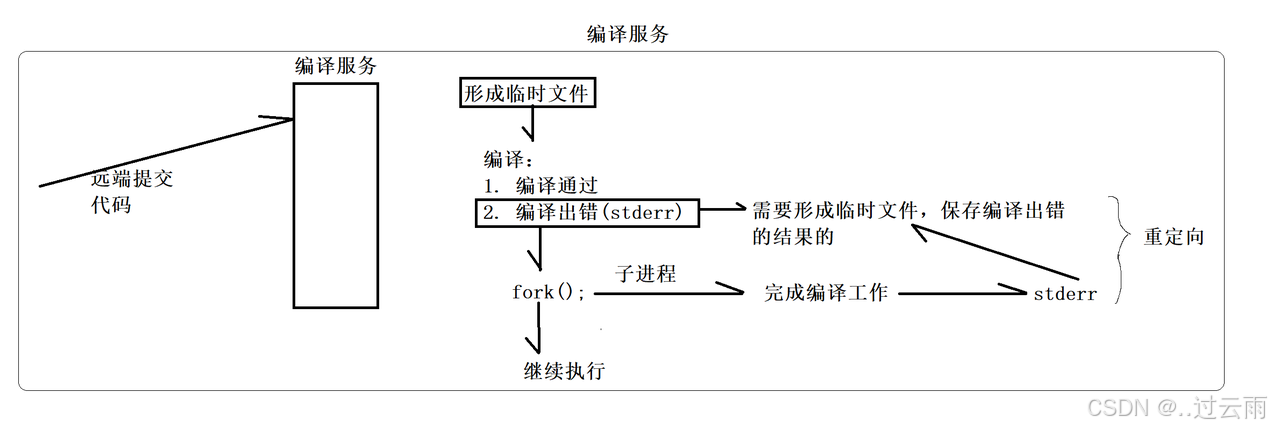
编译运行功能全部存放在compile_server文件夹中
compile_server:
compiler.hpp(编译器):用户代码编译。runner.hpp(执行器):用户代码运行与限制。compile_run.hpp(编译执行流程):编译运行流程、报错存放、中间文件删除。compile_server.cc(http协议+编译执行调用):http协议接收、执行编译运行流程。makefile(make指令):make编译与清理。
2. compile.hpp编译器设计
功能:创建子进程,将标准错误输出重定向到file_name.CompilerError文件,并将子进程替换为g++编译指令。编译成功之后查看是否存在可执行程序,并返回true。
cpp
#pragma once

#include <iostream>
#include <unistd.h>
#include <sys/wait.h>
#include <sys/types.h>
#include <sys/stat.h>
#include <fcntl.h>

#include "../comm/util.hpp"
#include "../comm/log.hpp"

// 只负责进行代码的编译

namespace ns_compiler
{
    // 引入路径拼接功能
    using namespace ns_util;
    using namespace ns_log;

    class Compiler
    {
    public:
        Compiler()
        {}
        ~Compiler()
        {}
        //返回值:编译成功:true,否则:false
        //输入参数:编译的文件名
        //file_name: 1234
        //1234 -> ./temp/1234.cpp
        //1234 -> ./temp/1234.exe
        //1234 -> ./temp/1234.stderr
        /*************************************
         * 1.创建子进程
         * 2.子进程替换,进行代码编译。保留错误信息到CompilerError文件中
         * 3.父进程回收
         *************************************/
        static bool Compile(const std::string &file_name)
        {
            pid_t pid = fork();
            if(pid < 0)
            {
                LOG(ERROR) << "内部错误,创建子进程失败" << "\n";
                return false;
            }
            else if(pid == 0)
            {
                umask(0);
                int _stderr = open(PathUtil::CompilerError(file_name).c_str(), O_CREAT | O_WRONLY, 0644);
                if(_stderr < 0)
                {
                    LOG(WARNING) << "没有成功形成stderr文件" << "\n";
                    exit(1);
                }
                //重定向标准错误到_stderr
                dup2(_stderr, 2);

                //程序替换,并不影响进程的文件描述符表
                //子进程: 调用编译器,完成对代码的编译工作
                //g++ -o target src -std=c++11
                execlp("g++", "g++", "-o", PathUtil::Exe(file_name).c_str(), \
                PathUtil::Src(file_name).c_str(),"-D", "COMPILER_ONLINE", "-std=c++11", nullptr/*不要忘记*/);

                LOG(ERROR) << "启动编译器g++失败,可能是参数错误" << "\n";
                exit(2);
            }
            else
            {
                waitpid(pid, nullptr, 0);
                // 编译是否成功,就看有没有形成对应的可执行程序
                if(FileUtil::IsFileExists(PathUtil::Exe(file_name)))
                {
                    LOG(INFO) << PathUtil::Src(file_name) << " 编译成功!" << "\n";
                    return true;
                }
            }
            LOG(ERROR) << "编译失败,没有形成可执行程序" << "\n";
            return false;
        }
    };

}
3. runner.hpp执行器设计
- 提供设置进程占用资源大小的接口(直接调用rlimit的函数和类实例化来实现) - 用来实现OJ中对代码时间复杂度及空间复杂度要求的设计。
- 创建标准文件并打开。创建子进程并进行进程替换运行编译好的可执行程序。
cpp
#pragma once

#include <iostream>
#include <string>
#include <unistd.h>
#include <sys/types.h>
#include <sys/stat.h>
#include <sys/wait.h>
#include <fcntl.h>
#include <sys/time.h>
#include <sys/resource.h>

#include "../comm/log.hpp"
#include "../comm/util.hpp"

namespace ns_runner
{
    using namespace ns_log;
    using namespace ns_util;
    class Runner
    {
    public:
        Runner()
        {
        }
        ~Runner()
        {
        }

    public:
        //提供设置进程占用资源大小的接口(直接调用rlimit的函数和类实例化来实现)
        static void SetProcLimit(int _cpu_limit, int _mem_limit)
        {
            struct rlimit cpu_rlimit;
            cpu_rlimit.rlim_max = RLIM_INFINITY;
            cpu_rlimit.rlim_cur = _cpu_limit;
            setrlimit(RLIMIT_CPU, &cpu_rlimit);

            struct rlimit mem_rlimit;
            mem_rlimit.rlim_max = RLIM_INFINITY;
            mem_rlimit.rlim_cur = _mem_limit * 1024;
            setrlimit(RLIMIT_AS, &mem_rlimit);
        }
        // 运行程序
        /**********************************
         * 1.创建并的打开相关标准文件
         * 2.创建子进程:输入输出重定向到打开的文件中;添加时间和内存的相关限制;程序替换执行程序
         * 3.父进程直接关闭相关标准文件(因为父进程不对相关标准文件进行操作),并使用waitpid对子进程进行等待回收
         **************************************/
        static int Run(const std::string &file_name, int cpu_limit, int mem_limit)
        {
            // 获取并生成标准文件名(可执行文件、输入文件、输出文件、错误输出文件)
            std::string _execute = PathUtil::Exe(file_name);
            std::string _stdin = PathUtil::Stdin(file_name);
            std::string _stdout = PathUtil::Stdout(file_name);
            std::string _stderr = PathUtil::Stderr(file_name);

            umask(0);
            // 创建并打开(输入文件、输出文件、错误输出文件)
            int _stdin_fd = open(_stdin.c_str(), O_CREAT | O_RDONLY, 0644);
            int _stdout_fd = open(_stdout.c_str(), O_CREAT | O_WRONLY, 0644);
            int _stderr_fd = open(_stderr.c_str(), O_CREAT | O_WRONLY, 0644);

            // 文件打开失败则退出并返回-1
            if (_stdin_fd < 0 || _stdout_fd < 0 || _stderr_fd < 0)
            {
                LOG(ERROR) << "运行时打开标准文件失败" << "\n";
                return -1; // 代表打开文件失败
            }

            pid_t pid = fork();
            if (pid < 0)
            {
                LOG(ERROR) << "运行时创建子进程失败" << "\n";
                close(_stdin_fd);
                close(_stdout_fd);
                close(_stderr_fd);
                return -2;
            }
            else if (pid == 0)
            {
                // 输入输出重定向
                dup2(_stdin_fd, 0);
                dup2(_stdout_fd, 1);
                dup2(_stderr_fd, 2);
                // 添加时间和内存限制,限制值由出题方给出
                SetProcLimit(cpu_limit, mem_limit);
                // 执行程序
                execl(_execute.c_str(), _execute.c_str(), nullptr);
                exit(1);
            }
            else
            {
                // 父进程不需要对文件操作,首先关闭文件
                close(_stdin_fd);
                close(_stdout_fd);
                close(_stderr_fd);
                // 使用waitpid对子进程进行回收,并将退出码存储到status变量中返回
                int status = 0;
                waitpid(pid, &status, 0);

                LOG(INFO) << "运行完毕, info: " << (status & 0x7F) << "\n";
                // 信号有32个,0~32,退出码对应异常信号
                return status & 0x7F;
            }
        }
    };

}
4. compile_run.hpp编译运行整体逻辑
- RemoveTempFile用来删除生成的中间文件。
- CodeToDesc对编译错误或者输出错误进行文字描述
- Start将接收到的json格式字符串进行解析并执行编译运行功能,并将输出结果以json格式送出,最后删除中间文件。
cpp
#pragma once

#include "compiler.hpp"
#include "runner.hpp"

#include "../comm/log.hpp"
#include "../comm/util.hpp"

#include <signal.h>
#include <unistd.h>
#include <jsoncpp/json/json.h>

namespace ns_compile_and_run
{
    using namespace ns_log;
    using namespace ns_util;
    using namespace ns_compiler;
    using namespace ns_runner;

    class CompileAndRun
    {
    public:
        // 用来删除相关标准文件
        static void RemoveTempFile(const std::string &file_name)
        {
            // 清理文件的个数是不确定的,但是有哪些我们是知道的
            std::string _src = PathUtil::Src(file_name);
            if(FileUtil::IsFileExists(_src))    unlink(_src.c_str());

            std::string _compiler_error = PathUtil::CompilerError(file_name);
            if(FileUtil::IsFileExists(_compiler_error))    unlink(_compiler_error.c_str());

            std::string _execute  = PathUtil::Exe(file_name);
            if(FileUtil::IsFileExists(_execute ))    unlink(_execute .c_str());

            std::string _stdin = PathUtil::Stdin(file_name);
            if(FileUtil::IsFileExists(_stdin))    unlink(_stdin.c_str());

            std::string _stdout  = PathUtil::Stdout(file_name);
            if(FileUtil::IsFileExists(_stdout ))    unlink(_stdout .c_str());

            std::string _stderr  = PathUtil::Stderr(file_name);
            if(FileUtil::IsFileExists(_stderr ))    unlink(_stderr .c_str());
        }

        // 对编译或者运行错误的退出码进行文字描述
        static std::string CodeToDesc(int code, const std::string &file_name)
        {
            std::string desc;
            switch (code)
            {
            case 0:
                desc = "编译运行成功";
                break;
            case -1:
                desc = "提交的代码是空的";
                break;
            case -2:
                desc = "未知错误";
                break;
            case -3:
                FileUtil::ReadFile(PathUtil::CompilerError(file_name), &desc, true);
                break;
            case SIGABRT:
                desc = "内存超出范围";
                break;
            case SIGXCPU:
                desc = "CPU使用超时";
                break;
            case SIGFPE:
                desc = "浮点数溢出";
                break;
            default:
                desc = "未知:" + std::to_string(code);
                break;
            }

            return desc;
        }

        /*******************************
         * 输入:
         * code:用户自己提交的代码
         * input:用户给自己代码对应的输入,不做处理
         * cpu_limit:时间要求
         * mem_limit:空间要求
         *
         * 输出:
         * status:状态码
         * reason:请求结果
         * 选填:
         * stdout:我的程序运行完的结果
         * stderr:我的程序运行完的错误结果
         *
         * 参数:
         * in_json:{"code":"#include....", "input":" ", "cpu_limit":1, "mem_limit":10240}
         * out_json:{"status":"0", "reason":" ", "stdout", "stderr"}
         **********************************/
        /********************************
         * 1.将输入的in_json字符串进行解析
         * 2.生成唯一的随即文件名并进行代码写入
         * 3.判断编译时和运行时是否出错,并返回对应的退出码
         * 4.将退出码、运行结果状态(退出原因)、运行结果、运行错误信息输出到out_json字符串。
         * (运行结果和运行错误信息在runner.hpp的Run函数中进行了输出重定向到了对应文件中)(out_json为输出型字符串)
         */
        static void Start(const std::string &in_json, std::string *out_json)
        {
            Json::Value in_value;
            Json::Reader reader;
            reader.parse(in_json, in_value);

            std::string code = in_value["code"].asString();
            std::string input = in_value["input"].asString();
            int cpu_limit = in_value["cpu_limit"].asInt();
            int mem_limit = in_value["mem_limit"].asInt();

            int status_code = 0;
            Json::Value out_value;
            int run_result = 0;
            std::string file_name; // 需要内部形成的唯一文件名

            // 判断程序编译/运行是否出错
            // 1.判断是否代码为空
            if (code.size() == 0)
            {
                status_code = -1;
                goto END;
            }
            // 2.生成随即唯一文件名,并将in_json解析出来的code字符串写入到文件
            file_name = FileUtil::UniqFileName();
            if (!FileUtil::WriteFile(PathUtil::Src(file_name), code))
            {
                status_code = -2; // 未知错误
                goto END;
            }
            // 3.编译程序 -- 编译代码并获取编译时错误
            if (!Compiler::Compile(file_name))
            {
                // 编译失败
                status_code = -3;
                goto END;
            }

            // 4.运行程序 -- 运行代码并获取与运行时错误
            run_result = Runner::Run(file_name, cpu_limit, mem_limit);
            if (run_result < 0)
            {
                // 未知错误
                status_code = -2;
            }
            else if (run_result > 0)
            {
                // 程序运行崩溃
                status_code = run_result;
            }
            else
            {
                // 程序运行成功
                status_code = 0;
            }
        END:
            out_value["status"] = status_code;
            out_value["reason"] = CodeToDesc(status_code, file_name);
            if (status_code == 0)
            {
                // 整个过程全部成功
                std::string _stdout;
                FileUtil::ReadFile(PathUtil::Stdout(file_name), &_stdout, true);
                out_value["stdout"] = _stdout;

                std::string _stderr;
                FileUtil::ReadFile(PathUtil::Stderr(file_name), &_stderr, true);
                out_value["stderr"] = _stderr;
            }

            Json::StyledWriter writer;
            *out_json = writer.write(out_value);

            RemoveTempFile(file_name);
        }
    };

}
5. compile_server.cc交互文件
使用http协议通信,接收用户数据并调用compile_server目录中的各个文件进行,编译运行输出。
cpp
#include "compile_run.hpp"
#include "../comm/httplib.h"

using namespace ns_compile_and_run;
using namespace httplib;

void Usage(std::string proc)
{
    std::cerr << "Usage: " << "\n\t" << proc << " prot" << std::endl;
}

//编译服务随时可能被多个人请求,必须保证传递上来的code,形成源文件名称的时候,要具有
//唯一性,要不然多个用户之间会互相影响
/********************************
 * 1.使用httplib.h的Server类中的Post请求,将req请求中的body内容写入in_json - 执行Start函数之后,将结果赋值out_json,并设置到resp响应的内容中
 * 2. 启动http服务
 */
//./compile_server port
int main(int argc, char* argv[])
{
    if(argc != 2)
    {
        Usage(argv[0]);
        return 1;
    }

    Server svr;

    // 1.此处的Post是事先设置好路由服务
    // 2.listen本质是一个阻塞循环监听
    svr.Post("/compile_and_run", [](const Request &req, Response &resp){
        // 用户请求的服务正文是我们想要的json string
        std::string in_json = req.body;
        std::string out_json;
        if(!in_json.empty())
        {
            CompileAndRun::Start(in_json, &out_json);
            resp.set_content(out_json, "application/json;charset=utf-8");
        }
    });
    svr.listen("0.0.0.0", atoi(argv[1])); // 启动http服务

    return 0;
}