webrtc客户端-服务端连接过程时序图
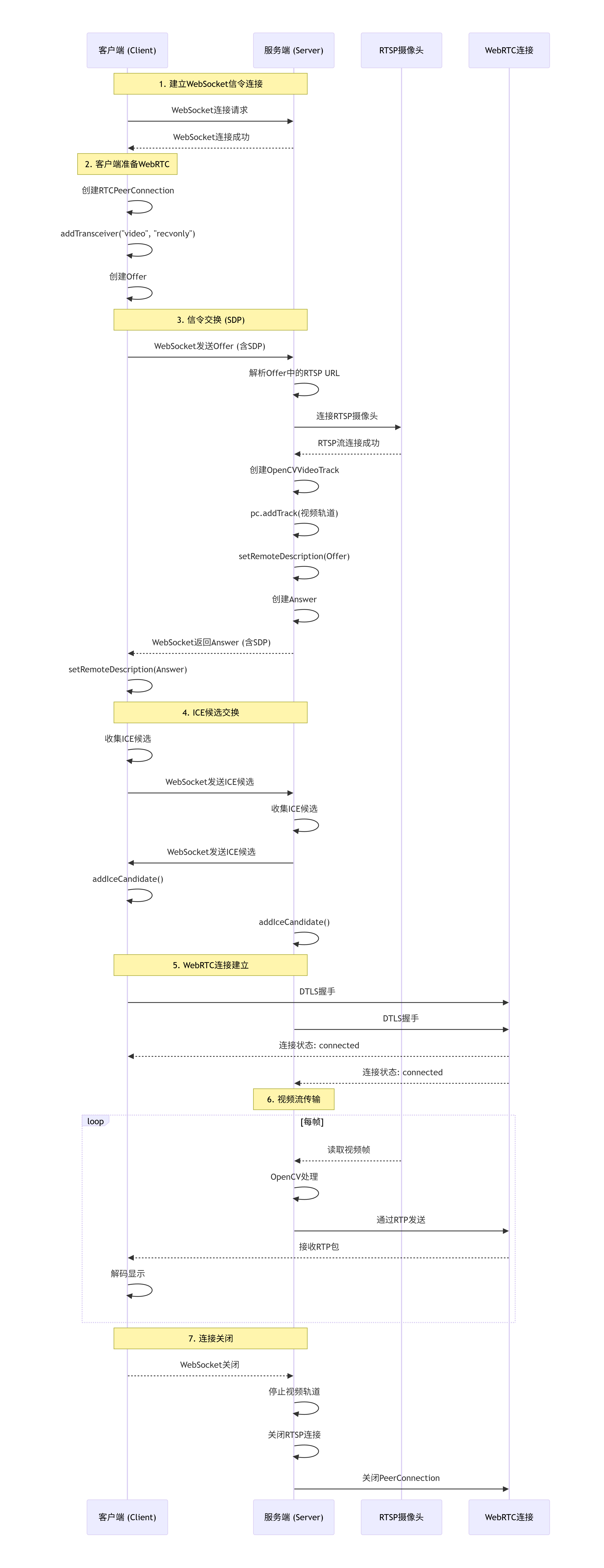
服务端代码
import asyncio
import cv2
import numpy as np
from aiortc import RTCPeerConnection, RTCSessionDescription, VideoStreamTrack
import json
import websockets
import threading
from av import VideoFrame
import time
import logging
from fractions import Fraction

# 设置日志
logging.basicConfig(level=logging.INFO)
logger = logging.getLogger(__name__)


class OpenCVVideoTrack(VideoStreamTrack):
    """
    自定义视频轨道:从 OpenCV 读取 RTSP 流
    """

    def __init__(self, rtsp_url):
        super().__init__()
        self.rtsp_url = rtsp_url
        self.cap = None
        self.running = True
        self.fps = 25
        self.frame_time = 1.0 / self.fps
        self.last_frame = None
        self.frame_count = 0
        self.time_base = Fraction(1, 90000)  # 90kHz 时钟,使用 Fraction 对象

        # 启动 OpenCV 捕获线程
        self.thread = threading.Thread(target=self._capture_frames)
        self.thread.daemon = True
        self.thread.start()
        logger.info(f"视频轨道创建,RTSP地址: {rtsp_url}")

    def _capture_frames(self):
        """在独立线程中持续捕获 RTSP 流"""
        retry_count = 0
        while self.running:
            try:
                if self.cap is None or not self.cap.isOpened():
                    # 重新连接 RTSP
                    logger.info(f"连接RTSP流: {self.rtsp_url}")
                    self.cap = cv2.VideoCapture(self.rtsp_url)

                    # 设置缓存大小和超时
                    self.cap.set(cv2.CAP_PROP_BUFFERSIZE, 1)

                    if not self.cap.isOpened():
                        retry_count += 1
                        logger.error(f"无法打开RTSP流 (尝试 {retry_count}),5秒后重试...")
                        time.sleep(5)
                        continue

                    # 获取实际帧率
                    actual_fps = self.cap.get(cv2.CAP_PROP_FPS)
                    if actual_fps > 0:
                        self.fps = actual_fps
                        self.frame_time = 1.0 / self.fps
                        logger.info(f"RTSP流已连接,帧率: {self.fps:.2f}")
                    else:
                        logger.info("RTSP流已连接")

                    retry_count = 0

                ret, frame = self.cap.read()
                if not ret:
                    logger.warning("读取帧失败,重新连接...")
                    self.cap.release()
                    self.cap = None
                    time.sleep(1)
                    continue

                # 转换为 RGB (OpenCV 默认是 BGR)
                frame_rgb = cv2.cvtColor(frame, cv2.COLOR_BGR2RGB)

                # 可以在这里添加图像处理
                self.frame_count += 1
                cv2.putText(frame_rgb, f"Server Frame: {self.frame_count}", (10, 30),
                            cv2.FONT_HERSHEY_SIMPLEX, 1, (0, 255, 0), 2)

                self.last_frame = frame_rgb

                # 控制帧率
                time.sleep(self.frame_time)

            except Exception as e:
                logger.error(f"捕获线程错误: {e}")
                time.sleep(1)

    async def recv(self):
        """
        aiortc 调用此方法获取视频帧
        """
        if self.last_frame is None:
            # 如果没有帧,返回一个黑色帧
            frame = np.zeros((480, 640, 3), dtype=np.uint8)
            pts = time.time()
            video_frame = VideoFrame.from_ndarray(frame, format="rgb24")
            video_frame.pts = int(pts * 90000)  # 90kHz 时钟
            video_frame.time_base = self.time_base  # 使用 Fraction 对象
            return video_frame

        # 使用最新的帧
        pts = time.time()
        video_frame = VideoFrame.from_ndarray(self.last_frame, format="rgb24")
        video_frame.pts = int(pts * 90000)
        video_frame.time_base = self.time_base  # 使用 Fraction 对象
        return video_frame

    def stop(self):
        """停止捕获"""
        self.running = False
        if self.cap:
            self.cap.release()
        logger.info("视频轨道已停止")


class WebRTCServer:
    def __init__(self, host="0.0.0.0", port=8765):
        self.host = host
        self.port = port
        self.pcs = set()
        self.video_tracks = {}

    async def handle_websocket(self, websocket):
        """
        处理 WebSocket 信令
        """
        pc = RTCPeerConnection()
        self.pcs.add(pc)
        logger.info(f"新的客户端连接,当前连接数: {len(self.pcs)}")

        # 当连接关闭时清理
        @pc.on("connectionstatechange")
        async def on_connectionstatechange():
            logger.info(f"连接状态变化: {pc.connectionState}")
            if pc.connectionState in ["failed", "closed", "disconnected"]:
                await self.close_pc(pc)

        @pc.on("iceconnectionstatechange")
        async def on_iceconnectionstatechange():
            logger.info(f"ICE连接状态: {pc.iceConnectionState}")

        @pc.on("icegatheringstatechange")
        async def on_icegatheringstatechange():
            logger.info(f"ICE收集状态: {pc.iceGatheringState}")

        try:
            # 接收客户端消息
            async for message in websocket:
                try:
                    data = json.loads(message)
                    logger.info(f"收到消息类型: {data.get('type')}")

                    if data["type"] == "offer":
                        # 客户端发送了 offer
                        await self.handle_offer(pc, data, websocket)

                    elif data["type"] == "ice-candidate":
                        # 客户端发送 ICE 候选
                        candidate = data["candidate"]
                        if candidate:
                            await pc.addIceCandidate(candidate)
                            logger.info("添加ICE候选")

                except json.JSONDecodeError:
                    logger.error("无效的JSON消息")
                except Exception as e:
                    logger.error(f"处理消息错误: {e}")

        except websockets.exceptions.ConnectionClosed:
            logger.info("客户端断开连接")
        finally:
            await self.close_pc(pc)

    async def handle_offer(self, pc, data, websocket):
        """
        处理客户端的 offer
        """
        try:
            # 获取 RTSP URL
            rtsp_url = data.get("rtsp_url")
            if not rtsp_url:
                rtsp_url = "rtsp://admin:yjzn_2025@192.168.1.236:554/Streaming/Channels/101"

            logger.info(f"请求的RTSP流: {rtsp_url}")

            # 创建 RTSP 视频轨道
            video_track = OpenCVVideoTrack(rtsp_url)
            self.video_tracks[id(pc)] = video_track

            # 添加视频轨道到连接
            pc.addTrack(video_track)
            logger.info("视频轨道已添加到PeerConnection")

            # 设置远程描述符 (客户端的 offer)
            await pc.setRemoteDescription(
                RTCSessionDescription(sdp=data["sdp"], type=data["type"])
            )
            logger.info("远程描述符设置成功")

            # 创建 answer
            answer = await pc.createAnswer()
            await pc.setLocalDescription(answer)
            logger.info("本地answer创建成功")

            # 发送 answer 回客户端
            response = {
                "type": "answer",
                "sdp": pc.localDescription.sdp
            }
            await websocket.send(json.dumps(response))
            logger.info("answer已发送给客户端")

        except Exception as e:
            logger.error(f"处理offer错误: {e}")
            import traceback
            traceback.print_exc()
            raise

    async def close_pc(self, pc):
        """
        关闭 PeerConnection 并清理资源
        """
        # 停止视频轨道
        if id(pc) in self.video_tracks:
            self.video_tracks[id(pc)].stop()
            del self.video_tracks[id(pc)]

        # 关闭连接
        if pc in self.pcs:
            self.pcs.remove(pc)
            await pc.close()
            logger.info(f"PeerConnection已关闭,剩余连接数: {len(self.pcs)}")

    async def start(self):
        """
        启动 WebSocket 服务器
        """
        async with websockets.serve(self.handle_websocket, self.host, self.port):
            logger.info(f"WebRTC信令服务器运行在 ws://{self.host}:{self.port}")
            await asyncio.Future()  # 运行 forever


def main():
    server = WebRTCServer()
    try:
        asyncio.run(server.start())
    except KeyboardInterrupt:
        logger.info("服务器关闭")


if __name__ == "__main__":
    main()
客户端
import asyncio
import cv2
import json
import websockets
from aiortc import RTCPeerConnection, RTCSessionDescription
from aiortc.contrib.media import MediaPlayer, MediaRecorder
import numpy as np
import logging
import time

# 设置日志
logging.basicConfig(level=logging.INFO)
logger = logging.getLogger(__name__)


class WebRTCClient:
    def __init__(self, server_url="ws://localhost:8765"):
        self.server_url = server_url
        self.pc = RTCPeerConnection()
        self.running = True
        self.frame_count = 0

        # 用于显示视频的窗口
        cv2.namedWindow("WebRTC Client - RTSP Stream", cv2.WINDOW_NORMAL)

        # 处理连接状态
        @self.pc.on("connectionstatechange")
        async def on_connectionstatechange():
            logger.info(f"连接状态变化: {self.pc.connectionState}")
            if self.pc.connectionState == "failed":
                await self.cleanup()
            elif self.pc.connectionState == "connected":
                logger.info("WebRTC连接已建立!")

        @self.pc.on("iceconnectionstatechange")
        async def on_iceconnectionstatechange():
            logger.info(f"ICE连接状态: {self.pc.iceConnectionState}")

        # 处理接收到的轨道
        @self.pc.on("track")
        def on_track(track):
            logger.info(f"收到轨道: {track.kind}")
            if track.kind == "video":
                # 创建任务处理视频帧
                asyncio.create_task(self.process_video(track))

        # 添加接收视频的 transceiver
        self.pc.addTransceiver("video", direction="recvonly")
        logger.info("已添加视频接收通道")

    async def process_video(self, track):
        """
        处理接收到的视频帧
        """
        logger.info("开始处理视频流...")

        while self.running:
            try:
                # 接收帧,设置超时
                frame = await asyncio.wait_for(track.recv(), timeout=5.0)

                # 转换为 OpenCV 格式 (BGR)
                img = frame.to_ndarray(format="bgr24")

                # 图像处理
                self.frame_count += 1

                # 添加信息文字
                height, width = img.shape[:2]
                cv2.putText(img, f"Frame: {self.frame_count}", (10, 30),
                            cv2.FONT_HERSHEY_SIMPLEX, 1, (0, 255, 0), 2)
                cv2.putText(img, f"Size: {width}x{height}", (10, 60),
                            cv2.FONT_HERSHEY_SIMPLEX, 0.6, (255, 255, 255), 1)
                cv2.putText(img, "RTSP via WebRTC", (10, height - 20),
                            cv2.FONT_HERSHEY_SIMPLEX, 0.7, (0, 0, 255), 2)

                # 显示图像
                cv2.imshow("WebRTC Client - RTSP Stream", img)

                # 必须调用 waitKey 来刷新窗口
                key = cv2.waitKey(1) & 0xFF
                if key == ord('q') or key == 27:  # 'q' 或 ESC
                    self.running = False
                    break

            except asyncio.TimeoutError:
                logger.warning("接收视频帧超时")
                continue
            except Exception as e:
                logger.error(f"处理视频帧错误: {e}")
                break

        logger.info("视频处理结束")

    async def connect(self, rtsp_url=None):
        """
        连接到服务器并开始接收视频流
        """
        try:
            # 如果没有指定RTSP URL,使用默认值
            if rtsp_url is None:
                rtsp_url = "rtsp://admin:yjzn_2025@192.168.1.236:554/Streaming/Channels/101"

            logger.info(f"正在连接到信令服务器: {self.server_url}")
            logger.info(f"请求RTSP流: {rtsp_url}")

            # 连接到信令服务器
            async with websockets.connect(self.server_url) as websocket:
                logger.info("已连接到信令服务器")

                # 创建 offer
                logger.info("创建WebRTC offer...")
                offer = await self.pc.createOffer()
                await self.pc.setLocalDescription(offer)
                logger.info("offer创建成功")

                # 发送 offer 到服务器
                message = {
                    "type": "offer",
                    "sdp": self.pc.localDescription.sdp,
                    "rtsp_url": rtsp_url
                }
                await websocket.send(json.dumps(message))
                logger.info("offer已发送到服务器")

                # 等待服务器的 answer
                logger.info("等待服务器answer...")
                response = await websocket.recv()
                answer = json.loads(response)
                logger.info(f"收到answer,类型: {answer['type']}")

                # 设置远程描述符
                await self.pc.setRemoteDescription(
                    RTCSessionDescription(sdp=answer["sdp"], type=answer["type"])
                )
                logger.info("远程描述符设置成功")

                logger.info("WebRTC连接建立中,等待视频流...")

                # 保持连接,处理可能的ICE候选
                async for message in websocket:
                    data = json.loads(message)
                    if data["type"] == "ice-candidate":
                        await self.pc.addIceCandidate(data["candidate"])
                        logger.debug("添加ICE候选")

        except websockets.exceptions.ConnectionClosed:
            logger.info("与服务器的连接已关闭")
        except Exception as e:
            logger.error(f"连接错误: {e}")
        finally:
            await self.cleanup()

    async def cleanup(self):
        """
        清理资源
        """
        self.running = False
        await self.pc.close()
        cv2.destroyAllWindows()
        logger.info("资源已清理")


def main():
    # 创建客户端
    client = WebRTCClient(server_url="ws://localhost:8765")

    # 指定RTSP地址
    rtsp_url = "rtsp://admin:yjzn_2025@192.168.1.236:554/Streaming/Channels/101"

    # 运行客户端
    try:
        asyncio.run(client.connect(rtsp_url))
    except KeyboardInterrupt:
        logger.info("用户中断")
    finally:
        logger.info("客户端关闭")


if __name__ == "__main__":
    main()