一、Docker安装
基于Ubuntu的安装及配置都完成后,点击跳转安装
1.安装必要的系统工具
bash
root@ubuntu:~# apt-get -y install apt-transport-https ca-certificates curl software-properties-common2.安装GPG证书
bash
root@ubuntu:~# curl -fsSL https://mirrors.aliyun.com/docker-ce/linux/ubuntu/gpg | apt-key add -这里使用的是阿里云的docker软件源--->可以更换其他的docker软件源
3.写入docker-ce软件源信息
bash
root@ubuntu:~# add-apt-repository "deb [arch=amd64] https://mirrors.aliyun.com/docker-ce/linux/ubuntu $(lsb_release -cs) stable"
E: Malformed entry 58 in list file /etc/apt/sources.list (Component)
E: The list of sources could not be read.
出现错误后,修正步骤:
root@ubuntu:~# sed -i '58d' /etc/apt/sources.list
root@ubuntu:~# sudo apt update
4. 更新并安装Docker
bash
root@ubuntu:~# sudo apt-get update
root@ubuntu:~# apt-cache madison docker-ce
docker-ce | 5:19.03.9~3-0~ubuntu-focal | https://mirrors.aliyun.com/docker-ce/linux/ubuntu focal/stable amd64 Packages   #安装5:19.03.9~3-0~ubuntu-focal版本,如果不使用k8s,可以不使用该版本--->我需要使用k8s
root@ubuntu:~# apt-get install -y docker-ce=5:19.03.9~3-0~ubuntu-focal
E: Could not get lock /var/lib/dpkg/lock-frontend. It is held by process 3035 (unattended-upgr)
N: Be aware that removing the lock file is not a solution and may break your system.
E: Unable to acquire the dpkg frontend lock (/var/lib/dpkg/lock-frontend), is another process using it?
出现该提示错误时,修正步骤:(原因是apt被占用)
root@ubuntu:~# sudo killall apt apt-get unattended-upgr 2>/dev/null
root@ubuntu:~# sudo rm -f /var/lib/dpkg/lock-frontend /var/lib/dpkg/lock /var/lib/apt/lists/lock
root@ubuntu:~# sudo dpkg --configure -a
root@ubuntu:~# sudo apt-get install -y docker-ce=5:19.03.9~3-0~ubuntu-focal
二、Docker配置
我是为了支持k8s,之后做的一些基础配置,如果你实在不知道要做一些什么配置可以跟我一起做如下配置,不影响
1.查看docker-ce的信息:
bash
root@ubuntu:~# docker info  #查看详细信息
如果结尾出现WARNING提示
表示你系统的docker-ce不支持swap,解决方式:
编辑:vim /etc/default/grup 文件
编辑行:GRUB_CMDLINE_LINUX="cgroup_enable=memony swapaccount=1"
更新,重启grap
update-grup
reboot
2.重启系统,配置iptables
bash
root@ubuntu:~# reboot
临时方法:
root@ubuntu:~# iptables -P FORWARD ACCEPT
永久方法:
root@ubuntu:~# vim /lib/systemd/system/docker.service
在ExecReload=/bin/kill -s HUP $MAINPID之后
添加ExecStartPost=/sbin/iptables -P FORWARD ACCEPT
root@ubuntu:~# systemctl daemon-reload
root@ubuntu:~# systemctl restart docker
root@ubuntu:~# iptables -L | less  #查看修改结果
3.自定义Docker加速器
bash
root@ubuntu:~# cat > /etc/docker/daemon.json << EOF
{
"registry-mirrors":["http://f1361db2.m.daocloud.io"],
"exec-opts":["native.cgroupdriver=systemd"],
"log-driver":"json-file",
"log-opts":{
"max-size":"100m"
},
"storage-driver":"overlay2"
}
EOF
root@ubuntu:~# systemctl daemon-reload
root@ubuntu:~# systemctl restart docker
root@ubuntu:~# docker info
Registry Mirrors:
  http://f1361db2.m.daocloud.io/
成功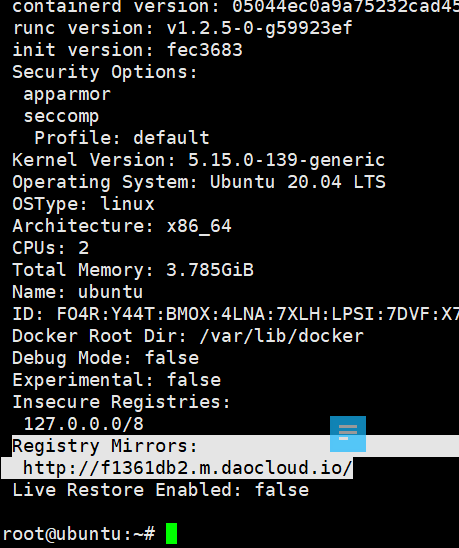
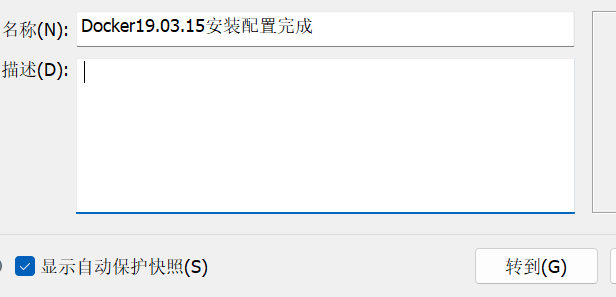
4.关闭系统,拍摄快照
bash
root@ubuntu:~# shutdown -h now