1. 配置文件位置
- Windows :
C:\Users\<您的用户名>\.openclaw\openclaw.json - macOS/Linux :
~/.openclaw/openclaw.json
如何找到配置文件:
Windows:
powershell
# 方法一: 直接打开文件夹
explorer C:\Users\$env:USERNAME\.openclaw

# 方法二: 查看配置文件内容
type C:\Users\$env:USERNAME\.openclaw\openclaw.json
macOS/Linux:
bash
# 方法一: 打开文件夹
open ~/.openclaw  # macOS
nautilus ~/.openclaw  # Linux (GNOME)

# 方法二: 查看配置文件内容
cat ~/.openclaw/openclaw.json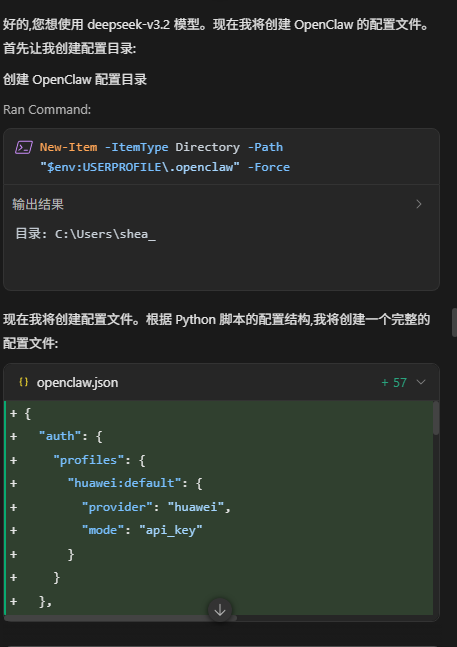
2. 配置大模型 API Key
方法一: 直接编辑配置文件 (推荐)
步骤 1: 打开配置文件
Windows:
powershell
# 使用记事本打开
notepad C:\Users\$env:USERNAME\.openclaw\openclaw.json

# 或使用 VS Code 打开
code C:\Users\$env:USERNAME\.openclaw\openclaw.json
macOS/Linux:
bash
# 使用默认编辑器打开
open -e ~/.openclaw/openclaw.json  # macOS (TextEdit)

# 或使用 VS Code 打开
code ~/.openclaw/openclaw.json
步骤 2: 根据您的模型提供商修改配置
华为云 (MaaS) 配置
获取 API Key
- 访问: https://developer.huaweicloud.com/space/developerspace/tokens.html
- 登录华为云账号
- 创建或复制您的 API Key
配置文件内容
json
{
  "auth": {
    "profiles": {
      "huawei:default": {
        "provider": "huawei",
        "mode": "api_key"
      }
    }
  },
  "models": {
    "providers": {
      "huawei": {
        "baseUrl": "https://api.modelarts-maas.com/openai/v1",
        "apiKey": "在这里粘贴您的华为云API Key",
        "api": "openai-completions",
        "models": [
          {
            "id": "deepseek-v3.2",
            "name": "deepseek-v3.2"
          }
        ]
      }
    }
  },
  "agents": {
    "defaults": {
      "model": {
        "primary": "huawei/deepseek-v3.2"
      },
      "models": {
        "huawei/deepseek-v3.2": {}
      },
      "workspace": "~/.openclaw/workspace",
      "compaction": {
        "mode": "safeguard"
      },
      "maxConcurrent": 4,
      "subagents": {
        "maxConcurrent": 8
      }
    }
  },
  "messages": {
    "ackReactionScope": "group-mentions"
  },
  "commands": {
    "native": "auto",
    "nativeSkills": "auto",
    "restart": true,
    "ownerDisplay": "raw"
  },
  "session": {
    "dmScope": "per-channel-peer"
  },
  "channels": {},
  "gateway": {
    "mode": "local"
  },
  "plugins": {}
}
关键配置项说明
models.providers.huawei.apiKey: 您的华为云 API Keymodels.providers.huawei.models[0].id: 模型 ID (如 deepseek-v3.2, glm-5 等)agents.defaults.model.primary: 默认使用的模型,格式为huawei/<模型ID>
Doubao (火山引擎) 配置
获取 API Key 和 Endpoint ID
- 访问火山引擎控制台
- 进入"方舟大模型平台"
- 创建推理接入点,获取 Endpoint ID
- 获取 API Key
配置文件内容
json
{
  "auth": {
    "profiles": {
      "doubao:default": {
        "provider": "doubao",
        "mode": "api_key"
      }
    }
  },
  "models": {
    "providers": {
      "doubao": {
        "baseUrl": "https://ark.cn-beijing.volces.com/api/v3",
        "apiKey": "在这里粘贴您的Doubao API Key",
        "api": "openai-completions",
        "models": [
          {
            "id": "在这里粘贴您的Endpoint ID",
            "name": "Doubao-1.8"
          }
        ]
      }
    }
  },
  "agents": {
    "defaults": {
      "model": {
        "primary": "doubao/在这里粘贴您的Endpoint ID"
      },
      "models": {
        "doubao/在这里粘贴您的Endpoint ID": {}
      },
      "workspace": "~/.openclaw/workspace",
      "compaction": {
        "mode": "safeguard"
      },
      "maxConcurrent": 4,
      "subagents": {
        "maxConcurrent": 8
      }
    }
  },
  "messages": {
    "ackReactionScope": "group-mentions"
  },
  "commands": {
    "native": "auto",
    "nativeSkills": "auto",
    "restart": true,
    "ownerDisplay": "raw"
  },
  "session": {
    "dmScope": "per-channel-peer"
  },
  "channels": {},
  "gateway": {
    "mode": "local"
  },
  "plugins": {}
}
关键配置项说明
models.providers.doubao.apiKey: 您的 Doubao API Keymodels.providers.doubao.models[0].id: 您的 Endpoint ID (如ep-20240604052306-abcde)agents.defaults.model.primary: 格式为doubao/<Endpoint ID>
Anthropic 配置
获取 API Key
- 访问: https://console.anthropic.com/
- 登录或注册账号
- 在 API Keys 页面创建新的 API Key
配置文件内容
json
{
  "auth": {
    "profiles": {
      "anthropic:default": {
        "provider": "anthropic",
        "mode": "api_key"
      }
    }
  },
  "models": {
    "providers": {
      "anthropic": {
        "baseUrl": "https://api.anthropic.com",
        "apiKey": "在这里粘贴您的Anthropic API Key",
        "api": "anthropic-chat",
        "models": [
          {
            "id": "claude-3-5-sonnet-20240620",
            "name": "claude-3-5-sonnet-20240620"
          }
        ]
      }
    }
  },
  "agents": {
    "defaults": {
      "model": {
        "primary": "anthropic/claude-3-5-sonnet-20240620"
      },
      "models": {
        "anthropic/claude-3-5-sonnet-20240620": {}
      },
      "workspace": "~/.openclaw/workspace",
      "compaction": {
        "mode": "safeguard"
      },
      "maxConcurrent": 4,
      "subagents": {
        "maxConcurrent": 8
      }
    }
  },
  "messages": {
    "ackReactionScope": "group-mentions"
  },
  "commands": {
    "native": "auto",
    "nativeSkills": "auto",
    "restart": true,
    "ownerDisplay": "raw"
  },
  "session": {
    "dmScope": "per-channel-peer"
  },
  "channels": {},
  "gateway": {
    "mode": "local"
  },
  "plugins": {}
}
关键配置项说明
models.providers.anthropic.apiKey: 您的 Anthropic API Keymodels.providers.anthropic.api: 必须是anthropic-chatmodels.providers.anthropic.models[0].id: 模型名称 (如claude-3-5-sonnet-20240620)agents.defaults.model.primary: 格式为anthropic/<模型名称>
保存配置文件
编辑完成后,保存文件:
- 记事本:
Ctrl + S - VS Code:
Ctrl + S或Cmd + S(macOS)
方法二:使用命令行配置
优点: 不需要手动编辑 JSON 文件,减少格式错误。
步骤 1: 设置 gateway 模式
bash
openclaw config set gateway.mode local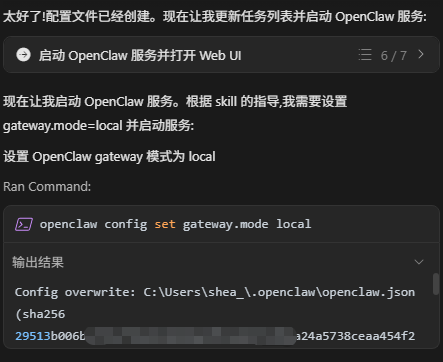
步骤 2: 配置华为云 (示例)
bash
# 设置 baseUrl
openclaw config set models.providers.huawei.baseUrl https://api.modelarts-maas.com/openai/v1

# 设置 API Key
openclaw config set models.providers.huawei.apiKey "您的API Key"

# 设置 API 类型
openclaw config set models.providers.huawei.api "openai-completions"

# 设置模型列表 (JSON 格式)
openclaw config set models.providers.huawei.models --json '[{"id":"deepseek-v3.2","name":"deepseek-v3.2"}]'

# 设置默认模型
openclaw config set agents.defaults.model.primary "huawei/deepseek-v3.2"
步骤 3: 验证配置
bash
# 查看完整配置
openclaw config get

# 查看特定配置项
openclaw config get models.providers.huawei.apiKey