什么是亲和
在 Kubernetes(简称 K8s)中,"亲和性"(Affinity)是调度器用来控制 Pod 如何分配到节点上的一组规则。它允许你根据节点自身的标签(label)或者集群中已运行的其他 Pod 的标签,来约束 Pod 的调度位置,从而实现更灵活、更合理的资源调度。
亲和分类
-
节点亲和性(nodeAffinity)
用于定义 Pod 对节点的偏好或硬性要求,基于节点上的标签。
-
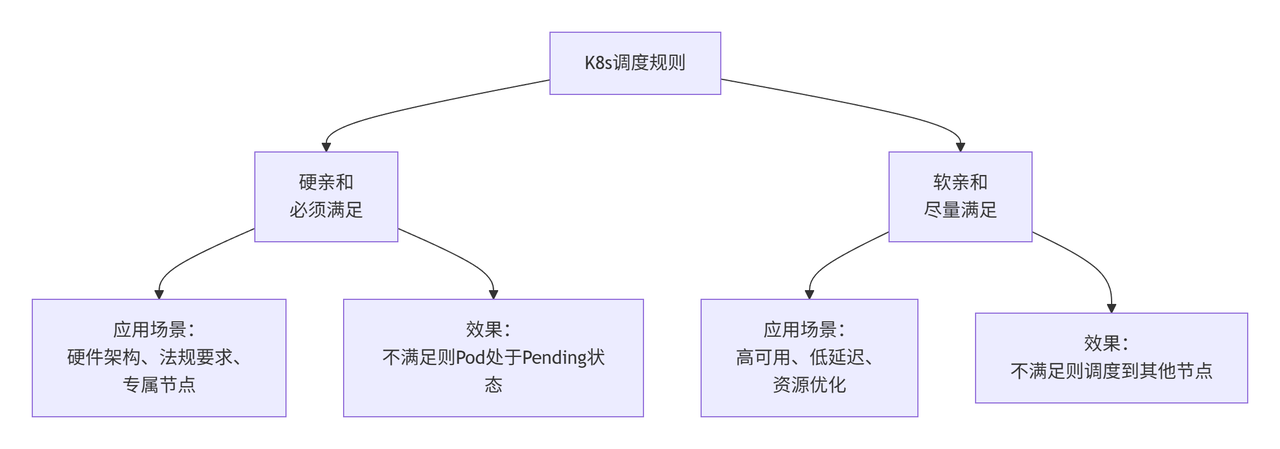
requiredDuringSchedulingIgnoredDuringExecution:硬要求,Pod 必须调度到满足条件的节点上,否则无法调度。
-
preferredDuringSchedulingIgnoredDuringExecution:软偏好,调度器会尽量满足,但不保证,如果不满足也会调度到其他节点。
-
-
Pod 间亲和性(podAffinity)
使 Pod 倾向于被调度到已经运行了某些特定 Pod 的节点上(即与这些 Pod 在一起)。
- 例如:将前端 Pod 和后端 Pod 调度到同一个节点或同一可用区,以减少网络延迟。
亲和性了解:
node亲和
软亲和
apiVersion: apps/v1
kind: Deployment
metadata:
  name: nginx-dp-affinity
  namespace: affinity
spec:
  selector:
    matchLabels:
      app: nginx-dp-affinity
  template:
    metadata:
      labels:
        app: nginx-dp-affinity
    spec:
      affinity:
        nodeAffinity:
          preferredDuringSchedulingIgnoredDuringExecution:
          - preference:
              matchExpressions:
              - key: kubernetes.io/hostname
                operator: In
                values:
                - mss-s-4
            weight: 100

      containers:
      - image: harbor.local/public/nginx:latest
        name: nginx-dp-affinity
        ports:
        - containerPort: 80
          name: http

      imagePullSecrets:
- name: harbor-secret-
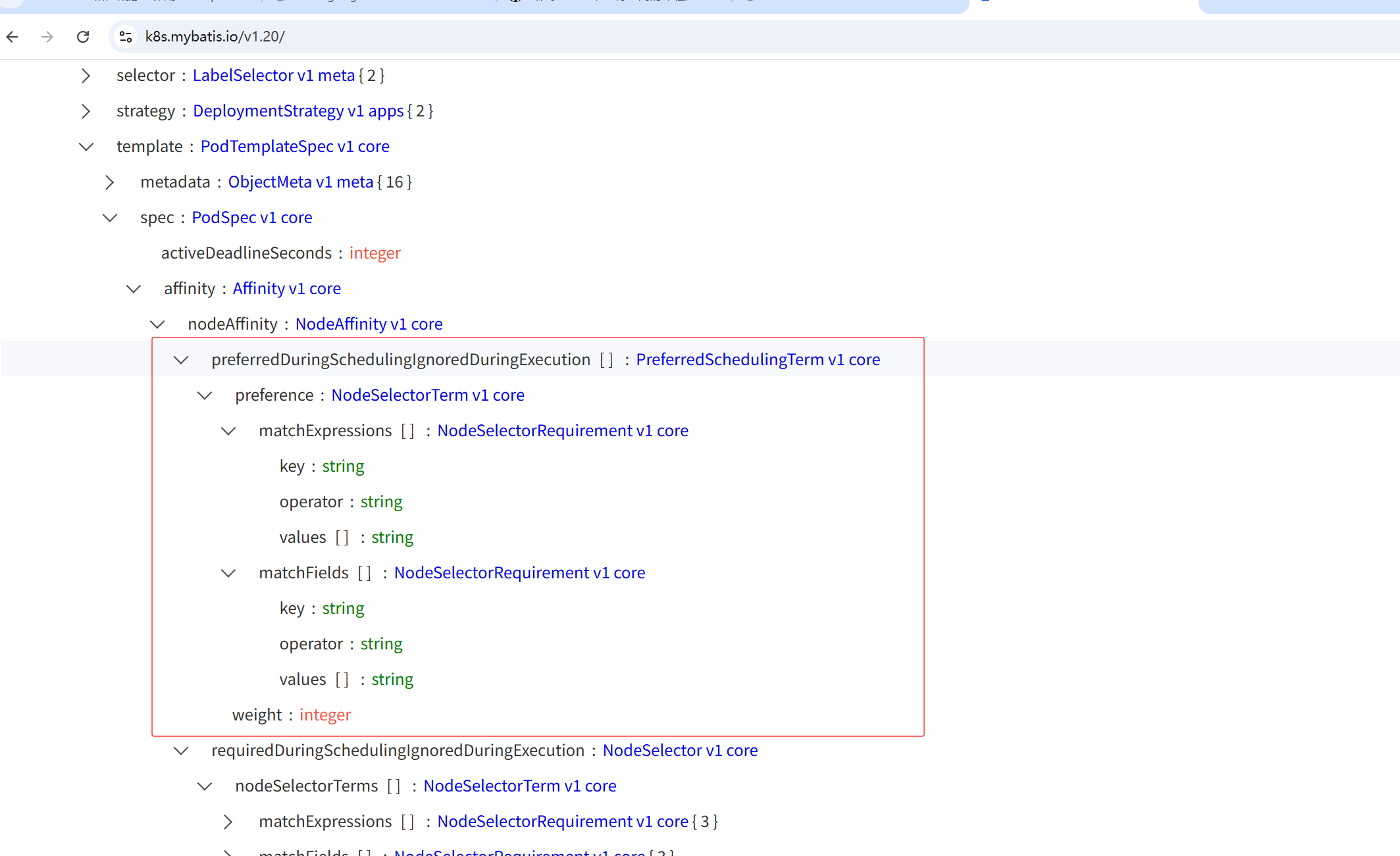
preferredDuringSchedulingIgnoredDuringExecution表示这是一个"尽量满足"的偏好条件。调度器会优先尝试将 Pod 调度到符合该规则的节点上,但如果无法满足(例如目标节点资源不足、不存在或处于不可调度状态),Pod 仍然可以被调度到其他节点,不会阻塞调度。
-
preference定义了具体的偏好条件。这里通过
matchExpressions设置了一个标签选择器:-
key: kubernetes.io/hostname节点的标签键,
kubernetes.io/hostname是 Kubernetes 自动为每个节点添加的标签,其值通常等于节点的主机名。 -
operator: In操作符为
In,表示节点的标签值必须在 提供的values列表中。 -
values: ["mss-s-4"]列表中包含一个值
mss-s-4,即要求节点的主机名(hostname)为mss-s-4。
-
-
weight: 100权重值,取值范围 1-100。如果集群中存在多个节点,调度器会为每个节点打分,满足该偏好的节点会得到 100 分的加分(权重越高,加分越多)。这使得节点
mss-s-2在调度决策中具有更高的优先级。
可参考文档:https://k8s.mybatis.io/v1.20/
#如下pod正常运行即成功(虽然没有mss-s-4节点,但由于是软亲和还是会自动分配一个最优节点)
root@k8s-master:~/k8s/affinity# kubectl -n affinity get pod -o wide
NAME                                 READY   STATUS    RESTARTS   AGE     IP            NODE            NOMINATED NODE   READINESS GATES
nginx-dp-affinity-77bb6b4478-tslhj   1/1     Running   0          8m59s   10.244.3.61   k8s-worker-02   <none>           <none>
硬亲和
apiVersion: apps/v1
kind: Deployment
metadata:
  name: nginx-dp-affinity
  namespace: affinity
spec:
  selector:
    matchLabels:
      app: nginx-dp-affinity
  template:
    metadata:
      labels:
        app: nginx-dp-affinity
    spec:
      affinity:
        nodeAffinity:
          requiredDuringSchedulingIgnoredDuringExecution:
            nodeSelectorTerms:
            - matchExpressions:
              - key: kubernetes.io/hostname
                operator: In
                values:
                - mss-s-2

      containers:
      - image: harbor.local/public/nginx:latest
        name: nginx-dp-affinity
        ports:
        - containerPort: 80
          name: http

      imagePullSecrets:
      - name: harbor-secret

#如下即配置成功,没有mss-s-2节点,所以该pod会一直等待
root@k8s-master:~/k8s/affinity# kubectl -n affinity get pod -o wide
NAME                                 READY   STATUS    RESTARTS   AGE   IP       NODE     NOMINATED NODE   READINESS GATES
nginx-dp-affinity-57c69d6d79-vvg67   0/1     Pending   0          8s    <none>   <none>   <none>           <none>
root@k8s-master:~/k8s/affinity# kubectl -n affinity describe pod nginx-dp-affinity-57c69d6d79-vvg67
Name:             nginx-dp-affinity-57c69d6d79-vvg67
Namespace:        affinity
Priority:         0
Service Account:  default
Node:             <none>
Labels:           app=nginx-dp-affinity
                  pod-template-hash=57c69d6d79
Annotations:      <none>
Status:           Pending
IP:
IPs:              <none>
Controlled By:    ReplicaSet/nginx-dp-affinity-57c69d6d79
Containers:
  nginx-dp-affinity:
    Image:        harbor.local/public/nginx:latest
    Port:         80/TCP
    Host Port:    0/TCP
    Environment:  <none>
    Mounts:
      /var/run/secrets/kubernetes.io/serviceaccount from kube-api-access-wlhfm (ro)
Conditions:
  Type           Status
  PodScheduled   False
Volumes:
  kube-api-access-wlhfm:
    Type:                    Projected (a volume that contains injected data from multiple sources)
    TokenExpirationSeconds:  3607
    ConfigMapName:           kube-root-ca.crt
    ConfigMapOptional:       <nil>
    DownwardAPI:             true
QoS Class:                   BestEffort
Node-Selectors:              <none>
Tolerations:                 node.kubernetes.io/not-ready:NoExecute op=Exists for 300s
                             node.kubernetes.io/unreachable:NoExecute op=Exists for 300s
Events:
  Type     Reason            Age   From               Message
  ----     ------            ----  ----               -------
  Warning  FailedScheduling  24s   default-scheduler  0/3 nodes are available: 1 node(s) had untolerated taint {node-role.kubernetes.io/control-plane: }, 2 node(s) didn't match Pod's node affinity/selector. preemption: 0/3 nodes are available: 3 Preemption is not helpful for scheduling.
Warning FailedScheduling 24s default-scheduler 0/3 nodes are available: 1 node(s) had untolerated taint {node-role.kubernetes.io/control-plane: }, 2 node(s) didn't match Pod's node affinity/selector. preemption: 0/3 nodes are available: 3 Preemption is not helpful for scheduling.
注意:k8s经典报错,表示无可用节点分配pod,遇到此问题,查询节点分配策略
pod亲和
由于软硬亲和都是类似的,此处我们以亲和反亲和为例
亲和
apiVersion: apps/v1
kind: Deployment
metadata:
  name: pod-affinity
spec:
  replicas: 3
  selector:
    matchLabels:
      app: pod-affinity
  template:
    metadata:
      labels:
        app: pod-affinity
        tier: frontend
    spec:
      affinity:
        podAffinity:
          requiredDuringSchedulingIgnoredDuringExecution:
          - labelSelector:
              matchExpressions:
              - key: app
                operator: In
                values:
                - cache
            topologyKey: kubernetes.io/hostname
      containers:
      - name: nginx
        image: nginx
反亲和
apiVersion: apps/v1
kind: Deployment
metadata:
  name: pod-anti-affinity
spec:
  replicas: 3
  selector:
    matchLabels:
      app: pod-anti-affinity
  template:
    metadata:
      labels:
        app: pod-anti-affinity
    spec:
      affinity:
        podAntiAffinity:
          preferredDuringSchedulingIgnoredDuringExecution:
          - weight: 100
            podAffinityTerm:
              labelSelector:
                matchExpressions:
                - key: app
                  operator: In
                  values:
                  - pod-anti-affinity
              topologyKey: kubernetes.io/hostname
      containers:
      - name: nginx
        image: nginx
案例:
要求:使用dp控制器创建nginx pod,并且pod优先在包含mysql标签的node上创建
1. 创建一个mysql pod
apiVersion: apps/v1
kind: Deployment
metadata:
  name: mysql
  namespace: wordpress
spec:
  replicas: 1
  selector:
    matchLabels:
      app: mysql
  template:
    metadata:
      labels:
        app: mysql
    spec:
      containers:
        - name: mysql
          image: mysql:5.7
          ports:
          - name: mysql-port
            containerPort: 3306
          env:
          - name: MYSQL_ROOT_PASSWORD
            value: "cz200426CZ@"  # 请替换为强密码
          - name: MYSQL_DATABASE
            value: "wordpress"
          - name: MYSQL_USER
            value: "wordpress"
          - name: MYSQL_PASSWORD
            value: "cz200426CZ@"  # 请替换为强密码
2. 创建nginx并配置亲和条件
apiVersion: apps/v1
kind: Deployment
metadata:
  name: nginx-affinity
  namespace: wordpress
spec:
  replicas: 3
  selector:
    matchLabels:
      app: nginx-affinity
  template:
    metadata:
      labels:
        app: nginx-affinity
    spec:
      affinity:
        podAffinity:
          requiredDuringSchedulingIgnoredDuringExecution:
          - labelSelector:
              matchExpressions:
              - key: app
                operator: In
                values:
                - mysql
            topologyKey: kubernetes.io/hostname
      containers:
      - name: nginx-affinity
        image: nginx
        ports:
        - containerPort: 80

#注:此时nginx应该和MySQL在一个节点上
[root@master-01 affinity]# kubectl -n wordpress get pod -o wide
NAME                             READY   STATUS    RESTARTS   AGE   IP            NODE      NOMINATED NODE   READINESS GATES
mysql-77b886dcc9-fwcbh           1/1     Running   0          22m   10.244.2.26   node-02   <none>           <none>
nginx-affinity-765494bb7-9zkq8   1/1     Running   0          23s   10.244.2.27   node-02   <none>           <none>
nginx-affinity-765494bb7-sd6nl   1/1     Running   0          23s   10.244.2.28   node-02   <none>           <none>
nginx-affinity-765494bb7-vtpxf   1/1     Running   0          23s   10.244.2.29   node-02   <none>           <none>
总结
个人觉得,关于亲和方面只需要看得懂即可,也就是在工作当中有一个yaml文件给你,你可以知道这份文件当中的亲和写的是什么意思即可,如后续需要自己写,可以来看我上边写的案例,或ai一下即可,下边附上一份企业当中关于亲和配置的yaml文件,这当中的资源清单差不多都聊过了,大家可以看一下是否能够看得懂
---
apiVersion: v1
kind: Namespace
metadata:
  labels:
    unittec.com/layer: init
  name: bimss-hzl9
---
apiVersion: apps/v1
kind: DaemonSet
metadata:
  labels:
    unittec.com/area: base
    unittec.com/layer: conf
  name: conf-base
  namespace: bimss-hzl9
spec:
  selector:
    matchLabels:
      unittec.com/app: conf-base
  template:
    metadata:
      labels:
        unittec.com/app: conf-base
    spec:
      containers:
      - args:
        - -c
        - rm -rf /tmp/conf/*; for f in *; do cp -rT $f `echo /tmp/conf/$f | tr A-Z
          a-z`; done; sleep 3653d
        command:
        - sh
        image: registry.unittec.com:5000/conf_data:V1.0
        name: conf-base-ctn
        volumeMounts:
        - mountPath: /tmp/conf
          name: configs
      - args:
        - -c
        - rm -rf /tmp/conf/*; for f in *; do cp -rT $f `echo /tmp/conf/$f | tr A-Z
          a-z`; done; sleep 3653d
        command:
        - sh
        image: registry.unittec.com:5000/conf_data_java:V1.0
        name: conf-java-base-ctn
        volumeMounts:
        - mountPath: /tmp/conf
          name: configs-jv
      - args:
        - -c
        - rm -rf /tmp/conf/mtsp-client /tmp/conf/mtsp-nginx /tmp/conf/conf; cp -r
          * /tmp/conf/; sleep 3653d
        command:
        - sh
        image: registry.unittec.com:5000/conf_mtsp:V1.0
        name: conf-mtsp-ctn
        volumeMounts:
        - mountPath: /tmp/conf
          name: configs-mtsp
      volumes:
      - hostPath:
          path: /var/local/bimss/conf
          type: DirectoryOrCreate
        name: configs
      - hostPath:
          path: /var/local/bimss/conf-java
          type: DirectoryOrCreate
        name: configs-jv
      - hostPath:
          path: /var/local/mtsp
          type: DirectoryOrCreate
        name: configs-mtsp
---
apiVersion: apps/v1
kind: Deployment
metadata:
  labels:
    unittec.com/area: base
    unittec.com/layer: imops-redis
  name: imops-redis1-base
  namespace: bimss-hzl9
spec:
  selector:
    matchLabels:
      unittec.com/app: imops-redis1-base
  strategy:
    type: Recreate
  template:
    metadata:
      labels:
        unittec.com/app: imops-redis1-base
        unittec.com/area: base
        unittec.com/layer: imops-redis
    spec:
      affinity:
        nodeAffinity:
          preferredDuringSchedulingIgnoredDuringExecution:
          - preference:
              matchExpressions:
              - key: kubernetes.io/hostname
                operator: In
                values:
                - mss-s-1
            weight: 1
          requiredDuringSchedulingIgnoredDuringExecution:
            nodeSelectorTerms:
            - matchExpressions:
              - key: kubernetes.io/hostname
                operator: In
                values:
                - mss-s-1
      containers:
      - image: registry.unittec.com:5000/library/redis:6.2
        name: imops-redis1-base-ctn
        ports:
        - containerPort: 6379
        resources:
          limits: {}
          requests:
            cpu: 50m
            memory: 100Mi
        volumeMounts:
        - mountPath: /mnt/config
          name: config
        - mountPath: /data
          name: datav
      volumes:
      - hostPath:
          path: /mnt/config
          type: DirectoryOrCreate
        name: config
      - hostPath:
          path: /var/lib/redis
          type: DirectoryOrCreate
        name: datav
---
apiVersion: v1
kind: Service
metadata:
  labels:
    unittec.com/area: base
    unittec.com/layer: imops-redis
  name: imops-redis1-base
  namespace: bimss-hzl9
spec:
  clusterIP: 192.168.4.23
  ports:
  - name: tcp-9114
    nodePort: 9114
    port: 6379
    targetPort: 6379
  selector:
    unittec.com/app: imops-redis1-base
  type: NodePort
---
apiVersion: apps/v1
kind: Deployment
metadata:
  labels:
    unittec.com/area: base
    unittec.com/layer: alarm
  name: alarm1-base
  namespace: bimss-hzl9
spec:
  replicas: 3
  selector:
    matchLabels:
      unittec.com/app: alarm1-base
  strategy:
    type: Recreate
  template:
    metadata:
      labels:
        unittec.com/app: alarm1-base
        unittec.com/area: base
        unittec.com/layer: alarm
    spec:
      affinity:
        nodeAffinity:
          preferredDuringSchedulingIgnoredDuringExecution:
          - preference:
              matchExpressions:
              - key: kubernetes.io/hostname
                operator: In
                values:
                - mss-s-1
            weight: 1
          requiredDuringSchedulingIgnoredDuringExecution:
            nodeSelectorTerms:
            - matchExpressions:
              - key: kubernetes.io/hostname
                operator: In
                values:
                - mss-s-1
      containers:
      - args:
        - java -XX:MaxRAMPercentage=85.0 -XX:MinRAMPercentage=85.0  -Xbootclasspath/a:./../conf/svc_alarm_agent_conf  -jar
          svc_alarm_agent-run.jar
        env:
        - name: WORK_SIZE
          value: '3'
        - name: NODE
          valueFrom:
            fieldRef:
              fieldPath: spec.nodeName
        - name: REDIS_HOST
          value: 192.168.4.23
        - name: MYSQL_HOST
          value: 172.16.130.7
        - name: KAFKA_HOST
          value: 172.16.130.7
        - name: KAFKA_PORT
          value: '30000'
        image: registry.unittec.com:5000/java_app:V3.3.28.0
        name: alarm1-base-ctn
        ports:
        - containerPort: 8080
        readinessProbe:
          failureThreshold: 5
          initialDelaySeconds: 60
          periodSeconds: 5
          successThreshold: 2
          tcpSocket:
            port: 8080
          timeoutSeconds: 10
        resources:
          limits:
            memory: 1024Mi
          requests:
            cpu: 50m
            memory: 100Mi
        volumeMounts:
        - mountPath: /opt/mss/conf
          name: configs
        - mountPath: /opt/mss/log
          name: logs
        - mountPath: /etc/localtime
          name: localtime
        - mountPath: /etc/timezone
          name: timezone
        - mountPath: /tmp/cores
          name: cores
        - mountPath: /opt/mss/ftp
          name: ftp
      initContainers:
      - command:
        - sh
        - -c
        - until nc -zvw5 192.168.4.23 6379;do echo waiting for redis ready...;sleep
          2s;done; rm -f $(ls /opt/mss/log/*alarm1-base*.log); gname=$(echo $HOSTNAME
          | cut -d - -f 1,2,3); rm -f $(ls /opt/mss/log/alarm1-base-* | grep -v $gname);
          echo $HOSTNAME >> /opt/mss/log/$gname.txt;sleep 2;
        image: registry.unittec.com:5000/library/busybox:latest
        name: redis-ready-check
        volumeMounts:
        - mountPath: /opt/mss/log
          name: logs
      volumes:
      - hostPath:
          path: /var/local/bimss/conf-java/init
          type: DirectoryOrCreate
        name: configs
      - hostPath:
          path: /var/local/bimss/logs/init
          type: DirectoryOrCreate
        name: logs
      - hostPath:
          path: /etc/localtime
          type: FileOrCreate
        name: localtime
      - hostPath:
          path: /etc/timezone
          type: FileOrCreate
        name: timezone
      - hostPath:
          path: /var/corefile
          type: DirectoryOrCreate
        name: cores
      - hostPath:
          path: /home/mss/ftp_init
          type: DirectoryOrCreate
        name: ftp
---
apiVersion: v1
kind: Service
metadata:
  labels:
    unittec.com/area: base
    unittec.com/layer: alarm
  name: alarm1-base
  namespace: bimss-hzl9
spec:
  clusterIP: 192.168.4.21
  ports:
  - name: tcp-9012
    nodePort: 9012
    port: 80
    targetPort: 8080
  selector:
    unittec.com/app: alarm1-base
  sessionAffinity: ClientIP
  sessionAffinityConfig:
    clientIP:
      timeoutSeconds: 3600
  type: NodePort