上一篇:一起学springAI系列一:流式返回-CSDN博客
多个模型
在某些情况下,我们可能需要在一个应用程序中同时使用多个聊天模型:
1、针对不同类型的任务采用不同的模型(例如,使用强大的模型来进行复杂的推理,而使用速度更快、成本更低的模型来处理较为简单的任务)
2、当某一模型服务不可用时,实施备用机制
3、对不同的模型或配置进行 A/B 测试
4、根据用户的偏好为他们提供多种选择的型号
5、结合使用专门的模型(一个用于代码生成,另一个用于创意内容生成等)
实现
禁用ChatClient的自动配置
在配置文件中增加配置:spring.ai.chat.client.enabled=false
使用单一模型类型实现多个聊天客户端,解決多客户端使用不同模型参数问题
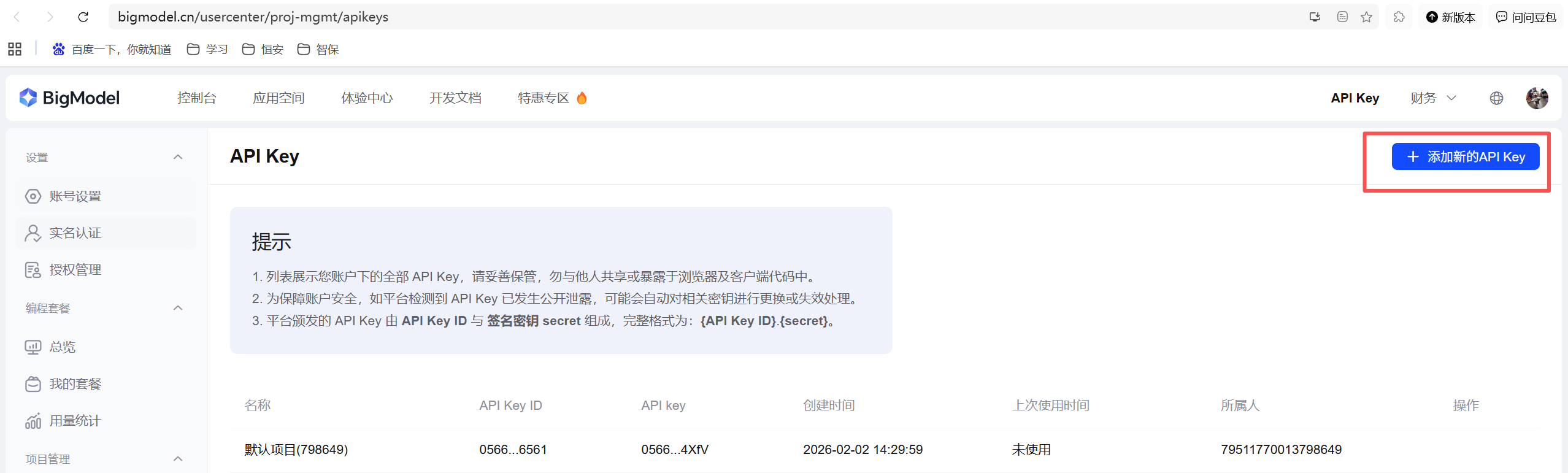
以智谱为例,在智谱AI开放平台创建apiKey
官网地址: https://bigmodel.cn/glm-coding
引入智谱模型依赖
XML
        <dependency>
            <groupId>org.springframework.ai</groupId>
            <artifactId>spring-ai-starter-model-zhipuai</artifactId>
        </dependency>
创建多个 ChatClient 实例,实现多个聊天客户端
java
import org.springframework.ai.chat.client.ChatClient;
import org.springframework.ai.chat.client.ChatClientResponse;
import org.springframework.ai.chat.model.ChatModel;
import org.springframework.ai.chat.model.ChatResponse;
import org.springframework.ai.zhipuai.ZhiPuAiChatModel;
import org.springframework.ai.zhipuai.ZhiPuAiChatOptions;
import org.springframework.ai.zhipuai.api.ZhiPuAiApi;
import org.springframework.http.MediaType;
import org.springframework.web.bind.annotation.GetMapping;
import org.springframework.web.bind.annotation.RequestMapping;
import org.springframework.web.bind.annotation.RequestParam;
import org.springframework.web.bind.annotation.RestController;
import reactor.core.publisher.Flux;

/**
 * @Author: yin79
 * @Date: 2026/3/18
 */
@RestController
@RequestMapping("/ai")
public class HelloAIController {

    private final ChatClient zhipuChatClient;

    private final ChatClient noThinkZhipuCHatClient;

    public HelloAIController() {
        // 智谱Client
        ZhiPuAiApi zhiPuAiApi = ZhiPuAiApi.builder()
                .baseUrl("https://open.bigmodel.cn/api/paas")
                .apiKey("替换你的apikey")
                .build();
        // 思考模式与结果随机性大
        ZhiPuAiChatOptions zhiPuAiChatOptions = ZhiPuAiChatOptions.builder()
                .model("GLM-4.5-Air")  //模型名称
                .temperature(0.8) // 大模型参数-模型温度,控制生成结果的 "随机性 / 创造性",数值越大越放飞,越小越严谨
                .thinking(ZhiPuAiApi.ChatCompletionRequest.Thinking.enabled())   // 开启思考模式
                .build();
        ChatModel chatModel = new ZhiPuAiChatModel(zhiPuAiApi, zhiPuAiChatOptions);

        // 不思考模式与结果随机性小
        ZhiPuAiChatOptions noThinkZhiPuAiChatOptions = ZhiPuAiChatOptions.builder()
                .model("GLM-4.5-Air")  //模型名称
                .temperature(0.5) // 大模型参数-模型温度,控制生成结果的 "随机性 / 创造性",数值越大越放飞,越小越严谨
                .thinking(ZhiPuAiApi.ChatCompletionRequest.Thinking.disabled())   // 关闭思考模式
                .build();
        ChatModel noThinkCchatModel = new ZhiPuAiChatModel(zhiPuAiApi, noThinkZhiPuAiChatOptions);
        this.zhipuChatClient = ChatClient.builder(chatModel)
                .defaultSystem("You are a helpful assistant.")
                .build();
        this.noThinkZhipuCHatClient = ChatClient.builder(noThinkCchatModel)
                .defaultSystem("You are a helpful assistant.")
                .build();
    }

    @GetMapping("/hi")
    String generation(String message) {

        return this.zhipuChatClient.prompt()
                .user(message)
                .call()
                .content();
    }

    /**
     * 流式返回
     * @param message
     * @return
     */
    @GetMapping(value = "/hi-stream", produces = MediaType.TEXT_EVENT_STREAM_VALUE)
    public Flux<String> hiStream(@RequestParam(required = false) String message) {
        return noThinkZhipuCHatClient.prompt()
                .user(message)    // 用户的输入,可以理解为用户提示词
                .stream()         // 调用大模型流式返回
                .content();       // 获取大模型的回复, string类型的
    }


    /**
     * 流式返回
     * @param message
     * @return
     */
    @GetMapping(value = "/hi-stream-chat-response", produces = MediaType.TEXT_EVENT_STREAM_VALUE)
    public Flux<ChatResponse> hiStreamChatResponse(@RequestParam(required = false) String message) {
        return zhipuChatClient.prompt()
                .user(message)    // 用户的输入,可以理解为用户提示词
                .stream()         // 调用大模型流式返回
                .chatResponse();  // 获取大模型的回复, ChatResponse类型的
    }

    /**
     * 流式返回
     * @param message
     * @return
     */
    @GetMapping(value = "/hi-stream-chat-client-response", produces = MediaType.TEXT_EVENT_STREAM_VALUE)
    public Flux<ChatClientResponse> hiStreamChatClientResponse(@RequestParam(required = false) String message) {
        return zhipuChatClient.prompt()
                .user(message)    // 用户的输入,可以理解为用户提示词
                .stream()         // 调用大模型流式返回
                .chatClientResponse();  // 获取大模型的回复, ChatClientResponse类型的
    }
}
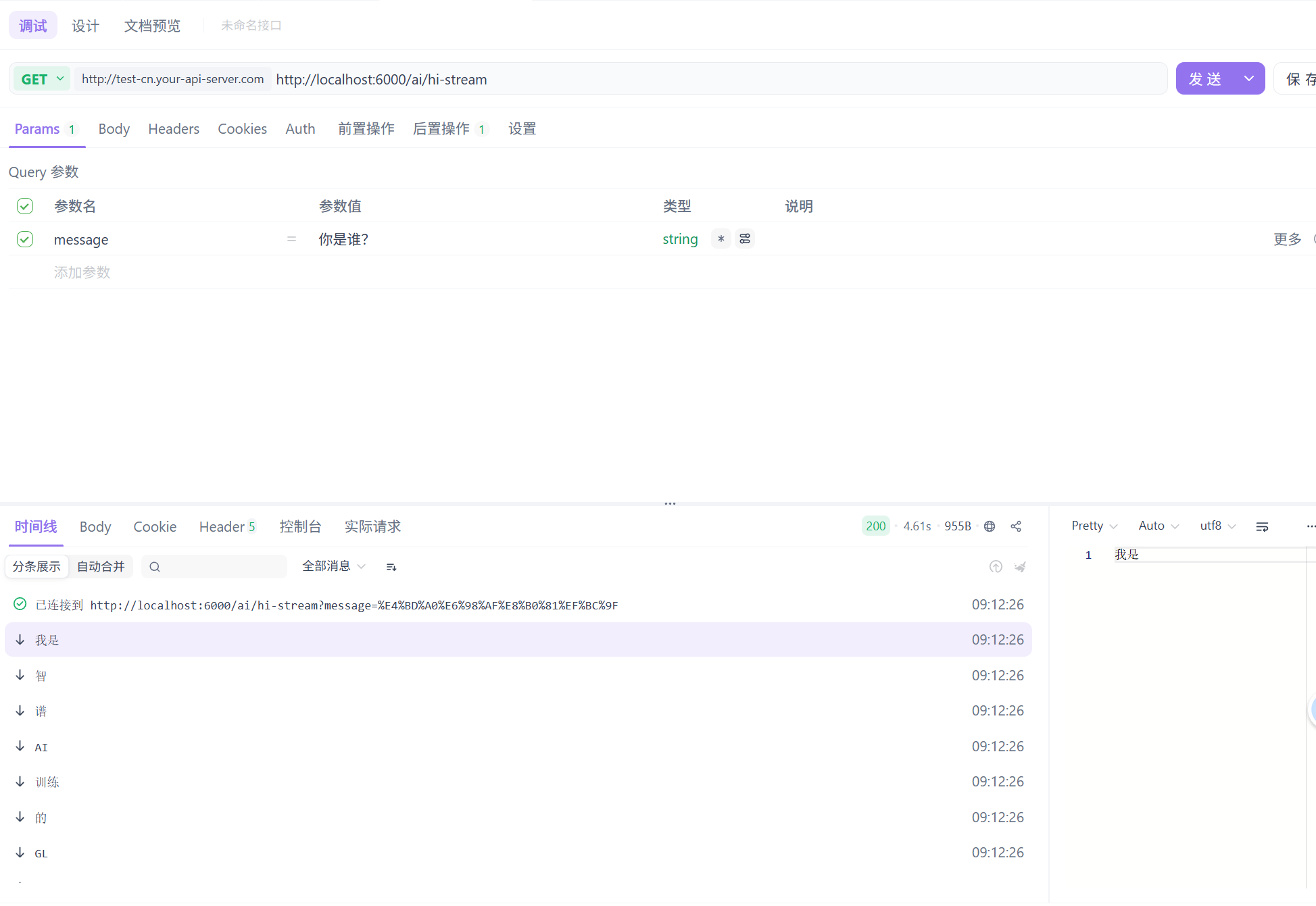
测试发送请求
不同模型类型的聊天客户端
在application.yml中添加模型配置
XML
spring:
  ai:
    openai:
      api-key: 替换openai的apiKey
    zhipuai:
      api-key: 替换智谱的apiKey
      chat:
        options:
          model: GLM-4.5-Air
    retry:
      max-attempts: 3
      on-client-errors: false
    chat:
      client:
enabled: false #关闭模型自动配置,实现自定义多模型新建ChatClientConfig.java
java
import org.springframework.ai.chat.client.ChatClient;
import org.springframework.ai.openai.OpenAiChatModel;
import org.springframework.ai.zhipuai.ZhiPuAiChatModel;
import org.springframework.context.annotation.Bean;

/**
 * 聊天客户端配置
 * @Author: yin79
 * @Date: 2026/3/18
 */
public class ChatClientConfig {

    @Bean
    public ChatClient openAiChatClient(OpenAiChatModel chatModel) {
        return ChatClient.create(chatModel);
    }

    @Bean
    public ChatClient zhipuChatClient(ZhiPuAiChatModel chatModel) {
        return ChatClient.create(chatModel);
    }
}
多个与 OpenAI 兼容的 API 端点
很多模型供应商都兼容OpenAI,比如智谱,我们可以用openAI的入参和出参格式来使用智谱的模型,并且有时候我们也会在本地部署兼容OpenAI的模型,我们已经在配置文件中配置了openAI,那现在我想要灵活的在增加一个本地部署兼容OpenAI的模型,这在springAI中也是支持的
在ChatClientConfig.java中追加
java
import org.springframework.ai.chat.client.ChatClient;
import org.springframework.ai.openai.OpenAiChatModel;
import org.springframework.ai.openai.OpenAiChatOptions;
import org.springframework.ai.openai.api.OpenAiApi;
import org.springframework.ai.zhipuai.ZhiPuAiChatModel;
import org.springframework.beans.factory.annotation.Autowired;
import org.springframework.context.annotation.Bean;
import org.springframework.context.annotation.Configuration;

/**
 * 聊天客户端配置
 * @Author: yin79
 * @Date: 2026/3/18
 */
@Configuration
public class ChatClientConfig {

    @Autowired
    private OpenAiChatModel baseChatModel;

    @Autowired
    private OpenAiApi baseOpenAiApi;

    @Bean
    public ChatClient localOpenAiChatClient() {
        OpenAiApi localOpenAiApi = baseOpenAiApi.mutate()
                .baseUrl("本地模型地址或者各厂商模型调用地址")
                .apiKey("替换为你的apiKey,为了安全也可以配置到环境变量中,使用System.getenv(\"LOCAL_API_KEY\")")
                .build();
        OpenAiChatModel localModel = baseChatModel.mutate()
                .openAiApi(localOpenAiApi)
                .defaultOptions(OpenAiChatOptions.builder().model("模型名称").temperature(0.5).build())
                .build();
        return ChatClient.builder(localModel).build();
    }


}