目 录
-
- 摘要
- [1. 引言:Elasticsearch在搜索领域的地位](#1. 引言:Elasticsearch在搜索领域的地位)
- [2. 倒排索引原理:搜索引擎的基石](#2. 倒排索引原理:搜索引擎的基石)
-
- [2.1 从正排索引到倒排索引](#2.1 从正排索引到倒排索引)
- [2.2 倒排索引的核心组成](#2.2 倒排索引的核心组成)
- [2.3 FST:高效的前缀树实现](#2.3 FST:高效的前缀树实现)
- [3. 全文搜索基础:核心查询语法](#3. 全文搜索基础:核心查询语法)
-
- [3.1 match查询:全文检索的主力](#3.1 match查询:全文检索的主力)
- [3.2 term查询:精确匹配](#3.2 term查询:精确匹配)
- [3.3 bool查询:复杂条件组合](#3.3 bool查询:复杂条件组合)
- [4. 聚合查询详解:数据分析利器](#4. 聚合查询详解:数据分析利器)
-
- [4.1 聚合类型概览](#4.1 聚合类型概览)
- [4.2 terms聚合:分组统计](#4.2 terms聚合:分组统计)
- [4.3 histogram聚合:区间统计](#4.3 histogram聚合:区间统计)
- [5. 相关性评分机制:精准排序的核心](#5. 相关性评分机制:精准排序的核心)
-
- [5.1 TF-IDF算法原理](#5.1 TF-IDF算法原理)
- [5.2 BM25算法:更先进的评分模型](#5.2 BM25算法:更先进的评分模型)
- [5.3 自定义评分策略](#5.3 自定义评分策略)
- [6. 性能优化:构建高性能搜索系统](#6. 性能优化:构建高性能搜索系统)
-
- [6.1 索引设计优化](#6.1 索引设计优化)
- [6.2 查询优化策略](#6.2 查询优化策略)
- [6.3 缓存策略](#6.3 缓存策略)
- [7. 实战案例:电商商品搜索系统](#7. 实战案例:电商商品搜索系统)
-
- [7.1 系统架构设计](#7.1 系统架构设计)
- [7.2 核心代码实现](#7.2 核心代码实现)
- [8. 常见问题与解决方案](#8. 常见问题与解决方案)
-
- [8.1 深度分页问题](#8.1 深度分页问题)
- [8.2 数据同步延迟](#8.2 数据同步延迟)
- [8.3 聚合结果不准确](#8.3 聚合结果不准确)
- [9. 总结](#9. 总结)
- 参考资料
摘要
本文深入探讨Elasticsearch在全文搜索与数据分析领域的核心原理与实战应用。从倒排索引的底层实现机制出发,详细解析词条、倒排表、FST等关键数据结构,揭示Elasticsearch高效检索的秘密。在全文搜索部分,系统讲解match、term、bool等核心查询语法及其适用场景。聚合查询章节涵盖terms、avg、histogram等常用聚合类型,助力数据分析能力提升。作为本文重点,相关性评分机制章节深入剖析TF-IDF与BM25算法原理,并介绍自定义评分策略的实现方法。最后通过电商商品搜索系统的完整实战案例,将理论知识转化为可落地的技术方案。读者将掌握Elasticsearch的核心原理与最佳实践,具备构建高性能搜索系统的能力。
1. 引言:Elasticsearch在搜索领域的地位
在当今数据爆炸的时代,如何从海量数据中快速、精准地检索信息,成为企业技术架构中的核心挑战。传统关系型数据库在面对模糊搜索、全文检索、复杂聚合分析等场景时,往往力不从心。Elasticsearch应运而生,以其强大的搜索能力和水平扩展性,成为企业级搜索引擎的首选方案。
Elasticsearch是基于Apache Lucene构建的分布式搜索引擎,由Shay Banon于2010年创建并开源。它不仅继承了Lucene强大的全文检索能力,更在分布式架构、RESTful API、实时搜索等方面进行了深度优化。根据DB-Engines的排名,Elasticsearch连续多年位居搜索引擎类别榜首,被Netflix、GitHub、Wikipedia等知名企业广泛采用。
Elasticsearch的核心优势体现在三个维度:搜索性能 、扩展能力 和分析功能。在搜索性能方面,借助倒排索引和分片机制,Elasticsearch能够在毫秒级别完成亿级数据的检索。在扩展能力方面,支持水平扩展,通过增加节点即可线性提升处理能力。在分析功能方面,丰富的聚合API使其不仅是一个搜索引擎,更是一个强大的数据分析平台。
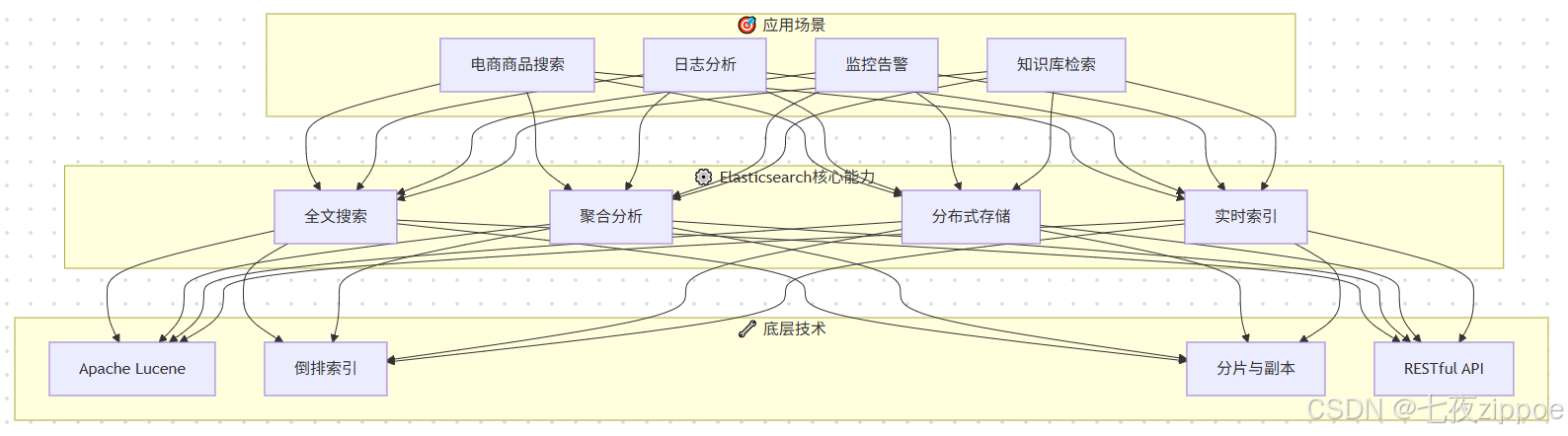
从技术架构角度看,Elasticsearch采用"索引-分片-副本"的三层结构。索引是文档的逻辑容器,类似于关系数据库中的表。分片是索引的物理存储单元,每个分片是一个独立的Lucene实例。副本是分片的复制,提供数据冗余和查询负载均衡。这种架构设计使得Elasticsearch既能保证数据可靠性,又能实现查询性能的水平扩展。
2. 倒排索引原理:搜索引擎的基石
倒排索引(Inverted Index)是Elasticsearch实现高效全文检索的核心数据结构。理解倒排索引的原理,是掌握Elasticsearch搜索机制的关键。
2.1 从正排索引到倒排索引
传统数据库采用正排索引,即"文档ID→内容"的映射方式。当需要搜索包含特定词的文档时,必须遍历所有文档进行匹配,时间复杂度为O(n),在海量数据场景下效率极低。
倒排索引则采用"词条→文档ID列表"的映射方式,将正排索引的关系进行了反转。搜索时只需查找词条对应的文档列表,时间复杂度接近O(1),极大地提升了检索效率。
| 索引类型 | 数据结构 | 搜索方式 | 时间复杂度 | 适用场景 |
|---|---|---|---|---|
| 正排索引 | 文档ID → 内容 | 遍历匹配 | O(n) | 主键查询 |
| 倒排索引 | 词条 → 文档ID列表 | 直接查找 | O(1) | 全文检索 |
2.2 倒排索引的核心组成
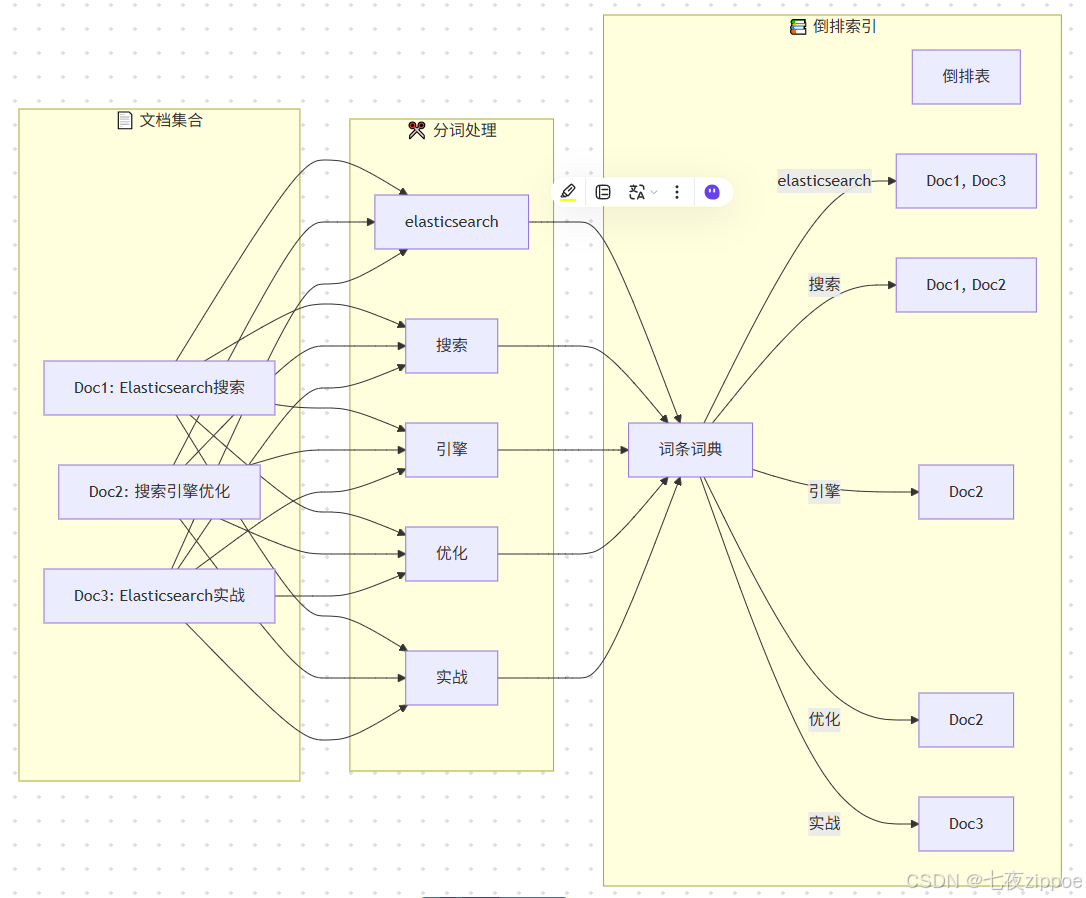
倒排索引由三个核心组件构成:词条词典(Term Dictionary) 、倒排表(Posting List)和词条索引(Term Index)。
词条词典存储所有不重复的词条及其在倒排表中的位置。词条是文本经过分词器处理后得到的最小语义单元。例如,"Elasticsearch搜索引擎"经过分词后可能得到"elasticsearch", "搜索引擎"两个词条。
倒排表记录每个词条出现的文档ID列表,以及词频、位置等统计信息。每个词条对应一个倒排表项,包含文档ID、词频、位置偏移量等元数据。
词条索引 是词条词典的索引,采用FST(Finite State Transducer)数据结构实现,用于快速定位词条在词典中的位置。
2.3 FST:高效的前缀树实现
FST(Finite State Transducer,有限状态传感器)是Lucene对传统前缀树的优化实现,用于存储词条索引。相比传统前缀树,FST具有更高的空间效率和查询效率。
FST的核心思想是将词条词典构建为一个有限状态自动机,共享公共前缀和后缀。通过状态转移实现词条查找,同时支持输出值的计算。这种结构使得词条索引可以常驻内存,大幅减少磁盘IO。
FST的优势体现在三个方面:空间压缩 、快速查找 和前缀匹配。空间压缩通过共享前后缀实现,内存占用可减少50%以上。快速查找通过状态转移实现,时间复杂度为O(m),m为词条长度。前缀匹配支持自动补全等场景,无需额外数据结构。
python
# FST构建示例:模拟词条索引的构建过程
class FSTNode:
    """FST节点类"""
    def __init__(self):
        self.transitions = {}  # 状态转移表
        self.output = 0        # 输出值
        self.is_final = False  # 是否为终止状态

class FST:
    """简化的FST实现"""
    def __init__(self):
        self.root = FSTNode()

    def insert(self, term, doc_ids):
        """
        插入词条及其对应的文档ID列表
        term: 词条字符串
        doc_ids: 文档ID列表
        """
        node = self.root
        for char in term:
            if char not in node.transitions:
                node.transitions[char] = FSTNode()
            node = node.transitions[char]
        node.is_final = True
        node.output = doc_ids  # 存储倒排表指针

    def search(self, term):
        """
        查找词条对应的文档ID列表
        返回: 文档ID列表或None
        """
        node = self.root
        for char in term:
            if char not in node.transitions:
                return None
            node = node.transitions[char]
        return node.output if node.is_final else None

# 构建示例
fst = FST()
fst.insert("elasticsearch", [1, 3])
fst.insert("搜索", [1, 2])
fst.insert("引擎", [2])
fst.insert("优化", [2])
fst.insert("实战", [3])

# 查询示例
result = fst.search("搜索")
print(f"'搜索' 对应的文档ID: {result}")  # 输出: [1, 2]
上述代码展示了FST的基本结构和操作。在实际的Lucene实现中,FST采用了更加复杂的压缩算法和序列化格式,但核心思想是一致的。通过FST,Elasticsearch能够在内存中快速定位词条,然后从磁盘读取对应的倒排表,实现高效的全文检索。
3. 全文搜索基础:核心查询语法
Elasticsearch提供了丰富的查询DSL(Domain Specific Language),支持从简单到复杂的各种搜索场景。掌握核心查询语法,是构建高效搜索系统的基础。
3.1 match查询:全文检索的主力
match查询是Elasticsearch中最常用的全文检索查询类型。它会对查询文本进行分词,然后查找包含任意或所有分词结果的文档。
json
// match查询示例:搜索商品名称
GET /products/_search
{
  "query": {
    "match": {
      "name": {
        "query": "智能手机",
        "operator": "or",        // 匹配任意一个词即可
        "minimum_should_match": "75%",  // 至少匹配75%的词
        "analyzer": "ik_max_word"  // 使用IK分词器
      }
    }
  },
  "highlight": {
    "fields": {
      "name": {}  // 高亮显示匹配部分
    }
  },
  "size": 20
}上述查询展示了match查询的完整语法。query字段指定查询文本,operator控制匹配逻辑(or/and),minimum_should_match设置最小匹配比例,analyzer指定分词器。查询结果会高亮显示匹配部分,便于用户快速定位。
match查询有多个变体:match_phrase 用于短语匹配,要求词序一致;match_phrase_prefix 支持前缀匹配,适用于搜索建议;multi_match支持多字段查询,适用于需要同时搜索多个字段的场景。
3.2 term查询:精确匹配
term查询用于精确匹配,不对查询文本进行分词处理。适用于关键词、ID、状态码等精确值字段的查询。
json
// term查询示例:精确匹配商品分类
GET /products/_search
{
  "query": {
    "bool": {
      "must": [
        {
          "term": {
            "category_id": {
              "value": "electronics"
            }
          }
        },
        {
          "terms": {
            "brand_id": ["apple", "samsung", "huawei"]  // 多值匹配
          }
        }
      ],
      "filter": [
        {
          "range": {
            "price": {
              "gte": 1000,
              "lte": 5000
            }
          }
        }
      ]
    }
  }
}上述查询使用bool查询组合多个条件。must中的条件必须满足,filter中的条件用于过滤但不参与评分。term查询适用于keyword类型字段,对于text类型字段,建议使用match查询。
3.3 bool查询:复杂条件组合
bool查询是Elasticsearch中最强大的查询类型,支持通过逻辑组合构建复杂查询条件。
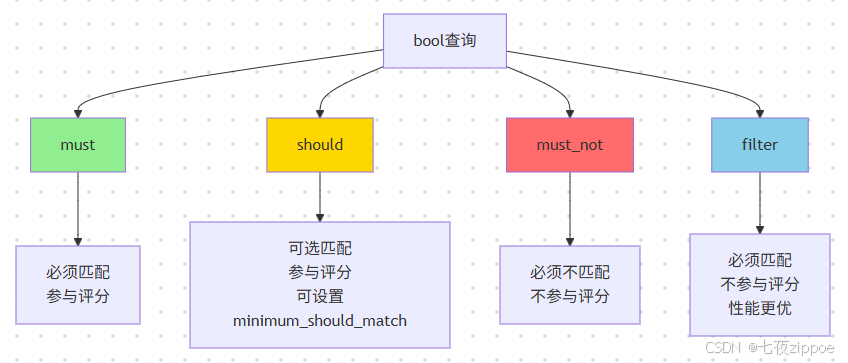
bool查询的四个子句各有特点:must 表示必须匹配,参与评分计算;should 表示可选匹配,参与评分计算,可通过minimum_should_match控制最少匹配数;must_not 表示必须不匹配,不参与评分;filter表示必须匹配,但不参与评分,性能更优。
python
# 使用Python Elasticsearch客户端构建bool查询
from elasticsearch import Elasticsearch
from elasticsearch.helpers import bulk

# 连接Elasticsearch
es = Elasticsearch(
    ["http://localhost:9200"],
    basic_auth=("elastic", "your_password")
)

# 构建复杂的bool查询
def search_products(keyword, category=None, min_price=None,
                    max_price=None, brands=None, page=1, size=20):
    """
    商品搜索函数:支持关键词、分类、价格区间、品牌等多条件组合

    参数说明:
    - keyword: 搜索关键词,使用match查询进行全文检索
    - category: 商品分类,使用term精确匹配
    - min_price, max_price: 价格区间,使用range查询
    - brands: 品牌列表,使用terms多值匹配
    - page, size: 分页参数
    """
    query = {
        "query": {
            "bool": {
                "must": [
                    {
                        "match": {
                            "name": {
                                "query": keyword,
                                "operator": "and",
                                "boost": 2.0  # 提升名称匹配的权重
                            }
                        }
                    },
                    {
                        "match": {
                            "description": keyword  # 同时搜索描述字段
                        }
                    }
                ],
                "should": [
                    {
                        "term": {
                            "is_hot": {
                                "value": True,
                                "boost": 1.5  # 热门商品权重提升
                            }
                        }
                    }
                ],
                "filter": []
            }
        },
        "sort": [
            "_score",  # 按相关性评分排序
            {"sales_count": "desc"},  # 销量降序
            {"created_at": "desc"}  # 创建时间降序
        ],
        "from": (page - 1) * size,
        "size": size,
        "highlight": {
            "fields": {
                "name": {},
                "description": {"fragment_size": 150}
            }
        }
    }

    # 添加过滤条件
    if category:
        query["query"]["bool"]["filter"].append({
            "term": {"category_id": category}
        })

    if min_price is not None or max_price is not None:
        price_range = {}
        if min_price is not None:
            price_range["gte"] = min_price
        if max_price is not None:
            price_range["lte"] = max_price
        query["query"]["bool"]["filter"].append({
            "range": {"price": price_range}
        })

    if brands:
        query["query"]["bool"]["filter"].append({
            "terms": {"brand_id": brands}
        })

    # 执行查询
    response = es.search(index="products", body=query)

    # 处理结果
    results = []
    for hit in response["hits"]["hits"]:
        product = hit["_source"]
        product["_score"] = hit["_score"]
        if "highlight" in hit:
            product["highlight"] = hit["highlight"]
        results.append(product)

    return {
        "total": response["hits"]["total"]["value"],
        "results": results,
        "page": page,
        "size": size
    }

# 调用示例
result = search_products(
    keyword="智能手机",
    category="electronics",
    min_price=1000,
    max_price=5000,
    brands=["apple", "huawei"],
    page=1,
    size=20
)
print(f"找到 {result['total']} 个商品")
上述代码展示了如何使用Python客户端构建复杂的bool查询。查询包含must、should、filter三个子句,实现了关键词搜索、分类过滤、价格区间筛选、品牌过滤等功能。同时支持分页、排序和高亮显示,是一个完整的商品搜索实现。
4. 聚合查询详解:数据分析利器
聚合(Aggregations)是Elasticsearch强大的数据分析功能,支持对数据进行统计、分组、计算等操作。聚合查询可以与搜索查询结合使用,实现"搜索+分析"一体化。
4.1 聚合类型概览
Elasticsearch提供了三大类聚合:指标聚合(Metric Aggregations) 、桶聚合(Bucket Aggregations)和管道聚合(Pipeline Aggregations)。
| 聚合类型 | 功能描述 | 常用聚合 | 典型场景 |
|---|---|---|---|
| 指标聚合 | 计算数值指标 | avg, sum, max, min, stats, cardinality | 统计分析 |
| 桶聚合 | 将文档分组 | terms, range, date_histogram, filter | 分组统计 |
| 管道聚合 | 对其他聚合结果进行计算 | derivative, cumulative_sum, moving_avg | 趋势分析 |
4.2 terms聚合:分组统计
terms聚合是最常用的桶聚合,按照字段的值将文档分组,并返回每个分组的文档数量。
json
// terms聚合示例:统计各品牌商品数量和平均价格
GET /products/_search
{
  "size": 0,  // 不返回文档,只返回聚合结果
  "aggs": {
    "brands": {
      "terms": {
        "field": "brand_id",
        "size": 10,  // 返回前10个品牌
        "order": {
          "avg_price": "desc"  // 按平均价格降序排列
        }
      },
      "aggs": {
        "avg_price": {
          "avg": {
            "field": "price"
          }
        },
        "total_sales": {
          "sum": {
            "field": "sales_count"
          }
        },
        "price_ranges": {
          "range": {
            "field": "price",
            "ranges": [
              {"to": 1000, "key": "低价位"},
              {"from": 1000, "to": 3000, "key": "中价位"},
              {"from": 3000, "key": "高价位"}
            ]
          }
        }
      }
    }
  }
}
上述查询展示了terms聚合的嵌套使用。外层terms聚合按品牌分组,内层嵌套了avg、sum和range三种聚合,分别计算平均价格、总销量和价格区间分布。这种嵌套聚合是Elasticsearch强大的分析能力体现。
4.3 histogram聚合:区间统计
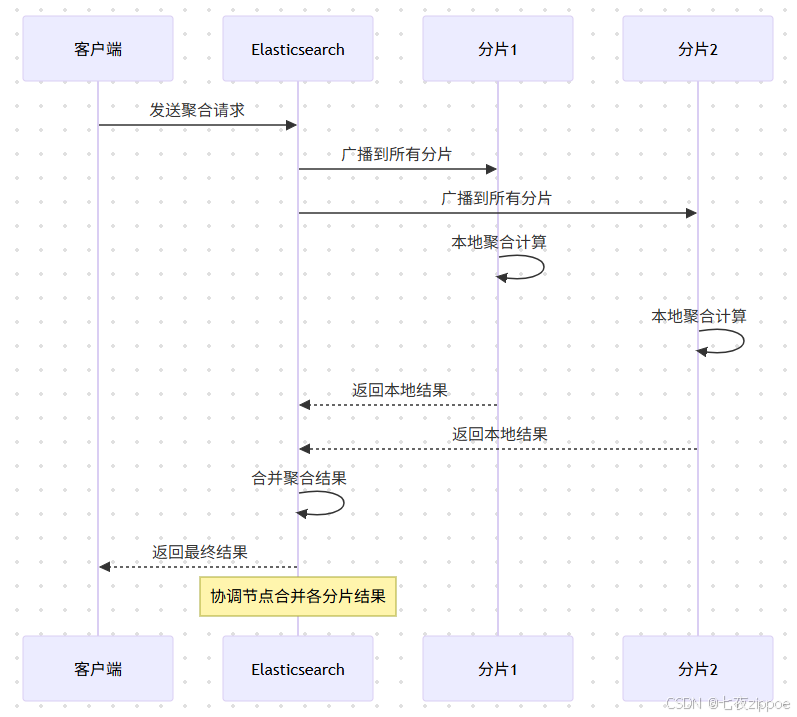
histogram聚合将数值字段按指定间隔分组,适用于价格区间、年龄分布等场景。date_histogram是histogram的时间版本,适用于时间序列数据分析。
python
# 时间序列聚合分析示例
def analyze_sales_trend(index="orders", interval="day",
                        start_date=None, end_date=None):
    """
    分析销售趋势:按时间维度统计订单量和销售额

    参数说明:
    - index: 索引名称
    - interval: 时间间隔(day/week/month)
    - start_date, end_date: 时间范围
    """
    query = {
        "size": 0,
        "query": {
            "range": {
                "created_at": {
                    "gte": start_date,
                    "lte": end_date
                }
            }
        },
        "aggs": {
            "sales_over_time": {
                "date_histogram": {
                    "field": "created_at",
                    "calendar_interval": interval,
                    "format": "yyyy-MM-dd",
                    "min_doc_count": 0  // 返回空桶
                },
                "aggs": {
                    "total_revenue": {
                        "sum": {
                            "field": "total_amount"
                        }
                    },
                    "avg_order_value": {
                        "avg": {
                            "field": "total_amount"
                        }
                    },
                    "revenue_derivative": {
                        "derivative": {
                            "buckets_path": "total_revenue"
                        }
                    },
                    "cumulative_revenue": {
                        "cumulative_sum": {
                            "buckets_path": "total_revenue"
                        }
                    }
                }
            }
        }
    }

    response = es.search(index=index, body=query)

    # 解析结果
    buckets = response["aggregations"]["sales_over_time"]["buckets"]
    trend_data = []
    for bucket in buckets:
        trend_data.append({
            "date": bucket["key_as_string"],
            "order_count": bucket["doc_count"],
            "total_revenue": bucket["total_revenue"]["value"],
            "avg_order_value": bucket["avg_order_value"]["value"],
            "revenue_change": bucket.get("revenue_derivative", {}).get("value"),
            "cumulative_revenue": bucket["cumulative_revenue"]["value"]
        })

    return trend_data

# 调用示例
trend = analyze_sales_trend(
    index="orders",
    interval="day",
    start_date="2024-01-01",
    end_date="2024-01-31"
)
上述代码展示了时间序列聚合的完整实现。使用date_histogram按天分组,嵌套计算总销售额、平均订单金额,并使用derivative管道聚合计算销售额变化率,cumulative_sum计算累计销售额。这种多层次的聚合分析,是构建数据仪表盘的核心能力。
5. 相关性评分机制:精准排序的核心
相关性评分(Relevance Scoring)是搜索引擎的核心能力,决定了搜索结果的排序质量。Elasticsearch通过评分算法计算每个文档与查询的相关性分数,并按分数降序返回结果。
5.1 TF-IDF算法原理
TF-IDF(Term Frequency-Inverse Document Frequency)是Elasticsearch早期版本使用的评分算法,至今仍是理解相关性评分的基础。
**词频(TF)**衡量词条在文档中出现的频率,出现次数越多,相关性越高。计算公式为:TF = √(词频),使用平方根是为了避免词频过高时权重过大。
**逆文档频率(IDF)**衡量词条的区分度,出现越少的词条区分度越高。计算公式为:IDF = 1 + log(总文档数 / 包含该词的文档数)。
字段长度归一化 考虑字段长度的影响,较短字段中出现的词条权重更高。计算公式为:norm = 1 / √(字段长度)。
最终的TF-IDF评分公式为:
score = Σ (TF × IDF × norm)
      = Σ (√词频 × (1 + log(N/df)) × (1/√字段长度))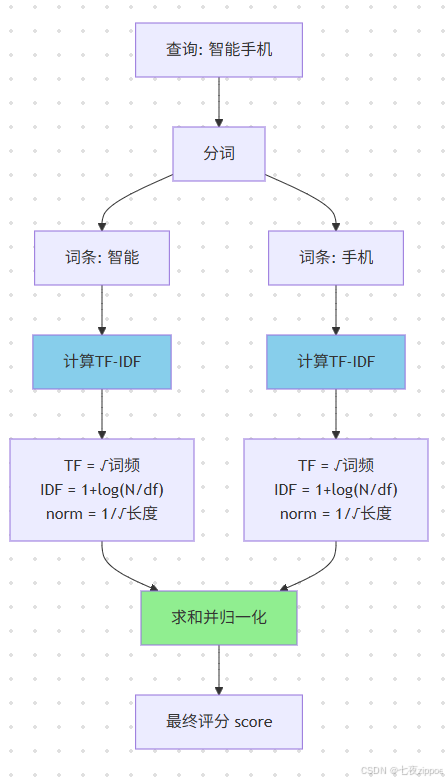
5.2 BM25算法:更先进的评分模型
从Elasticsearch 5.0开始,BM25(Best Matching 25)成为默认的评分算法。BM25是对TF-IDF的改进,解决了TF-IDF的一些缺陷。
BM25的主要改进包括:
饱和度控制 :BM25使用饱和函数控制词频的增长,避免词频过高时权重无限增长。公式为:TF_BM25 = ((k1 + 1) × tf) / (k1 × (1 - b + b × dl/avgdl) + tf),其中k1控制饱和速度,默认值为1.2。
字段长度归一化改进:BM25将字段长度与平均长度比较,而非直接使用字段长度。参数b控制归一化程度,默认值为0.75。
IDF计算调整 :BM25的IDF计算考虑了文档频率的边界情况,公式为:IDF_BM25 = log(1 + (N - df + 0.5) / (df + 0.5))。
| 特性 | TF-IDF | BM25 |
|---|---|---|
| 词频处理 | √tf,无限增长 | 饱和函数,有上限 |
| 长度归一化 | 1/√dl | (1-b+b×dl/avgdl) |
| 可调参数 | 无 | k1, b |
| 长文档处理 | 可能偏低 | 更合理 |
| 适用场景 | 通用 | 长文档更优 |
json
// 查看BM25评分详情
GET /products/_explain/{document_id}
{
  "query": {
    "match": {
      "name": "智能手机"
    }
  }
}

// 自定义BM25参数
PUT /products/_mapping
{
  "properties": {
    "name": {
      "type": "text",
      "similarity": "my_bm25"
    }
  }
}

// 在索引设置中定义自定义BM25
PUT /products/_settings
{
  "index": {
    "similarity": {
      "my_bm25": {
        "type": "BM25",
        "k1": 1.5,    // 增加词频权重
        "b": 0.5      // 降低长度归一化影响
      }
    }
  }
}
5.3 自定义评分策略
在实际业务中,单纯的文本相关性评分往往不能满足需求。电商搜索需要考虑销量、评价、价格等因素;内容搜索需要考虑时效性、热度等因素。Elasticsearch提供了多种自定义评分方式。
function_score查询是最灵活的自定义评分方式,支持多种评分函数:
python
# function_score自定义评分示例
def search_with_custom_score(keyword, page=1, size=20):
    """
    使用function_score实现多因素综合评分

    评分因素:
    1. 文本相关性(BM25)
    2. 销量权重(衰减函数)
    3. 评价分数(field_value_factor)
    4. 时效性(衰减函数)
    5. 是否热门(权重提升)
    """
    query = {
        "query": {
            "function_score": {
                "query": {
                    "multi_match": {
                        "query": keyword,
                        "fields": ["name^2", "description", "tags^1.5"],
                        "type": "best_fields"
                    }
                },
                "functions": [
                    {
                        # 销量权重:使用对数函数平滑处理
                        "field_value_factor": {
                            "field": "sales_count",
                            "factor": 0.1,
                            "modifier": "log1p",
                            "missing": 1
                        }
                    },
                    {
                        # 评价分数:直接使用字段值
                        "field_value_factor": {
                            "field": "rating",
                            "factor": 2,
                            "modifier": "sqrt",
                            "missing": 3
                        }
                    },
                    {
                        # 时效性:发布时间衰减
                        "gauss": {
                            "created_at": {
                                "origin": "now",
                                "scale": "30d",
                                "decay": 0.5
                            }
                        }
                    },
                    {
                        # 热门商品权重提升
                        "filter": {
                            "term": {"is_hot": True}
                        },
                        "weight": 1.5
                    },
                    {
                        # 品牌权重
                        "filter": {
                            "terms": {"brand_id": ["apple", "huawei"]}
                        },
                        "weight": 1.2
                    }
                ],
                "score_mode": "sum",      # 各函数评分求和
                "boost_mode": "multiply", # 与原评分相乘
                "max_boost": 10           # 最大提升倍数
            }
        },
        "from": (page - 1) * size,
        "size": size
    }

    return es.search(index="products", body=query)

# 调用示例
result = search_with_custom_score("智能手机")
for hit in result["hits"]["hits"]:
    print(f"商品: {hit['_source']['name']}, 评分: {hit['_score']:.2f}")
上述代码展示了function_score的完整用法。通过field_value_factor使用字段值影响评分,通过gauss实现时间衰减,通过filter+weight实现条件权重提升。score_mode控制各函数评分的组合方式,boost_mode控制与原评分的组合方式。
script_score允许使用Painless脚本实现更复杂的评分逻辑:
json
// script_score自定义评分
GET /products/_search
{
  "query": {
    "script_score": {
      "query": {
        "match": {"name": "智能手机"}
      },
      "script": {
        "source": """
          // 基础评分
          double score = _score;

          // 销量贡献(对数平滑)
          score += Math.log10(doc['sales_count'].value + 1) * 0.5;

          // 评价贡献
          score += doc['rating'].value * 0.3;

          // 价格因素(价格越低权重越高,但有下限)
          double priceFactor = Math.max(0, 1 - doc['price'].value / 10000);
          score += priceFactor * 0.2;

          // 时效性(7天内发布的商品加权)
          long daysSinceCreated = (new Date().getTime() - doc['created_at'].value) / 86400000;
          if (daysSinceCreated < 7) {
            score += (7 - daysSinceCreated) * 0.1;
          }

          return score;
        """
      }
    }
  }
}
6. 性能优化:构建高性能搜索系统
性能优化是Elasticsearch生产部署的关键环节。从索引设计、查询优化到缓存策略,每个环节都需要精心调优。
6.1 索引设计优化
分片策略是索引设计的核心。分片数量影响并行度和资源消耗,需要根据数据量和查询特点合理规划。
| 数据规模 | 建议分片数 | 单分片大小 | 说明 |
|---|---|---|---|
| < 10GB | 1-2 | 5-10GB | 小规模数据,单分片即可 |
| 10-100GB | 3-5 | 10-30GB | 中等规模,适度分片 |
| 100GB-1TB | 5-20 | 30-50GB | 大规模,需要合理规划 |
| > 1TB | 20+ | 50GB左右 | 超大规模,考虑时序索引 |
字段类型选择 直接影响存储效率和查询性能。keyword类型适用于精确匹配和聚合,text类型适用于全文检索。对于不需要搜索的字段,可以设置"index": false节省存储。
json
// 优化的索引映射设置
PUT /products
{
  "settings": {
    "number_of_shards": 5,
    "number_of_replicas": 1,
    "refresh_interval": "5s",  // 增大刷新间隔提升写入性能
    "index": {
      "max_result_window": 100000,  // 深度分页限制
      "analysis": {
        "analyzer": {
          "ik_smart_analyzer": {
            "type": "custom",
            "tokenizer": "ik_smart"
          }
        }
      }
    }
  },
  "mappings": {
    "properties": {
      "name": {
        "type": "text",
        "analyzer": "ik_max_word",
        "search_analyzer": "ik_smart",
        "fields": {
          "keyword": {
            "type": "keyword",
            "ignore_above": 256
          }
        }
      },
      "description": {
        "type": "text",
        "analyzer": "ik_max_word"
      },
      "price": {
        "type": "scaled_float",
        "scaling_factor": 100
      },
      "sales_count": {
        "type": "integer",
        "doc_values": true
      },
      "category_id": {
        "type": "keyword"
      },
      "brand_id": {
        "type": "keyword"
      },
      "tags": {
        "type": "keyword"
      },
      "is_hot": {
        "type": "boolean"
      },
      "created_at": {
        "type": "date",
        "format": "yyyy-MM-dd HH:mm:ss||epoch_millis"
      },
      "updated_at": {
        "type": "date",
        "format": "yyyy-MM-dd HH:mm:ss||epoch_millis"
      }
    }
  }
}
6.2 查询优化策略
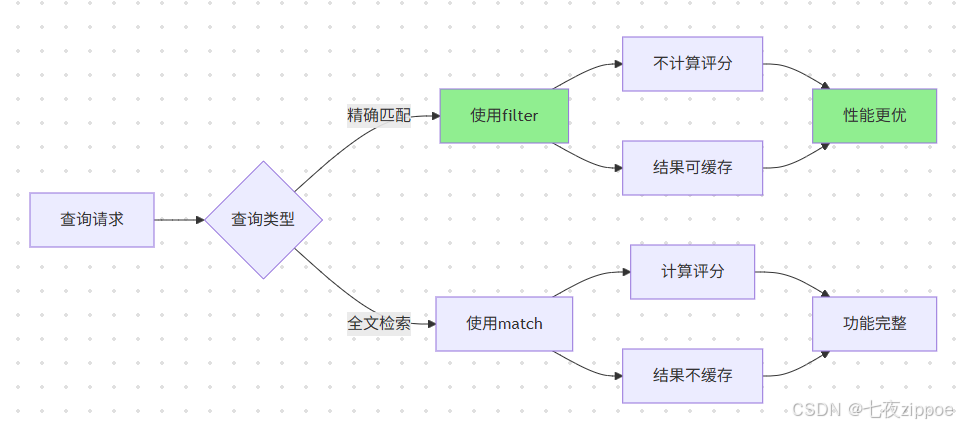
使用filter代替query:filter不计算评分,结果可被缓存,性能更优。对于精确匹配条件,应优先使用filter。
避免深度分页:from+size的分页方式在深度分页时性能急剧下降。推荐使用search_after或scroll API。
批量操作:使用bulk API进行批量写入,减少网络开销。合理设置批量大小,一般建议5-15MB。
python
# 批量写入优化示例
from elasticsearch.helpers import bulk

def bulk_index_products(products, index="products", chunk_size=500):
    """
    批量索引商品数据

    优化策略:
    1. 使用bulk API减少网络请求
    2. 合理设置批量大小
    3. 禁用refresh提升写入速度
    4. 处理失败重试
    """
    actions = []
    for product in products:
        action = {
            "_index": index,
            "_id": product["id"],
            "_source": product
        }
        actions.append(action)

        # 达到批量大小后执行
        if len(actions) >= chunk_size:
            success, failed = bulk(
                es,
                actions,
                chunk_size=chunk_size,
                request_timeout=60
            )
            print(f"成功: {success}, 失败: {len(failed)}")
            actions = []

    # 处理剩余数据
    if actions:
        success, failed = bulk(es, actions)
        print(f"成功: {success}, 失败: {len(failed)}")

# 禁用refresh后批量写入,完成后手动刷新
es.indices.put_settings(
    index="products",
    body={"index": {"refresh_interval": "-1"}}
)
# 执行批量写入...
# 完成后恢复refresh
es.indices.put_settings(
    index="products",
    body={"index": {"refresh_interval": "5s"}}
)
es.indices.refresh(index="products")
6.3 缓存策略
Elasticsearch提供了多层缓存机制:查询缓存(Query Cache) 、请求缓存(Request Cache)和节点查询缓存(Node Query Cache)。
查询缓存缓存查询结果,适用于重复查询场景。请求缓存缓存完整的搜索结果,适用于仪表盘等场景。节点查询缓存缓存倒排表数据,加速filter查询。
json
// 启用请求缓存
GET /products/_search?request_cache=true
{
  "size": 0,
  "aggs": {
    "brands": {
      "terms": {"field": "brand_id"}
    }
  }
}

// 查看缓存统计
GET /products/_stats?request_cache=true

// 清除缓存
POST /products/_cache/clear
7. 实战案例:电商商品搜索系统
7.1 系统架构设计
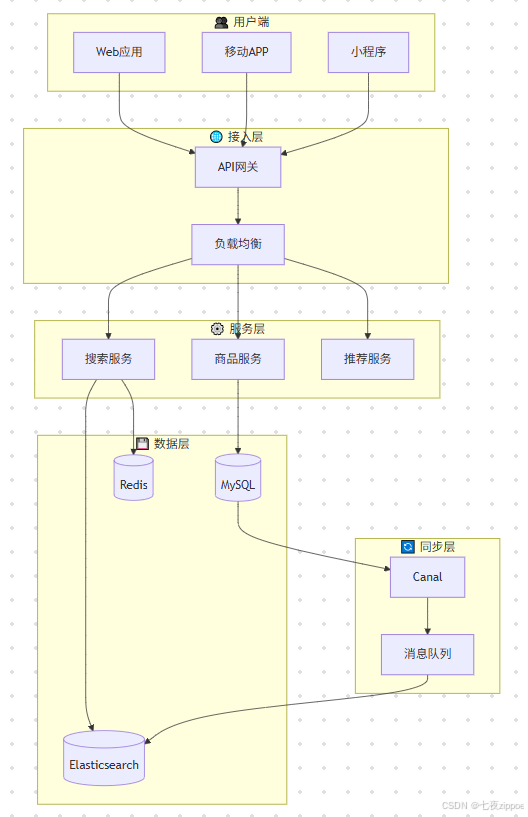
本节以电商商品搜索系统为例,展示Elasticsearch在实际项目中的应用。系统需要支持关键词搜索、分类筛选、价格区间、品牌过滤、排序、分页等功能。
前端通过API网关访问搜索服务,搜索服务调用Elasticsearch进行查询。数据通过Canal监听MySQL binlog,实时同步到Elasticsearch。系统采用主从架构,主节点负责写入,从节点负责查询,实现读写分离。
7.2 核心代码实现
python
# 完整的电商搜索服务实现
from elasticsearch import Elasticsearch
from elasticsearch.helpers import bulk
from dataclasses import dataclass
from typing import List, Optional, Dict, Any
import logging

logging.basicConfig(level=logging.INFO)
logger = logging.getLogger(__name__)

@dataclass
class SearchParams:
    """搜索参数封装"""
    keyword: str
    category_id: Optional[str] = None
    brand_ids: Optional[List[str]] = None
    min_price: Optional[float] = None
    max_price: Optional[float] = None
    tags: Optional[List[str]] = None
    sort_by: str = "relevance"  # relevance/price_asc/price_desc/sales
    page: int = 1
    size: int = 20

class ProductSearchService:
    """商品搜索服务"""

    def __init__(self, es_hosts: List[str], index_name: str = "products"):
        self.es = Elasticsearch(es_hosts)
        self.index_name = index_name

    def search(self, params: SearchParams) -> Dict[str, Any]:
        """
        执行商品搜索

        支持功能:
        - 关键词全文检索(名称、描述、标签)
        - 分类、品牌、价格区间过滤
        - 多种排序方式
        - 分页
        - 高亮显示
        - 聚合统计
        """
        query = self._build_query(params)

        try:
            response = self.es.search(
                index=self.index_name,
                body=query,
                request_cache=True
            )

            return self._parse_response(response, params)
        except Exception as e:
            logger.error(f"搜索失败: {e}")
            raise

    def _build_query(self, params: SearchParams) -> Dict[str, Any]:
        """构建查询DSL"""
        query = {
            "query": {
                "bool": {
                    "must": self._build_must_clauses(params),
                    "should": self._build_should_clauses(params),
                    "filter": self._build_filter_clauses(params)
                }
            },
            "sort": self._build_sort(params),
            "from": (params.page - 1) * params.size,
            "size": params.size,
            "highlight": {
                "fields": {
                    "name": {},
                    "description": {"fragment_size": 150, "number_of_fragments": 3}
                },
                "pre_tags": ["<em>"],
                "post_tags": ["</em>"]
            },
            "aggs": {
                "brands": {
                    "terms": {"field": "brand_id", "size": 20}
                },
                "price_ranges": {
                    "range": {
                        "field": "price",
                        "ranges": [
                            {"to": 100, "key": "0-100"},
                            {"from": 100, "to": 500, "key": "100-500"},
                            {"from": 500, "to": 1000, "key": "500-1000"},
                            {"from": 1000, "key": "1000+"}
                        ]
                    }
                }
            }
        }
        return query

    def _build_must_clauses(self, params: SearchParams) -> List[Dict]:
        """构建must子句"""
        clauses = []
        if params.keyword:
            clauses.append({
                "multi_match": {
                    "query": params.keyword,
                    "fields": ["name^2", "description", "tags^1.5"],
                    "type": "best_fields",
                    "operator": "and"
                }
            })
        return clauses

    def _build_should_clauses(self, params: SearchParams) -> List[Dict]:
        """构建should子句"""
        clauses = [
            {"term": {"is_hot": {"value": True, "boost": 1.3}}},
            {"range": {"sales_count": {"gte": 1000, "boost": 1.2}}}
        ]
        return clauses

    def _build_filter_clauses(self, params: SearchParams) -> List[Dict]:
        """构建filter子句"""
        clauses = []

        if params.category_id:
            clauses.append({"term": {"category_id": params.category_id}})

        if params.brand_ids:
            clauses.append({"terms": {"brand_id": params.brand_ids}})

        if params.min_price is not None or params.max_price is not None:
            price_range = {}
            if params.min_price is not None:
                price_range["gte"] = params.min_price
            if params.max_price is not None:
                price_range["lte"] = params.max_price
            clauses.append({"range": {"price": price_range}})

        if params.tags:
            clauses.append({"terms": {"tags": params.tags}})

        return clauses

    def _build_sort(self, params: SearchParams) -> List[Dict]:
        """构建排序"""
        sort_map = {
            "relevance": ["_score", {"sales_count": "desc"}],
            "price_asc": [{"price": "asc"}, "_score"],
            "price_desc": [{"price": "desc"}, "_score"],
            "sales": [{"sales_count": "desc"}, "_score"],
            "newest": [{"created_at": "desc"}, "_score"]
        }
        return sort_map.get(params.sort_by, sort_map["relevance"])

    def _parse_response(self, response: Dict, params: SearchParams) -> Dict:
        """解析响应结果"""
        hits = response["hits"]
        products = []

        for hit in hits["hits"]:
            product = hit["_source"]
            product["_score"] = hit["_score"]
            if "highlight" in hit:
                product["highlight"] = hit["highlight"]
            products.append(product)

        # 解析聚合结果
        aggregations = {}
        if "aggregations" in response:
            aggs = response["aggregations"]
            aggregations = {
                "brands": [
                    {"key": b["key"], "count": b["doc_count"]}
                    for b in aggs["brands"]["buckets"]
                ],
                "price_ranges": [
                    {"key": r["key"], "count": r["doc_count"]}
                    for r in aggs["price_ranges"]["buckets"]
                ]
            }

        return {
            "total": hits["total"]["value"],
            "products": products,
            "aggregations": aggregations,
            "page": params.page,
            "size": params.size,
            "has_more": hits["total"]["value"] > params.page * params.size
        }

# 使用示例
if __name__ == "__main__":
    service = ProductSearchService(
        es_hosts=["http://localhost:9200"],
        index_name="products"
    )

    # 执行搜索
    params = SearchParams(
        keyword="智能手机",
        category_id="electronics",
        min_price=1000,
        max_price=5000,
        sort_by="sales",
        page=1,
        size=20
    )

    result = service.search(params)
    print(f"找到 {result['total']} 个商品")
    for product in result['products'][:5]:
        print(f"- {product['name']} (¥{product['price']})")
上述代码实现了完整的商品搜索服务。通过SearchParams类封装搜索参数,ProductSearchService类提供搜索功能。支持关键词搜索、多条件过滤、多种排序、分页、高亮和聚合统计。代码结构清晰,易于扩展和维护。
8. 常见问题与解决方案
8.1 深度分页问题
问题描述:使用from+size进行深度分页时,性能急剧下降。Elasticsearch默认限制from+size不超过10000。
解决方案:使用search_after或scroll API。
json
// search_after分页
GET /products/_search
{
  "size": 20,
  "sort": [
    {"created_at": "desc"},
    "_id"
  ],
  "search_after": ["2024-01-15T10:00:00", "abc123"]
}
8.2 数据同步延迟
问题描述:MySQL数据更新后,Elasticsearch中数据存在延迟。
解决方案:使用Canal监听binlog实时同步,或使用消息队列解耦。
8.3 聚合结果不准确
问题描述:terms聚合返回的数量与实际不符。
解决方案 :调整shard_size参数,或使用terms聚合的execution_hint参数。
json
// 调整shard_size提高准确性
GET /products/_search
{
  "size": 0,
  "aggs": {
    "brands": {
      "terms": {
        "field": "brand_id",
        "size": 10,
        "shard_size": 50
      }
    }
  }
}
9. 总结
本文从倒排索引原理、全文搜索基础、聚合查询、相关性评分机制、性能优化等多个维度,全面解析了Elasticsearch的核心技术。通过电商商品搜索系统的实战案例,展示了Elasticsearch在实际项目中的应用方法。
核心要点回顾:
-
倒排索引是Elasticsearch高效检索的基石,理解词条词典、倒排表、FST等核心组件,有助于优化搜索性能。
-
查询语法需要根据场景选择:match用于全文检索,term用于精确匹配,bool用于复杂条件组合。
-
聚合查询提供了强大的数据分析能力,terms、histogram等聚合类型可以满足大多数分析场景。
-
相关性评分是搜索排序的核心,BM25算法相比TF-IDF更加合理,function_score支持多因素综合评分。
-
性能优化需要从索引设计、查询优化、缓存策略等多方面入手,构建高性能搜索系统。
思考题:
-
在你的业务场景中,如何平衡搜索相关性与商业目标(如销量、利润)的权重?
-
面对海量数据(TB级别),如何设计Elasticsearch的索引策略以保证查询性能?
-
如何实现搜索结果的个性化排序,让不同用户看到不同的搜索结果?