引言
随着数据集在规模和复杂度上不断增长,RAG 系统的效果不仅取决于嵌入和向量存储的质量,也取决于检索效率。一个结构良好的向量数据库可以容纳数百万个高维向量,但若想在毫秒级返回相关结果,就必须依赖专门的检索技术。高效检索能够确保即使存储数据量持续增长,查询性能依然保持快速、准确且可扩展。
本章将探讨在向量存储中实现高效检索的实用方法。我们将考察索引策略、降维、近似最近邻(ANN)算法以及混合检索方法如何在几乎不显著牺牲准确率的前提下,大幅提升查询速度。此外,我们还会介绍缓存、内存优化以及冷/热存储分层策略,以在性能与成本效率之间取得平衡。
结构
本章将涵盖以下主题:
- 软件要求
- 近似最近邻索引
- 应用 chunk 大小优化
- 缓存高频查询
- 使用 cross-encoder 进行重排序
- 面向规模化的分布式索引
- 评估并调优检索参数
- 面向紧凑存储的降维
- 按主题分区
- 面向不同内容类型的自适应切分
- 冷存储与热存储分离
学习目标
到本章结束时,读者将能够解释如何从向量存储中实现快速、可扩展且准确的检索策略与技术。本章聚焦于通过索引方法、近似最近邻算法以及结合稠密与稀疏信号的混合方法来优化相似度搜索。读者将学习如何在检索速度、精度和资源效率之间取得平衡,并具备为真实世界中的语义搜索与 RAG 应用设计和实现高性能检索流水线的实用知识。
软件要求
本书中的每个概念后面都会配有相应的 recipe,也就是用 Python 编写的可运行代码。你会在所有 recipe 中看到代码注释,这些注释将逐行解释每一行代码的作用。
运行这些 recipe 需要以下软件环境:
- 系统配置:至少 16.0 GB 内存的系统
- 操作系统:Windows
- Python:Python 3.13.3 或更高版本
- LangChain:1.0.5
- LLM 模型 :Ollama 的
llama3.2:3b - 程序输入文件:程序中使用的输入文件可在本书的 Git 仓库中获取
要运行程序,请执行 Python 命令 pip install <packages name> 安装 recipe 中提到的依赖包。安装完成后,在你的开发环境中运行 recipe 中提到的 Python 脚本(.py 文件)即可。
图 6.1 展示了检索系统:
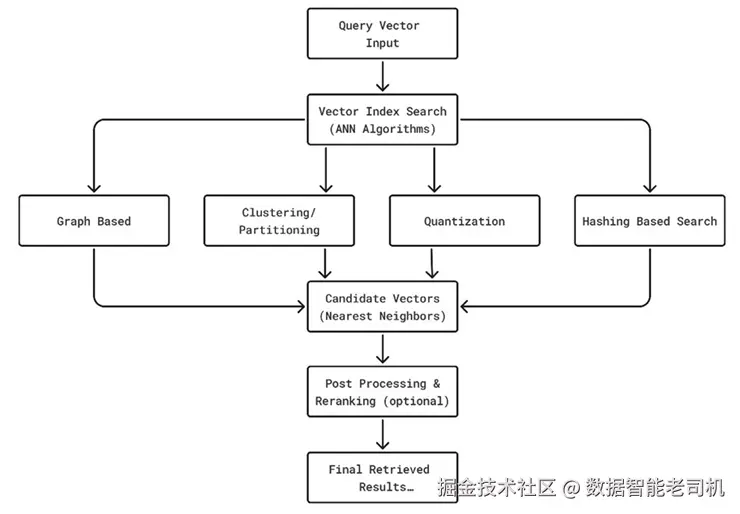
图 6.1:检索
近似最近邻索引
寻找精确的最近邻通常计算代价很高;而 ANN(Approximate Nearest Neighbor,近似最近邻)使用专门的数据结构和算法,来快速逼近最相近的匹配结果。常见的 ANN 技术包括分层可导航小世界图(HNSW)、FAISS 索引以及 Annoy 树。
Recipe 62
本 recipe 演示如何实现 ANN 索引:
为数据库与查询生成随机向量。这模拟了一个场景:我们拥有一个向量数据库,并希望对其进行查询。
为了简单起见,创建一个使用 flat index 的 FAISS 索引,它适用于小规模数据集。
将向量添加到索引中。这一步会把数据库中的向量建立索引。
执行搜索。
安装所需依赖:
pip install faiss-cpuann_indexing_withfaiss.py
请参考以下代码:
ini
# ann_indexing_withfaiss.py
import numpy as np
import faiss  # pip install faiss-cpu

# 1. Generate random vectors for database and queries
# This simulates a scenario where we have a database of vectors
# and we want to query them
d = 64         # dimension of vectors
nb = 1000      # database size
nq = 5         # number of queries
np.random.seed(42)
xb = np.random.random((nb, d)).astype('float32')
xq = np.random.random((nq, d)).astype('float32')

# 2. Create a FAISS index
# Using a flat index for simplicity, which is suitable for
# small datasets
index = faiss.IndexFlatL2(d)
print("Is trained:", index.is_trained)

# 3. Add vectors to the index
# This step indexes the vectors in the database
index.add(xb)
print("Total vectors indexed:", index.ntotal)

# 4. Perform a search
k = 5  # number of nearest neighbors
distances, indices = index.search(xq, k)

# 5. Print the results
# This will show the indices of the nearest neighbors and their
# distances for each query vector
print("Query Results (indices):")
print(indices)
print("Query Results (distances):")
print(distances)
打印结果。程序会展示每个查询向量对应的最近邻索引及其距离。
输出:
ini
Is trained: True
Total vectors indexed: 1000
Query Results (indices):
[[502 606 234  85 162]
 [650 699 444 636 408]
 [432 629 451 148 601]
 [515  38 733 629 612]
 [303 919  33 769 307]]
Query Results (distances):
[[6.099058  6.650052  6.803897  6.9097624 6.9527254]
 [6.225289  6.4456444 6.5882893 6.5965033 6.91004  ]
 [6.649529  7.715449  7.8666945 7.918375  7.98004  ]
 [6.9578114 6.9743586 7.126389  7.2978797 7.492543 ]
 [5.6874714 6.157484  6.350458  6.787052  6.847723 ]]
应用 chunk 大小优化
在 RAG 中,大型文档会先被切分为较小的片段(chunk),再进行嵌入并存入向量数据库。chunk 大小优化就是为这些片段选择合适长度的过程。若 chunk 太小,检索返回的可能只是缺乏上下文的碎片;若 chunk 太大,嵌入会变得不够精确,检索速度下降,同时还可能带入无关信息。
理想的 chunk 大小需要在上下文完整性 与检索准确率之间取得平衡,通常会落在 300--800 token 之间,具体取决于使用场景以及模型的上下文窗口大小。像滑动窗口或语义切分这样的技术,还可以通过在边界处保留语义连续性,进一步优化 chunking。
Recipe 63
本 recipe 演示如何实现 chunk 大小优化:
加载你的文本文档。请确保与脚本位于同一目录下有一个名为 RAG.txt 的文本文件。
使用 HuggingFace 模型初始化嵌入模型。
测试不同的 chunk 大小。这将帮助我们找到最适合当前场景的 chunk 大小。
遍历不同 chunk 大小,观察它们对检索的影响。
使用 RecursiveCharacterTextSplitter 将文档切分为 chunk,以处理不同大小设置。
基于这些 chunk 创建一个 FAISS 向量存储,从而为相似度搜索建立索引。
执行相似度搜索。它将返回与给定查询最相似的 top-k chunk。
安装所需依赖:
pip install langchain langchain-community faiss-cpu sentence-transformerschunk_size_optimization.py
请参考以下代码:
python
# chunk_size_optimization.py
from langchain.text_splitter import RecursiveCharacterTextSplitter
from langchain_community.vectorstores import FAISS
from langchain_huggingface import HuggingFaceEmbeddings
from langchain_community.document_loaders import TextLoader
import warnings

warnings.filterwarnings("ignore", category=FutureWarning, module="torch")

# 1. Load your text document
# Ensure you have a text file named "RAG.txt" in the same directory
loader = TextLoader("RAG.txt")
documents = loader.load()

# 2. Initialize the embedding model
# Using a HuggingFace model for embeddings
embedding_model = HuggingFaceEmbeddings(model_name="sentence-transformers/all-MiniLM-L6-v2")

# 3. Test different chunk sizes
# This will help us find the optimal chunk size for our use case
chunk_sizes = [200, 500, 1000]

# 4. Loop through different chunk sizes to see their impact on
# retrieval
for size in chunk_sizes:
    print(f"\nTesting with chunk size = {size}")

    # 4a. Split the documents into chunks
    # Using RecursiveCharacterTextSplitter to handle different chunk sizes
    splitter = RecursiveCharacterTextSplitter(
        chunk_size=size,
        chunk_overlap=50  # keep some overlap for context
    )
    chunks = splitter.split_documents(documents)
    print(f"Total Chunks Created: {len(chunks)}")

    # 4b. Create a FAISS vector store with the chunks
    # This will index the chunks for similarity search
    vectorstore = FAISS.from_documents(chunks, embedding_model)

    # 4c. Perform a similarity search
    # This will retrieve the top-k chunks similar to a given query
    query = "What is RAG?"
    results = vectorstore.similarity_search(query, k=3)

    print("Top Results:")
    # 5. Print the top results for the query
    for i, r in enumerate(results, 1):
        print(f"{i}. {r.page_content[:150]}...")
打印查询的 top 结果。
输入:
RAG.txt 是本程序所使用的输入文件,其内容如下:
sql
Retrieval Augmented Generation (RAG) is an architecture that combines the ability of large language models (LLMs) with a retrieval system to enhance the factual accuracy, contextual relevance, and quality of generated response against the query raised by user to a RAG system.
Traditional generative models rely solely on internal parameters for producing responses, which limits their ability to provide up-to-date or domain-specific knowledge. RAG mitigates this by augmenting the generation process with real-time retrieval from external knowledge sources.
Traditional generative models laid the foundation for today's LLMs. They helped us understand how to model processes represent knowledge, user input and generate data. However, they are now mostly replaced or augmented by deep learning-based transformer models, which offer greater accuracy, coherence, and scalability.
输出:
vbnet
Testing with chunk size = 200
Total Chunks Created: 6
Top Results:
1. Retrieval Augmented Generation (RAG) is an architecture that combines the ability of large language models (LLMs) with a retrieval system to enhance t...
2. the factual accuracy, contextual relevance, and quality of generated response against the query raised by user to a RAG system....
3. Traditional generative models rely solely on internal parameters for producing responses, which limits their ability to provide up-to-date or domain-s...

Testing with chunk size = 500
Total Chunks Created: 3
Top Results:
1. Retrieval Augmented Generation (RAG) is an architecture that combines the ability of large language models (LLMs) with a retrieval system to enhance t...
2. Traditional generative models rely solely on internal parameters for producing responses, which limits their ability to provide up-to-date or domain-s...
3. Traditional generative models laid the foundation for today's LLMs. They helped us understand how to model processes represent knowledge, user input...

Testing with chunk size = 1000
Total Chunks Created: 1
Top Results:
1. Retrieval Augmented Generation (RAG) is an architecture that combines the ability of large language models (LLMs) with a retrieval system to enhance t...
缓存高频查询
在 RAG 系统中,很多检索请求都是重复出现的,例如常见的客户问题或反复进行的知识查询。为了避免重复计算,系统可以把高频查询及其对应的嵌入与检索结果缓存起来。
通过直接从缓存返回答案,可以获得以下好处:
- 降低延迟:无需重新生成嵌入或执行向量搜索;
- 降低计算成本:跳过昂贵的检索操作;
- 改善用户体验:对重复查询几乎可以即时响应。
缓存可以定期刷新或失效,以确保结果始终与最新知识库保持一致。
Recipe 64
本 recipe 演示如何对高频查询进行缓存:
加载你的文本文档。请确保与脚本位于同一目录下有一个名为 chapter6_sample_doc.txt 的文本文件。
使用 HuggingFace 模型初始化嵌入模型。
使用 RecursiveCharacterTextSplitter 将文档切分为多个 chunk,以便处理不同 chunk 大小。
基于这些 chunk 创建一个 FAISS 向量存储,从而为相似度搜索建立索引。
为高频查询实现缓存。这里使用一个简单的字典来缓存结果。
定义一个带缓存的搜索函数。
先检查查询是否已存在于缓存中。
如果不在缓存中,则执行搜索。这会返回与给定查询最相似的 top-k chunk。
将结果存入缓存。
使用若干查询测试缓存机制。你可以将这些查询替换为任何与你的文档相关的内容。
安装所需依赖:
pip install langchain langchain-community faiss-cpu sentence-transformerscache_frequent_queries.py
请参考以下代码:
ini
# cache_frequent_queries.py
from langchain_text_splitters import RecursiveCharacterTextSplitter
from langchain_community.vectorstores import FAISS
from langchain_huggingface import HuggingFaceEmbeddings
from langchain_community.document_loaders import TextLoader
import warnings

warnings.filterwarnings("ignore", category=FutureWarning, module="torch")

# 1. Load your text document
# Ensure you have a text file named "chapter6_sample_doc.txt" in the
# same directory
loader = TextLoader("chapter6_sample_doc.txt")
documents = loader.load()

# 2. Initialize the embedding model
# Using a HuggingFace model for embeddings
embedding_model = HuggingFaceEmbeddings(model_name="sentence-transformers/all-MiniLM-L6-v2")

# 3. Split the documents into chunks
# Using RecursiveCharacterTextSplitter to handle different chunk sizes
splitter = RecursiveCharacterTextSplitter(chunk_size=500, chunk_overlap=50)
chunks = splitter.split_documents(documents)

# 4. Create a FAISS vector store with the chunks
# This will index the chunks for similarity search
vectorstore = FAISS.from_documents(chunks, embedding_model)

# 5. Implement caching for frequent queries
# Using a simple dictionary to cache results
query_cache = {}   # dictionary to store {query: results}

# 6. Function to perform search with caching
def search_with_cache(query, k=3):
    # 6a. Check if the query is in cache
    if query in query_cache:
        print(f"Cache Hit: Returning cached results for '{query}'")
        return query_cache[query]

    # 6b. If not in cache, perform the search
    # This will retrieve the top-k chunks similar to the given query
    print(f"Cache Miss: Running similarity search for '{query}'")
    results = vectorstore.similarity_search(query, k=k)

    # 6c. Store the results in the cache
    query_cache[query] = results
    return results

# 7. Test the caching mechanism with some queries
# You can replace these queries with any relevant to your document
queries = [
    "What is machine learning?",
    "What is AI?",
    "What is machine learning?",   # repeated
    "Applications of machine learning",
    "What is AI?"                  # repeated
]

# 8. Loop through the queries and print the results
for q in queries:
    results = search_with_cache(q)
    print(f"Top Result: {results[0].page_content[:100]}...\n")
遍历这些查询并打印结果。
输入:
chapter6_sample_doc.txt 是本程序所使用的输入文件,其内容如下:
vbnet
Artificial Intelligence (AI) is the simulation of human intelligence processes by machines,
especially computer systems. These processes include learning, reasoning, and self-correction.
Applications of AI include expert systems, speech recognition, and computer vision.

Machine Learning (ML) is a subset of AI that focuses on the development of algorithms that
allow computers to learn from and make predictions based on data. ML algorithms improve
automatically through experience. It is widely used in spam detection, recommendation engines,
and predictive analytics.

Deep Learning is a specialized branch of machine learning that uses neural networks with many
layers (deep architectures). It is especially powerful for tasks like image recognition,
natural language processing, and speech recognition.

Natural Language Processing (NLP) is the ability of a machine to understand, interpret, and
generate human language. Common applications include chatbots, machine translation, and
sentiment analysis.

Applications of Machine Learning and AI are diverse:
- Healthcare: AI helps in disease detection, drug discovery, and personalized medicine.
- Finance: Fraud detection, risk assessment, and automated trading.
- Retail: Personalized recommendations, inventory management, and customer support chatbots.
- Autonomous Vehicles: Self-driving cars rely on AI for navigation, object detection, and decision-making.
输出:
sql
Cache Miss: Running similarity search for 'What is machine learning?'
Top Result: Machine Learning (ML) is a subset of AI that focuses on the development of algorithms that allow co...

Cache Miss: Running similarity search for 'What is AI?'
Top Result: Artificial Intelligence (AI) is the simulation of human intelligence processes by machines, especia...

Cache Hit: Returning cached results for 'What is machine learning?'
Top Result: Machine Learning (ML) is a subset of AI that focuses on the development of algorithms that allow co...

Cache Miss: Running similarity search for 'Applications of machine learning'
Top Result: Applications of Machine Learning and AI are diverse:
- Healthcare: AI helps in disease detection, d...

Cache Hit: Returning cached results for 'What is AI?'
Top Result: Artificial Intelligence (AI) is the simulation of human intelligence processes by machines, especia...
使用 cross-encoder 进行重排序
从向量存储中进行初步检索时,返回结果往往会混杂"高度相关"与"仅略有关联"的 chunk。为了进一步提高精度,可以使用 cross-encoder 进行重排序。与分别独立生成嵌入的 bi-encoder 不同,cross-encoder 会把查询和候选段落一起作为输入,并直接计算一个相关性分数。
由于它能建模查询与文本之间的完整交互,因此 cross-encoder 在排序结果时通常能获得更高准确率。不过,它的计算开销也更大,所以一般只会应用在初步检索出的 top-k 候选上,而不会对整个语料库执行。
这个额外步骤可以确保 LLM 接收到最符合上下文的信息,减少噪声,并提升 RAG 流水线中最终回答的整体质量。
Recipe 65
本 recipe 演示如何实现基于 cross-encoder 的重排序:
加载你的文本文档。请确保与脚本位于同一目录下有一个名为 chapter6_sample_doc.txt 的文本文件。
使用 HuggingFace 模型初始化嵌入模型。
使用 RecursiveCharacterTextSplitter 将文档切分为多个 chunk,以便处理不同 chunk 大小。
基于这些 chunk 创建一个 FAISS 向量存储,从而为相似度搜索建立索引。
执行一次相似度搜索,返回与给定查询最相似的 top-k chunk。
使用 cross-encoder 进行重排序,并初始化对应模型。
为 cross-encoder 准备输入对,即为重排序创建 (query, document) 这样的配对。
利用 cross-encoder 为每个文档打分,以反映其与查询的相关性。
将初始检索结果与得分结合起来。
根据分数对结果重新排序,并按降序排列。
安装所需依赖:
pip install langchain langchain-community faiss-cpu sentence-transformersreranking_with_crossencoders.py
请参考以下代码:
ini
# reranking_with_crossencoders.py
from langchain_community.vectorstores import FAISS
from langchain_huggingface import HuggingFaceEmbeddings
from langchain_text_splitters import RecursiveCharacterTextSplitter
from langchain_community.document_loaders import TextLoader
from sentence_transformers import CrossEncoder
import warnings

warnings.filterwarnings("ignore", category=FutureWarning, module="torch")

# 1. Load your text document
# Ensure you have a text file named "chapter6_sample_doc.txt" in
# the same directory
loader = TextLoader("chapter6_sample_doc.txt")
documents = loader.load()

# 2. Initialize the embedding model
# Using a HuggingFace model for embeddings
embedding_model = HuggingFaceEmbeddings(model_name="sentence-transformers/all-MiniLM-L6-v2")

# 3. Split the documents into chunks
# Using RecursiveCharacterTextSplitter to handle different
# chunk sizes
splitter = RecursiveCharacterTextSplitter(chunk_size=500, chunk_overlap=50)
chunks = splitter.split_documents(documents)

# 4. Create a FAISS vector store with the chunks
# This will index the chunks for similarity search
vectorstore = FAISS.from_documents(chunks, embedding_model)

# 5. Perform a similarity search
# This will retrieve the top-k chunks similar to a given query
query = "What are the applications of machine learning?"
initial_results = vectorstore.similarity_search(query, k=5)

# 6. Print initial results
# These are the results before re-ranking
print("\nInitial FAISS Results:")
for r in initial_results:
    print("-", r.page_content[:100], "...")

# 7. Re-Rank using Cross-Encoder
# Initialize the Cross-Encoder model
cross_encoder = CrossEncoder("cross-encoder/ms-marco-MiniLM-L-6-v2")

# 8. Prepare pairs for Cross-Encoder
# Create pairs of (query, document) for re-ranking
pairs = [(query, r.page_content) for r in initial_results]

# 9. Get scores from Cross-Encoder
# This will score each document based on its relevance to the query
scores = cross_encoder.predict(pairs)

# 10. Combine results with scores
# Zip the initial results with their corresponding scores
scored_results = list(zip(initial_results, scores))

# 11. Re-Rank the results based on scores
# Sort the results by score in descending order
reranked = sorted(scored_results, key=lambda x: x[1], reverse=True)

# 12. Print the re-ranked results
# Display the top results after re-ranking
print("\nRe-Ranked Results (Cross-Encoder):")
for doc, score in reranked:
    print(f"Score: {score:.4f} | {doc.page_content[:100]}...")
打印初始结果,即重排序前的结果。
打印重排序后的结果,即展示 cross-encoder 重排后的 top 结果。
输入:
chapter6_sample_doc.txt 是本程序所使用的输入文件,其内容如下:
vbnet
Artificial Intelligence (AI) is the simulation of human intelligence processes by machines,
especially computer systems. These processes include learning, reasoning, and self-correction.
Applications of AI include expert systems, speech recognition, and computer vision.

Machine Learning (ML) is a subset of AI that focuses on the development of algorithms that
allow computers to learn from and make predictions based on data. ML algorithms improve
automatically through experience. It is widely used in spam detection, recommendation engines,
and predictive analytics.

Deep Learning is a specialized branch of machine learning that uses neural networks with many
layers (deep architectures). It is especially powerful for tasks like image recognition,
natural language processing, and speech recognition.

Natural Language Processing (NLP) is the ability of a machine to understand, interpret, and
generate human language. Common applications include chatbots, machine translation, and
sentiment analysis.

Applications of Machine Learning and AI are diverse:
- Healthcare: AI helps in disease detection, drug discovery, and personalized medicine.
- Finance: Fraud detection, risk assessment, and automated trading.
- Retail: Personalized recommendations, inventory management, and customer support chatbots.
- Autonomous Vehicles: Self-driving cars rely on AI for navigation, object detection, and decision-making.
输出:
vbnet
Initial FAISS Results:
- Applications of Machine Learning and AI are diverse:
- Healthcare: AI helps in disease detection, d ...
- Machine Learning (ML) is a subset of AI that focuses on the development of algorithms that allow co ...
- Artificial Intelligence (AI) is the simulation of human intelligence processes by machines, especia ...
- Deep Learning is a specialized branch of machine learning that uses neural networks with many layer ...

Re-Ranked Results (Cross-Encoder):
Score: 9.0629 | Applications of Machine Learning and AI are diverse:
- Healthcare: AI helps in disease detection, d...
Score: 7.0553 | Machine Learning (ML) is a subset of AI that focuses on the development of algorithms that allow co...
Score: 6.0113 | Deep Learning is a specialized branch of machine learning that uses neural networks with many layer...
Score: 1.7071 | Artificial Intelligence (AI) is the simulation of human intelligence processes by machines, especia...
面向规模化的分布式索引
当数据规模增长到数百万甚至数十亿个向量时,单机往往已经无法高效承担存储或检索任务。**分布式索引(distributed indexing)**通过将向量索引切分并分布到多个节点或服务器上来解决这一问题。每个节点存储并搜索其中一部分数据,最后再将结果汇总为最终检索输出。
这种方法支持横向扩展 、容错以及在大规模 RAG 系统中更快地处理查询。
Recipe 66
本 recipe 演示如何实现面向规模化的分布式索引:
使用 HuggingFaceEmbeddings 初始化嵌入模型,将文本转换为向量嵌入。
使用 RecursiveCharacterTextSplitter 将文档切分为多个 chunk,以便处理不同 chunk 大小。
为每份文档分别创建一个 FAISS 向量存储。每个 worker / 节点都会构建自己的 FAISS 索引。
将多个向量存储合并为一个分布式索引。这模拟了一个分布式建索引的场景。
在该分布式索引上执行相似度搜索。它将返回与给定查询最相似的 top-k chunk。
安装所需依赖:
pip install langchain langchain-community faiss-cpu sentence-transformersdistributed_indexing.py
请参考以下代码:
ini
# distributed_indexing.py
import os
from langchain_community.vectorstores import FAISS
from langchain_huggingface import HuggingFaceEmbeddings
from langchain.text_splitter import RecursiveCharacterTextSplitter
from langchain_community.document_loaders import TextLoader
import warnings

warnings.filterwarnings("ignore", category=FutureWarning, module="torch")

# 1. Initialize the embedding model
# Using HuggingFaceEmbeddings to convert text into vector embeddings
embedding_model = HuggingFaceEmbeddings(model_name="sentence-transformers/all-MiniLM-L6-v2")

# 2. Split documents into chunks
# Using RecursiveCharacterTextSplitter to handle different chunk sizes
data_files = ["chapter6_data_part1.txt", "chapter6_data_part2.txt", "chapter6_data_part3.txt"]
vectorstores = []

# 3. Create a FAISS vector store for each document
# Each worker/node will build its own FAISS index
for file in data_files:
    loader = TextLoader(file)  # Load each document
    docs = loader.load()
    splitter = RecursiveCharacterTextSplitter(chunk_size=500, chunk_overlap=50)
    chunks = splitter.split_documents(docs)  # Split the documents into chunks

    # Create a FAISS vector store with the chunks
    # This will index the chunks for similarity search
    vs = FAISS.from_documents(chunks, embedding_model)
    vectorstores.append(vs)

# 4. Merge the vector stores into a distributed index
# This simulates a distributed indexing scenario
main_index = vectorstores[0]
for vs in vectorstores[1:]:
    main_index.merge_from(vs)

# 5. Perform a similarity search on the distributed index
# This will retrieve the top-k chunks similar to a given query
query = "Explain the applications of Artificial Intelligence."
results = main_index.similarity_search(query, k=3)

# 6. Print the results from the distributed index
# Display the top results from the distributed index
print("\nTop Results from Distributed Index:")
for r in results:
    print("-", r.page_content[:100], "...")
打印分布式索引中的结果,即展示 top 返回结果。
输入:
以下三个输入文件及其内容将被本程序使用:
chapter6_data_part1.txt
vbnet
Artificial Intelligence (AI) is the ability of machines to simulate human intelligence.
It includes processes such as learning, reasoning, and problem-solving.
The primary goal of AI is to create systems that can perform tasks that normally
require human intelligence, such as visual perception, speech recognition,
decision-making, and language translation.
chapter6_data_part2.txt
vbnet
Machine Learning (ML) is a subset of Artificial Intelligence that enables
systems to automatically learn and improve from experience without being explicitly programmed.
It relies on algorithms and statistical models to analyze data and make predictions.
Deep Learning is a specialized branch of ML that uses artificial neural networks
with multiple layers. Deep Learning excels in image recognition, speech processing,
and natural language understanding.
chapter6_data_part3.txt
erlang
AI and Machine Learning have transformed multiple industries.
In healthcare, AI assists in disease diagnosis and personalized treatment.
In finance, AI is used for fraud detection, automated trading, and credit scoring.
In retail, AI powers recommendation engines and chatbots for customer support.
Autonomous vehicles rely on AI for navigation, object detection, and decision-making.
Natural Language Processing (NLP) enables applications like machine translation
and sentiment analysis.
输出:
vbnet
Top Results from Distributed Index:
- Artificial Intelligence (AI) is the ability of machines to simulate human intelligence. It includes ...
- AI and Machine Learning have transformed multiple industries. In healthcare, AI assists in disease  ...
- Machine Learning (ML) is a subset of Artificial Intelligence that enables systems to automatically  ...
评估并调优检索参数
高效检索不仅依赖索引本身,也取决于控制检索过程的参数。诸如返回结果数量(top-k)、相似度阈值、距离度量方式,以及重排序策略等因素,都会显著影响准确率与速度。
Recipe 67
本 recipe 演示如何编写程序来评估并调优检索参数:
加载文档。
初始化嵌入模型。
使用指定的 chunk 大小与 overlap 构建向量存储。这个函数将用于创建待评估的向量存储。
定义评估查询。这些查询会被用于评估检索性能。
评估向量存储。该函数会基于向量存储和预定义查询运行评估。
调优参数并执行评估。遍历不同的 chunk 大小、overlap 和 top_k 值,以找到最佳配置。
安装所需依赖:
pip install langchain langchain-community faiss-cpu sentence-transformersevaluate_tune_retrieval.py
请参考以下代码:
ini
# evaluate_tune_retrieval.py
from langchain_community.vectorstores import FAISS
from langchain_huggingface import HuggingFaceEmbeddings
from langchain_text_splitters import RecursiveCharacterTextSplitter
from langchain_community.document_loaders import TextLoader
import warnings

warnings.filterwarnings("ignore", category=FutureWarning, module="torch")

# 1. Load the document
loader = TextLoader("chapter6_sample_doc.txt")
docs = loader.load()

# 2. Initialize the embedding model
embedding_model = HuggingFaceEmbeddings(model_name="sentence-transformers/all-MiniLM-L6-v2")

# 3. Build the vector store with specified chunk size and overlap
# This function will be used to create the vector store for
# evaluation
def build_vectorstore(chunk_size=300, overlap=50):
    splitter = RecursiveCharacterTextSplitter(chunk_size=chunk_size, chunk_overlap=overlap)
    chunks = splitter.split_documents(docs)
    return FAISS.from_documents(chunks, embedding_model)

# 4. Define evaluation queries
# These queries will be used to evaluate the retrieval performance
eval_queries = {
    "What is Artificial Intelligence?": "AI is the ability of machines to simulate human intelligence.",
    "Explain Deep Learning.": "Deep Learning uses neural networks with multiple layers.",
    "Applications of AI in healthcare.": "AI assists in disease diagnosis and personalized treatment."
}

# 5. Evaluate the vector store
def evaluate(vectorstore, top_k=3):
    correct = 0
    total = len(eval_queries)
    for query, expected in eval_queries.items():
        results = vectorstore.similarity_search(query, k=top_k)
        retrieved_texts = " ".join([r.page_content for r in results])
        if expected.lower().split()[0] in retrieved_texts.lower():  # simple keyword match
            correct += 1
    return correct / total  # accuracy score

# 6. Tune parameters and evaluate
chunk_sizes = [200, 300, 500]
overlaps = [20, 50, 100]
top_ks = [2, 3, 5]

best_score = 0
best_params = None

for cs in chunk_sizes:
    for ov in overlaps:
        vs = build_vectorstore(chunk_size=cs, overlap=ov)
        for k in top_ks:
            score = evaluate(vs, top_k=k)
            print(f"Chunk={cs}, Overlap={ov}, top_k={k} → Accuracy={score:.2f}")
            if score > best_score:
                best_score = score
                best_params = (cs, ov, k)

# 7. Output the best parameters found
print("\nBest Parameters Found:")
print(f"Chunk Size={best_params[0]}, Overlap={best_params[1]}, top_k={best_params[2]} with Accuracy={best_score:.2f}")
输出找到的最佳参数。
输入:
chapter6_sample_doc.txt 是本程序所使用的输入文件,其内容如下:
vbnet
Artificial Intelligence (AI) is the simulation of human intelligence processes by machines,
especially computer systems. These processes include learning, reasoning, and self-correction.
Applications of AI include expert systems, speech recognition, and computer vision.

Machine Learning (ML) is a subset of AI that focuses on the development of algorithms that
allow computers to learn from and make predictions based on data. ML algorithms improve
automatically through experience. It is widely used in spam detection, recommendation engines,
and predictive analytics.

Deep Learning is a specialized branch of machine learning that uses neural networks with many
layers (deep architectures). It is especially powerful for tasks like image recognition,
natural language processing, and speech recognition.

Natural Language Processing (NLP) is the ability of a machine to understand, interpret, and
generate human language. Common applications include chatbots, machine translation, and
sentiment analysis.

Applications of Machine Learning and AI are diverse:
- Healthcare: AI helps in disease detection, drug discovery, and personalized medicine.
- Finance: Fraud detection, risk assessment, and automated trading.
- Retail: Personalized recommendations, inventory management, and customer support chatbots.
- Autonomous Vehicles: Self-driving cars rely on AI for navigation, object detection, and decision-making.
输出:
ini
Chunk=200, Overlap=20, top_k=2 → Accuracy=1.00
Chunk=200, Overlap=20, top_k=3 → Accuracy=1.00
Chunk=200, Overlap=20, top_k=5 → Accuracy=1.00
Chunk=200, Overlap=50, top_k=2 → Accuracy=1.00
Chunk=200, Overlap=50, top_k=3 → Accuracy=1.00
Chunk=200, Overlap=50, top_k=5 → Accuracy=1.00
Chunk=200, Overlap=100, top_k=2 → Accuracy=1.00
Chunk=200, Overlap=100, top_k=3 → Accuracy=1.00
Chunk=200, Overlap=100, top_k=5 → Accuracy=1.00
Chunk=300, Overlap=20, top_k=2 → Accuracy=1.00
Chunk=300, Overlap=20, top_k=3 → Accuracy=1.00
Chunk=300, Overlap=20, top_k=5 → Accuracy=1.00
Chunk=300, Overlap=50, top_k=2 → Accuracy=1.00
Chunk=300, Overlap=50, top_k=3 → Accuracy=1.00
Chunk=300, Overlap=50, top_k=5 → Accuracy=1.00
Chunk=300, Overlap=100, top_k=2 → Accuracy=1.00
Chunk=300, Overlap=100, top_k=3 → Accuracy=1.00
Chunk=300, Overlap=100, top_k=5 → Accuracy=1.00
Chunk=500, Overlap=20, top_k=2 → Accuracy=1.00
Chunk=500, Overlap=20, top_k=3 → Accuracy=1.00
Chunk=500, Overlap=20, top_k=5 → Accuracy=1.00
Chunk=500, Overlap=50, top_k=2 → Accuracy=1.00
Chunk=500, Overlap=50, top_k=3 → Accuracy=1.00
Chunk=500, Overlap=50, top_k=5 → Accuracy=1.00
Chunk=500, Overlap=100, top_k=2 → Accuracy=1.00
Chunk=500, Overlap=100, top_k=3 → Accuracy=1.00
Chunk=500, Overlap=100, top_k=5 → Accuracy=1.00

Best Parameters Found:
Chunk Size=200, Overlap=20, top_k=2 with Accuracy=1.00
面向紧凑存储的降维
高维嵌入(例如 768--1536 维)在大规模场景下会带来较高存储成本,也会使检索速度变慢。降维技术可以在保留大部分语义信息的前提下,将这些向量压缩到更低维空间。
这样可以降低内存占用、加快检索速度,并减少基础设施成本。对于超大规模 RAG 部署而言,降维是保持存储紧凑、查询高效的关键优化手段之一。
Recipe 68
本 recipe 演示如何编写程序来实现用于紧凑存储的降维:
加载你的文本文档。请确保与脚本位于同一目录下有一个名为 chapter6_sample_doc.txt 的文本文件。
使用 CharacterTextSplitter 将文档切分为多个 chunk,以处理不同 chunk 大小。
使用 HuggingFace 模型初始化嵌入模型。
使用奇异值分解(SVD)进行降维。设置目标维度,并确保该值不超过样本数或特征数。
使用降维后的嵌入创建一个 FAISS 索引。注意,FAISS 建索引需要 float32 类型。
执行相似度搜索。它将返回与给定查询最相似的 top-k chunk。
安装所需依赖:
pip install langchain langchain-community faiss-cpu sentence-transformers scikit-learnembedding_dimensionality_reduction.py
请参考以下代码:
ini
# embedding_dimensionality_reduction.py
from langchain_huggingface import HuggingFaceEmbeddings
from langchain_text_splitters import CharacterTextSplitter
from langchain_community.document_loaders import TextLoader
from sklearn.decomposition import TruncatedSVD
import numpy as np
import faiss
import warnings

warnings.filterwarnings("ignore", category=FutureWarning, module="torch")

# 1. Load your text document
loader = TextLoader("chapter6_sample_doc.txt")
docs = loader.load()

# 2. Split the documents into chunks
splitter = CharacterTextSplitter(chunk_size=200, chunk_overlap=50)
chunks = splitter.split_documents(docs)

# 3. Initialize the embedding model
embeddings = HuggingFaceEmbeddings(model_name="all-MiniLM-L6-v2")
original_embeddings = embeddings.embed_documents([c.page_content for c in chunks])
print(f"Original dim: {len(original_embeddings[0])}, Chunks: {len(original_embeddings)}")

# 4. Reduce dimensionality using SVD
target_dim = 128
max_possible_dim = min(len(original_embeddings), len(original_embeddings[0]))  # cannot exceed samples/features
safe_dim = min(target_dim, max_possible_dim)
svd = TruncatedSVD(n_components=safe_dim, random_state=42)
reduced_embeddings = svd.fit_transform(original_embeddings)
actual_dim = reduced_embeddings.shape[1]
print(f"Reduced dim: {actual_dim}")

# 5. Create a FAISS index with the reduced embeddings
index = faiss.IndexFlatL2(actual_dim)  # match the actual reduced dimension
index.add(np.array(reduced_embeddings).astype("float32"))
print(f"FAISS Index contains {index.ntotal} vectors.")

# 6. Perform a similarity search
query = "Applications of AI in healthcare"
query_emb = embeddings.embed_query(query)
query_emb_reduced = svd.transform([query_emb])
D, I = index.search(np.array(query_emb_reduced).astype("float32"), k=2)

# 7. Print the results
print("\nQuery:", query)
print("Retrieved Chunks:")
for idx in I[0]:
    print("-", chunks[idx].page_content[:150], "...")
打印结果。
输入:
chapter6_sample_doc.txt 是本程序所使用的输入文件,其内容如下:
vbnet
Artificial Intelligence (AI) is the simulation of human intelligence processes by machines,
especially computer systems. These processes include learning, reasoning, and self-correction.
Applications of AI include expert systems, speech recognition, and computer vision.

Machine Learning (ML) is a subset of AI that focuses on the development of algorithms that
allow computers to learn from and make predictions based on data. ML algorithms improve
automatically through experience. It is widely used in spam detection, recommendation engines,
and predictive analytics.

Deep Learning is a specialized branch of machine learning that uses neural networks with many
layers (deep architectures). It is especially powerful for tasks like image recognition,
natural language processing, and speech recognition.

Natural Language Processing (NLP) is the ability of a machine to understand, interpret, and
generate human language. Common applications include chatbots, machine translation, and
sentiment analysis.

Applications of Machine Learning and AI are diverse:
- Healthcare: AI helps in disease detection, drug discovery, and personalized medicine.
- Finance: Fraud detection, risk assessment, and automated trading.
- Retail: Personalized recommendations, inventory management, and customer support chatbots.
- Autonomous Vehicles: Self-driving cars rely on AI for navigation, object detection, and decision-making.
输出:
yaml
Original dim: 384, Chunks: 5
Reduced dim: 5
FAISS Index contains 5 vectors.

Query: Applications of AI in healthcare
Retrieved Chunks:
- Applications of Machine Learning and AI are diverse:
- Healthcare: AI helps in disease detection, drug discovery, and personalized medicine.
- Finan ...
- Artificial Intelligence (AI) is the simulation of human intelligence processes by machines,
especially computer systems. These processes include lear ...
按主题分区
当知识库跨越多个不同领域时,把所有嵌入都存放在同一个索引中,可能会降低检索精度。**按主题分区(partitioning by topic)**就是按照主题(例如 finance、healthcare、legal)把文档组织到不同索引或逻辑分区中。查询会先被路由到最相关的分区,然后再执行相似度搜索。
这种方法能够减少噪声、提升准确率,并通过缩小搜索空间来提高检索速度。在大型、异构的 RAG 系统中,主题感知分区尤其有用,因为那类系统往往非常依赖领域上下文。
Recipe 69
本 recipe 演示如何编写程序来实现按主题分区:
加载你的文本文档。请确保与脚本位于同一目录下有一个名为 chapter6_sample_doc.txt 的文本文件。
使用 CharacterTextSplitter 将文档切分为多个 chunk,以处理不同 chunk 大小。
使用 HuggingFace 模型初始化嵌入模型。
使用 K-means 对嵌入进行聚类。主题数量需要根据你的数据来设定,并且可以继续调优。
按主题对 chunk 进行分区,并创建一个字典来存储每个主题下的 chunk。
为每个主题分区分别创建 FAISS 索引,以便在各主题内部高效搜索。
对一个查询执行相似度搜索,返回与查询最相似的 top-k chunk。
使用 K-means 判断该查询属于哪个主题。
在相应主题分区内执行搜索。取出该主题对应的 FAISS 索引和 chunk 编号。
安装所需依赖:
pip install langchain langchain-community sentence-transformers faiss-cpu scikit-learnpartitioning_by_topic.py
请参考以下代码:
ini
# partitioning_by_topic.py
from langchain_community.document_loaders import TextLoader
from langchain_text_splitters import CharacterTextSplitter
from langchain_huggingface import HuggingFaceEmbeddings
from sklearn.cluster import KMeans
import faiss
import numpy as np
import warnings

warnings.filterwarnings("ignore", category=FutureWarning, module="torch")

# 1. Load your text document
loader = TextLoader("chapter6_sample_doc.txt")
docs = loader.load()

# 2. Split the documents into chunks
splitter = CharacterTextSplitter(chunk_size=200, chunk_overlap=50)
chunks = splitter.split_documents(docs)

# 3. Initialize the embedding model
embeddings = HuggingFaceEmbeddings(model_name="all-MiniLM-L6-v2")
chunk_texts = [c.page_content for c in chunks]
chunk_embeddings = embeddings.embed_documents(chunk_texts)
print(f"Created {len(chunks)} chunks with {len(chunk_embeddings[0])}-dim embeddings")

# 4. Cluster embeddings using KMeans
num_topics = 3   # tune this based on data size
kmeans = KMeans(n_clusters=num_topics, random_state=42, n_init=10)
labels = kmeans.fit_predict(chunk_embeddings)

# 5. Partition chunks by topic
partitions = {i: [] for i in range(num_topics)}
for idx, label in enumerate(labels):
    partitions[label].append(idx)

print("\nPartition sizes:")
for topic, idxs in partitions.items():
    print(f"Topic {topic}: {len(idxs)} chunks")

# 6. Create FAISS indices for each topic partition
topic_indices = {}
for topic, idxs in partitions.items():
    topic_embs = np.array([chunk_embeddings[i] for i in idxs]).astype("float32")
    index = faiss.IndexFlatL2(topic_embs.shape[1])
    index.add(topic_embs)
    topic_indices[topic] = (index, idxs)

# 7. Perform a similarity search for a query
query = "How is AI used in healthcare?"
query_emb = embeddings.embed_query(query)

# 8. Determine the topic of the query using KMeans
centroids = kmeans.cluster_centers_
topic_id = np.argmin(np.linalg.norm(centroids - query_emb, axis=1))
print(f"\nQuery routed to Topic {topic_id}")

# 9. Search within the topic partition
index, idxs = topic_indices[topic_id]
D, I = index.search(np.array([query_emb]).astype("float32"), k=2)

# 10. Print the results
print("\nQuery:", query)
print("Retrieved Chunks:")
for rank, idx in enumerate(I[0]):
    chunk_id = idxs[idx]
    print(f"- {chunk_texts[chunk_id][:150]}...")
打印结果。
输出:
yaml
Created 5 chunks with 384-dim embeddings

Partition sizes:
Topic 0: 3 chunks
Topic 1: 1 chunks
Topic 2: 1 chunks

Query routed to Topic 0

Query: How is AI used in healthcare?
Retrieved Chunks:
- Artificial Intelligence (AI) is the simulation of human intelligence processes by machines, especially computer systems. These processes include lear...
- Applications of Machine Learning and AI are diverse:
- Healthcare: AI helps in disease detection, drug discovery, and personalized medicine.
- Finan...
面向不同内容类型的自适应切分
并不是所有内容都适合用固定 chunk 大小进行切分。**自适应切分(adaptive chunking)**会根据源材料的结构与性质,动态调整切分策略。例如,代码可以按函数或类来切分;表格或转录文本则可能更适合使用结构化或语义分组。
通过让切分方式与内容类型对齐,检索质量会更高,因为每个 chunk 都能保留更有意义的上下文。这样可以确保 LLM 接收到的是连贯信息,而不是碎片化或噪声较大的输入。
Recipe 70
本 recipe 演示如何实现面向不同内容类型的自适应切分:
加载示例文档。
定义基于内容类型的智能切分逻辑。这个函数会根据文本结构自适应地进行切分。
对所有文档应用该智能切分逻辑,从而为不同内容类型生成自适应 chunk。
安装所需依赖:
pip install langchain langchain-communityadaptive_chunking_for_different_content_type.py
请参考以下代码:
python
# adaptive_chunking_for_different_content_type.py
from langchain_text_splitters import RecursiveCharacterTextSplitter
from langchain_community.document_loaders import TextLoader

# 1. Load sample document
loader = TextLoader("chapter6_adaptive_chunking_sample_doc.txt")
docs = loader.load()

# 2. Define smart chunking logic based on content type
# This function will adaptively chunk text based on its structure
def smart_chunking(doc_content: str):
    chunks = []
    blocks = doc_content.split("\n\n")  # split by paragraphs / code blocks

    for block in blocks:
        block = block.strip()
        if not block:
            continue

        if block.startswith("def ") or block.startswith("class "):
            # Code → keep whole block intact
            chunks.append(block)
        elif "-" in block:
            # Bullets → keep together unless too long
            if len(block) > 400:
                splitter = RecursiveCharacterTextSplitter(chunk_size=400, chunk_overlap=50)
                chunks.extend(splitter.split_text(block))
            else:
                chunks.append(block)
        else:
            # Narrative text → allow larger chunks
            if len(block) > 500:
                splitter = RecursiveCharacterTextSplitter(chunk_size=500, chunk_overlap=50)
                chunks.extend(splitter.split_text(block))
            else:
                chunks.append(block)

    return chunks

# 3. Apply smart chunking to all documents
# This will create adaptive chunks based on content type
all_chunks = []
for doc in docs:
    chunks = smart_chunking(doc.page_content)
    all_chunks.extend(chunks)

# 4. Output the results
print(f"Total chunks created: {len(all_chunks)}\n")
for i, chunk in enumerate(all_chunks, start=1):
    print(f"Chunk {i}:\n{chunk}\n{'-'*50}")
输出结果。
输入:
chapter6_adaptive_chunking_sample_doc.txt 是本程序所使用的输入文件,其内容如下:
python
Artificial Intelligence is transforming industries at an unprecedented pace.
In healthcare, AI assists in diagnosis, predictive analytics, and personalized medicine.
In finance, it powers fraud detection, risk management, and automated trading systems.
In education, AI enables personalized learning experiences and adaptive testing.

Key applications of AI:
- AI in Healthcare: diagnosis support, drug discovery, patient monitoring
- AI in Finance: fraud detection, robo-advisors, risk modeling
- AI in Education: adaptive learning, plagiarism detection, grading automation

def add_numbers(a, b):
    return a + b

class Student:
    def __init__(self, name, grade):
        self.name = name
        self.grade = grade
    def promote(self):
        self.grade += 1
        return f"{self.name} promoted to grade {self.grade}"

Artificial Intelligence will continue to reshape industries by making processes more efficient,
reducing costs, and creating new opportunities. Ethical challenges, however, remain important to address.
输出:
python
Total chunks created: 6

Chunk 1:
Artificial Intelligence is transforming industries at an unprecedented pace.
In healthcare, AI assists in diagnosis, predictive analytics, and personalized medicine.
In finance, it powers fraud detection, risk management, and automated trading systems.
In education, AI enables personalized learning experiences and adaptive testing.
--------------------------------------------------

Chunk 2:
Key applications of AI:
- AI in Healthcare: diagnosis support, drug discovery, patient monitoring
- AI in Finance: fraud detection, robo-advisors, risk modeling
- AI in Education: adaptive learning, plagiarism detection, grading automation
--------------------------------------------------

Chunk 3:
def add_numbers(a, b):
    return a + b
--------------------------------------------------

Chunk 4:
class Student:
    def __init__(self, name, grade):
        self.name = name
        self.grade = grade
--------------------------------------------------

Chunk 5:
def promote(self):
        self.grade += 1
        return f"{self.name} promoted to grade {self.grade}"
--------------------------------------------------

Chunk 6:
Artificial Intelligence will continue to reshape industries by making processes more efficient,
reducing costs, and creating new opportunities. Ethical challenges, however, remain important to address.
--------------------------------------------------
冷存储与热存储分离
在大规模 RAG 系统中,并不是所有数据都会以相同频率被访问。**热存储(hot storage)会把高频使用的嵌入保存在快速、面向内存优化的索引中,以支持低延迟检索;而冷存储(cold storage)**则保存访问频率较低的数据,通常使用较慢但更便宜的存储形式(例如基于磁盘或归档式存储)。
这种分层方式可以在性能与成本之间取得平衡。热存储为常见查询提供快速响应,而冷存储则保证完整知识库始终可访问,而不会压垮高性能资源。系统还可以根据数据使用模式,动态将查询路由到对应层级。
Recipe 71
本 recipe 演示如何实现冷/热存储分离:
设置嵌入模型。
准备示例文档:这些文档应带有 last_accessed 字段,用于标记最近一次访问时间。
划分热文档与冷文档:在最近 6 个月内访问过的文档属于热文档。
将热文档存入 FAISS:先把热文档转换为适合 FAISS 的文本形式。
将冷文档存入 JSON:把冷文档转换为简单 JSON 格式。
定义检索函数:它会根据查询,同时从热存储与冷存储中返回结果。
给出一个查询示例:从热存储与冷存储中检索相关文档。
安装所需依赖:
pip install langchain langchain-community faiss-cpu sentence-transformers python-dateutilcold_hot_storage_separation.py
请参考以下代码:
ini
# cold_hot_storage_separation.py
# This script demonstrates how to separate hot and cold storage for
# documents
import os
import json
import numpy as np
from datetime import datetime
import dateutil.parser
from langchain_huggingface import HuggingFaceEmbeddings
from langchain_community.vectorstores import FAISS

# 1. Set up embedding model
embedding_model = HuggingFaceEmbeddings(model_name="sentence-transformers/all-MiniLM-L6-v2")

# 2. Sample documents
documents = [
    {"content": "Artificial Intelligence is transforming healthcare.", "last_accessed": "2025-08-01"},
    {"content": "Machine Learning models need lots of labeled data.", "last_accessed": "2024-03-15"},
    {"content": "FAISS enables fast similarity search on large datasets.", "last_accessed": "2025-08-10"},
    {"content": "Old research papers are often useful for background reading.", "last_accessed": "2022-11-20"},
]

# 3. Separate hot and cold documents
def is_hot(doc):
    """Hot if accessed within last 6 months"""
    now = datetime.now()
    last_accessed = dateutil.parser.parse(doc["last_accessed"])
    delta = (now - last_accessed).days
    return delta <= 180   # within 6 months

hot_docs = [doc for doc in documents if is_hot(doc)]
cold_docs = [doc for doc in documents if not is_hot(doc)]

# 4. Store HOT docs in FAISS
hot_texts = [d["content"] for d in hot_docs]
if hot_texts:
    hot_store = FAISS.from_texts(hot_texts, embedding_model)
else:
    hot_store = None

# 5. Store COLD docs in JSON
with open("cold_storage.json", "w", encoding="utf-8") as f:
    json.dump(cold_docs, f, indent=2)

print("Hot storage (FAISS):", hot_texts)
print("Cold storage (JSON):", [d["content"] for d in cold_docs])

# 6. Retrieval function
def retrieve(query, top_k=2):
    results = {"hot": [], "cold": []}

    # Search in HOT store
    if hot_store:
        hot_results = hot_store.similarity_search(query, k=top_k)
        results["hot"] = [r.page_content for r in hot_results]

    # Load cold store
    with open("cold_storage.json", "r", encoding="utf-8") as f:
        cold_data = json.load(f)

    if cold_data:
        cold_texts = [d["content"] for d in cold_data]
        cold_embeds = embedding_model.embed_documents(cold_texts)
        query_vec = embedding_model.embed_query(query)
        similarities = np.dot(cold_embeds, query_vec) / (
            np.linalg.norm(cold_embeds, axis=1) * np.linalg.norm(query_vec)
        )
        top_cold_idx = np.argsort(similarities)[::-1][:top_k]
        results["cold"] = [cold_texts[i] for i in top_cold_idx]

    return results

# 7. Example query
results = retrieve("AI in healthcare")

# 8. Display results
print("\nQuery Results:")
print("HOT store:", results["hot"])
print("COLD store:", results["cold"])
展示结果。
输出:
vbnet
Hot storage (FAISS): ['Artificial Intelligence is transforming healthcare.', 'FAISS enables fast similarity search on large datasets.']
Cold storage (JSON): ['Machine Learning models need lots of labeled data.', 'Old research papers are often useful for background reading.']

Query Results:
HOT store: ['Artificial Intelligence is transforming healthcare.', 'FAISS enables fast similarity search on large datasets.']
COLD store: ['Machine Learning models need lots of labeled data.', 'Old research papers are often useful for background reading.']
结论
从向量存储中进行高效检索,是构建高性能 RAG 系统的核心基础。通过结合查询缓存、降维、混合检索以及优化索引等策略,我们能够确保相关知识即使在大规模场景下也能被快速、准确地找到。本章所涵盖的技术表明:检索不仅仅是"存储嵌入",更是关于如何设计能够在速度、准确率与成本之间取得平衡的检索流水线。不过,检索本身还不是终点。RAG 系统的最终目标,是生成连贯、基于上下文、并且接近人类风格的回答。一旦正确的信息已经从向量存储中被取出,下一步关键工作就是以一种结构化方式把这些上下文传递给大语言模型(LLM),以最大化相关性并最小化幻觉,从而产出真正有价值的输出。
在下一章中,我们将探讨如何把这些检索到的 chunk 转化为有意义的输出。我们会讨论 prompt engineering、上下文格式化、重排序,以及受控生成策略,帮助 LLM 不仅知道"去哪里看",还知道"该如何回答"。高效检索与有效生成,一起构成了健壮 RAG 流水线的两大关键支柱。