根文件多加入一个gpio输出功能,所以根文件下改成
gpioled {
compatible = "alientek,led";
led-gpio = <&gpio1 RK_PA3 GPIO_ACTIVE_HIGH>;
status = "okay";
};
mygpioled {
compatible = "rzroomi,mygpioled";
led-gpio = <&gpio1 RK_PD3 GPIO_ACTIVE_LOW>;
status = "okay";
};
of_find_node_by_type函数通过 device_type 属性查找指定的节。也就是读取上面的gpioled和mygpioled。
of_property_read_string函数用于读取属性中字符串值。也就是读取上面的status = "okay";
of_get_named_gpio此函数获取 GPIO 编号,因为 Linux 内核中关于 GPIO 的 API 函数都要使用 GPIO 编号,此函数会将设备树中类似<&gpio4 RK_PA1 GPIO_ACTIVE_LOW>的属性信息转换为对应的GPIO 编号
gpio_request 函数用于申请一个 GPIO 管脚,在使用一个 GPIO 之前一定要使用
gpio_direction_output此函数用于设置某个 GPIO 为输出,并且设置默认输出值
int register_chrdev_region(dev_t from, unsigned count, const char *name)
参数 from 是要申请的起始设备号,也就是给定的设备号;参数 count 是要申请的数量,
一般都是一个;参数 name 是设备名字。
void cdev_init(struct cdev *cdev, const struct file_operations *fops)
参数 cdev 就是要初始化的 cdev 结构体变量,参数 fops 就是字符设备文件操作函数集合。
int cdev_add(struct cdev *p, dev_t dev, unsigned count)
参数 p 指向要添加的字符设备(cdev 结构体变量),参数 dev 就是设备所使用的设备号,参
数 count 是要添加的设备数量
struct class *class_create (struct module *owner, const char *name)
class_create 一共有两个参数,参数 owner 一般为 THIS_MODULE,参数 name 是类名字。
返回值是个指向结构体 class 的指针,也就是创建的类。
struct device *device_create(struct class*class,
struct device *parent,
dev_t devt,
void *drvdata,
const char *fmt, ...)
device_create 是个可变参数函数,参数 class 就是设备要到创建哪个类下面;参数 parent
是父设备,一般为 NULL,也就是没有父设备;参数 devt 是设备号;
考着这些函数就可以完成驱动代码
#include <linux/types.h>
#include <linux/kernel.h>
#include <linux/delay.h>
#include <linux/ide.h>
#include <linux/init.h>
#include <linux/module.h>
#include <linux/errno.h>
#include <linux/gpio.h>
#include <linux/cdev.h>
#include <linux/device.h>
#include <linux/of.h>
#include <linux/of_address.h>
#include <linux/of_gpio.h>
#include <asm/uaccess.h>
#include <asm/io.h>

#define GPIOLED_CNT               1
#define GPIOLED_NAME              "gpioled"
#define MYGPIOLED_NAME            "mygpioled"
#define LEDOFF                    0
#define LEDON                     1

struct gpioled_dev{
    dev_t devid;                //设备号,主加次,内核识别设备用
    struct cdev cdev;           //字符设备结构体,内核用
    struct class *class;        //设备类,自动创建节点用
    struct device *device;      //设备实体,生成dev/xxx用
    int major;                  //主设备号
    int minor;                  //次设备号
    struct device_node *nd;     //设备树节点,从设备树拿配置
    int led_gpio;               //GPIO编号
    int active_low;             //是否低电平有效
};

//创建两个设备
static struct gpioled_dev gpioled;
static struct gpioled_dev mygpioled;

/*
 * @description  	: 打开设备
 * @param -- inode	: 传递给驱动的inode
 * @param - filp 	: 设备文件,file结构体有个叫做private_data的成员变量
 *                    一般在open的时候将private_data指向设备结构体。
 * @return       	: 0 成功;其他 失败

执行echo 1> /dev/gpioled后会执行这个led_open,
通过/dev/gpioled这个设备来找到gpioled_dev整个结构体,然后去控制结构体里的其他变量。
最后通过filp->private_data = dev;这个让系统知道现在打开是这个文件
 */

static int led_open(struct inode *inode, struct file *filp)
{
    // 找到当前打开的是哪个LED设备(gpioled 还是 mygpioled)
    struct gpioled_dev *dev = container_of(inode->i_cdev, struct gpioled_dev, cdev);
    filp->private_data = dev;
    return 0;
}

/*
读取低电平时用,目前没有使用
*/
static ssize_t led_read(struct file *filp, char __user *buf, size_t cnt, loff_t *offt)
{
    return -EINVAL;
}

/*
 * @description 	: 向设备写数据
 * @param - filp 	: 设备文件,表示打开的文件描述符
 * @param - buf  	: 要写给设备写入的数据
 * @param - cnt  	: 要写入的数据长度
 * @param - offt 	: 相对于文件首地址的偏移
 * @return        	: 写入的字节数,如果为负值,表示写入失败
 */
static ssize_t led_write(struct file *filp, const char __user *buf, size_t cnt, loff_t *offt)
{
    int ret;
    char kbuf[8];
    struct gpioled_dev *dev = filp->private_data;

    if (cnt > sizeof(kbuf))
        cnt = sizeof(kbuf);

    ret = copy_from_user(kbuf, buf, cnt);
    if (ret)
        return -EFAULT;

    if (kbuf[0] == '1') {
        gpio_set_value(dev->led_gpio, dev->active_low ? 0 : 1);
    } else if (kbuf[0] == '0') {
        gpio_set_value(dev->led_gpio, dev->active_low ? 1 : 0);
    }

    return cnt; //必须返回长度,echo 才不会卡死
}

static int led_release(struct inode *inode, struct file *filp)
{
    return 0;
}

static struct file_operations gpioled_fops = {
    .owner = THIS_MODULE,
    .open = led_open,
    .write = led_write,
    .read = led_read,
    .release = led_release,
};


static int __init led_setup(struct gpioled_dev *dev, const char *node_path, const char *compat, const char *name)
{
    int ret;
    const char *str;
    enum of_gpio_flags flags;

//找到节点
    dev->nd = of_find_node_by_path(node_path);
    if (!dev->nd) {
        printk("%s node not found\n", name);
        return -ENODEV;
    }
//是否使能
    ret = of_property_read_string(dev->nd, "status", &str);
    if (ret < 0 || strcmp(str, "okay"))
        return -EINVAL;
//检查驱动与设备树是否匹配
    ret = of_property_read_string(dev->nd, "compatible", &str);
    if (ret < 0 || strcmp(str, compat))
        return -EINVAL;
//获取GPIO编号和电平状态
    dev->led_gpio = of_get_named_gpio_flags(dev->nd, "led-gpio", 0, &flags);
    if (dev->led_gpio < 0)
        return -EINVAL;

    dev->active_low = (flags == OF_GPIO_ACTIVE_LOW);
//申请gpio
    ret = gpio_request(dev->led_gpio, name);
    if (ret)
        return ret;
//设置 GPIO 为输出模式
    gpio_direction_output(dev->led_gpio, dev->active_low ? 1 : 0);
//向内核申请设备号
    ret = alloc_chrdev_region(&dev->devid, 0, 1, name);
    if (ret)
        goto err_gpio;
//初始化字符设备 cdev
    cdev_init(&dev->cdev, &gpioled_fops);
    dev->cdev.owner = THIS_MODULE;
    cdev_add(&dev->cdev, dev->devid, 1);
//创建 class(设备类)
    dev->class = class_create(THIS_MODULE, name);
    if (IS_ERR(dev->class)) {
        ret = PTR_ERR(dev->class);
        goto err_cdev;
    }
//创建设备节点 /dev/xxx
    dev->device = device_create(dev->class, NULL, dev->devid, NULL, name);
    if (IS_ERR(dev->device)) {
        ret = PTR_ERR(dev->device);
        goto err_class;
    }

    printk("%s ready\n", name);
    return 0;

err_class:
    class_destroy(dev->class);
err_cdev:
    cdev_del(&dev->cdev);
    unregister_chrdev_region(dev->devid, 1);
err_gpio:
    gpio_free(dev->led_gpio);
    return ret;
}

static void led_destroy(struct gpioled_dev *dev)
{
    device_destroy(dev->class, dev->devid);
    class_destroy(dev->class);
    cdev_del(&dev->cdev);
    unregister_chrdev_region(dev->devid, 1);
    gpio_free(dev->led_gpio);
}

static int __init led_init(void)
{
    int ret;

    ret = led_setup(&gpioled, "/gpioled", "alientek,led", GPIOLED_NAME);
    if (ret)
        return ret;

    ret = led_setup(&mygpioled, "/mygpioled", "rzroomi,mygpioled", MYGPIOLED_NAME);
    if (ret) {
        led_destroy(&gpioled);
        return ret;
    }

    return 0;
}

static void __exit led_exit(void)
{
    led_destroy(&gpioled);
    led_destroy(&mygpioled);
}

module_init(led_init);
module_exit(led_exit);
MODULE_LICENSE("GPL");
也是烧入了很多遍,其中遇到的问题
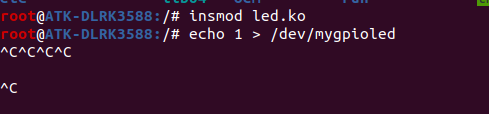
1,写入卡死,退不出来
在led_write写入函数里,要 return cnt;不能return 0;否则就会像图片这样
2,写第二个驱动时,异常不能使用return,而是用goto释放掉第一个设备申请的否则在insmod的时候就会报错
3,注意GPIO_ACTIVE_HIGH,我的设备树里,gpioled 节点的led是高电平有效,当我执行命令
"echo 1 > /dev/gpioled"就会发现引脚设置高电平
而mygpioled里设置的是GPIO_ACTIVE_LOW,"echo 1 > /dev/mygpioled",引脚是设置低电平。
可以这么去理解GPIO_ACTIVE_HIGH或GPIO_ACTIVE_LOW是有效电平,设置上面就是GPIO_ACTIVE_HIGH=1。所以尽量设置GPIO_ACTIVE_HIGH比较好理解吧1就是高,0就是低