引言
序列是 Python 中最基本的数据结构。
序列中的每个值都有对应的位置值,称之为索引,第一个索引是 0,第二个索引是 1,依此类推。
Python 有 6 个序列的内置类型,但最常见的是列表和元组。
列表都可以进行的操作包括索引,切片,加,乘,检查成员。
此外,Python 已经内置确定序列的长度以及确定最大和最小的元素的方法。
列表是最常用的 Python 数据类型,它可以作为一个方括号内的逗号分隔值出现。
列表的数据项不需要具有相同的类型
创建一个列表,只要把逗号分隔的不同的数据项使用方括号括起来即可。如下所示:
python
list1 = ['Google', 'Runoob', 1997, 2000]
list2 = [1, 2, 3, 4, 5 ]
list3 = ["a", "b", "c", "d"]
list4 = ['red', 'green', 'blue', 'yellow', 'white', 'black']
访问列表中的值
与字符串的索引一样,列表索引从 0 开始,第二个索引是 1,依此类推。
通过索引列表可以进行截取、组合等操作。
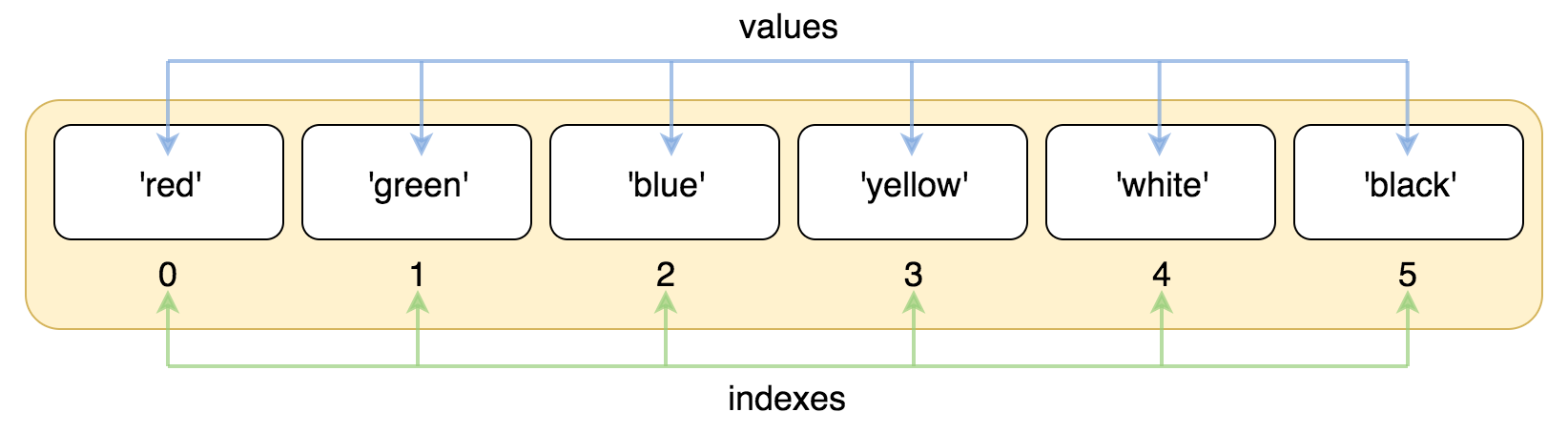
实例 - 01
python
list = ['red', 'green', 'blue', 'yellow', 'white', 'black']
print( list[0] )
print( list[1] )
print( list[2] )
以上实例输出结果:
索引也可以从尾部开始,最后一个元素的索引为 -1,往前一位为 -2,以此类推。
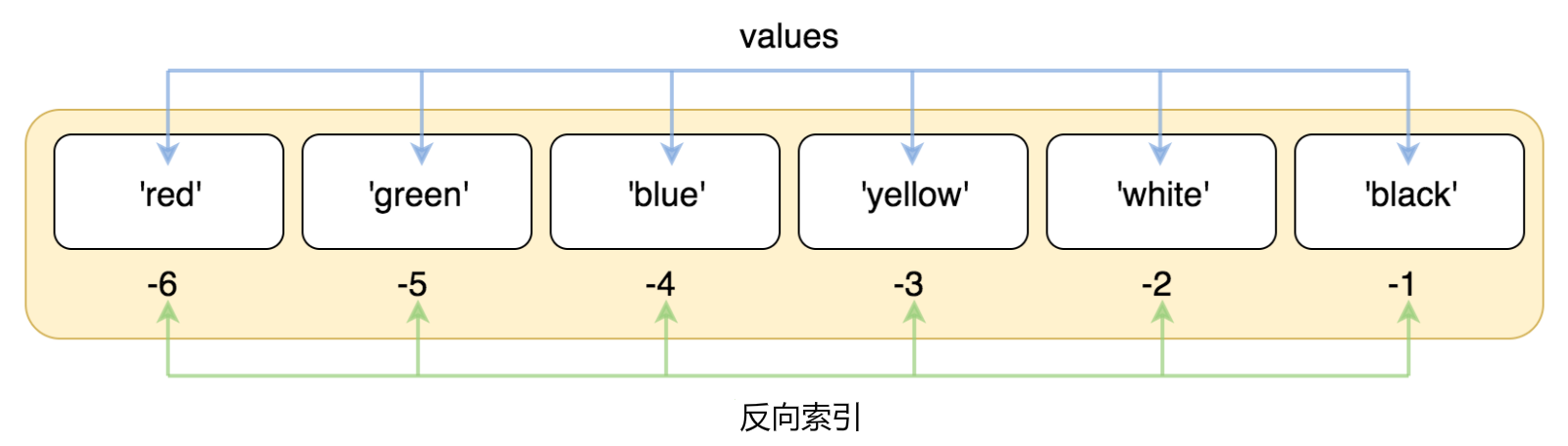
实例 - 02
python
list = ['red', 'green', 'blue', 'yellow', 'white', 'black']
print( list[-1] )
print( list[-2] )
print( list[-3] )
以上实例输出结果:
使用下标索引来访问列表中的值,同样你也可以使用方括号 \[\] 的形式截取字符,如下所示:
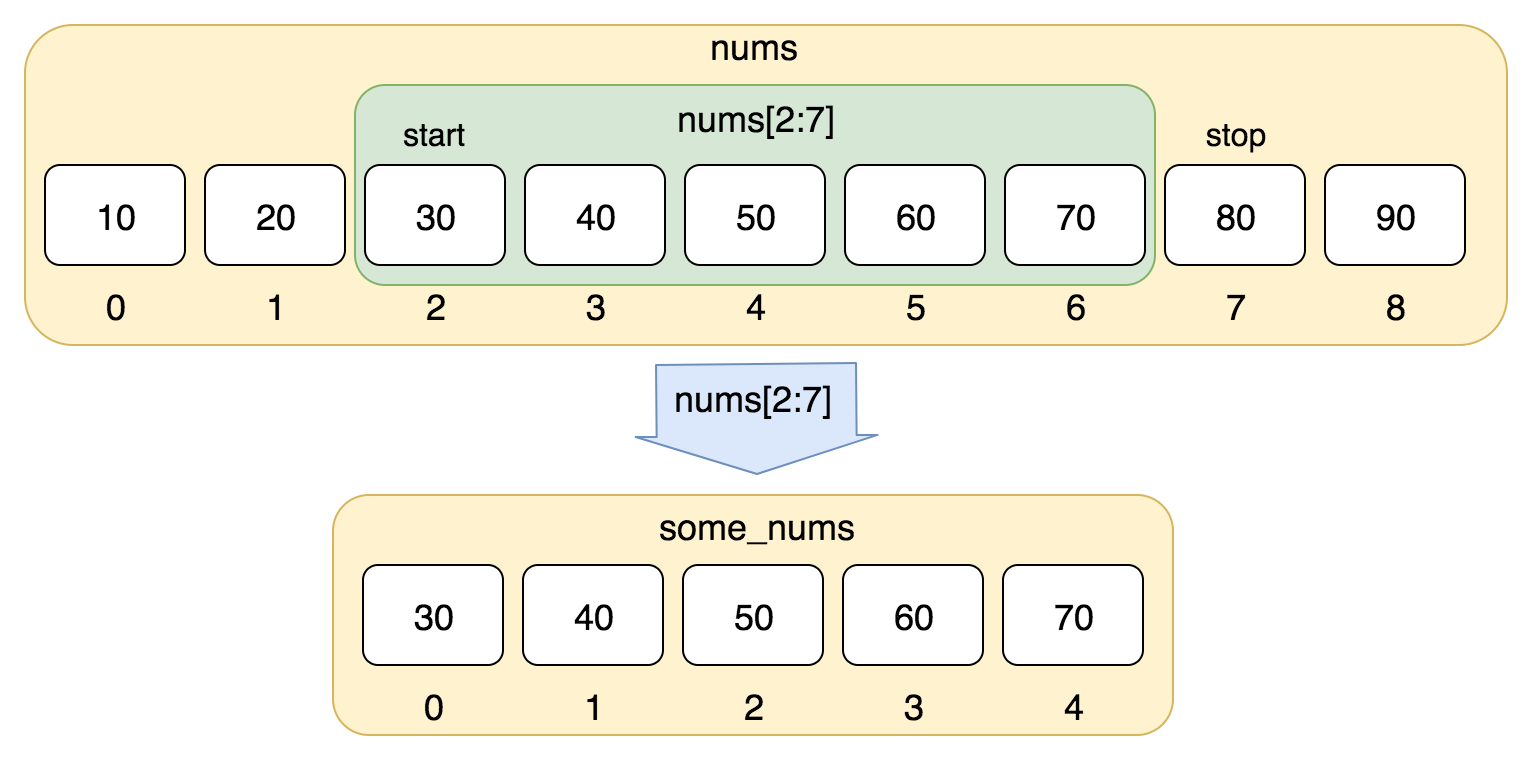
实例 - 03
python
nums = [10, 20, 30, 40, 50, 60, 70, 80, 90]
print(nums[0:4])
以上实例输出结果:
使用负数索引值截取:
实例 - 04
python
list = ['Google', 'Runoob', "Zhihu", "Taobao", "Wiki"]
# 读取第二位
print ("list[1]: ", list[1])
# 从第二位开始(包含)截取到倒数第二位(不包含)
print ("list[1:-2]: ", list[1:-2])
以上实例输出结果:
更新列表
你可以对列表的数据项进行修改或更新,你也可以使用 **append()**方法来添加列表项,如下所示:
实例 -05
python
list = ['Google', 'Runoob', 1997, 2000]
print ("第三个元素为 : ", list[2])
list[2] = 2001
print ("更新后的第三个元素为 : ", list[2])
list1 = ['Google', 'Runoob', 'Taobao']
list1.append('Baidu')
print ("更新后的列表 : ", list1)
以上实例输出结果:
删除列表元素
可以使用 del 语句来删除列表中的元素,如下实例:
实例 - 06
python
list = ['Google', 'Runoob', 1997, 2000]
print("原始列表 : ", list)
del list[2]
print("删除第三个元素 : ", list)
以上实例输出结果:
Python列表脚本操作符
列表对 + 和 * 的操作符与字符串相似。+ 号用于组合列表,* 号用于重复列表。
如下所示:
| Python 表达式 | 结果 | 描述 |
|---|---|---|
| len(1, 2, 3) | 3 | 长度 |
| 1, 2, 3 + 4, 5, 6 | 1, 2, 3, 4, 5, 6 | 组合 |
| 'Hi!' * 4 | 'Hi!', 'Hi!', 'Hi!', 'Hi!' | 重复 |
| 3 in 1, 2, 3 | True | 元素是否存在于列表中 |
| for x in 1, 2, 3: print(x, end=" ") | 1 2 3 | 迭代 |
Python 列表截取与拼接
Python 的列表截取与字符串操作类似,如下所示:
python
L=['Google', 'Runoob', 'Taobao']操作:
| Python 表达式 | 结果 | 描述 |
|---|---|---|
| L2 | 'Taobao' | 读取第三个元素 |
| L-2 | 'Runoob' | 从右侧开始读取倒数第二个元素: count from the right |
| L1: | 'Runoob', 'Taobao' | 输出从第二个元素开始后的所有元素 |
python
>>> L=['Google', 'Runoob', 'Taobao']
>>> L[2]
'Taobao'
>>> L[-2]
'Runoob'
>>> L[1:]
['Runoob', 'Taobao']
>>>
列表还支持拼接操作:
python
>>> squares = [1, 4, 9, 16, 25]
>>> squares += [36, 49, 64, 81, 100]
>>> squares
[1, 4, 9, 16, 25, 36, 49, 64, 81, 100]
>>>
嵌套列表
使用嵌套列表即在列表里创建其它列表,例如:
python
>>> a = ['a', 'b', 'c']
>>> n = [1, 2, 3]
>>> x = [a, n]
>>> x
[['a', 'b', 'c'], [1, 2, 3]]
>>> x[0]
['a', 'b', 'c']
>>> x[0][1]
'b'
Python列表函数&方法
Python包含以下函数:
| 序号 | 函数 |
|---|---|
| 1 | len(list) 列表元素个数 |
| 2 | max(list) 返回列表元素最大值 |
| 3 | min(list) 返回列表元素最小值 |
| 4 | list(seq) 将元组转换为列表 |
Python包含以下方法:
| 序号 | 方法 |
|---|---|
| 1 | list.append(obj) 在列表末尾添加新的对象 |
| 2 | list.count(obj) 统计某个元素在列表中出现的次数 |
| 3 | list.extend(seq) 在列表末尾一次性追加另一个序列中的多个值(用新列表扩展原来的列表) |
| 4 | list.index(obj) 从列表中找出某个值第一个匹配项的索引位置 |
| 5 | list.insert(index, obj) 将对象插入列表 |
| 6 | list.pop(index=-1) 移除列表中的一个元素(默认最后一个元素),并且返回该元素的值 |
| 7 | list.remove(obj) 移除列表中某个值的第一个匹配项 |
| 8 | list.reverse() 反向列表中元素 |
| 9 | list.sort( key=None,reverse=False) 对原列表进行排序 |
| 10 | list.clear() 清空列表 |
| 11 | list.copy() 复制列表 |