一、什么是中间件?
实际中的请求流程都不是直接到自己写的接口函数的,而是:
客户端 → 中间件 → 路由函数 → 中间件 → 客户端中间件其实是在**"请求到达接口之前"** 和**"响应返回客户端之前"** 执行的一段公共代码, 就像一个拦截器 / 关卡 / 过滤器。可以把中间件看作放公共逻辑的地方,这样避免有些需要重复执行的逻辑在每个接口都写一遍。
其常见应用场景如下:
| 用途 | 举例 |
|---|---|
| 日志记录 | 记录谁访问了哪个接口 |
| 身份认证 | 判断用户是否登录 |
| 统计接口耗时 | 看接口慢不慢 |
| 统一异常处理 | 捕获全局异常 |
| 跨域处理 | 允许前端访问 |
| 请求限流 | 防止接口被刷 |
| 统一添加响应头 | 加 token / 加版本号 |
| [中间件常见用途] |
根据文章开头的实际请求流程,可以看出中间件可以做两件事:
1. 请求进入前处理 request
2. 响应返回前处理 response
二、中间件代码示例
在实际代码中,如何定义中间件?具体运行方式又如何?
1、写出一个中间件
FastAPI 中间件有两种写法:装饰器写法 和 类中间件写法。
| 写法 | 类比 |
|---|---|
| 装饰器写法(@app.middleware) | 小脚本 |
| 类中间件写法(BaseHTTPMiddleware) | 正式模块 |
当前只需要掌握装饰器写法即可。代码示例:
python
from fastapi import FastAPI

app= FastAPI()

# 利用装饰器来定义中间件,不论几个中间件装饰器@app.middleware("http")的写法是固定的
@app.middleware("http")
'''这里开始定义中间件函数的具体内容
   request是请求
   call_next是FastAPI在执行中间件时自动传进来的一个函数'''

# 根据中间件的用途定义中间件函数名称
async def log_middleware(request, call_next):
    print("有人访问了:", request.url)

    # call_next()让请求继续往后走,交给真正的接口函数处理,然后把接口函数的返回值拿回来
    response = await call_next(request)

    print("请求处理完成")
    return response

@app.get("/")
async def root():
    print('这里是root函数')
    return {"message": "hello world"}
运行效果如下:

关于中间件的核心代码其实只有:
python
async def log_middleware(request, call_next):
    ...
    response = await call_next(request)
    ...

'''
其中:
request 是fastapi自动创建的Request的实例对象。
        其标准写法应该是:async def log_middleware(request:Request, call_next):

call_next 是 FastAPI 在执行中间件时提供的一个函数。不需要自己创建,直接在中间件模块里调用即可。
          其作用是把请求继续传递给下一个中间件或路由函数处理,并返回响应结果。

await 是Python异步处理的关键字。
      它表示call_next()函数异步执行。
'''
2、中间件的洋葱式运行顺序
可以看到当单个中间件执行的时候,代码的运行顺序是:
python
middleware1 → root()函数 → middleware1相当于 root 函数被嵌套在了 middleware1 里面了。
当定义两个中间件时,示例代码:
python
from fastapi import FastAPI

app = FastAPI()

# 中间件1
@app.middleware("http")
async def middleware1(request, call_next):
    print("中间件1:响应前")
    response = await call_next(request)
    print("中间件1:响应后")
    return response

# 中间件2
@app.middleware("http")
async def middleware2(request, call_next):
    print("中间件2:响应前")
    response = await call_next(request)
    print("中间件2:响应后")
    return response

@app.get("/")
async def root():
    print("这里是root函数")
    return {"message": "hello"}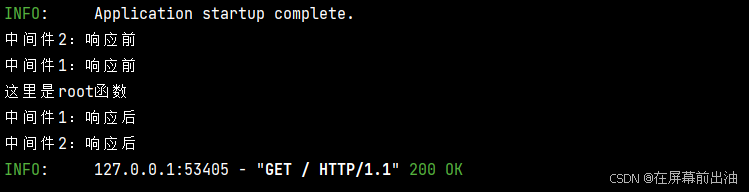
通过两个中间件的示例,可以更清楚地看到其按照洋葱式顺序执行:
python
中间件2 → 中间件1 → root()函数 → 中间件1 → 中间件2多个中间件和路由函数嵌套起来了:middleware2 ( middleware1 ( root函数 ) )
三、3个中间件的实际代码示例
仅凭借阅读概念和简单的示例代码可能无法立刻理解中间件,需要结合实际场景多写代码才能加深理解。此处用3个例子初步加深印象。
1、例子1:打印所有访问的URL(日志中间件)
python
from fastapi import FastAPI, Request

app = FastAPI()

@app.middleware("http")
async def log_middleware(request: Request, call_next):
print("有人访问了:", request.url)

response = await call_next(request)

print("请求处理完成")
return response

@app.get("/")
async def root():
return {"message": "hello"}
访问浏览器时,会看到终端打印:
python
有人访问了: http://127.0.0.1:8000/
请求处理完成这就是最简单的日志中间件。
2、例子2:统计接口耗时 / 性能监控(非常常见)
python
from fastapi import FastAPI, Request
import time

app = FastAPI()

@app.middleware("http")
async def time_middleware(request: Request, call_next):
start = time.time()

response = await call_next(request)

end = time.time()
print("接口耗时:", end - start)

return response

@app.get("/slow")
async def slow_api():
time.sleep(1)
return {"msg": "slow api"}
访问 /slow,终端会显示:
python
接口耗时: 1.003、例子3:简单"登录检查"(认证中间件思想)
python
from fastapi import FastAPI, Request
from fastapi.responses import JSONResponse

app = FastAPI()

@app.middleware("http")
async def auth_middleware(request: Request, call_next):
token = request.headers.get("token")

if token != "123":
return JSONResponse(
    status_code=401,
    content={"error": "未登录"}
)

response = await call_next(request)
return response

@app.get("/user")
async def user():
return {"name": "alex"}现在你访问:http://127.0.0.1:8000/user
会返回:
python
{"error": "未登录"}只有在请求头里加:token: 123,才能访问。