在什么情况下使用reindex重建索引:
- 集群版本升级,特别是夸大版本必须重建索引
- 索引远程迁移
- 索引分片数量调整(主分片)
- 索引字段类型变更
- 索引字段属性变更
- 索引文档对象结构变更
- 索引内存碎片垃圾过多
常用重建索引的方式Reindex
- 重建索引是创建新的索引,原有的索引保留
- 想要重建索引,原索引的_source必须开启,否则找不到原始数据
使用的时候,按着我们新的要求创建索引,之后将所有使用reindex进行重建
PUT kibana_sample_data_flights_001
{
  "settings": {
    "number_of_replicas": 0,
    "number_of_shards": 1,
    "blocks.write": false,
    "refresh_interval": "10s",
    "blocks.read": false
  },
  "mappings": {
    "dynamic_templates": [
      {
        "match_long_to_integer": {
          "match_mapping_type":"long",
          "mapping":{
            "type":"integer"
          }
        }
      }
    ]
  }
}


POST _reindex
{
  "source": {
    "index": "kibana_sample_data_flights"
  },
  "dest": {
    "index": "kibana_sample_data_flights_001"
  }
}
Reindex body参数解读
索引数据冲突参数:
"conflicts": "proceed",索引数据冲突如何解决,选择直接终端还是覆盖
单秒数据量阈值控制:
requests_per_second
在实际生产中,推荐的速度是再500~1000,控制索引重建的速度,防止集群瞬间IO增大。默认是1000.
如果设置成-1就是没有限制,但是没有限制的话对于集群的资源消耗是巨大的:
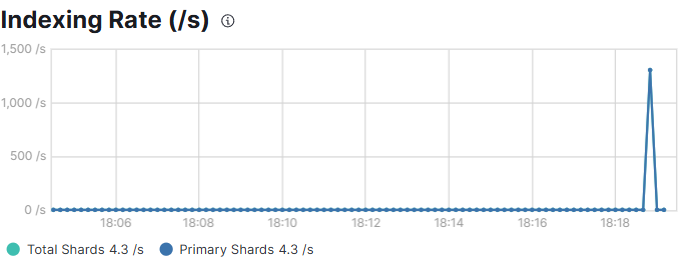
但是如果再数据量大的时候,可能会出现超时的情况,使用wait_for_completion异步执行。
POST _reindex?requests_per_second=100&wait_for_completion=false
{
  "source": {
    "index": "kibana_sample_data_flights"
  },
  "dest": {
    "index": "kibana_sample_data_flights_001"
  }
}
数据切片控制:
再数据量大的索引中重建索引时,我们可以指定他的分片,通过分批次的情况执行。分片的max的数之建议设置成和主分片数量一致。
手动切片:
POST _reindex
{
  "source": {
    "index":"kibana_sample_data_flights",
    "slice":{
      "id":2,
      "max":3
      }
  },
  "dest": {
    "index":"kibana_sample_data_flights_001"
  }
}
自动切片
这种方式是不建议的,他虽然是分批执行的,但是他是连续执行,也十分的消耗es的资源
POST _reindex?slices=2
{
  "source": {
    "index": "kibana_sample_data_flights"
  },
  "dest": {
    "index": "kibana_sample_data_flights_002"
  }
}
路由机制:
在重建索引得时候我们可以指定具体的路由分片
POST _reindex?slices=2
{
  "source": {
    "index": "kibana_sample_data_flights"
  },
  "dest": {
    "index": "kibana_sample_data_flights_002",
    "routing": "=MAN"
  }
}
如果是"KEEP"的话就是和原索引的分片是一致的,但是如果是自己指定的话,就需要注意,一定要带有"="这个符号。
query:通过删选查询,重建索引
POST _reindex
{
  "source": {
    "index": "kibana_sample_data_flights",
    "query": {
      "match": {
        "DestAirportID": "MUC"
      }
    }
  },
  "dest": {
    "index": "kibana_sample_data_flights_003"
  }
}
max_docs设置最多的条数
也可以通过max_docs设置最多的条数
POST _reindex
{
  "max_docs":10,
  "source": {
    "index": "kibana_sample_data_flights",
    "query": {
      "match": {
        "DestAirportID": "MUC"
      }
    }
  },
  "dest": {
    "index": "kibana_sample_data_flights_004"
  }
}
批量执行Reindex重建索引
POST _reindex
{
  "source": {
    "index": ["kibana_sample_data_flights",
    "kibana_sample_data_logs"
    ]
  },
  "dest": {
    "index": "kibana_sample_data_flights_005"
  }
}
限定重建索引的字段类型
通过指定具体的字段,规定重建索引的时候那些字段需要进行保留,操作之后新的索引只有我们保留的字段。
POST _reindex
{
  "source": {
    "index": ["kibana_sample_data_flights"],
    "_source":["FlightNum","Dest"]
  },
  "dest": {
    "index": "kibana_sample_data_flights_001"
  }
}
基于脚本修改字段名字:
es的字段名字实际上是不可以修改的,但是我们可以通过脚本修改字段的名字。
POST _reindex
{
  "source": {
    "index": "kibana_sample_data_flights"
  },
  "dest": {
    "index":"kibana_sample_data_flights_001"
  },
  "script": {
    "source": """
    ctx._source.FlightNum01=ctx._source.FlightNum;
    ctx._source.remove('FlightNum')
    """
  }
}
使用脚本修改文档数据
POST _reindex
{
  "source": {
    "index": "kibana_sample_data_flights"
  },
  "dest": {
    "index":"kibana_sample_data_flights_003"
  },
  "script": {
    "source": """
    ctx._source.FlightNum=ctx._source.FlightNum+"_123";
    """
  }
}
跨集群重建索引
小编在这里详细讲解一下跨集群重建索引的过程,因为es8版本中,我们开启了安全模式,但是服务器使用自签名证书 ,Elasticsearch 默认启用了安全功能(xpack.security.enabled=true),并自动生成自签名证书。这种证书未被 Java 默认信任存储(cacerts)中的根 CA(证书颁发机构)所信任,因此会导致 PKIX path building failed。
为了解决这个问题,我们可以采用三种方案:
🛠️ 方案一:将 CA 证书导入客户端信任库
这是最标准、最推荐的解决方案,适用于生产环境 和开发环境。
原理
将 Elasticsearch 集群的"根证书颁发机构"(CA)证书导入到发起请求的客户端(如另一个 ES 集群、Java 应用)所使用的 Java 信任库(cacerts)中。这相当于告诉客户端:"请无条件信任由这个 CA 签发的所有证书。"
操作步骤
-
获取 CA 证书 :从目标 ES 集群(例如 175 服务器)上找到其 CA 证书文件,通常位于
config/certs/ca/ca.crt。 -
复制到客户端 :将此
ca.crt文件复制到发起请求的客户端服务器(例如 189 服务器)上。 -
导入信任库 :在客户端服务器上,使用 JDK 自带的
keytool工具执行导入命令。bash编辑
/path/to/jdk/bin/keytool -importcert -alias <你的别名> -file /path/to/ca.crt -keystore /path/to/jdk/lib/security/cacerts -storepass changeit当提示"是否信任此证书?"时,输入
yes。 -
清理配置 :确保客户端
elasticsearch.yml中没有配置reindex.remote.allow_self_signed_certificates等已废弃或错误的参数。 -
重启服务:重启客户端 Elasticsearch 服务。
优点
- 安全性高:建立了完整的信任链,是标准的安全实践。
- 一劳永逸:导入后,所有由该 CA 签发的证书都会被信任。
缺点
- 操作稍繁琐:需要在每个需要连接的客户端上执行操作。
- 需要权限:修改 JDK 的信任库需要管理员权限。
之后,降低 SSL 验证级别
这是一种快速、便捷的妥协方案,更适用于开发、测试或高度可信的内网环境。
原理
通过配置 reindex.ssl.verification_mode: certificate,告诉 Elasticsearch 在进行跨集群通信时,只验证证书是否由受信任的 CA 签发,但不校验证书中的主机名(Common Name)是否与访问地址匹配。这解决了因证书中的主机名是机器名而非 IP 地址而导致的连接失败问题。
操作步骤
-
修改配置 :在发起请求的客户端(189 服务器)的
elasticsearch.yml文件中,添加以下配置:yamlreindex.ssl.verification_mode: certificate -
重启服务:重启客户端 Elasticsearch 服务。
优点
- 快速有效:能迅速解决主机名不匹配的报错,配置简单。
- 兼顾部分安全:仍然会验证证书的签发者,比完全关闭验证要安全。
缺点
- 存在安全风险:无法防范"中间人攻击"。如果内网中有一台恶意服务器也使用同一个 CA 签发证书,客户端可能会错误地连接到它。
⚠️ 方案二:使用公共 CA 签发的证书
这是最完美的解决方案,可以彻底杜绝证书信任问题,但实施成本最高。
原理
不使用 ES 自动生成的自签名证书,而是向公共或企业内部的证书颁发机构(CA)(如 Let's Encrypt)申请一个正式证书。由于公共 CA 的根证书已经预装在绝大多数操作系统和 Java 的信任库中,因此客户端会自动信任该证书,无需任何额外配置。
操作步骤
- 申请证书 :为你的 ES 服务器域名(如
es.example.com)申请一个由公共 CA 签发的证书。 - 替换证书 :将申请到的证书和私钥替换掉 ES 默认的自签名证书,并在
elasticsearch.yml中指向新证书的路径。 - 重启服务:重启 Elasticsearch 服务。
优点
- 最安全、最规范:符合互联网安全标准,无需任何"绕过"或"妥协"配置。
- 客户端零配置:任何标准的客户端(浏览器、应用)都能直接连接,无需导入证书。
缺点
- 需要域名:必须拥有一个有效的域名,并能正确配置 DNS 解析。
- 维护成本:公共证书有有效期(如 Let's Encrypt 为 90 天),需要设置自动续期。
总结与对比
表格
| 方案 | 优点 | 缺点 | 适用场景 |
|---|---|---|---|
| 导入 CA 证书 | 安全性高,标准做法 | 操作稍繁琐,需管理信任库 | 生产环境 、开发环境(推荐) |
| 降低验证级别 | 快速、方便 | 存在中间人攻击风险 | 开发/测试环境 、可信内网 |
| 使用公共 CA 证书 | 最安全,客户端零配置 | 需要域名,维护成本高 | 对外提供服务 、高安全要求的生产环境 |
小编在这里使用的是方案1:
首先将我们的原始数据集群的安全证书放到我们当前的目标集群中,也就是将175的证书copy到189上,这个证书默认在elasticsearch-8.5.2\config\certs文件中。文件名是http_ca.crt.
之后将这个文件,之后按着上述的步骤直接操作就行了。
信任证书之后,直接使用下面的代码,就可以将175上的数据,重建索引到当前的集群中,但是需要在dest的集群配置文件elasticsearch.yml中配置白名单。
配置白名单的信息
reindex.remote.whitelist: "192.168.0.175:9200"
POST _reindex
{
  "source": {
    "index": "kibana_sample_data_flights",
    "remote": {
      "host": "https://192.168.0.175:9200",
      "username": "elastic",
      "password": "tdO4tsaTNAvUpOfyhy9X"
    }
  },
  "dest": {
    "index": "hdk_remote_index_reindex"
  }
}