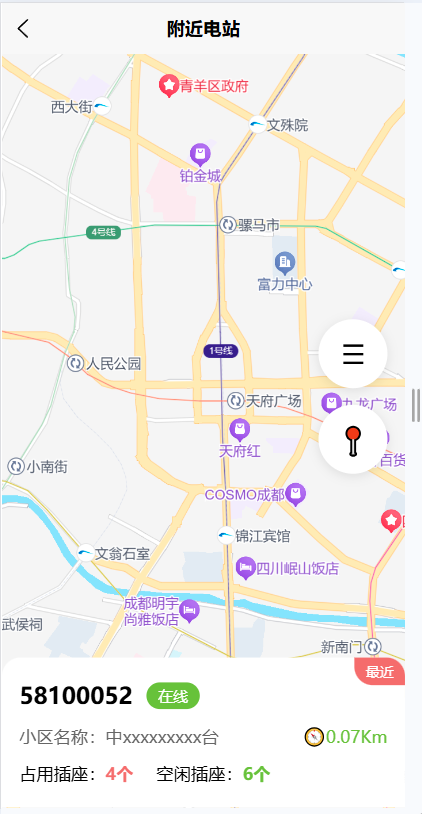
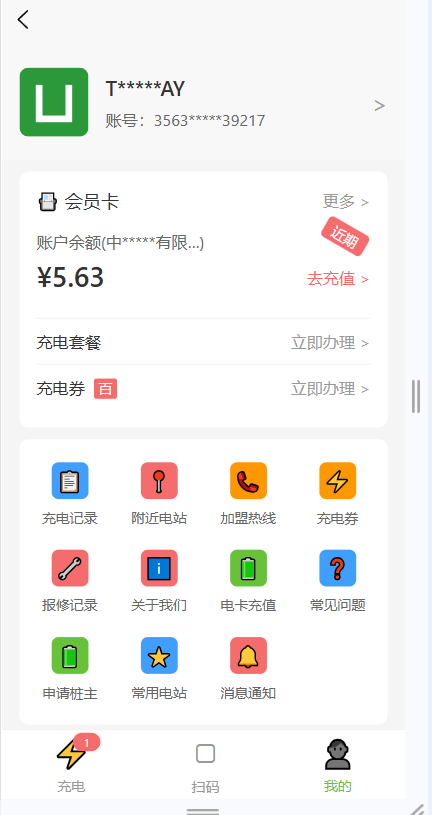
nearStation.vue
html
<template>
  <view class="near-page">
    <!-- 顶部导航栏 -->
    <view class="nav-bar">
      <view class="nav-back" @click="handleBack">×</view>
      <view class="nav-title">附近电站</view>
      <view class="nav-more" @click="handleMore">⋯</view>
    </view>

    <!-- 地图容器 -->
    <view class="map-container">
     <view id="container" style="width:100%;height:100vh;"></view>

      <!-- 地图右侧按钮 -->
      <view class="map-func">
        <view class="func-btn menu-btn" @click="handleMenu">
          <text class="icon">☰</text>
        </view>
        <view class="func-btn location-btn" @click="handleLocate">
          <text class="icon">📍</text>
        </view>
      </view>

      <!-- 电站卡片 -->
      <view class="station-card">
        <view class="near-badge">最近</view>
        <view class="station-header">
          <view class="station-id">58100052</view>
          <view class="station-status online">在线</view>
        </view>
        <view class="station-info">
          <view class="info-item">
            <text class="label">小区名称:</text>
            <text class="value">中xxxxxxxxx台</text>
          </view>
          <view class="info-item distance">
            <text class="icon">🧭</text>
            <text class="value">0.07Km</text>
          </view>
        </view>
        <view class="station-socket">
          <view class="socket-item used">
            <text class="label">占用插座:</text>
            <text class="num">4个</text>
          </view>
          <view class="socket-item free">
            <text class="label">空闲插座:</text>
            <text class="num">6个</text>
          </view>
        </view>
      </view>
    </view>
  </view>
</template>

<script>
export default {
  data() {
    return {
      isH5: false,
      latitude: 30.6633,
      longitude: 104.0711,
      map: null
    };
  },
  onReady() {
    // 直接初始化!不用加载SDK,不用AK
    this.initMap()
  },
  methods: {
    // 只保留真正有用的
    initMap() {
      const map = new BMapGL.Map("container")
      const point = new BMapGL.Point(this.longitude, this.latitude)
      map.centerAndZoom(point, 15)
      map.enableScrollWheelZoom(true)

      // 保存地图实例,方便后面定位使用
      this.map = map
    },

    handleLocate() {
      // 先给提示,证明点击有效
      uni.showLoading({ title: "正在获取定位..." });

      uni.getLocation({
        type: "gcj02",

        // 定位成功
        success: (res) => {
          console.log("定位成功:", res); // 必须加这个,看控制台

          this.latitude = res.latitude;
          this.longitude = res.longitude;

          if (this.map) {
            const point = new BMapGL.Point(this.longitude, this.latitude);
            this.map.centerAndZoom(point, 16);

            // 先清空旧标记,再加新标记
            this.map.clearOverlays();
            const marker = new BMapGL.Marker(point);
            this.map.addOverlay(marker);
          }

          uni.showToast({ title: "定位成功" });
        },

        // 定位失败(关键!你原来没有这个)
        fail: (err) => {
          console.error("定位失败:", err); // 看这里就知道为啥没反应
          uni.showToast({
            title: "定位失败,请开启位置权限",
            icon: "none",
            duration: 3000
          });
        },

        // 结束
        complete: () => {
          uni.hideLoading();
        }
      });
    },
    handleBack() {
      uni.navigateBack()
    },
    handleMore() {
      uni.showActionSheet({ itemList: ["刷新", "分享"] })
    },
    handleMenu() {
      uni.showToast({ title: "筛选" })
    }
  }
};
</script>

<style scoped>
page {
  background: #f5f5f5;
}
.near-page {
  height: 100vh;
  display: flex;
  flex-direction: column;
}
.nav-bar {
  height: 44px;
  display: flex;
  align-items: center;
  justify-content: space-between;
  padding: 0 15px;
  background: #fff;
}
.nav-back, .nav-more {
  font-size: 30px;
  color: #333;
}
.nav-title {
  font-size: 18px;
  font-weight: 500;
}
.map-container {
  flex: 1;
  position: relative;
}
.map-func {
  position: absolute;
  right: 15px;
  top: 50%;
  transform: translateY(-50%);
  z-index: 10;
}
.func-btn {
  width: 60px;
  height: 60px;
  border-radius: 50%;
  background: #fff;
  display: flex;
  align-items: center;
  justify-content: center;
  margin-bottom: 15px;
  box-shadow: 0 2px 10px rgba(0,0,0,0.1);
}
.func-btn .icon {
  font-size: 24px;
}
.station-card {
  position: absolute;
  left: 0;
  right: 0;
  bottom: 0;
  background: #fff;
  border-radius: 16px 16px 0 0;
  padding: 20px 15px;
  z-index: 20;
}
.near-badge {
  position: absolute;
  top: 0;
  right: 0;
  background: #f56c6c;
  color: #fff;
  font-size: 12px;
  padding: 4px 10px;
  border-radius: 0 16px 0 16px;
}
.station-header {
  display: flex;
  align-items: center;
  gap: 12px;
  margin-bottom: 12px;
}
.station-id {
  font-size: 20px;
  font-weight: bold;
}
.station-status {
  padding: 3px 10px;
  border-radius: 20px;
  color: #fff;
  font-size: 13px;
}
.online {
  background: #67c23a;
}
.station-info {
  display: flex;
  justify-content: space-between;
  margin-bottom: 12px;
  font-size: 15px;
  color: #666;
}
.distance {
  color: #67c23a;
  font-weight: 500;
}
.station-socket {
  display: flex;
  gap: 20px;
  font-size: 15px;
}
.used .num {
  color: #f56c6c;
  font-weight: bold;
}
.free .num {
  color: #67c23a;
  font-weight: bold;
}

/* PC 适配 */
@media (min-width: 768px) {
  .near-page {
    max-width: 500px;
    margin: 0 auto;
    border-radius: 12px;
    overflow: hidden;
    box-shadow: 0 0 20px rgba(0,0,0,0.1);
  }
}
</style>
my.vue
html
<template>
  <view class="my-page">
    <!-- 顶部用户信息栏 -->
    <view class="user-header">
      <view class="user-info">
        <image class="avatar" src="/static/logo.png" mode="aspectFill"></image>
        <view class="user-detail">
          <view class="username">T*****AY</view>
          <view class="account">账号:3563*****39217</view>
        </view>
      </view>
      <view class="arrow-right">></view>
    </view>

    <!-- 会员卡模块 -->
    <view class="card-section">
      <view class="card-header">
        <view class="card-title">
          <text class="icon-card">📇</text>
          会员卡
        </view>
        <view class="more-btn">更多 ></view>
      </view>

      <view class="balance-item">
        <view class="balance-left">
          <view class="balance-label">账户余额(中*****有限...)</view>
          <view class="balance-amount">¥5.63</view>
        </view>
        <view class="balance-right">
          <view class="tag-expire">近期</view>
          <view class="recharge-btn">去充值 ></view>
        </view>
      </view>

      <view class="menu-item">
        <text class="menu-text">充电套餐</text>
        <text class="menu-arrow">立即办理 ></text>
      </view>

      <view class="menu-item">
        <text class="menu-text">充电券 <text class="tag-coupon">百</text></text>
        <text class="menu-arrow">立即办理 ></text>
      </view>
    </view>

    <!-- 功能入口网格 -->
    <view class="func-grid">
      <view class="func-item" v-for="(item, index) in funcList" :key="index" @click="handleFuncClick(item)">
        <view class="func-icon" :style="{ backgroundColor: item.color }">{{ item.icon }}</view>
        <view class="func-name">{{ item.name }}</view>
      </view>
    </view>

    <!-- 底部导航栏 -->
    <view class="tab-bar">
      <view class="tab-item" :class="{ active: currentTab === 0 }" @click="switchTab(0)">
        <view class="tab-icon">⚡</view>
        <view class="tab-text">充电</view>
        <view v-if="tabBadge[0] > 0" class="tab-badge">{{ tabBadge[0] }}</view>
      </view>
      <view class="tab-item" :class="{ active: currentTab === 1 }" @click="switchTab(1)">
        <view class="tab-icon">▢</view>
        <view class="tab-text">扫码</view>
      </view>
      <view class="tab-item" :class="{ active: currentTab === 2 }" @click="switchTab(2)">
        <view class="tab-icon">👤</view>
        <view class="tab-text">我的</view>
      </view>
    </view>
  </view>
</template>

<script>
export default {
  data() {
    return {
      currentTab: 2, // 默认选中「我的」
      tabBadge: [1, 0, 0], // 充电页角标
      funcList: [
        { name: '充电记录', icon: '📋', color: '#409EFF', path: '/pages/record/record' },
        { name: '附近电站', icon: '📍', color: '#F56C6C', path: '/pages/near/near' },
        { name: '加盟热线', icon: '📞', color: '#FF9800', path: 'tel:400-xxx-xxxx' },
        { name: '充电券', icon: '⚡', color: '#FF9800', path: '/pages/coupon/coupon' },
        { name: '报修记录', icon: '🔧', color: '#F56C6C', path: '/pages/repair/repair' },
        { name: '关于我们', icon: 'ℹ️', color: '#F56C6C', path: '/pages/about/about' },
        { name: '电卡充值', icon: '🔋', color: '#67C23A', path: '/pages/recharge/recharge' },
        { name: '常见问题', icon: '❓', color: '#409EFF', path: '/pages/faq/faq' },
        { name: '申请桩主', icon: '🔋', color: '#67C23A', path: '/pages/apply/apply' },
        { name: '常用电站', icon: '⭐', color: '#409EFF', path: '/pages/favorite/favorite' },
        { name: '消息通知', icon: '🔔', color: '#F56C6C', path: '/pages/notice/notice' },
      ]
    }
  },
  onLoad() {
    // 适配PC端:监听窗口大小变化
    this.handleResize()
    window.addEventListener('resize', this.handleResize)
  },
  onUnload() {
    window.removeEventListener('resize', this.handleResize)
  },
  methods: {
    handleResize() {
      // 可根据窗口大小动态调整布局(这里已用CSS响应式,预留扩展)
    },
    handleFuncClick(item) {
      if (item.path.startsWith('tel:')) {
        uni.makePhoneCall({ phoneNumber: item.path.replace('tel:', '') })
      } else {
        uni.navigateTo({ url: item.path })
      }
    },
    switchTab(index) {
      this.currentTab = index
      const tabPages = ['/pages/index/index', '/pages/scan/scan', '/pages/my/my']
      uni.switchTab({ url: tabPages[index] })
    }
  }
}
</script>

<style scoped>
/* 全局样式重置 & 基础适配 */
page {
  background-color: #f5f5f5;
  font-family: -apple-system, BlinkMacSystemFont, 'Segoe UI', Roboto, 'Helvetica Neue', Arial, sans-serif;
}
.my-page {
  min-height: 100vh;
  padding-bottom: 60px; /* 给底部导航留空间 */
  background-color: #f5f5f5;
}

/* 顶部用户信息 */
.user-header {
  display: flex;
  justify-content: space-between;
  align-items: center;
  padding: 20px 15px;
  background-color: #f8f8f8;
}
.user-info {
  display: flex;
  align-items: center;
}
.avatar {
  width: 60px;
  height: 60px;
  border-radius: 8px;
  margin-right: 15px;
}
.user-detail .username {
  font-size: 18px;
  font-weight: 500;
  color: #333;
  margin-bottom: 5px;
}
.user-detail .account {
  font-size: 14px;
  color: #666;
}
.arrow-right {
  font-size: 20px;
  color: #999;
}

/* 会员卡模块 */
.card-section {
  margin: 10px 15px;
  padding: 15px;
  background-color: #fff;
  border-radius: 8px;
}
.card-header {
  display: flex;
  justify-content: space-between;
  align-items: center;
  margin-bottom: 15px;
}
.card-title {
  font-size: 16px;
  font-weight: 500;
  color: #333;
}
.more-btn {
  font-size: 14px;
  color: #999;
}
.balance-item {
  display: flex;
  justify-content: space-between;
  align-items: center;
  margin-bottom: 20px;
}
.balance-left .balance-label {
  font-size: 14px;
  color: #666;
  margin-bottom: 5px;
}
.balance-left .balance-amount {
  font-size: 24px;
  font-weight: 600;
  color: #333;
}
.balance-right {
  display: flex;
  flex-direction: column;
  align-items: flex-end;
}
.tag-expire {
  font-size: 12px;
  color: #fff;
  background-color: #f56c6c;
  padding: 2px 8px;
  border-radius: 4px;
  transform: rotate(30deg);
  transform-origin: right top;
  margin-bottom: 5px;
}
.recharge-btn {
  font-size: 14px;
  color: #f56c6c;
}
.menu-item {
  display: flex;
  justify-content: space-between;
  align-items: center;
  padding: 10px 0;
  border-top: 1px solid #f0f0f0;
}
.menu-item:first-of-type {
  border-top: none;
}
.menu-text {
  font-size: 14px;
  color: #333;
}
.tag-coupon {
  font-size: 12px;
  color: #fff;
  background-color: #f56c6c;
  padding: 1px 4px;
  border-radius: 2px;
  margin-left: 4px;
}
.menu-arrow {
  font-size: 14px;
  color: #999;
}

/* 功能网格 */
.func-grid {
  display: grid;
  grid-template-columns: repeat(4, 1fr);
  gap: 20px;
  padding: 20px 15px;
  background-color: #fff;
  margin: 10px 15px;
  border-radius: 8px;
}
.func-item {
  display: flex;
  flex-direction: column;
  align-items: center;
  cursor: pointer;
}
.func-icon {
  width: 32px;
  height: 32px;
  border-radius: 6px;
  display: flex;
  align-items: center;
  justify-content: center;
  font-size: 18px;
  margin-bottom: 8px;
  color: #fff;
}
.func-name {
  font-size: 12px;
  color: #666;
  text-align: center;
}

/* 底部导航栏 */
.tab-bar {
  position: fixed;
  bottom: 0;
  left: 0;
  right: 0;
  height: 60px;
  display: flex;
  justify-content: space-around;
  align-items: center;
  background-color: #fff;
  border-top: 1px solid #f0f0f0;
  z-index: 999;
}
.tab-item {
  display: flex;
  flex-direction: column;
  align-items: center;
  position: relative;
  cursor: pointer;
}
.tab-item.active .tab-icon,
.tab-item.active .tab-text {
  color: #67C23A;
}
.tab-icon {
  font-size: 24px;
  color: #999;
  margin-bottom: 4px;
}
.tab-text {
  font-size: 12px;
  color: #999;
}
.tab-badge {
  position: absolute;
  top: -2px;
  right: -10px;
  min-width: 16px;
  height: 16px;
  background-color: #f56c6c;
  color: #fff;
  font-size: 10px;
  border-radius: 8px;
  display: flex;
  align-items: center;
  justify-content: center;
  padding: 0 4px;
}

/* ========== PC端适配(媒体查询) ========== */
@media screen and (min-width: 768px) {
  .my-page {
    max-width: 1200px;
    margin: 0 auto;
    padding: 20px;
  }
  .user-header {
    border-radius: 8px;
    margin-bottom: 10px;
  }
  .card-section, .func-grid {
    margin: 20px 0;
  }
  .func-grid {
    grid-template-columns: repeat(6, 1fr); /* PC端显示6列,更美观 */
    gap: 30px;
    padding: 30px;
  }
  .func-icon {
    width: 40px;
    height: 40px;
    font-size: 22px;
  }
  .func-name {
    font-size: 14px;
  }
  .tab-bar {
    display: none; /* PC端隐藏底部导航,用侧边栏/顶部导航替代(可按需开启) */
  }
  .my-page {
    padding-bottom: 0;
  }
}
</style>
加载百度地图需要再根目录中的index.html 加上这段
html
<script type="text/javascript" src="https://api.map.baidu.com/api?v=1.0&type=webgl&ak=你的百度地图AK"></script>