现在 AI 工具真的是百花齐放,看得人眼花缭乱。团队开发时,各个成员又都有自己的想法,用的工具更是五花八门------有用开源方案的(Kilo Code、Roo Code),有用国际化方案的(Cursor、Claude Code),有用国内羊毛多多方案的(Qwen Code、Trae)
各个工具有各个工具的配置,比如 MCP 的配置:
- Cursor 的路径是
.cursor/mcp.json - Qwen Code 的路径是
.qwen/settings.json
有的甚至格式都不一样,比如说子代理(sub-agent),Cursor 对于子代理的模型指定支持 fast,而 Claude Code 则是自家的快速模型 haiku
md
---
name: playwright 测试
model: fast
        ^--- Claude Code 无法识别,只认 `haiku`
---

# playwright 测试

规划并生成 Playwright 测试用例
在公司内部中推动配置共享的时候,各个团队各个开发者用的AI工具五花八门,需要花大量时间去列举不同 AI 工具的配置差异
到底有没有工具持给所有 AI 工具安装这些 MCP、斜杠命令之类的配置?!
有的兄弟,有的。它就是------Agent Add
几乎支持安装所有类型的 AI 工具配置,也几乎涵盖了了市面上所有的 AI 工具
| AI 工具 | MCP | Prompt | Skill | 斜杠命令 | 子代理 |
|---|---|---|---|---|---|
| Cursor | ✅ | ✅ | ✅ | ✅ | ✅ |
| Claude Code | ✅ | ✅ | ✅ | ✅ | ✅ |
| Trae | ✅ | ✅ | ✅ | ❌ | ❌ |
| Qwen Code | ✅ | ✅ | ✅ | ✅ | ✅ |
| GitHub Copilot | ✅ | ✅ | ✅ | ✅ | ✅ |
| Codex CLI | ✅ | ✅ | ✅ | ❌ | ✅ |
| Windsurf | ✅ | ✅ | ✅ | ✅ | ❌ |
| Gemini CLI | ✅ | ✅ | ✅ | ✅ | ✅ |
| Kimi Code | ✅ | ✅ | ✅ | ❌ | ❌ |
| Augment | ✅ | ✅ | ✅ | ✅ | ✅ |
| Roo Code | ✅ | ✅ | ✅ | ✅ | ❌ |
| Kiro CLI | ✅ | ✅ | ✅ | ❌ | ✅ |
| Tabnine CLI | ✅ | ✅ | ❌ | ✅ | ❌ |
| Kilo Code | ✅ | ✅ | ✅ | ✅ | ✅ |
| opencode | ✅ | ✅ | ✅ | ✅ | ✅ |
| OpenClaw | ❌ | ✅ | ✅ | ❌ | ❌ |
| Mistral Vibe | ✅ | ✅ | ✅ | ❌ | ❌ |
| Claude Desktop | ✅ | ❌ | ❌ | ❌ | ❌ |
无需安装,一个简单的命令可以完成数个 AI 配置的安装:
bash
npx -y agent-add \
  --mcp '{"playwright":{"command":"npx","args":["-y","@playwright/mcp"]}}' \
  --mcp 'https://github.com/modelcontextprotocol/servers.git#.mcp.json' \
  --skill 'https://github.com/anthropics/skills.git#skills/pdf' \
  --prompt $'# Code Review Rules\n\nAlways review for security issues first.' \
  --command 'https://github.com/wshobson/commands.git#tools/security-scan.md' \
  --sub-agent 'https://github.com/VoltAgent/awesome-claude-code-subagents.git#categories/01-core-development/backend-developer.md'
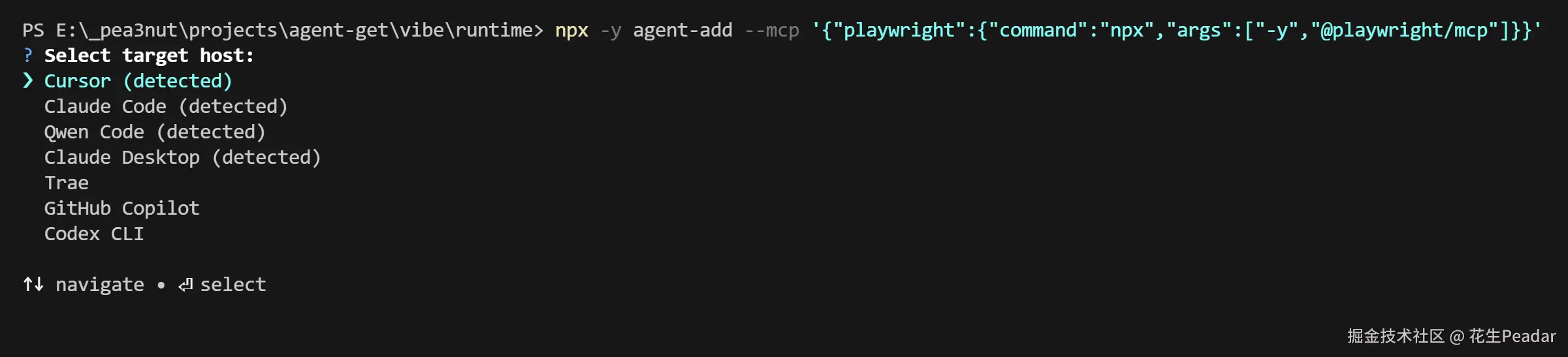
如果你不指定 --host,工具还会有一个交互界面,询问你要给什么 AI 工具安装:
这个工具在如下场景尤其有用:
使用场景
场景一:AI 资产(MCP、斜杠命令、子代理、Skill)开发者,想要支持更多的 AI 工具
比如我开发了一个子代理,没有 agent-add 工具的情况下,我需要在 README.md 中写
md
将 my-agent.md 复制到你的 AI 工具中的对应目录,如:

- Claude code: .claude/agents
- Cursor: .claude/agents
- etc.
现在有了 agent-add ,我非常简洁的写到:
md
运行如下命令安装:

npx -y agent-add --sub-agent https://github.com/my-name/my-repo.git#dist/my-agent.md
这样可以支持所有 AI 工具,因为工具会帮你问和嗅探用户实际使用的 AI 工具
场景二:在团队中推广 AI 工具配置,但是团队内有多个工具,希望一份配置支持所有工具
以前想要共享 AI 工具配置,有如下方式:
- 将 AI 配置提交进 git 仓库
- 优点:开箱即用
- 缺点:要求所有开发者使用同一个 AI 工具
- 提供配置教程,.gitignore 中忽略所有 AI 配置
- 优点:支持多种 AI 工具
- 缺点:有理解成本,新人上手困难
现在简单多了,你可以直接提供一个 shell 脚本,来直接快速安装:
bash
# 不指定 --host,工具会询问
npx -y agent-add \
  # 列举所有依赖
  --mcp xxx \
  --skill xxx \
  --prompt xxx \
  --command xxx \
  --sub-agent xxx
针对这个场景,agent-add 也提供了一个文件配置,可以省略冗长的命令行参数
json
{
  "name": "my-team/frontend-pack",
  "assets": [
    { "type": "mcp",      "source": "https://github.com/modelcontextprotocol/servers.git#.mcp.json" },
    { "type": "skill",    "source": "https://github.com/anthropics/skills.git#skills/pdf" },
    { "type": "prompt",   "source": "https://raw.githubusercontent.com/PatrickJS/awesome-cursorrules/main/rules/nextjs-react-tailwind/.cursorrules" },
    { "type": "command",  "source": "https://github.com/wshobson/commands.git#tools/security-scan.md" },
    { "type": "subAgent", "source": "https://github.com/VoltAgent/awesome-claude-code-subagents.git#categories/01-core-development/backend-developer.md" }
  ]
}
将该文件提交进仓库,既可通过 --pack xxx.json 来简短安装
后记
欢迎试用 & 提 issue (中文欢迎):
顺便求个 Star~
愿你在 AI 时代,不被工具裹挟,而是被工具成全。