一、学习目标
- 掌握 Spring Data Redis 核心使用方式
- 学会使用 Spring Data Redis 缓存首页内容(实战场景)
二、Spring Data Redis 核心介绍
2.1 Spring Data 整体介绍
Spring Data 是一款用于简化数据库访问的开源框架,核心目标是让数据访问更便捷、高效,包含多个子项目:
- Spring Data JDBC:对 JDBC 的 Spring Data 存储库支持
- Spring Data JPA:对 JPA 的 Spring Data 存储库支持
- Spring Data MongoDB:对 MongoDB 的基于 Spring 对象文档的存储库支持
- Spring Data Redis:从 Spring 应用程序轻松配置和访问 Redis
2.2 Spring Data Redis 核心优势
Spring Data Redis 是 Spring Data 旗下模块,专门用于简化 Redis 操作,针对 Jedis 提供了核心能力:
-
高度封装的
RedisTemplate类,覆盖 Redis 五大数据结构操作:java
redisTemplate.opsForValue():操作字符串 redisTemplate.opsForHash():操作hash redisTemplate.opsForList():操作list redisTemplate.opsForSet():操作set redisTemplate.opsForZSet():操作zset -
SpringBoot2.x 后默认采用 Lettuce 客户端(基于 Netty 的异步非阻塞 IO),高并发场景下效率优于 Jedis
-
内置多种序列化器,适配不同数据存储场景:
| 序列化器 | 说明 |
|---|---|
| JdkSerializationRedisSerializer | POJO 对象存取,基于 JDK 序列化机制,存储字节序列,最常用 |
| StringRedisSerializer | 键 / 值为字符串场景,轻量级、高效,基于指定字符集编码解码 |
| GenericJackson2JsonRedisSerializer | POJO 与 JSON 互转,存储 JSON 格式,可读性高,无乱码问题 |
三、Spring Data Redis 实战使用
3.1 工程搭建
(1)创建工程
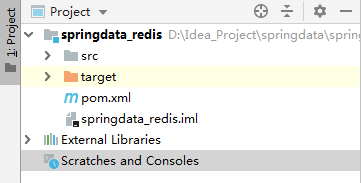
(2)POM 依赖配置
xml
<?xml version="1.0" encoding="UTF-8"?>
<project xmlns="http://maven.apache.org/POM/4.0.0"
         xmlns:xsi="http://www.w3.org/2001/XMLSchema-instance"
         xsi:schemaLocation="http://maven.apache.org/POM/4.0.0 http://maven.apache.org/xsd/maven-4.0.0.xsd">
    <modelVersion>4.0.0</modelVersion>
    <parent>
        <groupId>org.springframework.boot</groupId>
        <artifactId>spring-boot-starter-parent</artifactId>
        <version>2.3.2.RELEASE</version>
    </parent>

    <groupId>com.hg</groupId>
    <artifactId>springdata_redis</artifactId>
    <version>1.0-SNAPSHOT</version>

    <!-- 编码配置 -->
    <project.build.sourceEncoding>UTF-8</project.build.sourceEncoding>
    <project.reporting.outputEncoding>UTF-8</project.reporting.outputEncoding>
    <!-- JDK版本 -->
    <maven.compiler.source>1.8</maven.compiler.source>
    <maven.compiler.target>1.8</maven.compiler.target>

    <dependencies>
        <!-- SpringBoot Web启动器 -->
        <dependency>
            <groupId>org.springframework.boot</groupId>
            <artifactId>spring-boot-starter-web</artifactId>
        </dependency>
        <!-- Spring Data Redis启动器 -->
        <dependency>
            <groupId>org.springframework.boot</groupId>
            <artifactId>spring-boot-starter-data-redis</artifactId>
        </dependency>
        <!-- 测试启动器 -->
        <dependency>
            <groupId>org.springframework.boot</groupId>
            <artifactId>spring-boot-starter-test</artifactId>
        </dependency>
    </dependencies>
</project>
(3)application.yml 配置
yaml
spring:
  redis:
    cluster:
      nodes:
        - 192.168.204.131:7001
        - 192.168.204.131:7002
        - 192.168.204.131:7003
        - 192.168.204.131:7004
        - 192.168.204.131:7005
        - 192.168.204.131:7006
    jedis:
      pool:
        max-active: 20 # 连接池最大连接数
        max-idle: 10   # 连接池最大空闲连接
        min-idle: 5    # 连接池最小空闲连接
(4)核心配置类
java
package com.hg.config;

import org.springframework.context.annotation.Bean;
import org.springframework.context.annotation.Configuration;
import org.springframework.data.redis.connection.RedisConnectionFactory;
import org.springframework.data.redis.core.RedisTemplate;
import org.springframework.data.redis.serializer.JdkSerializationRedisSerializer;
import org.springframework.data.redis.serializer.StringRedisSerializer;

/**
 * Redis整合配置类
 */
@Configuration
public class RedisConfig {

    /**
     * 创建RedisTemplate:用于执行Redis操作的核心模板
     */
    @Bean
    public RedisTemplate<String, Object> getRedisTemplate(RedisConnectionFactory factory)    {
        RedisTemplate<String, Object> template = new RedisTemplate<String, Object>();
        template.setConnectionFactory(factory);
        return template;
    }
}
(5)启动类
运行
package com.hg;

import org.springframework.boot.SpringApplication;
import org.springframework.boot.autoconfigure.SpringBootApplication;

@SpringBootApplication
public class App {
	public static void main(String[] args) {
		SpringApplication.run(App.class, args);
	}
}
3.2 实体类准备
java
package com.hg.pojo;

import java.io.Serializable;

public class User implements Serializable {

	private Integer id;
	private String name;
	private Integer age;

	// getter/setter 方法
	public Integer getId() {
		return id;
	}
	public void setId(Integer id) {
		this.id = id;
	}
	public String getName() {
		return name;
	}
	public void setName(String name) {
		this.name = name;
	}
	public Integer getAge() {
		return age;
	}
	public void setAge(Integer age) {
		this.age = age;
	}

	@Override
	public String toString() {
		return "User [id=" + id + ", name=" + name + ", age=" + age + "]";
	}
}
3.3 基础操作测试
java
package com.hg.test;

import com.hg.App;
import com.hg.pojo.User;
import org.junit.Test;
import org.junit.runner.RunWith;
import org.springframework.beans.factory.annotation.Autowired;
import org.springframework.boot.test.context.SpringBootTest;
import org.springframework.data.redis.core.RedisTemplate;
import org.springframework.data.redis.serializer.GenericJackson2JsonRedisSerializer;
import org.springframework.data.redis.serializer.JdkSerializationRedisSerializer;
import org.springframework.data.redis.serializer.StringRedisSerializer;
import org.springframework.test.context.junit4.SpringJUnit4ClassRunner;

@RunWith(SpringJUnit4ClassRunner.class)
@SpringBootTest(classes = {App.class})
public class RedisTest {

    // 默认key-value序列化器:JdkSerializationRedisSerializer
    @Autowired
    private RedisTemplate redisTemplate;

    /**
     * 1、StringRedisSerializer:字符串类型数据操作
     */
    @Test
    public void testSetStr(){
        redisTemplate.setKeySerializer(new StringRedisSerializer());
        redisTemplate.setValueSerializer(new StringRedisSerializer());
        redisTemplate.opsForValue().set("str", "张三丰");
    }

    @Test
    public void testGetStr(){
        redisTemplate.setKeySerializer(new StringRedisSerializer());
        redisTemplate.setValueSerializer(new StringRedisSerializer());
        String str = (String) redisTemplate.opsForValue().get("str");
        System.out.println(str);
    }

    /**
     * 2、JdkSerializationRedisSerializer:POJO对象序列化(字节序列)
     */
    @Test
    public void testSetPojo(){
        User user = new User();
        user.setId(1);
        user.setName("张三丰");
        user.setAge(140);

        redisTemplate.setKeySerializer(new StringRedisSerializer());
        redisTemplate.setValueSerializer(new JdkSerializationRedisSerializer());
        redisTemplate.opsForValue().set("user", user);
    }

    @Test
    public void testGetPojo(){
        redisTemplate.setKeySerializer(new StringRedisSerializer());
        redisTemplate.setValueSerializer(new JdkSerializationRedisSerializer());
        User user = (User) redisTemplate.opsForValue().get("user");
        System.out.println(user);
    }

    /**
     * 3、GenericJackson2JsonRedisSerializer:POJO转JSON存储(无乱码)
     */
    @Test
    public void testSetPojo2(){
        User user = new User();
        user.setId(1);
        user.setName("张三丰");
        user.setAge(140);

        redisTemplate.setKeySerializer(new StringRedisSerializer());
        redisTemplate.setValueSerializer(new GenericJackson2JsonRedisSerializer());
        redisTemplate.opsForValue().set("user2", user);
    }

    @Test
    public void testGetPojo2(){
        redisTemplate.setKeySerializer(new StringRedisSerializer());
        redisTemplate.setValueSerializer(new GenericJackson2JsonRedisSerializer());
        User user2 = (User) redisTemplate.opsForValue().get("user2");
        System.out.println(user2);
    }

    /**
     * 4、GenericJackson2JsonRedisSerializer处理字符串
     */
    @Test
    public void testSetStr2(){
        redisTemplate.setKeySerializer(new StringRedisSerializer());
        redisTemplate.setValueSerializer(new GenericJackson2JsonRedisSerializer());
        redisTemplate.opsForValue().set("str2", "张三丰");
    }

    @Test
    public void testGetStr2(){
        redisTemplate.setKeySerializer(new StringRedisSerializer());
        redisTemplate.setValueSerializer(new GenericJackson2JsonRedisSerializer());
        String str2 = (String) redisTemplate.opsForValue().get("str2");
        System.out.println(str2);
    }

    /**
     * 5、默认序列化器操作POJO
     */
    @Test
    public void testSetPojo3(){
        User user = new User();
        user.setId(1);
        user.setName("张三丰");
        user.setAge(140);

        redisTemplate.opsForValue().set("user3", user);
    }

    @Test
    public void testGetPojo3(){
        User user3 = (User) redisTemplate.opsForValue().get("user3");
        System.out.println(user3);
    }
}
3.4 问题优化:设置通用序列化器
问题:每次存取 POJO 都要重复设置序列化器,开发效率低。
解决方案:在配置类中统一设置序列化器:
java
package com.hg.config;

import org.springframework.context.annotation.Bean;
import org.springframework.context.annotation.Configuration;
import org.springframework.data.redis.connection.RedisConnectionFactory;
import org.springframework.data.redis.core.RedisTemplate;
import org.springframework.data.redis.serializer.GenericJackson2JsonRedisSerializer;
import org.springframework.data.redis.serializer.StringRedisSerializer;

@Configuration
public class RedisConfig {

    @Bean
    public RedisTemplate redisTemplate(RedisConnectionFactory factory){
        RedisTemplate redisTemplate = new RedisTemplate();
        redisTemplate.setConnectionFactory(factory);

        // 全局序列化器配置
        redisTemplate.setKeySerializer(new StringRedisSerializer());
        redisTemplate.setValueSerializer(new GenericJackson2JsonRedisSerializer());
        redisTemplate.setHashKeySerializer(new StringRedisSerializer());
        redisTemplate.setHashValueSerializer(new GenericJackson2JsonRedisSerializer());

        return redisTemplate;
    }
}
3.5 进阶优化:封装 RedisClient(贴近原生命令)
问题:RedisTemplate 封装的 API 与 Redis 原生命令不一致,使用成本高。
解决方案:封装通用 RedisClient 工具类:
java
package com.hg.redis;

import org.springframework.beans.factory.annotation.Autowired;
import org.springframework.data.redis.core.RedisTemplate;
import org.springframework.stereotype.Component;

import java.util.List;
import java.util.Map;
import java.util.Set;
import java.util.concurrent.TimeUnit;

/**
 * RedisTemplate 封装工具类(贴近原生命令)
 */
@Component
public class RedisClient {

    @Autowired
    private RedisTemplate<String, Object> redisTemplate;

    /**
     * 指定缓存失效时间
     * @param key 键
     * @param time 时间(秒)
     * @return 是否成功
     */
    public boolean expire(String key,long time){
        try {
            if(time>0){
                redisTemplate.expire(key, time, TimeUnit.SECONDS);
            }
            return true;
        } catch (Exception e) {
            e.printStackTrace();
            return false;
        }
    }

    /**
     * 根据key获取过期时间
     * @param key 键(非空)
     * @return 过期时间(秒),0代表永久有效
     */
    public long ttl(String key){
        return redisTemplate.getExpire(key,TimeUnit.SECONDS);
    }

    /**
     * 判断key是否存在
     * @param key 键
     * @return true=存在,false=不存在
     */
    public Boolean exists(String key){
        return redisTemplate.hasKey(key);
    }

    //============================String=============================
    /**
     * 普通缓存获取
     * @param key 键
     * @return 值
     */
    public Object get(String key){
        return key==null?null:redisTemplate.opsForValue().get(key);
    }

    /**
     * 普通缓存放入
     * @param key 键
     * @param value 值
     * @return true=成功,false=失败
     */
    public boolean set(String key,Object value) {
        try {
            redisTemplate.opsForValue().set(key, value);
            return true;
        } catch (Exception e) {
            e.printStackTrace();
            return false;
        }
    }

    /**
     * 删除缓存
     * @param key 键(可传多个)
     */
    public Boolean del(String key){
       return redisTemplate.delete(key);
    }

    /**
     * 递增
     * @param key 键
     * @param delta 递增因子(>0)
     * @return 递增后的值
     */
    public long incr(String key, long delta){
        if(delta<0){
            throw new RuntimeException("递增因子必须大于0");
        }
        return redisTemplate.opsForValue().increment(key, delta);
    }

    /**
     * 递减
     * @param key 键
     * @param delta 递减因子(>0)
     * @return 递减后的值
     */
    public long decr(String key, long delta){
        if(delta<0){
            throw new RuntimeException("递减因子必须大于0");
        }
        return redisTemplate.opsForValue().decrement(key, -delta);
    }

    //================================Hash=================================
    /**
     * Hash获取指定字段值
     * @param key 键(非空)
     * @param item 字段(非空)
     * @return 值
     */
    public Object hget(String key,String item){
        return redisTemplate.opsForHash().get(key, item);
    }

    /**
     * Hash放入指定字段值
     * @param key 键
     * @param item 字段
     * @param value 值
     * @return true=成功,false=失败
     */
    public boolean hset(String key,String item,Object value) {
        try {
            redisTemplate.opsForHash().put(key, item, value);
            return true;
        } catch (Exception e) {
            e.printStackTrace();
            return false;
        }
    }

    /**
     * 删除Hash中指定字段
     * @param key 键(非空)
     * @param item 字段(可传多个,非空)
     */
    public void hdel(String key, Object... item){
        redisTemplate.opsForHash().delete(key,item);
    }

    //============================Set=============================
    /**
     * 根据key获取Set所有值
     * @param key 键
     * @return Set集合
     */
    public Set<Object> smembers(String key){
        try {
            return redisTemplate.opsForSet().members(key);
        } catch (Exception e) {
            e.printStackTrace();
            return null;
        }
    }

    /**
     * Set添加值
     * @param key 键
     * @param values 值(可传多个)
     * @return 成功添加个数
     */
    public long sadd(String key, Object...values) {
        try {
            return redisTemplate.opsForSet().add(key, values);
        } catch (Exception e) {
            e.printStackTrace();
            return 0;
        }
    }

    /**
     * Set移除指定值
     * @param key 键
     * @param values 值(可传多个)
     * @return 移除个数
     */
    public long srem(String key, Object ...values) {
        try {
            Long count = redisTemplate.opsForSet().remove(key, values);
            return count;
        } catch (Exception e) {
            e.printStackTrace();
            return 0;
        }
    }

    //===============================List=================================
    /**
     * 获取List缓存内容
     * @param key 键
     * @param start 开始索引
     * @param end 结束索引(0到-1代表所有)
     * @return List集合
     */
    public List<Object> lrange(String key, long start, long end){
        try {
            return redisTemplate.opsForList().range(key, start, end);
        } catch (Exception e) {
            e.printStackTrace();
            return null;
        }
    }

    /**
     * List右侧添加元素
     * @param key 键
     * @param value 值
     * @return true=成功,false=失败
     */
    public boolean rpush(String key, Object value) {
        try {
            redisTemplate.opsForList().rightPush(key, value);
            return true;
        } catch (Exception e) {
            e.printStackTrace();
            return false;
        }
    }

    /**
     * List批量添加元素
     * @param key 键
     * @param value 值列表
     * @return true=成功,false=失败
     */
    public boolean lpush(String key, List<Object> value) {
        try {
            redisTemplate.opsForList().rightPushAll(key, value);
            return true;
        } catch (Exception e) {
            e.printStackTrace();
            return false;
        }
    }

    /**
     * List移除指定值
     * @param key 键
     * @param count 移除个数
     * @param value 值
     * @return 移除个数
     */
    public long lrem(String key,long count,Object value) {
        try {
            Long remove = redisTemplate.opsForList().remove(key, count, value);
            return remove;
        } catch (Exception e) {
            e.printStackTrace();
            return 0;
        }
    }
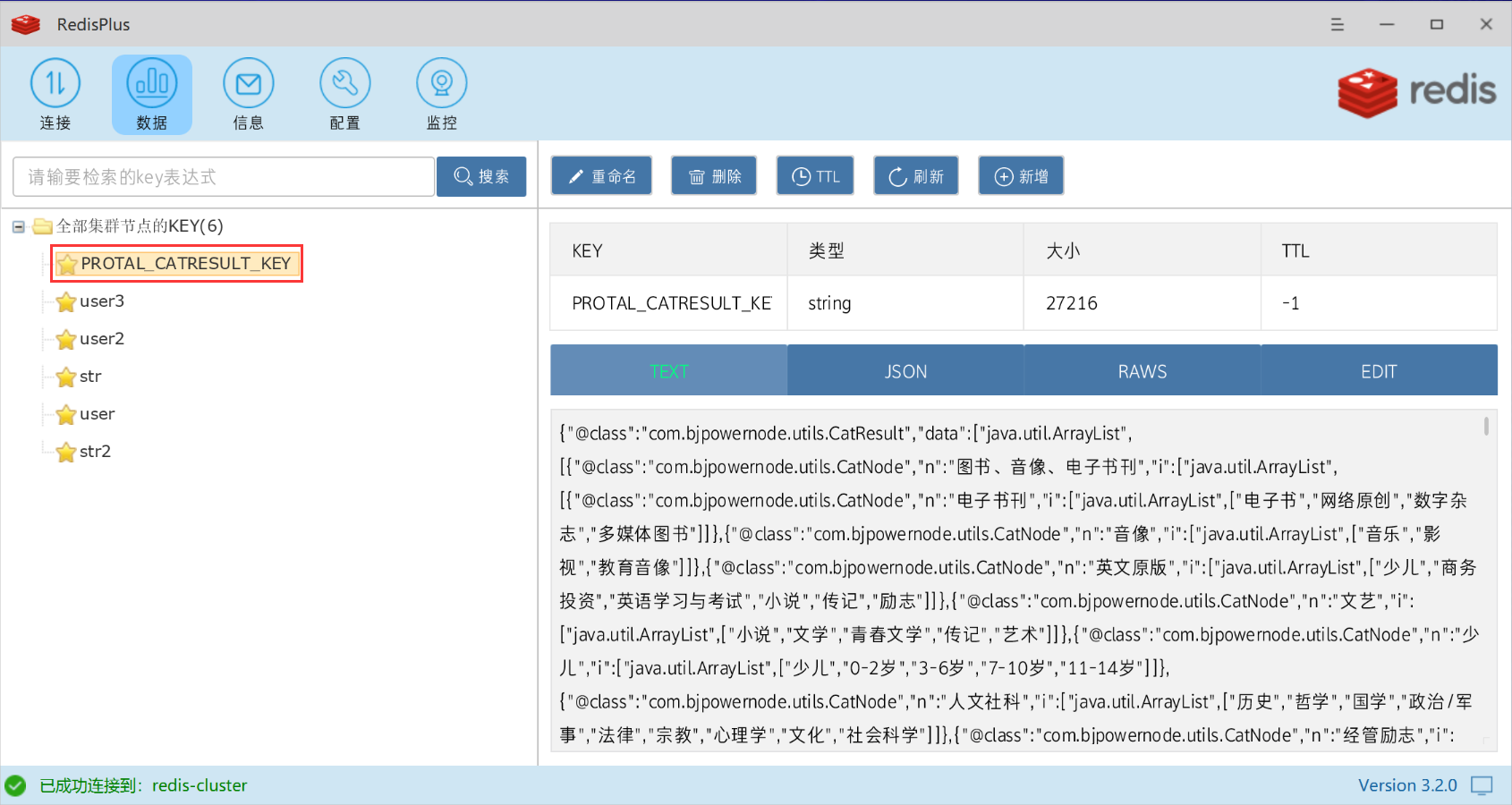
}
四、总结
- Spring Data Redis 核心是
RedisTemplate,封装了 Redis 五大数据结构的操作,简化了 Redis 客户端的使用 - 序列化器选择:字符串用
StringRedisSerializer,POJO 推荐用GenericJackson2JsonRedisSerializer(无乱码、可读性高) - 通过配置类统一设置序列化器,避免重复编码;封装 RedisClient 可让 API 更贴近 Redis 原生命令,降低使用成本
- SpringBoot2.x 后默认使用 Lettuce 客户端,高并发场景下性能更优,可结合连接池进一步优化 Redis 操作效率