基于YOLO26 Pose实现车牌检测
1. 背景介绍
1.1 车牌检测任务概述
车牌检测是计算机视觉中的重要任务,传统方法需要多个模型级联处理。本文介绍一种创新的方法:使用YOLO26 Pose模型直接检测车牌的四个角点坐标,这是一种高效的统一检测框架。
相比传统方案:
- ✅ 一次性检测:直接输出角点坐标,无需级联多个模型
- ✅ 实时性能:在单个GPU上可达到实时推理速度
- ✅ 易于部署:基于成熟的YOLO框架,部署和优化方案完善
- ✅ 高准确率:利用深度学习的强大特征提取能力
1.2 传统方案 vs 创新方案
❌ 传统方案
图像
车牌检测器
R-CNN系列
边界框
特征提取器
角点预测器
四个角点
✅ 我们的方案
图像
YOLO26 Pose
边界框 + 4个关键点坐标
优势:
- 端到端学习:框和关键点同时优化
- 减少冗余:不需要多个独立的模型
- 更快收敛:共享骨干网络的表示学习
2. 方案介绍
2.1 YOLO26 Pose 模型架构
YOLO (You Only Look Once)系列是目标检测领域的基准模型,而YOLO26 Pose是其最新一代用于关键点检测的变体。
输入图像
640×640
Backbone
CSPDarknet
Neck
PAN特征融合
Head
检测头
边界框
x, y, w, h
关键点
4个角点坐标
2.2 关键点定义
对于车牌,我们定义4个关键点:
车牌关键点定义
0 左上
1 右上
2 左下
3 右下
每个关键点格式: (x, y, confidence)
- x, y: 像素坐标
- confidence: 检测置信度
2.3 模型选择建议
| 模型 | 参数量 | 模型大小 | 推理速度(ms) | mAP |
|---|---|---|---|---|
| YOLO26n-pose | 3.3M | 6.3MB | 6 | 52.1 |
| YOLO26s-pose | 11.6M | 22.6MB | 12 | 62.5 |
| YOLO26m-pose | 26.4M | 49.7MB | 28 | 67.3 |
| YOLO26l-pose | 44.8M | 84.0MB | 50 | 69.8 |
选择建议:
- 🚀 实时性要求高 → YOLO26n-pose
- ⚖️ 平衡性能 → YOLO26s-pose (推荐)
- 🎯 高精度要求 → YOLO26l-pose
3. 环境准备
3.1 安装依赖
bash
# 创建虚拟环境(推荐)
python -m venv venv
source venv/bin/activate

# 安装YOLO26(最新版本)
pip install ultralytics

# 安装依赖
pip install torch torchvision torchaudio --index-url https://download.pytorch.org/whl/cu118
pip install opencv-python numpy pyyaml
3.2 下载预训练模型
python
# 自动下载(首次运行时)
from ultralytics import YOLO
model = YOLO("yolo26s-pose.pt")
3.3 验证环境
bash
# 验证YOLO26安装
python -c "from ultralytics import YOLO; model = YOLO('yolo26s-pose.pt'); print('YOLO26加载成功')"

# 验证GPU可用
python -c "import torch; print('GPU可用' if torch.cuda.is_available() else 'GPU不可用')"
4. 数据集配置
4.1 数据集结构
dataset
images
labels
data.yaml
train
val
test
train
val
test
img001.jpg
img002.jpg
img001.txt
img002.txt
4.2 标注文件格式
每个图像对应一个 .txt 文件,格式为:
<class_id> <x_center> <y_center> <width> <height> <kpt_x1> <kpt_y1> <kpt_conf1> ... <kpt_x4> <kpt_y4> <kpt_conf4>具体例子:
0 0.5 0.6 0.3 0.2 0.35 0.50 1 0.65 0.50 1 0.35 0.70 1 0.65 0.70 1参数说明:
0- 类别ID(0=车牌)0.5 0.6- 边界框中心 (归一化坐标 0-1)0.3 0.2- 边界框宽高 (归一化)0.35 0.50 1- 关键点1 (左上角): x, y, 置信度0.65 0.50 1- 关键点2 (右上角): x, y, 置信度0.35 0.70 1- 关键点3 (左下角): x, y, 置信度0.65 0.70 1- 关键点4 (右下角): x, y, 置信度
4.3 配置文件
yaml
# 数据集配置示例

path: ./dataset                    # 数据集根路径
train: images/train                # 训练集路径
val: images/val                    # 验证集路径
test: images/test                  # 测试集路径

nc: 1                              # 类别数量(只有车牌1个类)
names: ['plate']                   # 类别名称

kpt_shape: [4, 3]                 # 关键点形状: [点数=4, 维度=3(x,y,conf)]
创建命令:
bash
cat > dataset/data.yaml << 'EOF'
path: ./dataset
train: images/train
val: images/val
test: images/test

nc: 1
names: ['plate']

kpt_shape: [4, 3]
EOF
4.4 标注工具推荐
| 工具 | 特点 | 说明 |
|---|---|---|
| Roboflow | 在线标注+格式转换 | 支持导出为YOLO26格式,带数据增强 |
| LabelImg | 轻量级桌面工具 | 可标注边界框,需要脚本转换为关键点 |
| CVAT | 企业级标注平台 | 功能完整,支持多种任务类型 |
| Labelme | 多边形标注 | 可标注多边形,脚本转换为关键点 |
5. 模型训练代码
5.1 完整训练脚本
python
#!/usr/bin/env python3
"""
车牌关键点检测训练脚本 - Pose任务
基于YOLO26 Pose模型
用于检测车牌的四个角点位置
"""

import os
from pathlib import Path
from ultralytics import YOLO

def train_model(data_yaml_path, task='pose'):
    """训练YOLO26 Pose模型"""

    print("="*50)
    print("开始加载模型...")

    # 加载预训练Pose模型
    model = YOLO("yolo26s-pose.pt")
    print("模型加载完成")

    # 开始训练
    print("="*50)
    print("开始训练...\n")

    results = model.train(
        data=data_yaml_path,
        task=task,
        epochs=100,
        imgsz=640,
        batch=256,
        device=0,
        workers=4,
        project="./results",
        name="plate_detection",
        exist_ok=True,
        amp=True,              # 混合精度训练 (推荐)
        patience=20,           # 早停机制
        save=True,
        save_period=10,
        cache=True,
        verbose=True,
        # 数据增强参数
        flipud=0.5,            # 纵向翻转
        fliplr=0.5,            # 横向翻转
        degrees=10,            # 旋转
        hsv_h=0.015,           # 色度调整
        hsv_s=0.7,             # 饱和度调整
        hsv_v=0.4,             # 亮度调整
        translate=0.1,         # 平移
        scale=0.5,             # 缩放
        mosaic=1.0,            # Mosaic增强
        mixup=0.0,             # Mixup增强
        close_mosaic=10,       # 最后10个epoch关闭Mosaic
        weight_decay=0.0005,   # 权重衰减
        lr0=0.001,             # 初始学习率
        lrf=0.01,              # 最终学习率系数
    )

    return results

def main():
    print("=" * 50)
    print("车牌关键点检测模型训练")
    print("任务: 检测4个角点 (Pose)")
    print("=" * 50)

    data_yaml_path = "./dataset/data.yaml"

    if not Path(data_yaml_path).exists():
        print(f"\n错误: 配置文件不存在,请检查路径: {data_yaml_path}")
        return

    print(f"\n使用配置文件: {data_yaml_path}\n")

    # 开始训练
    results = train_model(data_yaml_path, task='pose')

    print("\n" + "=" * 50)
    print("训练完成!")
    print(f"最优模型: ./results/plate_detection/weights/best.pt")
    print(f"最后模型: ./results/plate_detection/weights/last.pt")
    print("=" * 50)

if __name__ == "__main__":
    main()
5.2 训练参数说明
python
results = model.train(
    data=data_yaml_path,           # 数据集配置
    task='pose',                   # 关键点检测任务
    epochs=100,                    # 训练轮数
    imgsz=640,                     # 输入分辨率
    batch=256,                     # 批量大小
    device=0,                      # GPU编号
    amp=True,                      # 混合精度训练
    patience=20,                   # 早停耐心值
    # 数据增强
    flipud=0.5,                    # 50%纵向翻转
    fliplr=0.5,                    # 50%横向翻转
    degrees=10,                    # 旋转角度范围
    scale=0.5,                     # 尺度变换
    mosaic=1.0,                    # Mosaic增强
)
5.3 启动训练
bash
python train_pose.py6. 模型推理代码
6.1 单张图像推理
python
from ultralytics import YOLO
import cv2
import numpy as np

def detect_plate_keypoints(image_path, model_path):
    """
    检测图像中的车牌和关键点

    Returns:
        results: YOLO26检测结果
        detections: 解析后的检测结果 [{
            'bbox': [x_min, y_min, x_max, y_max],
            'keypoints': [(x1,y1,conf1), (x2,y2,conf2), ...],
            'confidence': float
        }, ...]
    """

    # 加载模型
    model = YOLO(model_path)

    # 执行推理
    results = model(image_path)

    # 解析结果
    detections = []
    for result in results:
        for box, kpts in zip(result.boxes, result.keypoints):
            # 边界框
            bbox = box.xyxy[0].cpu().numpy()
            conf = box.conf[0].item()

            # 关键点
            keypoints = []
            for i in range(4):
                x = kpts.xy[0][i][0].item()
                y = kpts.xy[0][i][1].item()
                confidence = kpts.conf[0][i].item()
                keypoints.append((x, y, confidence))

            detections.append({
                'bbox': bbox,
                'keypoints': keypoints,
                'confidence': conf
            })

    return results, detections

# 使用
if __name__ == "__main__":
    image_path = "test_image.jpg"
    model_path = "./results/plate_detection/weights/best.pt"

    results, detections = detect_plate_keypoints(image_path, model_path)

    print(f"检测到 {len(detections)} 个车牌")
    for i, det in enumerate(detections):
        print(f"车牌 {i+1}:")
        print(f"  置信度: {det['confidence']:.2f}")
        print(f"  关键点: {det['keypoints']}")
6.2 批量推理
python
from pathlib import Path
from ultralytics import YOLO

def batch_detect(image_dir, model_path, output_dir):
    """批量检测图像"""

    model = YOLO(model_path)
    output_dir = Path(output_dir)
    output_dir.mkdir(exist_ok=True)

    image_files = list(Path(image_dir).glob("*.jpg")) + \
                  list(Path(image_dir).glob("*.png"))

    for image_file in image_files:
        print(f"处理: {image_file.name}")

        results = model(str(image_file))

        # 保存结果
        result_name = image_file.stem + "_result.jpg"
        results[0].save(output_dir / result_name)

# 使用
batch_detect("./test_images",
            "./results/plate_detection/weights/best.pt",
            "./output_results")
6.3 可视化结果
python
def visualize_detections(image_path, detections, output_path):
    """
    可视化检测结果
    """
    img = cv2.imread(image_path)

    for det in detections:
        bbox = det['bbox'].astype(int)
        keypoints = det['keypoints']
        conf = det['confidence']

        # 绘制边界框
        cv2.rectangle(img,
                     (bbox[0], bbox[1]),
                     (bbox[2], bbox[3]),
                     (0, 255, 0), 2)

        # 绘制关键点
        colors = [(255, 0, 0), (0, 255, 0), (0, 0, 255), (255, 255, 0)]
        labels = ['左上', '右上', '左下', '右下']

        for i, (x, y, kpt_conf) in enumerate(keypoints):
            x, y = int(x), int(y)
            cv2.circle(img, (x, y), 5, colors[i], -1)
            cv2.putText(img, labels[i], (x+5, y-5),
                       cv2.FONT_HERSHEY_SIMPLEX, 0.5, colors[i], 1)

        # 绘制置信度
        cv2.putText(img, f"Conf: {conf:.2f}",
                   (bbox[0], bbox[1]-10),
                   cv2.FONT_HERSHEY_SIMPLEX, 0.5, (0, 255, 0), 1)

    # 保存
    cv2.imwrite(output_path, img)
    print(f"结果已保存: {output_path}")
7. 结果显示
7.1 训练过程输出
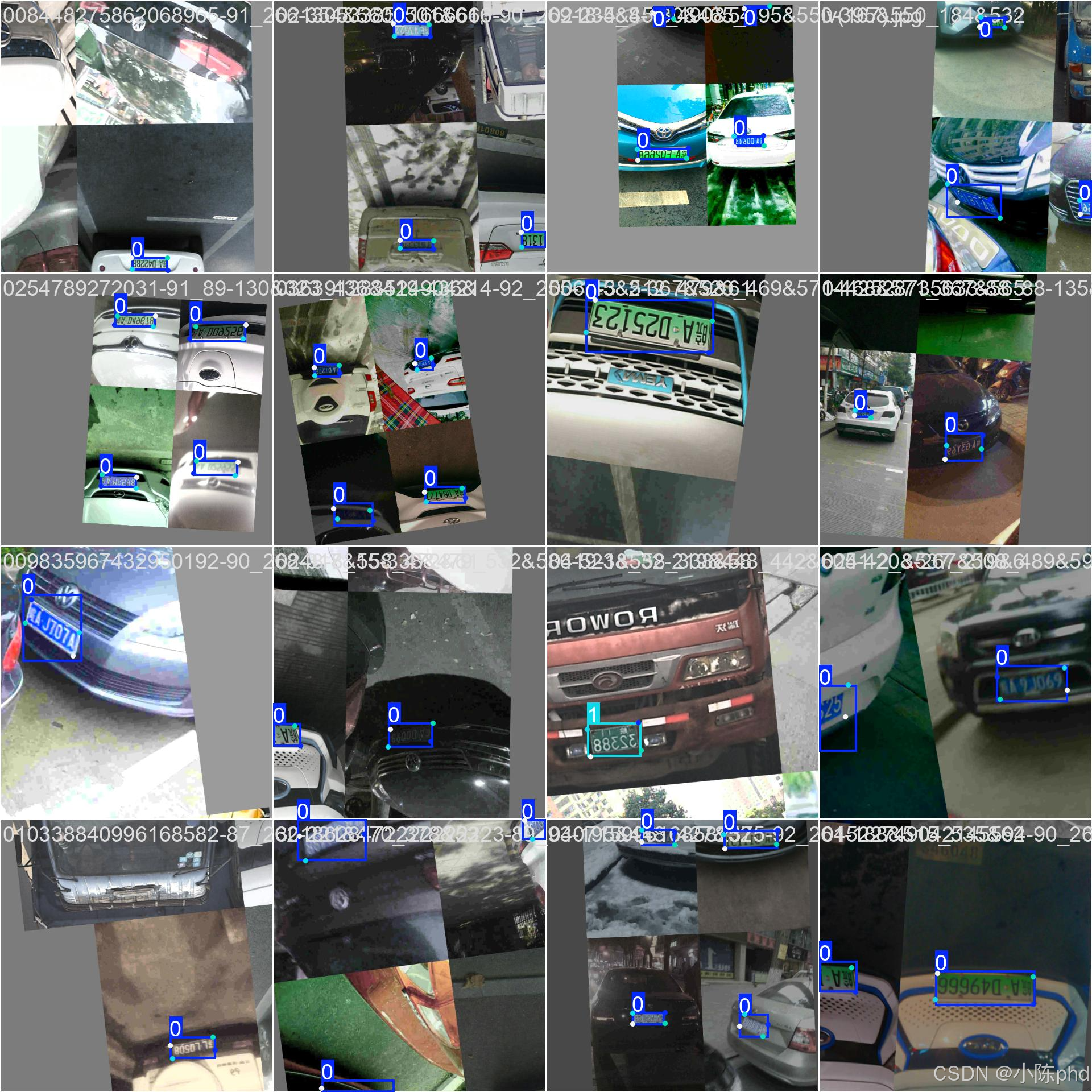
7.2 训练结果文件
bash
# 查看结果目录
ls ./results/plate_detection/

# 包含文件:
# - weights/best.pt       最优模型
# - weights/last.pt       最后模型
# - results.csv           训练日志
# - confusion_matrix.png  混淆矩阵
# - results.png           训练曲线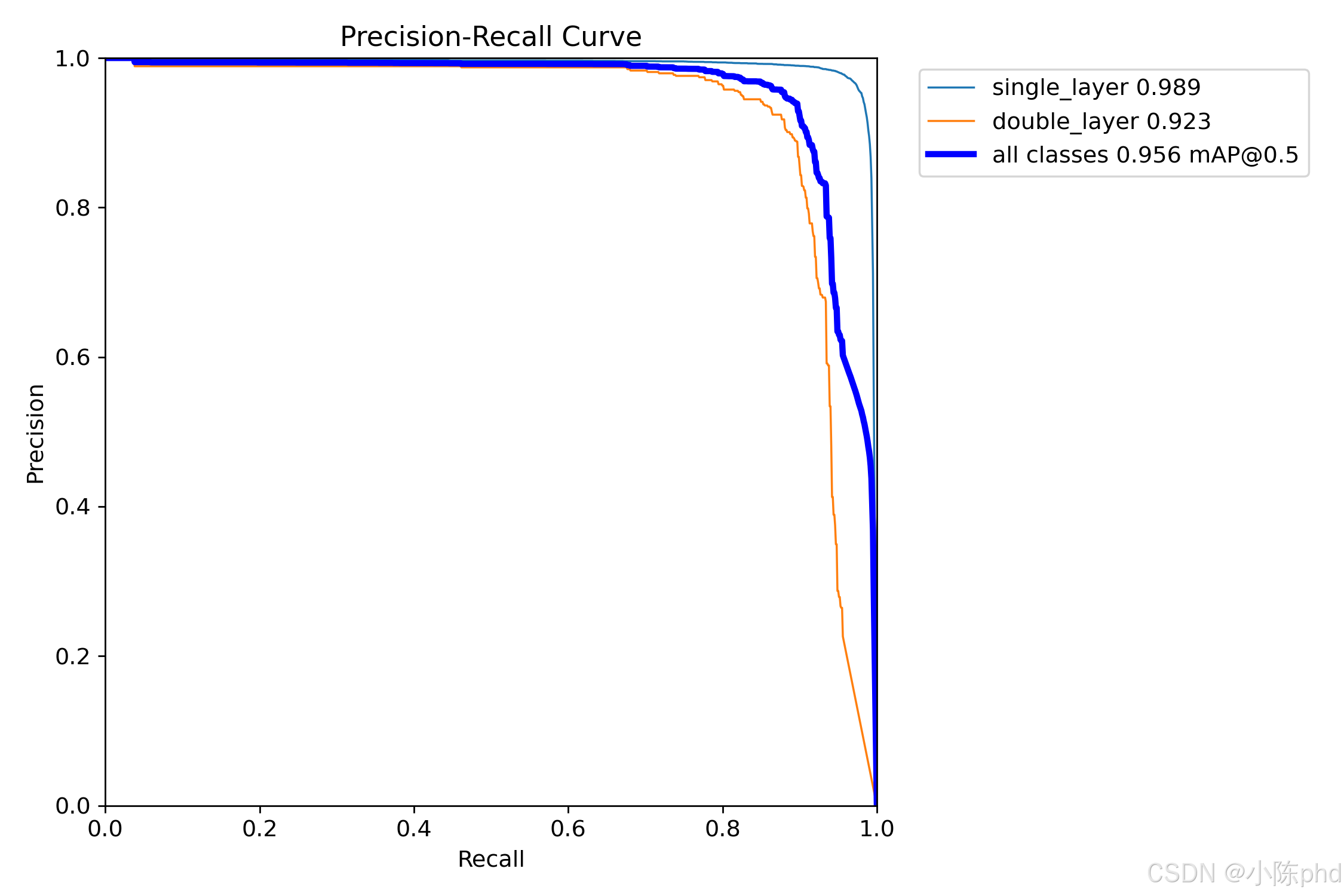
7.3 性能指标
python
from ultralytics import YOLO

def evaluate_model(model_path, data_yaml_path):
    """评估YOLO26模型性能"""

    model = YOLO(model_path)

    # 评估
    metrics = model.val(data=data_yaml_path, imgsz=640)

    print("评估结果:")
    print(f"Box mAP50: {metrics.box.map50:.3f}")
    print(f"Box mAP: {metrics.box.map:.3f}")
    print(f"Pose mAP50: {metrics.pose.map50:.3f}")
    print(f"Pose mAP: {metrics.pose.map:.3f}")

    return metrics

# 使用
evaluate_model(
    "./results/plate_detection/weights/best.pt",
    "./dataset/data.yaml"
)
8. 常见问题
Q1: 训练时GPU显存不足?
解决方案:
python
# 减小批量大小
batch=128  # 从256改为128

# 或减小输入分辨率
imgsz=416  # 从640改为416
Q2: 模型准确率不够高?
优化策略:
python
# 1. 增加训练轮数
epochs=200

# 2. 增强数据增强强度
mosaic=1.0
mixup=0.1
degrees=15

# 3. 使用更大的模型
model = YOLO("yolo26l-pose.pt")
Q3: 推理速度太慢?
加速方案:
python
# 1. 模型优化
model = YOLO("yolo26n-pose.pt")

# 2. 导出为ONNX (CPU快速推理)
model.export(format='onnx')

# 3. 导出为TensorRT (GPU快速推理)
model.export(format='engine')
Q4: 如何部署到移动设备?
方案:
python
# 导出为TFLite (移动设备)
model.export(format='tflite')

# 或导出为CoreML (iOS)
model.export(format='coreml')

# 或导出为ONNX (跨平台)
model.export(format='onnx')
参考资源
希望这篇指南对您有帮助!有任何问题欢迎提问。