目录
-
- 一、概述
- 二、技术栈与版本要求
-
- [2.1 当前项目版本配置](#2.1 当前项目版本配置)
- [2.2 SpringBoot与Elasticsearch版本对应关系](#2.2 SpringBoot与Elasticsearch版本对应关系)
- [2.3 版本兼容性问题解决方案](#2.3 版本兼容性问题解决方案)
-
- [2.3.1 方案一:降低Spring Boot版本(推荐)](#2.3.1 方案一:降低Spring Boot版本(推荐))
- [2.3.2 方案二:手动指定所有依赖版本](#2.3.2 方案二:手动指定所有依赖版本)
- 三、环境准备
-
- [3.1 安装 Elasticsearch 服务](#3.1 安装 Elasticsearch 服务)
- [3.2 验证服务状态](#3.2 验证服务状态)
- 四、项目集成步骤
-
- [4.1 添加 Maven 依赖](#4.1 添加 Maven 依赖)
- [4.2 配置 application.yml](#4.2 配置 application.yml)
- [4.3 配置类说明](#4.3 配置类说明)
- [4.4 Elasticsearch 索引 DSL](#4.4 Elasticsearch 索引 DSL)
- [4.5 IK 分词器插件安装与配置](#4.5 IK 分词器插件安装与配置)
-
- [4.5.1 方案一:安装 IK 分词器插件](#4.5.1 方案一:安装 IK 分词器插件)
- [4.5.2 Analyzer 与 Tokenizer 的关系](#4.5.2 Analyzer 与 Tokenizer 的关系)
- [4.5.3 IK 分词器的种类](#4.5.3 IK 分词器的种类)
- [4.5.4 使用建议](#4.5.4 使用建议)
- [4.5.5 方案二:使用标准分词器(不安装插件)](#4.5.5 方案二:使用标准分词器(不安装插件))
- [4.6 实体类中分词器使用方式说明](#4.6 实体类中分词器使用方式说明)
- [4.7 创建实体类](#4.7 创建实体类)
- 五、核心功能实现
-
- [5.1 创建 Repository 类](#5.1 创建 Repository 类)
- [5.2 服务层实现](#5.2 服务层实现)
-
- [5.2.1 创建服务接口](#5.2.1 创建服务接口)
- [5.2.2 创建服务实现类](#5.2.2 创建服务实现类)
- [5.3 控制层接口](#5.3 控制层接口)
- [六、REST API 接口文档](#六、REST API 接口文档)
-
- [6.1 商品管理接口](#6.1 商品管理接口)
-
- [6.1.1 创建商品](#6.1.1 创建商品)
- [6.1.2 获取商品详情](#6.1.2 获取商品详情)
- [6.1.3 获取商品列表](#6.1.3 获取商品列表)
- [6.1.4 搜索商品](#6.1.4 搜索商品)
- [6.1.5 删除商品](#6.1.5 删除商品)
- [6.1.6 复杂查询](#6.1.6 复杂查询)
- [6.1.7 价格分布统计](#6.1.7 价格分布统计)
- [6.1.8 分类统计](#6.1.8 分类统计)
- 七、高级查询与聚合实现
-
- [7.1 复杂查询实现](#7.1 复杂查询实现)
- [7.2 聚合分析实现](#7.2 聚合分析实现)
- 八、性能优化与最佳实践
-
- [8.1 索引优化](#8.1 索引优化)
- [8.2 查询优化](#8.2 查询优化)
- [8.3 连接池与超时](#8.3 连接池与超时)
- 九、常见问题与解决方案
-
- [9.1 版本冲突导致启动失败](#9.1 版本冲突导致启动失败)
- [9.2 连接拒绝 (Connection refused)](#9.2 连接拒绝 (Connection refused))
- [9.3 版本不兼容](#9.3 版本不兼容)
- [9.4 中文分词效果差](#9.4 中文分词效果差)
- [9.5 Elasticsearch版本兼容性问题](#9.5 Elasticsearch版本兼容性问题)
-
- [9.5.1 方案一:降低Spring Boot版本(推荐)](#9.5.1 方案一:降低Spring Boot版本(推荐))
- [9.5.2 方案二:手动指定所有依赖版本](#9.5.2 方案二:手动指定所有依赖版本)
一、概述
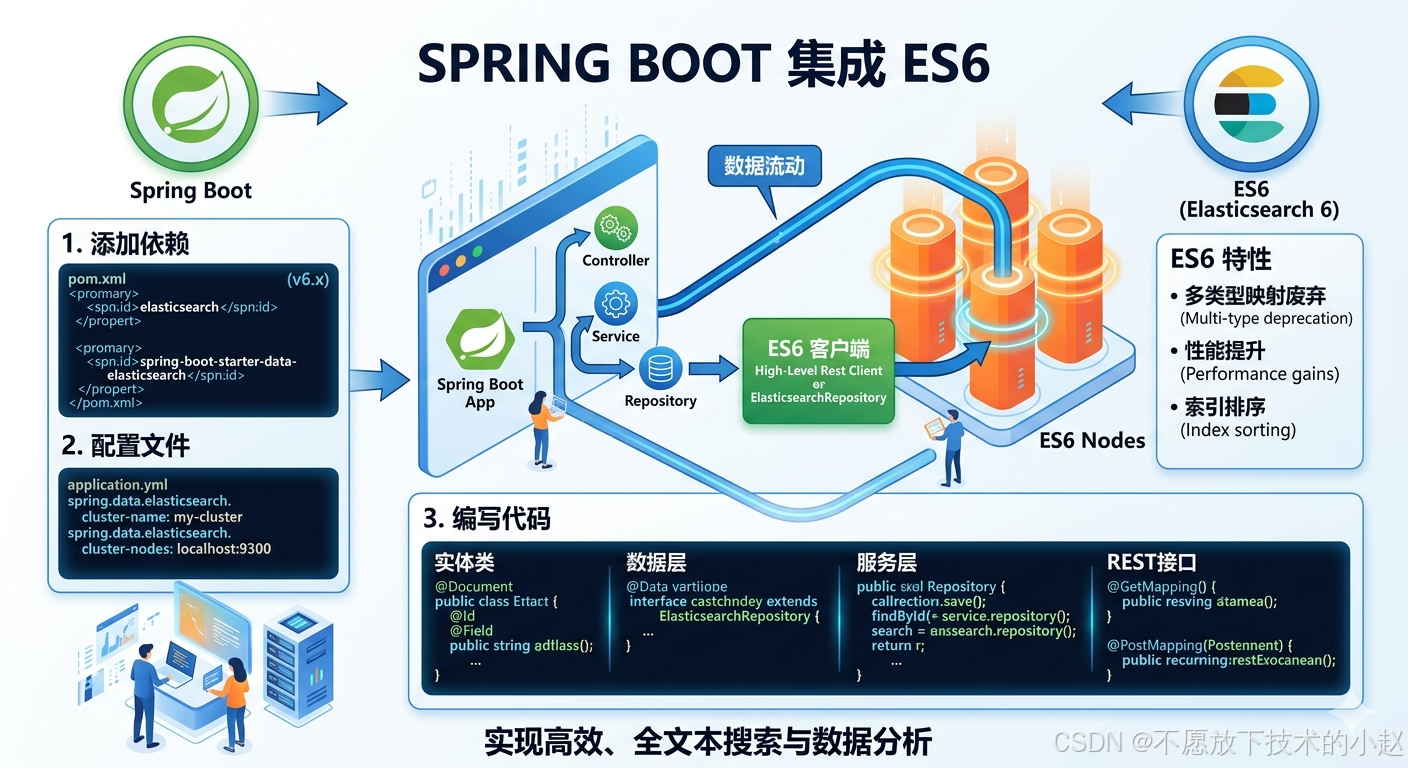
本文介绍了在 SpringBoot 项目中集成 Elasticsearch 的完整流程。
Elasticsearch是一个基于 Lucene 的分布式全文搜索引擎,通过elasticsearch-rest-high-level-client可以轻松实现与 SpringBoot 的整合,为应用提供强大的搜索、分析和数据可视化能力。本次集成将涵盖环境准备、依赖配置、索引管理、文档操作、高级查询等核心功能,确保系统具备高可用、高性能的搜索服务能力。
二、技术栈与版本要求
2.1 当前项目版本配置
| 组件 | 版本 | 说明 |
|---|---|---|
| SpringBoot | 2.2.13.RELEASE | 基础框架,提供自动配置 |
| Spring Data Elasticsearch | 3.2.12.RELEASE | Spring 官方数据访问模块 |
| Elasticsearch | 6.3.2 | 搜索引擎服务端 |
| JDK | 1.8 | Java 运行环境 |
| Maven | 3.6.3+ | 项目构建工具 |
版本兼容性说明:Spring Data Elasticsearch 3.2.x 版本对应 Elasticsearch 6.x 版本。本项目使用Elasticsearch 6.3.2版本,确保API兼容性。
2.2 SpringBoot与Elasticsearch版本对应关系
| SpringBoot版本 | Spring Data Elasticsearch版本 | Elasticsearch版本 | 说明 |
|---|---|---|---|
| 1.5.x.RELEASE | 2.1.x | 2.4.x | 早期版本 |
| 2.0.x.RELEASE | 3.0.x | 5.6.x | ES 5.x系列 |
| 2.1.x.RELEASE | 3.1.x | 6.2.x | ES 6.x早期版本 |
| 2.2.x.RELEASE | 3.2.x | 6.3.x-6.8.x | 当前项目使用版本 |
| 2.3.x.RELEASE | 4.0.x | 7.6.x | ES 7.x早期版本 |
| 2.4.x.RELEASE | 4.1.x | 7.9.x | ES 7.x |
| 2.5.x.RELEASE | 4.2.x | 7.12.x | ES 7.x |
| 2.6.x.RELEASE | 4.3.x | 7.15.x | ES 7.x |
| 2.7.x.RELEASE | 4.4.x | 7.17.x | ES 7.x最终版本 |
重要提示:由于本项目使用Elasticsearch 6.3.2,需要手动指定相关依赖版本以确保兼容性。Spring Boot 2.2.x默认管理的版本可能高于6.3.2。
2.3 版本兼容性问题解决方案
2.3.1 方案一:降低Spring Boot版本(推荐)
将Spring Boot版本从2.2.x降低到2.1.x,使其与Elasticsearch 6.3.2版本兼容:
xml
<properties>
    <spring.boot.version>2.1.0.RELEASE</spring.boot.version>
</properties>

<dependencies>
    <!-- 只保留高级REST客户端依赖,让Spring Boot管理版本 -->
    <dependency>
        <groupId>org.elasticsearch.client</groupId>
        <artifactId>elasticsearch-rest-high-level-client</artifactId>
    </dependency>
</dependencies>优势:
- 利用Spring Boot的依赖管理,自动解决版本兼容性问题
- 代码更简洁,无需手动指定所有Elasticsearch依赖版本
- 减少依赖冲突的可能性
2.3.2 方案二:手动指定所有依赖版本
移除spring-boot-starter-data-elasticsearch依赖,并明确指定所有Elasticsearch相关依赖的版本:
xml
<!-- 明确指定所有Elasticsearch依赖的版本 -->
<dependency>
    <groupId>org.elasticsearch</groupId>
    <artifactId>elasticsearch</artifactId>
    <version>6.3.2</version>
</dependency>
<dependency>
    <groupId>org.elasticsearch.client</groupId>
    <artifactId>elasticsearch-rest-client</artifactId>
    <version>6.3.2</version>
</dependency>
<dependency>
    <groupId>org.elasticsearch.client</groupId>
    <artifactId>elasticsearch-rest-high-level-client</artifactId>
    <version>6.3.2</version>
</dependency>
三、环境准备
3.1 安装 Elasticsearch 服务
推荐使用 Docker 快速部署 Elasticsearch 服务:
bash
# 拉取 Elasticsearch 镜像
docker pull elasticsearch:6.8.13

# 启动 Elasticsearch 容器
docker run -d \
  --name elasticsearch \
  -p 9200:9200 \
  -p 9300:9300 \
  -e "discovery.type=single-node" \
  -e "ES_JAVA_OPTS=-Xms512m -Xmx512m" \
  elasticsearch:6.8.13
3.2 验证服务状态
启动后,通过以下命令验证 Elasticsearch 是否正常运行:
bash
# 检查服务健康状态
curl -X GET "http://localhost:9200/_cluster/health?pretty"

# 查看节点信息
curl -X GET "http://localhost:9200/_cat/nodes?v"
如果 Elasticsearch 配置了账号密码,使用以下命令:
bash
# 检查服务健康状态(带认证)
curl -X GET -u username:password "http://localhost:9200/_cluster/health?pretty"

# 查看节点信息(带认证)
curl -X GET -u username:password "http://localhost:9200/_cat/nodes?v"

# 或者使用 --user 参数
curl -X GET --user username:password "http://localhost:9200/_cluster/health?pretty"
预期返回 status: green 表示集群健康。
四、项目集成步骤
4.1 添加 Maven 依赖
在 pom.xml 中添加 Elasticsearch 依赖(移除Spring Data Elasticsearch依赖,手动实现所有功能):
xml
<dependencies>
    <!-- Elasticsearch 高级 REST 客户端 -->
    <dependency>
        <groupId>org.elasticsearch.client</groupId>
        <artifactId>elasticsearch-rest-high-level-client</artifactId>
    </dependency>

    <!-- FastJSON -->
    <dependency>
        <groupId>com.alibaba</groupId>
        <artifactId>fastjson</artifactId>
        <version>1.2.83</version>
    </dependency>

    <!-- Lombok -->
    <dependency>
        <groupId>org.projectlombok</groupId>
        <artifactId>lombok</artifactId>
        <version>1.18.16</version>
        <scope>compile</scope>
        <optional>true</optional>
    </dependency>
</dependencies>
4.2 配置 application.yml
在 application.yml 中配置 Elasticsearch 连接信息:
项目实际配置(Spring Boot 2.2.x + Elasticsearch 6.3.2):
yaml
server:
  port: 8080

# Elasticsearch配置
elasticsearch:
  host: 111.228.59.250
  port: 9200
  username: elastic
  password: XXXX
scheme: http配置说明:
elasticsearch.host:Elasticsearch服务器地址elasticsearch.port:Elasticsearch服务器端口(HTTP端口9200)elasticsearch.username/password:Elasticsearch认证信息elasticsearch.scheme:连接协议(http或https)
4.3 配置类说明
由于移除了Spring Data Elasticsearch,需要创建配置类手动配置RestHighLevelClient:
java
package com.demo.config;

import org.apache.http.HttpHost;
import org.apache.http.auth.AuthScope;
import org.apache.http.auth.UsernamePasswordCredentials;
import org.apache.http.client.CredentialsProvider;
import org.apache.http.impl.client.BasicCredentialsProvider;
import org.elasticsearch.client.RestClient;
import org.elasticsearch.client.RestClientBuilder;
import org.elasticsearch.client.RestHighLevelClient;
import org.springframework.beans.factory.annotation.Value;
import org.springframework.context.annotation.Bean;
import org.springframework.context.annotation.Configuration;

@Configuration
public class ElasticsearchConfig {

    @Value("${elasticsearch.host}")
    private String host;

    @Value("${elasticsearch.port}")
    private int port;

    @Value("${elasticsearch.username}")
    private String username;

    @Value("${elasticsearch.password}")
    private String password;

    @Value("${elasticsearch.scheme}")
    private String scheme;

    @Bean
    public RestHighLevelClient client() {
        // 创建认证提供者
        CredentialsProvider credentialsProvider = new BasicCredentialsProvider();
        credentialsProvider.setCredentials(AuthScope.ANY,
                new UsernamePasswordCredentials(username, password));

        // 创建REST客户端构建器
        RestClientBuilder builder = RestClient.builder(
                        new HttpHost(host, port, scheme))
                .setHttpClientConfigCallback(httpClientBuilder ->
                        httpClientBuilder.setDefaultCredentialsProvider(credentialsProvider));

        return new RestHighLevelClient(builder);
    }
}
4.4 Elasticsearch 索引 DSL
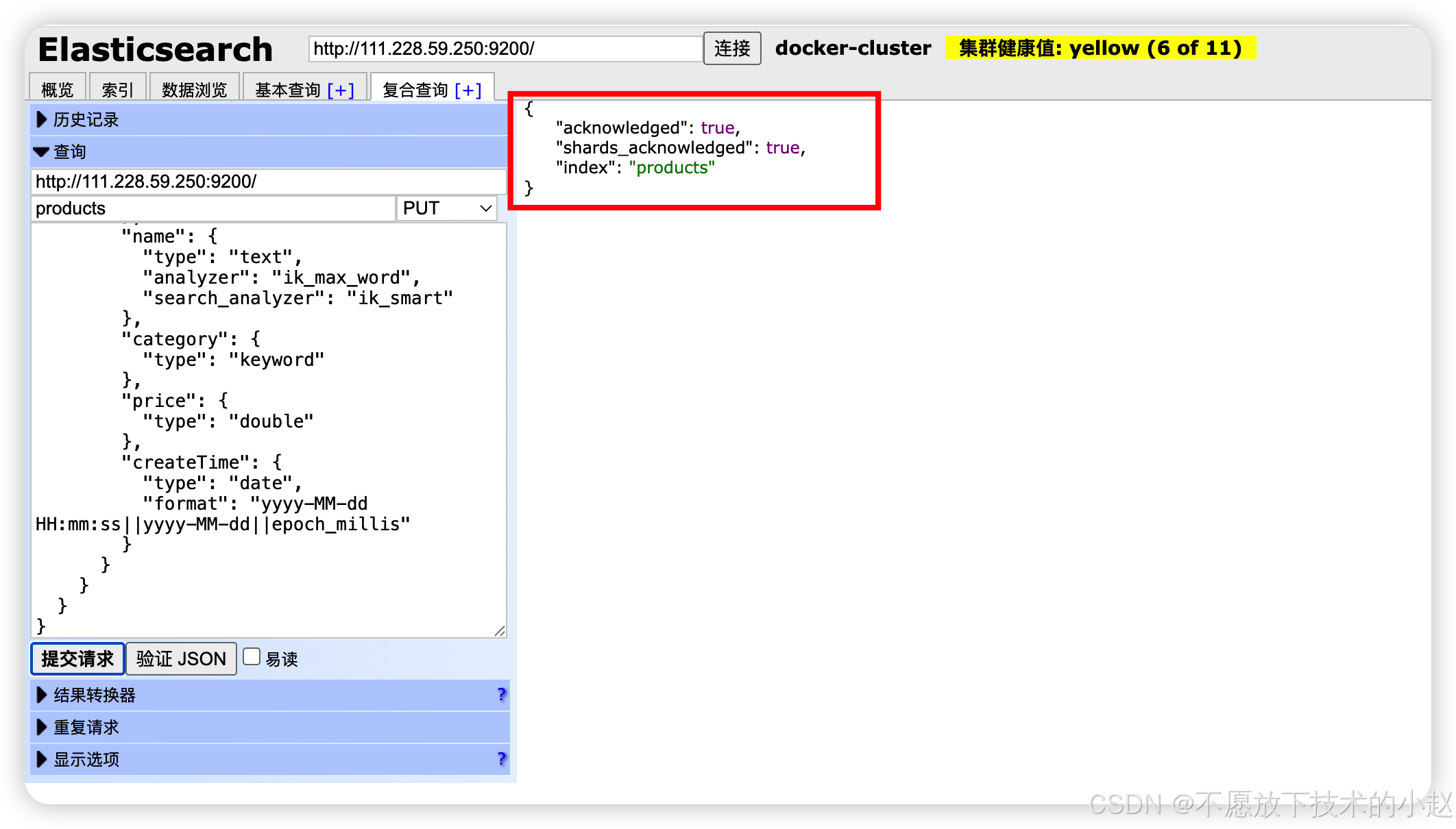
在创建实体类之前,我们先了解本次实战中涉及的 Elasticsearch 索引 DSL。这些 DSL 语句用于手动创建索引和定义映射。
创建 products 索引的 DSL:
json
PUT /products
{
  "settings": {
    "number_of_shards": 1,
    "number_of_replicas": 1,
    "analysis": {
      "analyzer": {
        "ik_max_word": {
          "type": "custom",
          "tokenizer": "ik_max_word"
        },
        "ik_smart": {
          "type": "custom",
          "tokenizer": "ik_smart"
        }
      }
    }
  },
  "mappings": {
    "product": {
      "properties": {
        "id": {
          "type": "keyword"
        },
        "title": {
          "type": "text",
          "analyzer": "ik_max_word",
          "search_analyzer": "ik_smart"
        },
        "category": {
          "type": "keyword"
        },
        "price": {
          "type": "double"
        },
        "createTime": {
          "type": "date",
          "format": "yyyy-MM-dd HH:mm:ss||yyyy-MM-dd||epoch_millis"
        }
      }
    }
  }
}
常用查询 DSL 示例:
json
// 1. 根据ID查询
GET /products/product/{id}

// 2. 根据标题模糊查询
GET /products/product/_search
{
  "query": {
    "match": {
      "title": "搜索关键词"
    }
  }
}

// 3. 根据分类和价格范围查询
GET /products/product/_search
{
  "query": {
    "bool": {
      "must": [
        {
          "term": {
            "category": "电子产品"
          }
        },
        {
          "range": {
            "price": {
              "gte": 100,
              "lte": 1000
            }
          }
        }
      ]
    }
  }
}

// 4. 聚合查询 - 按分类统计商品数量
GET /products/product/_search
{
  "size": 0,
  "aggs": {
    "categories": {
      "terms": {
        "field": "category"
      }
    }
  }
}
注意 :上述 DSL 中的
ik_max_word和ik_smart是 IK 分词器的两种模式,需要提前安装 IK 分词器插件。
4.5 IK 分词器插件安装与配置
如果在执行索引创建时遇到以下错误:
json
{
  "error": {
    "root_cause": [
      {
        "type": "illegal_argument_exception",
        "reason": "Custom Analyzer [ik_max_word] failed to find tokenizer under name [ik_max_word]"
      }
    ],
    "type": "illegal_argument_exception",
    "reason": "Custom Analyzer [ik_max_word] failed to find tokenizer under name [ik_max_word]"
  },
  "status": 400
}
这是因为 Elasticsearch 没有找到 IK 分词器插件。以下是解决方案:
4.5.1 方案一:安装 IK 分词器插件
对于 Elasticsearch 6.3.2 版本,需要安装对应版本的 IK 分词器插件:
bash
# 进入 Elasticsearch 容器
docker exec -it elasticsearch /bin/bash

# 进入 Elasticsearch 安装目录(通常是 /usr/share/elasticsearch)
cd /usr/share/elasticsearch

# 安装 IK 分词器插件
./bin/elasticsearch-plugin install https://github.com/medcl/elasticsearch-analysis-ik/releases/download/v6.3.2/elasticsearch-analysis-ik-6.3.2.zip

# 退出容器并重启 Elasticsearch
exit
docker restart elasticsearch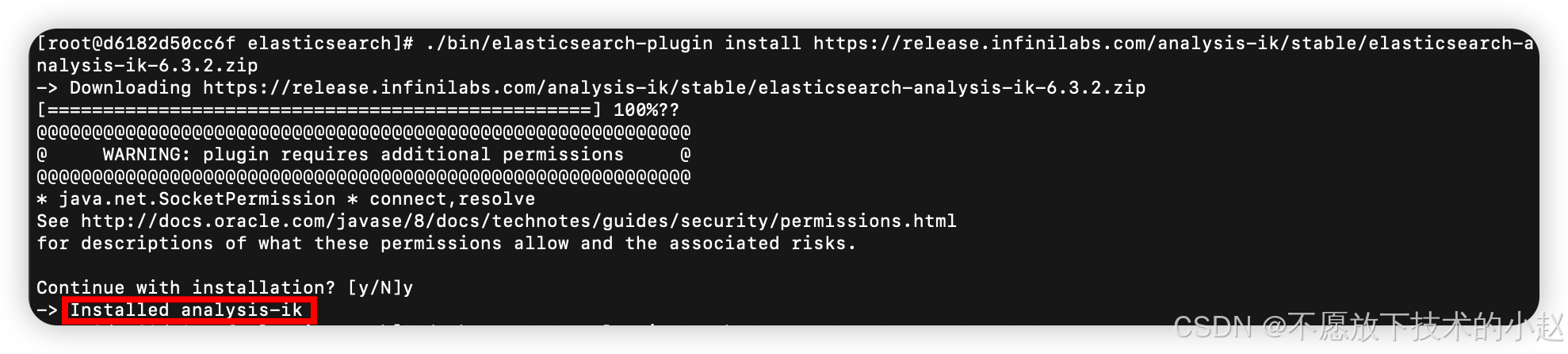
插件默认安装位置 :
IK 分词器插件默认安装在 Elasticsearch 的 plugins 目录下,具体路径为:
/usr/share/elasticsearch/plugins/analysis-ik/在这个目录下,你可以找到插件的配置文件和词典文件:
config/目录:包含 IK 分词器的配置文件config/main.dic:主词典文件config/stopword.dic:停用词词典config/quantifier.dic:量词词典
如果需要自定义词典,可以在 config 目录下添加自己的词典文件,格式为每行一个词。
安装完成后,可以通过以下命令验证插件是否安装成功:
bash
# 查看已安装的插件
curl -X GET "localhost:9200/_cat/plugins?v"

# 测试 IK 分词器
curl -X POST "localhost:9200/_analyze" -H 'Content-Type: application/json' -d'
{
  "analyzer": "ik_max_word",
  "text": "中华人民共和国"
}'
4.5.2 Analyzer 与 Tokenizer 的关系
在 Elasticsearch 中:
- Analyzer(分析器):是一个完整的文本处理管道,包含字符过滤器(character filters)、分词器(tokenizer)和词元过滤器(token filters)
- Tokenizer(分词器):是分析器的一部分,负责将文本分割成词元(tokens)
在索引 DSL 中的配置:
json
"analyzer": {
  "ik_max_word": {
    "type": "custom",
    "tokenizer": "ik_max_word"
  },
  "ik_smart": {
    "type": "custom",
    "tokenizer": "ik_smart"
  }
}
这是在定义两个自定义分析器,它们都使用了 IK 分词器作为 tokenizer。
4.5.3 IK 分词器的种类
IK 分词器是一个第三方中文分词插件,它提供了两种分词模式:
-
ik_max_word:最细粒度分词
- 会将文本做最细粒度的拆分
- 例如:"中华人民共和国国歌"会被分词为:"中华人民共和国,中华人民,中华,华人,人民共和国,人民,人,民,共和国,共和,和,国国,国歌"
-
ik_smart:智能分词
- 会做最粗粒度的拆分
- 例如:"中华人民共和国国歌"会被分词为:"中华人民共和国,国歌"
4.5.4 使用建议
- 索引时 :通常使用
ik_max_word,确保尽可能多的词被索引,提高召回率 - 搜索时 :通常使用
ik_smart,确保搜索词尽可能准确,提高准确率
这就是为什么在实体类注解中你会看到:
java
@Field(type = FieldType.Text, analyzer = "ik_max_word", searchAnalyzer = "ik_smart")4.5.5 方案二:使用标准分词器(不安装插件)
如果不想安装 IK 分词器插件,可以使用 Elasticsearch 内置的标准分词器:
json
PUT /products
{
  "settings": {
    "number_of_shards": 1,
    "number_of_replicas": 1
  },
  "mappings": {
    "product": {
      "properties": {
        "id": {
          "type": "keyword"
        },
        "name": {
          "type": "text",
          "analyzer": "standard"
        },
        "category": {
          "type": "keyword"
        },
        "price": {
          "type": "double"
        },
        "createTime": {
          "type": "date",
          "format": "yyyy-MM-dd HH:mm:ss||yyyy-MM-dd||epoch_millis"
        }
      }
    }
  }
}
如果使用标准分词器,需要相应修改实体类中的注解:
java
@Field(type = FieldType.Text, analyzer = "standard")
private String title;
4.6 实体类中分词器使用方式说明
在 Product 实体类中,name 字段使用了特殊的注解:
java
@Field(type = FieldType.Text, analyzer = "ik_max_word", searchAnalyzer = "ik_smart")
private String title;参数说明:
-
type = FieldType.Text:- 表示该字段是可分词的文本类型
- 与 Elasticsearch 中的
text类型对应
-
analyzer = "ik_max_word":- 指定索引时使用的分析器
ik_max_word是 IK 分词器的最细粒度分词模式- 在文档被索引时,会使用此分析器处理字段内容
- 确保尽可能多的词被索引,提高召回率
-
searchAnalyzer = "ik_smart":- 指定搜索时使用的分析器
ik_smart是 IK 分词器的智能分词模式- 在执行搜索查询时,会使用此分析器处理搜索关键词
- 确保搜索词尽可能准确,提高准确率
4.7 创建实体类
定义与 Elasticsearch 索引映射的实体类 Product.java:
java
package com.demo.entity;

import com.fasterxml.jackson.annotation.JsonFormat;

import java.util.Date;

public class Product {

    private String id;
    private String title;
    private String category;
    private Double price;

    @JsonFormat(pattern = "yyyy-MM-dd HH:mm:ss", timezone = "GMT+8")
    private Date createTime;

    // 构造函数
    public Product() {}

    // Getter和Setter方法
    public String getId() {
        return id;
    }

    public void setId(String id) {
        this.id = id;
    }

    public String getTitle() {
        return title;
    }

    public void setTitle(String title) {
        this.title = title;
    }

    public String getCategory() {
        return category;
    }

    public void setCategory(String category) {
        this.category = category;
    }

    public Double getPrice() {
        return price;
    }

    public void setPrice(Double price) {
        this.price = price;
    }

    public Date getCreateTime() {
        return createTime;
    }

    public void setCreateTime(Date createTime) {
        this.createTime = createTime;
    }
}字段说明:
- 移除了所有Spring Data Elasticsearch注解,使用纯POJO
@JsonFormat:用于处理JSON日期格式解析,解决"yyyy-MM-dd HH:mm:ss"格式问题- 提供了完整的getter/setter方法,便于JSON序列化和反序列化
五、核心功能实现
5.1 创建 Repository 类
创建 ProductRepository 类,手动实现所有功能:
java
package com.demo.repository;

import com.demo.entity.Product;
import com.fasterxml.jackson.databind.ObjectMapper;
import org.apache.http.Header;
import org.apache.http.message.BasicHeader;
import org.elasticsearch.action.delete.DeleteRequest;
import org.elasticsearch.action.delete.DeleteResponse;
import org.elasticsearch.action.get.GetRequest;
import org.elasticsearch.action.get.GetResponse;
import org.elasticsearch.action.index.IndexRequest;
import org.elasticsearch.action.index.IndexResponse;
import org.elasticsearch.action.search.SearchRequest;
import org.elasticsearch.action.search.SearchResponse;
import org.elasticsearch.client.RestHighLevelClient;
import org.elasticsearch.common.xcontent.XContentType;
import org.elasticsearch.index.query.BoolQueryBuilder;
import org.elasticsearch.index.query.QueryBuilders;
import org.elasticsearch.search.SearchHit;
import org.elasticsearch.search.builder.SearchSourceBuilder;
import org.springframework.beans.factory.annotation.Autowired;
import org.springframework.stereotype.Repository;

import java.io.IOException;
import java.util.ArrayList;
import java.util.List;
import java.util.Map;

@Repository
public class ProductRepository {

    @Autowired
    private RestHighLevelClient client;

    private final ObjectMapper objectMapper = new ObjectMapper();
    private static final String INDEX_NAME = "products";
    private static final String TYPE_NAME = "product";

    // 创建默认的Header数组
    private static final Header[] DEFAULT_HEADERS = new Header[]{
            new BasicHeader("Content-Type", "application/json")
    };

    // 保存商品
    public Product save(Product product) throws IOException {
        IndexRequest request;
        if (product.getId() != null) {
            request = new IndexRequest(INDEX_NAME, TYPE_NAME, product.getId())
                    .source(objectMapper.writeValueAsString(product), XContentType.JSON);
        } else {
            request = new IndexRequest(INDEX_NAME, TYPE_NAME)  // 不指定ID,让ES自动生成
                    .source(objectMapper.writeValueAsString(product), XContentType.JSON);
        }

        IndexResponse response = client.index(request, DEFAULT_HEADERS);

        // 如果ID是自动生成的,将其设置到product对象中
        if (product.getId() == null) {
            product.setId(response.getId());
        }

        return product;
    }

    // 根据ID查询
    public Product findById(String id) throws IOException {
        GetRequest request = new GetRequest(INDEX_NAME, TYPE_NAME, id);
        GetResponse response = client.get(request, DEFAULT_HEADERS);

        if (response.isExists()) {
            Map<String, Object> source = response.getSourceAsMap();
            Product product = objectMapper.convertValue(source, Product.class);
            // 设置文档ID
            product.setId(id);
            return product;
        }
        return null;
    }

    // 查询所有商品
    public List<Product> findAll() throws IOException {
        SearchRequest searchRequest = new SearchRequest(INDEX_NAME);
        SearchSourceBuilder sourceBuilder = new SearchSourceBuilder();
        sourceBuilder.query(QueryBuilders.matchAllQuery());
        searchRequest.source(sourceBuilder);

        return executeSearch(searchRequest);
    }

    // 根据商品名称模糊查询
    public List<Product> findByTitleContaining(String title) throws IOException {
        SearchRequest searchRequest = new SearchRequest(INDEX_NAME);
        SearchSourceBuilder sourceBuilder = new SearchSourceBuilder();
        sourceBuilder.query(QueryBuilders.matchQuery("title", title));
        searchRequest.source(sourceBuilder);

        return executeSearch(searchRequest);
    }

    // 根据分类和价格范围查询
    public List<Product> findByCategoryAndPriceBetween(String category, Double minPrice, Double maxPrice) throws IOException {
        SearchRequest searchRequest = new SearchRequest(INDEX_NAME);
        SearchSourceBuilder sourceBuilder = new SearchSourceBuilder();

        BoolQueryBuilder boolQuery = QueryBuilders.boolQuery();
        boolQuery.filter(QueryBuilders.termQuery("category", category));
        boolQuery.filter(QueryBuilders.rangeQuery("price").gte(minPrice).lte(maxPrice));

        sourceBuilder.query(boolQuery);
        searchRequest.source(sourceBuilder);

        return executeSearch(searchRequest);
    }

    // 删除商品
    public void deleteById(String id) throws IOException {
        DeleteRequest request = new DeleteRequest(INDEX_NAME, TYPE_NAME, id);
        DeleteResponse response = client.delete(request, DEFAULT_HEADERS);
    }

    // 执行搜索并返回结果
    private List<Product> executeSearch(SearchRequest searchRequest) throws IOException {
        SearchResponse response = client.search(searchRequest, DEFAULT_HEADERS);
        SearchHit[] searchHits = response.getHits().getHits();

        List<Product> products = new ArrayList<>();
        for (SearchHit hit : searchHits) {
            Map<String, Object> source = hit.getSourceAsMap();
            Product product = objectMapper.convertValue(source, Product.class);
            // 设置文档ID
            product.setId(hit.getId());
            products.add(product);
        }

        return products;
    }
}关键改进点:
- 添加Header数组:为所有Elasticsearch API调用提供默认的Header数组,解决版本兼容性问题
- 统一API调用方式:所有操作都使用带有Header参数的API调用方式
- 异常处理:所有方法都声明抛出IOException,由上层服务处理
- 手动实现:完全手动实现所有CRUD操作,不依赖Spring Data Elasticsearch
- ID处理:正确处理Elasticsearch自动生成的ID,确保返回的数据包含有效的ID字段
5.2 服务层实现
创建服务层接口和实现类,遵循面向接口编程原则。
5.2.1 创建服务接口
创建 ProductService 接口定义业务方法:
java
package com.demo.service;

import com.demo.entity.Product;
import java.util.List;

public interface ProductService {

    // 保存单个商品
    Product saveProduct(Product product);

    // 批量保存商品
    Iterable<Product> saveProducts(List<Product> products);

    // 根据ID查询
    Product findById(String id);

    // 查询所有商品
    Iterable<Product> findAll();

    // 根据标题模糊搜索
    List<Product> searchByTitle(String title);

    // 根据分类和价格范围搜索
    List<Product> searchByCategoryAndPrice(String category, Double minPrice, Double maxPrice);

    // 删除商品
    void deleteProduct(String id);
}
5.2.2 创建服务实现类
创建 ProductServiceImpl 实现类,处理IOException异常:
java
package com.demo.service.impl;

import com.demo.entity.Product;
import com.demo.repository.ProductRepository;
import com.demo.service.ProductService;
import org.springframework.beans.factory.annotation.Autowired;
import org.springframework.stereotype.Service;

import java.io.IOException;
import java.util.List;

@Service
public class ProductServiceImpl implements ProductService {

    @Autowired
    private ProductRepository productRepository;

    @Override
    public Product saveProduct(Product product) {
        try {
            return productRepository.save(product);
        } catch (IOException e) {
            throw new RuntimeException("保存商品失败", e);
        }
    }

    @Override
    public Iterable<Product> saveProducts(List<Product> products) {
        for (Product product : products) {
            saveProduct(product);
        }
        return products;
    }

    @Override
    public Product findById(String id) {
        try {
            return productRepository.findById(id);
        } catch (IOException e) {
            throw new RuntimeException("查询商品失败", e);
        }
    }

    @Override
    public Iterable<Product> findAll() {
        try {
            return productRepository.findAll();
        } catch (IOException e) {
            throw new RuntimeException("查询所有商品失败", e);
        }
    }

    @Override
    public List<Product> searchByTitle(String title) {
        try {
            return productRepository.findByTitleContaining(title);
        } catch (IOException e) {
            throw new RuntimeException("按标题搜索商品失败", e);
        }
    }

    @Override
    public List<Product> searchByCategoryAndPrice(String category, Double minPrice, Double maxPrice) {
        try {
            return productRepository.findByCategoryAndPriceBetween(category, minPrice, maxPrice);
        } catch (IOException e) {
            throw new RuntimeException("按分类和价格搜索商品失败", e);
        }
    }

    @Override
    public void deleteProduct(String id) {
        try {
            productRepository.deleteById(id);
        } catch (IOException e) {
            throw new RuntimeException("删除商品失败", e);
        }
    }
}
5.3 控制层接口
创建 ProductController 提供 REST API:
java
package com.demo.controller;

import com.demo.entity.Product;
import com.demo.service.ProductService;
import org.slf4j.Logger;
import org.slf4j.LoggerFactory;
import org.springframework.beans.factory.annotation.Autowired;
import org.springframework.web.bind.annotation.*;

import java.util.List;

@RestController
@RequestMapping("/api/products")
public class ProductController {

    private static final Logger logger = LoggerFactory.getLogger(ProductController.class);

    @Autowired
    private ProductService productService;

    /**
     * 创建商品
     * POST /api/products/create
     */
    @PostMapping("/create")
    public Product create(@RequestBody Product product) {
        logger.info("创建商品请求,商品信息: {}", product);
        Product savedProduct = productService.saveProduct(product);
        logger.info("商品创建成功,ID: {}", savedProduct.getId());
        return savedProduct;
    }

    /**
     * 根据ID获取商品
     * GET /api/products/get/{id}
     */
    @GetMapping("/get/{id}")
    public Product getById(@PathVariable String id) {
        logger.info("根据ID获取商品请求,ID: {}", id);
        Product product = productService.findById(id);
        if (product != null) {
            logger.info("成功获取商品,ID: {}", id);
        } else {
            logger.warn("未找到商品,ID: {}", id);
        }
        return product;
    }

    /**
     * 获取所有商品
     * GET /api/products/list
     */
    @GetMapping("/list")
    public List<Product> getAll() {
        logger.info("获取所有商品列表请求");
        List<Product> products = (List<Product>) productService.findAll();
        logger.info("成功获取商品列表,共 {} 条记录", products.size());
        return products;
    }

    /**
     * 搜索商品
     * GET /api/products/search
     */
    @GetMapping("/search")
    public List<Product> search(
            @RequestParam(required = false) String name,
            @RequestParam(required = false) String category,
            @RequestParam(required = false) Double minPrice,
            @RequestParam(required = false) Double maxPrice) {

        logger.info("搜索商品请求,参数: title={}, category={}, minPrice={}, maxPrice={}",
                   title, category, minPrice, maxPrice);

        List<Product> result;
        if (name != null && !name.isEmpty()) {
            result = productService.searchByName(name);
            logger.info("按标题搜索商品,关键词: {},结果数量: {}", title, result.size());
        } else if (category != null && minPrice != null && maxPrice != null) {
            result = productService.searchByCategoryAndPrice(category, minPrice, maxPrice);
            logger.info("按分类和价格范围搜索商品,分类: {},价格范围: {}-{},结果数量: {}",
                       category, minPrice, maxPrice, result.size());
        } else {
            result = (List<Product>) productService.findAll();
            logger.info("获取所有商品,结果数量: {}", result.size());
        }
        return result;
    }

    /**
     * 删除商品
     * DELETE /api/products/delete/{id}
     */
    @DeleteMapping("/delete/{id}")
    public void delete(@PathVariable String id) {
        logger.info("删除商品请求,ID: {}", id);
        productService.deleteProduct(id);
        logger.info("商品删除成功,ID: {}", id);
    }
}控制层特点:
- 完整的日志记录:每个API调用都有详细的日志记录,便于问题排查
- 清晰的接口路径:使用语义化的URL路径(/create, /get/{id}, /list, /search, /delete/{id})
- 参数验证:对搜索参数进行合理的条件判断
- 响应处理:统一处理各种查询场景的响应
六、REST API 接口文档
注意:部分电脑(如:Mac),
curl命令中包含中文会转换失败,可以使用--data-urlencode传参,如下所示:
javacurl -X GET "http://localhost:8080/api/products/complex-search" \ --data-urlencode "keyword=华为"
6.1 商品管理接口
6.1.1 创建商品
-
接口: POST /api/products/create
-
描述: 创建新商品
-
curl命令:
bashcurl -X POST http://localhost:8080/api/products/create \ -H "Content-Type: application/json" \ -d '{ "title": "iPhone 13", "category": "手机", "price": 5999.00, "createTime": "2023-12-01 10:00:00" }'
- 执行结果:

6.1.2 获取商品详情
-
接口: GET /api/products/get/{id}
-
描述: 根据ID获取商品详情
-
curl命令:
bashcurl -X GET http://localhost:8080/api/products/get/EMpzZ50Bfj08Xy4w0qGD
- 执行结果:

6.1.3 获取商品列表
-
接口: GET /api/products/list
-
描述: 获取所有商品列表
-
curl命令:
bashcurl -X GET http://localhost:8080/api/products/list
- 执行结果:

6.1.4 搜索商品
-
接口: GET /api/products/search
-
描述: 按条件搜索商品
-
curl命令:
bash# 按标题搜索 curl -X GET "http://localhost:8080/api/products/search?title=iPhone" # 按分类和价格范围搜索 curl -X GET "http://localhost:8080/api/products/search?category=手机&minPrice=1000&maxPrice=8000" # 获取所有商品 curl -X GET http://localhost:8080/api/products/search
- 执行结果:

6.1.5 删除商品
-
接口: DELETE /api/products/delete/{id}
-
描述: 删除指定商品
-
curl命令:
bashcurl -X DELETE http://localhost:8080/api/products/delete/EMpzZ50Bfj08Xy4w0qGD
- 执行结果:

6.1.6 复杂查询
-
接口: GET /api/products/complex-search
-
描述: 复杂条件搜索商品
-
curl命令:
bash# 按关键词和分类搜索 curl -X GET "http://localhost:8080/api/products/complex-search?keyword=iPhone&category=手机&minScore=1.0" # 仅按关键词搜索 curl -X GET "http://localhost:8080/api/products/complex-search?keyword=华为" # 获取所有商品(按价格排序) curl -X GET http://localhost:8080/api/products/complex-search curl -X GET "http://localhost:8080/api/products/complex-search" \ --data-urlencode "keyword=华为"
- 执行结果:

6.1.7 价格分布统计
-
接口: GET /api/products/stats/price-distribution
-
描述: 获取商品价格分布统计
-
curl命令:
bashcurl -X GET http://localhost:8080/api/products/stats/price-distribution
- 执行结果:

6.1.8 分类统计
-
接口: GET /api/products/stats/category
-
描述: 获取商品分类统计
-
curl命令:
bashcurl -X GET http://localhost:8080/api/products/stats/category
- 执行结果:

七、高级查询与聚合实现
高级查询和聚合功能已在ProductService中实现,并通过Controller暴露为REST API接口。这些功能包括:
7.1 复杂查询实现
复杂查询功能通过complexSearch方法实现,支持以下特性:
- 关键词搜索(支持模糊匹配)
- 分类筛选
- 最小评分过滤
- 结果按价格升序排序
7.2 聚合分析实现
聚合分析功能通过以下方法实现:
- 价格分布统计:将商品价格分为四个区间(0-100, 100-500, 500-1000, 1000+)并统计每个区间的商品数量
- 分类统计:统计每个分类下的商品数量
这些功能通过Elasticsearch的聚合API实现,提供了强大的数据分析能力。
八、性能优化与最佳实践
8.1 索引优化
-
合理设置分片和副本 :根据数据量和查询负载设置
number_of_shards和number_of_replicas。 -
使用合适的分析器 :中文场景推荐
ik分词器,避免使用默认的standard分词器。 -
禁用不必要的字段 :对不需要搜索的字段设置
"index": false。
8.2 查询优化
-
避免深度分页 :使用
search_after替代from/size进行深度分页。 -
使用过滤器上下文 :对于不参与评分的条件(如状态、分类),使用
filter而非must,利用缓存提升性能。 -
合理使用批量操作 :使用
bulkAPI 进行批量索引和删除,减少网络开销。
8.3 连接池与超时
在 application.yml 中配置连接池参数:
yaml
spring:
  data:
    elasticsearch:
      properties:
        http:
          max-content-length: 10MB
        transport:
          tcp:
            keep-alive: true
            connect-timeout: 30s
九、常见问题与解决方案
9.1 版本冲突导致启动失败
问题 :java.lang.NoSuchMethodError: 'boolean org.elasticsearch.client.IndicesClient.exists(...)'
原因:Spring Data Elasticsearch 3.2.x默认管理的版本可能与ES 6.3.2不兼容,导致API方法签名不匹配。
解决方案:
xml
<!-- 对于ES 6.3.2,需要明确指定版本以确保兼容性 -->
<dependency>
    <groupId>org.elasticsearch.client</groupId>
    <artifactId>elasticsearch-rest-high-level-client</artifactId>
    <version>6.3.2</version>
</dependency>
9.2 连接拒绝 (Connection refused)
问题 :java.net.ConnectException: Connection refused: no further information
原因:Elasticsearch 服务未启动或端口未开放。
解决方案:
-
检查 Elasticsearch 容器或服务是否正常运行。
-
使用
docker ps或netstat -an | grep 9200确认端口监听状态。 -
检查防火墙设置。
9.3 版本不兼容
问题 :java.lang.NoSuchMethodError 或 NoNodeAvailableException
原因:Spring Data Elasticsearch 客户端版本与 Elasticsearch 服务端版本不匹配。
解决方案:
-
确认版本兼容性矩阵。
-
升级或降级客户端/服务端版本至兼容版本。
9.4 中文分词效果差
问题:中文搜索无法分词或匹配不准确。
解决方案:
-
安装
elasticsearch-analysis-ik插件。 -
在字段映射中指定
ik_max_word和ik_smart分析器。
9.5 Elasticsearch版本兼容性问题
问题描述 :
在使用Spring Boot 2.2.x与Elasticsearch 6.3.2集成时,遇到了以下错误:
Elasticsearch exception [type=illegal_argument_exception, reason=request [/products/_refresh] contains unrecognized parameter: [ignore_throttled]]以及后续的版本冲突错误:
java.lang.NoSuchMethodError: 'void org.elasticsearch.client.Request.<init>(java.lang.String, java.lang.String)'错误分析:
- Spring Data Elasticsearch 3.2.x与Elasticsearch 6.3.2版本不兼容
- Spring Data Elasticsearch在刷新索引时使用了Elasticsearch 6.3.2不支持的
ignore_throttled参数 - Spring Boot的依赖管理引入了不兼容的elasticsearch-rest-client版本
- 存在版本冲突:不同版本的Elasticsearch客户端API不兼容
解决方案 :
通过两种方案解决了版本兼容性问题:
9.5.1 方案一:降低Spring Boot版本(推荐)
将Spring Boot版本从2.2.x降低到2.1.x,使其与Elasticsearch 6.3.2版本兼容:
xml
<properties>
    <spring.boot.version>2.1.0.RELEASE</spring.boot.version>
</properties>

<dependencies>
    <!-- 只保留高级REST客户端依赖,让Spring Boot管理版本 -->
    <dependency>
        <groupId>org.elasticsearch.client</groupId>
        <artifactId>elasticsearch-rest-high-level-client</artifactId>
    </dependency>
</dependencies>优势:
- 利用Spring Boot的依赖管理,自动解决版本兼容性问题
- 代码更简洁,无需手动指定所有Elasticsearch依赖版本
- 减少依赖冲突的可能性
9.5.2 方案二:手动指定所有依赖版本
移除spring-boot-starter-data-elasticsearch依赖,并明确指定所有Elasticsearch相关依赖的版本:
xml
<!-- 删除Spring Data Elasticsearch依赖 -->
<!--
<dependency>
    <groupId>org.springframework.boot</groupId>
    <artifactId>spring-boot-starter-data-elasticsearch</artifactId>
</dependency>
-->

<!-- 明确指定所有Elasticsearch依赖的版本 -->
<dependency>
    <groupId>org.elasticsearch</groupId>
    <artifactId>elasticsearch</artifactId>
    <version>6.3.2</version>
</dependency>
<dependency>
    <groupId>org.elasticsearch.client</groupId>
    <artifactId>elasticsearch-rest-client</artifactId>
    <version>6.3.2</version>
</dependency>
<dependency>
    <groupId>org.elasticsearch.client</groupId>
    <artifactId>elasticsearch-rest-high-level-client</artifactId>
    <version>6.3.2</version>
</dependency>关键改进:
- 重构ElasticsearchConfig:不再使用Spring Data Elasticsearch的自动配置,手动配置RestHighLevelClient
- 重写ProductRepository:不再继承ElasticsearchRepository接口,使用RestHighLevelClient手动实现所有CRUD操作
- Header数组参数:所有API调用都使用Header数组参数,解决Request构造函数签名问题
java
// 创建默认的Header数组
private static final Header[] DEFAULT_HEADERS = new Header[]{
    new BasicHeader("Content-Type", "application/json")
};

// 所有API调用都使用Header参数
IndexResponse response = client.index(request, DEFAULT_HEADERS);
GetResponse response = client.get(request, DEFAULT_HEADERS);
DeleteResponse response = client.delete(request, DEFAULT_HEADERS);
SearchResponse response = client.search(searchRequest, DEFAULT_HEADERS);关键注意事项:
- 必须统一所有Elasticsearch相关依赖的版本
- Elasticsearch 6.3.2版本的API与较新版本有差异
- 手动实现虽然增加了代码量,但提供了更好的版本控制和错误处理能力
- Header数组参数是解决Request构造函数签名不匹配的关键
重构后的优势:
- 完全避免了版本兼容性问题
- 对Elasticsearch操作有更直接的控制
- 代码更加清晰,易于理解和维护
- 可以精确控制每个操作的参数和行为
整理完毕,完结撒花~🌻