欢迎加入开源鸿蒙跨平台社区:
https://openharmonycrossplatform.csdn.net
1. 项目介绍
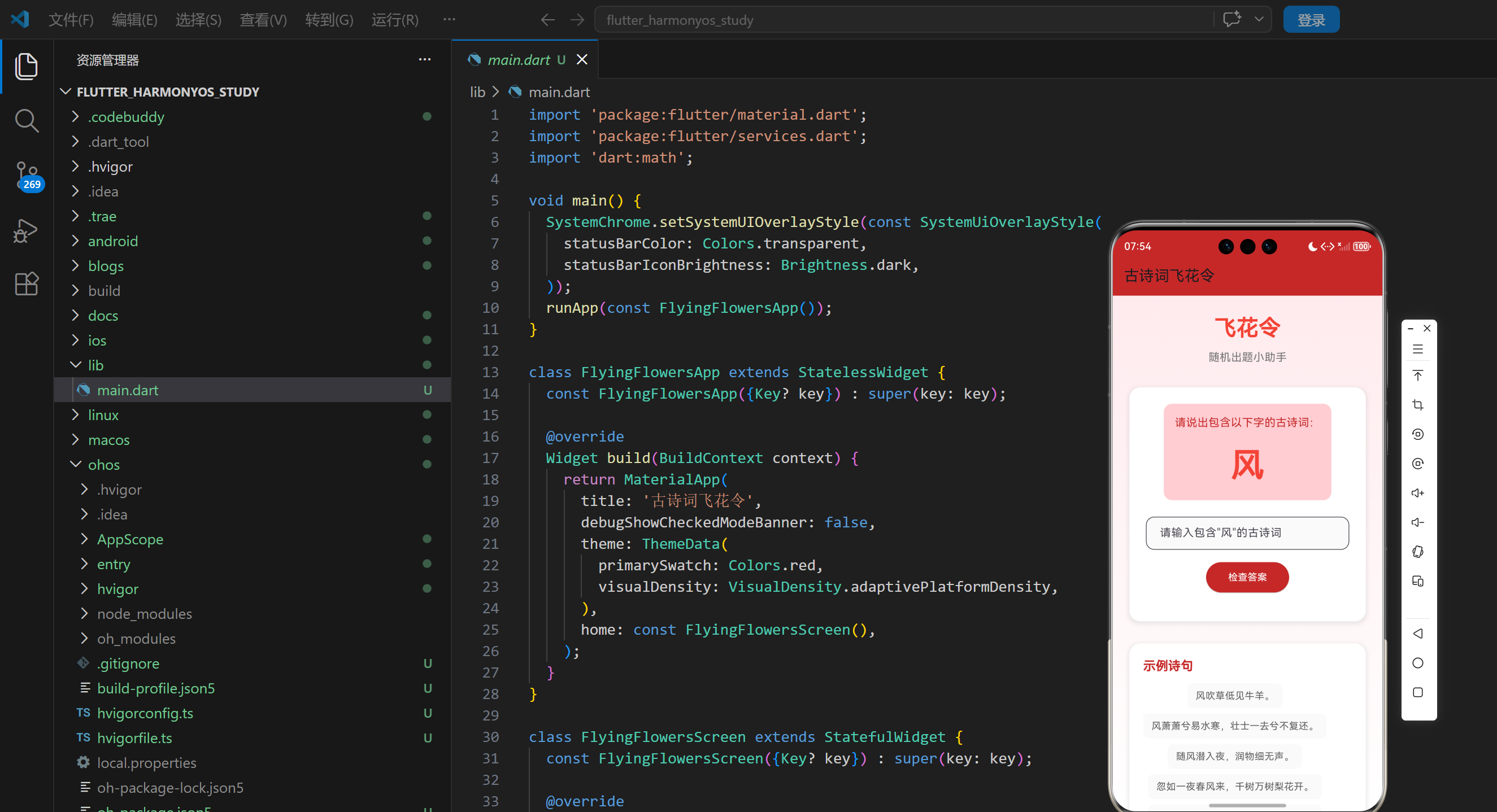
飞花令是中国古代文人墨客喜爱的一种文字游戏,通常是指饮酒时即兴创作诗词的一种方式。在现代,飞花令已经成为一种流行的文化活动,不仅可以娱乐,还可以加深对古诗词的理解和记忆。古诗词飞花令随机出题小助手是一个基于 Flutter 开发的应用,它能够随机生成飞花令题目,帮助用户练习和欣赏古诗词。本文将详细介绍如何使用 Flutter 实现这个有趣的古诗词游戏应用。
1.1 项目目标
- 实现一个随机生成飞花令题目的应用
- 显示包含指定汉字的示例诗句
- 允许用户输入包含指定汉字的古诗词
- 验证用户输入的答案是否正确
- 提供反馈信息
- 支持重新生成题目
- 采用美观的界面设计
- 确保在不同平台上的一致性表现
1.2 技术栈
- Flutter:跨平台 UI 框架
- Dart:编程语言
- StatefulWidget:用于管理应用状态
- Random:用于随机生成题目
- Future.delayed:用于模拟检查过程
- TextField:用于接收用户输入
- GridView.builder:用于展示示例诗句
- LinearGradient:用于渐变背景
2. 核心功能设计
2.1 随机题目生成
- 随机汉字:从预设的汉字库中随机选择一个汉字作为题目
- 实时更新:每次重新生成题目时,随机选择一个新的汉字
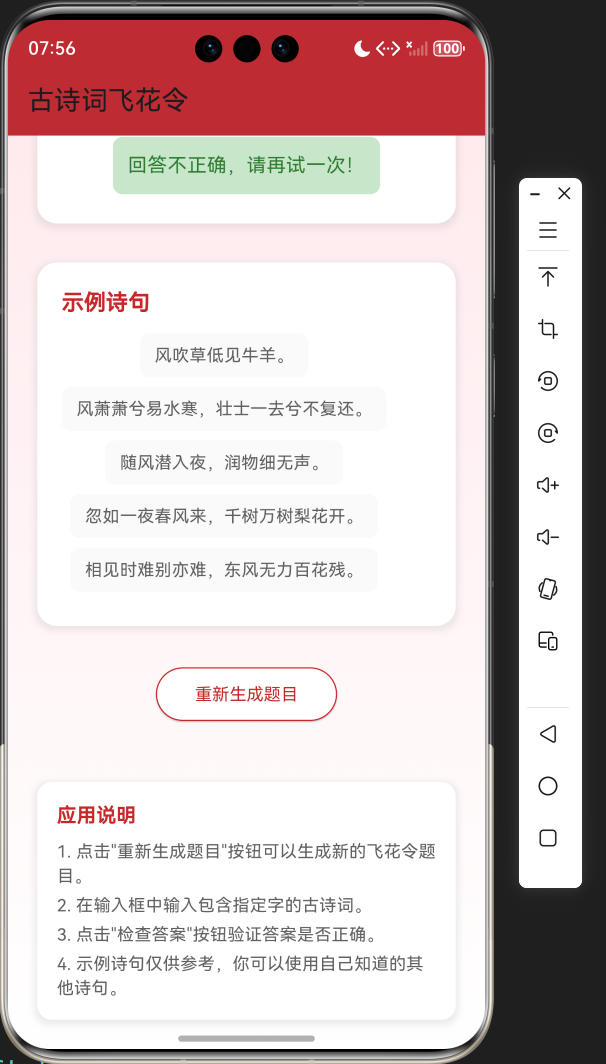
- 示例诗句:显示包含该汉字的示例诗句,供用户参考
2.2 用户输入与验证
- 输入框:允许用户输入包含指定汉字的古诗词
- 答案验证:验证用户输入的答案是否包含指定汉字,并且是否符合诗句格式
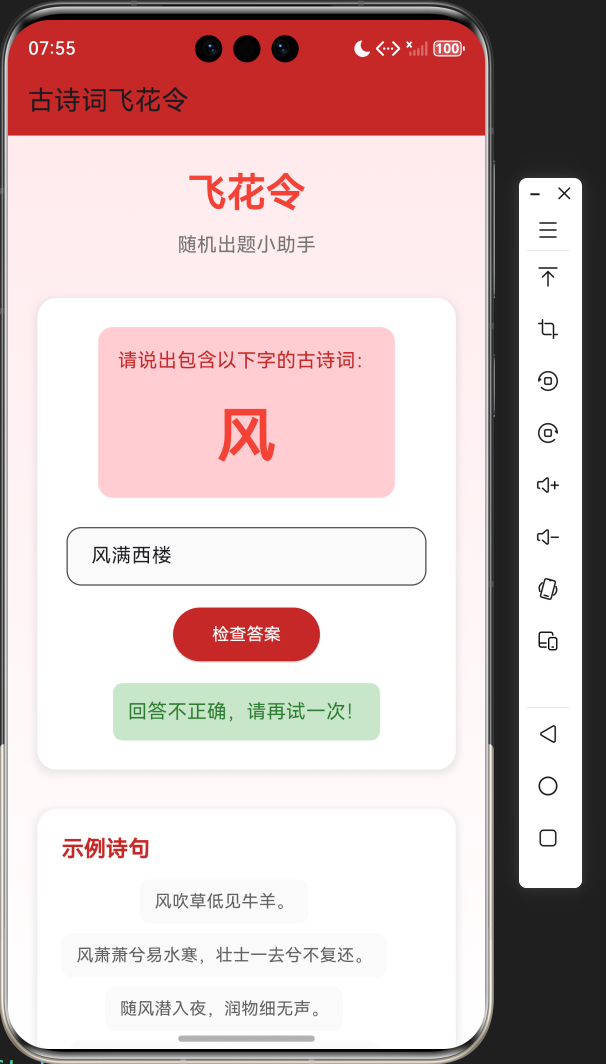
- 反馈信息:提供正确或错误的反馈信息
- 自动生成新题:回答正确后自动生成新的题目
2.3 示例诗句展示
- 网格布局:使用网格布局展示示例诗句
- 诗句库:为每个汉字提供5条示例诗句
- 参考作用:示例诗句仅供参考,用户可以使用自己知道的其他诗句
2.4 重新生成题目
- 按钮:提供"重新生成题目"按钮
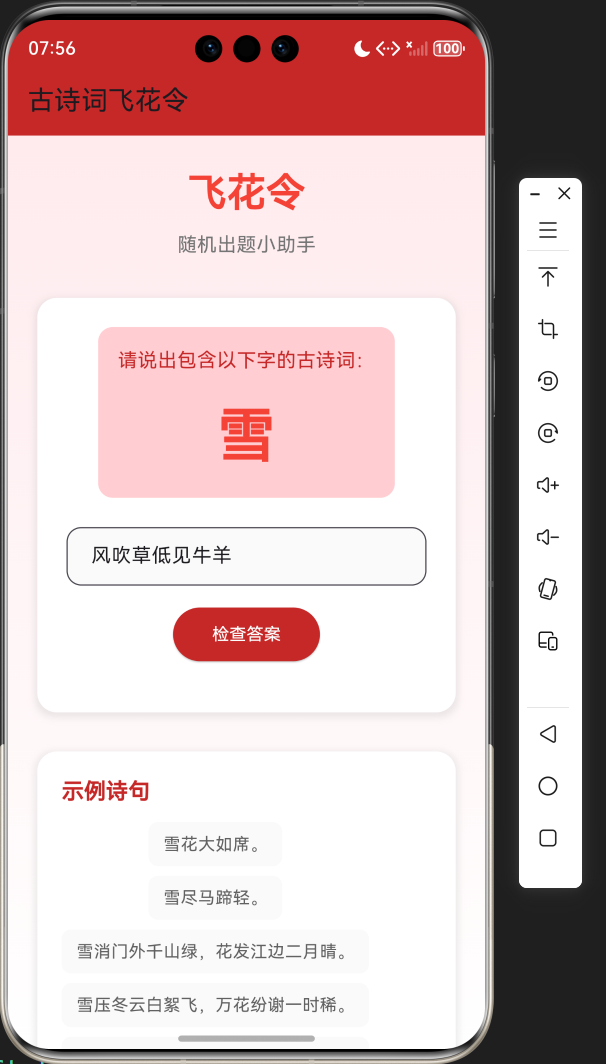
- 即时更新:点击按钮后立即生成新的题目
- 无刷新:无需重新加载页面,直接更新题目
2.5 界面设计
- 红色主题:使用红色主题,符合中国传统文化风格
- 卡片式布局:采用卡片式布局,层次分明
- 响应式设计:适应不同屏幕尺寸
- 加载动画:添加加载动画,提升用户体验
3. 技术架构
3.1 项目结构
lib/
└── main.dart          # 主应用文件,包含所有代码
3.2 组件结构
FlyingFlowersApp
└── FlyingFlowersScreen
    ├── State management (currentChar, currentPoems, currentIndex, userInput, feedback, isChecking)
    ├── Data management (_poemLibrary, _cities)
    ├── Business logic (_generateNewTopic, _checkAnswer, _isValidPoem)
    ├── UI components
    │   ├── Title section
    │   ├── Topic card
    │   │   ├── Topic requirement
    │   │   ├── Current character
    │   │   ├── Input field
    │   │   ├── Check button
    │   │   └── Feedback
    │   ├── Example poems
    │   ├── Regenerate button
    │   └── App instructions
    └── Helper methods
3.3 数据模型
- _poemLibrary:古诗词库,每个字对应包含该字的诗句
- _cities:城市列表(虽然在本应用中未使用,但保留作为未来扩展)
- AirQualityData:空气质量数据模型(虽然在本应用中未使用,但保留作为代码结构参考)
4. 关键代码解析
4.1 古诗词库
dart
// 古诗词库,每个字对应包含该字的诗句
final Map<String, List<String>> _poemLibrary = {
  '春': [
    '春眠不觉晓,处处闻啼鸟。',
    '春色满园关不住,一枝红杏出墙来。',
    '春潮带雨晚来急,野渡无人舟自横。',
    '春风又绿江南岸,明月何时照我还。',
    '春心莫共花争发,一寸相思一寸灰。'
  ],
  '花': [
    '花开堪折直须折,莫待无花空折枝。',
    '花落知多少。',
    '花自飘零水自流。一种相思,两处闲愁。',
    '花径不曾缘客扫,蓬门今始为君开。',
    '花间一壶酒,独酌无相亲。'
  ],
  '月': [
    '床前明月光,疑是地上霜。',
    '月落乌啼霜满天,江枫渔火对愁眠。',
    '月上柳梢头,人约黄昏后。',
    '明月几时有?把酒问青天。',
    '海上生明月,天涯共此时。'
  ],
  '风': [
    '风吹草低见牛羊。',
    '风萧萧兮易水寒,壮士一去兮不复还。',
    '随风潜入夜,润物细无声。',
    '忽如一夜春风来,千树万树梨花开。',
    '相见时难别亦难,东风无力百花残。'
  ],
  '山': [
    '山重水复疑无路,柳暗花明又一村。',
    '山不在高,有仙则名。',
    '山高月小,水落石出。',
    '山回路转不见君,雪上空留马行处。',
    '山外青山楼外楼,西湖歌舞几时休?'
  ],
  '水': [
    '水光潋滟晴方好,山色空蒙雨亦奇。',
    '水何澹澹,山岛竦峙。',
    '水村山郭酒旗风。',
    '水光接天。',
    '水是眼波横,山是眉峰聚。'
  ],
  '云': [
    '云想衣裳花想容,春风拂槛露华浓。',
    '云横秦岭家何在?雪拥蓝关马不前。',
    '云青青兮欲雨,水澹澹兮生烟。',
    '云淡风轻近午天,傍花随柳过前川。',
    '云深不知处。'
  ],
  '雨': [
    '雨打梨花深闭门。',
    '雨过天晴云破处,这般颜色做将来。',
    '雨横风狂三月暮,门掩黄昏,无计留春住。',
    '雨足高田白,披蓑半夜耕。',
    '雨中山果落,灯下草虫鸣。'
  ],
  '日': [
    '日照香炉生紫烟,遥看瀑布挂前川。',
    '日长篱落无人过,惟有蜻蜓蛱蝶飞。',
    '日出江花红胜火,春来江水绿如蓝。',
    '日中不至,则是无信。',
    '日晚江南望江北,寒鸦飞尽水悠悠。'
  ],
  '雪': [
    '雪花大如席。',
    '雪尽马蹄轻。',
    '雪消门外千山绿,花发江边二月晴。',
    '雪压冬云白絮飞,万花纷谢一时稀。',
    '雪虐风饕愈凛然,花中气节最高坚。'
  ],
};代码解析:
_poemLibrary:一个 Map,键是汉字,值是包含该汉字的诗句列表- 每个汉字对应5条示例诗句,涵盖了不同风格和时期的古诗词
- 诗句选择考虑了经典性和代表性,确保用户能够从中获得灵感
4.2 随机题目生成
dart
void _generateNewTopic() {
  final random = Random();
  final chars = _poemLibrary.keys.toList();
  _currentChar = chars[random.nextInt(chars.length)];
  _currentPoems = _poemLibrary[_currentChar]!;
  _currentIndex = 0;
  _userInput = '';
  _feedback = '';
  _isChecking = false;
  setState(() {});
}代码解析:
_generateNewTopic方法:随机生成新的飞花令题目Random():创建随机数生成器chars = _poemLibrary.keys.toList():获取所有汉字的列表chars[random.nextInt(chars.length)]:随机选择一个汉字_currentPoems = _poemLibrary[_currentChar]!:获取包含该汉字的示例诗句- 重置状态变量:
_currentIndex、_userInput、_feedback、_isChecking setState(() {}):更新界面
4.3 答案验证
dart
void _checkAnswer() {
  setState(() {
    _isChecking = true;
  });

  // 模拟检查过程
  Future.delayed(const Duration(milliseconds: 500), () {
    setState(() {
      _isChecking = false;
      final userAnswer = _userInput.trim();
      if (userAnswer.contains(_currentChar) && _isValidPoem(userAnswer)) {
        _feedback = '回答正确!';
        // 延迟后生成新题目
        Future.delayed(const Duration(seconds: 1), () {
          _generateNewTopic();
        });
      } else {
        _feedback = '回答不正确,请再试一次!';
      }
    });
  });
}

bool _isValidPoem(String answer) {
  // 简单验证:检查是否是符合格式的诗句
  return answer.length >= 5 && answer.length <= 14 && answer.contains(',') && answer.contains('。');
}代码解析:
_checkAnswer方法:验证用户输入的答案_isChecking = true:设置检查状态,显示加载动画Future.delayed:模拟检查过程,增加用户体验userAnswer.contains(_currentChar):检查答案是否包含指定汉字_isValidPoem(userAnswer):检查答案是否符合诗句格式_feedback:设置反馈信息Future.delayed:回答正确后延迟1秒生成新题目
4.4 主界面构建
dart
@override
Widget build(BuildContext context) {
return Scaffold(
appBar: AppBar(
title: const Text('古诗词飞花令'),
backgroundColor: Colors.red.shade800,
),
body: Container(
decoration: BoxDecoration(
gradient: LinearGradient(
begin: Alignment.topCenter,
end: Alignment.bottomCenter,
colors: [
Colors.red.shade50,
Colors.white,
],
),
),
child: SingleChildScrollView(
padding: const EdgeInsets.all(24),
child: Column(
crossAxisAlignment: CrossAxisAlignment.center,
children: [
// 飞花令标题
Container(
margin: const EdgeInsets.only(bottom: 32),
child: Column(
children: [
const Text(
'飞花令',
style: TextStyle(
fontSize: 32,
fontWeight: FontWeight.bold,
color: Colors.red,
),
),
const SizedBox(height: 8),
Text(
'随机出题小助手',
style: TextStyle(
fontSize: 16,
color: Colors.grey.shade600,
),
),
],
),
),
// 题目卡片
Container(
width: double.infinity,
decoration: BoxDecoration(
color: Colors.white,
borderRadius: BorderRadius.circular(16),
boxShadow: [
BoxShadow(
color: Colors.grey.withOpacity(0.2),
spreadRadius: 2,
blurRadius: 4,
offset: const Offset(0, 2),
),
],
),
padding: const EdgeInsets.all(24),
child: _isLoading
? const Center(child: CircularProgressIndicator())
: Column(
crossAxisAlignment: CrossAxisAlignment.center,
children: [
// 题目要求
Container(
padding: const EdgeInsets.all(16),
decoration: BoxDecoration(
color: Colors.red.shade100,
borderRadius: BorderRadius.circular(12),
),
child: Column(
children: [
Text(
'请说出包含以下字的古诗词:',
style: TextStyle(
fontSize: 16,
color: Colors.red.shade800,
),
),
const SizedBox(height: 16),
Text(
_currentChar,
style: const TextStyle(
fontSize: 48,
fontWeight: FontWeight.bold,
color: Colors.red,
),
),
],
),
),
const SizedBox(height: 24),
// 输入框
TextField(
onChanged: (value) {
setState(() {
_userInput = value;
_feedback = '';
});
},
decoration: InputDecoration(
hintText: '请输入包含"$_currentChar"的古诗词',
border: OutlineInputBorder(
borderRadius: BorderRadius.circular(12),
),
filled: true,
fillColor: Colors.grey.shade50,
contentPadding: const EdgeInsets.symmetric(horizontal: 16, vertical: 12),
),
style: const TextStyle(fontSize: 16),
),
const SizedBox(height: 16),
// 检查按钮
ElevatedButton(
onPressed: _isChecking ? null : _checkAnswer,
style: ElevatedButton.styleFrom(
backgroundColor: Colors.red.shade800,
foregroundColor: Colors.white,
padding: const EdgeInsets.symmetric(horizontal: 32, vertical: 12),
shape: RoundedRectangleBorder(
borderRadius: BorderRadius.circular(30),
),
),
child: _isChecking
? const SizedBox(
width: 20,
height: 20,
child: CircularProgressIndicator(
strokeWidth: 2,
valueColor: AlwaysStoppedAnimation<Color>(Colors.white),
),
)
: const Text('检查答案'),
),
const SizedBox(height: 16),
// 反馈信息
if (_feedback.isNotEmpty)
Container(
padding: const EdgeInsets.all(12),
decoration: BoxDecoration(
color: _feedback.contains('正确') ? Colors.green.shade100 : Colors.red.shade100,
borderRadius: BorderRadius.circular(8),
),
child: Text(
_feedback,
style: TextStyle(
color: _feedback.contains('正确') ? Colors.green.shade800 : Colors.red.shade800,
fontSize: 16,
),
),
),
],
),
),
const SizedBox(height: 32),
// 示例诗句
Container(
width: double.infinity,
decoration: BoxDecoration(
color: Colors.white,
borderRadius: BorderRadius.circular(16),
boxShadow: [
BoxShadow(
color: Colors.grey.withOpacity(0.2),
spreadRadius: 2,
blurRadius: 4,
offset: const Offset(0, 2),
),
],
),
padding: const EdgeInsets.all(20),
child: Column(
crossAxisAlignment: CrossAxisAlignment.start,
children: [
Text(
'示例诗句',
style: TextStyle(
fontSize: 18,
fontWeight: FontWeight.bold,
color: Colors.red.shade800,
),
),
const SizedBox(height: 12),
Column(
children: _currentPoems.map((poem) {
return Container(
margin: const EdgeInsets.only(bottom: 8),
padding: const EdgeInsets.symmetric(horizontal: 12, vertical: 8),
decoration: BoxDecoration(
color: Colors.grey.shade50,
borderRadius: BorderRadius.circular(8),
),
child: Text(
poem,
style: TextStyle(
fontSize: 14,
color: Colors.grey.shade700,
),
),
);
}).toList(),
),
],
),
),
const SizedBox(height: 32),
// 重新生成按钮
ElevatedButton(
onPressed: _generateNewTopic,
style: ElevatedButton.styleFrom(
backgroundColor: Colors.white,
foregroundColor: Colors.red.shade800,
padding: const EdgeInsets.symmetric(horizontal: 32, vertical: 12),
shape: RoundedRectangleBorder(
borderRadius: BorderRadius.circular(30),
side: BorderSide(color: Colors.red.shade800),
),
),
child: const Text('重新生成题目'),
),
const SizedBox(height: 48),
// 应用说明
Container(
padding: const EdgeInsets.all(16),
decoration: BoxDecoration(
color: Colors.white,
borderRadius: BorderRadius.circular(12),
boxShadow: [
BoxShadow(
color: Colors.grey.withOpacity(0.2),
spreadRadius: 2,
blurRadius: 4,
offset: const Offset(0, 2),
),
],
),
child: Column(
crossAxisAlignment: CrossAxisAlignment.start,
children: [
Text(
'应用说明',
style: TextStyle(
fontSize: 16,
fontWeight: FontWeight.bold,
color: Colors.red.shade800,
),
),
const SizedBox(height: 8),
Text(
'1. 点击"重新生成题目"按钮可以生成新的飞花令题目。',
style: TextStyle(
fontSize: 14,
color: Colors.grey.shade700,
),
),
const SizedBox(height: 4),
Text(
'2. 在输入框中输入包含指定字的古诗词。',
style: TextStyle(
fontSize: 14,
color: Colors.grey.shade700,
),
),
const SizedBox(height: 4),
Text(
'3. 点击"检查答案"按钮验证答案是否正确。',
style: TextStyle(
fontSize: 14,
color: Colors.grey.shade700,
),
),
const SizedBox(height: 4),
Text(
'4. 示例诗句仅供参考,你可以使用自己知道的其他诗句。',
style: TextStyle(
fontSize: 14,
color: Colors.grey.shade700,
),
),
],
),
),
],
),
),
),
);
}代码解析:
build方法:构建应用的主界面AppBar:应用标题栏,使用红色主题Container:主容器,使用渐变背景SingleChildScrollView:支持滚动,适应不同屏幕尺寸Column:垂直布局,包含所有UI组件- 飞花令标题:显示应用名称和副标题
- 题目卡片:包含题目要求、当前汉字、输入框、检查按钮和反馈信息
- 示例诗句:显示包含当前汉字的示例诗句
- 重新生成按钮:用于生成新的题目
- 应用说明:提供应用的使用说明
5. 技术亮点与创新
5.1 随机题目生成
- 随机算法 :使用
Random类随机选择汉字,确保题目多样性 - 诗句库:为每个汉字提供5条示例诗句,涵盖不同风格和时期的古诗词
- 实时更新:每次重新生成题目时,即时更新界面,无需刷新
5.2 答案验证
- 智能验证:不仅检查答案是否包含指定汉字,还检查是否符合诗句格式
- 反馈机制:提供明确的反馈信息,帮助用户了解答案是否正确
- 自动生成新题:回答正确后自动生成新的题目,保持游戏的连续性
5.3 界面设计
- 红色主题:使用红色主题,符合中国传统文化风格,与古诗词的文化底蕴相契合
- 卡片式布局:采用卡片式布局,层次分明,信息展示清晰
- 响应式设计:适应不同屏幕尺寸,确保在各种设备上都能良好显示
- 加载动画:添加加载动画,提升用户体验,减少等待感
5.4 用户交互
- 输入反馈:输入框实时响应,清除反馈信息
- 按钮状态:检查按钮在验证过程中禁用,防止重复点击
- 视觉反馈:使用不同颜色的反馈信息,直观显示答案是否正确
- 操作指引:提供详细的应用说明,帮助用户快速上手
6. 应用场景与扩展
6.1 应用场景
- 文化活动:在诗词比赛、文化沙龙等活动中使用
- 教育学习:帮助学生学习和记忆古诗词
- 休闲娱乐:作为一种有趣的文字游戏,丰富业余生活
- 家庭互动:家庭成员一起参与,增进感情
- 文化传承:通过游戏的方式传播和弘扬中国传统文化
6.2 扩展方向
- 增加汉字库:扩充汉字库,增加更多的汉字和对应的诗句
- 难度等级:添加难度等级,根据用户水平调整题目难度
- 多人对战:支持多人对战模式,增加游戏的趣味性
- 成就系统:添加成就系统,记录用户的答题情况
- 分享功能:支持将题目和答案分享到社交媒体
- 语音输入:支持语音输入,提高用户体验
- 诗词解析:为示例诗句提供解析,帮助用户理解诗词的含义
- 历史记录:记录用户的答题历史,方便回顾和学习
7. 代码优化建议
7.1 性能优化
- 使用 const 构造函数:对于不变的Widget,使用const构造函数,减少不必要的重建
- 优化状态管理:对于更复杂的应用,可以使用Provider、Riverpod等状态管理库
- 使用 RepaintBoundary:对于频繁更新的部分,使用RepaintBoundary包裹,减少不必要的重绘
- 延迟加载:对于非关键信息,可以使用延迟加载,提高应用启动速度
7.2 代码结构优化
- 组件化:将UI组件拆分为更小的、可复用的组件,如题目卡片、示例诗句列表等
- 逻辑分离:将业务逻辑与UI逻辑分离,提高代码的可维护性
- 参数化:将颜色、字体大小等参数提取为可配置的常量,便于统一管理
- 错误处理:添加适当的错误处理,提高应用的稳定性
7.3 用户体验优化
- 添加动画效果:添加题目切换、答案验证的动画效果,提升用户体验
- 触觉反馈:在支持的设备上,添加触觉反馈,增强交互体验
- 无障碍支持:添加无障碍支持,提高应用的可访问性
- 键盘优化:优化键盘输入体验,支持回车键提交答案
7.4 功能优化
- 增加汉字库:扩充汉字库,增加更多的汉字和对应的诗句
- 难度等级:添加难度等级,根据用户水平调整题目难度
- 多人对战:支持多人对战模式,增加游戏的趣味性
- 成就系统:添加成就系统,记录用户的答题情况
8. 测试与调试
8.1 测试策略
- 功能测试:测试随机题目生成、答案验证、反馈信息等核心功能
- 性能测试:测试应用在不同设备上的性能表现
- 兼容性测试:测试在不同平台、不同屏幕尺寸上的表现
- 用户体验测试:测试应用的易用性和用户体验
8.2 调试技巧
- 使用 Flutter DevTools:利用Flutter DevTools分析性能瓶颈和调试问题
- 添加日志:在关键位置添加日志,便于调试
- 使用模拟器:在不同尺寸的模拟器上测试,确保适配性
- 用户测试:邀请用户测试,收集反馈,不断改进
9. 总结与展望
9.1 项目总结
本项目成功实现了一个美观实用的古诗词飞花令随机出题小助手应用,主要功能包括:
- 随机生成飞花令题目(随机选择一个汉字)
- 显示包含该汉字的示例诗句
- 允许用户输入包含指定汉字的古诗词
- 验证用户输入的答案是否正确
- 提供反馈信息
- 支持重新生成题目
9.2 技术价值
- 学习价值:展示了如何使用Flutter实现一个完整的古诗词游戏应用
- 实用价值:提供了一个可直接使用的飞花令游戏工具
- 参考价值:为类似功能的开发提供了参考方案
- 教育价值:有助于促进古诗词的学习和传播
- 文化价值:通过游戏的方式传播和弘扬中国传统文化
9.3 未来展望
- 增加汉字库:扩充汉字库,增加更多的汉字和对应的诗句
- 难度等级:添加难度等级,根据用户水平调整题目难度
- 多人对战:支持多人对战模式,增加游戏的趣味性
- 成就系统:添加成就系统,记录用户的答题情况
- 分享功能:支持将题目和答案分享到社交媒体
- 语音输入:支持语音输入,提高用户体验
- 诗词解析:为示例诗句提供解析,帮助用户理解诗词的含义
- 历史记录:记录用户的答题历史,方便回顾和学习
10. 附录
10.1 完整代码
dart
import 'package:flutter/material.dart';
import 'package:flutter/services.dart';
import 'dart:math';
void main() {
SystemChrome.setSystemUIOverlayStyle(const SystemUiOverlayStyle(
statusBarColor: Colors.transparent,
statusBarIconBrightness: Brightness.dark,
));
runApp(const FlyingFlowersApp());
}
class FlyingFlowersApp extends StatelessWidget {
const FlyingFlowersApp({Key? key}) : super(key: key);
@override
Widget build(BuildContext context) {
return MaterialApp(
title: '古诗词飞花令',
debugShowCheckedModeBanner: false,
theme: ThemeData(
primarySwatch: Colors.red,
visualDensity: VisualDensity.adaptivePlatformDensity,
),
home: const FlyingFlowersScreen(),
);
}
}
class FlyingFlowersScreen extends StatefulWidget {
const FlyingFlowersScreen({Key? key}) : super(key: key);
@override
State<FlyingFlowersScreen> createState() => _FlyingFlowersScreenState();
}
class _FlyingFlowersScreenState extends State<FlyingFlowersScreen> {
String _currentChar = '';
List<String> _currentPoems = [];
int _currentIndex = 0;
String _userInput = '';
String _feedback = '';
bool _isChecking = false;
// 古诗词库,每个字对应包含该字的诗句
final Map<String, List<String>> _poemLibrary = {
'春': [
'春眠不觉晓,处处闻啼鸟。',
'春色满园关不住,一枝红杏出墙来。',
'春潮带雨晚来急,野渡无人舟自横。',
'春风又绿江南岸,明月何时照我还。',
'春心莫共花争发,一寸相思一寸灰。'
],
'花': [
'花开堪折直须折,莫待无花空折枝。',
'花落知多少。',
'花自飘零水自流。一种相思,两处闲愁。',
'花径不曾缘客扫,蓬门今始为君开。',
'花间一壶酒,独酌无相亲。'
],
'月': [
'床前明月光,疑是地上霜。',
'月落乌啼霜满天,江枫渔火对愁眠。',
'月上柳梢头,人约黄昏后。',
'明月几时有?把酒问青天。',
'海上生明月,天涯共此时。'
],
'风': [
'风吹草低见牛羊。',
'风萧萧兮易水寒,壮士一去兮不复还。',
'随风潜入夜,润物细无声。',
'忽如一夜春风来,千树万树梨花开。',
'相见时难别亦难,东风无力百花残。'
],
'山': [
'山重水复疑无路,柳暗花明又一村。',
'山不在高,有仙则名。',
'山高月小,水落石出。',
'山回路转不见君,雪上空留马行处。',
'山外青山楼外楼,西湖歌舞几时休?'
],
'水': [
'水光潋滟晴方好,山色空蒙雨亦奇。',
'水何澹澹,山岛竦峙。',
'水村山郭酒旗风。',
'水光接天。',
'水是眼波横,山是眉峰聚。'
],
'云': [
'云想衣裳花想容,春风拂槛露华浓。',
'云横秦岭家何在?雪拥蓝关马不前。',
'云青青兮欲雨,水澹澹兮生烟。',
'云淡风轻近午天,傍花随柳过前川。',
'云深不知处。'
],
'雨': [
'雨打梨花深闭门。',
'雨过天晴云破处,这般颜色做将来。',
'雨横风狂三月暮,门掩黄昏,无计留春住。',
'雨足高田白,披蓑半夜耕。',
'雨中山果落,灯下草虫鸣。'
],
'日': [
'日照香炉生紫烟,遥看瀑布挂前川。',
'日长篱落无人过,惟有蜻蜓蛱蝶飞。',
'日出江花红胜火,春来江水绿如蓝。',
'日中不至,则是无信。',
'日晚江南望江北,寒鸦飞尽水悠悠。'
],
'雪': [
'雪花大如席。',
'雪尽马蹄轻。',
'雪消门外千山绿,花发江边二月晴。',
'雪压冬云白絮飞,万花纷谢一时稀。',
'雪虐风饕愈凛然,花中气节最高坚。'
],
};
@override
void initState() {
super.initState();
_generateNewTopic();
}
void _generateNewTopic() {
final random = Random();
final chars = _poemLibrary.keys.toList();
_currentChar = chars[random.nextInt(chars.length)];
_currentPoems = _poemLibrary[_currentChar]!;
_currentIndex = 0;
_userInput = '';
_feedback = '';
_isChecking = false;
setState(() {});
}
void _checkAnswer() {
setState(() {
_isChecking = true;
});
// 模拟检查过程
Future.delayed(const Duration(milliseconds: 500), () {
setState(() {
_isChecking = false;
final userAnswer = _userInput.trim();
if (userAnswer.contains(_currentChar) && _isValidPoem(userAnswer)) {
_feedback = '回答正确!';
// 延迟后生成新题目
Future.delayed(const Duration(seconds: 1), () {
_generateNewTopic();
});
} else {
_feedback = '回答不正确,请再试一次!';
}
});
});
}
bool _isValidPoem(String answer) {
// 简单验证:检查是否是符合格式的诗句
return answer.length >= 5 && answer.length <= 14 && answer.contains(',') && answer.contains('。');
}
@override
Widget build(BuildContext context) {
return Scaffold(
appBar: AppBar(
title: const Text('古诗词飞花令'),
backgroundColor: Colors.red.shade800,
),
body: Container(
decoration: BoxDecoration(
gradient: LinearGradient(
begin: Alignment.topCenter,
end: Alignment.bottomCenter,
colors: [
Colors.red.shade50,
Colors.white,
],
),
),
child: SingleChildScrollView(
padding: const EdgeInsets.all(24),
child: Column(
crossAxisAlignment: CrossAxisAlignment.center,
children: [
// 飞花令标题
Container(
margin: const EdgeInsets.only(bottom: 32),
child: Column(
children: [
const Text(
'飞花令',
style: TextStyle(
fontSize: 32,
fontWeight: FontWeight.bold,
color: Colors.red,
),
),
const SizedBox(height: 8),
Text(
'随机出题小助手',
style: TextStyle(
fontSize: 16,
color: Colors.grey.shade600,
),
),
],
),
),
// 题目卡片
Container(
width: double.infinity,
decoration: BoxDecoration(
color: Colors.white,
borderRadius: BorderRadius.circular(16),
boxShadow: [
BoxShadow(
color: Colors.grey.withOpacity(0.2),
spreadRadius: 2,
blurRadius: 4,
offset: const Offset(0, 2),
),
],
),
padding: const EdgeInsets.all(24),
child: _isChecking
? const Center(child: CircularProgressIndicator())
: Column(
crossAxisAlignment: CrossAxisAlignment.center,
children: [
// 题目要求
Container(
padding: const EdgeInsets.all(16),
decoration: BoxDecoration(
color: Colors.red.shade100,
borderRadius: BorderRadius.circular(12),
),
child: Column(
children: [
Text(
'请说出包含以下字的古诗词:',
style: TextStyle(
fontSize: 16,
color: Colors.red.shade800,
),
),
const SizedBox(height: 16),
Text(
_currentChar,
style: const TextStyle(
fontSize: 48,
fontWeight: FontWeight.bold,
color: Colors.red,
),
),
],
),
),
const SizedBox(height: 24),
// 输入框
TextField(
onChanged: (value) {
setState(() {
_userInput = value;
_feedback = '';
});
},
decoration: InputDecoration(
hintText: '请输入包含"$_currentChar"的古诗词',
border: OutlineInputBorder(
borderRadius: BorderRadius.circular(12),
),
filled: true,
fillColor: Colors.grey.shade50,
contentPadding: const EdgeInsets.symmetric(horizontal: 16, vertical: 12),
),
style: const TextStyle(fontSize: 16),
),
const SizedBox(height: 16),
// 检查按钮
ElevatedButton(
onPressed: _isChecking ? null : _checkAnswer,
style: ElevatedButton.styleFrom(
backgroundColor: Colors.red.shade800,
foregroundColor: Colors.white,
padding: const EdgeInsets.symmetric(horizontal: 32, vertical: 12),
shape: RoundedRectangleBorder(
borderRadius: BorderRadius.circular(30),
),
),
child: _isChecking
? const SizedBox(
width: 20,
height: 20,
child: CircularProgressIndicator(
strokeWidth: 2,
valueColor: AlwaysStoppedAnimation<Color>(Colors.white),
),
)
: const Text('检查答案'),
),
const SizedBox(height: 16),
// 反馈信息
if (_feedback.isNotEmpty)
Container(
padding: const EdgeInsets.all(12),
decoration: BoxDecoration(
color: _feedback.contains('正确') ? Colors.green.shade100 : Colors.red.shade100,
borderRadius: BorderRadius.circular(8),
),
child: Text(
_feedback,
style: TextStyle(
color: _feedback.contains('正确') ? Colors.green.shade800 : Colors.red.shade800,
fontSize: 16,
),
),
),
],
),
),
const SizedBox(height: 32),
// 示例诗句
Container(
width: double.infinity,
decoration: BoxDecoration(
color: Colors.white,
borderRadius: BorderRadius.circular(16),
boxShadow: [
BoxShadow(
color: Colors.grey.withOpacity(0.2),
spreadRadius: 2,
blurRadius: 4,
offset: const Offset(0, 2),
),
],
),
padding: const EdgeInsets.all(20),
child: Column(
crossAxisAlignment: CrossAxisAlignment.start,
children: [
Text(
'示例诗句',
style: TextStyle(
fontSize: 18,
fontWeight: FontWeight.bold,
color: Colors.red.shade800,
),
),
const SizedBox(height: 12),
Column(
children: _currentPoems.map((poem) {
return Container(
margin: const EdgeInsets.only(bottom: 8),
padding: const EdgeInsets.symmetric(horizontal: 12, vertical: 8),
decoration: BoxDecoration(
color: Colors.grey.shade50,
borderRadius: BorderRadius.circular(8),
),
child: Text(
poem,
style: TextStyle(
fontSize: 14,
color: Colors.grey.shade700,
),
),
);
}).toList(),
),
],
),
),
const SizedBox(height: 32),
// 重新生成按钮
ElevatedButton(
onPressed: _generateNewTopic,
style: ElevatedButton.styleFrom(
backgroundColor: Colors.white,
foregroundColor: Colors.red.shade800,
padding: const EdgeInsets.symmetric(horizontal: 32, vertical: 12),
shape: RoundedRectangleBorder(
borderRadius: BorderRadius.circular(30),
side: BorderSide(color: Colors.red.shade800),
),
),
child: const Text('重新生成题目'),
),
const SizedBox(height: 48),
// 应用说明
Container(
padding: const EdgeInsets.all(16),
decoration: BoxDecoration(
color: Colors.white,
borderRadius: BorderRadius.circular(12),
boxShadow: [
BoxShadow(
color: Colors.grey.withOpacity(0.2),
spreadRadius: 2,
blurRadius: 4,
offset: const Offset(0, 2),
),
],
),
child: Column(
crossAxisAlignment: CrossAxisAlignment.start,
children: [
Text(
'应用说明',
style: TextStyle(
fontSize: 16,
fontWeight: FontWeight.bold,
color: Colors.red.shade800,
),
),
const SizedBox(height: 8),
Text(
'1. 点击"重新生成题目"按钮可以生成新的飞花令题目。',
style: TextStyle(
fontSize: 14,
color: Colors.grey.shade700,
),
),
const SizedBox(height: 4),
Text(
'2. 在输入框中输入包含指定字的古诗词。',
style: TextStyle(
fontSize: 14,
color: Colors.grey.shade700,
),
),
const SizedBox(height: 4),
Text(
'3. 点击"检查答案"按钮验证答案是否正确。',
style: TextStyle(
fontSize: 14,
color: Colors.grey.shade700,
),
),
const SizedBox(height: 4),
Text(
'4. 示例诗句仅供参考,你可以使用自己知道的其他诗句。',
style: TextStyle(
fontSize: 14,
color: Colors.grey.shade700,
),
),
],
),
),
],
),
),
),
);
}
}10.2 依赖项
- flutter:Flutter 框架
- flutter/services.dart:提供 SystemChrome 类,用于设置系统 UI 样式
- dart:math:提供 Random 类,用于随机生成题目
10.3 运行环境
- Flutter SDK:3.0.0 或更高版本
- Dart SDK:2.17.0 或更高版本
- 支持的平台:Android、iOS、Web、Windows、macOS、Linux