前言:
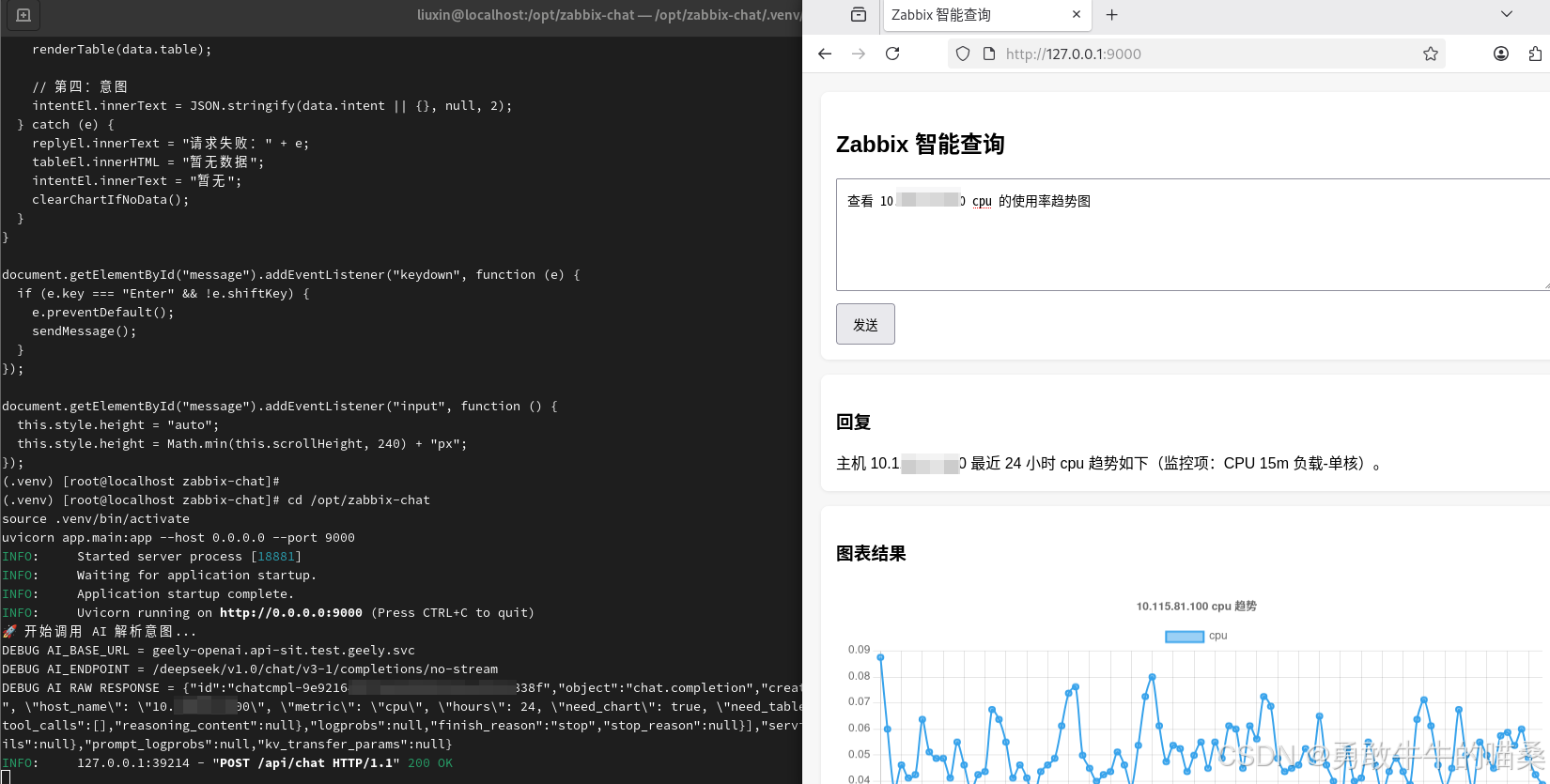
在当前AI与数智化背景下,近期公司恰好提供了一些可免费使用的AI智能体和API接口。借着这次机会,想到同事在查询监控数据的时候,需要经历申请、登录堡垒机、连接服务器、执行命令等多步繁琐流程。效率有点低。能不能直接跟AI对话一样获取监控数据勒?SO,那我准备探索利用一下AI技术对Zabbix监控系统进行一次轻量级的二次开发。
构想:构建一个简易的交互界面,允许用户通过自然语言描述查询意图,系统自动将其转换为对Zabbix API的调用,并直接返回结构化的监控数据结果。
目标:本次实践的核心目标并非立即打造一个生产级应用,而是通过这个具体项目,了解了解AI在接口调用、意图识别等场景下的工作原理与应用模式。
基于以上想法,开搞!
项目环境
可开发部署新服务的系统:almalinux9(默认python3.9)
zabbix服务器:zabbx版本7.0
AI接口描述:内部大模型推理服务接口
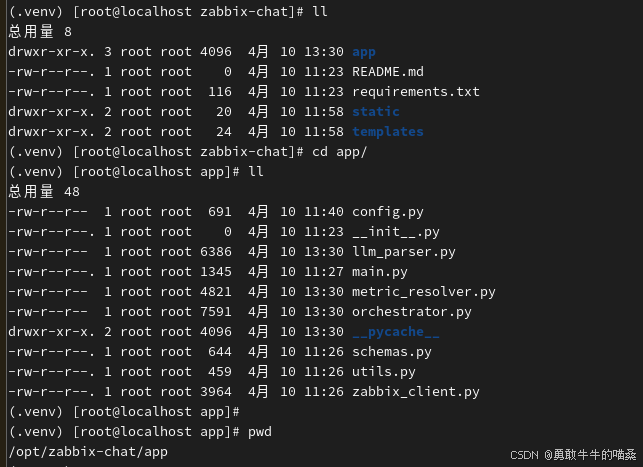
项目目录结构
zabbix-chat/                    # 项目根目录,整个 Zabbix 聊天式查询系统
├── app/                        # 后端核心代码目录
│   ├── __init__.py             # Python 包初始化文件,标识 app 为可导入模块
│   ├── main.py                 # FastAPI 启动入口,定义接口路由并启动 Web 服务
│   ├── config.py               # 配置管理,读取 .env 中的环境变量,如 Zabbix、AI 接口地址等
│   ├── schemas.py              # 数据结构定义,统一请求体、响应体、意图 JSON 等模型
│   ├── llm_parser.py           # AI 解析模块,把用户自然语言问题转换成结构化意图
│   ├── orchestrator.py         # 编排调度模块,根据意图决定调用哪些查询逻辑并组装最终结果
│   ├── zabbix_client.py        # Zabbix API 客户端,负责认证、主机查询、指标查询、趋势查询、告警查询
│   ├── metric_resolver.py      # 指标解析模块,将 AI 理解出的指标语义映射为可查询的监控项类型
│   └── utils.py                # 通用工具函数,如时间处理、格式转换、公共辅助方法
├── templates/                  # 前端模板目录
│   └── index.html              # 聊天页面模板,浏览器访问时加载的主页面
├── static/                     # 前端静态资源目录
│   └── app.js                  # 前端交互脚本,负责发送聊天请求、接收结果并渲染回复/图表/表格
├── .env                        # 环境变量配置文件,存放服务地址、账号密码、Token 等敏感配置
├── requirements.txt            # Python 依赖清单,记录项目运行所需第三方库
└── README.md                   # 项目说明文档,记录部署方法、使用说明和开发背景
实施步骤
-
目录创建
准备放项目的目录,例如 /optcd /opt
mkdir -p zabbix-chat
cd /opt/zabbix-chat
mkdir -p app templates static
touch app/init.py
touch app/main.py app/config.py app/schemas.py app/llm_parser.py app/orchestrator.py app/zabbix_client.py app/metric_resolver.py app/utils.py
touch templates/index.html
touch static/app.js
touch .env .gitignore requirements.txt README.md
创建完后的结构图
-
写入并安装依赖
cd /opt/zabbix-chat
cat > requirements.txt <<'EOF'
fastapi==0.115.12
uvicorn[standard]==0.30.6
httpx==0.27.2
python-dotenv==1.0.1
jinja2==3.1.4
pydantic==2.9.2
pygbop
EOF
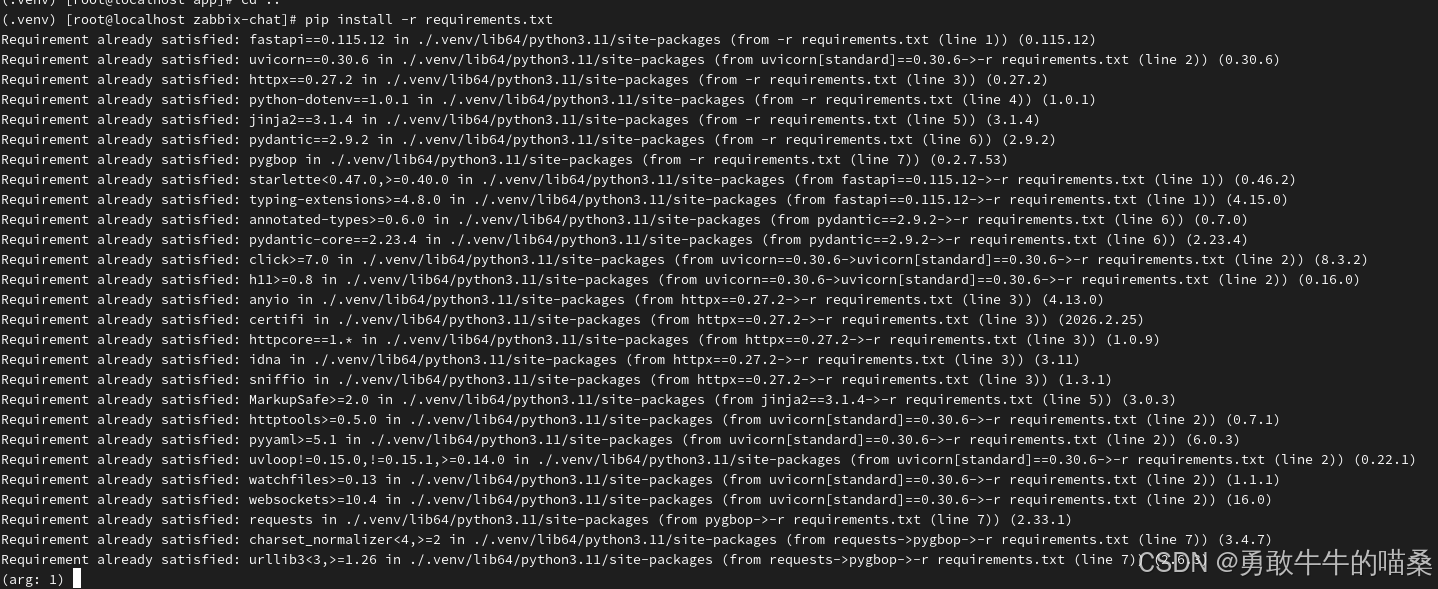
pip install -r requirements.txt
pip list | egrep 'fastapi|uvicorn|httpx|python-dotenv|jinja2|pydantic'
我这边是已装好的图
-
配置环境变量
cat > .env <<'EOF'
APP_HOST=0.0.0.0
APP_PORT=9000ZABBIX_URL=http://zabbix服务器ip/api_jsonrpc.php
ZABBIX_TOKEN=你的tokenAI_BASE_URL=http://你的AI地址
AI_ENDPOINT=/你的接口路径
AI_APP_KEY=你的app_key
AI_APP_SECRET=你的app_secret
AI_MODEL=你的模型名
AI_TIMEOUT=60
EOF
设置权限
chmod 600 .env
ls -l .env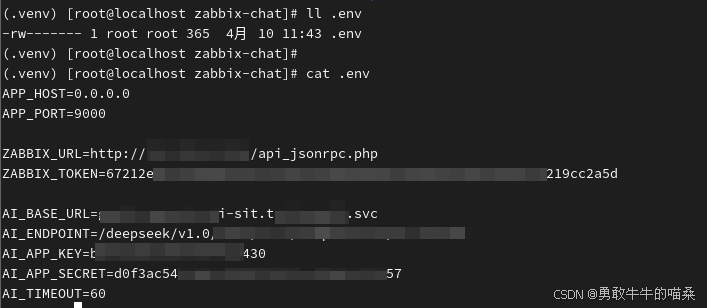
-
编写后端代码
4.1.app/config.pyimport os
from dotenv import load_dotenvload_dotenv()
class Settings:
APP_HOST = os.getenv("APP_HOST", "0.0.0.0")
APP_PORT = int(os.getenv("APP_PORT", "9000"))ZABBIX_URL = os.getenv("ZABBIX_URL", "").strip() ZABBIX_TOKEN = os.getenv("ZABBIX_TOKEN", "").strip() AI_BASE_URL = os.getenv("AI_BASE_URL", "").strip().rstrip("/") AI_ENDPOINT = os.getenv("AI_ENDPOINT", "").strip() # 兼容两种命名:AI_APP_KEY / APP_KEY AI_APP_KEY = os.getenv("AI_APP_KEY", os.getenv("APP_KEY", "")).strip() AI_APP_SECRET = os.getenv("AI_APP_SECRET", os.getenv("APP_SECRET", "")).strip() AI_TIMEOUT = int(os.getenv("AI_TIMEOUT", "60"))settings = Settings()
4.2.app/schemas.py
from typing import Any, Dict, List, Optional
from pydantic import BaseModel, Field

class ChatRequest(BaseModel):
    message: str = Field(..., min_length=1, description="用户输入的自然语言查询")

class TableData(BaseModel):
    columns: List[str] = []
    rows: List[Dict[str, Any]] = []

class ChartSeries(BaseModel):
    name: str
    data: List[float]

class ChartData(BaseModel):
    type: str
    title: str
    labels: List[str]
    series: List[ChartSeries]

class ChatResponse(BaseModel):
    reply: str
    table: Optional[TableData] = None
    chart: Optional[ChartData] = None
    intent: Optional[Dict[str, Any]] = None
4.3.app/utils.py
from datetime import datetime

SEVERITY_MAP = {
    "0": "未分类",
    "1": "信息",
    "2": "警告",
    "3": "一般严重",
    "4": "严重",
    "5": "灾难",
}

def ts_to_str(ts: int) -> str:
    return datetime.fromtimestamp(int(ts)).strftime("%Y-%m-%d %H:%M:%S")

def safe_float(v, default=0.0):
    try:
        return float(v)
    except Exception:
        return default

def severity_to_text(v):
    return SEVERITY_MAP.get(str(v), str(v))
4.4.app/zabbix_client.py
import httpx
from typing import Any, Dict, List, Optional
from app.config import settings

class ZabbixClient:
    def __init__(self):
        self.url = settings.ZABBIX_URL
        self.token = settings.ZABBIX_TOKEN
        self._id = 1

    async def call(self, method: str, params: Dict[str, Any]) -> Any:
        payload = {
            "jsonrpc": "2.0",
            "method": method,
            "params": params,
            "id": self._id,
        }
        self._id += 1

        headers = {
            "Content-Type": "application/json-rpc",
            "Authorization": f"Bearer {self.token}",
        }

        async with httpx.AsyncClient(timeout=60) as client:
            resp = await client.post(self.url, json=payload, headers=headers)
            resp.raise_for_status()
            data = resp.json()

        if "error" in data:
            raise RuntimeError(f"Zabbix API error: {data['error']}")
        return data.get("result")

    async def get_hosts(self) -> List[Dict[str, Any]]:
        params = {
            "output": ["hostid", "host", "name", "status"],
            "selectInterfaces": ["ip", "dns", "port", "main", "useip"],
            "sortfield": "host",
        }
        return await self.call("host.get", params)

    async def find_host(self, host_name: str) -> Optional[Dict[str, Any]]:
        params = {
            "output": ["hostid", "host", "name", "status"],
            "selectInterfaces": ["ip", "dns", "port", "main", "useip"],
            "search": {"host": host_name},
            "searchByAny": True,
            "sortfield": "host",
        }
        result = await self.call("host.get", params)
        if result:
            for h in result:
                if h.get("host") == host_name or h.get("name") == host_name:
                    return h
            return result[0]
        return None

    async def get_recent_problems(self, limit: int = 20) -> List[Dict[str, Any]]:
        params = {
            "output": "extend",
            "selectHosts": ["host", "name"],
            "sortfield": ["eventid"],
            "sortorder": "DESC",
            "limit": limit,
            "recent": True,
        }
        return await self.call("problem.get", params)

    async def get_host_items(self, hostid: str, limit: int = 100) -> List[Dict[str, Any]]:
        params = {
            "output": ["itemid", "name", "key_", "lastvalue", "units", "value_type"],
            "hostids": hostid,
            "sortfield": "name",
            "limit": limit,
        }
        return await self.call("item.get", params)

    async def find_items_by_keywords(self, hostid: str, keywords: List[str]) -> List[Dict[str, Any]]:
        items = await self.get_host_items(hostid, limit=500)
        results = []
        for item in items:
            name = (item.get("name") or "").lower()
            key_ = (item.get("key_") or "").lower()
            for kw in keywords:
                kw = kw.lower()
                if kw in name or kw in key_:
                    results.append(item)
                    break
        return results

    async def get_history(self, itemid: str, value_type: int, time_from: int, time_till: int, limit: int = 5000):
        params = {
            "output": "extend",
            "history": value_type,
            "itemids": [itemid],
            "time_from": time_from,
            "time_till": time_till,
            "sortfield": "clock",
            "sortorder": "ASC",
            "limit": limit,
        }
        return await self.call("history.get", params)

    async def get_trends(self, itemid: str, time_from: int, time_till: int, limit: int = 5000):
        params = {
            "output": "extend",
            "itemids": [itemid],
            "time_from": time_from,
            "time_till": time_till,
            "sortfield": "clock",
            "sortorder": "ASC",
            "limit": limit,
        }
        return await self.call("trend.get", params)
4.5.app/metric_resolver.py
import re
from typing import List, Dict, Any, Optional

METRIC_KEYWORDS = {
    "cpu": [
        "cpu", "system.cpu", "cpu utilization", "processor load", "system.cpu.util"
    ],
    "memory": [
        "memory", "mem", "vm.memory", "available memory", "used memory"
    ],
    "disk": [
        "disk", "vfs.fs", "filesystem", "disk usage", "used space"
    ],
    "network": [
        "network", "net.if", "inbound", "outbound", "bits received", "bits sent"
    ],
    "gpu": [
        "gpu", "nvidia", "graphics"
    ],
}

METRIC_CN_ALIAS = {
    "cpu": "cpu",
    "处理器": "cpu",
    "内存": "memory",
    "memory": "memory",
    "mem": "memory",
    "磁盘": "disk",
    "disk": "disk",
    "网络": "network",
    "网卡": "network",
    "network": "network",
    "gpu": "gpu",
}


def normalize_mount_point(mount_point: str) -> str:
    mp = (mount_point or "").strip()
    if mp in ("根目录", "/目录"):
        return "/"
    return mp


def _contains_mount_point(text: str, mount_point: str) -> bool:
    """
    尽量精确判断监控项名称/键值中是否包含目标挂载点。
    """
    if not text or not mount_point:
        return False

    text = text.lower()
    mp = mount_point.lower()

    if mp == "/":
        # 根目录需要特殊处理,避免把 /boot /home 当成 /
        patterns = [
            r'vfs\.fs\.(?:size|inode)\[/,',
            r'(?<![a-z0-9_])/(?![a-z0-9_])',
            r'挂载点\s*/(?![a-z0-9_])',
            r'文件系统\s*/(?![a-z0-9_])',
        ]
        return any(re.search(p, text) for p in patterns)

    escaped = re.escape(mp)
    patterns = [
        rf'vfs\.fs\.(?:size|inode)\[{escaped},',
        rf'(?<![a-z0-9_]){escaped}(?![a-z0-9_])',
    ]
    return any(re.search(p, text) for p in patterns)


def _disk_stat_score(item: Dict[str, Any], stat: str) -> int:
    """
    根据用户要求的 stat,给磁盘项做语义偏好分。
    分数只用于"同一挂载点下"的候选排序,不负责语义猜测。
    """
    name = (item.get("name") or "").lower()
    key_ = (item.get("key_") or "").lower()
    text = f"{name} {key_}"

    score = 0
    stat = (stat or "").lower()

    if stat == "usage_percent":
        if "pused" in key_:
            score += 120
        if "%" in name or "percent" in text or "used, in %" in text or "usage" in text:
            score += 60
        if "used" in key_:
            score += 20

    elif stat == "free":
        if "free" in key_ or "pfree" in key_:
            score += 100
        if "free" in name:
            score += 40

    elif stat == "used":
        if "used" in key_ or "used" in name:
            score += 100

    return score


def pick_best_item(items: List[Dict[str, Any]], metric: str, mount_point: str = "", stat: str = "") -> Optional[Dict[str, Any]]:
    """
    选择最符合语义的监控项。
    关键策略:
    1. 如果是disk且指定了mount_point,必须优先在该挂载点内筛选
    2. 在同一挂载点候选中,再根据stat排序
    3. 如果没有mount_point,再退化到通用选择
    """
    if not items:
        return None

    metric = (metric or "").strip().lower()
    mount_point = normalize_mount_point(mount_point)
    stat = (stat or "").strip().lower()

    if metric == "disk":
        # 先筛挂载点
        if mount_point:
            filtered = []
            for item in items:
                text = f"{item.get('name', '')} {item.get('key_', '')}"
                if _contains_mount_point(text, mount_point):
                    filtered.append(item)

            if filtered:
                scored = []
                for item in filtered:
                    score = _disk_stat_score(item, stat)

                    name = (item.get("name") or "").lower()
                    key_ = (item.get("key_") or "").lower()

                    if "vfs.fs.size" in key_:
                        score += 20
                    if item.get("status") == "0":
                        score += 5

                    scored.append((score, item))

                scored.sort(key=lambda x: x[0], reverse=True)
                return scored[0][1]

            return None

        # 未指定挂载点时,尽量选更通用的 disk 项
        scored = []
        for item in items:
            score = _disk_stat_score(item, stat)
            key_ = (item.get("key_") or "").lower()
            name = (item.get("name") or "").lower()

            if "vfs.fs.size" in key_:
                score += 20
            if "/boot" in name or "/boot" in key_:
                score -= 5

            scored.append((score, item))

        scored.sort(key=lambda x: x[0], reverse=True)
        return scored[0][1] if scored else items[0]

    # 非disk先保留原有简单逻辑
    return items[0]
4.6.app/llm_parser.py
import json
import re

from app.config import settings
from pygbop import BasicAuth, GbopApiClient, Method

SYSTEM_PROMPT = """
你是一个Zabbix监控查询意图解析器。
你的唯一任务是:把用户输入解析成结构化JSON。
不要回答解释,不要补充说明,不要输出markdown代码块,只输出JSON。

只允许以下intent:
1. list_hosts
2. recent_problems
3. host_items
4. metric_trend

JSON字段规范:
{
  "intent": "list_hosts | recent_problems | host_items | metric_trend",
  "host_name": "可为空",
  "metric": "cpu | memory | disk | network | gpu | 可为空",
  "hours": 24,
  "need_chart": true,
  "need_table": true,
  "mount_point": "磁盘挂载点,可为空,例如 / /home /var",
  "stat": "指标语义,可为空,例如 usage_percent | free | used | utilization"
}

规则:
- "查看主机列表/有哪些主机/监控了哪些服务器" => list_hosts
- "最近告警/最近有哪些告警/近期开了哪些问题" => recent_problems
- "查看xxx监控项/xxx有哪些指标" => host_items
- "查看xxx最近24小时CPU趋势/内存情况/磁盘曲线/网络流量图" => metric_trend

主机识别规则:
- host_name 填主机名、IP、DNS名称都可以
- 例如:192.168.1.1 也应放入 host_name

时间规则:
- 如果用户未明确时间范围,hours默认24
- "最近24小时" => hours=24
- "最近12小时" => hours=12
- "最近7天" => hours=168

图表与表格规则:
- 如果用户提到趋势、曲线、图、图表,need_chart=true
- 默认need_table=true

metric规则:
- CPU/处理器 => cpu
- 内存/memory/mem => memory
- 磁盘/磁盘使用率/目录使用率/文件系统 => disk
- 网络/流量/带宽/网卡 => network
- GPU => gpu

mount_point规则(非常重要):
- 只有在 metric=disk 时才尽量提取 mount_point
- 用户提到"/目录""根目录""/ 挂载点" => mount_point="/"
- 用户提到"/home""/boot""/var""/data"等 => 原样提取
- 如果没提到具体挂载点,则 mount_point 置空

stat规则:
- "使用率""占用率" => usage_percent
- "空闲""剩余" => free
- "已用""使用量" => used
- CPU"使用率" => utilization
- 如果无法明确,就根据常识填写:
  - cpu => utilization
  - memory => utilization
  - disk 且说"使用率/趋势图" => usage_percent
  - 其他不明确可置空

如果缺主机名但intent需要主机名,host_name置空。
请严格只输出JSON对象,不要输出其他内容。
"""


def _extract_json(text: str):
    text = text.strip()
    text = text.replace("```json", "").replace("```", "").strip()

    match = re.search(r"\{.*\}", text, re.S)
    if not match:
        raise ValueError(f"LLM返回中未找到JSON,原始返回:{text}")

    return json.loads(match.group(0))


def _post_fix_result(message: str, result: dict) -> dict:
    """
    对LLM结果做轻量兜底修正:
    1. 规范 mount_point
    2. 规范 stat
    3. 尽量不改语义,只补明显可确定的信息
    """
    msg = (message or "").strip()

    result.setdefault("intent", "")
    result.setdefault("host_name", "")
    result.setdefault("metric", "")
    result.setdefault("hours", 24)
    result.setdefault("need_chart", False)
    result.setdefault("need_table", True)
    result.setdefault("mount_point", "")
    result.setdefault("stat", "")

    metric = (result.get("metric") or "").strip().lower()
    stat = (result.get("stat") or "").strip().lower()
    mount_point = (result.get("mount_point") or "").strip()

    # 根目录兜底识别
    if metric == "disk":
        if not mount_point:
            if re.search(r"(?<!\S)/(?!\S)", msg):
                mount_point = "/"
            elif "根目录" in msg or "/目录" in msg:
                mount_point = "/"

        # 规范 stat
        if not stat:
            if "使用率" in msg or "占用率" in msg:
                stat = "usage_percent"
            elif "空闲" in msg or "剩余" in msg:
                stat = "free"
            elif "已用" in msg or "使用量" in msg:
                stat = "used"
            else:
                stat = "usage_percent"

    elif metric == "cpu":
        if not stat:
            stat = "utilization"
    elif metric == "memory":
        if not stat:
            if "空闲" in msg or "剩余" in msg:
                stat = "free"
            elif "已用" in msg or "使用量" in msg or "使用率" in msg:
                stat = "utilization"
            else:
                stat = "utilization"

    result["mount_point"] = mount_point
    result["stat"] = stat
    return result


async def parse_intent(message: str) -> dict:
    auth = BasicAuth(
        access_key=settings.AI_APP_KEY,
        secret_key=settings.AI_APP_SECRET
    )

    client = GbopApiClient(
        auth,
        base_url=settings.AI_BASE_URL
    )

    payload = {
        "max_tokens": 400,
        "temperature": 0.1,
        "top_p": 1,
        "frequency_penalty": 0,
        "presence_penalty": 0,
        "enable_thinking": False,
        "messages": [
            {"role": "system", "content": SYSTEM_PROMPT},
            {"role": "user", "content": message},
        ],
        "user": "zabbix_chat_intent_parser"
    }

    print("🚀 开始调用 AI 解析意图...")
    print(f"DEBUG AI_BASE_URL = {settings.AI_BASE_URL}")
    print(f"DEBUG AI_ENDPOINT = {settings.AI_ENDPOINT}")

    response = client.execute(
        method=Method.POST,
        path=settings.AI_ENDPOINT,
        data=payload,
        data_is_json=True,
        timeout=settings.AI_TIMEOUT
    )

    if isinstance(response, bytes):
        raw_text = response.decode("utf-8", errors="ignore")
    else:
        raw_text = str(response)

    print(f"DEBUG AI RAW RESPONSE = {raw_text}")

    data = json.loads(raw_text)

    content = None
    if isinstance(data, dict):
        if "choices" in data and data["choices"]:
            content = data["choices"][0].get("message", {}).get("content")
        elif "data" in data:
            content = data["data"]
        elif "content" in data:
            content = data["content"]

    if not content:
        raise ValueError(f"AI返回结构无法识别:{data}")

    result = _extract_json(content)
    result = _post_fix_result(message, result)
    return result
4.7.app/orchestrator.py
import time
from app.zabbix_client import ZabbixClient
from app.metric_resolver import (
    METRIC_KEYWORDS,
    METRIC_CN_ALIAS,
    pick_best_item,
    normalize_mount_point,
)
from app.utils import ts_to_str, safe_float, severity_to_text

zbx = ZabbixClient()


def normalize_metric(metric: str) -> str:
    if not metric:
        return ""
    metric = metric.strip().lower()
    return METRIC_CN_ALIAS.get(metric, metric)


async def handle_intent(intent_data: dict) -> dict:
    intent = intent_data.get("intent", "").strip()
    host_name = (intent_data.get("host_name") or "").strip()
    metric = normalize_metric(intent_data.get("metric", ""))
    hours = int(intent_data.get("hours") or 24)
    need_chart = bool(intent_data.get("need_chart", False))
    need_table = bool(intent_data.get("need_table", True))
    mount_point = normalize_mount_point(intent_data.get("mount_point", ""))
    stat = (intent_data.get("stat") or "").strip().lower()

    if intent == "list_hosts":
        return await handle_list_hosts()

    if intent == "recent_problems":
        return await handle_recent_problems()

    if intent == "host_items":
        if not host_name:
            return {"reply": "请提供主机名,例如:查看 test-server 的监控项"}
        return await handle_host_items(host_name)

    if intent == "metric_trend":
        if not host_name:
            return {"reply": "请提供主机名,例如:查看 test-server 最近24小时 CPU 趋势图"}
        if not metric:
            return {"reply": "请提供指标类型,例如 CPU、内存、磁盘、网络"}
        return await handle_metric_trend(
            host_name=host_name,
            metric=metric,
            hours=hours,
            need_chart=need_chart,
            need_table=need_table,
            mount_point=mount_point,
            stat=stat,
        )

    return {
        "reply": "我没理解你的请求,请换一种说法,例如:查看主机列表、最近有哪些告警、查看 test-server 最近24小时 CPU 趋势图"
    }


async def handle_list_hosts() -> dict:
    hosts = await zbx.get_hosts()
    rows = []
    for h in hosts:
        ip = ""
        interfaces = h.get("interfaces") or []
        if interfaces:
            main_if = interfaces[0]
            ip = main_if.get("ip") or main_if.get("dns") or ""
        rows.append({
            "host": h.get("host"),
            "name": h.get("name"),
            "ip": ip,
            "status": "启用" if h.get("status") == "0" else "禁用"
        })

    return {
        "reply": f"当前共查询到 {len(rows)} 台主机。",
        "table": {
            "columns": ["host", "name", "ip", "status"],
            "rows": rows
        }
    }


async def handle_recent_problems() -> dict:
    problems = await zbx.get_recent_problems(limit=20)
    rows = []
    for p in problems:
        hosts = p.get("hosts") or []
        host_name = hosts[0].get("host") if hosts else ""
        rows.append({
            "time": ts_to_str(int(p.get("clock", 0))),
            "host": host_name,
            "severity": severity_to_text(p.get("severity")),
            "name": p.get("name", "")
        })

    return {
        "reply": f"最近告警共 {len(rows)} 条。",
        "table": {
            "columns": ["time", "host", "severity", "name"],
            "rows": rows
        }
    }


async def handle_host_items(host_name: str) -> dict:
    host = await zbx.find_host(host_name)
    if not host:
        return {"reply": f"未找到主机 {host_name},请确认主机名是否正确"}

    items = await zbx.get_host_items(host["hostid"], limit=200)
    rows = []
    for i in items:
        rows.append({
            "name": i.get("name"),
            "key": i.get("key_"),
            "lastvalue": i.get("lastvalue"),
            "units": i.get("units")
        })

    return {
        "reply": f"主机 {host.get('host')} 共查询到 {len(rows)} 个监控项。",
        "table": {
            "columns": ["name", "key", "lastvalue", "units"],
            "rows": rows
        }
    }


async def handle_metric_trend(
    host_name: str,
    metric: str,
    hours: int,
    need_chart: bool,
    need_table: bool,
    mount_point: str = "",
    stat: str = "",
) -> dict:
    host = await zbx.find_host(host_name)
    if not host:
        return {"reply": f"未找到主机 {host_name},请确认主机名是否正确"}

    keywords = METRIC_KEYWORDS.get(metric, [metric])
    items = await zbx.find_items_by_keywords(host["hostid"], keywords)
    if not items:
        return {"reply": f"主机 {host_name} 未找到 {metric} 相关监控项"}

    item = pick_best_item(
        items=items,
        metric=metric,
        mount_point=mount_point,
        stat=stat,
    )

    if not item:
        if metric == "disk" and mount_point:
            return {"reply": f"主机 {host_name} 未找到挂载点 {mount_point} 对应的磁盘监控项"}
        return {"reply": f"主机 {host_name} 未找到符合条件的 {metric} 监控项"}

    itemid = item["itemid"]
    value_type = int(item.get("value_type", 0))

    now_ts = int(time.time())
    start_ts = now_ts - hours * 3600

    rows = []
    labels = []
    values = []

    if value_type in (0, 3):
        history = await zbx.get_history(itemid, value_type, start_ts, now_ts, limit=2000)
        for x in history:
            t = ts_to_str(int(x["clock"]))
            v = safe_float(x.get("value"))
            rows.append({"time": t, "value": v})
            labels.append(t[11:16])
            values.append(v)
    else:
        trends = await zbx.get_trends(itemid, start_ts, now_ts, limit=2000)
        for x in trends:
            t = ts_to_str(int(x["clock"]))
            v = safe_float(x.get("value_avg"))
            rows.append({"time": t, "value": v})
            labels.append(t[11:16])
            values.append(v)

    if not rows:
        if metric == "disk" and mount_point:
            return {"reply": f"主机 {host_name} 的 {mount_point} 在最近 {hours} 小时内没有历史数据"}
        return {"reply": f"主机 {host_name} 的 {metric} 指标在最近 {hours} 小时内没有历史数据"}

    metric_desc = metric
    if metric == "disk" and mount_point:
        metric_desc = f"{mount_point} 磁盘"

    if metric == "disk" and mount_point and stat == "usage_percent":
        reply = f"主机 {host.get('host')} 最近 {hours} 小时 {mount_point} 使用率趋势如下(监控项:{item.get('name')})。"
    else:
        reply = f"主机 {host.get('host')} 最近 {hours} 小时 {metric_desc} 趋势如下(监控项:{item.get('name')})。"

    result = {
        "reply": reply,
        "intent": {
            "intent": "metric_trend",
            "host_name": host_name,
            "metric": metric,
            "hours": hours,
            "mount_point": mount_point,
            "stat": stat,
            "selected_item": {
                "itemid": item.get("itemid"),
                "name": item.get("name"),
                "key_": item.get("key_"),
            }
        }
    }

    if need_chart:
        result["chart"] = {
            "type": "line",
            "title": f"{host.get('host')} {metric_desc} 趋势",
            "labels": labels,
            "series": [
                {
                    "name": metric_desc,
                    "data": values
                }
            ]
        }

    if need_table:
        result["table"] = {
            "columns": ["time", "value"],
            "rows": rows
        }

    return result
4.8.app/main.py
from fastapi import FastAPI, Request
from fastapi.responses import HTMLResponse, JSONResponse
from fastapi.staticfiles import StaticFiles
from fastapi.templating import Jinja2Templates

from app.schemas import ChatRequest
from app.llm_parser import parse_intent
from app.orchestrator import handle_intent

app = FastAPI(title="Zabbix Chat Query Service")

app.mount("/static", StaticFiles(directory="static"), name="static")
templates = Jinja2Templates(directory="templates")

@app.get("/health")
async def health():
    return {"ok": True}

@app.get("/", response_class=HTMLResponse)
async def index(request: Request):
    return templates.TemplateResponse("index.html", {"request": request})

@app.post("/api/chat")
async def chat(req: ChatRequest):
    try:
        intent_data = await parse_intent(req.message)
    except Exception as e:
        return JSONResponse(status_code=200, content={
            "reply": f"AI 意图解析失败,请换一种说法。错误信息:{str(e)}"
        })

    try:
        result = await handle_intent(intent_data)
        result["intent"] = intent_data
        return result
    except Exception as e:
        return JSONResponse(status_code=200, content={
            "reply": f"查询 Zabbix 数据失败,请稍后重试。错误信息:{str(e)}",
            "intent": intent_data
})- 编写前端页面
5.1.templates/index.html
<!DOCTYPE html>
<html lang="zh-CN">
<head>
  <meta charset="UTF-8" />
  <meta name="viewport" content="width=device-width, initial-scale=1.0" />
  <title>Zabbix 智能查询</title>
  <script src="https://cdn.jsdelivr.net/npm/chart.js"></script>
  <style>
    body {
      font-family: Arial, sans-serif;
      margin: 20px;
      background: #f7f7f7;
    }

    .container {
      max-width: 1000px;
      margin: 0 auto;
    }

    .card {
      background: #fff;
      padding: 16px;
      border-radius: 8px;
      margin-bottom: 16px;
      box-shadow: 0 1px 4px rgba(0,0,0,.08);
    }

    textarea {
      width: 100%;
      min-height: 120px;
      max-height: 240px;
      padding: 10px;
      font-size: 14px;
      line-height: 1.6;
      resize: vertical;
      box-sizing: border-box;
      white-space: pre-wrap;
    }

    button {
      padding: 10px 16px;
      cursor: pointer;
      margin-top: 12px;
    }

    table {
      width: 100%;
      border-collapse: collapse;
      margin-top: 12px;
      background: #fff;
    }

    th, td {
      border: 1px solid #ddd;
      padding: 8px;
      font-size: 14px;
    }

    th {
      background: #fafafa;
    }

    .reply {
      white-space: pre-wrap;
      line-height: 1.7;
      min-height: 24px;
    }

    #chartWrap {
      background: #fff;
      padding: 10px;
      border-radius: 8px;
      min-height: 320px;
    }

    #chartCanvas {
      width: 100% !important;
      height: 300px !important;
    }

    pre {
      white-space: pre-wrap;
      word-break: break-word;
      background: #fafafa;
      padding: 12px;
      border-radius: 6px;
      overflow-x: auto;
    }
  </style>
</head>
<body>
  <div class="container">
    <div class="card">
      <h2>Zabbix 智能查询</h2>

      <textarea
        id="message"
        placeholder="你可以这样问:
1. 查看192.168.1.1的CPU性能
2. 最近最近24小时有哪些告警"
      ></textarea>

      <button onclick="sendMessage()">发送</button>
    </div>

    <div class="card">
      <h3>回复</h3>
      <div id="reply" class="reply">等待查询...</div>
    </div>

    <div class="card">
      <h3>图表结果</h3>
      <div id="chartWrap">
        <canvas id="chartCanvas"></canvas>
      </div>
    </div>

    <div class="card">
      <h3>表格结果</h3>
      <div id="tableContainer">暂无数据</div>
    </div>

    <div class="card">
      <h3>解析意图</h3>
      <pre id="intentBox">暂无</pre>
    </div>
  </div>

  <script src="/static/app.js"></script>
</body>
</html>
5.2.static/app.js
let chartInstance = null;

function renderTable(table) {
  const container = document.getElementById("tableContainer");

  if (!table || !table.columns || !table.rows || table.rows.length === 0) {
    container.innerHTML = "暂无数据";
    return;
  }

  let html = "<table><thead><tr>";
  table.columns.forEach(col => {
    html += `<th>${col}</th>`;
  });
  html += "</tr></thead><tbody>";

  table.rows.forEach(row => {
    html += "<tr>";
    table.columns.forEach(col => {
      html += `<td>${row[col] ?? ""}</td>`;
    });
    html += "</tr>";
  });

  html += "</tbody></table>";
  container.innerHTML = html;
}

function renderChart(chart) {
  const canvas = document.getElementById("chartCanvas");
  const ctx = canvas.getContext("2d");

  if (chartInstance) {
    chartInstance.destroy();
    chartInstance = null;
  }

  if (!chart || !chart.labels || !chart.series || chart.series.length === 0) {
    return;
  }

  chartInstance = new Chart(ctx, {
    type: chart.type || "line",
    data: {
      labels: chart.labels,
      datasets: chart.series.map((s, idx) => ({
        label: s.name,
        data: s.data,
        borderWidth: 2,
        fill: false,
        tension: 0.25
      }))
    },
    options: {
      responsive: true,
      maintainAspectRatio: false,
      plugins: {
        title: {
          display: true,
          text: chart.title || "趋势图"
        }
      }
    }
  });
}

function clearChartIfNoData() {
  if (chartInstance) {
    chartInstance.destroy();
    chartInstance = null;
  }
}

async function sendMessage() {
  const messageEl = document.getElementById("message");
  const replyEl = document.getElementById("reply");
  const tableEl = document.getElementById("tableContainer");
  const intentEl = document.getElementById("intentBox");

  const message = messageEl.value.trim();
  if (!message) {
    alert("请输入内容");
    return;
  }

  // 按你的要求:先回复,再图表,再表格,再意图
  replyEl.innerText = "查询中,请稍候...";
  tableEl.innerHTML = "加载中...";
  intentEl.innerText = "解析中...";
  clearChartIfNoData();

  try {
    const resp = await fetch("/api/chat", {
      method: "POST",
      headers: {
        "Content-Type": "application/json"
      },
      body: JSON.stringify({ message })
    });

    const data = await resp.json();

    replyEl.innerText = data.reply || "";

    // 第二:图表
    renderChart(data.chart);

    // 第三:表格
    renderTable(data.table);

    // 第四:意图
    intentEl.innerText = JSON.stringify(data.intent || {}, null, 2);
  } catch (e) {
    replyEl.innerText = "请求失败:" + e;
    tableEl.innerHTML = "暂无数据";
    intentEl.innerText = "暂无";
    clearChartIfNoData();
  }
}

document.getElementById("message").addEventListener("keydown", function (e) {
  if (e.key === "Enter" && !e.shiftKey) {
    e.preventDefault();
    sendMessage();
  }
});

document.getElementById("message").addEventListener("input", function () {
  this.style.height = "auto";
  this.style.height = Math.min(this.scrollHeight, 240) + "px";
});-
补充基础文件
6.1.gitignorecat > .gitignore <<'EOF'
.venv/
pycache/
*.pyc
.env
EOF
cat > README.md <<'EOF'
# zabbix-chat

无数据库、浏览器聊天式 Zabbix 查询服务。

## 启动
```bash
source .venv/bin/activate
uvicorn app.main:app --host 0.0.0.0 --port 9000-
启动服务验证
cd /opt/zabbix-chat
source .venv/bin/activate
uvicorn app.main:app --host 0.0.0.0 --port 9000