简单记录ROS2安装EVO评估工具--
1.安装EVO
pip install evo --upgrade --no-binary evo 若提示找不到pip,则先安装pip:
sudo apt install python3-pip2.安装EVO后,直接运行
evo_traj tum pose.txt -p发现报错:
WARNING: The scripts f2py and numpy-config are installed in '/home/siliya/.local/bin' which is not on PATH.
Consider adding this directory to PATH or, if you prefer to suppress this warning, use --no-warn-script-location.
WARNING: The script natsort is installed in '/home/siliya/.local/bin' which is not on PATH.
Consider adding this directory to PATH or, if you prefer to suppress this warning, use --no-warn-script-location.
WARNING: The script rosbags-convert is installed in '/home/siliya/.local/bin' which is not on PATH.
Consider adding this directory to PATH or, if you prefer to suppress this warning, use --no-warn-script-location.
WARNING: The scripts evo, evo_ape, evo_config, evo_ipython, evo_res, evo_rpe and evo_traj are installed in '/home/siliya/.local/bin' which is not on PATH.
Consider adding this directory to PATH or, if you prefer to suppress this warning, use --no-warn-script-location.
证明路径不对,输入以下指令:
echo 'export PATH="$HOME/.local/bin:$PATH"' >> ~/.bashrc^C
source ~/.bashrc
然后再次查看轨迹,发现报错为:
/usr/lib/python3/dist-packages/scipy/init.py:146: UserWarning: A NumPy version >=1.17.3 and <1.25.0 is required for this version of SciPy (detected version 2.2.6
warnings.warn(f"A NumPy version >={np_minversion} and <{np_maxversion}"
证明相关的依赖版本不正确,则运行以下命令:
# 卸载当前版本的相关依赖
pip uninstall numpy scipy matplotlib -y

# 安装兼容版本
pip install numpy==1.24.4 scipy==1.9.3 matplotlib==3.7.3

# 安装EVO
pip install evo --upgrade --no-binary evo

# 路径添加
echo 'export PATH="$HOME/.local/bin:$PATH"' >> ~/.bashrc^C
source ~/.bashrc
3.再次运行查看轨迹,发现报错:
Warning: Ignoring XDG_SESSION_TYPE=wayland on Gnome. Use QT_QPA_PLATFORM=wayland to run on Wayland anyway.
ERROR Unhandled error in evo.cli.traj
提示为没有PyQT6,安装即可:
# 安装PyQt6
pip install PyQt6

# 再次测试EVO
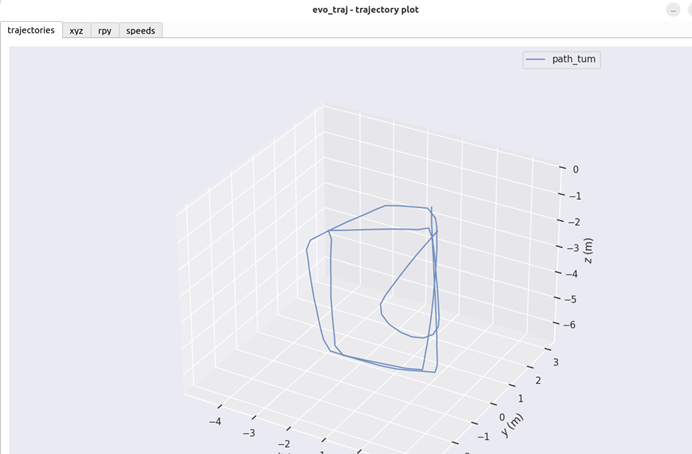
evo_traj tum pose_tum.txt -p
然后即可正常运行,查看轨迹,如图: