向量数据库架构与应用实战:从原理到生产部署
第一章 向量数据库概述:为什么需要向量数据库?
1.1 传统数据库的局限性
在传统的关系型数据库中,数据查询主要基于精确匹配或范围查询。例如:
sql
SELECT * FROM users WHERE id = 123;
SELECT * FROM products WHERE price BETWEEN 100 AND 500;
然而,在 AI 应用场景中,我们经常需要处理"语义相似性"查询:
- "找出与这张图片相似的图片"
- "找出与这段文字语义相近的文档"
- "找出与这个用户兴趣相似的其他用户"
这类查询无法用传统的 SQL 表达,因为它们不是基于精确值匹配,而是基于向量空间中的距离计算。
1.2 向量化:将万物转化为数字
向量数据库的核心思想是将各种类型的数据(文本、图片、音频、视频)转化为向量表示(Embedding)。向量是一个浮点数数组,例如:
文本 "人工智能改变世界" → [0.123, -0.456, 0.789, ..., 0.234] (768 维)
图片 [猫的照片] → [0.567, 0.123, -0.890, ..., 0.456] (512 维)这些向量保留了原始数据的语义信息:语义相似的内容,其向量在空间中的距离也更近。
1.3 向量数据库的核心价值
向量数据库专为向量数据设计,提供以下核心能力:
- 高效相似度搜索:在亿级向量中毫秒级返回 Top-K 相似结果
- 多模态支持:统一处理文本、图片、音频等多种数据类型
- 元数据过滤:支持向量搜索 + 传统条件过滤的组合查询
- 动态更新:支持向量的实时插入、删除、更新
- 分布式扩展:支持水平扩展,应对海量数据场景
第二章 向量相似度搜索原理与算法
2.1 相似度度量方法
向量相似度搜索的核心是计算两个向量之间的"距离"。常用的相似度度量方法包括:
欧几里得距离(L2 Distance):
python
def euclidean_distance(a, b):
    return sum((a[i] - b[i]) ** 2 for i in range(len(a))) ** 0.5
余弦相似度(Cosine Similarity):
python
def cosine_similarity(a, b):
    dot_product = sum(a[i] * b[i] for i in range(len(a)))
    norm_a = sum(x ** 2 for x in a) ** 0.5
    norm_b = sum(x ** 2 for x in b) ** 0.5
    return dot_product / (norm_a * norm_b)
内积相似度(Inner Product):
python
def inner_product(a, b):
    return sum(a[i] * b[i] for i in range(len(a)))
2.2 暴力搜索的局限性
最直接的搜索方法是计算查询向量与数据库中所有向量的距离,然后排序返回 Top-K。这种方法的时间复杂度是 O(N),其中 N 是向量总数。
对于亿级向量库,暴力搜索完全不可行:
- 1 亿向量 × 768 维 × 8 字节 = 约 600GB 数据
- 单次查询需要遍历全部数据,延迟达到秒级甚至分钟级
- 无法满足实时应用的毫秒级响应要求
2.3 近似最近邻搜索(ANN)算法
为了解决暴力搜索的性能问题,研究者提出了近似最近邻搜索(Approximate Nearest Neighbor, ANN)算法。ANN 通过牺牲少量精度换取数量级的性能提升。
2.3.1 HNSW 算法(Hierarchical Navigable Small World)
HNSW 是目前最流行的 ANN 算法之一,其核心思想是构建多层图结构:
Layer 3:    A ───────────── B
            │               │
Layer 2:    C ─── D ─────── E
            │     │         │
Layer 1:    F ─── G ─── H ──I
            │     │     │   │
Layer 0: J ─── K ─── L ─ M (最底层,包含所有节点)搜索过程:
- 从最高层的入口点开始
- 在当前层找到最近邻
- 下降到下一层,以该点为起点继续搜索
- 重复直到最底层,返回结果
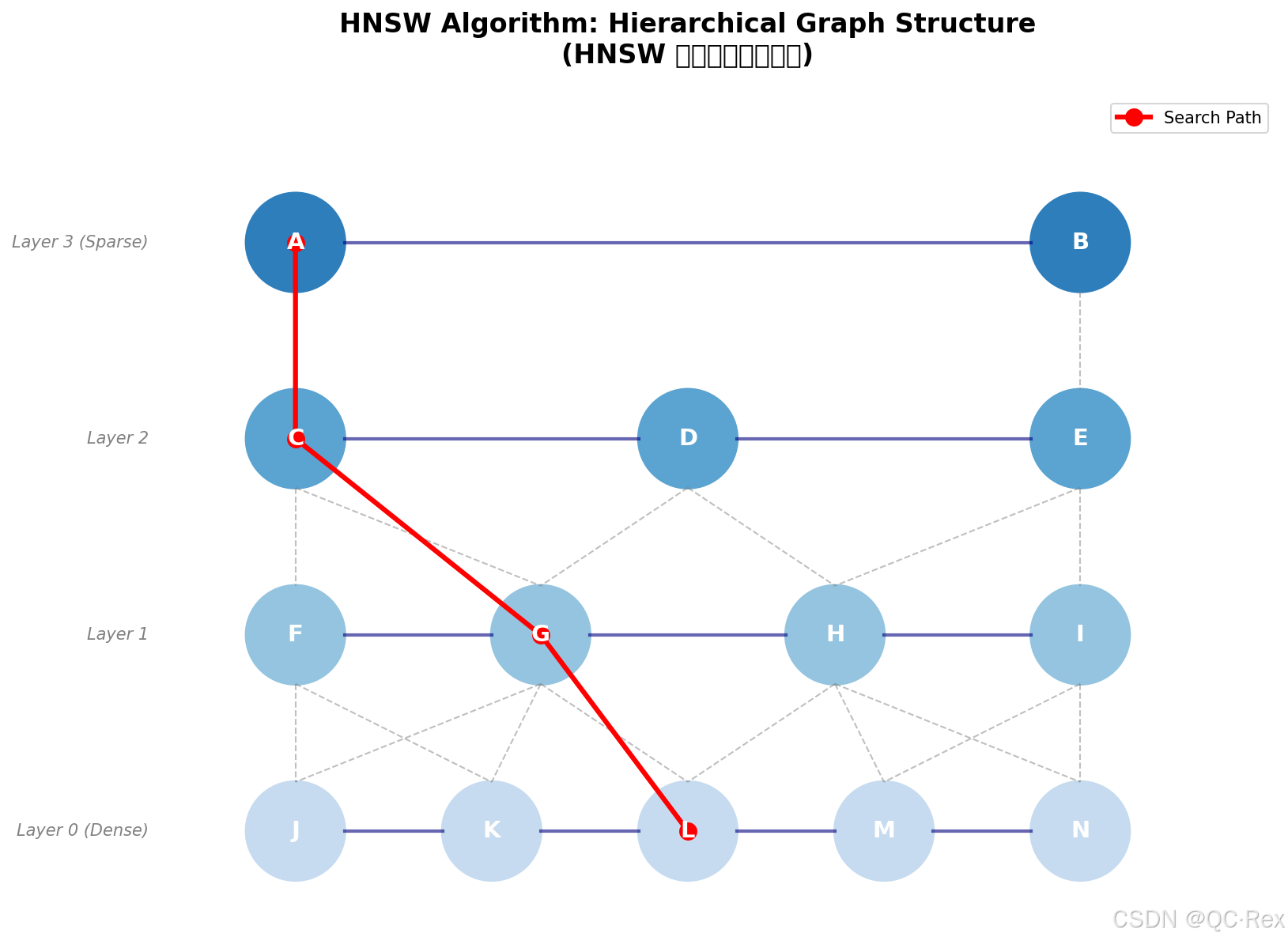
图 1: HNSW 算法分层图结构示意图
特点:
- 搜索复杂度:O(log N)
- 召回率高(通常>95%)
- 内存占用较大
- 适合对精度要求高的场景
2.3.2 IVF-PQ 算法(Inverted File + Product Quantization)
IVF-PQ 是另一种主流 ANN 算法,结合了倒排索引和乘积量化:
步骤 1: 聚类(IVF)
  - 使用 K-Means 将向量聚类为 N 个簇
  - 每个簇建立一个倒排索引

步骤 2: 量化(PQ)
  - 将高维向量分割为 M 个子向量
  - 每个子向量用少量比特编码
  - 大幅压缩存储空间

步骤 3: 搜索
  - 找到查询向量所属的簇
  - 只在相关簇内搜索
- 使用量化后的向量计算距离特点:
- 存储压缩率高(可达 10-100 倍)
- 适合超大规模向量库
- 精度略低于 HNSW
- 适合内存受限场景
2.4 算法选择建议
| 场景 | 推荐算法 | 理由 |
|---|---|---|
| 精度优先(<1000 万向量) | HNSW | 召回率高,延迟低 |
| 内存受限(>1 亿向量) | IVF-PQ | 压缩率高,成本低 |
| 实时写入频繁 | HNSW | 动态更新友好 |
| 批量离线搜索 | IVF-PQ | 批量处理效率高 |
第三章 主流向量数据库对比评测
3.1 四大主流向量数据库
3.1.1 Milvus
定位:开源向量数据库,云原生架构
核心特性:
- 支持 HNSW、IVF、SCANN 等多种索引类型
- 云原生设计,支持 Kubernetes 部署
- 多语言 SDK(Python、Java、Go、Node.js)
- 支持混合查询(向量 + 标量过滤)
适用场景:
- 中大型 AI 应用
- 需要私有化部署
- 对可控性和扩展性要求高
3.1.2 Pinecone
定位:托管向量数据库服务
核心特性:
- 全托管服务,无需运维
- 自动扩缩容
- 简单 API,快速集成
- 企业级 SLA 保障
适用场景:
- 快速原型验证
- 初创团队
- 不想投入运维资源
3.1.3 Qdrant
定位:开源向量数据库,Rust 实现
核心特性:
- Rust 实现,性能优异
- 支持过滤条件查询
- 内置分词和文本处理
- 支持分布式部署
适用场景:
- 高性能要求场景
- 需要精细过滤控制
- 技术团队偏好 Rust 生态
3.1.4 Weaviate
定位:开源向量搜索引擎
核心特性:
- 内置模块化架构
- 支持多种向量模型
- GraphQL API
- 自动 schema 推断
适用场景:
- 知识图谱应用
- 需要灵活查询接口
- 多模态搜索场景
3.2 性能对比数据
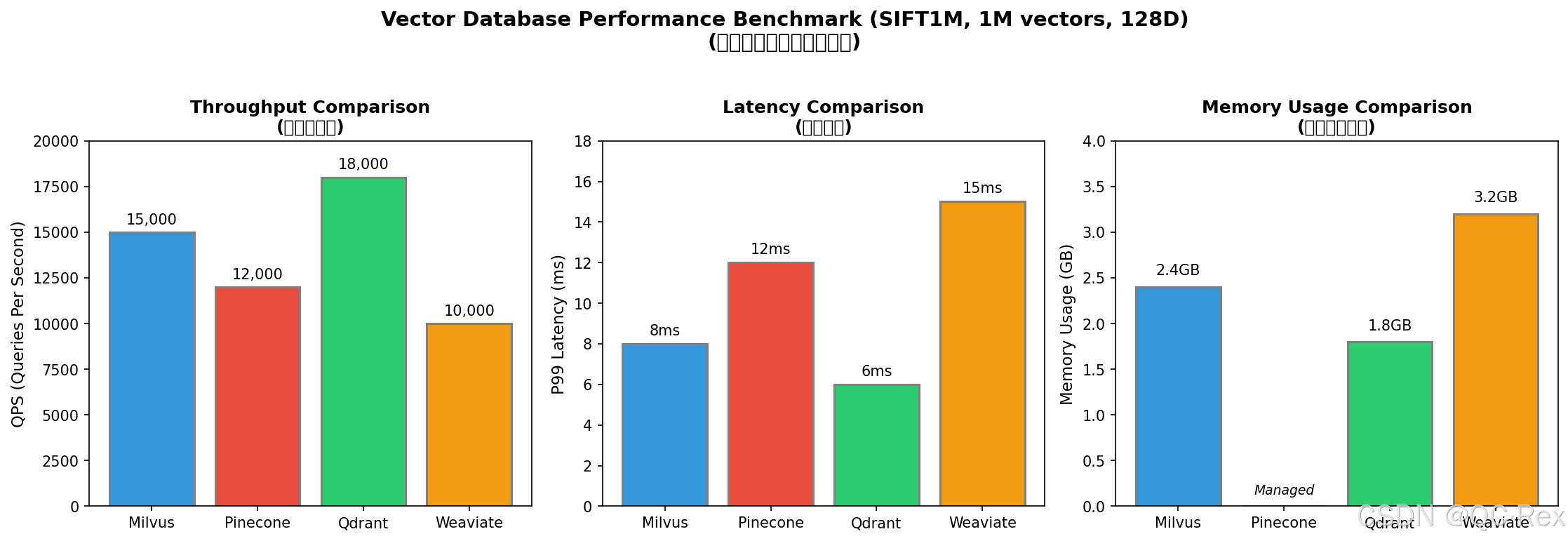
图 3: 主流向量数据库性能基准测试对比
基于公开基准测试(SIFT1M 数据集,100 万向量,128 维):
| 数据库 | QPS@95% 召回率 | P99 延迟 | 内存占用 |
|---|---|---|---|
| Milvus (HNSW) | 15,000 | 8ms | 2.4GB |
| Pinecone | 12,000 | 12ms | 托管 |
| Qdrant (HNSW) | 18,000 | 6ms | 1.8GB |
| Weaviate | 10,000 | 15ms | 3.2GB |
结论:
- Qdrant 在性能方面表现最优
- Milvus 在功能和生态方面最完善
- Pinecone 在易用性方面最佳
- Weaviate 在灵活性方面最突出
第四章 RAG 系统架构设计
4.1 RAG 基本概念
RAG(Retrieval-Augmented Generation,检索增强生成)是当前最主流的 AI 应用架构。其核心思想是:
用户问题 → 向量检索 → 相关文档 → 大模型 → 增强回答4.2 完整 RAG 系统架构
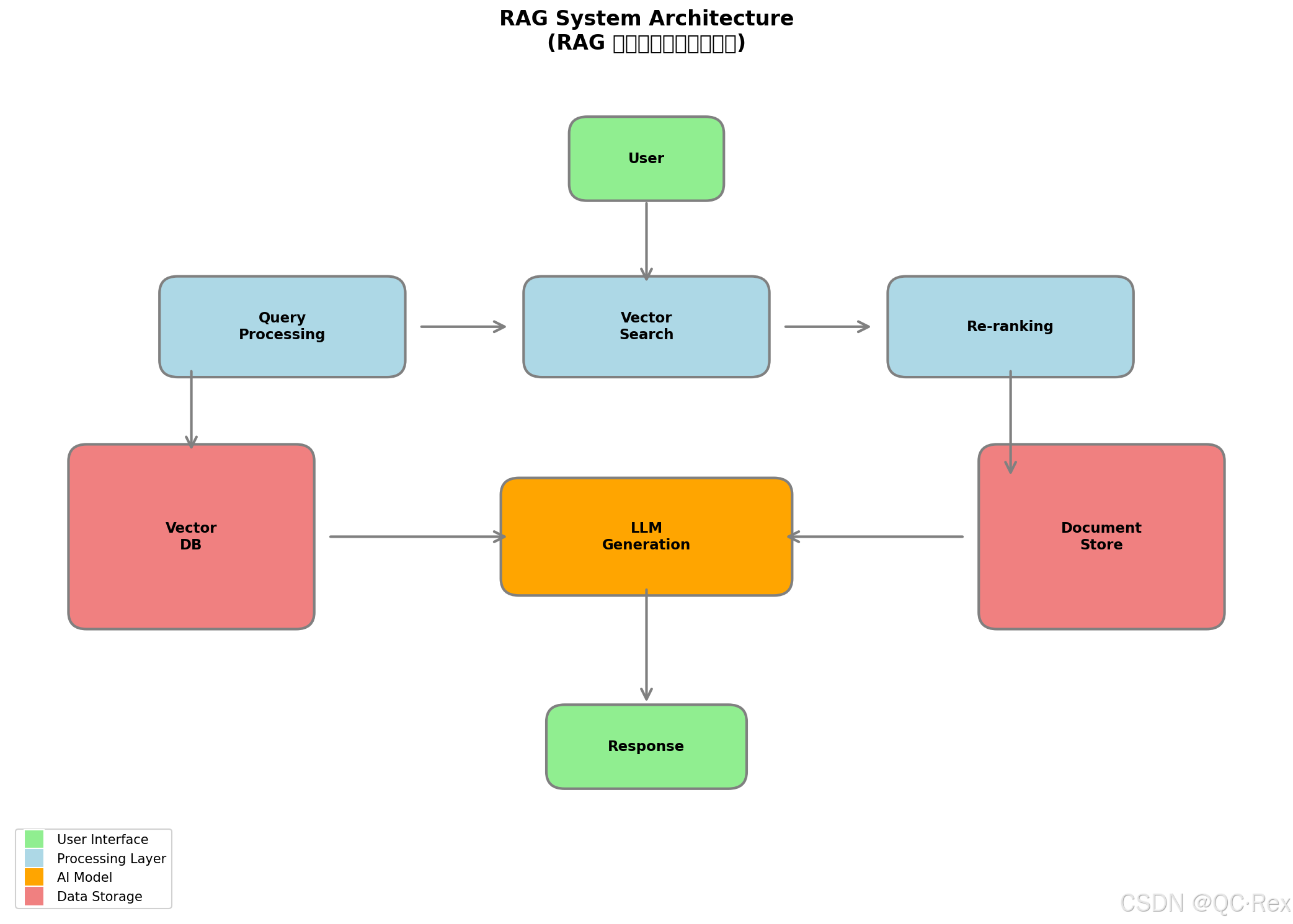
图 2: RAG 检索增强生成系统架构图
原架构示意:
┌─────────────────────────────────────────────────────────────┐
│                      RAG System Architecture                │
├─────────────────────────────────────────────────────────────┤
│                                                             │
│  ┌──────────────┐    ┌──────────────┐    ┌──────────────┐  │
│  │   数据摄入    │    │   向量索引    │    │   查询服务    │  │
│  │  Ingestion   │───▶│   Indexing   │───▶│   Query      │  │
│  └──────────────┘    └──────────────┘    └──────────────┘  │
│         │                   │                   │           │
│         ▼                   ▼                   ▼           │
│  ┌──────────────┐    ┌──────────────┐    ┌──────────────┐  │
│  │ 文档解析器    │    │  向量数据库   │    │   重排序     │  │
│  │  Parser      │    │  Vector DB   │    │  Re-ranking  │  │
│  └──────────────┘    └──────────────┘    └──────────────┘  │
│                           │                   │           │
│                           └─────────┬─────────┘           │
│                                     ▼                     │
│                            ┌──────────────┐               │
│                            │   大模型      │               │
│                            │   LLM        │               │
│                            └──────────────┘               │
│                                     │                     │
│                                     ▼                     │
│                            ┌──────────────┐               │
│                            │   用户响应    │               │
│                            │   Response   │               │
│                            └──────────────┘               │
└─────────────────────────────────────────────────────────────┘
4.3 关键组件详解
4.3.1 数据摄入管道
python
# Python 示例:文档处理流水线
from langchain.text_splitter import RecursiveCharacterTextSplitter
from langchain.embeddings import OpenAIEmbeddings
import hashlib

class DocumentIngestion:
    def __init__(self, chunk_size=500, chunk_overlap=50):
        self.splitter = RecursiveCharacterTextSplitter(
            chunk_size=chunk_size,
            chunk_overlap=chunk_overlap,
            separators=["\n\n", "\n", "。", "!", "?", " ", ""]
        )
        self.embeddings = OpenAIEmbeddings()

    def process_document(self, content: str, metadata: dict) -> list:
        # 1. 文本分块
        chunks = self.splitter.split_text(content)

        # 2. 生成向量
        vectors = []
        for i, chunk in enumerate(chunks):
            embedding = self.embeddings.embed_query(chunk)
            vectors.append({
                "id": self._generate_id(content, i),
                "vector": embedding,
                "text": chunk,
                "metadata": {
                    **metadata,
                    "chunk_index": i,
                    "total_chunks": len(chunks)
                }
            })

        return vectors

    def _generate_id(self, content: str, index: int) -> str:
        hash_input = f"{content[:100]}:{index}"
        return hashlib.md5(hash_input.encode()).hexdigest()
4.3.2 查询优化策略
策略 1:混合搜索(Hybrid Search)
结合向量搜索和关键词搜索的优势:
python
def hybrid_search(query: str, vector_weight=0.7, keyword_weight=0.3):
    # 向量搜索
    vector_results = vector_db.search(
        query_embedding=query_embedding,
        top_k=20
    )

    # 关键词搜索(BM25)
    keyword_results = bm25_index.search(query, top_k=20)

    # 融合排序(Reciprocal Rank Fusion)
    fused_results = reciprocal_rank_fusion(
        vector_results, keyword_results,
        vector_weight, keyword_weight
    )

    return fused_results[:10]
策略 2:查询重写(Query Rewriting)
python
def rewrite_query(query: str) -> list:
    """生成多个查询变体,提高召回率"""
    prompt = f"""
    原始查询:{query}

    请生成 3 个语义相同但表达不同的查询变体:
    1.
    2.
    3.
    """
    rewrites = llm.generate(prompt)
    return [query] + rewrites
第五章 生产环境部署实践
5.1 部署架构设计
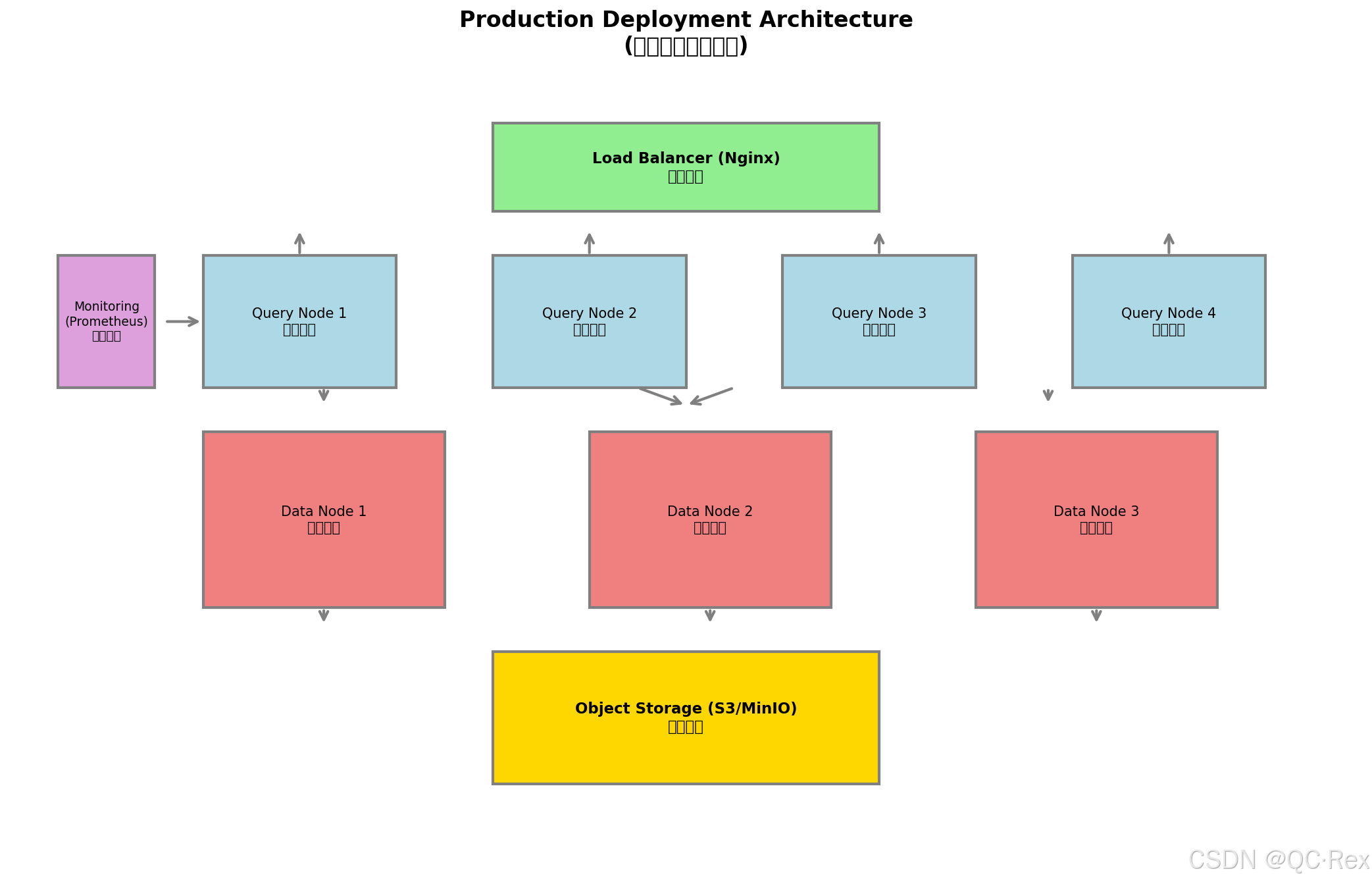
图 4: 生产环境部署架构图
原架构示意:
┌─────────────────────────────────────────────────────────────┐
│                   Production Deployment Architecture        │
├─────────────────────────────────────────────────────────────┤
│                                                             │
│  ┌─────────────┐    ┌─────────────┐    ┌─────────────┐     │
│  │   负载均衡   │    │   查询节点   │    │   查询节点   │     │
│  │   (Nginx)   │───▶│  (Query)    │    │  (Query)    │     │
│  └─────────────┘    └─────────────┘    └─────────────┘     │
│                            │                   │            │
│                            └─────────┬─────────┘            │
│                                      ▼                      │
│  ┌─────────────┐    ┌─────────────────────────────────┐    │
│  │   监控告警   │    │         向量数据库集群           │    │
│  │  (Prometheus)│◀──│  ┌───────┐ ┌───────┐ ┌───────┐  │    │
│  └─────────────┘    │  │ Data  │ │ Data  │ │ Data  │  │    │
│                     │  │ Node  │ │ Node  │ │ Node  │  │    │
│                     │  └───────┘ └───────┘ └───────┘  │    │
│                     └─────────────────────────────────┘    │
│                                      │                      │
│                                      ▼                      │
│                            ┌─────────────┐                 │
│                            │  对象存储    │                 │
│                            │  (S3/MinIO) │                 │
│                            └─────────────┘                 │
└─────────────────────────────────────────────────────────────┘
5.2 Java 客户端集成示例
java
// Milvus Java SDK 示例
import io.milvus.grpc.*;
import io.milvus.client.MilvusClient;
import io.milvus.client.MilvusClientBuilder;
import io.milvus.param.*;
import io.milvus.param.dml.*;

import java.util.*;

public class VectorDatabaseClient {

    private final MilvusClient milvusClient;
    private final String collectionName = "knowledge_base";

    public VectorDatabaseClient(String host, int port) {
        this.milvusClient = new MilvusClientBuilder()
            .withHost(host)
            .withPort(port)
            .build();
    }

    /**
     * 创建集合
     */
    public void createCollection() {
        // 定义 schema
        FieldType idField = FieldType.newBuilder()
            .withName("id")
            .withDataType(DataType.VarChar)
            .withMaxLength(64)
            .withPrimaryKey(true)
            .build();

        FieldType vectorField = FieldType.newBuilder()
            .withName("embedding")
            .withDataType(DataType.FloatVector)
            .withDimension(768)
            .build();

        FieldType textField = FieldType.newBuilder()
            .withName("content")
            .withDataType(DataType.VarChar)
            .withMaxLength(65535)
            .build();

        // 创建集合
        CreateCollectionParam createParam = CreateCollectionParam.newBuilder()
            .withCollectionName(collectionName)
            .withFieldTypes(Arrays.asList(idField, vectorField, textField))
            .build();

        milvusClient.createCollection(createParam);

        // 创建索引
        CreateIndexParam indexParam = CreateIndexParam.newBuilder()
            .withCollectionName(collectionName)
            .withFieldName("embedding")
            .withIndexType(IndexType.HNSW)
            .withMetricType(MetricType.COSINE)
            .withExtraParam("{\"M\":16,\"efConstruction\":200}")
            .build();

        milvusClient.createIndex(indexParam);
    }

    /**
     * 插入向量
     */
    public void insertVectors(List<VectorRecord> records) {
        List<InsertParam.Field> fields = new ArrayList<>();

        // ID 列表
        List<String> ids = records.stream()
            .map(VectorRecord::getId)
            .collect(Collectors.toList());
        fields.add(new InsertParam.Field("id", ids));

        // 向量列表
        List<List<Float>> vectors = records.stream()
            .map(VectorRecord::getEmbedding)
            .collect(Collectors.toList());
        fields.add(new InsertParam.Field("embedding", vectors));

        // 文本列表
        List<String> contents = records.stream()
            .map(VectorRecord::getContent)
            .collect(Collectors.toList());
        fields.add(new InsertParam.Field("content", contents));

        // 执行插入
        InsertParam insertParam = InsertParam.newBuilder()
            .withCollectionName(collectionName)
            .withFields(fields)
            .build();

        milvusClient.insert(insertParam);
    }

    /**
     * 相似度搜索
     */
    public List<SearchResult> search(List<Float> queryVector, int topK) {
        // 构建查询向量
        List<List<Float>> vectors = Arrays.asList(queryVector);

        // 搜索参数
        SearchParam searchParam = SearchParam.newBuilder()
            .withCollectionName(collectionName)
            .withMetricType(MetricType.COSINE)
            .withTopK(topK)
            .withVectors(vectors)
            .withVectorFieldName("embedding")
            .withParams("{\"ef\":100}")
            .withOutFields(Arrays.asList("id", "content"))
            .build();

        // 执行搜索
        R<SearchResults> response = milvusClient.search(searchParam);

        // 解析结果
        return parseSearchResults(response.getData());
    }

    /**
     * 向量记录
     */
    public static class VectorRecord {
        private String id;
        private List<Float> embedding;
        private String content;

        // Getters and Setters
        public String getId() { return id; }
        public void setId(String id) { this.id = id; }
        public List<Float> getEmbedding() { return embedding; }
        public void setEmbedding(List<Float> embedding) { this.embedding = embedding; }
        public String getContent() { return content; }
        public void setContent(String content) { this.content = content; }
    }

    /**
     * 搜索结果
     */
    public static class SearchResult {
        private String id;
        private String content;
        private float score;

        // Getters and Setters
        public String getId() { return id; }
        public void setId(String id) { this.id = id; }
        public String getContent() { return content; }
        public void setContent(String content) { this.content = content; }
        public float getScore() { return score; }
        public void setScore(float score) { this.score = score; }
    }
}
5.3 性能优化技巧
5.3.1 索引参数调优
yaml
# Milvus HNSW 索引参数调优指南
hnsw_params:
  # M: 每个节点的最大连接数
  # 范围:4-64,默认 16
  # 越大精度越高,但内存占用越大,构建越慢
  M: 32

  # efConstruction: 构建时的搜索范围
  # 范围:8-512,默认 200
  # 越大索引质量越高,但构建时间越长
  efConstruction: 400

  # ef: 搜索时的搜索范围
  # 范围:1-32768,默认 10
  # 越大召回率越高,但搜索延迟越大
  ef: 100
5.3.2 查询优化
python
# 批量查询优化
def batch_search(queries: list, batch_size=32) -> list:
    """批量查询减少网络开销"""
    results = []

    for i in range(0, len(queries), batch_size):
        batch = queries[i:i + batch_size]
        batch_vectors = [encode_query(q) for q in batch]

        # 一次网络调用处理多个查询
        batch_results = vector_db.batch_search(
            vectors=batch_vectors,
            top_k=10
        )

        results.extend(batch_results)

    return results

# 缓存热点查询
from functools import lru_cache

@lru_cache(maxsize=1000)
def cached_search(query_hash: str, query_vector: tuple) -> list:
    """缓存常见查询结果"""
    return vector_db.search(list(query_vector), top_k=10)
第六章 实战案例:构建企业知识库问答系统
6.1 系统需求
- 支持 100 万 + 文档片段
- 查询延迟 < 100ms (P99)
- 支持多租户隔离
- 支持权限控制
6.2 技术选型
| 组件 | 选型 | 理由 |
|---|---|---|
| 向量数据库 | Milvus | 开源、可扩展、功能完善 |
| Embedding 模型 | BGE-large-zh | 中文效果好,768 维 |
| 大模型 | Qwen2.5-72B | 中文理解能力强 |
| 缓存 | Redis | 热点查询缓存 |
| 部署 | Kubernetes | 弹性扩缩容 |
6.3 核心代码实现
python
# 完整 RAG 问答系统
from typing import List, Dict
import redis
import hashlib

class EnterpriseQA:
    def __init__(self):
        self.vector_db = MilvusClient(host="milvus.default.svc", port=19530)
        self.embeddings = BGELargeZH()
        self.llm = Qwen25_72B()
        self.cache = redis.Redis(host="redis.default.svc", port=6379)

    def ask(self, question: str, tenant_id: str, user_id: str) -> Dict:
        """
        企业知识库问答

        Args:
            question: 用户问题
            tenant_id: 租户 ID(数据隔离)
            user_id: 用户 ID(权限控制)

        Returns:
            包含答案、引用来源、置信度的响应
        """
        # 1. 检查缓存
        cache_key = f"qa:{tenant_id}:{hashlib.md5(question.encode()).hexdigest()}"
        cached = self.cache.get(cache_key)
        if cached:
            return json.loads(cached)

        # 2. 生成查询向量
        query_vector = self.embeddings.encode(question)

        # 3. 向量检索(带租户过滤)
        expr = f"tenant_id == '{tenant_id}'"
        search_results = self.vector_db.search(
            collection_name="knowledge_base",
            vectors=[query_vector],
            filter=expr,
            limit=10,
            output_fields=["content", "source", "page"]
        )

        # 4. 权限过滤(检查用户对每个文档的访问权限)
        authorized_results = self._filter_by_permission(
            search_results, user_id
        )

        # 5. 构建提示词
        context = "\n\n".join([r["content"] for r in authorized_results[:5]])
        prompt = self._build_prompt(question, context, authorized_results[:5])

        # 6. 大模型生成答案
        answer = self.llm.generate(prompt)

        # 7. 构建响应
        response = {
            "answer": answer,
            "sources": [
                {
                    "content": r["content"][:200] + "...",
                    "source": r["source"],
                    "page": r["page"],
                    "score": r["score"]
                }
                for r in authorized_results[:5]
            ],
            "confidence": self._calculate_confidence(authorized_results)
        }

        # 8. 缓存结果(1 小时)
        self.cache.setex(cache_key, 3600, json.dumps(response))

        return response

    def _filter_by_permission(self, results: List, user_id: str) -> List:
        """根据用户权限过滤结果"""
        # 获取用户可访问的文档列表
        user_permissions = self._get_user_permissions(user_id)

        # 过滤结果
        authorized = []
        for result in results:
            doc_id = result["source"]
            if doc_id in user_permissions:
                authorized.append(result)

        return authorized

    def _build_prompt(self, question: str, context: str, sources: List) -> str:
        """构建 RAG 提示词"""
        sources_text = "\n".join([
            f"[{i+1}] {s['source']} (第{s['page']}页)"
            for i, s in enumerate(sources)
        ])

        return f"""你是一个企业知识库助手。请根据以下参考资料回答问题。

【参考资料】
{context}

【来源列表】
{sources_text}

【用户问题】
{question}

【回答要求】
1. 基于参考资料回答,不要编造信息
2. 引用具体来源,标注页码
3. 如果资料中没有相关信息,明确说明
4. 回答简洁清晰,不超过 500 字

【回答】
"""

    def _calculate_confidence(self, results: List) -> float:
        """计算答案置信度"""
        if not results:
            return 0.0

        # 基于相似度分数计算置信度
        avg_score = sum(r["score"] for r in results[:5]) / min(5, len(results))

        # 归一化到 0-1
        return min(1.0, avg_score / 0.9)
第七章 总结与展望
7.1 核心要点回顾
-
向量数据库是 AI 应用的核心基础设施,解决了传统数据库无法处理语义搜索的问题
-
ANN 算法是性能关键:
- HNSW:精度高,适合中小规模
- IVF-PQ:压缩率高,适合超大规模
-
选型需综合考量:
- 开源 vs 托管
- 性能 vs 成本
- 功能 vs 复杂度
-
RAG 架构是最佳实践:
- 检索 + 生成结合
- 解决大模型幻觉问题
- 支持知识实时更新
7.2 未来趋势
- 多模态融合:文本、图片、音频统一向量空间
- 端侧部署:轻量级向量数据库在边缘设备运行
- 自动化调优:AI 自动优化索引参数
- 流式更新:实时向量更新与查询
7.3 学习资源推荐
-
官方文档:
-
论文阅读:
- "Efficient and Robust Approximate Nearest Neighbor Search Using Hierarchical Navigable Small World Graphs"
- "Product Quantization for Nearest Neighbor Search"
-
实践项目:
- LangChain RAG 教程
- LlamaIndex 知识库构建
参考来源
- Milvus 官方文档 - 向量数据库架构与 API 参考
- Qdrant 技术博客 - HNSW 算法实现细节
- Pinecone 学习中心 - 向量搜索基础教程
- LangChain 文档 - RAG 系统构建指南
- "A Survey of Product Quantization" - 学术综述
- 知乎专栏 - 向量数据库技术解析
- GitHub Trending - 开源向量数据库项目
版权声明:本文内容为原创,基于公开资料独立撰写。文中示例代码可自由使用于学习和个人项目。转载或引用请注明出处。
作者:超人不会飞
发布日期:2026 年 4 月 8 日