完整代码以整理:DrawTogether
一、为什么我要写这篇帖子?
你是否想过:手机A上随手画一笔,平板B立刻显示相同的笔迹,就像两块画布被神奇地连接在了一起?这个场景常见于远程辅导、在线会议、设计协作等。传统做法需要搭建WebSocket、处理设备发现、解决网络抖动......繁琐且容易出错。
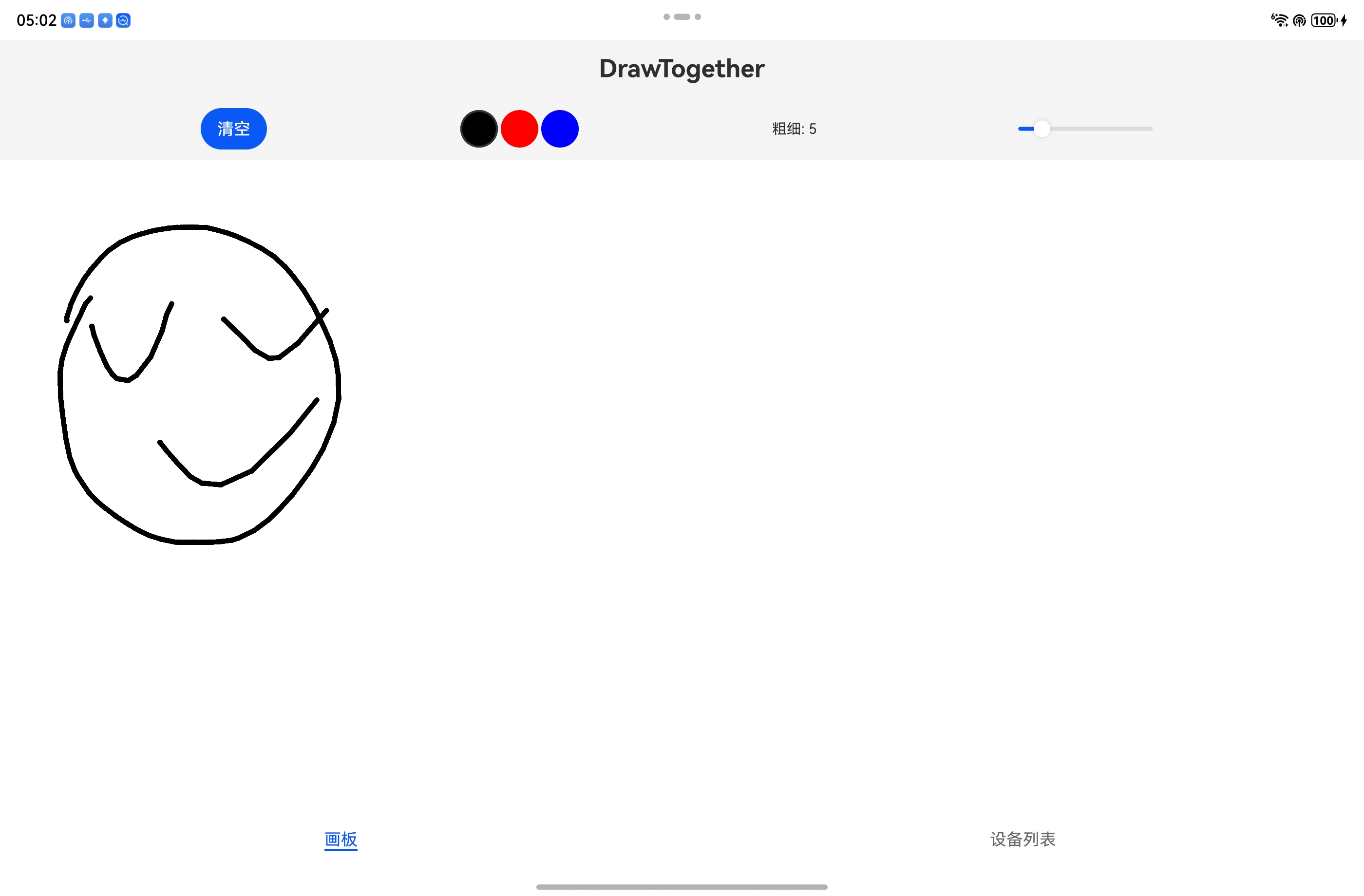
而鸿蒙的分布式能力宣称可以"让多设备像一台设备一样协同"。那么,只用鸿蒙原生API,不依赖任何第三方服务,能否实现实时绘图同步? 答案是肯定的。我花了一天多时间,从零写了一个"DrawTogether"应用,最终效果:
- 设备自动发现(登录同一华为账号即可)
- 实时同步延迟 < 50ms(用户无感知)
- 曲线平滑(每个点立即发送,无折线感)
- 支持颜色/粗细切换、清空双向同步
| 平板绘画 | 手机同步 |
|---|---|
 |
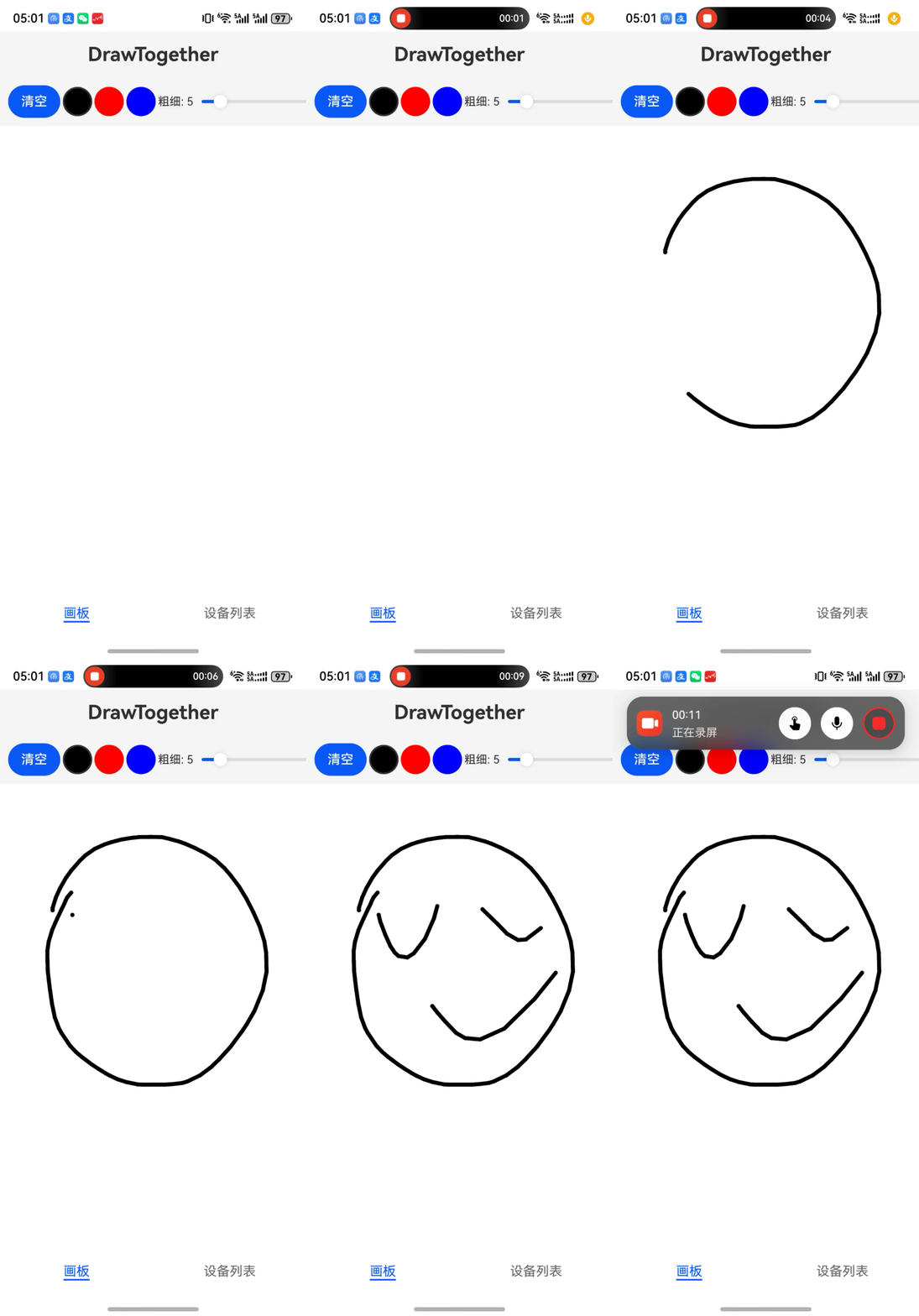 |
平板没有录屏截了一张图,手机的是录屏 平板绘制,手机实时同步。
实现画板功能并不是我的主要目的、能实现两台设备之间实时同步数据才是我的目的。所以一开始做的时候,画板我只写了简单的功能能画就行,能清空既可以每画一笔多台设备同步显示。本文将完整记录技术选型、核心代码、踩坑经验与优化策略,希望能帮你少走弯路。
二、技术选型与架构
鸿蒙提供了三种分布式数据方案:键值型数据库(KVStore) 、关系型数据库(RDB) 、分布式数据对象(DataObject)。
2.1 为什么不用分布式数据对象?
我最初被"分布式数据对象"吸引------它用起来就像本地变量一样简单。但文档里一行小字让我心凉半截:
当前仅分布式迁移场景对第三方应用开放Call调用权限,其余所有Call调用场景均限定为系统内部调用。
对于第三方应用的多端协同(如两人同时观看绘图),Call调用受到权限限制。因此,我放弃了分布式数据对象。
2.2 为什么不选关系型数据库(RDB)?
关系型数据库(RDB)虽然也支持分布式同步,但它适用于结构化数据和复杂查询(如多条件筛选、关联统计)。而绘图同步场景的特点完全相反:
| 维度 | 绘图同步需求 | RDB 特点 | 结论 |
|---|---|---|---|
| 数据模型 | 键值对(笔画ID → 点数组) | 表格、字段、索引 | KVStore 更匹配 |
| 写入频率 | 极高(每秒 60~100 次) | 事务、锁、索引维护开销大 | KVStore 更轻量 |
| 查询方式 | 仅按笔画ID或时间顺序读取 | 支持复杂SQL | 不需要复杂查询 |
| 同步粒度 | 每次增量同步一个点或一条消息 | 表级同步(或带条件同步) | KVStore 更精细 |
| 开发复杂度 | put/get 两行代码 |
需预定义表结构、写SQL | KVStore 更简单 |
此外,RDB 的分布式同步机制相对"重"。而 KVStore 专为高频读写和低延迟场景设计,且支持设备协同模式(DEVICE_COLLABORATION),自动按设备隔离数据,天然避免多端同时写入同一 key 的冲突。
因此,对于高频追加、无需复杂查询、追求实时性的绘图同步场景,KVStore 是最佳选择。
2.3 最终方案
| 能力 | 选型 | 原因 |
|---|---|---|
| 数据存储与同步 | DeviceKVStore + 手动sync |
多设备协同模式,自动按设备隔离数据,手动同步可控 |
| 绘图协议 | 增量消息(BEGIN / DELTA / END / CLEAR) | 支持实时追加,减少传输量 |
| 设备发现 | distributedDeviceManager |
获取在线可信设备列表,无需手动配对 |
| UI框架 | ArkTS + Canvas | 响应式状态管理,高性能绘图 |
2.4 运行环境要求
- 两台鸿蒙5.0+设备登录同一华为账号
- 开启WLAN和蓝牙 ,并允许多设备协同
- 应用动态申请
ohos.permission.DISTRIBUTED_DATASYNC权限
2.5 工程目录
DrawTogether/
└── AppScope/
    └── entry/
        └── src/main/
            ├── ets/
            │   ├── pages/           # 主页面
            │   │   └── Index.ets
            │   ├── components/      # 通用UI组件
            │   │   ├── DrawingBoard.ets    # 画板核心
            │   │   └── Toolbar.ets         # 工具栏
            │   ├── model/           # 数据结构
            │   │   ├── DrawPoint.ets
            │   │   └── DrawStroke.ets
            │   ├── service/         # 全局服务(同步、分布式)
            │   │   ├── SyncService.ets
            │   │   └── DistributedService.ets
            │   ├── constants/           # 常量
            │   │   └── AppConstants.ets
            │   ├── manager/           # 权限管理
            │   │   └── PermissionManager.ets
            │   ├── utils/           # 工具类
            │   │   └── Logger.ets
            │   └── entryability/    # 应用入口
            ├── resources/           # 资源文件
            └── module.json5         # 模块配置
三、核心实现:从数据模型到画板组件
3.1 数据模型
定义点、笔画和消息类型,为后续同步打下基础。
javascript
// 点坐标
export interface DrawPoint {
    x: number;
    y: number;
}

// 完整笔画(包含唯一ID和点序列)
export interface DrawStroke {
    id: string;
    points: DrawPoint[];
}

// 消息类型枚举
export enum MessageType {
    BEGIN = 0,   // 开始新笔画(包含起点)
    DELTA = 1,   // 增量点(单个点)
    END = 2,     // 结束笔画
    CLEAR = 3    // 清空画板
}

// 消息格式
export interface DrawingMessage {
    type: MessageType;
    strokeId?: string;
    points?: DrawPoint[];
    timestamp: number;
}
3.2 分布式服务封装(DistributedService)
负责KVStore初始化、设备列表获取、数据变化监听和消息发送。注意 :只处理insertEntries,因为每条消息的key都是唯一的(draw_${strokeId}_${timestamp}),不会触发updateEntries,这样可以避免重复回调。
javascript
import { distributedKVStore } from '@kit.ArkData';
import { distributedDeviceManager } from '@kit.DistributedServiceKit';
import { common } from '@kit.AbilityKit';
import { BusinessError } from '@kit.BasicServicesKit';
import { Logger } from '../utils/Logger';
import { AppConstants } from '../constants/AppConstants';

const TAG = 'DistributedService';

// 定义数据变化回调函数类型
export type DataChangeCallback = (key: string, value: string) => void;

export class DistributedService {
  private static instance: DistributedService;
  private kvManager?: distributedKVStore.KVManager;
  private kvStore?: distributedKVStore.DeviceKVStore;
  private deviceManager?: distributedDeviceManager.DeviceManager;
  private isInitialized: boolean = false;

  // 保存当前注册的数据变化回调,以便在 off 时移除
  private currentDataChangeCallback?: DataChangeCallback;

  static getInstance(): DistributedService {
    if (!DistributedService.instance) {
      DistributedService.instance = new DistributedService();
    }
    return DistributedService.instance;
  }

  async init(context: common.UIAbilityContext): Promise<boolean> {
    if (this.isInitialized) {
      Logger.info(TAG, 'Already initialized');
      return true;
    }
    try {
      const kvManagerConfig: distributedKVStore.KVManagerConfig = {
        bundleName: context.applicationInfo.name,
        context: context
      };

      this.kvManager = distributedKVStore.createKVManager(kvManagerConfig);
      const options: distributedKVStore.Options = {
        createIfMissing: true,
        encrypt: false,
        autoSync: true,
        kvStoreType: distributedKVStore.KVStoreType.DEVICE_COLLABORATION,
        securityLevel: distributedKVStore.SecurityLevel.S1
      };
      this.kvStore = await this.kvManager.getKVStore<distributedKVStore.DeviceKVStore>(
        AppConstants.KV_STORE_ID, options
      );
      this.deviceManager = distributedDeviceManager.createDeviceManager(context.applicationInfo.name);
      this.isInitialized = true;
      Logger.info(TAG, 'DistributedService initialized successfully');
      return true;
    } catch (err) {
      const error = err as BusinessError;
      Logger.error(TAG, `Init failed: ${error.code} - ${error.message}`);
      return false;
    }
  }

  // 获取完整设备信息
  getOnlineTrustedDevices(): distributedDeviceManager.DeviceBasicInfo[] {
    if (!this.deviceManager) return [];
    try {
      return this.deviceManager.getAvailableDeviceListSync();
    } catch (err) {
      Logger.error(TAG, `Get devices failed: ${err}`);
      return [];
    }
  }

  // 获取设备 networkId 列表
  getOnlineTrustedDeviceIds(): string[] {
    const devices = this.getOnlineTrustedDevices();
    return devices
      .map((device: distributedDeviceManager.DeviceBasicInfo) => device.networkId)
      .filter((id) => typeof id === 'string') as string[];
  }
  /**
   * 订阅数据变化
   * @param callback 数据变化回调函数
   */
  onDataChange(callback: DataChangeCallback): void {
    if (!this.kvStore) {
      Logger.error(TAG, 'KVStore not ready, cannot subscribe');
      return;
    }
    // 保存回调引用,以便后续取消订阅
    this.currentDataChangeCallback = callback;
    try {
      this.kvStore.on('dataChange', distributedKVStore.SubscribeType.SUBSCRIBE_TYPE_ALL, (data) => {
       // 只更新插入的信值
        if (data.insertEntries && data.insertEntries.length > 0) {
          for (let i = 0; i < data.insertEntries.length; i++) {
            const entry = data.insertEntries[i];
            // 确保 value 存在且能够转换为字符串
            if (entry.value && entry.value.value !== undefined) {
              callback(entry.key, entry.value.value.toString());
            }
          }
        }
      });
      Logger.info(TAG, 'Data change listener registered');
    } catch (error) {
      Logger.error(TAG, `Failed to register data change listener: ${error}`);
    }
  }

  /**
   * 取消订阅数据变化
   * 应在组件销毁时调用,避免内存泄漏
   */
  offDataChange(): void {
    if (!this.kvStore) {
      Logger.warn(TAG, 'KVStore not ready, cannot unregister');
      return;
    }
    try {
      // 移除之前注册的监听器
      this.kvStore.off('dataChange');
      this.currentDataChangeCallback = undefined;
      Logger.info(TAG, 'Data change listener unregistered');
    } catch (error) {
      Logger.error(TAG, `Failed to unregister data change listener: ${error}`);
    }
  }

  // 发送消息(写入 + 立即手动同步)
  async sendMessage(key: string, value: string): Promise<boolean> {
    if (!this.kvStore) {
      Logger.error(TAG, 'KVStore not ready, cannot send');
      return false;
    }
    try {
      await this.kvStore.put(key, value);
      const deviceIds = this.getOnlineTrustedDeviceIds();
      if (deviceIds.length > 0) {
        // 手动同步,立即推送
        this.kvStore.sync(deviceIds, distributedKVStore.SyncMode.PUSH_ONLY, AppConstants.SYNC_DELAY_MS);
      }
      return true;
    } catch (err) {
      Logger.error(TAG, `Send message failed: ${err}`);
      return false;
    }
  }

  isReady(): boolean {
    return this.isInitialized && this.kvStore !== undefined;
  }
}
3.3 同步协议实现(SyncService)------ 最核心的部分
发送端:每个点立即发送,保证曲线平滑。
接收端:维护笔画状态,实现消息去重,防止跨笔画错误连接。
javascript
import { DrawingMessage, MessageType } from '../model/DrawingMessage';
import { DrawPoint } from '../model/DrawStroke';
import { DistributedService } from '../services/DistributedService';
import { Logger } from '../utils/Logger';

const TAG = 'SyncService';

export interface SyncCallback {
  onStrokeBegin: (strokeId: string, firstPoint: DrawPoint) => void;
  onStrokeDelta: (strokeId: string, points: DrawPoint[]) => void;
  onStrokeEnd: (strokeId: string) => void;
  onClear?: () => void;
}

export class SyncService {
  private static instance: SyncService;
  private distributedService: DistributedService;
  private callback?: SyncCallback;
  private initialized: boolean = false;

  // 发送端
  private currentStrokeId: string = '';

  // 接收端状态
  private receivingStrokeId: string = '';
  private receivingPoints: DrawPoint[] = [];

  // 消息去重集合
  private processedKeys: Set<string> = new Set();

  private constructor() {
    this.distributedService = DistributedService.getInstance();
  }

  static getInstance(): SyncService {
    if (!SyncService.instance) {
      SyncService.instance = new SyncService();
    }
    return SyncService.instance;
  }

  init(callback?: SyncCallback): void {
    if (this.initialized) {
      Logger.warn(TAG, 'SyncService already initialized');
      return;
    }
    this.callback = callback;
    this.distributedService.onDataChange((key: string, value: string) => {
      if (key.startsWith('draw_')) {
        this.handleRemoteMessage(key, value);
      }
    });
    this.initialized = true;
    Logger.info(TAG, 'SyncService initialized');
  }

  setCallback(callback?: SyncCallback): void {
    this.callback = callback;
  }

  isInitialized(): boolean {
    return this.initialized && this.distributedService.isReady();
  }

  // 发送端接口
  startStroke(firstPoint: DrawPoint): void {
    if (!this.isInitialized()) return;
    this.currentStrokeId = `${Date.now()}_${Math.random().toString(36).substring(2, 8)}`;
    const msg: DrawingMessage = {
      type: MessageType.BEGIN,
      strokeId: this.currentStrokeId,
      points: [firstPoint],
      timestamp: Date.now()
    };
    this.sendMessage(msg);
  }

  // 每个点立即发送
  addPoint(point: DrawPoint): void {
    if (!this.isInitialized() || !this.currentStrokeId) return;
    const msg: DrawingMessage = {
      type: MessageType.DELTA,
      strokeId: this.currentStrokeId,
      points: [point],
      timestamp: Date.now()
    };
    this.sendMessage(msg);
  }

  endStroke(): void {
    if (!this.isInitialized() || !this.currentStrokeId) return;
    const msg: DrawingMessage = {
      type: MessageType.END,
      strokeId: this.currentStrokeId,
      points: [],
      timestamp: Date.now()
    };
    this.sendMessage(msg);
    this.currentStrokeId = '';
  }

  sendClear(): void {
    if (!this.isInitialized()) return;
    const msg: DrawingMessage = {
      type: MessageType.CLEAR,
      timestamp: Date.now()
    };
    this.sendMessage(msg);
  }

  private async sendMessage(msg: DrawingMessage): Promise<void> {
    const key = `draw_${msg.strokeId ?? 'clear'}_${msg.timestamp}`;
    const value = JSON.stringify(msg);
    await this.distributedService.sendMessage(key, value);
  }

  // 接收端处理
  public handleRemoteMessage(key: string, value: string): void {
    // 去重
    if (this.processedKeys.has(key)) {
      Logger.debug(TAG, `Duplicate message ignored: ${key}`);
      return;
    }
    this.processedKeys.add(key);
    if (this.processedKeys.size > 500) {
      const entries = Array.from(this.processedKeys);
      for (let i = 0; i < 250; i++) {
        this.processedKeys.delete(entries[i]);
      }
    }

    try {
      const msg: DrawingMessage = JSON.parse(value);
      switch (msg.type) {
        case MessageType.BEGIN:
          this.receiveBegin(msg.strokeId!, msg.points!);
          break;
        case MessageType.DELTA:
          this.receiveDelta(msg.strokeId!, msg.points!);
          break;
        case MessageType.END:
          this.receiveEnd(msg.strokeId!);
          break;
        case MessageType.CLEAR:
          this.receiveClear();
          break;
        default:
          Logger.warn(TAG, `Unknown message type: ${msg.type}`);
      }
    } catch (err) {
      Logger.error(TAG, `Parse message failed: ${err}, value=${value}`);
    }
  }

  private receiveBegin(strokeId: string, points: DrawPoint[]): void {
    if (points.length === 0) return;
    if (this.receivingStrokeId === strokeId) {
      Logger.warn(TAG, `receiveBegin: duplicate BEGIN for stroke ${strokeId}, ignored`);
      return;
    }
    if (this.receivingStrokeId) {
      Logger.warn(TAG, `receiveBegin: force ending previous stroke ${this.receivingStrokeId}`);
      this.callback?.onStrokeEnd(this.receivingStrokeId);
    }
    this.receivingStrokeId = strokeId;
    this.receivingPoints = [];
    this.receivingPoints.push(...points);
    this.callback?.onStrokeBegin(strokeId, points[0]);
    for (let i = 1; i < points.length; i++) {
      this.callback?.onStrokeDelta(strokeId, [points[i-1], points[i]]);
    }
  }

  private receiveDelta(strokeId: string, points: DrawPoint[]): void {
    if (strokeId !== this.receivingStrokeId) {
      Logger.warn(TAG, `receiveDelta: strokeId mismatch, expected ${this.receivingStrokeId}, got ${strokeId}`);
      return;
    }
    if (points.length === 0) return;
    if (this.receivingPoints.length > 0) {
      const lastPoint = this.receivingPoints[this.receivingPoints.length - 1];
      const firstNewPoint = points[0];
      this.callback?.onStrokeDelta(strokeId, [lastPoint, firstNewPoint]);
    }
    for (let i = 1; i < points.length; i++) {
      this.callback?.onStrokeDelta(strokeId, [points[i-1], points[i]]);
    }
    this.receivingPoints.push(...points);
  }

  private receiveEnd(strokeId: string): void {
    if (strokeId !== this.receivingStrokeId) return;
    this.callback?.onStrokeEnd(strokeId);
    this.receivingStrokeId = '';
    this.receivingPoints = [];
  }

  private receiveClear(): void {
    Logger.info(TAG, 'receiveClear');
    this.callback?.onClear?.();
    this.receivingStrokeId = '';
    this.receivingPoints = [];
  }
}
3.4 画板组件(DrawingBoard)
使用Canvas绘图,通过@Prop接收远端笔画数据,@Watch监听变化并重绘。需要注意到是,一开始我们的方案是每5个点,20ms 发送一次,但是真的会卡线条。修改方案实时发送,因为数据量不大只有xy还有id点信息这个方案可行。
javascript
import { DrawPoint, DrawStroke } from '../model/DrawStroke';
import { SyncService } from '../services/SyncService';

@Component
export struct DrawingBoard {
  @Prop @Watch('onPenColorChanged') penColor: string = '#000000';
  @Prop @Watch('onPenWidthChanged') penWidth: number = 5;
  @Prop @Watch('onClearTriggerChanged') clearTrigger: number = 0;
  @Prop @Watch('onRemoteStrokesChanged') remoteStrokes: DrawStroke[] = [];

  private settings: RenderingContextSettings = new RenderingContextSettings(true);
  private ctx?: CanvasRenderingContext2D = new CanvasRenderingContext2D(this.settings);
  private localStrokes: Array<DrawPoint[]> = [];
  private isDrawing: boolean = false;
  private currentStrokePoints: DrawPoint[] = [];

  build() {
    Canvas(this.ctx)
      .width('100%')
      .height('100%')
      .backgroundColor('#FFFFFF')
      .onReady(() => {
        this.initCanvasStyle();
        this.redrawAll();
      })
      .onTouch((event: TouchEvent) => {
        this.handleTouch(event);
      })
  }

  private initCanvasStyle(): void {
    if (!this.ctx) return;
    this.ctx.lineWidth = this.penWidth;
    this.ctx.strokeStyle = this.penColor;
    this.ctx.fillStyle = this.penColor;
    this.ctx.lineCap = 'round';
    this.ctx.lineJoin = 'round';
  }

  private handleTouch(event: TouchEvent): void {
    const touch = event.touches[0];
    if (!touch) return;
    const point: DrawPoint = { x: touch.x, y: touch.y };
    switch (event.type) {
      case TouchType.Down:
        this.startStroke(point);
        break;
      case TouchType.Move:
        this.moveStroke(point);
        break;
      case TouchType.Up:
        this.endStroke();
        break;
    }
  }

  private startStroke(point: DrawPoint): void {
    this.isDrawing = true;
    this.currentStrokePoints = [point];
    this.drawPoint(point);
    SyncService.getInstance().startStroke(point);
  }

  private moveStroke(point: DrawPoint): void {
    if (!this.isDrawing || this.currentStrokePoints.length === 0) return;
    const last = this.currentStrokePoints[this.currentStrokePoints.length - 1];
    this.drawLine(last, point);
    this.currentStrokePoints.push(point);
    SyncService.getInstance().addPoint(point);
  }

  private endStroke(): void {
    if (!this.isDrawing) return;
    if (this.currentStrokePoints.length > 0) {
      this.localStrokes.push([...this.currentStrokePoints]);
    }
    this.currentStrokePoints = [];
    this.isDrawing = false;
    SyncService.getInstance().endStroke();
  }

  private drawPoint(point: DrawPoint): void {
    if (!this.ctx) return;
    this.ctx.beginPath();
    this.ctx.arc(point.x, point.y, this.penWidth / 2, 0, 2 * Math.PI);
    this.ctx.fill();
  }

  private drawLine(from: DrawPoint, to: DrawPoint): void {
    if (!this.ctx) return;
    this.ctx.beginPath();
    this.ctx.moveTo(from.x, from.y);
    this.ctx.lineTo(to.x, to.y);
    this.ctx.stroke();
  }

  private redrawAll(): void {
    if (!this.ctx) return;

    if (this.ctx.width === 0 || this.ctx.height === 0) return;
    this.ctx.clearRect(0, 0, this.ctx.width, this.ctx.height);
    this.ctx.fillStyle = '#FFFFFF';
    this.ctx.fillRect(0, 0, this.ctx.width, this.ctx.height);
    this.initCanvasStyle();

    // 重绘本地笔画
    for (const stroke of this.localStrokes) {
      if (stroke.length === 0) continue;
      this.drawPoint(stroke[0]);
      for (let i = 1; i < stroke.length; i++) {
        this.drawLine(stroke[i-1], stroke[i]);
      }
    }
    // 重绘远端笔画(每个笔画独立,不会跨笔画连接)
    for (const stroke of this.remoteStrokes) {
      if (stroke.points.length === 0) continue;
      this.drawPoint(stroke.points[0]);
      for (let i = 1; i < stroke.points.length; i++) {
        this.drawLine(stroke.points[i-1], stroke.points[i]);
      }
    }
  }

  private onRemoteStrokesChanged(): void {
    // 远端笔画数据变化,全量重绘
    this.redrawAll();
  }

  private onPenColorChanged(): void {
    if (this.ctx) {
      this.ctx.strokeStyle = this.penColor;
    }
  }

  private onPenWidthChanged(): void {
    if (this.ctx) {
      this.ctx.lineWidth = this.penWidth;
    }
  }

  private onClearTriggerChanged(): void {
    // 清空本地存储的笔画
    this.localStrokes = [];
    this.currentStrokePoints = [];
    this.isDrawing = false;
    this.redrawAll();
  }
}
3.5 主页面(Index)
集成权限申请、设备列表展示、分布式服务初始化和回调注册。
javascript
import { common, Permissions } from '@kit.AbilityKit';
import { promptAction } from '@kit.ArkUI';
import { distributedDeviceManager } from '@kit.DistributedServiceKit';
import { DistributedService } from '../services/DistributedService';
import { SyncCallback, SyncService } from '../services/SyncService';
import { Toolbar } from '../components/Toolbar';
import { Logger } from '../utils/Logger';
import { PermissionManager } from '../manager/PermissionManager';
import { DrawStroke } from '../model/DrawStroke';
import { DrawingBoard } from '../components/DrawingBoard';

const TAG = 'Index';

@Entry
@Component
struct Index {
  @State isReady: boolean = false;
  @State deviceList: distributedDeviceManager.DeviceBasicInfo[] = [];
  @State selectedDeviceId?: string = '';
  @State currentTabIndex: number = 0;

  // 画板状态变量
  @State penColor: string = '#000000';
  @State penWidth: number = 5;
  @State clearTrigger: number = 0;  // 每次清空时递增,画板监听此值
  // 远端笔画数据
  @State remoteStrokes: DrawStroke[] = [];

  private dataChangeCallback?: (key: string, value: string) => void;
  private refreshTimer?: number;
  private distributedReady: boolean = false;

  aboutToAppear() {
    this.init();
  }

  aboutToDisappear() {
    if (this.refreshTimer){
      clearInterval(this.refreshTimer);
      this.refreshTimer = undefined
    }
    DistributedService.getInstance().offDataChange();
  }

  async init() {
    const context = getContext(this) as common.UIAbilityContext;
    const permissions: Permissions[] = ['ohos.permission.DISTRIBUTED_DATASYNC'];
    const granted = await PermissionManager.checkAndRequestPermissions(
      context,
      permissions,
      (denied) => {
        Logger.warn(TAG, `权限被拒绝: ${denied.join(', ')}`);
        promptAction.showToast({ message: '需要分布式权限才能同步绘图', duration: 2000 });
      }
    );
    if (!granted) {
      this.isReady = true;
      return;
    }
    await this.initDistributedServices(context);
    this.isReady = true;
  }

  async initDistributedServices(context: common.UIAbilityContext): Promise<boolean> {
    if (this.distributedReady) {
      Logger.info(TAG, 'Distributed services already initialized');
      return true;
    }
    try {
      const initSuccess = await DistributedService.getInstance().init(context);
      if (initSuccess) {
        // 初始化同步服务,并传入回调
        SyncService.getInstance().init(this.syncCallback);
        this.distributedReady = true;
        Logger.info(TAG, 'Distributed services initialized successfully');
        promptAction.showToast({ message: '已开启实时同步', duration: 1500 });

        this.refreshDeviceList();
        this.refreshTimer = setInterval(() => {
          this.refreshDeviceList()
        }, 5000);
        this.registerDataChangeListener();
        return true;
      } else {
        Logger.error(TAG, 'Distributed service init failed');
        promptAction.showToast({ message: '分布式服务初始化失败,仅限本地绘图', duration: 2000 });
        return false;
      }
    } catch (err) {
      Logger.error(TAG, `Init error: ${err}`);
      promptAction.showToast({ message: '分布式服务初始化异常', duration: 2000 });
      return false;
    }
  }

  refreshDeviceList() {
    const devices = DistributedService.getInstance().getOnlineTrustedDevices();
    this.deviceList = devices;
    if (devices.length > 0 && !this.selectedDeviceId) {
      this.selectedDeviceId = devices[0].networkId;
    }
    Logger.info(TAG, `刷新设备列表,共 ${devices.length} 个在线设备`);
  }

  registerDataChangeListener() {
    this.dataChangeCallback = (key: string, value: string) => {
      Logger.debug(TAG, `收到远端数据变化: key=${key}`);
      SyncService.getInstance().handleRemoteMessage(key, value);
    };
    DistributedService.getInstance().onDataChange(this.dataChangeCallback);
  }

  // 创建 SyncCallback
 private syncCallback:SyncCallback = {

      onStrokeBegin: (strokeId, firstPoint) => {
        this.remoteStrokes = [...this.remoteStrokes, { id: strokeId, points: [firstPoint] }];
      },

      onStrokeDelta: (strokeId, points) => {
        const index = this.remoteStrokes.findIndex(s => s.id === strokeId);
        if (index !== -1) {
          const newStrokes = [...this.remoteStrokes];
          const existingStroke = newStrokes[index];
          const newPoints = existingStroke.points.concat(points);
          const newStroke: DrawStroke = {
            id: existingStroke.id,
            points: newPoints
          };
          newStrokes[index] = newStroke;
          this.remoteStrokes = newStrokes;
        }
      },
      onStrokeEnd: (strokeId) => {
        Logger.debug(TAG, `Stroke ended: ${strokeId}`);
      },
     onClear: () => {
       Logger.info(TAG, "Received clear command, clearing remote strokes");
       this.remoteStrokes = [];
       this.clearTrigger++;   // 触发画板清空本地笔画
     }
  }

  build() {
    Column() {
      Text('DrawTogether')
        .fontSize(24)
        .fontWeight(FontWeight.Bold)
        .width('100%')
        .height(56)
        .textAlign(TextAlign.Center)
        .backgroundColor('#F5F5F5')

      Tabs({ barPosition: BarPosition.End, index: this.currentTabIndex }) {
        TabContent() { this.DrawingTabContent() }
        .tabBar('画板')
        TabContent() { this.DeviceListTabContent() }
        .tabBar('设备列表')
      }
      .vertical(false)
      .barMode(BarMode.Fixed)
      .barWidth('100%')
      .layoutWeight(1)
      .vertical(false)
      .scrollable(false)
    }
    .width('100%')
    .height('100%')
    .backgroundColor('#FFFFFF')
  }
}
四、踩坑与解决方案
在开发过程中,我遇到了几个典型问题,值得分享。
4.1 消息重复处理导致状态错乱
现象 :同一笔画的BEGIN消息被处理两次,导致receivingStrokeId被意外清空,后续DELTA因strokeId mismatch被忽略,最终绘制出来的已经乱套了。
原因 :分布式数据库的onDataChange可能同时触发insertEntries和updateEntries,或者网络重传导致同一条消息被多次送达。
解决 :在handleRemoteMessage中维护processedKeys集合,对已处理的消息key直接返回;同时在receiveBegin中增加重复判断。
4.2 新笔画起点与上一笔终点错误连接
现象:画完一条线后再画一个圆,圆中出现连接第一条线终点的四边形。
原因 :receiveDelta中无条件连接上一个接收点与新点,而receivingPoints在上一笔画结束时未正确清空(或BEGIN时未清空),导致跨笔画残留。
解决 :在receiveBegin中强制清空receivingPoints = [],并增加receivingStrokeId重复判断。
4.3 快速绘制时远端曲线呈折线
现象:在A设备画一个圆,B设备显示的线条呈折线状,不够平滑。
原因:起初采用批量发送策略(每5个点或20ms),导致采样点稀疏间断,接收端只能用稀疏点连线。
解决 :改为每个点立即发送,移除批量缓冲逻辑。实测每秒约60-100条消息,每条消息仅几十字节完全可接受,且曲线平滑度大幅提升。
五、结语
鸿蒙的分布式能力为开发者打开了多设备协同的新世界,但底层API的使用需要更多的探索和沉淀。希望本文能帮助你在分布式应用开发中少踩一些坑,快速实现自己的创意。
本文为原创技术干货,转载需注明出处。如果你觉得有帮助,欢迎点赞、收藏、评论交流。