一、引入
在计算机从局域单机走向全球互联的发展过程中,机器与机器之间的数据通信成为刚需,TCP、UDP 等网络通信协议应运而生。
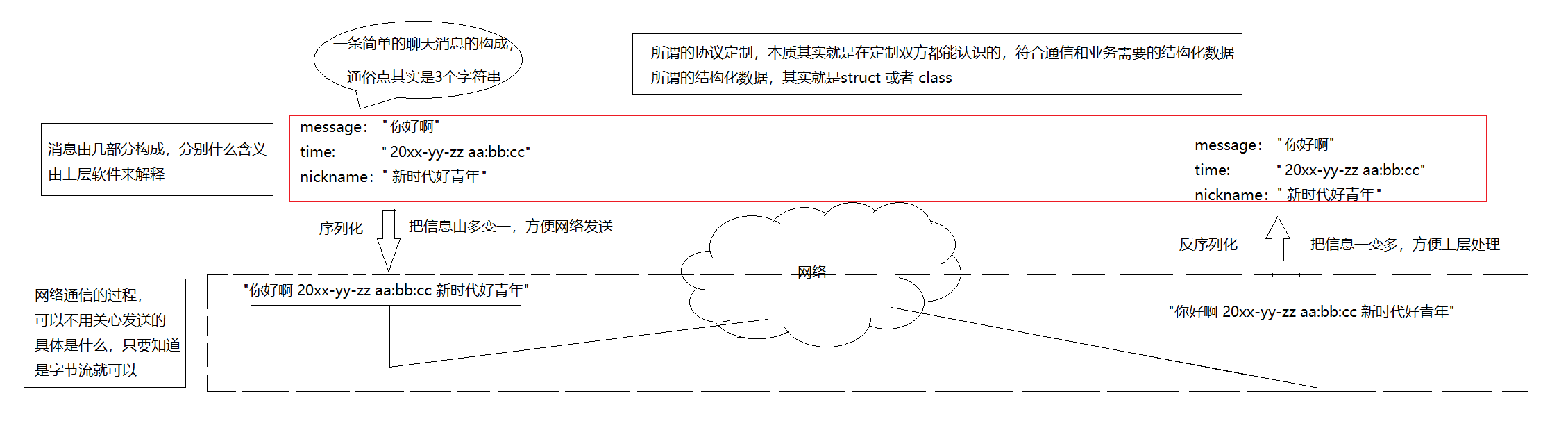
协议为所有通信设备制定了统一传输规则,通信数据需要按照网络规范进行封包处理,才能在网络中正常传输。序列化 是将应用层原始结构化数据、对象转换为可传输字节流的过程;反序列化则是接收端将传输的字节流,还原为原始业务数据的过程。
二、JsonCpp 库
JsonCpp 是C++语言中专门用于实现JSON数据序列化与反序列化的开源第三方库。
sudo apt install -y libjsoncpp-dev //Ubuntu安装1. 构造函数
-
**Json::Value()**默认构造函数,创建一个空的 Json::Value 对象,默认类型为 nullValue。
-
**Json::Value(ValueType type, bool allocated = false)**根据指定类型(nullValue、intValue、stringValue、arrayValue、objectValue 等)创建 Json::Value 对象。
#include <json/json.h>

// 1. 默认构造 空对象
Json::Value val1;

// 2. 指定类型构造
Json::Value val2(Json::arrayValue);   // 数组类型
Json::Value val3(Json::objectValue);  // 对象类型
2. 元素访问
-
Json::Value& operator\[\](const char key) 通过字符串键访问 JSON 对象成员。若键不存在,自动创建新成员。
-
**Json::Value& operator\[\](const std::string& key)**功能同上,支持 std::string 类型键。
-
Json::Value& operator\[\](ArrayIndex index) 通过索引访问 JSON 数组元素。若索引越界,自动扩容并创建元素。
-
Json::Value& at(const char key) 通过键安全访问对象成员,键不存在时抛出异常,更安全。
-
**Json::Value& at(const std::string& key)**功能同上,支持 std::string 类型键。
Json::Value obj;

// 按键访问,不存在自动创建
obj["name"] = "李四";
obj["age"] = 18;

// 数组下标访问
Json::Value arr;
arr[0] = 100;
arr[1] = 200;

// at() 安全访问,不存在抛异常
std::string name = obj.at("name").asString();
3. 类型判断
-
bool isNull():判断是否为 null 类型
-
bool isBool():判断是否为布尔类型
-
bool isInt() / isInt64():判断是否为 32/64 位整数
-
bool isUInt() / isUInt64():判断是否为无符号 32/64 位整数
-
bool isIntegral():判断是否为整数类型
-
bool isDouble():判断是否为双精度浮点数
-
bool isNumeric():判断是否为数字类型(整数 / 浮点数)
-
bool isString():判断是否为字符串
-
bool isArray():判断是否为数组
-
bool isObject() :判断是否为对象(键值对结构)
Json::Value data = "hello";

if (data.isString()){
    cout << "是字符串类型";
}

if (data.isNull()){
    cout << "为空";
}

if (data.isArray()){
    cout << "是数组";
}
4. 赋值与类型转换
赋值运算符
- operator=(bool)
- operator=(int)
- operator=(unsigned int)
- operator=(Int64)
- operator=(UInt64)
- operator=(double)
- operator=(const char)
- operator=(const std::string&)
将 C++ 原生类型赋值给 Json::Value 对象。
Json::Value v;
v = true;        // 布尔
v = 666;         // 整型
v = 3.14;        // 浮点
v = "测试文本";  // 字符串
类型转换(取值)
- bool asBool()
- int asInt()
- Int64 asInt64()
- unsigned int asUInt()
- UInt64 asUInt64()
- double asDouble()
- std::string asString()
将 Json::Value 内部数据安全转换为对应 C++ 原生类型。
bool    flag = v.asBool();
int     num  = v.asInt();
double  d    = v.asDouble();
string  str  = v.asString();
5. 数组与对象操作
-
**size_t size()**返回数组或对象中的成员数量。
-
**bool empty()**判断数组或对象是否为空。
-
**void resize(ArrayIndex newSize)**调整数组大小,用于预分配空间。
-
**void clear()**清空数组或对象的所有成员。
-
**void append(const Json::Value& value)**向数组末尾追加元素。
-
**Json::Value& operator\[\](const char* key, const Json::Value& defaultValue = Json::nullValue)**访问对象成员,若键不存在则返回默认值,不抛异常、不自动创建。
-
**Json::Value& operator\[\](const std::string& key, const Json::Value& defaultValue = Json::nullValue)**功能同上,支持 std::string 键。
Json::Value arr;

arr.append(11);     // 数组追加元素
arr.append(22);

cout << arr.size(); // 获取元素个数
arr.resize(5);      // 调整数组大小
arr.clear();        // 清空所有元素

// 带默认值访问,键不存在给默认null
auto val = obj["score", Json::nullValue];
三、自定义协议
#pragma once

// 自定义协议部分
#include <iostream>
#include <string>
#include <jsoncpp/json/json.h>
#include <functional>
#include "Logger.hpp"

using namespace NS_LOG_MODULE;

// 序列化采用 x oper y 的形式

// 请求报文
class Request
{
public:
    Request() : _data_x(0), _data_y(0), _oper(0)
    {
    }
    Request(int x, int y, char oper) : _data_x(x), _data_y(y), _oper(oper)
    {
    }
    // 序列化
    bool Serialize(std::string *out)
    {
        Json::Value root;
        root["left"] = _data_x;
        root["right"] = _data_y;
        root["oper"] = _oper;

        Json::FastWriter writer;
        *out = writer.write(root);
        return true;
    }
    // 反序列化
    bool Deserialize(std::string &in)
    {
        // "_data_x _oper _data_y" -> 结构化
        Json::Value root;
        Json::Reader reader;
        bool parsesuccess = reader.parse(in, root);
        if (!parsesuccess)
            return false;

        _data_x = root["left"].asInt();
        _data_y = root["right"].asInt();
        _oper = root["oper"].asInt();
        return true;
    }
    ~Request()
    {
    }

public:
    int _data_x;
    int _data_y;
    char _oper; // '+' '-' '/' '*' '%'
};

// 应答报文
class Response
{
public:
    Response() : _result(0), _code(0)
    {
    }
    Response(int result, int code) : _result(result), _code(code)
    {
    }
    bool Serialize(std::string *out)
    {
        Json::Value root;
        root["result"] = _result;
        root["code"] = _code;

        Json::FastWriter writer;
        *out = writer.write(root);
        return true;
    }
    bool Deserialize(std::string &in)
    {
        Json::Value root;
        Json::Reader reader;
        bool parsesuccess = reader.parse(in, root);
        if (!parsesuccess)
            return false;

        _result = root["result"].asInt();
        _code = root["code"].asInt();
        return true;
    }
    ~Response()
    {
    }

public:
    int _result; // 结果
    int _code;   // 状态码
};

const std::string gsep = "\n";

// 自定义函数类型
using HandlerRequest_t = std::function<Response(Request &)>;
using HandlerResponse_t = std::function<void(Response &)>;

class Protocol
{
public:
    Protocol(HandlerRequest_t handler) : _version("1.0"), _handler_request(handler)
    {
    }
    Protocol(HandlerResponse_t handler_response) : _version("1.0"), _handler_response(handler_response)
    {
    }
    // {"left": 10, "right": 20, oper: '+'}
    // len\r\n{"left": 10, "right": 20, oper: '+'}\r\n
    std::string Packet(const std::string &json_string) // 字符串打包
    {
        return std::to_string(json_string.size()) + gsep + json_string + gsep;
    }

    int Unpack(std::string &packet, std::string *json_string) // 解包
    {
        if (packet.empty())
            return 0;
        if (json_string == nullptr)
            return -1;

        // 分析报文
        auto pos = packet.find(gsep); // len/nx+y/n
        if (pos == std::string::npos)
            return 0;
        std::string lenstr = packet.substr(0, pos);

        // lenstr 合法性判断
        int len = std::stoi(lenstr); // lenstr中存放着有效子段的大小
        int total = lenstr.size() + len + 2 * gsep.size();
        if (packet.size() < total) // 太少了,攒一攒
            return 0;
        // 提取报文
        *json_string = packet.substr(pos + gsep.size(), len);
        packet.erase(0, total);
        return 1;
    }

    // 如果读到半个报文,什么都不做
    // 如果读到一个报文+,循环处理,把所有合法的报文都进行统一处理
    std::string ParseRequest(std::string &inbuffer)
    {
        std::string result;
        while (true)
        {
            std::string json_string;
            // 1. 解包
            int n = Unpack(inbuffer, &json_string);
            if (n < 0)
            {
                LOG(LogLevel::DEBUG) << "nothing";
                return std::string();
            }
            if (n == 0)
            {
                LOG(LogLevel::INFO) << inbuffer << " parse done";
                return result;
            }
            LOG(LogLevel::DEBUG) << "json_string:\n"
                                 << json_string;
            LOG(LogLevel::DEBUG) << "unpack done, inbuffer:\n"
                                 << inbuffer;
            // 2. 反序列化
            // 得到一个完整的报文jsonstring
            Request req;
            if (!req.Deserialize(json_string))
                return std::string();

            // 3. 业务计算,调用自定义函数
            Response resp;
            if (_handler_request)
                resp = _handler_request(req);

            // 4. 应答序列化
            std::string resp_json_string;
            resp.Serialize(&resp_json_string);

            // 5. 添加报头
            result += Packet(resp_json_string);
        }
    }

    std::string ParseResponse(std::string &inbuffer)
    {
        while (true)
        {
            std::string json_string;
            // 1. 解包
            int n = Unpack(inbuffer, &json_string);
            if (n < 0)
            {
                LOG(LogLevel::DEBUG) << "no way !!";
                return std::string();
            }
            if (n == 0)
            {
                LOG(LogLevel::INFO) << inbuffer << " parse done";
                return std::string();
            }
            // 2. 反序列化
            // 得到一个完整的报文jsonstring
            Response resp;
            if (!resp.Deserialize(json_string))
                return std::string();

            // 3. 回调处理
            if (_handler_response)
                _handler_response(resp);
        }
    }

private:
    std::string _version;
    HandlerRequest_t _handler_request;
    HandlerResponse_t _handler_response;
};
-
核心方法:
| 类 / 函数 | 核心作用 |
|---|---|
Request |
客户端→服务端的请求结构体(运算数 + 运算符) |
Response |
服务端→客户端的响应结构体(计算结果 + 状态码) |
Serialize() |
序列化:C++ 结构体 → JSON 文本 |
Deserialize() |
反序列化:JSON 文本 → C++ 结构体 |
Packet() |
打包:给 JSON 加长度头,生成网络报文 |
Unpack() |
解包:从网络数据中提取完整 JSON |
ParseRequest() |
服务端:解析请求 + 业务处理 + 生成响应 |
ParseResponse() |
客户端:解析响应 + 回调处理结果 |
完整工作流程(以10+20为例):
第一阶段:客户端 → 发送请求(上层代码 → 网络)
1、构建请求对象 客户端创建 Request 结构体:
Request req(10, 20, '+');2、序列化(JsonCpp 核心) 调用 req.Serialize(&json_str)→ 结构体 转 JSON 文本字符串:
{"left":10,"right":20,"oper":43}3、协议打包(解决粘包) 调用 Protocol::Packet(json_str)→ 拼接自定义报文格式:长度\nJSON\n
4、发送到网络客户端将打包后的字符串通过 TCP 发送给服务端。
第二阶段:服务端 → 接收并解析请求(网络 → 业务处理)
-
接收网络数据 服务端从 TCP 缓冲区读取数据,存入
inbuffer字符串。 -
协议解包(Unpack 核心) 调用
Unpack(inbuffer, &json_string):- 找到第一个
\n,提取长度 - 校验数据是否完整
- 提取中间的JSON 文本
- 清空缓冲区已处理数据
- 找到第一个
-
反序列化(JsonCpp 核心) 调用
req.Deserialize(json_string)→ JSON 文本 转回 C++ 结构体 :_data_x=10, _data_y=20, _oper='+' -
业务逻辑处理 调用回调函数
_handler_request(req),执行加法运算,得到结果30。 -
构建响应对象 创建
Response(30, 0)(结果 30,状态码 0 = 成功)。
第三阶段:服务端 → 回传响应(业务处理 → 网络)
-
响应序列化 调用
resp.Serialize(&resp_json)→ 响应结构体转 JSON 文本:{"result":30,"code":0} -
响应打包 调用
Packet()生成报文:21\n{"result":30,"code":0}\n -
发送回客户端服务端将响应报文通过 TCP 发回。
第四阶段:客户端 → 接收响应(网络 → 结果展示)
-
接收响应数据客户端读取服务端回传的报文。
-
解包提取 JSON 调用
Unpack()拿到响应的 JSON 文本。 -
响应反序列化 调用
resp.Deserialize()转回结构体:_result=30, _code=0 -
回调处理结果 调用
_handler_response(resp),打印 / 展示计算结果。