事前准备
IDEA: 2022.02
JDK: 11
Maven: 3.8.6
1 创建项目
1.1 项目创建
IDEA > File > New > Module..
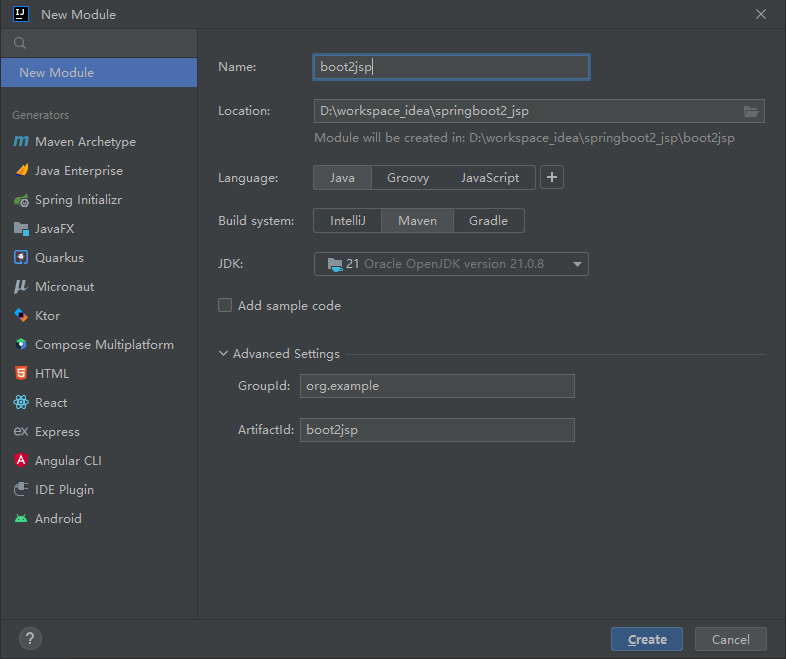
1.2 环境设置
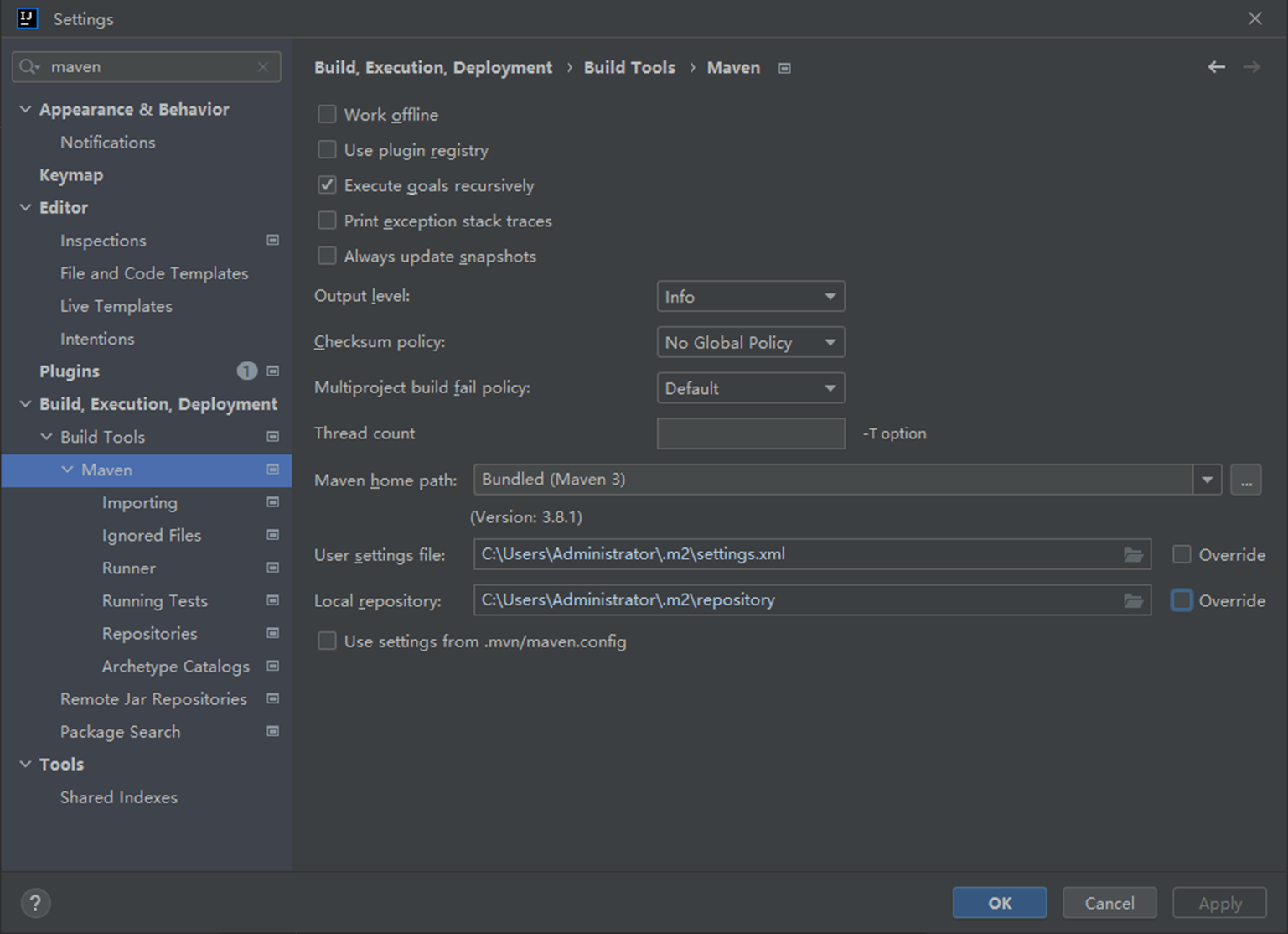
1.2.1 Maven设置
File > Settings > 搜Maven > 设置
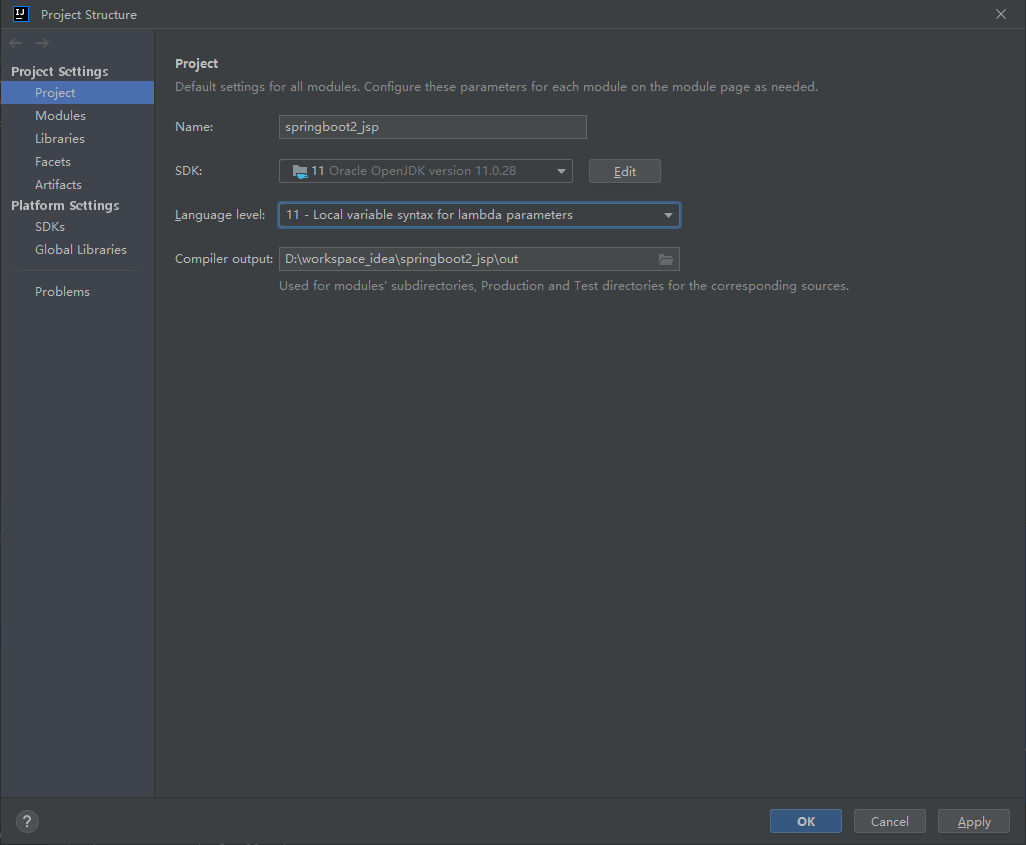
1.2.2 JDK设置
File > Project Structure... > Project > SDK (注释:Springboot2要求JDK8-11)
1.3 添加依赖
XML
    <packaging>jar</packaging>
    <parent>
        <groupId>org.springframework.boot</groupId>
        <artifactId>spring-boot-starter-parent</artifactId>
        <version>2.3.1.RELEASE</version>
        <relativePath/>
    </parent>
    <dependencies>
        <dependency>
            <groupId>org.springframework.boot</groupId>
            <artifactId>spring-boot-starter-web</artifactId>
        </dependency>
    </dependencies>
1.4 创建启动类
java
package com.example;

import org.springframework.boot.SpringApplication;
import org.springframework.boot.autoconfigure.SpringBootApplication;

@SpringBootApplication
public class Boot2JspApplication {
    public static void main(String[] args) {
        SpringApplication.run(Boot2JspApplication.class, args);
    }
}
2 过滤器
注释:部分IDEA控制台输出不支持中文 (汗!)
2.1 创建过滤器
java
package com.example.filter;

import org.springframework.stereotype.Component;

import javax.servlet.*;
import java.io.IOException;

@Component
public class SampleFilter implements Filter {
    @Override
    public void init(FilterConfig filterConfig) { }
    @Override
    public void doFilter(ServletRequest req, ServletResponse res, FilterChain filterChain) throws ServletException, IOException {
        System.out.println("SampleFilter run");
        filterChain.doFilter(req, res);
    }
    @Override
    public void destroy() {}
}
2.2 配置过滤器
创建ServletConfig配置类
java
package com.example.config;

import com.example.filter.SampleFilter;
import org.springframework.boot.web.servlet.FilterRegistrationBean;
import org.springframework.context.annotation.Bean;
import org.springframework.context.annotation.Configuration;

import java.util.Arrays;

@Configuration
public class ServletConfig {
//    @Bean
//    public ServletRegistrationBean getServlet(TestServlet servlet) {
//        ServletRegistrationBean regis = new ServletRegistrationBean(servlet, "/servlet");
//        return regis;
//    }
    @Bean
    public FilterRegistrationBean getFilter(SampleFilter filter) {
        FilterRegistrationBean regis = new FilterRegistrationBean();
        regis.setFilter(filter);
        regis.addUrlPatterns("/v1/*","/v2/*");
        return regis;
    }
//    @Bean
//    public ServletListenerRegistrationBean getServletListener(TestListener listener) {
//        ServletListenerRegistrationBean regis = new ServletListenerRegistrationBean();
//        return regis;
//    }
}
3 拦截器
3.1 创建拦截器
java
package com.example.interceptor;

import javax.servlet.http.HttpServletRequest;
import javax.servlet.http.HttpServletResponse;

import org.springframework.stereotype.Component;
import org.springframework.web.servlet.handler.HandlerInterceptorAdapter;
@Component
public class PermissionInterceptor extends HandlerInterceptorAdapter {
    @Override
    public boolean preHandle(HttpServletRequest request, HttpServletResponse response,
                             Object handler) throws Exception {
        System.out.println("PermissionInterceptor run");
        return true;
    }
}
3.2 配置拦截器
java
package com.example.config;

import com.example.interceptor.PermissionInterceptor;
import org.springframework.beans.factory.annotation.Autowired;
import org.springframework.context.annotation.Configuration;
import org.springframework.web.servlet.config.annotation.InterceptorRegistry;
import org.springframework.web.servlet.config.annotation.WebMvcConfigurer;

@Configuration
public class MvcConfig implements WebMvcConfigurer {
    @Autowired
    private PermissionInterceptor interceptor;
    @Override
    public void addInterceptors(InterceptorRegistry registry){
        registry.addInterceptor(interceptor)
                .addPathPatterns("/**")
                .excludePathPatterns("/login");
    }

}
4 控制器
4.1 创建控制器
java
package com.example.controller;

import org.springframework.stereotype.Controller;
import org.springframework.web.bind.annotation.RequestMapping;

@Controller
@RequestMapping("/v1")
public class SampleController {
    @RequestMapping("/sample")
    public String sample(){
        return "sample";
    }
}
5 前端页面
5.1 添加JSP依赖
pom.xml
XML
        <!-- Apache Tomcat的JSP引擎 -->
        <dependency>
            <groupId>org.apache.tomcat.embed</groupId>
            <artifactId>tomcat-embed-jasper</artifactId>
            <!-- <scope>provided</scope> --><!-- jar打包不要加 -->
        </dependency>
        <!-- JSTL标签库 -->
        <dependency>
            <groupId>javax.servlet</groupId>
            <artifactId>jstl</artifactId>
        </dependency>
5.2 配置视图解析器
application.properties
XML
spring.mvc.view.prefix=/WEB-INF/jsp/
spring.mvc.view.suffix=.jsp
5.3 配置插件
注释:插件会将webapp下的jsp复制到resources下并打到jar包里。否则springboot不支持jsp无法访问页面
pom.xml
XML
<build>
        <!-- 指定最终生成的 JAR 包名称(项目名) -->
        <finalName>boot2jsp</finalName>

    <plugins>
        <plugin>
            <groupId>org.springframework.boot</groupId>
            <artifactId>spring-boot-maven-plugin</artifactId>
        </plugin>
    </plugins>

    <resources>
        <!-- 1. 处理 src/main/resources 下的常规配置文件 -->
        <resource>
            <directory>src/main/resources</directory>
            <includes>
                <include>**/*.*</include>
            </includes>
        </resource>

        <!-- 2. 关键配置:将 webapp 目录下的资源复制到 META-INF/resources -->
        <resource>
            <directory>src/main/webapp</directory>
            <targetPath>META-INF/resources</targetPath>
            <includes>
                <include>**/*.*</include>
            </includes>
        </resource>
    </resources>
</build>
5.4 创建JSP页面
src/main/webapp/WEB-INF/jsp/sample.jsp
html
<%@ page language="java" contentType="text/html; charset=UTF-8"
         pageEncoding="UTF-8"%>
<!DOCTYPE html>
<html>
<head><meta charset="UTF-8"><title>Sample Page</title></head>
<body>Spring2.3.1 Sample</body>
</html>
6 数据库
6.1 创建数据库
连接数据库: mysql -hlocalhost -P3306 -uroot -proot
创建数据库: create database springboot2;
切换数据库: use springboot2;
创建数据库表: create table user(username varchar(20) primary key, password varchar(100) not null);
插入数据:insert into user values('zhangsan', '123456');
6.2 MySQL数据库连接
6.2.1 添加依赖
pom.xml
XML
        <dependency><!-- MySQL驱动 -->
            <groupId>mysql</groupId>
            <artifactId>mysql-connector-java</artifactId>
        </dependency>
        <dependency><!-- JDBC连接 -->
            <groupId>org.springframework.boot</groupId>
            <artifactId>spring-boot-starter-jdbc</artifactId>
        </dependency>
6.2.2 配置连接信息
application.properties
XML
# 数据库连接信息
spring.datasource.url=jdbc:mysql://localhost:3306/springboot2?serverTimezone=UTC
spring.datasource.username=root
spring.datasource.password=root
6.3 Druid数据源
6.3.1 添加依赖
pom.xml
XML
        <dependency>
            <groupId>com.alibaba</groupId>
            <artifactId>druid-spring-boot-starter</artifactId>
            <version>1.2.16</version>
        </dependency>
6.3.2 配置信息
application.properties
XML
# 数据源
spring.datasource.type=com.alibaba.druid.pool.DruidDataSource
# 初始化大小
spring.datasource.druid.initial-size=5
#最小空闲数
spring.datasource.druid.min-idle=5
#最大连接数
spring.datasource.druid.max-active=20
6.3.3 配置类
java
package com.example.config;

import com.alibaba.druid.pool.DruidDataSource;
import org.springframework.boot.context.properties.ConfigurationProperties;
import org.springframework.context.annotation.Bean;
import org.springframework.context.annotation.Configuration;

import javax.sql.DataSource;

@Configuration
public class JdbcConfig {
    @Bean
    @ConfigurationProperties(prefix="spring.datasource")
    public DataSource getDruid() {
        return new DruidDataSource();
    }
}
6.4 Mybatisy持久层框架
6.4.1 添加依赖
pom.xml
XML
        <dependency>
            <groupId>org.mybatis.spring.boot</groupId>
            <artifactId>mybatis-spring-boot-starter</artifactId>
            <version>2.3.1</version>
        </dependency>
6.4.2 配置信息
application.properties
XML
# Mybatis配置信息
mybatis.mapper-locations=classpath:com/example/mapper/*Mapper.xml
mybatis.type-aliases-package=com.example.pojo
mybatis.configuration.map-underscore-to-camel-case=true
6.5 业务代码获取数据
6.5.1 Controller
java
package com.example.controller;

import com.example.pojo.User;
import com.example.service.UserService;
import org.springframework.beans.factory.annotation.Autowired;
import org.springframework.stereotype.Controller;
import org.springframework.ui.Model;
import org.springframework.web.bind.annotation.RequestMapping;

import javax.servlet.http.HttpServletRequest;

@Controller
@RequestMapping("/v2")
public class UserController {
    @Autowired
    private UserService userService;

    @RequestMapping("/user")
    public String user(Model model){
        return "user";
    }
    @RequestMapping("/getUser")
    public String getUser(HttpServletRequest req){
        String username = req.getParameter("username");
        if (username == null || "".equals(username)) {
            return "user";
        }
        User user = userService.getUserById(username);
        if (user != null) {
            req.setAttribute("password", user.getPassword());
        }
        return "user";
    }
}
6.5.2 Service
java
package com.example.service;

import com.example.pojo.User;

public interface UserService {
    public User getUserById(String username);
}
java
package com.example.service;

import com.example.mapper.UserMapper;
import com.example.pojo.User;
import org.springframework.beans.factory.annotation.Autowired;

@Service
public class UserServiceImpl implements UserService{
    @Autowired
    private UserMapper userMapper;
    @Override
    public User getUserById(String username) {
        return userMapper.selectUserById(username);
    }
}
6.5.3 Pojo
java
package com.example.pojo;

public class User {
    private String username;
    private String password;

    public String getUsername() {
        return username;
    }

    public void setUsername(String username) {
        this.username = username;
    }

    public String getPassword() {
        return password;
    }

    public void setPassword(String password) {
        this.password = password;
    }
}
6.5.4 Mapper接口
java
package com.example.mapper;

import com.example.pojo.User;
import org.apache.ibatis.annotations.Mapper;

@Mapper
public interface UserMapper {
    public User selectUserById(String username);
}
6.5.5 Mapper配置
XML
<?xml version="1.0" encoding="UTF-8"?>
        <!DOCTYPE mapper PUBLIC "-//mybatis.org//DTD Mapper 3.0//EN"
                "http://mybatis.org/dtd/mybatis-3-mapper.dtd">

<mapper namespace="com.example.mapper.UserMapper">

    <!-- 查询用户ById -->
    <select id="selectUserById" resultType="com.example.pojo.User">
        SELECT username, password
        FROM user
        WHERE username = #{username}
    </select>

</mapper>
6.5.6 JSP
src/main/webapp/WEB-INF/jsp/user.jsp
html
<%@ page language="java" contentType="text/html; charset=UTF-8"
         pageEncoding="UTF-8"%>
<!DOCTYPE html>
<html>
<head>
    <meta charset="UTF-8">
    <title>Insert title here</title>
</head>
<body>

<br/>
Spring boot2 User page<br/>
<form name="form1" action="/v2/getUser" method="post">
    <input type="text" name="username" />
    <button>查询密码</button>
</form>
<%
    if(request.getAttribute("password") != null){
%>
${password}
<%
    }
%>
</body>
</html>
7 异常处理
application.properties
XML
# 关闭 Spring Boot 默认的 Whitelabel 错误页面
server.error.whitelabel.enabled=false
7.1 异常处理(Controller)
java
package com.example.controller;

import org.springframework.stereotype.Controller;
import org.springframework.ui.Model;
import org.springframework.web.bind.annotation.ExceptionHandler;
import org.springframework.web.bind.annotation.RequestMapping;

import javax.servlet.http.HttpServletRequest;

@Controller
@RequestMapping("/v1")
public class TestExceptionController {

    @RequestMapping("/exceptionHome")
    public String home() {
        return "exceptionHome";
    }
    @RequestMapping("/exceptionTest")
    public String exceptionTest(HttpServletRequest req) {
        String param = req.getParameter("param");
        String[] params = param.split(",");
        for (int i=0; i<10; i++){
            String str = params[i]; //NullPointerException
            System.out.println(Integer.valueOf(str)); // NumberFormatException
        }
        return "exceptionHome";
    }

    @ExceptionHandler(value={NullPointerException.class})
    public String xxxExceptionHandle(HttpServletRequest req, Exception e) {
        req.setAttribute("msg", e.getMessage());
        return "error";
    }


}
7.2 全局异常处理
java
package com.example.exception;

import org.springframework.ui.Model;
import org.springframework.web.bind.annotation.ControllerAdvice;
import org.springframework.web.bind.annotation.ExceptionHandler;

import javax.servlet.http.HttpServletRequest;

@ControllerAdvice
public class BusinessException {
    @ExceptionHandler(value={NumberFormatException.class})
    public String xxxExceptionHandle(Model model, Exception e) {
        model.addAttribute("msg", e.getMessage());
        return "error";
    }
    @ExceptionHandler(value={Exception.class})
    public String xxxExceptionHandle(HttpServletRequest req, Exception e) {
        req.setAttribute("msg", e.getMessage());
        return "error";
    }
}
7.3 异常画面
7.3.1 异常画面
src/main/webapp/WEB-INF/jsp/error.jsp
html
<%@ page language="java" contentType="text/html; charset=UTF-8"
         pageEncoding="UTF-8"%>
<!DOCTYPE html>
<html>
<head>
    <meta charset="UTF-8">
    <title>Insert title here</title>
</head>
<body>

<br/>
Spring boot2 Error Page<br/>
<%
    if(request.getAttribute("msg") != null){
%>
${msg}
<%
    }
%>
</body>
</html>
7.3.2 异常测试画面
src/main/webapp/WEB-INF/jsp/exceptionHome.jsp
html
<%@ page language="java" contentType="text/html; charset=UTF-8"
         pageEncoding="UTF-8"%>
<!DOCTYPE html>
<html>
<head>
    <meta charset="UTF-8">
    <title>Insert title here</title>
</head>
<body>

<br/>
Spring boot2 Test Exception Page<br/>
<form name="form1" action="/v1/exceptionTest" method="post">
    <input type="text" name="param" />
    <button>异常测试</button>
</form>
</body>
</html>
8 认证授权
8.1 添加依赖
XML
<dependency>
    <groupId>org.springframework.boot</groupId>
    <artifactId>spring-boot-starter-security</artifactId>
</dependency>
8.2 数据做成
8.2.1 创建表
连接数据库:mysql -hlocalhost -P3306 -uroot -proot
切换数据库:use springboot2;
创建权限表:create table authority(authkey varchar(20) primary key, authname varchar(20));
创建用户权限表:create table user_authority(username varchar(20), authkey varchar(20));
8.2.2 添加数据
insert into user values ('lisi', '123456');
insert into authority values ('admin', 'admin'), ('user', 'user');
insert into user_authority values ('zhangsan', 'admin'), ('zhangsan','user'), ('lisi', 'user');
8.3 认证
8.3.1 业务认证
(1) UserDetailsService封装
java
package com.example.service;

import com.example.pojo.Customer;
import org.springframework.beans.factory.annotation.Autowired;
import org.springframework.security.core.authority.SimpleGrantedAuthority;
import org.springframework.security.core.userdetails.User;
import org.springframework.security.core.userdetails.UserDetails;
import org.springframework.security.core.userdetails.UserDetailsService;
import org.springframework.security.core.userdetails.UsernameNotFoundException;
import org.springframework.stereotype.Service;

import java.util.List;
import java.util.stream.Collectors;

@Service
public class UserDetailsServiceImpl implements UserDetailsService {
    @Autowired
    private LoginService service;

    @Override
    public UserDetails loadUserByUsername(String username) throws UsernameNotFoundException {
        com.example.pojo.User user = service. getUser(username);
        List<String> authorities = service.getAuthority(username);
        List<SimpleGrantedAuthority> list = authorities.stream()
                .map(authority -> new SimpleGrantedAuthority(authority))
                .collect(Collectors.toList());
        if ( user != null ) {
            return new User(user.getUsername(), user.getPassword(), list);
        } else {
            throw new UsernameNotFoundException("当前用户不存在");
        }
    }
}
(2) service
java
package com.example.service;

import com.example.pojo.Customer;
import com.example.pojo.User;

import java.util.List;

public interface LoginService {
    User getUser(String username);
    List<String> getAuthority(String username);
}
java
package com.example.service;

import com.example.mapper.LoginMapper;
import com.example.pojo.Customer;
import com.example.pojo.User;
import org.springframework.beans.factory.annotation.Autowired;
import org.springframework.stereotype.Service;

import java.util.List;

@Service
public class LoginServiceImpl implements LoginService{
    @Autowired
    private LoginMapper loginMapper;

    public User getUser(String username) {
        return loginMapper.getUser(username);
    }
    public List<String> getAuthority(String username) {
        return loginMapper.getAuthority(username);
    }
}
(3) mapper
java
package com.example.mapper;

import com.example.pojo.Customer;
import com.example.pojo.User;
import org.apache.ibatis.annotations.Mapper;

import java.util.List;

@Mapper
public interface LoginMapper {
    User getUser(String username);
    List<String> getAuthority(String username);
}
(4) mapper配置
XML
<?xml version="1.0" encoding="UTF-8"?>
<!DOCTYPE mapper PUBLIC "-//mybatis.org//DTD Mapper 3.0//EN"
        "http://mybatis.org/dtd/mybatis-3-mapper.dtd">

<mapper namespace="com.example.mapper.LoginMapper">

    <!-- 查询用户ById -->
    <select id="getUser" resultType="com.example.pojo.User">
        SELECT username, password
        FROM user
        WHERE username = #{username}
    </select>
    <select id="getAuthority" resultType="String">
        SELECT authname
        FROM user
        INNER JOIN user_authority
        ON user.username = user_authority.username
        INNER JOIN authority
        ON user_authority.authkey = authority.authkey
        WHERE user.username = #{username}
    </select>

</mapper>
8.3.2 认证配置类
java
package com.example.config;

import com.example.service.UserDetailsServiceImpl;
import org.springframework.beans.factory.annotation.Autowired;
import org.springframework.context.annotation.Bean;
import org.springframework.security.config.annotation.authentication.builders.AuthenticationManagerBuilder;
import org.springframework.security.config.annotation.web.configuration.EnableWebSecurity;
import org.springframework.security.config.annotation.web.configuration.WebSecurityConfigurerAdapter;
import org.springframework.security.crypto.bcrypt.BCryptPasswordEncoder;
import org.springframework.security.crypto.password.PasswordEncoder;

@EnableWebSecurity
public class WebSecurityConfig  extends WebSecurityConfigurerAdapter {
    @Bean
    public PasswordEncoder passwordEncoder() {
        return new BCryptPasswordEncoder();
    }
    @Autowired
    private UserDetailsServiceImpl service;

    @Override
    protected void configure(AuthenticationManagerBuilder auth) throws Exception {
        auth.userDetailsService(service).passwordEncoder(passwordEncoder());
    }

}
8.4 授权
8.4.1 授权配置类
java
@EnableWebSecurity
public class WebSecurityConfig  extends WebSecurityConfigurerAdapter {
    ...
    @Override
    protected void configure(HttpSecurity http) throws Exception {
        http.csrf().disable();// 临时关闭,否则http请求无效

        http.authorizeRequests()
                .antMatchers("/v1").hasRole("admin")
                .antMatchers("/v2").hasRole("user")
                .antMatchers("/index","/password", "/updatePassword").permitAll()
                .anyRequest().authenticated();
        http.formLogin()
                .defaultSuccessUrl("/index")
                .failureUrl("/error");
        http.logout()
                .logoutUrl("/logout")
                .logoutSuccessUrl("/");
    }
}
8.4.2 授权登录后首页
(1) controller
java
package com.example.controller;

import org.springframework.stereotype.Controller;
import org.springframework.web.bind.annotation.RequestMapping;

@Controller
public class LoginController {
    @RequestMapping("/index")
    public String index(){
        return "index";
    }
}
(2) JSP
index.jsp
html
<%@ page language="java" contentType="text/html; charset=UTF-8"
         pageEncoding="UTF-8"%>
<!DOCTYPE html>
<html><head><meta charset="UTF-8"><title>Sample Page</title></head>
<body>Spring2.3.1 登录成功 首页</body>
<form name="form1" action="/logout" method="post">
    <button>退出登录</button>
</form>
</html>
8.5 数据加密
8.5.1 加密业务
(1) controller
java
package com.example.controller;

import com.example.service.PasswordService;
import org.springframework.beans.factory.annotation.Autowired;
import org.springframework.stereotype.Controller;
import org.springframework.web.bind.annotation.PostMapping;
import org.springframework.web.bind.annotation.RequestMapping;

import javax.servlet.http.HttpServletRequest;

@Controller
public class PasswordController {

    @Autowired
    private PasswordService service;

    @RequestMapping("/password")
    public String password(){
        return "password";
    }

    @RequestMapping("/updatePassword")
    public String changePassword(HttpServletRequest req){
        String username = req.getParameter("username");
        String password = req.getParameter("password");
        if (username == null || "".equals(username)) {
            req.setAttribute("msg", "请输入用户名");
            return "password";
        }
        if (password == null || "".equals(password)) {
            req.setAttribute("msg", "请输入密码");
            return "password";
        }
        int isOk = service.changePassword(username, password);
        if (isOk > 0){
            req.setAttribute("msg", "更新成功, "+ isOk +"件");
        } else {
            req.setAttribute("msg", "更新失败");
        }
        return "password";
    }

}
(2) service
java
package com.example.service;

public interface PasswordService {
    int changePassword(String username, String password);
}
java
package com.example.service;

import com.example.mapper.PasswordMapper;
import org.springframework.beans.factory.annotation.Autowired;
import org.springframework.security.crypto.password.PasswordEncoder;
import org.springframework.stereotype.Service;

@Service
public class PasswordServiceImpl implements PasswordService{
    @Autowired
    private PasswordMapper mapper;
    @Autowired
    private PasswordEncoder passwordEncoder;

    @Override
    public int changePassword(String username, String password) {
        String newPassword = passwordEncoder.encode(password);
        return mapper.updatePassword(username, newPassword);
    }
}
(3) mapper
java
package com.example.mapper;

import org.apache.ibatis.annotations.Mapper;
import org.apache.ibatis.annotations.Param;

@Mapper
public interface PasswordMapper {
    int updatePassword(@Param("username")String username, @Param("password")String password);
}
(4) mapper配置
XML
<?xml version="1.0" encoding="UTF-8"?>
<!DOCTYPE mapper PUBLIC "-//mybatis.org//DTD Mapper 3.0//EN"
        "http://mybatis.org/dtd/mybatis-3-mapper.dtd">

<mapper namespace="com.example.mapper.PasswordMapper">

    <update id="updatePassword" >
        UPDATE user SET password = #{password}
        WHERE username = #{username}
    </update>

</mapper>
(5) JSP页面
html
<%@ page language="java" contentType="text/html; charset=UTF-8"
         pageEncoding="UTF-8"%>
<!DOCTYPE html>
<html>
<head><meta charset="UTF-8"><title>Insert title here</title></head>
<body>
Springboot2 密码变更页面<br/>
<form name="form1" action="/updatePassword" method="post">
    用户名:<input type="text" name="username" /><br/>
    密码:<input type="password" name="password" /><br/>
    <button>更新密码</button>
</form>
<% if(request.getAttribute("msg") != null){ %>
${msg}
<% } %>
</body>
</html>
8.5.2 加密操作
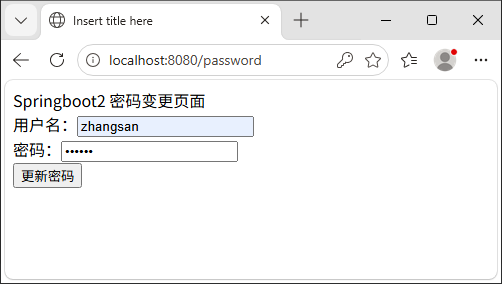
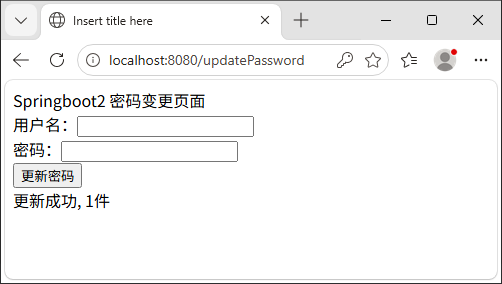
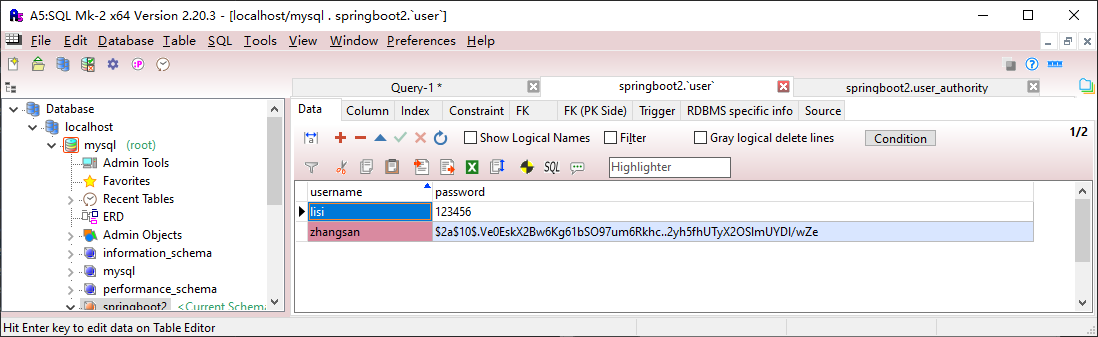
8.6 登录验证
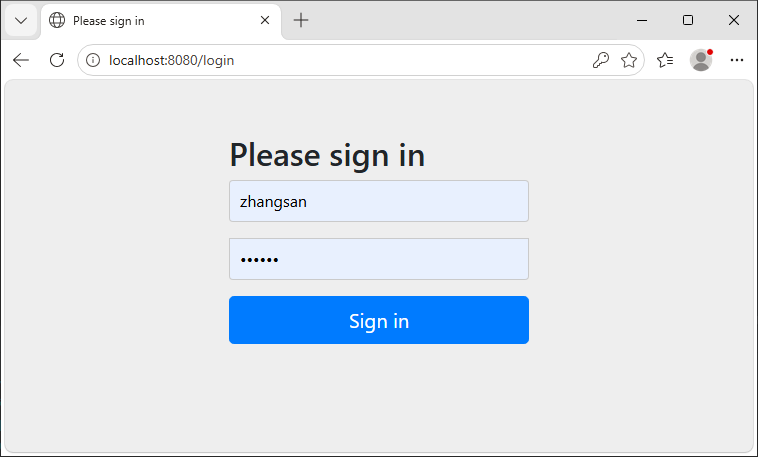
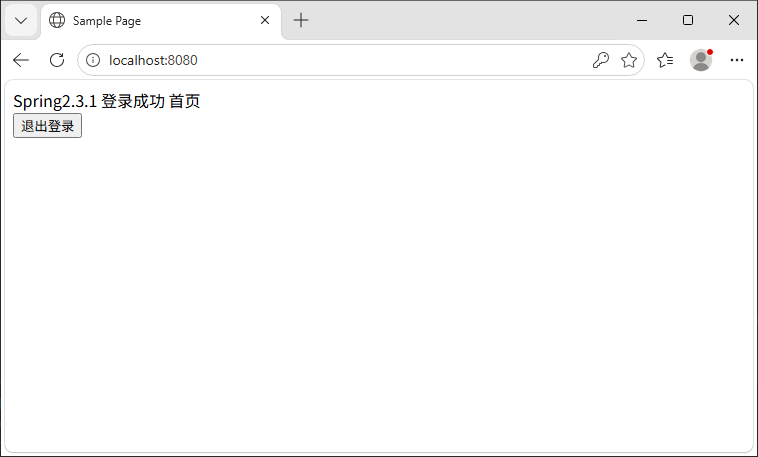
9 其它功能
9.1 文件上传
9.1.1 文件上传配置
application.properties
XML
#开启文件上传功能(默认开启)
#spring.servlet.multipart.enabled=true
#单个文件最大10MB(默认1Mb)
spring.servlet.multipart.max-file-size=10MB
#多个文件最大50MB(默认10MB)
spring.servlet.multipart.max-request-size=50MB
9.1.2 文件上传处理
java
package com.example.controller;

import org.springframework.stereotype.Controller;
import org.springframework.web.bind.annotation.PostMapping;
import org.springframework.web.bind.annotation.RequestMapping;
import org.springframework.web.bind.annotation.RequestParam;
import org.springframework.web.bind.annotation.ResponseBody;
import org.springframework.web.multipart.MultipartFile;
import org.springframework.web.multipart.MultipartHttpServletRequest;

import javax.servlet.http.HttpServletRequest;
import java.io.File;
import java.util.List;

@Controller
public class FileUploadController {

    @RequestMapping("/upload")
    public String upload() {
        return "upload";
    }

    @RequestMapping("/uploads")
    public String uploads() {
        return "uploads";
    }

    @RequestMapping("/fileUpload")
    public String fileUpload(@RequestParam("file") MultipartFile file, HttpServletRequest req) {
        String fileName = file.getOriginalFilename();

        File destFile = new File("D://fileUpload/upload/"+fileName);
        if (!destFile.getParentFile().exists()) {
            destFile.getParentFile().mkdirs();
        }
        try {
            file.transferTo(destFile);
            req.setAttribute("msg", "上传成功");
        } catch (Exception e) {
            req.setAttribute("msg", "上传失败");
        }
        return "upload";
    }

    @PostMapping("/fileUploads")
    public String upload(HttpServletRequest req) {
        List<MultipartFile> files = ((MultipartHttpServletRequest) req).getFiles("file");
        String msg = "";
        for (MultipartFile file: files) {
            String fileName = file.getOriginalFilename();
            File destFile = new File("D://fileUpload/uploads/"+fileName);
            if (!destFile.getParentFile().exists()) {
                destFile.getParentFile().mkdirs();
            }
            try {
                file.transferTo(destFile);
                msg = msg + fileName + ":上传成功 ";

            } catch (Exception e) {
                msg = msg + fileName + ":上传失败 ";
            }
        }
        req.setAttribute("msg", msg);
        return "uploads";
    }

}
9.1.3 文件上传页面
upload.jsp
html
<%@ page language="java" contentType="text/html; charset=UTF-8"
         pageEncoding="UTF-8"%>
<!DOCTYPE html>
<html>
<head><meta charset="UTF-8"><title>Insert title here</title></head>
<body>
Spring boot2 File Upload<br/>
<form name="form1" action="/fileUpload" method="post" enctype="multipart/form-data">
    <input type="file" name="file" /><br/>
    <button>文件上传</button>
</form>
<% if(request.getAttribute("msg") != null){ %>
${msg}
<% } %>
</body>
</html>
uploads.jsp
html
<%@ page language="java" contentType="text/html; charset=UTF-8"
         pageEncoding="UTF-8"%>
<!DOCTYPE html>
<html>
<head><meta charset="UTF-8"><title>Insert title here</title></head>
<body>
Spring boot2 File Uploads<br/>
<form name="form1" action="/fileUploads" method="post" enctype="multipart/form-data">
    <input type="file" name="file" /><br/>
    <input type="file" name="file" /><br/>
    <button>文件上传</button>
</form>
<% if(request.getAttribute("msg") != null){ %>
${msg}
<% } %>
</body>
</html>
9.2 文件下载
9.2.1 文件下载处理
java
package com.example.controller;

import org.springframework.stereotype.Controller;
import org.springframework.web.bind.annotation.GetMapping;
import org.springframework.web.bind.annotation.RequestMapping;

import javax.servlet.http.HttpServletResponse;
import java.io.File;
import java.io.FileInputStream;
import java.io.IOException;
import java.io.OutputStream;

@Controller
public class FileDownloadController {
    @RequestMapping("/download")
    public String download() {
        return "download";
    }

    @GetMapping("fileDownload")
    public void fileDownload(HttpServletResponse res) throws IOException {
        String filename = "test1.txt";
        File file = new File("D://fileUpload/upload/" + filename);
        FileInputStream fis = new FileInputStream(file);
        res.setContentType("application/force-download");
        res.setHeader("Content-Disposition", "attachment;fileName="+filename);
        OutputStream os = res.getOutputStream();
        byte[] buf = new byte[1024];
        int len=0;
        while((len=fis.read(buf))!=-1) {
            os.write(buf, 0, len);
        }
        fis.close();
        os.close();
    }


}
9.2.2 文件下载页面
download.jsp
html
<%@ page language="java" contentType="text/html; charset=UTF-8"
         pageEncoding="UTF-8"%>
<!DOCTYPE html>
<html>
<head><meta charset="UTF-8"><title>Insert title here</title></head>
<body>
Spring boot2 File download<br/>
<form name="form1" action="/fileDownload" method="get" >
    <button>文件下载</button>
</form>
<% if(request.getAttribute("msg") != null){ %>
${msg}
<% } %>
</body>
</html>