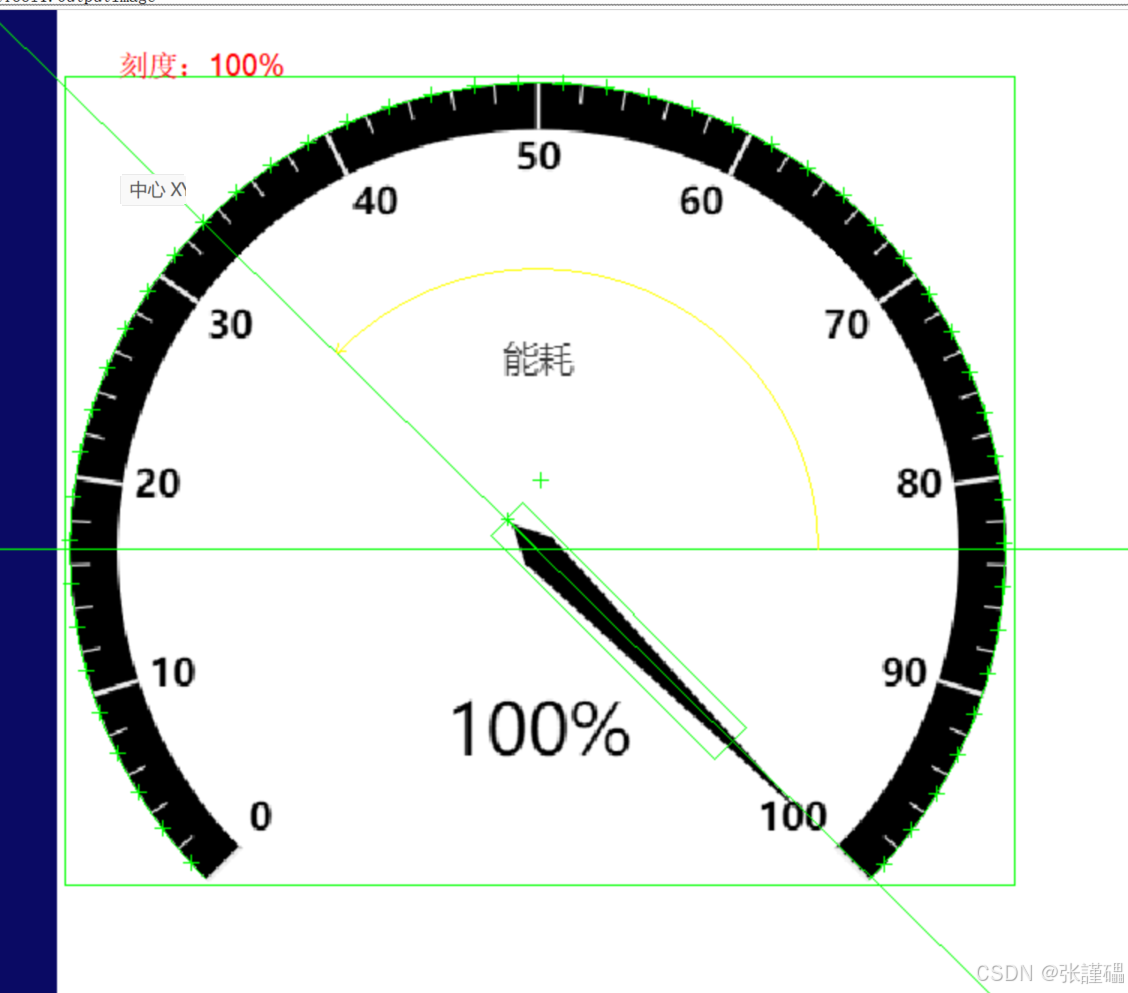
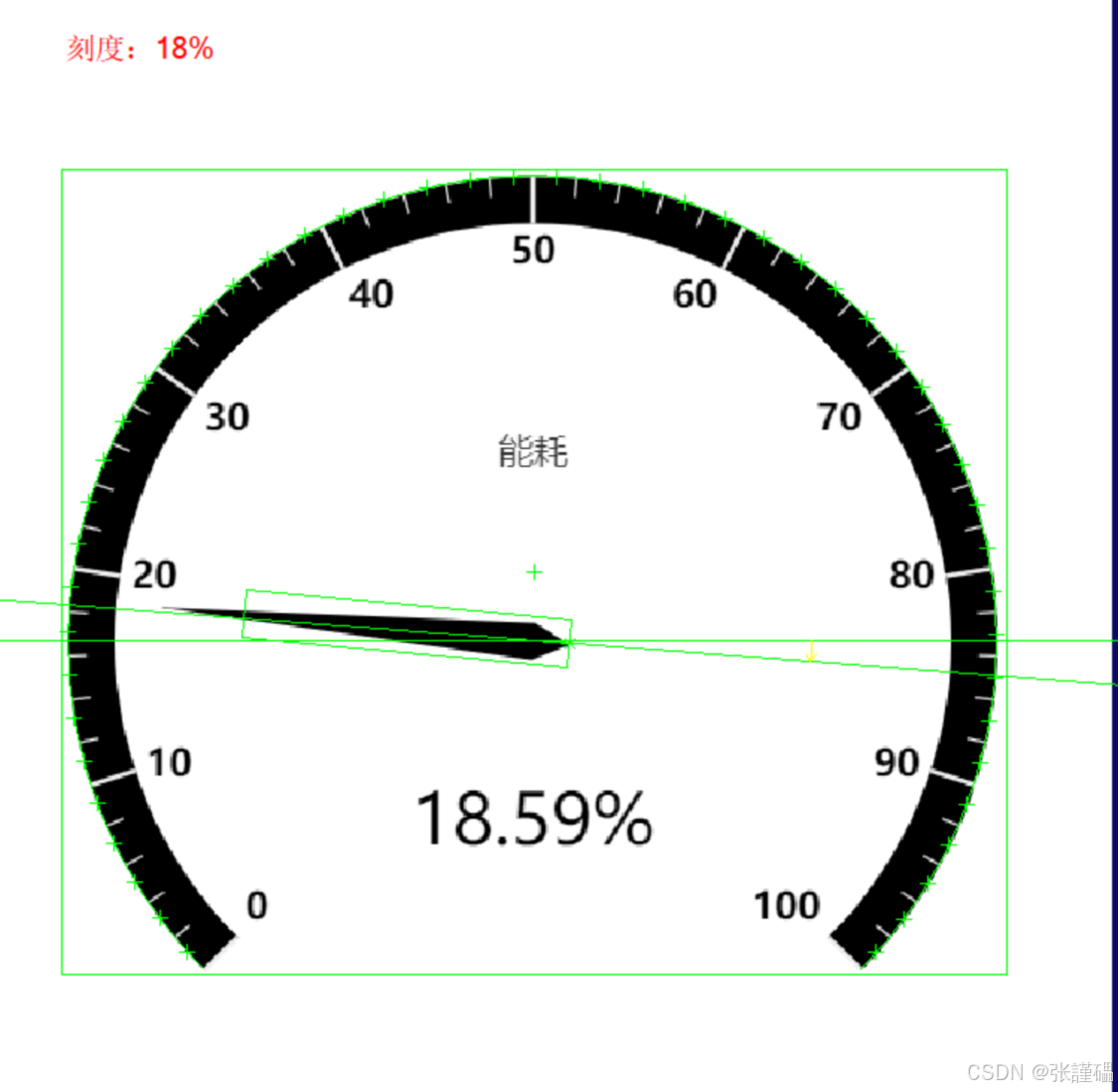
VisionPro 仪表指针智能识别 完整笔记(核心公式 + 脚本解析)
这是指针式仪表自动读数 的核心算法:**通过指针角度 → 换算成实际测量值(0~100)**工业常用:压力表、电流表、电压表、仪表盘、指针表自动识别。
一、核心功能(一句话)
输入:指针角度(弧度) 输出:仪表实际刻度值(0~100) 公式:角度线性插值换算(标准仪表换算公式)
二、完整脚本(带逐行注释)
c#
// 仪表刻度换算公式:实际值 = 最小值 + (最大值-最小值) * (当前角度-最小角度)/(最大角度-最小角度)
double Angle = CogMisc.RadToDeg(Inputs.Angle);  // 弧度 → 转角度(VisionPro专用)
double Vmin = 0;                                // 仪表刻度最小值
double Vmax = 100;                              // 仪表刻度最大值
double Angle_min = -45;                          // 指针最小角度(对应0)
double Angle_max = 225;                          // 指针最大角度(对应100)

// 角度修正:解决负角度超限问题(-180~-135 → 转为正角度)
if(Angle > -180 && Angle < -135)
{
    Angle = 180 + (180 - Math.Abs(Angle));
}

// 最终输出:角度 → 换算成仪表实际数值
Outputs.Output = Vmin + (Vmax - Vmin) * (Angle - Angle_min) / (Angle_max - Angle_min);
三、逐行超详细解析
1. 角度单位转换(必须)
c#
double Angle = CogMisc.RadToDeg(Inputs.Angle);- VisionPro 工具输出的角度是弧度(Rad)
- 必须用
CogMisc.RadToDeg转成角度(Deg) 才能计算
2. 仪表刻度参数
c#
double Vmin = 0;          // 仪表最小刻度:0
double Vmax = 100;        // 仪表最大刻度:100
double Angle_min = -45;   // 指针在 0 位时的角度
double Angle_max = 225;   // 指针在 100 位时的角度
这 4 个值根据你的仪表实际调整!
3. 角度修正(关键!解决 360° 转圈问题)
c#
if(Angle > -180 && Angle < -135)
{
    Angle = 180 + (180 - Math.Abs(Angle));
}- 指针转过 180° 后,角度会变成负数
- 这段代码把 -180~-135 修正为正角度,保证计算正确
4. 核心换算公式
c#
Outputs.Output = Vmin + (Vmax - Vmin) * (Angle - Angle_min) / (Angle_max - Angle_min);这就是 线性插值公式:
plaintext
实际值 = 最小值 + (最大值 - 最小值) × (当前角度 - 最小角度) / (最大角度 - 最小角度)四、配套使用的 VisionPro 工具
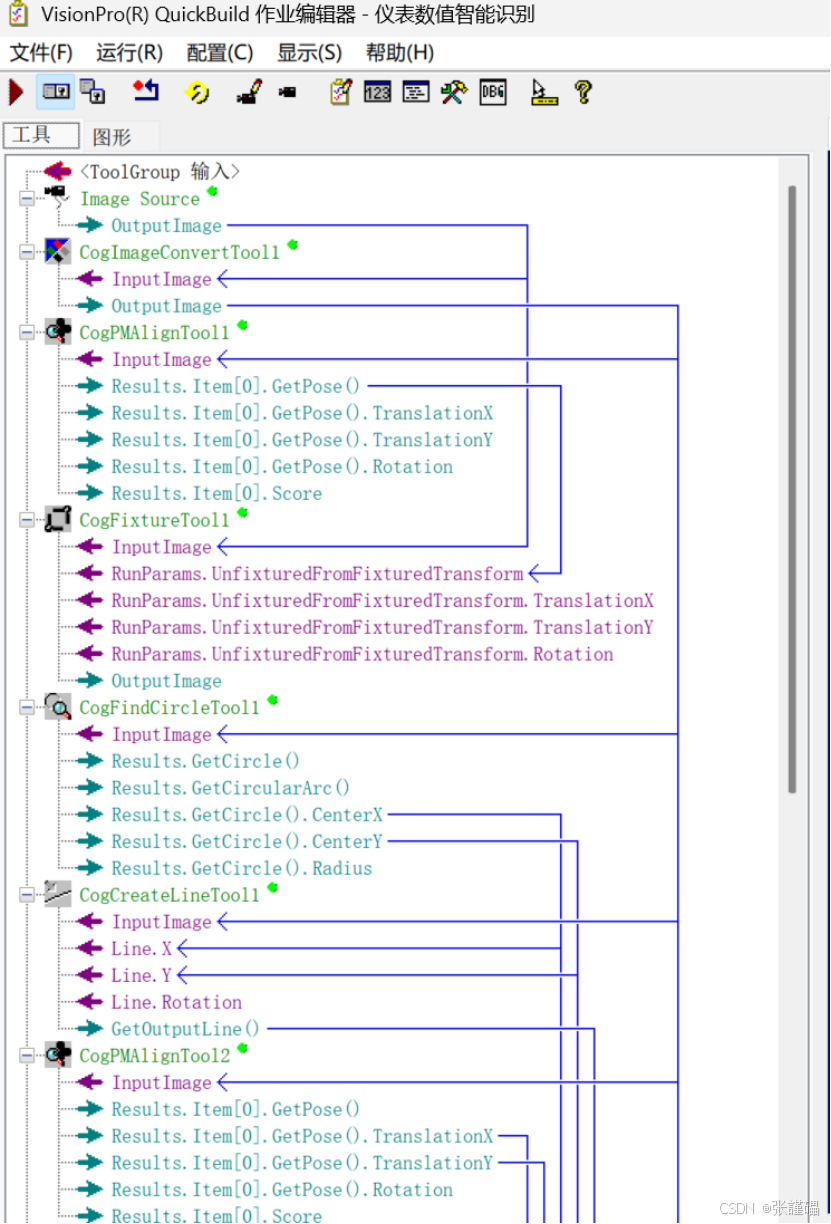
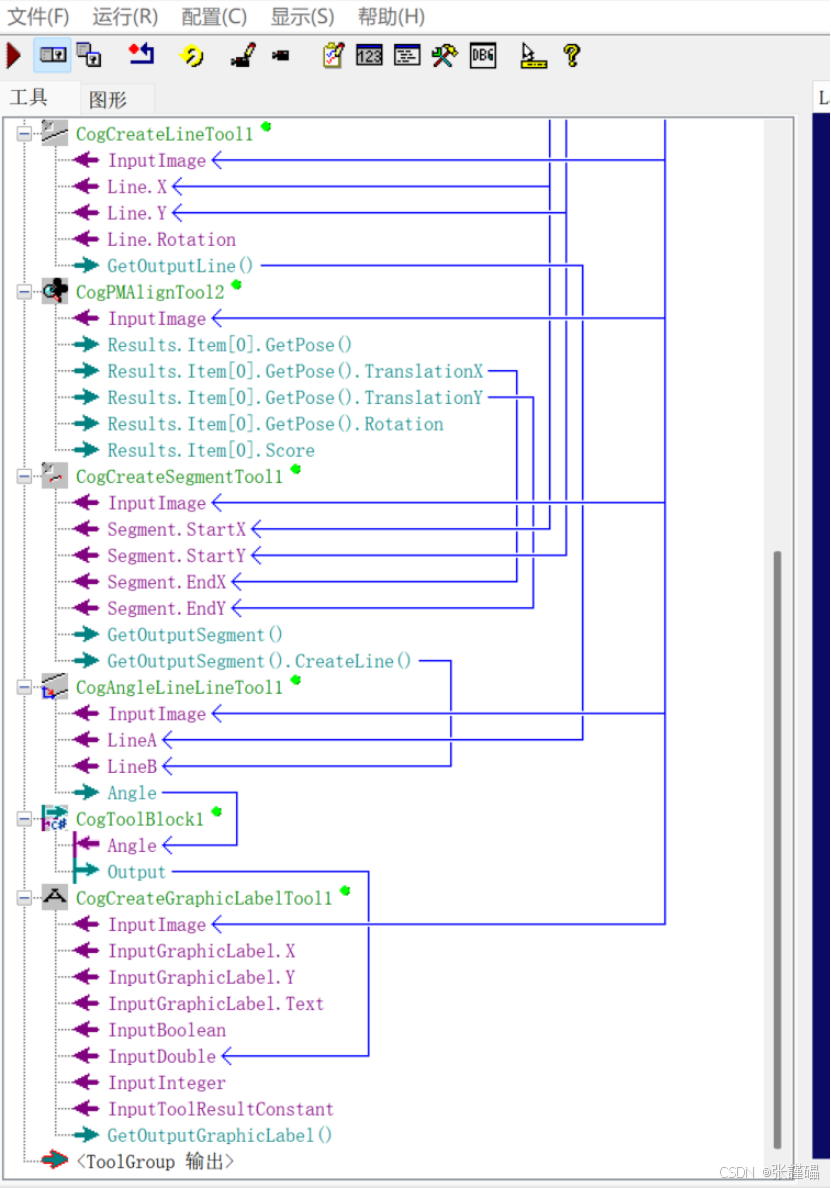
这个脚本必须配合以下工具使用:
- CogPMAlignTool (模板匹配)
- 定位仪表中心、表盘位置
- CogCaliperTool / CogAngleTool
- 找指针边缘,计算指针角度
- 脚本(你提供的这段)
- 角度 → 实际数值
五、工作流程(标准仪表识别流程)
plaintext
1. 图像采集
2. 模板匹配定位仪表
3. 卡尺/角度工具找指针
4. 获取指针角度(弧度)
5. 脚本:弧度转角度
6. 脚本:角度修正
7. 脚本:线性插值 → 输出实际读数
8. 输出结果:0~100
六、你只需要改这 4 个参数(调试重点)
c#
double Vmin = 0;         // 仪表最小值
double Vmax = 100;       // 仪表最大值
double Angle_min = -45;  // 指针在最小值时的角度
double Angle_max = 225;  // 指针在最大值时的角度
七、总结(最精简)
这是指针仪表自动读数的标准算法:
- 弧度转角度
- 角度修正(防负数错误)
- 线性插值公式 = 角度转实际值
工业 99% 指针压力表、电流表、电压表都用这套脚本!
需要我帮你:✅ 生成完整的 VisionPro 仪表识别工具链 ✅ 做成可直接导入运行的工程 ✅ 输出指针角度、原始值、最终值 ✅ 加 上下限报警(OK/NG)
工具:
脚本:
//V = Vmin +( Vmax - Vmin) * (Angle - Angle_min) / (Angle_max - Angle_min)
double Angle = CogMisc.RadToDeg(Inputs.Angle);
double Vmin = 0;
double Vmax = 100;
double Angle_min = -45;
double Angle_max = 225;
if(Angle > -180 && Angle < -135)
{
Angle = 180 + (180 - Math.Abs(Angle));
}
Outputs.Output = Vmin + ( Vmax - Vmin ) * (Angle - Angle_min) / (Angle_max - Angle_min);
完整代码:
cs
#region namespace imports
using System;
using System.Collections;
using System.Drawing;
using System.IO;
using System.Windows.Forms;
using Cognex.VisionPro;
using Cognex.VisionPro.ToolBlock;
using Cognex.VisionPro3D;
#endregion

public class CogToolBlockSimpleScript : CogToolBlockAdvancedScript
{
  /// <summary>
  /// Called when the parent tool is run.
  /// Add code here to customize or replace the normal run behavior.
  /// </summary>
  /// <param name="message">Sets the Message in the tool's RunStatus.</param>
  /// <param name="result">Sets the Result in the tool's RunStatus</param>
  /// <returns>True if the tool should run normally,
  ///          False if GroupRun customizes run behavior</returns>
  public override bool GroupRun(ref string message, ref CogToolResultConstants result)
  {
    // To let the execution stop in this script when a debugger is attached, uncomment the following lines.
    // #if DEBUG
    // if (System.Diagnostics.Debugger.IsAttached) System.Diagnostics.Debugger.Break();
    // #endif

    //V = Vmin +( Vmax - Vmin) * (Angle - Angle_min) / (Angle_max - Angle_min)
    double Angle = CogMisc.RadToDeg(Inputs.Angle);
    double Vmin = 0;
    double Vmax = 100;
    double Angle_min = -45;
    double Angle_max = 225;

    if(Angle > -180 && Angle < -135)
    {
      Angle =  180 + (180 - Math.Abs(Angle));
    }

    Outputs.Output = Vmin + ( Vmax - Vmin ) * (Angle - Angle_min) / (Angle_max - Angle_min);


    return false;
  }

  #region When the Script is Initialized
  /// <summary>
  /// Perform any initialization required by your script here
  /// </summary>
  /// <param name="host">The host tool</param>
  public override void Initialize(Cognex.VisionPro.ToolGroup.CogToolGroup host)
  {
    // DO NOT REMOVE - Call the base class implementation first - DO NOT REMOVE
    base.Initialize(host);


  }
  #endregion

}


#region auto-generated
// ------------------------------------------------------------------------------
//   <auto-generated>
//      This code was generated by a tool.
//      VisionPro Version: 9.0 CR2
//      Generated: 2026/5/1 20:08:19
//      Name: CogToolBlockScript, Version: 1.0
//      Options:
//                IncludeMainScriptClass,     OverrideGroupRun,
//                OverrideInitialize,         IncludeInputsAdapterClass,
//                IncludeOutputsAdapterClass, IncludeToolsAdapterClass,
//                ExposeToolBlockReference,   PlaceInAutoGeneratedRegion,
//                AdapterClassIsEnumerable,   IncludeRunToolFunction
//
//      Changes to this code below this comment may cause incorrect behavior
//      and will be lost if the code is regenerated.
//   </auto-generated>
// ------------------------------------------------------------------------------

public class CogToolBlockAdvancedScript : CogToolBlockAdvancedScriptBase
{
  #region Private Member Variables
  private Cognex.VisionPro.ToolBlock.CogToolBlock mToolBlock;
  private CollectionAdapterInputs mInputs;
  private CollectionAdapterOutputs mOutputs;
  #endregion

  /// <summary>
  /// Called when the parent tool is run.
  /// Add code here to customize or replace the normal run behavior.
  /// </summary>
  /// <param name="message">Sets the Message in the tool's RunStatus.</param>
  /// <param name="result">Sets the Result in the tool's RunStatus</param>
  /// <returns>True if the tool should run normally,
  ///          False if GroupRun customizes run behavior</returns>
  public override bool GroupRun(ref string message, ref CogToolResultConstants result)
  {
    // To let the execution stop in this script when a debugger is attached, uncomment the following lines.
    // #if DEBUG
    // if (System.Diagnostics.Debugger.IsAttached) System.Diagnostics.Debugger.Break();
    // #endif


    return false;
  }

  #region When the Script is Initialized
  /// <summary>
  /// Perform any initialization required by your script here
  /// </summary>
  /// <param name="host">The host tool</param>
  public override void Initialize(Cognex.VisionPro.ToolGroup.CogToolGroup host)
  {
    // DO NOT REMOVE - Call the base class implementation first - DO NOT REMOVE
    base.Initialize(host);

    // Initialize convenience types for ToolBlock Inputs, Outputs, and Tools
    this.mInputs = new CollectionAdapterInputs(((Cognex.VisionPro.ToolBlock.CogToolBlock)(host)));
    this.mOutputs = new CollectionAdapterOutputs(((Cognex.VisionPro.ToolBlock.CogToolBlock)(host)));

    // Store a local copy of the script host
    this.mToolBlock = ((Cognex.VisionPro.ToolBlock.CogToolBlock)(host));
  }
  #endregion

  /// <summary>
  /// Access the Tool's Inputs through an adapter class
  /// </summary>
  public CollectionAdapterInputs Inputs
  {
    get
    {
      return this.mInputs;
    }
  }

  /// <summary>
  /// Access the Tool's Outputs through an adapter class
  /// </summary>
  public CollectionAdapterOutputs Outputs
  {
    get
    {
      return this.mOutputs;
    }
  }


  #region Public Methods
  /// <summary>
  /// Called from a script to run a tool.
  /// </summary>
  /// <param name="tool">The tool to run.</param>
  /// <param name="message">The RunStatus Message.</param>
  /// <param name="result">The RunStatus Result.</param>
  /// <exception cref="System.Exception">
  /// Thrown when <paramref name="tool"/> returns and
  /// the calling tool's AbortRunOnToolFailure property is True.</exception>
  protected virtual void RunTool(Cognex.VisionPro.ICogTool tool, ref string message, ref CogToolResultConstants result)
  {
    this.mToolBlock.RunTool(tool, ref message, ref result);
  }
  #endregion

}

#region Adapter Classes
public class CollectionAdapterInputs
{
  private Cognex.VisionPro.ToolBlock.CogToolBlock mToolBlock;
  public CollectionAdapterInputs(Cognex.VisionPro.ToolBlock.CogToolBlock toolBlock)
  {
    this.mToolBlock = toolBlock;
  }
  public double Angle
  {
    get
    {
      try
      {
        return ((double)(this.mToolBlock.Inputs["Angle"].Value));
      }
      catch (System.Exception ex)
      {
        throw new System.Exception(String.Format(Cognex.VisionPro.CogLocalizer.GetString(typeof(Cognex.VisionPro.ToolGroup.Resources.CogResourceKeys), Cognex.VisionPro.ToolGroup.Resources.CogResourceKeys.RkScritptAdapterMemberAccessError), this.mToolBlock.Name, "Inputs.Angle"), ex);
      }
    }
  }
}

public class CollectionAdapterOutputs
{
  private Cognex.VisionPro.ToolBlock.CogToolBlock mToolBlock;
  public CollectionAdapterOutputs(Cognex.VisionPro.ToolBlock.CogToolBlock toolBlock)
  {
    this.mToolBlock = toolBlock;
  }
  public double Output
  {
    get
    {
      try
      {
        return ((double)(this.mToolBlock.Outputs["Output"].Value));
      }
      catch (System.Exception ex)
      {
        throw new System.Exception(String.Format(Cognex.VisionPro.CogLocalizer.GetString(typeof(Cognex.VisionPro.ToolGroup.Resources.CogResourceKeys), Cognex.VisionPro.ToolGroup.Resources.CogResourceKeys.RkScritptAdapterMemberAccessError), this.mToolBlock.Name, "Outputs.Output"), ex);
      }
    }
    set
    {
      this.mToolBlock.Outputs["Output"].Value = value;
    }
  }
}
#endregion


#endregion